Privilege Escalation via a Service Account Impersonation Chain
 Published on jdsec.cloud
This is a behind-the-scenes story of how I found a Service Account impersonation chain leading to vertical privilege escalation within Google SecOps SOAR.
The full write-up lives on its author's site
It belongs to its author, so we link to it rather than copy it. The other two tabs are our own rewrites, checked against it.
Context
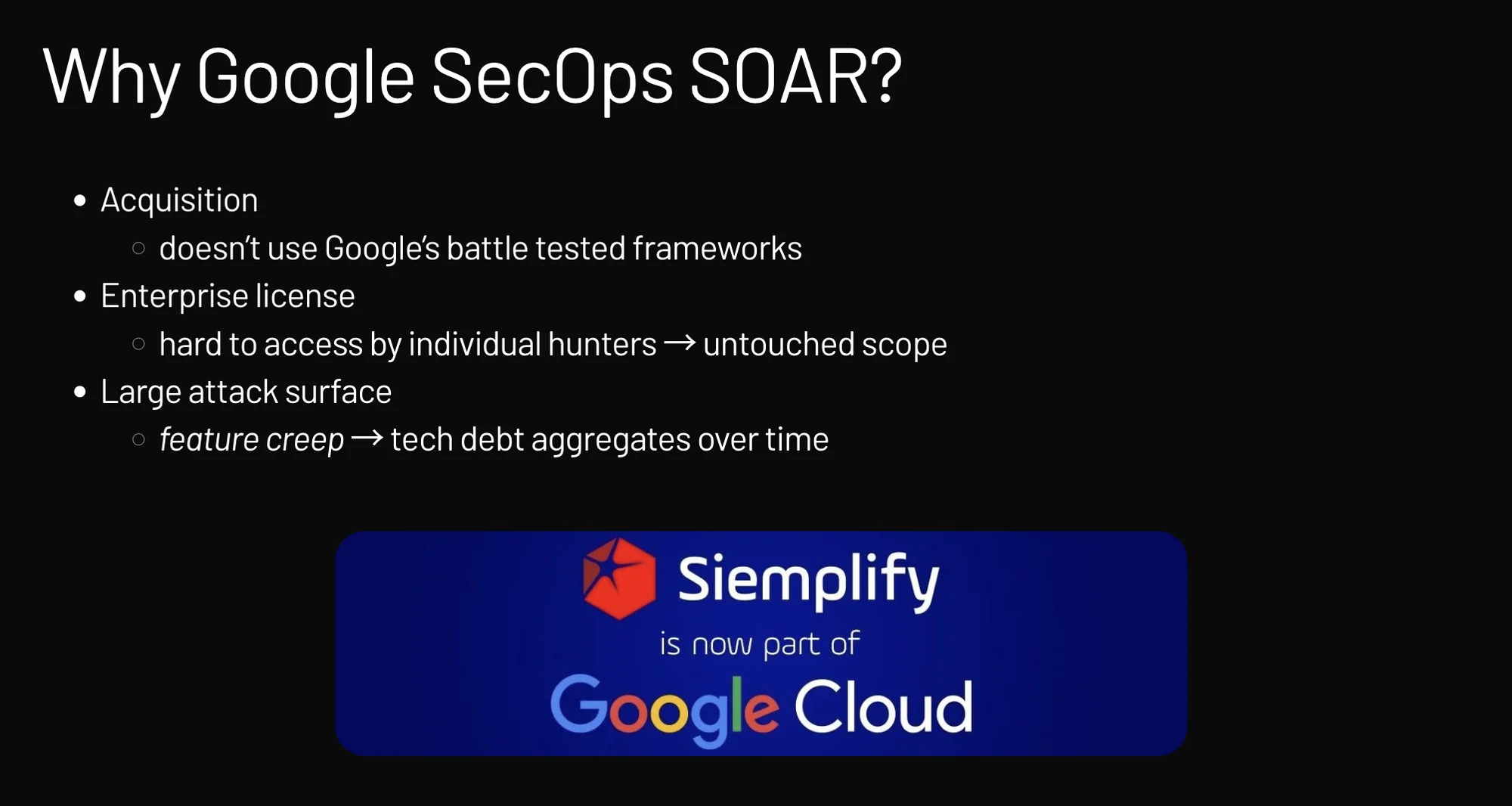
Google SecOps SOAR is a security orchestration, automation and response platform, documented at docs.cloud.google.com/chronicle/docs/soar. It lets analysts run predefined and custom integrations to automate triage and response to security events. The researcher chose it as a single target during Google Cloud bugSWAT 2025, a live hacking event, and found a Service Account impersonation chain that allowed an authenticated user with only the default Basic role to escalate to full Administrator access.
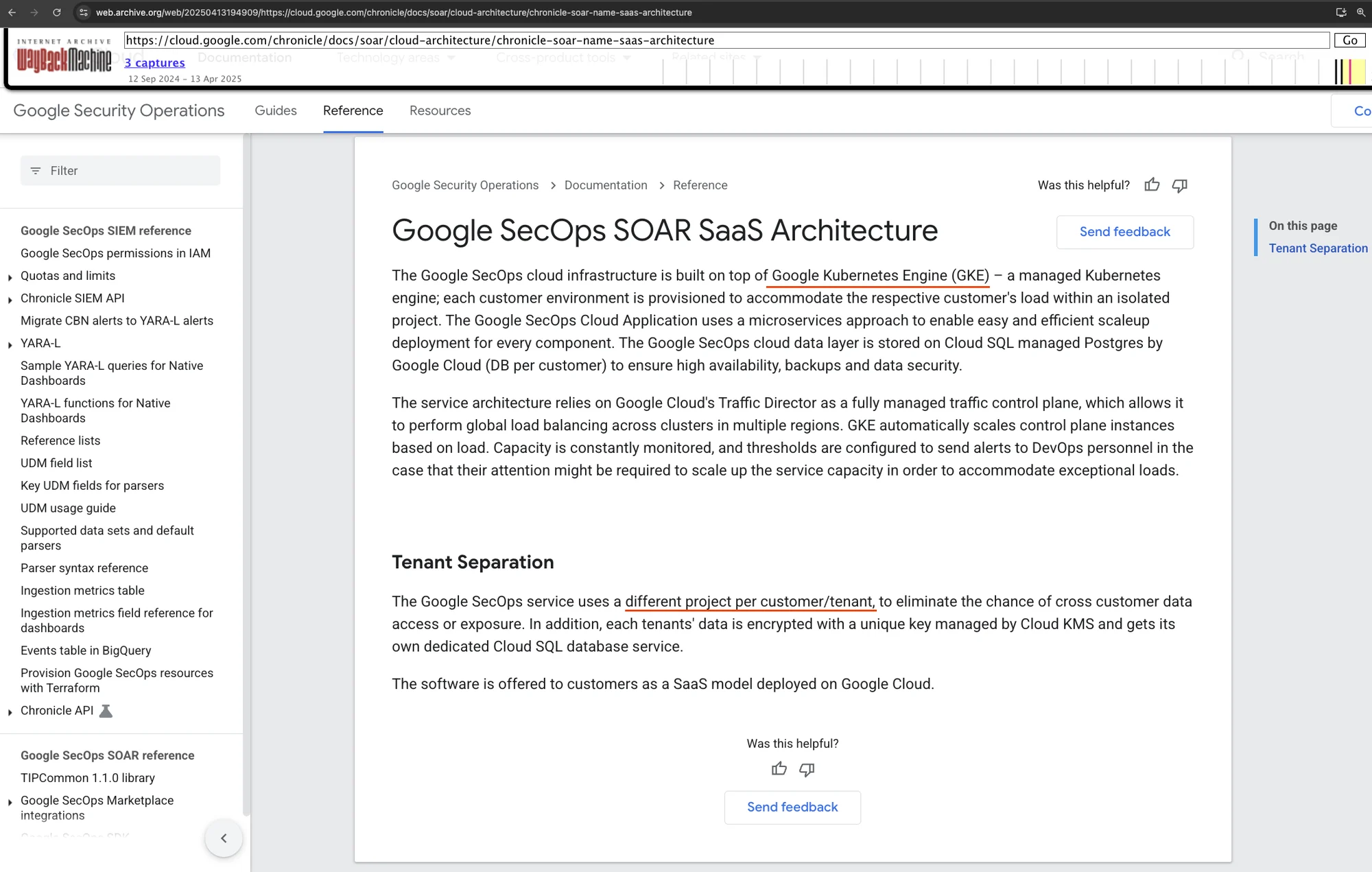
The report describes Google SecOps as a single-tenant SaaS product, which makes cross-tenant attack scenarios unlikely. The documentation also states that the product runs on GCP-managed services, specifically GKE and Cloud SQL.
Setup
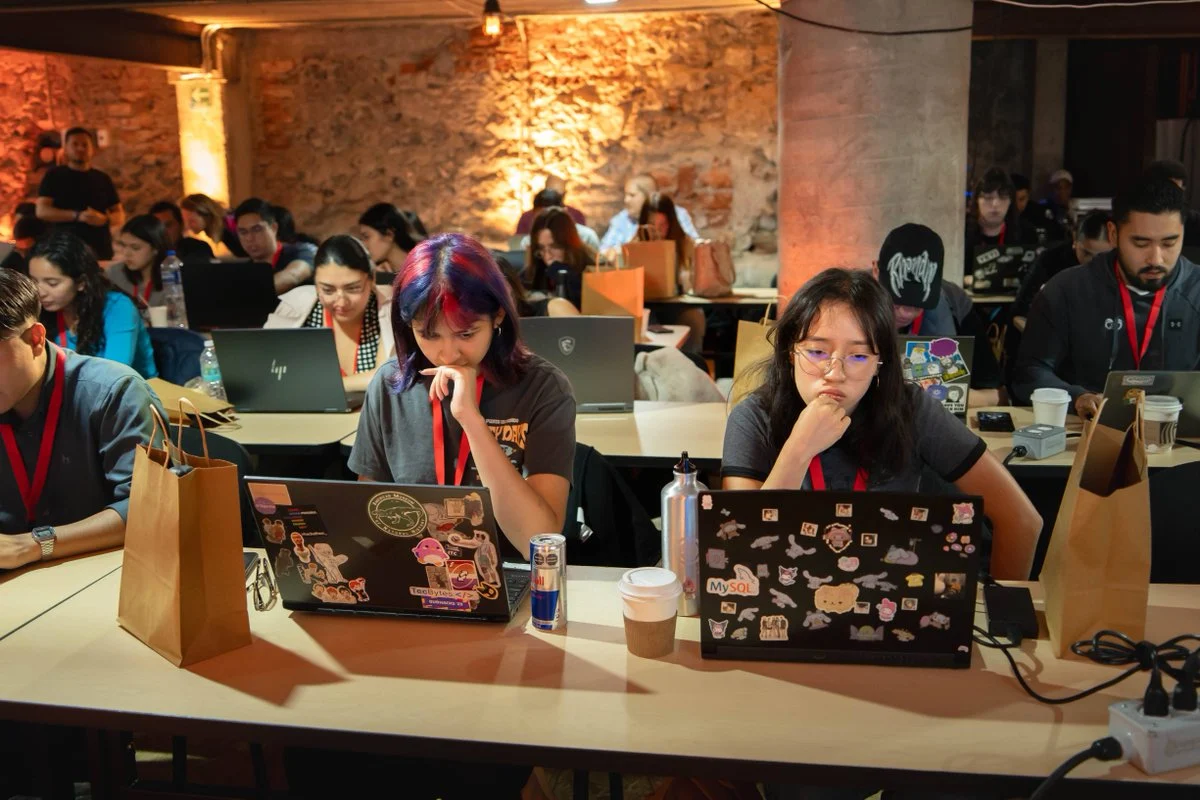
The event scope covered nine Google Cloud Products, which the researcher cannot disclose because of an NDA. Each researcher received a per-researcher tenant. The researcher worked against a tenant whose Python execution environment ran under the service account gke-init-python@soar-{ID}.iam.gserviceaccount.com, and against a GCP project named malachite-bugswat3007. Malachite is the internal name for Chronicle, now known as SecOps SIEM.
The researcher's methodology was a two-step cycle:
- Map the attack surface (unauthenticated and authenticated APIs, client-side requests, storage buckets and so on).
- Work on attack scenario ideation, relying only on verifiable hypotheses based on the current context, aiming for maximum impact.

Finding it
The Python execution environment
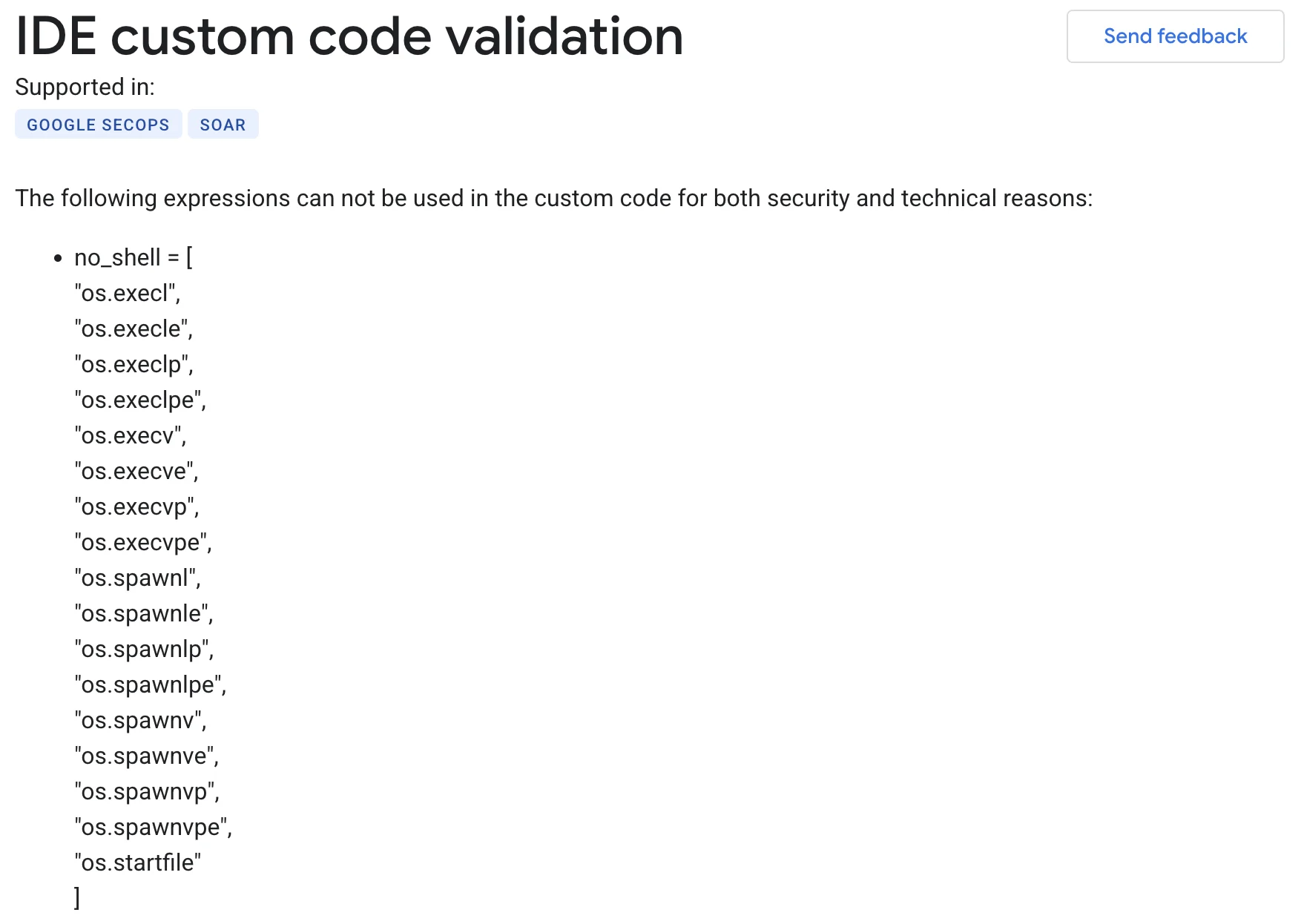
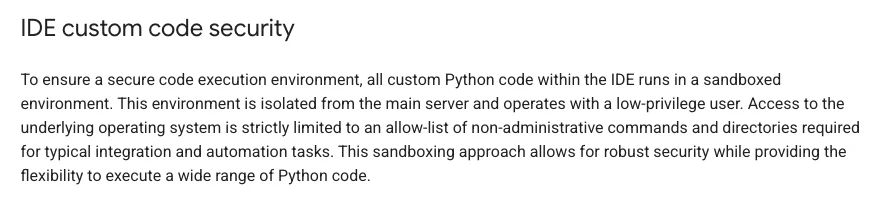
A fellow attendee spotted an excerpt in the documentation describing the sandbox for custom integrations. According to the docs, sandboxing was implemented by blocking usage of modules like os.system, several os.popen variants, and multiple functions from the subprocess module. That denylist approach looked insufficient.
The IDE validation bypass
Bypassing the validation mechanism turned out to be trivial using the dynamic __import__() method.
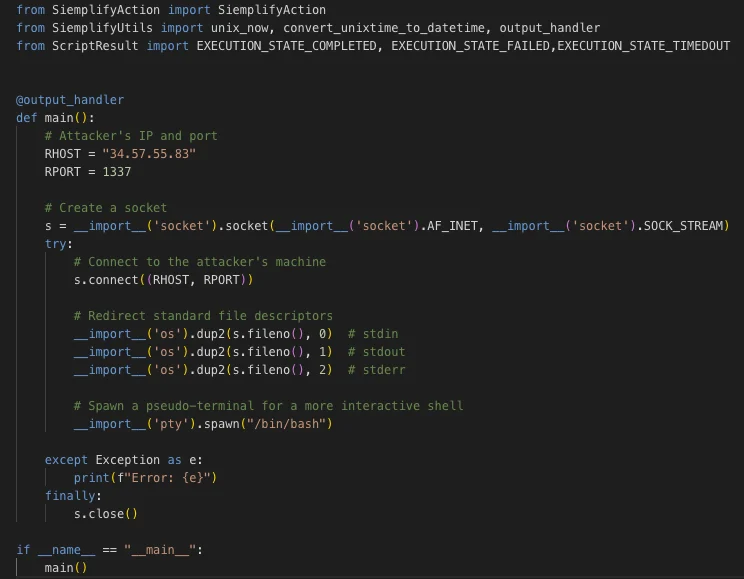
The researcher set up a reverse shell by dynamically importing socket, os and pty: __import__('socket') created a socket connecting back to the attacking machine, __import__('os') redirected the standard file descriptors, and __import__('pty') spawned a pseudo-terminal for an interactive shell.
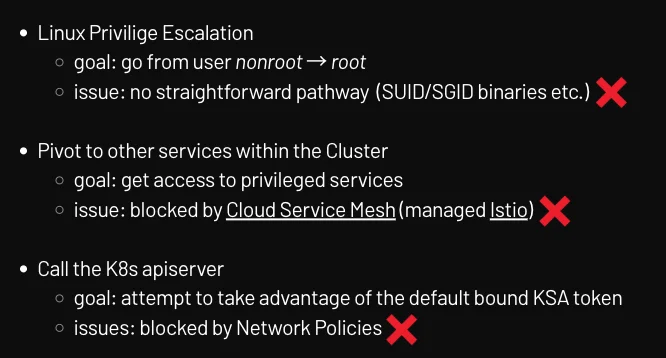
With shell access, none of the attempts to escalate privileges, abuse the K8s control plane or hit other microservices within the cluster worked.
The next target was the GCP Service Account bound to the K8s Pod running the Python execution environment. The report explains the three kinds of service accounts in Google Cloud: user-managed service accounts, default service accounts created automatically when certain services are enabled, and service agents created and managed by Google Cloud that allow services to access resources on your behalf.
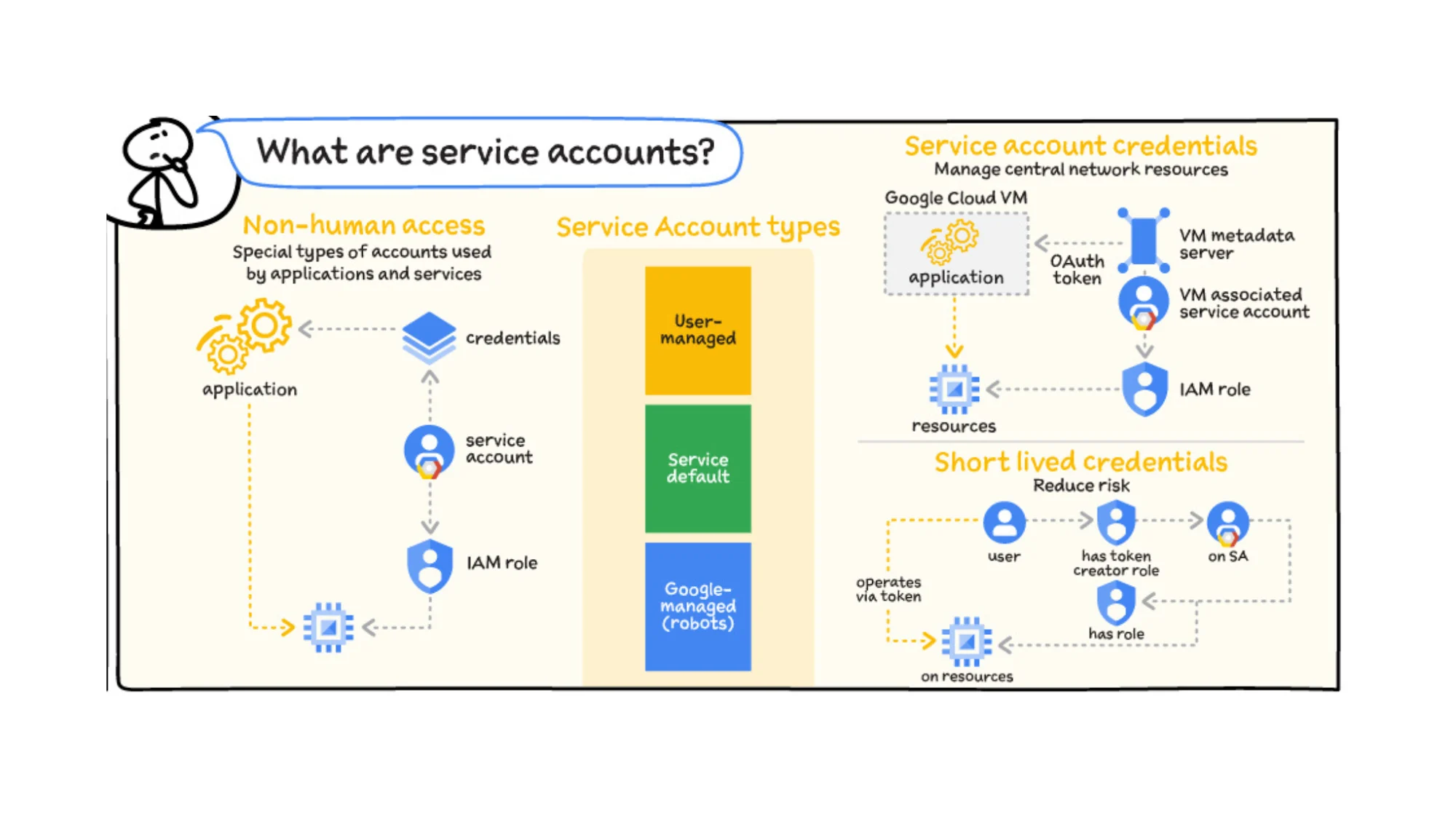
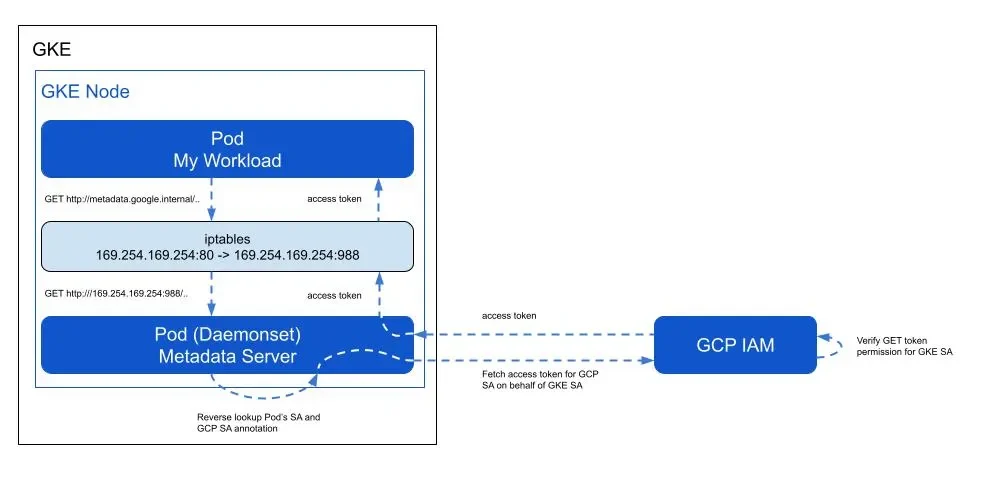
Workload Identity Federation for GKE is the mechanism that grants per-service Cloud IAM permissions within a GKE cluster.
Exploitation
Step 1: fetch the OAuth access token from the metadata server
With shell access inside the container, the bound service account's access token can be retrieved by querying the metadata server:
curl "http://metadata.[redacted]/computeMetadata/v1/instance/service-accounts/default/token" \
-H "Metadata-Flavor: Google"
The researcher notes that a reverse shell is not a prerequisite: an insider or attacker with sufficient permissions could create and run a custom integration that retrieves the OAuth access token programmatically.
Step 2: introspect the token
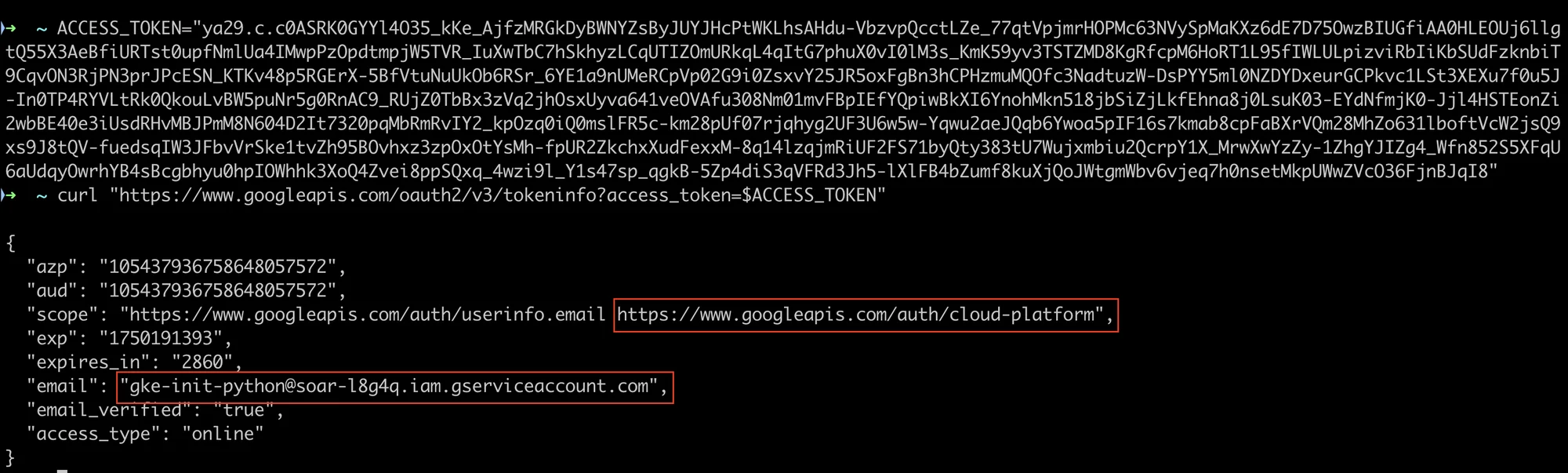
Service account access tokens are opaque, so they cannot be decoded locally. The researcher used the oauth2.googleapis.com/tokeninfo endpoint for introspection. This revealed the associated service account email:
gke-init-python@soar-{ID}.iam.gserviceaccount.com
and the OAuth scopes:
www.googleapis.com/auth/userinfowww.googleapis.com/auth/cloud-platform(the broadest scope for GCP APIs)
Step 3: understand what gke-init-python is for
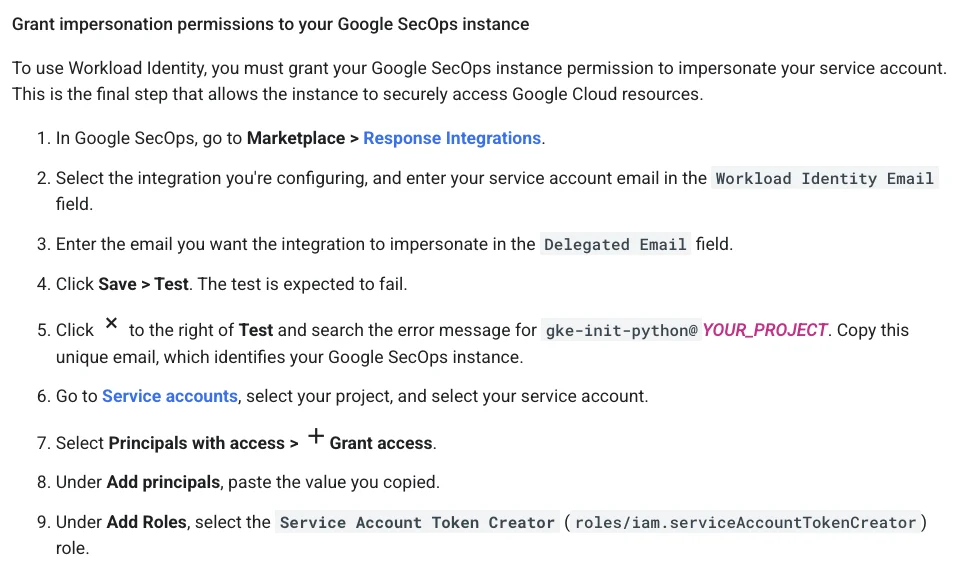
The documentation was key here. To use Workload Identity, the Google SecOps instance must be granted impersonation permissions. The gke-init-python email identifies the unique integration that needs permission to impersonate a service account to access Google Cloud resources securely. This access is granted by adding the Service Account Token Creator role.
In GCP, Service Account Impersonation lets a principal (a user or another service account) temporarily assume the identity and permissions of a target service account.
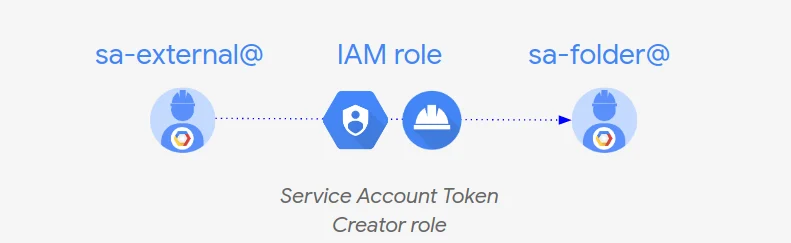
The researcher notes that this mechanism has been known to open room for privilege escalation since at least 2020, and lists GitLab's "Plundering GCP" research by Chris Moberly and Kat Traxler's "Privilege Escalation in GCP: A Transitive Path" as prior research examples.
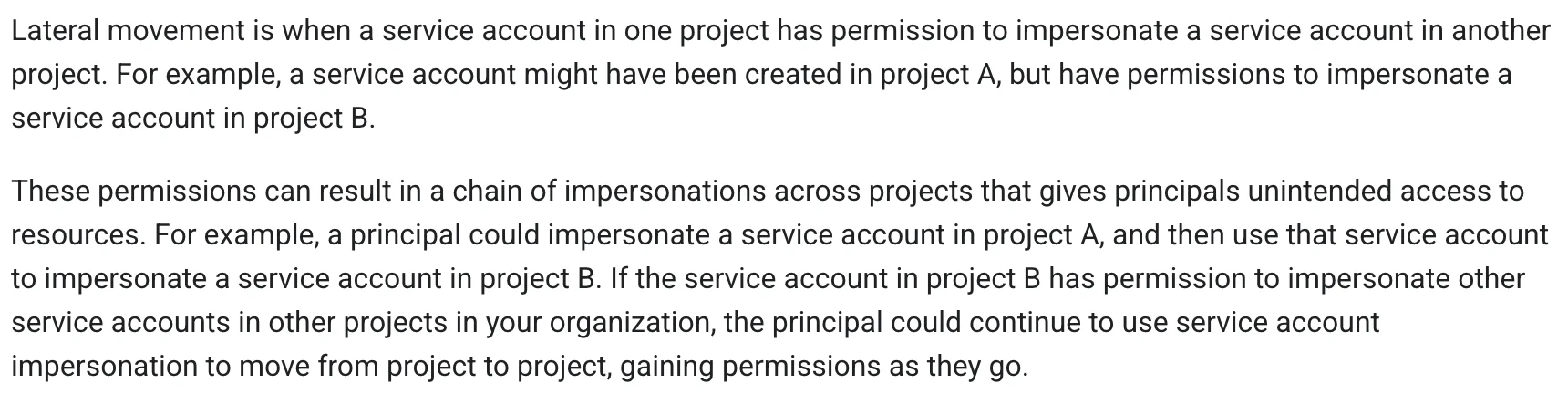
Step 4: enumerate as gke-init-python
Running rudimentary gcloud CLI commands as gke-init-python produced surprising results: the researcher could list Service Accounts from the malachite-bugswat3007 project.
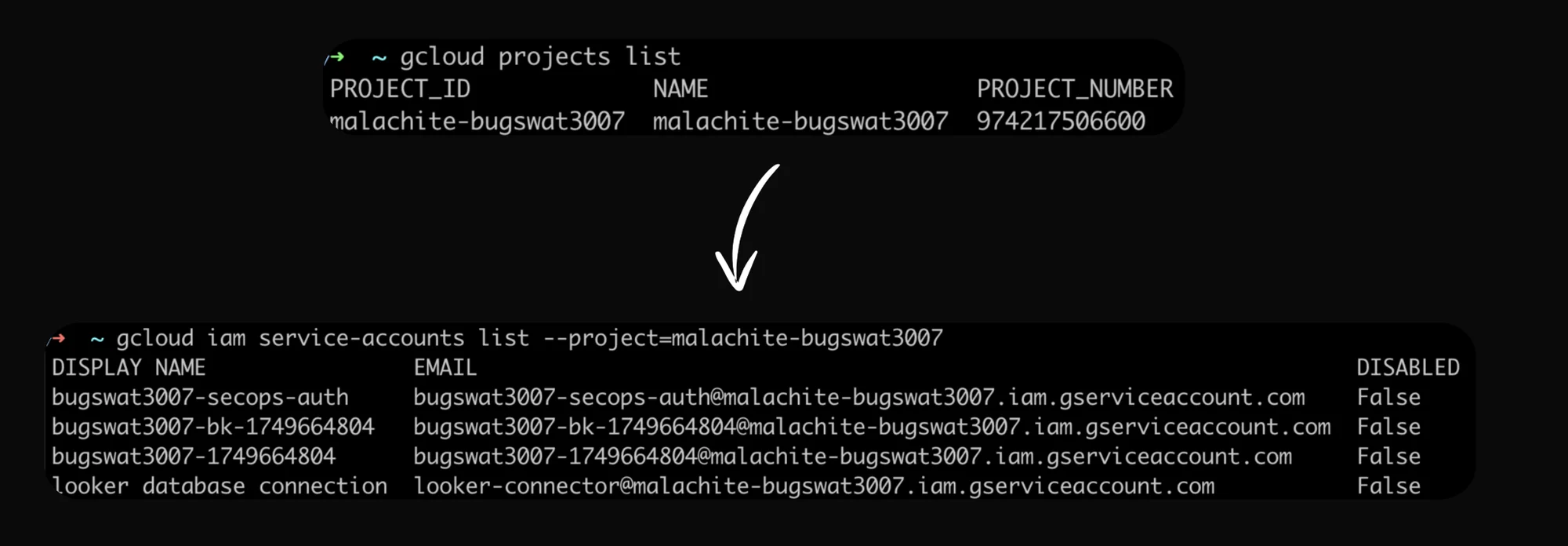
A tip in the report notes that most Google Cloud APIs expose the testIamPermissions() method, which can be used to enumerate a service account's permissions.
Step 5: confirm project-wide impersonation
The conjecture was that gke-init-python could impersonate other service accounts within the Malachite project, most likely because it had been assigned the iam.serviceAccountTokenCreator role project-wide.
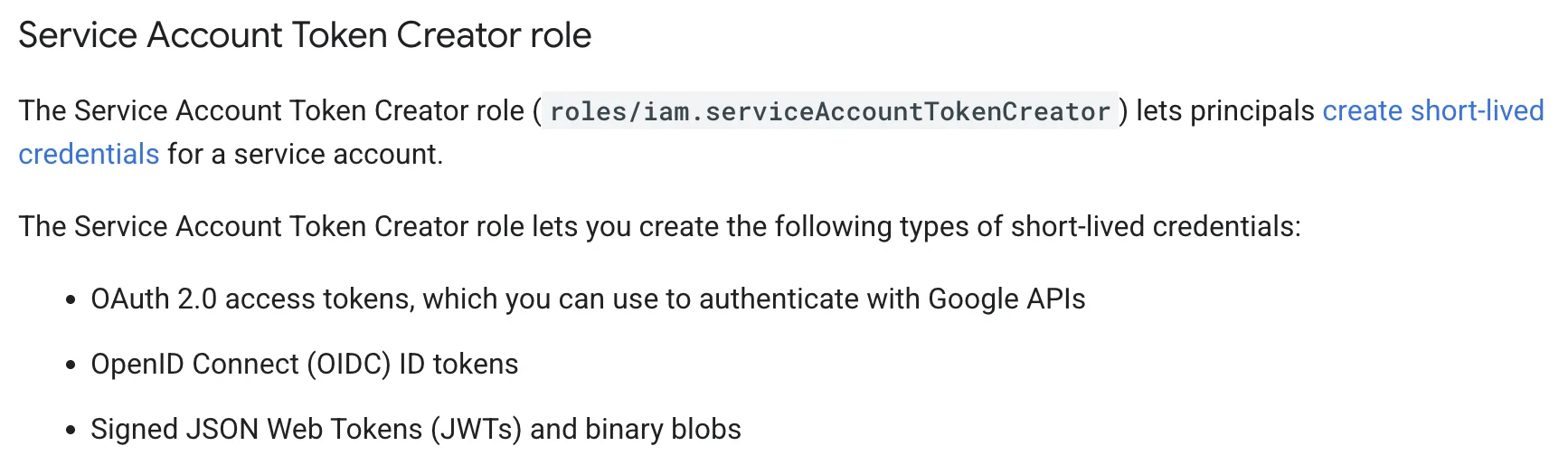
The hypothesis was validated in three steps. First, print an access token as gke-init-python while impersonating a target service account:
SECOPS_AUTH_TOKEN=$(gcloud auth print-access-token --impersonate-service-account=[redacted])
Second, load the token into the environment variable gcloud expects:
export CLOUDSDK_AUTH_ACCESS_TOKEN=$SECOPS_AUTH_TOKEN
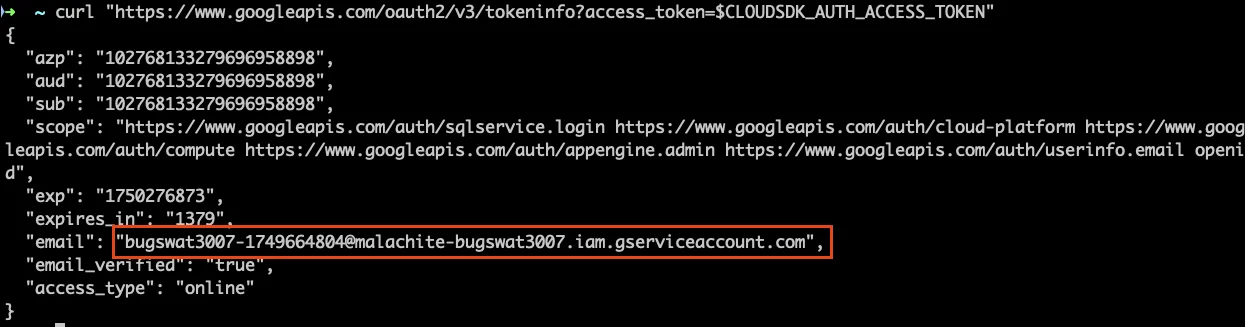
Third, verify that the token at hand is valid.
This led to a conclusion the researcher reported early on.
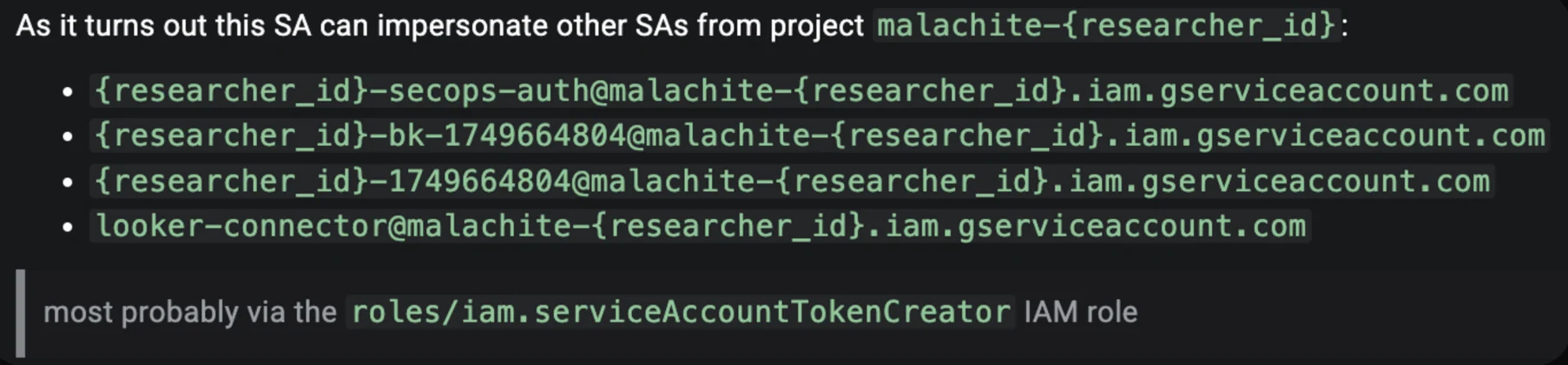
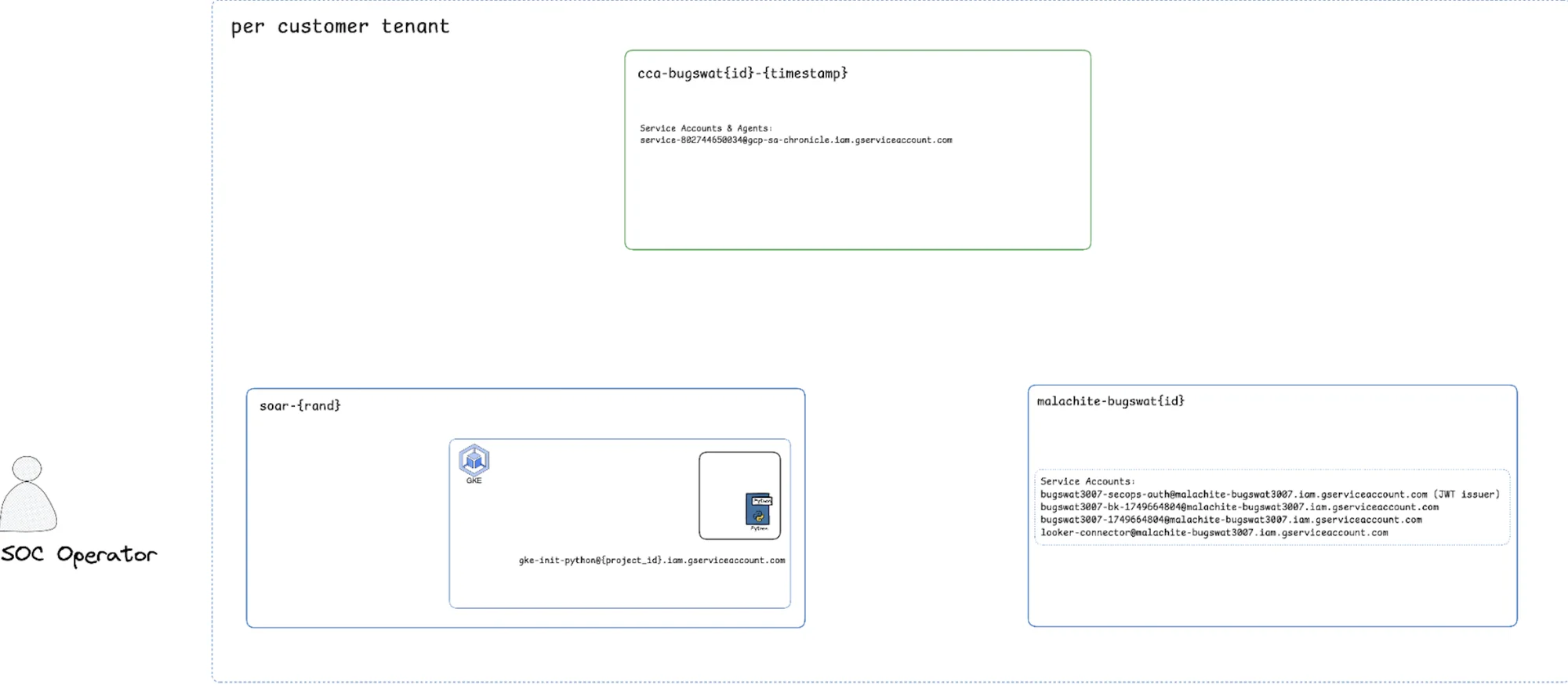
The architecture model was updated to note the separation between the SOAR environment, where gke-init-python lived, and the malachite-bugswat{id} project.
Step 6: examine the authentication flow
Of the four service accounts the researcher could impersonate, secops-auth caught their attention. They captured all HTTP(S) traffic during the standard sign-in process.
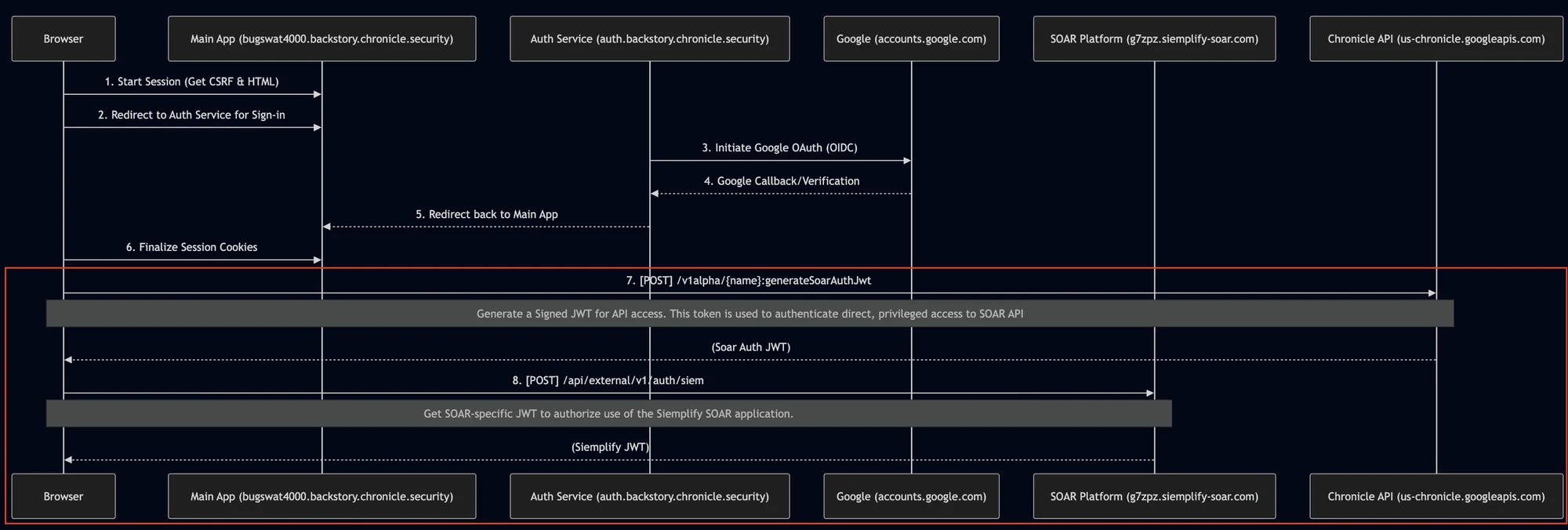
After the session cookie is set, two steps matter:
- In step
#7, aPOSTrequest is made to thegenerateSoarAuthJwtendpoint, retrieving a signed JWT (calledSOAR_SIGNED_JWT). - In step
#8, theSOAR_SIGNED_JWTis exchanged for a siemplify-specific signed JWT (calledSIEMPLIFY_SIGNED_JWT).
Examining a SOAR_SIGNED_JWT payload showed that its issuer was the secops-auth service account ([redacted]).
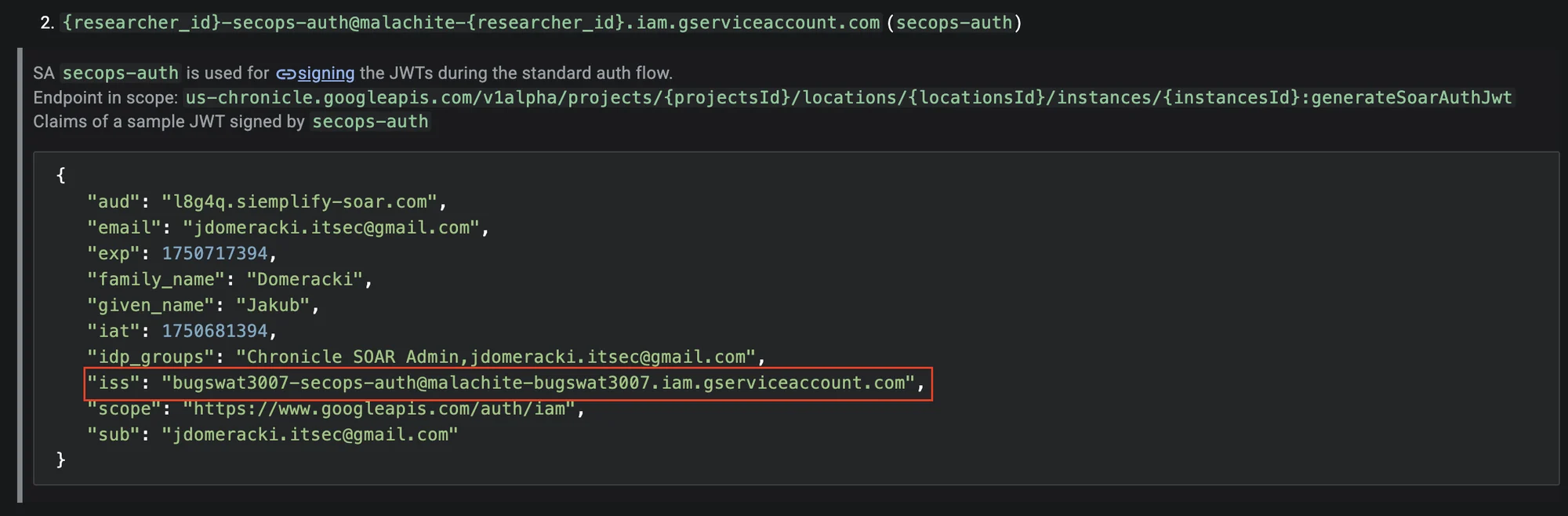
Step 7: sign a forged JWT
Each GCP service account comes with a Google-managed key pair. A service account can sign a JWT using its system-managed private key by invoking the projects.serviceAccounts.signJwt method.
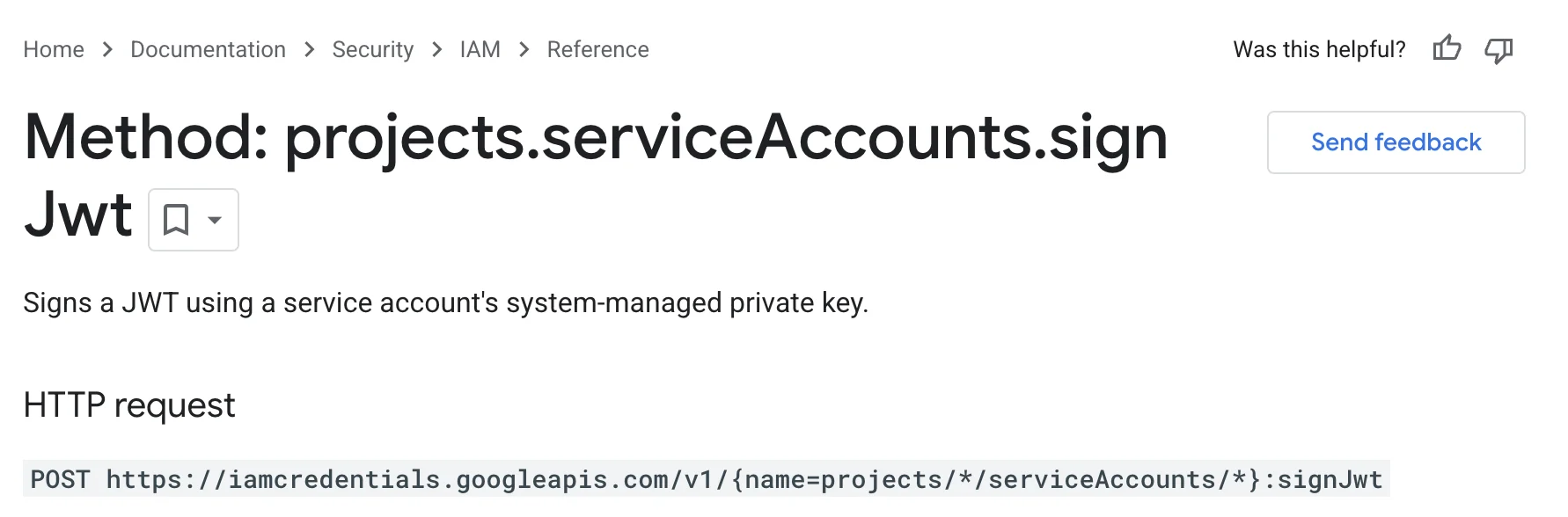
The resulting signature can be verified using the corresponding public key, available in three formats:
- X.509 certificate:
https://www.googleapis.com/service_accounts/v1/metadata/x509/SERVICE_ACCOUNT_EMAIL - JSON Web Key (JWK):
https://www.googleapis.com/service_accounts/v1/jwk/SERVICE_ACCOUNT_EMAIL - Raw format:
https://www.googleapis.com/service_accounts/v1/metadata/raw/SERVICE_ACCOUNT_EMAIL
The chain then clicked into place:
- The researcher could execute API calls using the permissions of the
gke-init-pythonservice account. gke-init-pythonhad permissions to impersonate thesecops-authservice account.secops-authwas the confirmed issuer ofSOAR_SIGNED_JWT.
An attacker could therefore abuse gke-init-python to impersonate the JWT issuer (secops-auth) and sign a forged JWT with arbitrary claims.
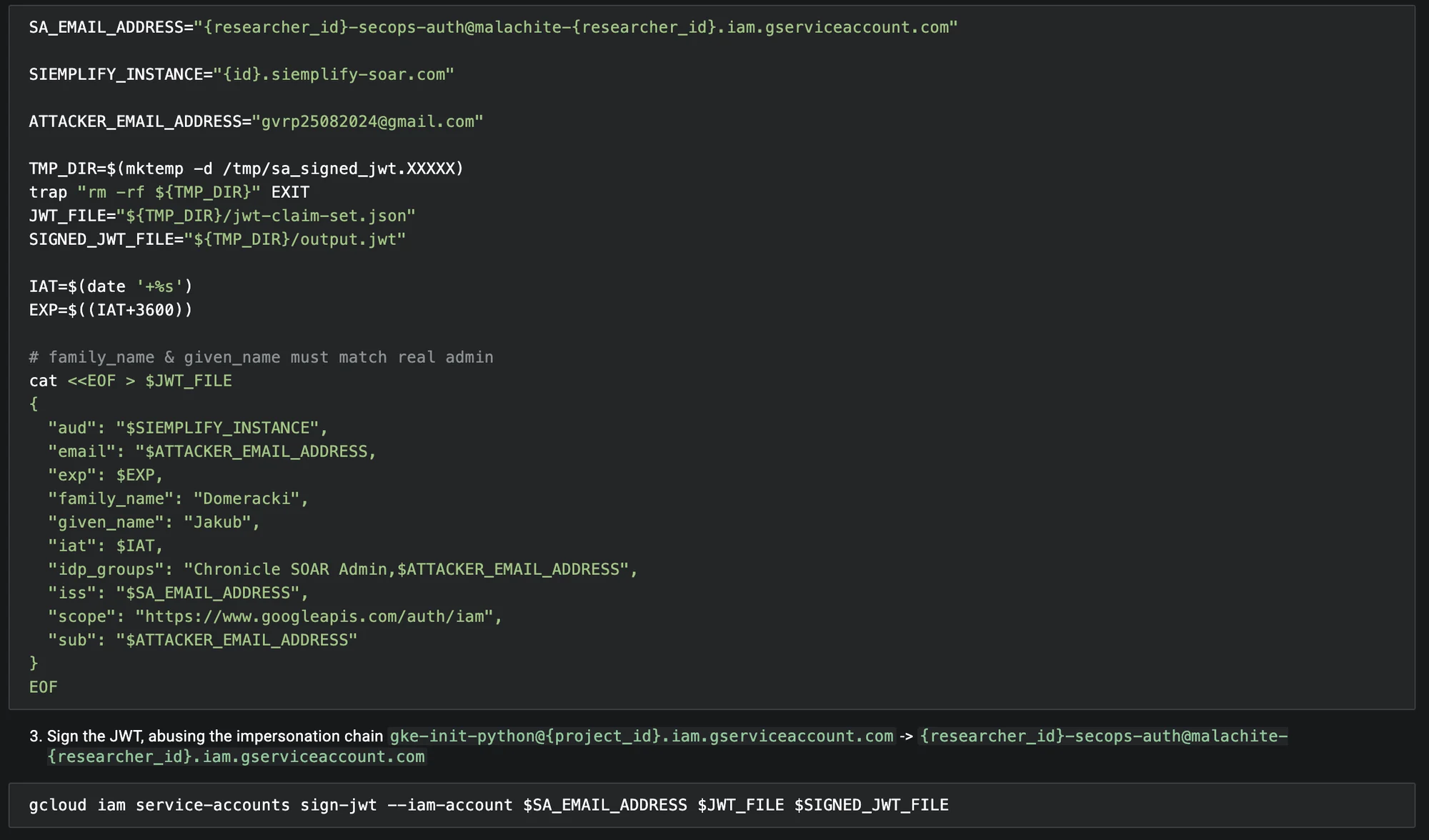
Step 8: reach the primitive as a low-privileged user
The primitive was interesting, but it did not automatically follow that it would be highly impactful. If only Admins could obtain the gke-init-python OAuth access token via the IDE validation bypass, minting arbitrary JWTs would not broaden the prerequisite level of access. The goal became finding pathways to abuse gke-init-python as a lower-privileged user.
Google VRP takes a permission delta approach: the larger the increase in access, the larger the impact and the reward. The default Basic user group is granted the permission to perform Manual Actions, so the researcher looked for ways to abuse that minimal level of access.
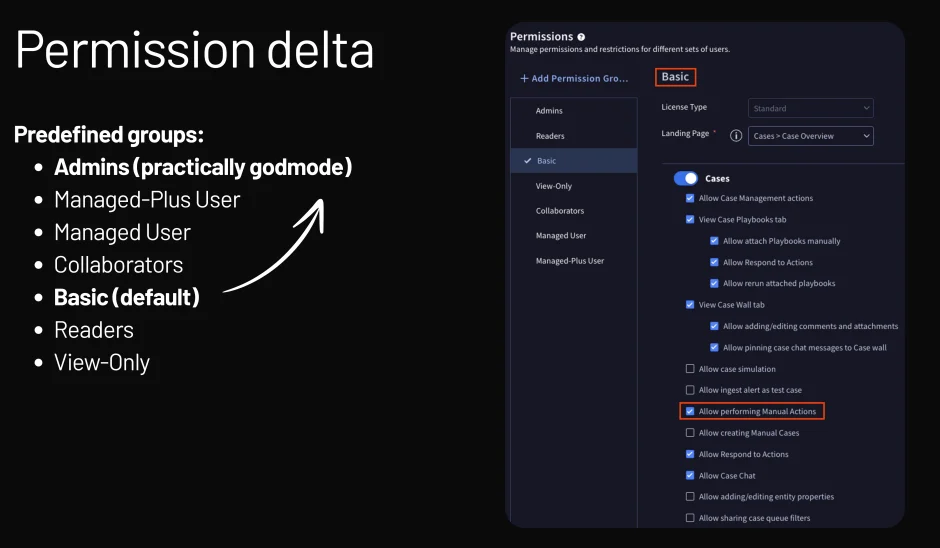
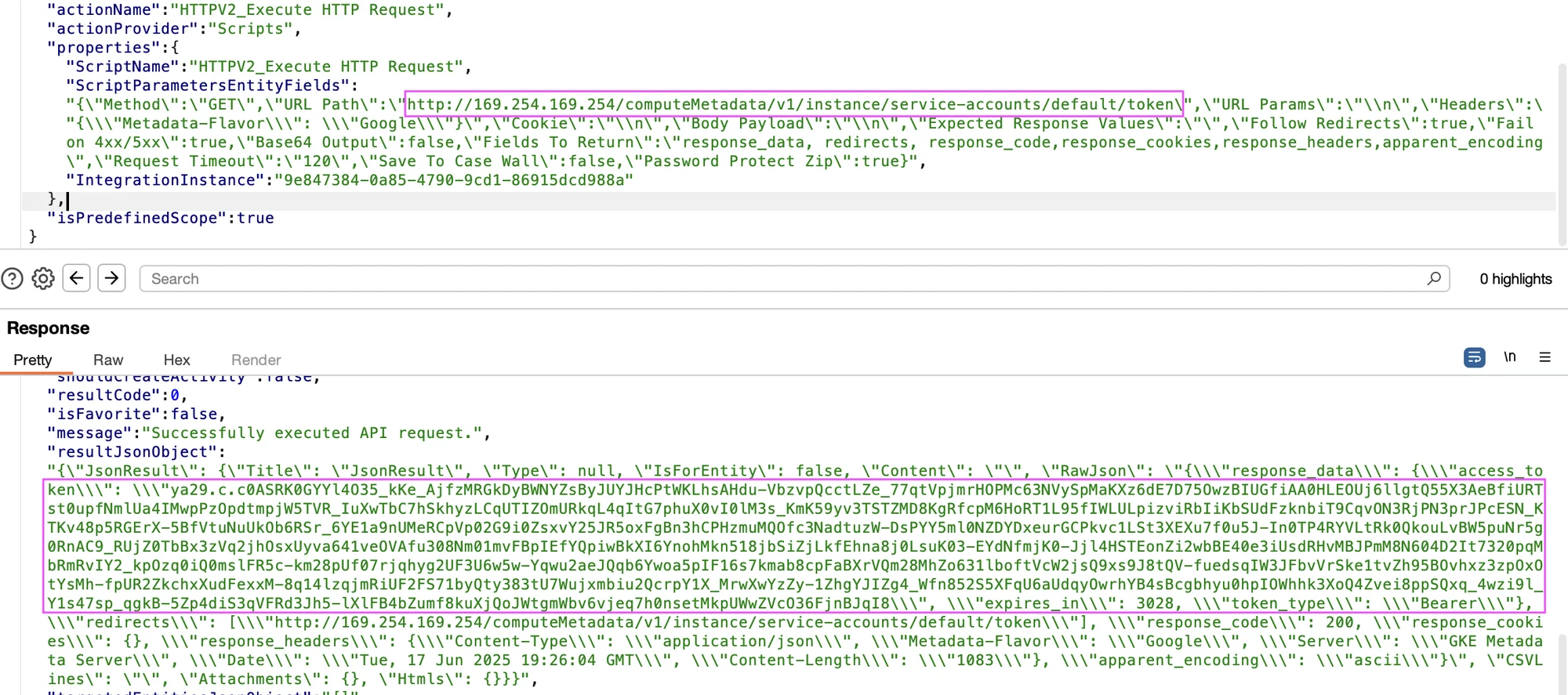
Full SSRF via the HTTPv2 integration
The HTTPv2 integration, one of the Google-managed integrations, allows setting:
- An arbitrary URL (
http://[redacted]/computeMetadata/v1/instance/service-accounts/default/token) - HTTP Method (
GET) - Arbitrary HTTP headers (
Metadata-Flavor: Google)
The corresponding code did not block access to the link-local address range [redacted]/16, most likely by design. An attacker could exploit this SSRF to fetch the OAuth access token bound to the Python execution environment service account.
Code execution via SSTI in TemplateEngine PowerUp
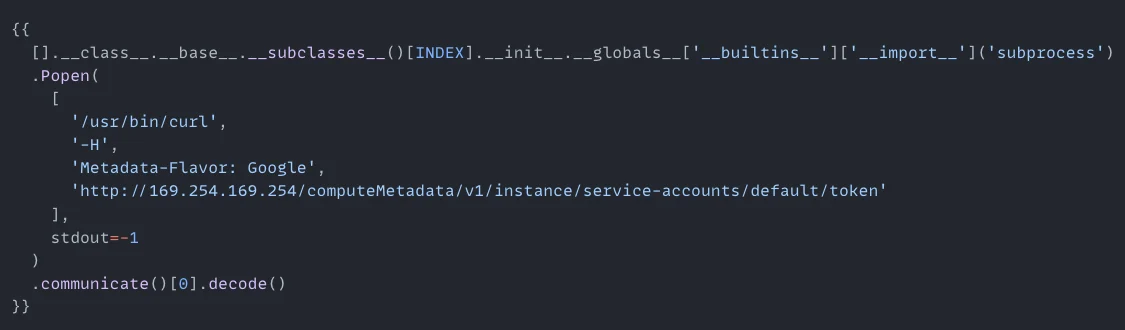
Another pathway to the access token was a classic Jinja2 Server Side Template Injection in the TemplateEngine PowerUp. The researcher does not go into details, noting only that exploiting the SSTI was easy because subprocess.Popen was already imported.
Step 9: full attack scenario
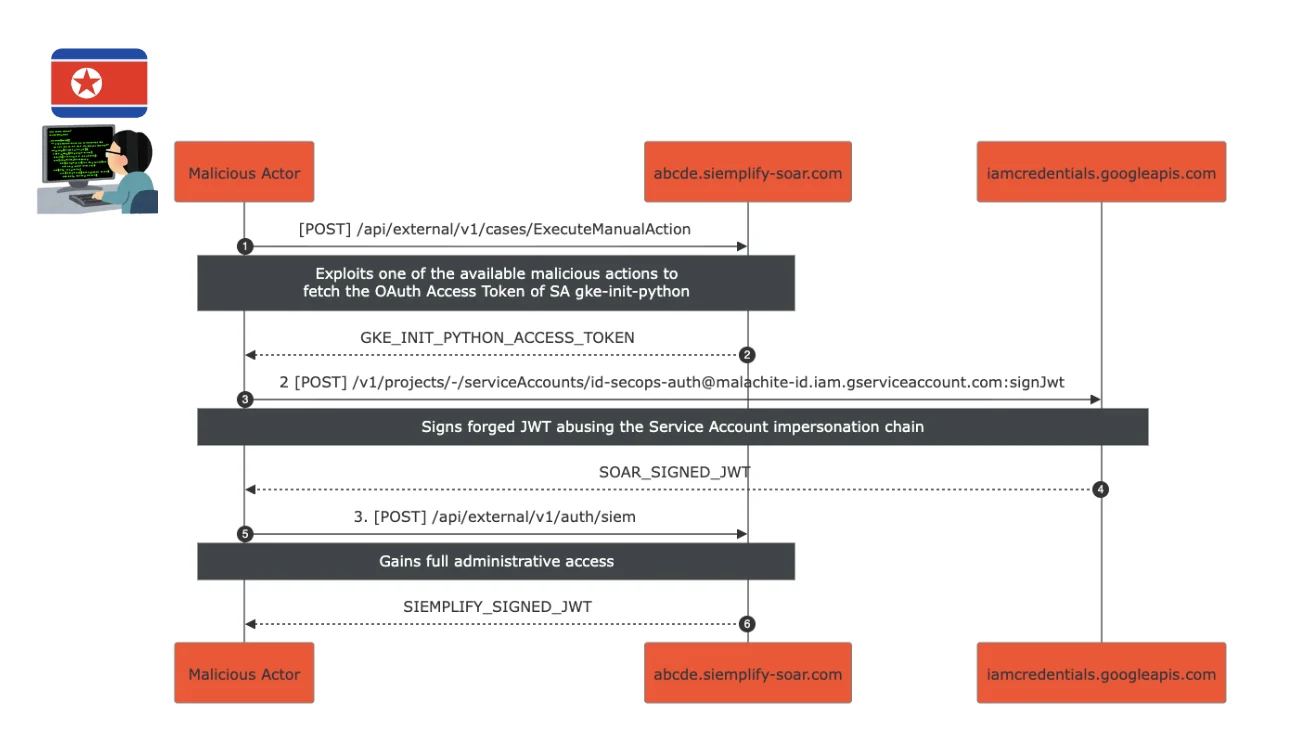
Putting it all together:
- An authenticated attacker performs a malicious action (SSTI or SSRF) to fetch the OAuth access token of the
gke-init-pythonservice account. - They sign a forged JWT, abusing the service account impersonation chain (
gke-init-pythonimpersonatessecops-auth), resulting in aSOAR_SIGNED_JWT. - They exchange the forged
SOAR_SIGNED_JWTfor aSIEMPLIFY_SIGNED_JWT, achieving full administrative access.
Root cause
The root cause was overly permissive IAM bindings granted to Google-managed, per-product, per-project service accounts (P4SA). Specifically, the SOAR Python pod service account held the Service Account Token Creator role project-wide, which let it impersonate other service accounts in the project, including secops-auth, the issuer of SOAR_SIGNED_JWT. Because the platform trusted JWTs signed by that issuer, anyone who could obtain the Python pod's token could sign a forged JWT with arbitrary claims.
The existing defences did not stop the chain. The Python sandbox relied on a denylist of modules and functions, which the dynamic __import__() bypassed. The HTTPv2 integration did not block the link-local range. The TemplateEngine PowerUp exposed a Jinja2 SSTI with subprocess.Popen already imported. And the default Basic role was enough to reach these features through Manual Actions.
Impact
An authenticated attacker with permissions sufficient to perform Manual Actions (included in the default Basic role) could escalate to full Administrator access. Google SecOps is an enterprise offering often used by heavily regulated companies such as pharma and finance. The researcher argues that the risk of a malicious insider abusing this or a similar privilege escalation pathway is non-trivial, given the recent proliferation of fake candidates circumventing background checks and APTs targeting large organisations from within. The report does not give a CVSS score or a bounty amount.
Fix
The Google SecOps Team removed the project-wide Service Account Token Creator binding granted to the SOAR Python pod service account.
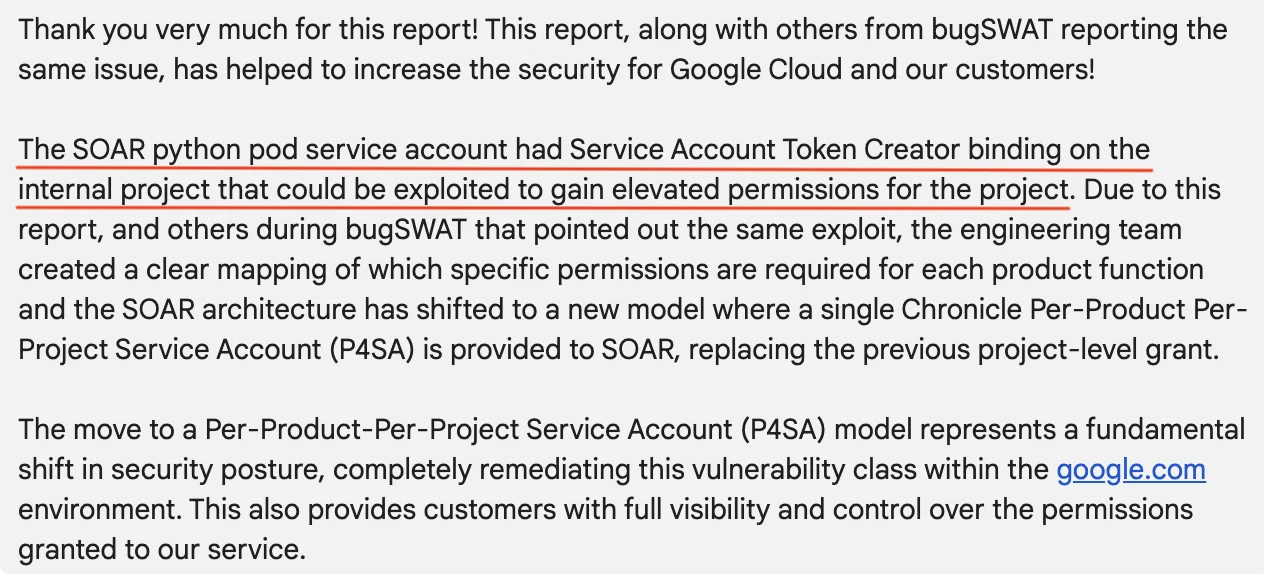
The platform is also migrating to a new per-customer tenant model. According to a Google VRP representative, as part of a long-term change a single P4SA is provided to SOAR, replacing the previous project-level grant. This P4SA is used for impersonation by all SOAR services including Python. The Chronicle API P4SA provides a set of permissions administrators can manage, and the Python service is configured to use only the essential subset required for its operations. The stated benefits are granular pre-defined permissions, adherence to Google Cloud best practice, and customer-managed access: administrators can audit, modify and approve the permissions granted to SOAR, enforcing least privilege according to their organisation's standards.
The updated documentation is far less verbose and reflects the mitigations put in place after the event.
Variants to test
- Project-wide
iam.serviceAccountTokenCreatoron workload identities. Enumerate the service accounts a workload identity can impersonate withgcloud iam service-accounts get-iam-policyor by attemptinggcloud auth print-access-token --impersonate-service-account=<target>. A positive result is a token for a service account with broader permissions than the workload's own. - JWT issuers trusted by the application. Capture sign-in traffic and decode any JWTs to find their
issclaim. If the issuer is a service account the workload can impersonate, try signing a forged JWT withprojects.serviceAccounts.signJwtand exchanging it. A positive result is a session or token with higher privileges. - Denylist sandboxes. In any custom code environment that blocks named modules or functions, try
__import__()with the blocked module names. A positive result is code execution that the denylist was meant to prevent. - Integrations that accept arbitrary URLs and headers. Test HTTP request integrations against
[redacted]with theMetadata-Flavor: Googleheader. A positive result is a metadata response containing an access token. - Template engines with pre-imported modules. Test Jinja2 expressions in template power-ups for access to
subprocess.Popenor similar. A positive result is command execution from a template. - Low-privilege roles reaching execution features. Check whether the default role can trigger Manual Actions or run integrations, then chain that into the above. A positive result is privilege escalation from the default role to administrator.
Closing remarks
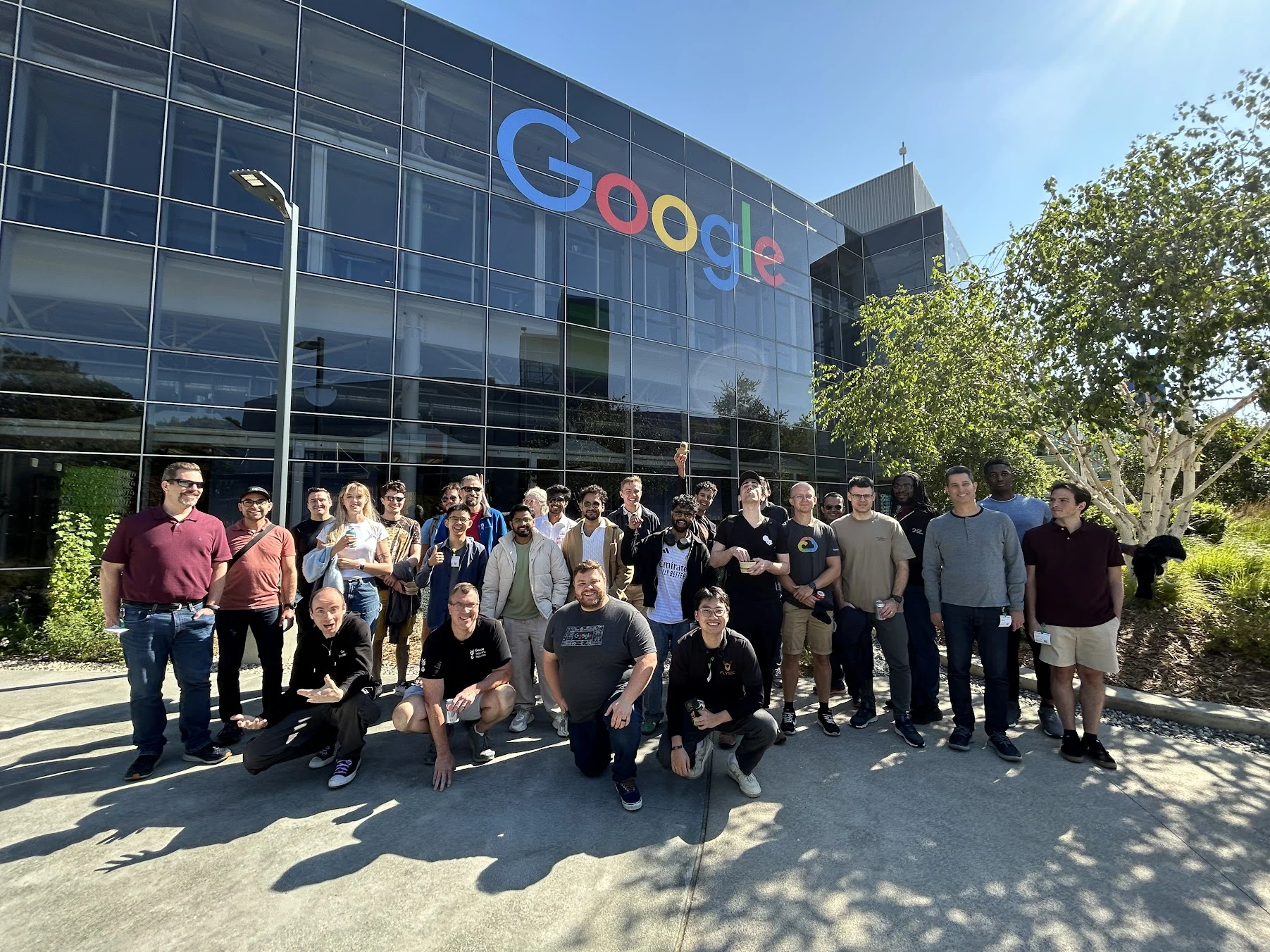
The report was submitted from Lufthansa's WiFi while flying to the on-site part of the event, past the duplicate window. Google had already received a submission a few months earlier highlighting the initial components of the chain, and an internal investigation had concluded there was no impact, so the original reporter received no reward. Other bugSWAT attendees also reported related issues, initially deemed informational. The reported chain proved high severity impact, so all researchers were rewarded, and according to Google VRP panel members the original reporter was rewarded retroactively as well. The researcher presented a live exploitation demo during Show&Tell and won the most creative award.


What happened, in plain words
A security researcher took part in a Google hacking event called bugSWAT 2025. During the event he looked at one Google product, Google SecOps SOAR, and found a way for a normal, low-privileged user of that product to become a full administrator. He did not need to break into anything from the outside: he started with an ordinary account, used a few features of the product in ways they were not meant to be used, and chained the results together until he held the keys to the whole thing.
The chain works like this. The product runs small pieces of Python code on the user's behalf. That code runs inside a container (a sealed box on a server) that carries a Google Cloud identity, called a service account. The researcher found that this identity was allowed to borrow the identity of another, more powerful service account. That second identity was the one that signs the login tokens the product trusts. So he could make the product sign a token that said whatever he wanted, and the product would believe it. The result was administrator access.
The most important part for a beginner is the word chain. No single step here is a dramatic break-in. Each step is a small permission that was handed out a little too generously. Put them in a row, and a basic user becomes an administrator.
The event and the target
Google organises bugSWAT Live Hacking Events to bring top-ranked researchers together. The report describes them as invite only, with collaboration encouraged, bounty multipliers, a duplicate window, a predefined scope, and a final couple of days onsite.
A bounty is money paid for a valid security report. A duplicate window is a period during which two researchers who report the same issue both get paid, instead of only the first one. Scope is the list of products that are allowed to be tested.
Getting invited, according to the researcher, comes down to having a track record of high signal submissions. He quotes Google's own blog post on the subject:
Google typically considers the performance of individual researchers from the past year of Cloud VRP reports as well as previous bugSWAT event performance when deciding who to invite
The scope covered nine Google Cloud Products, which he cannot name because of an NDA (a non-disclosure agreement, a contract promising not to reveal certain information). Because he had a full-time job and other obligations, he decided to pick a single target and stick with it for the whole event.
Why Google SecOps SOAR
Google SecOps SOAR is a security product. SOAR stands for security orchestration, automation and response. In everyday terms: a security team's control room. When something suspicious happens in a company's computer systems, this product helps the team collect the alert, run automatic checks, and respond, often by running small programs called integrations.
He chose it for a few strategic reasons, which he describes in the sections that follow.
Reading the documentation first
While the researchers waited for their own private copies of the product (called tenants) to be set up, he read the documentation. A tenant is your own isolated instance of a service, like getting your own flat in a building rather than sharing a room.
Two things stood out. First, Google SecOps is a single-tenant SaaS product. SaaS means software as a service: you use it in a browser, the provider runs it for you. Single-tenant here means each customer gets a separate environment, which makes attacks that jump from one customer to another unlikely.
Second, the documentation explicitly described the Google Cloud services the product is built on: GKE and Cloud SQL. GKE is Google Kubernetes Engine, a system for running many containers across many servers. Cloud SQL is Google's managed database service. Knowing the building blocks tells a researcher where to look.
Methodology
Once he had access to his tenant, he followed a simple two-step cycle:
- Map the attack surface: the unauthenticated and authenticated APIs, the requests the browser makes, the storage buckets, and so on.
- Work on attack scenario ideation, relying only on verifiable hypotheses based on the current context, aiming for maximum impact.
An API (application programming interface) is the set of addresses a program can call to make another program do something, like a service counter with numbered windows. Authenticated means the request carries proof of who you are; unauthenticated means it does not. A storage bucket is a folder in the cloud for files. An attack surface is everything an outsider can reach and interact with. A hypothesis is an educated guess you then try to prove or disprove.
SOAR integrations and the Python sandbox
SecOps SOAR lets users run predefined and custom integrations. These are small programs that automate the triage of and response to security events. Triage means sorting: deciding which alerts matter and what to do first.
One attendee spotted an interesting excerpt in the documentation about the Python execution environment. According to the docs, the sandbox was implemented by blocking modules like os.system, several os.popen variants, and multiple functions from the subprocess module.
A sandbox is a restricted play area: code runs, but is supposed to be unable to do dangerous things. This sandbox worked by denylist: it named the dangerous functions and blocked those names. The researcher immediately thought that was insufficient, because a denylist only stops what someone thought of in advance.
The updated documentation is far less verbose and reflects the mitigations put in place after the event.
Bypassing the code validation in the IDE
The product has an IDE, an integrated development environment: a built-in editor where users write their integration code. It validates the code before running it. Bypassing that validation turned out to be trivial using the dynamic __import__() method.
In Python, import loads a module, a bundle of ready-made code. __import__() does the same thing, but takes the module name as a piece of text at the moment the program runs. A validator that looks for the literal word os.system may not recognise __import__('os'), because the dangerous name is assembled at runtime. It is like a bouncer with a list of banned faces who does not check a person wearing a mask.
With that trick the researcher set up a reverse shell by dynamically importing socket, os and pty. A reverse shell is a connection from the victim's machine back to the attacker's machine, giving the attacker a command prompt inside the victim. The steps were:
__import__('socket')created a socket connecting back to his attacking machine. A socket is a program's endpoint for a network conversation.__import__('os')redirected the standard file descriptors. File descriptors are the numbered channels a program uses for input, output and errors; redirecting them sends the shell's input and output over the network connection instead of the screen.__import__('pty')spawned a pseudo-terminal for an interactive shell. A terminal is the text window where you type commands; a pseudo-terminal makes the remote connection behave like a real one.
He had a shell inside the container. But none of the attempts to escalate privileges, abuse the K8s control plane or hit other microservices within the cluster worked.
K8s is short for Kubernetes, the system that runs and manages containers. The control plane is the part of Kubernetes that decides where things run and who may do what; abusing it would mean taking over the whole cluster. A microservice is one small service in a larger application made of many such services. Privilege escalation means gaining more rights than you were given.
So the best bet was the GCP Service Account bound to the K8s Pod running the Python execution environment. A Pod is the smallest unit Kubernetes runs, usually one container. A service account in Google Cloud is an identity for software rather than a person, like a staff badge issued to a robot.
The report lists three kinds of service accounts in Google Cloud:
- User-managed service accounts: ones you create and manage, often used as identities for workloads.
- Default service accounts: created automatically when you enable certain Google Cloud services; you are responsible for managing them.
- Service agents: created and managed by Google Cloud, allowing services to access resources on your behalf.
Workload Identity Federation for GKE is the mechanism that grants per-service Cloud IAM permissions within a GKE cluster. IAM stands for Identity and Access Management: the system that decides who may do what. Federation here means letting a workload in the cluster act as a Google Cloud identity without storing long-lived keys.
Step 1: fetch the OAuth access token from the metadata server
With shell access inside the container, the bound service account's access token can be retrieved by querying the metadata server:
curl "http://metadata.[redacted]/computeMetadata/v1/instance/service-accounts/default/token" \
-H "Metadata-Flavor: Google"
Line by line:
curlis a command-line tool that fetches a web address, like a browser without a window.- The quoted address is the metadata server's endpoint for the default service account's token. The metadata server is a special address, reachable only from inside a cloud machine, that hands out information about that machine, including the identity it runs as.
- The backslash at the end of the first line means the command continues on the next line.
-H "Metadata-Flavor: Google"adds a request header. A header is a small labelled line of extra information sent with a web request. The request includes theMetadata-Flavor: Googleheader.
An OAuth access token is a short-lived string that proves an identity to Google's APIs, like a visitor badge valid for an hour. The researcher notes that a reverse shell is not a prerequisite: an insider or attacker with sufficient permissions could create and run a custom integration that retrieves the OAuth access token programmatically.
Step 2: introspect the token
Service account access tokens are opaque, meaning they cannot be decoded locally. So he used the oauth2.googleapis.com/tokeninfo endpoint for introspection. Introspection means asking the issuer what a token is: who it belongs to and what it may do.
This revealed the associated service account email:
gke-init-python@soar-{ID}.iam.gserviceaccount.com
and the OAuth scopes:
www.googleapis.com/auth/userinfowww.googleapis.com/auth/cloud-platform(the broadest scope for GCP APIs)
A scope is the list of things a token is allowed to do, like the categories printed on a credit card statement. cloud-platform is the widest scope available for Google Cloud APIs, so this token could reach a great deal.
Step 3: understand what gke-init-python is for
The documentation was key here. To use Workload Identity, the Google SecOps instance must be granted impersonation permissions. The gke-init-python email identifies the unique integration that needs permission to impersonate a service account to access Google Cloud resources securely. This access is granted by adding the Service Account Token Creator role.
A role is a named bundle of permissions. Service Account Token Creator is the role that allows one identity to obtain tokens for another service account. In GCP, Service Account Impersonation lets a principal (a user or another service account) temporarily assume the identity and permissions of a target service account.
The everyday comparison: a receptionist who is allowed to sign in on behalf of a colleague, using the colleague's badge for a while. Useful when a program needs to act as a specific identity, dangerous when the receptionist can borrow any badge in the building.
The researcher notes that this mechanism has been known to open room for privilege escalation since at least 2020, and lists GitLab's "Plundering GCP" research by Chris Moberly and Kat Traxler's "Privilege Escalation in GCP: A Transitive Path" as prior research examples.
Step 4: enumerate as gke-init-python
Running rudimentary gcloud CLI commands as gke-init-python produced surprising results: he could list Service Accounts from the malachite-bugswat3007 project.
gcloud is Google Cloud's command-line tool. A project in Google Cloud is a container for resources, like a folder that also carries its own permissions. Being able to list service accounts in a project is a sign that the identity has more reach than expected.
A tip in the report notes that most Google Cloud APIs expose the testIamPermissions() method, which can be used to enumerate a service account's permissions. In plain terms: you ask the service "may I do this?" for a list of actions, and the answers map out what you hold.
Step 5: confirm project-wide impersonation
The conjecture was that gke-init-python could impersonate other service accounts within the Malachite project, most likely because it had been assigned the iam.serviceAccountTokenCreator role project-wide. Malachite is the internal name for Chronicle, now known as SecOps SIEM. SIEM stands for security information and event management: the system that collects and correlates security logs.
He validated the hypothesis in three steps. First, print an access token as gke-init-python while impersonating a target service account:
SECOPS_AUTH_TOKEN=$(gcloud auth print-access-token --impersonate-service-account=[redacted])
Line by line:
SECOPS_AUTH_TOKEN=assigns the result to a shell variable with that name, so it can be reused later.$( ... )runs the command inside the brackets and substitutes its output.gcloud auth print-access-tokenasks gcloud to print a fresh access token.--impersonate-service-account=...tells gcloud to obtain that token as the named service account rather than as the current user. The name is an email-shaped identifier: the account name, then the project, then the fixed domain for service accounts.
Second, load the token into the environment variable gcloud expects:
export CLOUDSDK_AUTH_ACCESS_TOKEN=$SECOPS_AUTH_TOKEN
Line by line:
exportmakes a variable available to programs started from this shell.CLOUDSDK_AUTH_ACCESS_TOKENis the variable name gcloud reads to find a token to use.$SECOPS_AUTH_TOKENinserts the value stored earlier.
Third, verify that the token at hand is valid.
This led to a conclusion he reported early on.
The architecture model was updated to note the separation between the SOAR environment, where gke-init-python lived, and the malachite-bugswat{id} project.
Step 6: examine the authentication flow
Of the four service accounts he could impersonate, secops-auth caught his attention. He captured all HTTP(S) traffic during the standard sign-in process.
HTTP(S) traffic is the web requests and responses between the browser and the server; capturing it means recording them so they can be read afterwards, usually with the browser's developer tools or a proxy.
After the session cookie is set, two steps matter. A session cookie is a small piece of data the browser stores after you log in and sends with every later request, so the server recognises you; it works like a wristband at an event.
- In step
#7, aPOSTrequest is made to thegenerateSoarAuthJwtendpoint, retrieving a signed JWT (calledSOAR_SIGNED_JWT). - In step
#8, theSOAR_SIGNED_JWTis exchanged for a siemplify-specific signed JWT (calledSIEMPLIFY_SIGNED_JWT).
A JWT (JSON Web Token) is a small, signed package of claims: statements such as who you are and what you may do. Signed means the issuer attached a cryptographic proof that the contents have not been altered. A POST request is a web request that sends data to the server, as opposed to a GET, which only asks for something. An endpoint is one specific address on a server that performs one specific job.
Examining a SOAR_SIGNED_JWT payload showed that its issuer was the secops-auth service account ([redacted]).
The issuer is the claim that says who signed the token. If the application trusts tokens signed by secops-auth, then whoever can make secops-auth sign a token can write their own permissions.
Step 7: sign a forged JWT
Each GCP service account comes with a Google-managed key pair. A service account can sign a JWT using its system-managed private key by invoking the projects.serviceAccounts.signJwt method.
A key pair is two mathematically linked keys: a private one used to sign, and a public one used by anyone to check the signature. It is like a wax seal that only one person owns, but whose imprint anyone can recognise.
The resulting signature can be verified using the corresponding public key, available in three formats:
- X.509 certificate:
https://www.googleapis.com/service_accounts/v1/metadata/x509/SERVICE_ACCOUNT_EMAIL - JSON Web Key (JWK):
https://www.googleapis.com/service_accounts/v1/jwk/SERVICE_ACCOUNT_EMAIL - Raw format:
https://www.googleapis.com/service_accounts/v1/metadata/raw/SERVICE_ACCOUNT_EMAIL
These are three ways of publishing the same public key so that a verifier can fetch it. The chain then clicked into place:
- He could execute API calls using the permissions of the
gke-init-pythonservice account. gke-init-pythonhad permissions to impersonate thesecops-authservice account.secops-authwas the confirmed issuer ofSOAR_SIGNED_JWT.
An attacker could therefore abuse gke-init-python to impersonate the JWT issuer (secops-auth) and sign a forged JWT with arbitrary claims.
Arbitrary claims means the attacker chooses the contents: any user name, any role, any expiry.
Step 8: reach the primitive as a low-privileged user
The primitive was interesting, but it did not automatically follow that it would be highly impactful. A primitive is a basic building block of an attack: a capability, before it is turned into a full exploit. If only Admins could obtain the gke-init-python OAuth access token via the IDE validation bypass, minting arbitrary JWTs would not broaden the prerequisite level of access. The goal became finding pathways to abuse gke-init-python as a lower-privileged user.
Google VRP takes a permission delta approach: the larger the increase in access, the larger the impact and the reward. VRP stands for Vulnerability Reward Program, Google's bug bounty programme. A permission delta is the difference between what you had before and what you gain. The default Basic user group is granted the permission to perform Manual Actions, so he looked for ways to abuse that minimal level of access.
A Manual Action is a step a user can trigger by hand in the product, for example running an integration against a case. A user group is a set of accounts that share permissions.
Full SSRF via the HTTPv2 integration
The HTTPv2 integration, one of the Google-managed integrations, allows setting:
- An arbitrary URL (
http://[redacted]/computeMetadata/v1/instance/service-accounts/default/token) - HTTP Method (
GET) - Arbitrary HTTP headers (
Metadata-Flavor: Google)
The corresponding code did not block access to the link-local address range [redacted]/16, most likely by design. An attacker could exploit this SSRF to fetch the OAuth access token bound to the Python execution environment service account.
SSRF stands for server-side request forgery: you make the server send a request to an address of your choosing. The everyday comparison is persuading a delivery driver to fetch a parcel from a room you are not allowed to enter. The address [redacted] is the metadata server mentioned earlier; it is reachable only from inside the cloud machine, which is exactly why the server, not the attacker, has to make the request. Link-local is a range of addresses meant for communication on the local network only, and [redacted]/16 is the block that contains the metadata address.
Code execution via SSTI in TemplateEngine PowerUp
Another pathway to the access token was a classic Jinja2 Server Side Template Injection in the TemplateEngine PowerUp. He does not go into details, noting only that exploiting the SSTI was easy because subprocess.Popen was already imported.
A template is text with placeholders that a program fills in, like a mail merge. Jinja2 is a popular template engine for Python. SSTI means the attacker manages to put template code into a placeholder, so the server evaluates it as instructions rather than as text. subprocess.Popen is a Python function that starts another program; if it is already loaded in the environment, the injected template can call it directly.
Step 9: full attack scenario
Putting it all together:
- An authenticated attacker performs a malicious action (SSTI or SSRF) to fetch the OAuth access token of the
gke-init-pythonservice account. - They sign a forged JWT, abusing the service account impersonation chain (
gke-init-pythonimpersonatessecops-auth), resulting in aSOAR_SIGNED_JWT. - They exchange the forged
SOAR_SIGNED_JWTfor aSIEMPLIFY_SIGNED_JWT, achieving full administrative access.
Root cause
The root cause was overly permissive IAM bindings granted to Google-managed, per-product, per-project service accounts (P4SA). An IAM binding is the act of attaching a role to an identity for a resource. Specifically, the SOAR Python pod service account held the Service Account Token Creator role project-wide, which let it impersonate other service accounts in the project, including secops-auth, the issuer of SOAR_SIGNED_JWT. Because the platform trusted JWTs signed by that issuer, anyone who could obtain the Python pod's token could sign a forged JWT with arbitrary claims.
The existing defences did not stop the chain. The Python sandbox relied on a denylist of modules and functions, which the dynamic __import__() bypassed. The HTTPv2 integration did not block the link-local range. The TemplateEngine PowerUp exposed a Jinja2 SSTI with subprocess.Popen already imported. And the default Basic role was enough to reach these features through Manual Actions.
Impact
An authenticated attacker with permissions sufficient to perform Manual Actions (included in the default Basic role) could escalate to full Administrator access. Google SecOps is an enterprise offering often used by heavily regulated companies such as pharma and finance. The researcher argues that the risk of a malicious insider abusing this or a similar privilege escalation pathway is non-trivial, given the recent proliferation of fake candidates circumventing background checks and APTs targeting large organisations from within. An APT is an advanced persistent threat: a well-resourced attacker who stays hidden inside a network for a long time. The report does not give a CVSS score or a bounty amount.
Fix
The Google SecOps Team removed the project-wide Service Account Token Creator binding granted to the SOAR Python pod service account.
The platform is also migrating to a new per-customer tenant model. According to a Google VRP representative, as part of a long-term change a single P4SA is provided to SOAR, replacing the previous project-level grant. This P4SA is used for impersonation by all SOAR services including Python. The Chronicle API P4SA provides a set of permissions administrators can manage, and the Python service is configured to use only the essential subset required for its operations. The stated benefits are granular pre-defined permissions, adherence to Google Cloud best practice, and customer-managed access: administrators can audit, modify and approve the permissions granted to SOAR, enforcing least privilege according to their organisation's standards. Least privilege means giving each identity only the permissions it actually needs.
Variants to test
These are the general lessons a defender or researcher can reuse elsewhere:
- Project-wide
iam.serviceAccountTokenCreatoron workload identities. Enumerate the service accounts a workload identity can impersonate withgcloud iam service-accounts get-iam-policyor by attemptinggcloud auth print-access-token --impersonate-service-account=<target>. A positive result is a token for a service account with broader permissions than the workload's own. - JWT issuers trusted by the application. Capture sign-in traffic and decode any JWTs to find their
issclaim. If the issuer is a service account the workload can impersonate, try signing a forged JWT withprojects.serviceAccounts.signJwtand exchanging it. A positive result is a session or token with higher privileges. - Denylist sandboxes. In any custom code environment that blocks named modules or functions, try
__import__()with the blocked module names. A positive result is code execution that the denylist was meant to prevent. - Integrations that accept arbitrary URLs and headers. Test HTTP request integrations against
[redacted]with theMetadata-Flavor: Googleheader. A positive result is a metadata response containing an access token. - Template engines with pre-imported modules. Test Jinja2 expressions in template power-ups for access to
subprocess.Popenor similar. A positive result is command execution from a template. - Low-privilege roles reaching execution features. Check whether the default role can trigger Manual Actions or run integrations, then chain that into the above. A positive result is privilege escalation from the default role to administrator.
Closing remarks
The report was submitted from Lufthansa's WiFi while flying to the on-site part of the event, past the duplicate window. Google had already received a submission a few months earlier highlighting the initial components of the chain, and an internal investigation had concluded there was no impact, so the original reporter received no reward. Other bugSWAT attendees also reported related issues, initially deemed informational. The reported chain proved high severity impact, so all researchers were rewarded, and according to Google VRP panel members the original reporter was rewarded retroactively as well. The researcher presented a live exploitation demo during Show&Tell and won the most creative award.
Glossary
- API: the set of addresses a program can call to make another program do something.
- APT: advanced persistent threat; a well-resourced attacker who stays hidden inside a network for a long time.
- Attack surface: everything an outsider can reach and interact with.
- Authenticated: a request that carries proof of who is making it.
- Binding (IAM): attaching a role to an identity for a resource.
- Bounty: money paid for a valid security report.
- Bucket: a folder in the cloud for files.
- Container: a sealed, self-contained environment in which a program runs.
- Control plane: the part of Kubernetes that decides where things run and who may do what.
- Cookie (session): small data the browser stores after login and sends with later requests so the server recognises you.
- CVSS: a standard scoring system for the severity of a vulnerability.
- Denylist: a list of things that are forbidden; anything not on the list is allowed.
- Duplicate window: a period during which two researchers reporting the same issue both get paid.
- Endpoint: one specific address on a server that performs one specific job.
- File descriptor: a numbered channel a program uses for input, output and errors.
- GKE: Google Kubernetes Engine, a system for running containers across servers.
- gcloud: Google Cloud's command-line tool.
- Header: a small labelled line of extra information sent with a web request or response.
- HTTP(S): the protocol browsers and servers use to exchange web requests and responses, with S for the encrypted version.
- IAM: Identity and Access Management, the system that decides who may do what.
- IDE: integrated development environment, an editor for writing and running code.
- Integration: a small program in SOAR that automates part of security work.
- Introspection: asking the issuer what a token is and what it may do.
- Issuer: the claim in a token saying who signed it.
- Jinja2: a popular template engine for Python.
- JWT: JSON Web Token, a small signed package of claims.
- Key pair: a private key used to sign and a public key used to verify.
- Kubernetes (K8s): the system that runs and manages containers.
- Least privilege: giving each identity only the permissions it actually needs.
- Link-local: an address range meant for communication on the local network only.
- Manual Action: a step a user triggers by hand in the product, such as running an integration.
- Metadata server: a special address reachable only from inside a cloud machine that hands out information about that machine, including its identity.
- Microservice: one small service in an application made of many such services.
- NDA: non-disclosure agreement, a contract promising not to reveal certain information.
- OAuth access token: a short-lived string that proves an identity to Google's APIs.
- P4SA: Google-managed, per-product, per-project service account.
- Permission delta: the difference between the access you had and the access you gain.
- Pod: the smallest unit Kubernetes runs, usually one container.
- POST: a web request that sends data to the server.
- Primitive: a basic building block of an attack, a capability before it becomes a full exploit.
- Project: a container for resources in Google Cloud that also carries its own permissions.
- Pseudo-terminal: a software imitation of a terminal, so a remote connection behaves like a real one.
- Reverse shell: a connection from the victim's machine back to the attacker's machine giving a command prompt.
- Role: a named bundle of permissions.
- SaaS: software as a service, software you use in a browser while the provider runs it.
- Sandbox: a restricted play area in which code runs but is supposed to be unable to do dangerous things.
- Scope: the list of things a token is allowed to do.
- Service account: an identity for software rather than a person.
- Service Account Impersonation: temporarily assuming the identity and permissions of another service account.
- Service Account Token Creator: the role that allows one identity to obtain tokens for another service account.
- SIEM: security information and event management, the system that collects and correlates security logs.
- SOAR: security orchestration, automation and response, a platform for automating security work.
- Socket: a program's endpoint for a network conversation.
- SSRF: server-side request forgery, making the server send a request to an address of your choosing.
- SSTI: server-side template injection, getting template code evaluated as instructions.
- Tenant: your own isolated instance of a service.
- Terminal: the text window where you type commands.
- Triage: sorting alerts to decide which matter and what to do first.
- VRP: Vulnerability Reward Program, Google's bug bounty programme.
- Workload Identity Federation: a mechanism that lets a workload in a cluster act as a Google Cloud identity without long-lived keys.


