Hunting for Bucket Traversals in Google's Client Libraries
The Python Google Cloud Storage client library's concurrent chunk upload function built the request URL by directly concatenating the bucket and blob names without encoding, allowing a blob name containing path traversal sequences to target a different bucket. An attacker who controls the blob name could upload files to an unintended bucket, potentially overwriting existing files or planting malicious content.
 Published on jdomeracki.github.io
This writeup picks up pretty much where the last one ended, that is when I found an exploitable instance of a bucket traversal vulnerability and stumbled on an N-day in Go Cloud Storage client library.
The full write-up lives on its author's site
It belongs to its author, so we link to it rather than copy it. The other two tabs are our own rewrites, checked against it.
Context
This write-up continues from an earlier piece in which I found an exploitable instance of a bucket traversal vulnerability and stumbled on an N-day in the Go Cloud Storage client library. Intrigued by that finding, I decided to audit other Cloud Storage client libraries, focusing solely on variants of similar issues.
So what is a bucket traversal to begin with? A bucket traversal vulnerability is a class of security weakness where an application improperly handles user-supplied input when interacting with cloud storage services such as AWS S3, Google Cloud Storage or Azure Blob Storage. The flaw allows an attacker to manipulate the input, typically filenames, paths or object keys, to access or sometimes modify objects within a storage bucket that they are not intended to have access to.
That definition is not wrong, but it omits a vital Cloud IAM prerequisite that also has to be met: the service account (a non-human identity) attached to the targeted workload has to be granted IAM permissions to read, write or edit buckets other than the intended one.
For the purpose of this write-up I differentiate between two subsets of bucket traversal issues:
- Application level, that is faulty business logic, lack of input validation and so on.
- Library level, that is security bugs in opinionated SDKs often maintained by cloud service providers.
There is little I could add to what practices could prevent issues from the first subset, which is AppSec 101. I therefore focus primarily on the second class, where the implementation of the vendor-maintained library is itself vulnerable.
The target of this case study is the Python Client for Google Cloud Storage, an open source project maintained by Google. Client libraries make it easier to access Google Cloud APIs from a supported language: while you can use the APIs directly by making raw requests to the server, client libraries provide simplifications that significantly reduce the amount of code you need to write. The library is used in many foundational Python-based ML and AI open source projects such as Kubeflow, Mlflow and Ray, so the relatively modest number of stars on GitHub does not properly reflect its significance.
Setup
Google Cloud Storage exposes three distinct APIs: the JSON API, the XML API and the RPC API. I decided to focus on the XML API because of its subjectively error-prone schema and its interoperability with Amazon Simple Storage Service.
After some brief source code review and grey box testing, I pinpointed a spot where a traversal could occur. The vulnerable function was google.cloud.storage.transfer_manager.upload_chunks_concurrently().
Timeline:
- The faulty function was introduced in version 2.11.0 on 19 September 2023.
- I submitted the issue to Google VRP on 14 July 2024.
- The vulnerability was fixed in version 2.18.1 on 6 August 2024.
The recently disclosed report is available at https://bughunters.google.com/reports/vrp/h1K5SciPh.
Finding it
The issue stemmed from the fact that the URL path was constructed insecurely, with a lack of context-specific encoding:
    url = "{hostname}/{bucket}/{blob}".format(
        hostname=hostname, bucket=bucket.name, blob=blob.name
    )
As a result, if blob.name was supplied from user input, an attacker could make use of the classic dot-dot-slash technique and upload a file to a bucket unintended by the victim, for example ../bucket/object.
The method in question is google.cloud.storage.transfer_manager.upload_chunks_concurrently(), which is vulnerable to a variant of a path (bucket) traversal.
Exploitation
Step 1: Start from the official sample
The proof of concept was based on the official sample snippet storage_transfer_manager_upload_chunks_concurrently.py. The recording of the original PoC accompanies the write-up.
Step 2: Control the blob name
Because the URL is built by plain string formatting, the value of blob.name is placed into the path without encoding. Supplying a name that contains dot-dot-slash sequences lets the resulting request path escape the intended bucket segment and address a different bucket, for example:
../bucket/object
Step 3: Upload to the unintended bucket
With the crafted name, the upload performed through upload_chunks_concurrently() lands in a bucket other than the one the application intended, provided the service account behind the workload holds the necessary IAM permissions on that other bucket.
Root cause
The mistake is in the library: the URL path is assembled with str.format from hostname, bucket.name and blob.name, and no context-specific encoding is applied to the blob name. A name containing traversal sequences therefore changes the meaning of the path rather than being treated as a single opaque object key. The only thing standing between this and a cross-bucket write is IAM: the service account attached to the targeted workload must be granted permissions on buckets other than the intended one, which is the prerequisite the usual definition of bucket traversal leaves out.
Impact
Depending on the IAM permissions granted to the underlying service account, this could lead to malicious scenarios such as:
- Overwriting existing files, causing data and integrity loss.
- Uploading an object that is later consumed by the application, for example a config override or XSS.
The potential impact of the first vector is self-evident. I think the second scenario is far more interesting.
To convey the idea, I prepared a diagram of a sample vulnerable application called GigaUpload. This fictitious service meets the following criteria:
- large file upload implemented using
google.cloud.storage.transfer_manager.upload_chunks_concurrently() - client side behaviour (features, flags and so on) managed via config files fetched from a dedicated GCS bucket
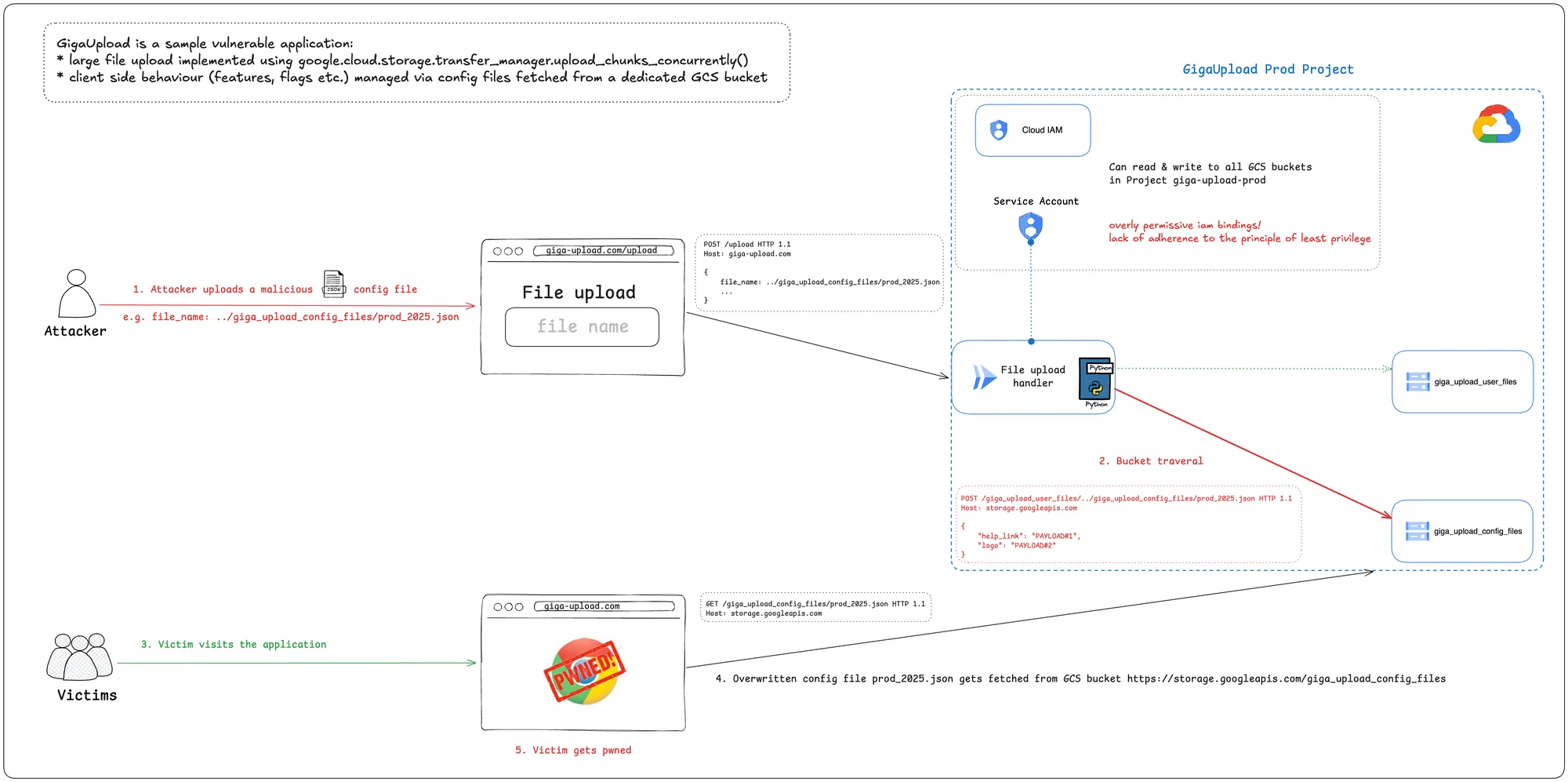
In such a design, an object written into the config bucket through the traversal could later be fetched and acted upon by clients.
Fix
The vulnerability was fixed in version 2.18.1 of the Python client, released on 6 August 2024. The fix commit is referenced in the report. No GitHub Security Advisory or CVE was published for the issue.
- Other methods in the same library that build request paths by string formatting from bucket and blob names. A positive result is a request whose path escapes the intended bucket segment when the blob name contains traversal sequences.
- The same pattern in client libraries for other languages and other cloud storage providers. A positive result is an upload or read that reaches an object outside the bucket the caller intended, subject to the workload's IAM permissions.
- Applications that pass user-controlled filenames into SDK upload helpers. A positive result is an object appearing in a bucket the application never meant to write to, or an existing object being overwritten.
- Applications that fetch configuration or other consumable content from a dedicated bucket. A positive result is attacker-influenced content being served to clients as configuration, which is the
GigaUploadscenario.
Bucket traversal appears to be an underresearched class of vulnerabilities, requiring significant context-specific knowledge for comprehensive understanding. It exists at the intersection of traditional Application Security and Cloud Security, underscoring the critical need to integrate these two domains.
What happened, in plain words
Imagine a large office building where every department has its own filing cabinet, and a clerk is only supposed to put documents into the cabinet for their own department. Now imagine the clerk is given a label that says "go up one floor, then into the finance cabinet" instead of a plain document name. If nobody checks the label, the clerk walks to the wrong cabinet and files the document there. That is the essence of the bug described in this write-up: a piece of software that was supposed to upload a file into one storage area ended up being tricked into uploading it into a different one.
The storage areas in question are called buckets. A bucket is simply a container in the cloud where files (called objects) are kept, much like a folder on your computer, except it lives on a server run by a cloud provider. Google Cloud Storage is one such service. Files inside a bucket have names, and those names are called object keys or blob names. A blob is just Google's word for a file stored in a bucket.
The software that had the bug is a client library: a bundle of ready-made code that programmers add to their own programs so they do not have to talk to Google's servers by hand. The library in question is the Python Client for Google Cloud Storage, written in the Python programming language and maintained by Google as an open source project (meaning anyone can read its code).
The bug belongs to a family called bucket traversal. The name comes from an older, similar family called path traversal, where a crafted file name containing .. (which means "go up one folder" on almost every computer system) lets someone escape the folder they were meant to stay in. Bucket traversal is the cloud storage version of the same idea: a crafted name lets a file land in a bucket the application never intended to touch.
This write-up continues from an earlier piece by the same researcher, in which an exploitable bucket traversal was found and an N-day turned up in the Go Cloud Storage client library. An N-day is a vulnerability that is already publicly known (and usually already fixed) but still exists in software that has not been updated. Intrigued by that finding, the researcher decided to look through other Cloud Storage client libraries, focusing only on variations of the same kind of issue.
Bucket traversal, explained from zero
Before going further, it helps to be precise about what a bucket traversal actually is. The write-up quotes a definition generated by Gemini 2.5:
A Bucket Traversal Vulnerability is a class of security weaknesses where an application improperly handles user-supplied input when interacting with cloud storage services (like AWS S3, Google Cloud Storage, Azure Blob Storage, etc.). This flaw allows an attacker to manipulate the input (typically filenames, paths, or object keys) to access or sometimes modify objects within a storage bucket that they are not intended to have access to.
In everyday terms: a program takes something a user typed (a file name, a path, a key) and passes it to a cloud storage service without checking it carefully. An attacker can craft that input so the storage service reads it as an instruction to go somewhere else, reaching files the attacker should never see or change.
The write-up notes that this definition is not wrong, but it leaves out a vital prerequisite. In the cloud, every program that runs usually does so under an identity, called a service account. A service account is a non-human identity: it is like a badge that a program wears, and the cloud provider checks that badge before letting the program do anything. The permissions attached to that badge are managed by a system called IAM (Identity and Access Management). The missing prerequisite is this: the service account attached to the targeted workload has to be granted IAM permissions to read, write or edit buckets other than the intended one. If the badge only opens one cabinet, then even a perfect traversal trick cannot reach a second cabinet. The bug and the permissions have to line up for real damage to happen.
For the purpose of the write-up, bucket traversal issues are split into two subsets:
- Application level: faulty business logic, lack of input validation and so on. In plain words, the programmer's own code makes a mistake, for example by trusting a file name that came straight from a user.
- Library level: security bugs in opinionated SDKs often maintained by cloud service providers. An SDK (software development kit) is the same idea as a client library: a package of code provided by the vendor to make its services easier to use. "Opinionated" means the library makes decisions for you, hiding the low-level details, which is convenient but means a bug inside it affects everyone who uses it.
There is little the write-up could add about preventing the first subset, which it calls AppSec 101 (the basics of application security). It therefore focuses primarily on the second class, where the implementation of the vendor-maintained library is itself vulnerable. The reasoning is simple: if the mistake is in the library, every program that uses the library inherits the mistake, whether or not its own authors did anything wrong.
The target: a library many projects depend on
The target of the case study is the Python Client for Google Cloud Storage, an open source project maintained by Google. The write-up quotes the documentation to explain what a client library is for:
Client libraries make it easier to access Google Cloud APIs from a supported language. While you can use Google Cloud APIs directly by making raw requests to the server, client libraries provide simplifications that significantly reduce the amount of code you need to write.
Unpacking that: an API (Application Programming Interface) is the set of addresses and rules a service offers so that other programs can ask it to do things. You can think of it as a restaurant menu: the menu lists what you can order and how to order it, without you needing to walk into the kitchen. A raw request is like shouting your order through the kitchen door in exactly the right format; a client library is like a waiter who takes your order in normal language and translates it into the kitchen's format for you. The library saves programmers a lot of work, which is exactly why a bug inside it matters so much.
The write-up points out that this library is used in many foundational Python-based machine learning and AI open source projects, naming Kubeflow, Mlflow and Ray. It adds that the relatively modest number of stars on GitHub does not properly reflect its significance. Stars are GitHub's way of showing appreciation for a project; a low count can make a project look unimportant even when huge systems quietly depend on it.
The setup: which API, and how the search was done
Google Cloud Storage exposes three distinct APIs: the JSON API, the XML API and the RPC API. These are three different menus for the same restaurant, each with its own format for requests and responses.
The researcher decided to focus on the XML API because of its subjectively error-prone schema and its interoperability with Amazon Simple Storage Service. Two ideas there need explaining. A schema is the agreed structure of a request or response: which fields exist, in what order, and what they may contain. Calling it error-prone means it is easy to get details wrong, and places where details are easy to get wrong are good places to look for bugs. Interoperability means the ability of one provider's service to work with another provider's conventions; Google's XML API is designed to be compatible with Amazon S3, the equivalent storage service from Amazon, so tools written for one can often talk to the other.
After some brief source code review and grey box testing, the researcher pinpointed a spot where a traversal could occur. Source code review means reading a program's code looking for mistakes, the way an editor reads a manuscript looking for errors. Grey box testing means testing with partial knowledge of how the system works inside: not a pure outsider guessing at a black box, and not a fully informed insider either, but somewhere in between. A commit is a saved snapshot of a code repository, a numbered point in the project's history, so referring to one makes the finding reproducible.
The vulnerable function was google.cloud.storage.transfer_manager.upload_chunks_concurrently(). A function is a named block of code that does one job and can be called by name. The long dotted name is just the address of the function inside the library: google.cloud.storage is the package, transfer_manager is the module (a file of related code), and upload_chunks_concurrently is the function itself. The name says what it does: it uploads a file in several chunks at the same time (concurrently), which is how large files are sent quickly.
The timeline is short and worth laying out:
- The faulty function was introduced in version 2.11.0 on 19 September 2023.
- The issue was submitted to Google VRP on 14 July 2024. VRP stands for Vulnerability Reward Program: Google's scheme for paying people who report security bugs to it.
- The vulnerability was fixed in version 2.18.1 on 6 August 2024.
The recently disclosed report is available at https://bughunters.google.com/reports/vrp/h1K5SciPh. No GitHub Security Advisory and no CVE were published. A GitHub Security Advisory is a public notice attached to a code repository warning users about a flaw and telling them which version fixes it. A CVE (Common Vulnerabilities and Exposures) is a globally recognised identifier for a publicly known security flaw, so that everyone discussing it refers to the same thing. The write-up says the researcher was told that at least a post factum comment would eventually be added, meaning a note added after the fact.
Finding it: how a file name becomes a wrong turn
The issue stemmed from the fact that the URL path was constructed insecurely, with a lack of context-specific encoding. A URL is the address of something on the internet, the text you see in your browser's address bar. A URL path is the part of that address that points to a particular item, like the /folder/file part after the site name. Encoding means converting characters into a safe, unambiguous form before putting them into an address, so that a character which normally has a special meaning is treated as ordinary text. "Context-specific" means the encoding has to match where the value is going: the rules for safely placing text in a URL path differ from the rules for placing it in a web page.
Here is the offending code, exactly as it appears in the report:
    url = "{hostname}/{bucket}/{blob}".format(
        hostname=hostname, bucket=bucket.name, blob=blob.name
    )
Line by line, in plain words:
url = "{hostname}/{bucket}/{blob}".format(starts building the address. The string in quotes is a template: the parts in curly braces are placeholders, and the slashes between them are literal slashes that will separate the pieces of the path..format(is the instruction to fill those placeholders in.hostname=hostname, bucket=bucket.name, blob=blob.namesupplies the three values.hostnameis the server's address.bucket.nameis the name of the bucket the program means to use.blob.nameis the name of the file being uploaded.)closes the call, and the finished address is stored in the variableurl.
The crucial point is that the values are dropped into the template exactly as they are, with no encoding. If blob.name is a harmless name like report.pdf, the address comes out as expected. But if blob.name is supplied from user input, an attacker can make use of the classic dot-dot-slash technique and upload a file to a bucket unintended by the victim, for example ../bucket/object. The two dots followed by a slash mean "go up one level" in path notation, so the finished address no longer points inside the intended bucket; it points at a different one.
The method in question, google.cloud.storage.transfer_manager.upload_chunks_concurrently(), is therefore vulnerable to a variant of a path (bucket) traversal.
Exploitation, step by step
Step 1: Start from the official sample
The proof of concept was based on the official sample snippet storage_transfer_manager_upload_chunks_concurrently.py. A proof of concept (PoC) is a small, working demonstration that the bug is real, rather than a theoretical worry. Starting from the official sample is a sensible choice: it is the code Google itself publishes to show how the function is meant to be used, so a demonstration built on it reflects realistic usage rather than an artificial setup. The recording of the original PoC accompanies the write-up.
Step 2: Control the blob name
Because the URL is built by plain string formatting, the value of blob.name is placed into the path without encoding. Supplying a name that contains dot-dot-slash sequences lets the resulting request path escape the intended bucket segment and address a different bucket, for example:
../bucket/object
Reading that snippet: .. means "go up one level", the following / separates path pieces, bucket is the name of the bucket the attacker wants to reach, and object is the name of the file to create there. When this text is pasted into the address template in place of a normal file name, the address now walks out of the intended bucket and into another one.
Step 3: Upload to the unintended bucket
With the crafted name, the upload performed through upload_chunks_concurrently() lands in a bucket other than the one the application intended, provided the service account behind the workload holds the necessary IAM permissions on that other bucket. This is where the prerequisite from the beginning becomes concrete: the trick only works if the program's badge already opens the second cabinet. The bug lets the program be pointed at the wrong cabinet; the permissions decide whether the door actually opens.
Root cause
The mistake is in the library. The URL path is assembled with str.format from hostname, bucket.name and blob.name, and no context-specific encoding is applied to the blob name. A name containing traversal sequences therefore changes the meaning of the path rather than being treated as a single opaque object key. "Opaque" is the key word: a file name should be treated as one indivisible label, so that whatever characters it contains, it names one file and nothing else. Here, the characters are interpreted as directions, and the label turns into a route.
The only thing standing between this and a cross-bucket write is IAM: the service account attached to the targeted workload must be granted permissions on buckets other than the intended one, which is the prerequisite the usual definition of bucket traversal leaves out.
Impact
Depending on the IAM permissions granted to the underlying service account, this could lead to malicious scenarios such as:
- Overwriting existing files, causing data and integrity loss.
- Uploading an object that is later consumed by the application, for example a config override or XSS.
The potential impact of the first vector is self-evident: if an attacker can replace a file that other people or programs rely on, the data is no longer trustworthy, and integrity (the guarantee that data is what it claims to be) is lost. The write-up finds the second scenario far more interesting, and it deserves a careful explanation.
A config file is a small file of settings that a program reads to decide how to behave: which features are switched on, which flags are set, where to connect, and so on. If an application fetches its config from a bucket, and an attacker can write into that bucket, then the attacker effectively gets to choose the application's settings. A config override means exactly that: replacing the intended settings with the attacker's own. XSS (cross-site scripting) is a class of attack in which an attacker gets their own code, usually JavaScript, to run inside another user's browser as if it came from the trusted site; if a config value ends up rendered in a page without proper handling, it can become a route to XSS.
To convey the idea, the write-up includes a diagram of a sample vulnerable application called GigaUpload. This fictitious service meets the following criteria:
- large file upload implemented using
google.cloud.storage.transfer_manager.upload_chunks_concurrently() - client side behaviour (features, flags and so on) managed via config files fetched from a dedicated GCS bucket
The diagram shows the shape of the problem. "Client side behaviour" means what happens in the user's browser or app rather than on the server: which buttons appear, which features are enabled, and similar. Because those decisions are driven by config files pulled from a dedicated bucket, an object written into that bucket through the traversal could later be fetched and acted upon by clients. That is what makes the second scenario more than a simple overwrite: the attacker is not just damaging a file, they are feeding instructions to everyone who uses the service.
Fix
The vulnerability was fixed in version 2.18.1 of the Python client, released on 6 August 2024. The fix commit is referenced in the report. No GitHub Security Advisory or CVE was published for the issue. For anyone using the library, the practical lesson is the ordinary one: update to the fixed version, because the flaw lives in the library itself and not in the code that calls it.
Because the same pattern can appear elsewhere, the write-up lists places worth checking. Each entry describes what a positive result would look like, which is useful for anyone repeating the research:
- Other methods in the same library that build request paths by string formatting from bucket and blob names. A positive result is a request whose path escapes the intended bucket segment when the blob name contains traversal sequences.
- The same pattern in client libraries for other languages and other cloud storage providers. A positive result is an upload or read that reaches an object outside the bucket the caller intended, subject to the workload's IAM permissions.
- Applications that pass user-controlled filenames into SDK upload helpers. A positive result is an object appearing in a bucket the application never meant to write to, or an existing object being overwritten.
- Applications that fetch configuration or other consumable content from a dedicated bucket. A positive result is attacker-influenced content being served to clients as configuration, which is the
GigaUploadscenario.
Why this matters
Bucket traversal appears to be an underresearched class of vulnerabilities, requiring significant context-specific knowledge for comprehensive understanding. It exists at the intersection of traditional Application Security and Cloud Security, underscoring the critical need to integrate these two domains. In everyday terms: the people who review application code and the people who manage cloud permissions usually sit in different teams, and this kind of bug only makes sense when you look at both at once. A file name handling mistake is an application problem; whether it can reach another bucket is a cloud permissions question. Neither team sees the whole picture alone.
Glossary
- API (Application Programming Interface): the set of addresses and rules a service offers so other programs can ask it to do things, like a restaurant menu.
- AppSec (Application Security): the practice of finding and preventing security mistakes in the code of applications themselves.
- Blob: Google's word for a file stored in a bucket; also called an object.
- Bucket: a container in cloud storage that holds files, similar to a folder but hosted on a provider's servers.
- Bucket traversal: a vulnerability where crafted input, usually a file name or path, makes an application reach a storage bucket it was not meant to access.
- Client library / SDK: a package of ready-made code provided by a vendor so programmers can use its services without writing low-level requests by hand.
- Commit: a saved snapshot of a code repository at a particular point in its history.
- Config file: a file of settings that a program reads to decide how it behaves.
- Config override: replacing an application's intended settings with an attacker's own.
- Context-specific encoding: converting characters into a safe form that matches where the value will be placed, such as a URL path, so special characters are treated as ordinary text.
- CVE (Common Vulnerabilities and Exposures): a globally recognised identifier for a publicly known security flaw.
- Dot-dot-slash: the sequence
..followed by/, meaning "go up one level" in a file or URL path; the basis of classic path traversal. - Function: a named block of code that performs one job and can be called by name.
- GitHub Security Advisory: a public notice attached to a code repository warning about a flaw and naming the version that fixes it.
- Grey box testing: testing with partial knowledge of how a system works internally, between pure outsider testing and fully informed testing.
- Hostname: the part of a URL that identifies the server, such as the site name in an address.
- IAM (Identity and Access Management): the system that decides which identities may do what with which cloud resources.
- Integrity: the guarantee that data is what it claims to be and has not been altered.
- Interoperability: the ability of one provider's service to work with another provider's conventions, so tools written for one can talk to the other.
- JSON API / XML API / RPC API: three different formats Google Cloud Storage offers for the same operations, each with its own request and response structure.
- Module: a file of related code inside a library or program.
- N-day: a vulnerability that is already publicly known, and usually already fixed, but still present in software that has not been updated.
- Object / object key: a file in cloud storage and the name that identifies it within its bucket.
- Open source: software whose code is publicly available for anyone to read.
- Path traversal: a vulnerability where crafted input containing
..lets someone escape the folder they were meant to stay in. - Proof of concept (PoC): a small working demonstration that a vulnerability is real.
- Raw request: a request sent directly to a service in its exact low-level format, without a library translating for you.
- Schema: the agreed structure of a request or response, defining which fields exist and what they may contain.
- Service account: a non-human identity that a program uses, like a badge it wears, whose permissions the cloud provider checks.
- Source code review: reading a program's code looking for mistakes.
- URL: the address of something on the internet, as seen in a browser's address bar.
- URL path: the part of a URL that points to a particular item, after the server name.
- VRP (Vulnerability Reward Program): a scheme, here Google's, that pays people who report security bugs.
- Workload: the running program or service being discussed, together with the identity it runs under.
- XSS (cross-site scripting): an attack that gets an attacker's code to run inside another user's browser as if it came from the trusted site.



