reCAPTCHA bypass via HTTP Parameter Pollution
A reCAPTCHA bypass was possible when a web application built the verification request URL by concatenating the user-supplied response before the secret, allowing an attacker to inject an extra secret parameter. By supplying the documented test secret that disables verification, an attacker could make the reCAPTCHA API return success and bypass the CAPTCHA.
 Published on andresriancho.com
I reported a reCAPTCHA bypass to Google in late January. The bypass required the web application using reCAPTCHA to craft the request to /recaptcha/api/siteverify in an insecure way; but when this situation occurred the attacker was able to bypass the protection every time.
The full write-up lives on its author's site
It belongs to its author, so we link to it rather than copy it. The other two tabs are our own rewrites, checked against it.
Context
reCAPTCHA is Google's CAPTCHA service, which lets a web application add a challenge to its forms with little integration work. The service has several behaviours depending on the situation: sometimes it trusts a visitor based on existing cookies, and sometimes it presents one or more challenges. The write-up focuses on the case where the application asks Google for a challenge, Google returns an image set, and JavaScript in the page displays it to the user.
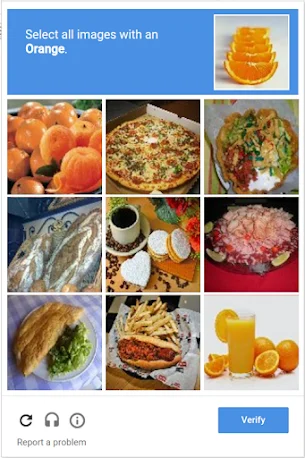
The flow has two halves. The browser sends the solved challenge to the application, and the application then calls Google's verification API to check the answer. The application authenticates to that API with its own secret key, and the API returns a JSON document saying whether the answer was correct. If the answer was correct, the application normally grants access to whatever the CAPTCHA was protecting.
Setup
The report does not describe any accounts, roles or tooling beyond the requests themselves. The precondition is a web application that integrates reCAPTCHA and builds the verification request to Google by string concatenation, in a way that is open to HTTP parameter pollution. The researcher also relied on a documented Google feature: hard-coded site and secret keys that disable reCAPTCHA verification in staging environments. Those keys are published in Google's documentation:
- Site key: [redacted]
- Secret key: 6LeIxAcTAAAAAGG-vFI1TnRWxMZNFuojJ4WifJWe
Finding it
The normal browser-to-application request after a user solves the challenge looks like this:
POST /verify-recaptcha-response HTTP/1.1
Host: vulnerable-app.com

recaptcha-response={reCAPTCHA-generated-hash}
The application then verifies that value with Google:
POST /recaptcha/api/siteverify HTTP/1.1
Content-Length: 458
Host: www.google.com
Content-Type: application/x-www-form-urlencoded

recaptcha-response={reCAPTCHA-generated-hash}&[redacted]
A successful verification returns:
HTTP/1.1 200 OK
Content-Type: application/json; charset=utf-8
Content-Length: 90

{
  "success": true,
  "challenge_ts": "2018-01-29T17:58:36Z",
  "hostname": "..."
}
The application processes that response and, in the usual case, grants the user access to the protected resource.
The first is that some applications build the verification URL by concatenating the user-supplied response and the application secret in a way that is open to HTTP parameter pollution. The second is on Google's side: the API accepted two requests that differed only in a duplicated secret parameter and returned the same response to both.
POST /recaptcha/api/siteverify HTTP/1.1
Host: www.google.com
...

recaptcha-response={reCAPTCHA-generated-hash}&[redacted]
POST /recaptcha/api/siteverify HTTP/1.1
Host: www.google.com
...

recaptcha-response={reCAPTCHA-generated-hash}&[redacted]&[redacted]
The API always used the first secret parameter and ignored the second. On its own that behaviour is not a vulnerability, but it is the piece the exploit depends on.
Exploitation
Step 1: find an application that concatenates the URL
A vulnerable integration builds the verification URL with string concatenation, as in this example:
private String sendPost(String CaptchaResponse, String Secret) throws Exception {

    String url = "https://www.google.com/recaptcha/api/siteverify"+"?response="+CaptchaResponse+"&secret="+Secret;
    URL obj = new URL(url);
    HttpsURLConnection con = (HttpsURLConnection) obj.openConnection();
Here the url variable is assembled from the user-controlled CaptchaResponse and the application's Secret. Because the response value is inserted before the secret, an attacker who can inject a parameter separator into the response can add their own secret parameter ahead of the application's one.
Step 2: send a crafted response to the application
The attacker submits a response value that contains an encoded ampersand and an encoded equals sign, followed by the documented key that disables verification:
POST /verify-recaptcha-response HTTP/1.1
Host: vulnerable-app.com

recaptcha-response=anything%26secret%3d6LeIxAcTAAAAAGG-vFI1TnRWxMZNFuojJ4WifJWe
The payload breaks down as follows:
anything: a placeholder value.%26: a URL-encoded ampersand, which starts a new parameter once the application decodes or passes the value through.secret: the name of the parameter being injected.%3d: a URL-encoded equals sign.6Le...JWe: the documented secret key that disables reCAPTCHA response verification.
Step 3: the application forwards a polluted request
When the application concatenates the attacker's value into its URL, the request it sends to Google contains two secret parameters:
POST /recaptcha/api/siteverify HTTP/1.1
Host: www.google.com
Content-Type: application/x-www-form-urlencoded
User-Agent: Python-urllib/2.7

recaptcha-response=anything&[redacted]&[redacted]
The first secret is controlled by the attacker through the parameter pollution; the second is the application's own secret. Because the API uses the first one, and that first one is the key that disables verification, the API always answers:
HTTP/1.1 200 OK
Content-Type: application/json; charset=utf-8
Content-Length: 90

{
  "success": true,
  "challenge_ts": "2018-01-29T17:58:36Z",
  "hostname": "..."
}
The application processes the success response and grants the attacker access.
Root cause
Two weaknesses have to line up. On the application side, the verification URL is built by string concatenation, so a value supplied by the user can introduce extra query parameters. On Google's side, the API resolved duplicate secret parameters by taking the first one and ignoring the rest, which let the attacker's injected secret take precedence over the application's real one.
The bypass also depends on parameter order. The application must place the response parameter before the secret, as in response=...&secret=.... If the secret comes first, the injected parameter lands after it and the API's first-value behaviour works against the attacker. The researcher notes that almost all integrations use secret=...&response=..., likely because Google's documentation and code examples used that order and others copied it.
Impact
When both conditions are met, an attacker can bypass reCAPTCHA verification every time, without solving any challenge, and reach whatever the CAPTCHA was protecting. GitHub searches showed that around 60% of reCAPTCHA integrations were vulnerable to parameter pollution, but only 5 to 10% of implementations put the response parameter before the secret. Combined, roughly 3% of sites using reCAPTCHA would have been exploitable. Google's triage reduced the severity of the report because of the parameter pollution requirement.
Fix
Google fixed the issue in the reCAPTCHA REST API rather than in individual applications. The fix is simple: if a request to /recaptcha/api/siteverify contains two parameters with the same name, the API returns an error. Applications vulnerable to the parameter pollution are therefore protected without any patch of their own.
For developers, the report's guidance is to never build query strings by string concatenation. Store keys and values in a dictionary and URL-encode the result instead.
Timeline
- 2018-Jan-29: vulnerability reported to Google.
- 2018-Jan-30: Google replies that reCAPTCHA is working exactly as designed.
- 2018-Jan-31: researcher asks Google to re-read the report.
- 2018-Jan-31: Google asks for more information.
- 2018-Feb-1: Google confirms the vulnerability.
- 2018-Feb-15: Google awards 500 USD, which the researcher donated to charity.
- 2018-Mar-25: patch released.
What happened, in plain words
A security researcher found a way to get past reCAPTCHA, the little puzzle that websites show to check that you are a human and not a robot. He reported it to Google in late January 2018, and Google paid him 500 US dollars, which he gave to charity.
The trick only worked on websites that had made a particular programming mistake when they talked to Google's reCAPTCHA service. When that mistake was present, an attacker could skip the puzzle every single time. Google fixed the problem on its own side, so the websites themselves did not need to change anything.
Below I walk through the whole story slowly, explaining each idea from scratch: what reCAPTCHA is, what an API is, what a secret key is, what "HTTP parameter pollution" means, and how the pieces were put together.
Background: what reCAPTCHA is and how it works
A CAPTCHA is a small test that is easy for a human and hard for a computer program. The most familiar version asks you to tick a box, or to pick out all the pictures that contain traffic lights. The point is to slow down automated abuse: someone writing a script to create thousands of fake accounts, or to flood a comment form with spam, has to get past the test first.
reCAPTCHA is Google's version of this service. A website owner does not have to build the puzzle themselves; they add a small piece of Google's code to their page and Google does the hard work. reCAPTCHA is quite clever and has several behaviours depending on the situation: sometimes it trusts you straight away because of cookies already in your browser, and sometimes it asks you to solve one or more challenges. The write-up focuses on one specific case: the website asks Google for a challenge, Google sends back a set of images, and JavaScript in the page shows them to you.
The picture above shows what the visitor sees: the image challenge that Google provides, displayed in the browser by JavaScript.
The two halves of the conversation
When you solve the puzzle, two separate conversations happen:
- Your browser sends your answer to the website you are using.
- The website then asks Google, privately, whether that answer was correct.
The website cannot simply believe your browser, because your browser is under your control. So it checks with Google. To prove to Google that the request really comes from the website and not from some random person, the website includes its own secret key. Google replies with a short machine-readable document saying whether the answer was right. If it was, the website normally lets you through to whatever the CAPTCHA was protecting, such as a sign-up form or a login page.
Words you will meet
- API: an API (Application Programming Interface) is a way for one computer program to talk to another. Think of it as a service counter: you hand over a request in an agreed format, and you get back an answer in an agreed format. You do not go into the kitchen; you just use the counter. Google's reCAPTCHA API is the counter where websites hand over a visitor's answer and get back a verdict.
- JSON: a simple text format for structured data, built from names and values in curly braces. It is what the API's answer is written in.
- Secret key: a long random string that acts like a password for a program. The website uses it to prove its identity to Google. It must never be shown to visitors.
- HTTP request: the message your browser (or a program) sends to a server to ask for something or to submit something. It has a first line with a method (like
POST), a path, and a version, then some headers, then optionally a body. - Header: a line of extra information attached to a request or response, such as the type of content being sent.
- Query string: the part of a URL after the
?, made ofname=valuepairs joined by&. For example,?colour=blue&size=largehas two parameters. - Parameter: one
name=valuepair inside a query string or a form body.
The normal flow, step by step
Step 1: your browser tells the website your answer
After you solve the challenge and click "Verify", your browser sends a request to the website. In the write-up it looks like this:
POST /verify-recaptcha-response HTTP/1.1
Host: vulnerable-app.com

recaptcha-response={reCAPTCHA-generated-hash}
Line by line:
POST /verify-recaptcha-response HTTP/1.1: this is a POST request (a request that carries data) to the path/verify-recaptcha-responseon the server, using version 1.1 of the HTTP protocol.Host: vulnerable-app.com: the name of the website being contacted.vulnerable-app.comis a placeholder name used in the write-up for an example site.- The blank line separates the headers from the body.
recaptcha-response={reCAPTCHA-generated-hash}: the body of the request. It contains one parameter,recaptcha-response, whose value is a long code that Google generated when it gave you the challenge. The curly braces mark it as a placeholder, not a literal value.
Why this step exists: the website needs to receive your answer before it can check it. The code in recaptcha-response is not the picture you clicked; it is a token that represents your attempt.
Step 2: the website asks Google whether the answer was right
The website now makes its own request, this time to Google:
POST /recaptcha/api/siteverify HTTP/1.1
Content-Length: 458
Host: www.google.com
Content-Type: application/x-www-form-urlencoded

recaptcha-response={reCAPTCHA-generated-hash}&[redacted]
Line by line:
POST /recaptcha/api/siteverify HTTP/1.1: a POST request to Google's verification endpoint,/recaptcha/api/siteverify. An endpoint is simply a specific address on a server that does a specific job.Content-Length: 458: tells the server how many bytes long the body is, so it knows where the body ends.Host: www.google.com: the server being contacted, Google.Content-Type: application/x-www-form-urlencoded: says the body is formatted as a list ofname=valuepairs joined by&, the same style as a query string. This is the format a plain HTML form uses when it is submitted.- The body contains two parameters:
recaptcha-response, the code from the visitor, andsecret, the website's own secret key.
Why this step exists: the website cannot trust the visitor's browser, so it asks the authority, Google, whether the code is genuine and was solved correctly. The secret parameter is how the website proves to Google that the request comes from a paying customer and not from an impostor.
Step 3: Google answers
If the visitor answered correctly, Google replies:
HTTP/1.1 200 OK
Content-Type: application/json; charset=utf-8
Content-Length: 90

{
  "success": true,
  "challenge_ts": "2018-01-29T17:58:36Z",
  "hostname": "..."
}
Line by line:
HTTP/1.1 200 OK: the status line.200is the standard code for "everything went fine".Content-Type: application/json; charset=utf-8: the body is JSON text, encoded in UTF-8 (a common way of representing characters).Content-Length: 90: the body is 90 bytes long.- The body is a JSON object with three fields:
successistrue, meaning the answer was accepted;challenge_tsis a timestamp in a standard date format;hostnameis the site the challenge belonged to, shown here as....
The website reads this reply, sees "success": true, and normally lets the visitor in. That is the whole normal flow: browser to website, website to Google, Google back to website, website back to browser.
The two ingredients of the bypass
The researcher noticed two separate things. Neither is a serious problem on its own, but together they allowed a bypass.
Ingredient one: websites that glue strings together
Many websites build the address they send to Google by gluing pieces of text together, a technique called string concatenation. Here is an example of that style of code from the write-up:
private String sendPost(String CaptchaResponse, String Secret) throws Exception {

    String url = "https://www.google.com/recaptcha/api/siteverify"+"?response="+CaptchaResponse+"&secret="+Secret;
    URL obj = new URL(url);
    HttpsURLConnection con = (HttpsURLConnection) obj.openConnection();
Line by line:
private String sendPost(String CaptchaResponse, String Secret) throws Exception {: defines a method calledsendPostthat takes two pieces of text, the visitor's captcha response and the website's secret, and may throw an error.String url = "https://www.google.com/recaptcha/api/siteverify"+"?response="+CaptchaResponse+"&secret="+Secret;: builds the full address by adding together a fixed beginning, the text?response=, the visitor's value, the text&secret=, and the website's secret. The+sign means "join these pieces of text".URL obj = new URL(url);: turns that text into a URL object the program can use.HttpsURLConnection con = (HttpsURLConnection) obj.openConnection();: opens a secure connection to that address.
The important detail is the order: the visitor's value (CaptchaResponse) is placed before the website's secret. If the visitor's value contains characters that mean something special in a query string, the visitor can change the structure of the address. That is the essence of the next concept.
What HTTP parameter pollution means
HTTP parameter pollution (often shortened to HPP) is a situation where the same parameter name appears more than once, or where a value supplied by a user is allowed to introduce extra parameters into a request. Different programs handle duplicates differently: some take the first value, some take the last, some combine them, some reject the request. When two programs in a chain disagree about which value counts, surprising things can happen.
A simple everyday comparison: imagine a form where one line says "deliver to: home address" and someone sneaks in a second line saying "deliver to: their address". If the courier reads the first line, nothing changes. If the courier reads the last line, the parcel goes to the wrong place. The risk depends entirely on which line the courier trusts.
HPP appears almost everywhere, on the browser side and on the server side, and its risk depends greatly on context. In some specific cases it can lead to a huge data breach, but in most cases it is a low-risk finding. That is why Google's triage team treated this report as less severe: the bypass needed a website that was already vulnerable to HPP.
Ingredient two: Google took the first secret and ignored the rest
On Google's side, the researcher found that these two requests got the same response:
POST /recaptcha/api/siteverify HTTP/1.1
Host: www.google.com
...

recaptcha-response={reCAPTCHA-generated-hash}&[redacted]
POST /recaptcha/api/siteverify HTTP/1.1
Host: www.google.com
...

recaptcha-response={reCAPTCHA-generated-hash}&[redacted]&[redacted]
Line by line:
- Both are POST requests to the same endpoint,
/recaptcha/api/siteverify, onwww.google.com. - The
...stands for headers the write-up did not repeat. - The first body has one
secretparameter. - The second body has two
secretparameters, joined by&.
The API always used the first secret parameter and ignored the second one. On its own, that is not a vulnerability: a server is allowed to decide how it handles duplicates. But it is the piece the exploit depends on, because it means whoever controls the first secret controls which key Google checks.
The third piece: a documented key that switches verification off
Web developers need to test their applications automatically, without solving a puzzle by hand every time. To make that possible, Google documented a pair of hard-coded keys that turn reCAPTCHA verification off in staging environments. Staging means a test copy of a website, used before changes go live. The keys are published openly in Google's documentation:
- Site key: [redacted]
- Secret key: 6LeIxAcTAAAAAGG-vFI1TnRWxMZNFuojJ4WifJWe
The site key is the public half, placed in the page. The secret key is the private half, used by the server when it talks to Google. Because this secret key is published, anyone can use it, and Google's API treats it as "always say yes".
Putting it all together
Now the researcher had everything he needed:
- A website that glues the visitor's response into the verification address before its own secret.
- A Google API that reads the first
secretand ignores later ones. - A published secret key that makes the API answer "success" without any real challenge.
The crafted request to the website
The attacker sends this to the vulnerable website:
POST /verify-recaptcha-response HTTP/1.1
Host: vulnerable-app.com

recaptcha-response=anything%26secret%3d6LeIxAcTAAAAAGG-vFI1TnRWxMZNFuojJ4WifJWe
Line by line:
POST /verify-recaptcha-response HTTP/1.1: the same endpoint the browser normally uses to submit an answer.Host: vulnerable-app.com: the example vulnerable website.recaptcha-response=anything%26secret%3d6LeIxAcTAAAAAGG-vFI1TnRWxMZNFuojJ4WifJWe: the body. The value ofrecaptcha-responseis not a real answer; it is a specially built string.
The value breaks down as follows:
anything: just a placeholder, any text will do.%26: an ampersand character (&) written in URL encoding. URL encoding is a way of writing characters that would otherwise be special, so that they can travel inside a value.%26means "this is an ampersand, not a separator".secret: the name of the parameter the attacker wants to inject.%3d: an equals sign (=) in URL encoding.6Le...JWe: the published secret key that disables reCAPTCHA response verification.
Why this step exists: the attacker is betting that the website will take this text and paste it into its own address to Google without cleaning it. If the website does that, the encoded & and = become real separators again, and a new secret parameter appears in the address, ahead of the website's own secret.
The request the website ends up sending to Google
When the conditions are met, the website sends this to Google:
POST /recaptcha/api/siteverify HTTP/1.1
Host: www.google.com
Content-Type: application/x-www-form-urlencoded
User-Agent: Python-urllib/2.7

recaptcha-response=anything&[redacted]&[redacted]
Line by line:
POST /recaptcha/api/siteverify HTTP/1.1: Google's verification endpoint.Host: www.google.com: Google's server.Content-Type: application/x-www-form-urlencoded: the body is a list ofname=valuepairs.User-Agent: Python-urllib/2.7: identifies the program that made the request. Here it says the request came from a Python program using theurlliblibrary, version 2.7.- The body now has three parameters:
recaptcha-response=anything, then[redacted] (the attacker's injected key), then[redacted] (the website's real secret).
The first secret is controlled by the attacker through the parameter pollution; the second is the website's own. Because the API uses the first one, and the first one is the key that disables verification, the API always answers:
HTTP/1.1 200 OK
Content-Type: application/json; charset=utf-8
Content-Length: 90

{
  "success": true,
  "challenge_ts": "2018-01-29T17:58:36Z",
  "hostname": "..."
}
Line by line, this is the same success reply as in the normal flow: status 200, a JSON body, success set to true, a timestamp, and a hostname. The website reads it, believes the visitor solved the challenge, and grants access. The attacker never solved anything.
Why it worked: the root cause
Two weaknesses had to line up:
- On the website side, the verification address was built by string concatenation, so a value supplied by the visitor could introduce extra query parameters.
- On Google's side, the API resolved duplicate
secretparameters by taking the first one and ignoring the rest, which let the attacker's injected secret take precedence over the website's real one.
The bypass also depended on parameter order. The website had to place the response parameter before the secret, as in response=...&secret=.... If the secret comes first, the injected parameter lands after it, and the API's first-value behaviour works against the attacker instead of for him.
The researcher noted that almost all integrations use secret=...&response=..., likely because Google's documentation and code examples used that order and others copied it. Google got lucky there: if the documented order had been the other way round, the vulnerability would have affected even more sites.
How many sites were affected
The researcher used GitHub searches to gauge how common each coding pattern is. GitHub is a website where programmers publish and share code, so searching it gives a rough picture of how common a coding pattern is.
- Around 60% of reCAPTCHA integrations were vulnerable to parameter pollution.
- Only 5 to 10% of implementations put the response parameter before the secret.
- Combined, roughly 3% of sites using reCAPTCHA would have been exploitable.
That is not bad, given that reCAPTCHA is used everywhere, but it is small compared with other vulnerabilities. Google's triage team reduced the severity of the report because of the parameter pollution requirement.
The fix
Google fixed the issue in the reCAPTCHA REST API rather than in individual websites. REST is simply a style of API built around ordinary web requests. The fix is simple: if a request to /recaptcha/api/siteverify contains two parameters with the same name, the API returns an error. Websites that are vulnerable to the parameter pollution are therefore protected without any patch of their own.
For developers, the report's guidance is to never build query strings by string concatenation. Store keys and values in a dictionary and URL-encode the result instead. A dictionary here means a structure that holds named values, so the program can encode each name and value properly rather than gluing raw text together.
Things worth testing on other systems
Timeline
- 2018-Jan-29: vulnerability reported to Google.
- 2018-Jan-30: Google replies that reCAPTCHA is working exactly as designed.
- 2018-Jan-31: the researcher asks Google to re-read the report.
- 2018-Jan-31: Google asks for more information.
- 2018-Feb-1: Google confirms the vulnerability.
- 2018-Feb-15: Google awards 500 USD, which the researcher donated to charity.
- 2018-Mar-25: patch released.
Glossary
- API: a way for one program to talk to another, with agreed requests and replies, like a service counter.
- CAPTCHA: a small test that is easy for a human and hard for a program, used to slow down automated abuse.
- reCAPTCHA: Google's CAPTCHA service, which a website can add with little integration work.
- Endpoint: a specific address on a server that performs a specific job, such as
/recaptcha/api/siteverify. - HTTP request: the message a browser or program sends to a server, made of a method, a path, headers and an optional body.
- Header: a line of extra information attached to a request or response, such as
Content-Type. - POST: an HTTP method used when sending data to a server.
- Query string: the part of a URL after
?, made ofname=valuepairs joined by&. - Parameter: one
name=valuepair in a query string or form body. - URL encoding: a way of writing characters that would otherwise be special, such as
%26for&and%3dfor=. - Secret key: a long random string a program uses to prove its identity to a service; it must stay private.
- Site key: the public half of a reCAPTCHA key pair, placed in the page.
- String concatenation: building a piece of text by gluing smaller pieces together with
+. - HTTP parameter pollution (HPP): a situation where a parameter name appears more than once, or where user input can introduce extra parameters, and different programs disagree about which value counts.
- Triage: the first review a security team does on a report to decide whether it is valid and how severe it is.
- Severity: how serious a security issue is judged to be.
- Staging environment: a test copy of a website used before changes go live.
- REST API: a style of API built around ordinary web requests.
- Proxy: a tool that sits between your browser and a server and lets you read and edit the traffic.
- GitHub: a website where programmers publish and share code.
- User-Agent: a header that identifies the program making a request.
- Content-Type: a header that says what format the body is in.
- Content-Length: a header that says how many bytes long the body is.
- Status code: the number at the start of a response, such as
200for success. - UTF-8: a common way of representing characters in bytes.




