Res-block: Extension Resources Block Attack on Chrome’s Incognito Mode
Chrome extensions' web-accessible resources are blocked in incognito mode, so a website can detect whether a visitor is using incognito by trying to load a known extension resource and checking for an error. The attack works with pre-installed extensions, making it reliable for any Chrome user.
 Published on medium.com
This attack can be used to detect if victim is using incognito mode in latest version of Chrome (77.0.3865.90) by the time of discovery by me exactly a year ago in Sept 2019 by abusing webaccessibleresources. The research can be find over 0x48piraj/PwnHouse.
The full write-up lives on its author's site
It belongs to its author, so we link to it rather than copy it. The other two tabs are our own rewrites, checked against it.
Context
Chrome extensions can expose packaged files to ordinary web pages through the web_accessible_resources manifest key. Chrome's documentation describes it as an array of paths, relative to the package root and possibly containing wildcards, that are expected to be usable in the context of a web page. The documentation's own example is:
{ ... "web_accessible_resources": [ "images/*.png", "style/double-rainbow.css", "script/double-rainbow.js", "script/main.js", "templates/*" ], ...}
Those resources are then reachable at chrome-extension://[PACKAGE-ID]/[PATH], a URL that can be produced with the extension.getURL method. Allow-listed resources are served with appropriate CORS headers, so they are also available through mechanisms such as XHR.
The documentation notes that before manifest version 2 every resource inside an extension could be reached from any page on the web, which let a malicious site fingerprint installed extensions or exploit vulnerabilities such as XSS bugs inside them. Restricting availability to explicitly web-accessible resources was meant to reduce that attack surface and protect user privacy.
The research described here, published by Piyush Raj (@0x48piraj) and disclosed on 16 September 2020, turns that same mechanism into a way to detect whether a visitor is browsing in incognito mode. The work was done against Chrome 77.0.3865.90, the version current when the technique was discovered in September 2019, and the code lives in the 0x48piraj/PwnHouse repository.

Setup
The technique needs a Chrome installation with an extension that declares web_accessible_resources, and a page that loads the resource.
To build the payload the researcher needed two pieces of information per extension:
- The path of a web-accessible resource, read from the extension's manifest or its source.
- The extension's package ID, which can be read from
chrome://extensionsafter switching on Developer mode, where Chrome shows extensive details about each installed extension.
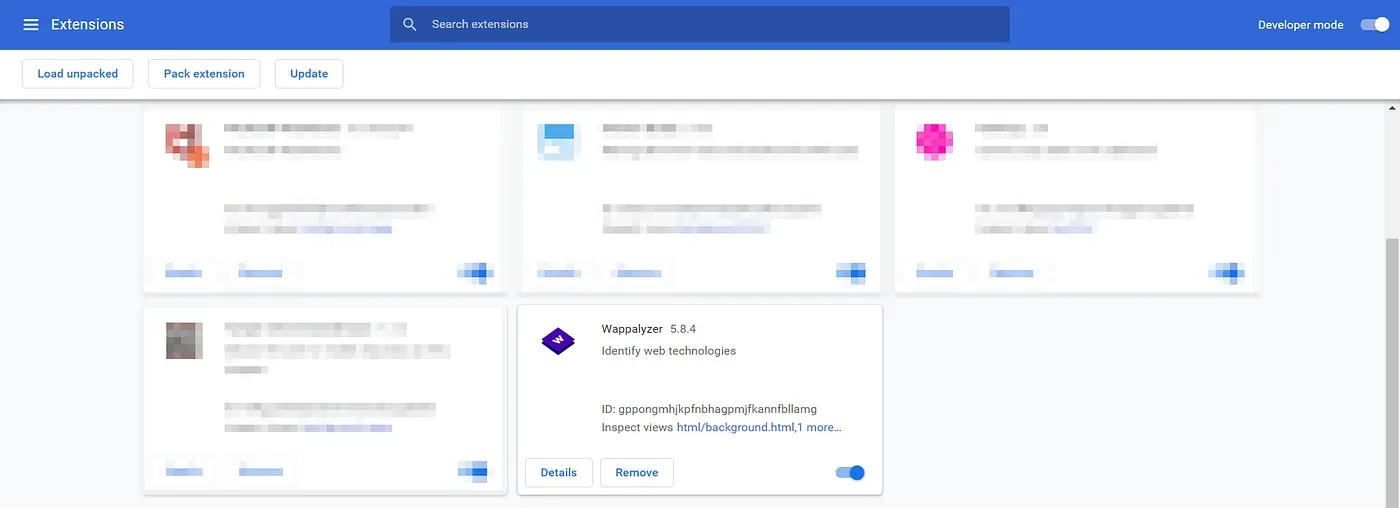
Because the package ID is constant throughout, the researcher treats it as a reliable attack vector: the same identifier works for every victim who has that extension installed.
Finding it
While studying web_accessible_resources, the researcher noticed that the chrome-extension://[PACKAGE-ID]/[PATH] URLs were not available in incognito mode. The likely reason is that Chrome blocks extensions in incognito by default, since it cannot guarantee that an extension is not tracking the user's data.
That difference is the loophole. If a page can load a known web-accessible resource from a known extension ID in a normal window, and the same load fails in an incognito window, then the success or failure of the load reveals the browsing mode. The remaining question was whether popular extensions actually ship such resources, so the next step was to scan for extensions whose manifests contain web_accessible_resources and try them one by one.
Exploitation
Step 1: pick an extension and read its manifest
The researcher chose the Wappalyzer extension because its source shows web_accessible_resources in the manifest, and because he had worked with its code base before, in research that ended with a talk at BSides Delhi 2019. The relevant part of the manifest is:
--SNIP-- ], "web_accessible_resources": [ "js/inject.js" ],--SNIP--
This gives the resource path, js/inject.js.
Step 2: obtain the package ID
Visiting chrome://extensions and switching to Developer mode exposes the extension details, including the ID. For Wappalyzer the resulting URL is:
chrome-extension://gppongmhjkpfnbhagpmjfkannfbllamg/js/inject.js
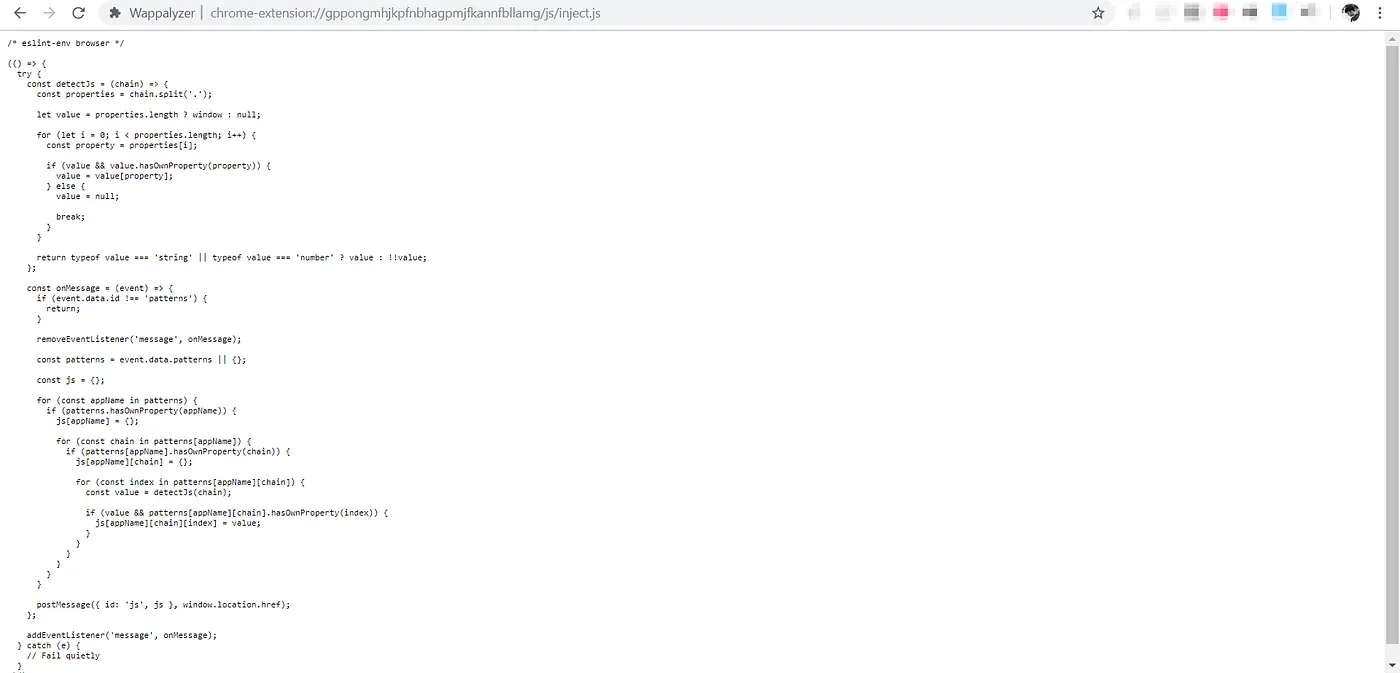
Step 3: confirm the difference between normal and incognito windows
Loading that URL in a normal window works as expected. Repeating the test in incognito mode produces an error with code ERR_BLOCKED_BY_CLIENT, reported as Failed to load resource: net::ERR_BLOCKED_BY_CLIENT.
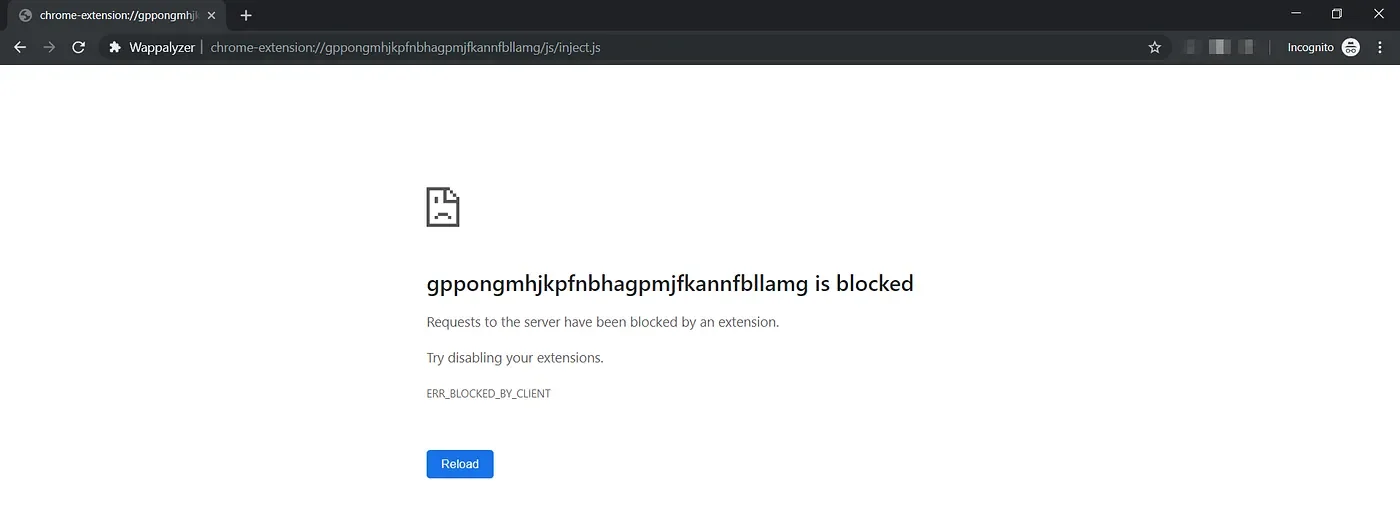
Step 4: turn the difference into a proof of concept
A <script> element with a src pointing at the target resource is enough. If it loads successfully, the visitor is not in incognito mode; if the page cannot load, the visitor is. The proof of concept for a browser with the Wappalyzer extension installed is:
<html><body><script src="chrome-extension://gppongmhjkpfnbhagpmjfkannfbllamg/js/inject.js"></script></body><html>
The same error appears again, this time programmatically.
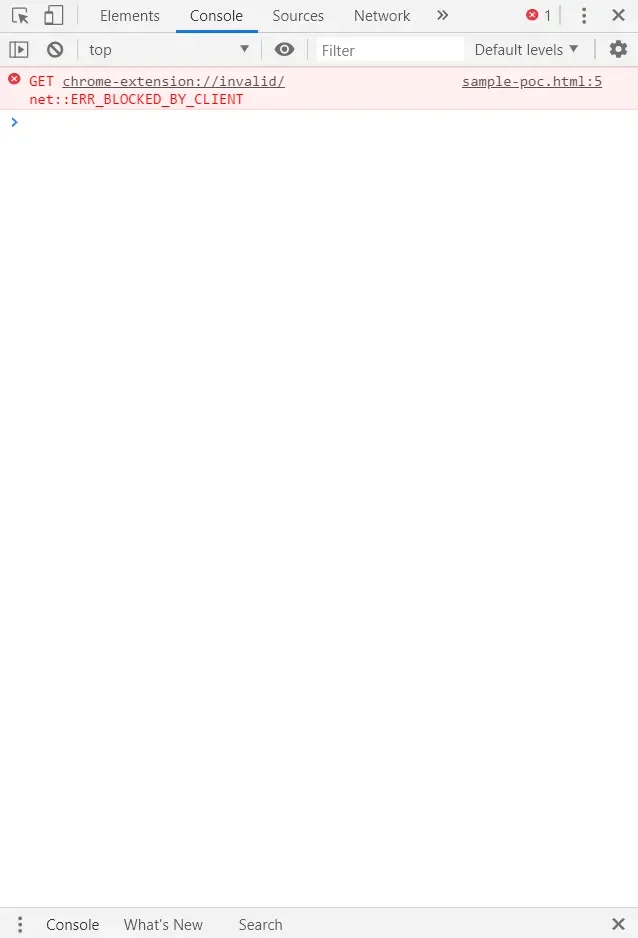
Step 5: detect the outcome
To decide whether the user is in incognito mode, the page only has to observe one of two events on the script element:
onload: the resource loaded successfully.onerror: an error occurred.
Step 6: chain with pre-installed extensions
The technique becomes far more interesting once the researcher finds web_accessible_resources in extensions that come pre-installed in every Chrome browser, which makes the bug very exploitable. A dump of the pre-installed extensions for Chrome 77.0.3865.90 is published in the repository. The extensions found to have web-accessible resources are:
- Google Docs Offline Extension (
resblock/vuln-manifests/google-docs-manifest.json) - Chrome Media Router (Chromecast) Extension (
resblock/vuln-manifests/chromecast-manifest.json)
The final proof-of-concept exploit is published as resblock/res-block-poc.html in the same repository.
Root cause
Web-accessible resources are deliberately reachable from any web page, and Chrome serves them with CORS headers so that pages can fetch them. That design is what makes fingerprinting possible in the first place. The difference is that the same resources are not available in incognito mode, where Chrome blocks extensions by default, so the load outcome differs between the two modes and leaks the mode itself. The manifest restriction described in Chrome's documentation limits which resources are exposed, but it does not stop a page from probing the exposed ones and learning from whether they load.
Impact
A page can tell whether a visitor is browsing in incognito mode, provided the visitor has an extension installed whose web-accessible resources the page knows. The researcher found web accessible resources in the pre-installed Google Docs Offline and Chrome Media Router extensions, which is why he rates the chained version as very exploitable. The detection is a single boolean per visitor; the report does not describe any further use of the result.
Fix
The report does not describe a fix or a vendor response.
Variants to test
What happened, in plain words
A security researcher named Piyush Raj (@0x48piraj) found a way for an ordinary website to tell whether the person visiting it is browsing in Chrome's incognito mode. Incognito mode is the private window in Chrome: the idea is that your browsing in that window is not kept in your history and is not shared with the normal window. The trick works by asking the browser to load a small file that belongs to a browser add-on (an extension), and watching whether the file loads or fails. In a normal window it loads; in an incognito window Chrome refuses, and that refusal is the signal.
The technique was discovered in September 2019 against Chrome version 77.0.3865.90, the version that was current at the time, and the write-up was disclosed on 16 September 2020. The code and supporting files are published in the 0x48piraj/PwnHouse repository. The researcher called the technique the res-block attack.
Before going further, a few words on the pieces involved, because the whole attack is built out of them.
A browser extension (also called an add-on) is a small program you install into your browser to add a feature: a password manager, an ad blocker, a tool that recognises which technologies a website is built with. Extensions are packaged as a bundle of files: images, style sheets, scripts, HTML templates. Each installed extension gets a unique identifier, called the package ID, which is a long string of letters. Chrome uses that ID to keep extensions apart.
A manifest is a file inside every extension that describes it to the browser: its name, its version, which websites it is allowed to touch, and so on. It is written in JSON, a simple text format for structured data (think of it as a very strict shopping list: names on the left, values on the right).
Some extensions want to show pictures, styles or scripts on the web pages you visit. To do that, the extension has to declare those files as web accessible resources: files it explicitly allows ordinary web pages to reach. This is a deliberate opening in the extension's otherwise closed bundle.
Finally, incognito mode is Chrome's private browsing window. By default Chrome does not run your extensions in incognito mode, because it cannot guarantee that an extension is not quietly recording what you do. That default is the heart of this story.
The building block: web accessible resources
Chrome's own documentation explains web_accessible_resources as an array of strings: a list of file paths inside the extension that are expected to be usable from a web page. The paths are relative to the root of the extension package and may contain wildcards (a * that stands for "anything here"). The documentation's example looks like this:
{ ... "web_accessible_resources": [ "images/*.png", "style/double-rainbow.css", "script/double-rainbow.js", "script/main.js", "templates/*" ], ...}
Line by line, in plain words:
- The outer
{ ... }is the manifest file, a JSON object. The...marks parts of the manifest that are not shown, because they are not relevant here. "web_accessible_resources"is the name of the setting. Everything inside the square brackets after it is the list of files the extension is willing to share with web pages."images/*.png"means every PNG image inside theimagesfolder. The*is the wildcard: any file name ending in.pngin that folder."style/double-rainbow.css"is one specific style sheet file, named exactly."script/double-rainbow.js"and"script/main.js"are two specific JavaScript files. JavaScript is the programming language web pages run in your browser."templates/*"means every file in thetemplatesfolder, whatever its name or type.
The documentation goes on to say that these shared files become reachable at a URL of the form chrome-extension://[PACKAGE-ID]/[PATH]. Read that as a postal address: chrome-extension:// is the kind of address (like https://), [PACKAGE-ID] is which extension you are writing to, and [PATH] is which file inside it. Chrome can also build that address for the extension itself with a method called extension.getURL.
There is one more detail that matters later: files on this allow-list are served with the right CORS headers. CORS (Cross-Origin Resource Sharing) is a set of rules by which a server tells the browser "yes, pages from other sites are allowed to read this response". Without those headers, a page from one site cannot read data from another site. With them, the file can be fetched by ordinary page code, for example through XHR (XMLHttpRequest), the older mechanism web pages use to ask the server for data in the background without reloading the page.
The documentation also explains why this list exists at all. Before manifest version 2 (manifest versions are revisions of the format Chrome uses to describe extensions), every file inside an extension could be reached from any page on the web. That let a malicious website fingerprint which extensions a visitor had installed, or even exploit bugs such as XSS inside those extensions. XSS, cross-site scripting, is a class of bug where an attacker gets their own code to run inside someone else's page. Restricting access to only the files an extension explicitly shares was meant to shrink that attack surface and protect users' privacy.
The vulnerability
While studying this mechanism, the researcher noticed something odd: the chrome-extension://[PACKAGE-ID]/[PATH] addresses were not available in incognito mode. The likely reason is the default mentioned earlier: Chrome blocks extensions in incognito because it cannot guarantee they are not tracking your data.
That difference is the loophole. Think of it like a doorbell: in a normal window the doorbell rings, in an incognito window it stays silent. If a web page can ring a doorbell that belongs to a known extension, the sound (or silence) tells it which kind of window you are in. The open question was whether real, popular extensions actually share files this way, so the plan was to scan for extensions whose manifests contain web_accessible_resources and try them one by one.
Testing the waters
The researcher picked the Wappalyzer extension as the first test subject. Wappalyzer is a tool that recognises which technologies a website is built with. Two reasons for choosing it: its source shows web_accessible_resources in the manifest, and the researcher had worked with its code base before, in earlier research that ended with a talk at BSides Delhi 2019.
The relevant part of Wappalyzer's manifest is:
--SNIP-- ], "web_accessible_resources": [ "js/inject.js" ],--SNIP--
Line by line:
--SNIP--marks text that has been cut out of the listing because it is not needed here.],closes some earlier list in the manifest that is not shown."web_accessible_resources": [opens the list of files the extension shares with web pages."js/inject.js"is the one shared file: a JavaScript file calledinject.jsinside thejsfolder.],closes the list, and the final--SNIP--marks more omitted text.
So the path we need is js/inject.js. The other half of the address is the package ID. To find it, the researcher visited chrome://extensions, a page built into Chrome that lists your installed extensions, and switched on Developer mode, a toggle that makes Chrome show extensive details about each extension, including its ID.
A note the researcher makes here matters for the whole attack: the package ID is constant throughout. It does not change from one visitor to another, so the same address works for every victim who has that extension installed. That is what makes it a reliable attack vector, meaning a dependable way in, rather than a lucky guess.
Final payload
Putting the two halves together gives the address of the shared file:
chrome-extension://gppongmhjkpfnbhagpmjfkannfbllamg/js/inject.js
Line by line:
chrome-extension://says this is a file inside a browser extension, not a normal website.gppongmhjkpfnbhagpmjfkannfbllamgis the package ID of the Wappalyzer extension, as read fromchrome://extensions./js/inject.jsis the path of the shared file, as read from the manifest.
As expected, loading that address in a normal window works. The next step is the interesting one: repeat the test in incognito mode.
It fails. Chrome reports an error with the code ERR_BLOCKED_BY_CLIENT, shown as Failed to load resource: net::ERR_BLOCKED_BY_CLIENT. In plain words, the browser is saying: something on the client side (the browser itself, not the network) blocked this request. That is exactly the difference the attack needs.
Turning it into a proof of concept
A proof of concept (often shortened to PoC) is a small, minimal demonstration that a security issue is real, not just theoretical. Here it can be tiny: a <script> element whose src points at the target file. A <script> tag is the ordinary way a web page loads JavaScript; the browser fetches whatever address is in src and runs it.
The proof of concept, for a browser with the Wappalyzer extension installed, is:
<html><body><script src="chrome-extension://gppongmhjkpfnbhagpmjfkannfbllamg/js/inject.js"></script></body><html>
Line by line:
<html>opens the page.<body>opens the visible part of the page. Nothing visible is placed here; the page is only a vehicle for the script tag.<script src="chrome-extension://gppongmhjkpfnbhagpmjfkannfbllamg/js/inject.js">tells the browser to fetch the Wappalyzer file from the extension address. Thesrcattribute is the address to load.</script>closes the script element.</body>closes the body, and the final<html>closes the page (written as an opening tag in the original, which browsers tolerate).
The logic is simple:
- If the script loads successfully, the visitor is not in incognito mode.
- If the page cannot load it, the visitor definitely is.
Running this programmatically, the same error appears again.
So the last piece is to detect that error from code. A script element fires one of two events, and the page can listen for either:
onload: the resource loaded successfully.onerror: an error occurred.
An event is simply a signal the browser sends when something happens, and page code can attach a function to it that runs when the signal arrives. Whichever of the two fires tells the page which kind of window the visitor is using.
Chaining for the win
The bug became far more interesting when the researcher found web_accessible_resources in extensions that come pre-installed in every Chrome browser. That changes the scale of the problem: the attack no longer depends on the visitor having chosen to install something. The researcher calls this very exploitable.
A dump of the pre-installed extensions on Chrome 77.0.3865.90 is published in the repository. The extensions found to have web accessible resources are:
- Google Docs Offline Extension (
resblock/vuln-manifests/google-docs-manifest.json) - Chrome Media Router (Chromecast) Extension (
resblock/vuln-manifests/chromecast-manifest.json)
Both are listed among the pre-installed extensions that have web accessible resources.
The final proof-of-concept exploit is published as resblock/res-block-poc.html in the same repository.
Pwned, as the researcher puts it: the demonstration worked.
Why it works
Two design decisions combine to cause the problem. First, web accessible resources are deliberately reachable from any web page, and Chrome serves them with CORS headers so pages can fetch them. That is what makes probing possible at all. Second, the same resources are not served in incognito mode, where extensions are blocked by default, so the outcome of the load differs between the two modes and leaks the mode itself. The manifest restriction described in Chrome's documentation limits which files are exposed, but it does not stop a page from probing the exposed ones and learning from whether they load.
A useful comparison: a shop that publishes its opening hours is not doing anything wrong, but if the lights are on during published hours and off outside them, anyone watching the window learns the time. The extension is allowed to share the file; the leak comes from the file being shared in one mode and not the other.
Impact
A page can tell whether a visitor is browsing in incognito mode, provided the visitor has an extension installed whose web accessible resources the page knows about. With the pre-installed Google Docs Offline and Chrome Media Router extensions, that condition is met on a stock Chrome installation, which is why the researcher rates the chained version as very exploitable. The detection is a single yes-or-no answer per visitor; the report does not describe any further use of the result.
Fix
The report does not describe a fix or a vendor response.
Variants to test
Glossary
- Browser extension (add-on): a small program installed into a browser to add a feature, packaged as a bundle of files with a manifest.
- Package ID: the unique identifier Chrome assigns to each installed extension, used in its
chrome-extension://address. - Manifest: the JSON file inside an extension that describes it to the browser, including which files it shares with web pages.
- JSON: a simple text format for structured data, made of names and values.
- web_accessible_resources: the manifest setting that lists files inside an extension which ordinary web pages are allowed to load.
- Wildcard: a
*character in a path that stands for any file name or any text in that position. - chrome-extension:// URL: the address scheme used to reach files inside an installed extension, of the form
chrome-extension://[PACKAGE-ID]/[PATH]. - extension.getURL: a method an extension can use to build the address of one of its own files.
- CORS (Cross-Origin Resource Sharing): rules by which a server tells the browser that pages from other sites may read its responses.
- XHR (XMLHttpRequest): the older mechanism web pages use to fetch data in the background without reloading.
- XSS (cross-site scripting): a class of bug where an attacker gets their own code to run inside someone else's page.
- Incognito mode: Chrome's private browsing window, which does not keep history and, by default, does not run extensions.
- Fingerprinting: identifying something about a visitor or their setup from signals their browser gives off.
- Attack surface: the total set of ways an attacker could try to get in.
- Proof of concept (PoC): a minimal demonstration that a security issue is real.
<script>tag: the HTML element a page uses to load and run JavaScript, with the address in itssrcattribute.- Event (
onload,onerror): a signal the browser sends when something happens, to which page code can attach a function. ERR_BLOCKED_BY_CLIENT: Chrome's error code meaning the browser itself blocked a request, rather than the network failing.- Developer mode: a toggle on Chrome's extensions page that reveals extra details about installed extensions, including their IDs.
chrome://extensions: the page built into Chrome that lists installed extensions.- Attack vector: a dependable route an attacker uses to reach a target.
- Boolean: a value that is either true or false; here, whether the visitor is in incognito mode.
- Chromium: the open-source browser project on which Chrome and several other browsers are based.




