DoS Vulnerability via Cache Poisoning on cdn.shopify.com and shopify-assets.shopifycdn.com
The cache server treated backslashes and forward slashes as equivalent, while the origin server returned 404 for paths with backslashes. An attacker could send a request with backslashes to cache a 404 response for a legitimate file, causing a denial of service for that file.
 Originally disclosed on HackerOne
- Triaged in 21 hours
- Fixed in 14 days
- Paid in 7 days
- Disclosed after 2.7 years
Summary by the program
A web cache poisoning vulnerability was discovered on Shopify's CDN domains where cache servers treated backslashes and forward slashes as equivalent while origin servers returned 404 errors for paths with backslashes. This discrepancy allowed an attacker to send requests with backslashes instead of forward slashes, causing 404 errors to be cached and served for legitimate requests, creating a Denial of Service condition that could impact multiple Shopify services. The vulnerability was fixed by implementing consistent path handling across all affected CDN domains.
The report
Summary:
There's a web cache poisoning vulnerability on cdn.shopify.com that allows the attacker to block access to any file hosted on the website. This vulnerability exists as the cache server deals with the backslash as a frontslash. However, the original server returns a 404 error when a backslash exists in the URL So, according to the caching server, these two URLs are the same https://cdn.shopify.com/static/javascripts/vendor/bugsnag.v7.4.0.min.js https://cdn.shopify.com\static\javascripts\vendor\bugsnag.v7.4.0.min.js However, the second one will return 404 from the original server
So, when an attacker sends a request with replacing the slashes with backslashes for a certain file, the server will return 404 Not Found error page, and this error will be saved into the cache and any upcoming requests to this file will return 404 Not Found error. This scenario could be exploited to cause DoS on nearly every Shopify website as all the javascript and static files used by Shopify websites are hosted on cdn.shopify.com.
Steps To Reproduce:
- Open any file hosted on cdn.shopify.com (ex: https://cdn.shopify.com/static/javascripts/vendor/bugsnag.v7.4.0.min.js) and intercept the request using Burp Suite. which will look like this:
GET /static/javascripts/vendor/bugsnag.v7.4.0.min.js HTTP/1.1
Host: cdn.shopify.com
Connection: close
Upgrade-Insecure-Requests: 1
User-Agent: Mozilla/5.0 (Windows NT 10.0; Win64; x64) AppleWebKit/537.36 (KHTML, like Gecko) Chrome/105.0.0.0 Safari/537.36
Accept: text/html,application/xhtml+xml,application/xml;q=0.9,image/avif,image/webp,image/apng,*/*;q=0.8,application/signed-exchange;v=b3;q=0.9
Accept-Encoding: gzip, deflate
Accept-Language: en-US,en;q=0.9
- In order to make this request return 404 Not Found, we will replace the slashes in the url with backslashes
- Also, before doing any testing, you have to add a cache buster query parameter to the end of the URL to prevent DoS on all users using the website. (i.e. Add ?cachebuster={random-value} to the end of the URL).
Now the new request will be:
GET /static\javascripts\vendor\bugsnag.v7.4.0.min.js?cachebuster=123 HTTP/1.1
Host: cdn.shopify.com
Connection: close
Upgrade-Insecure-Requests: 1
User-Agent: Mozilla/5.0 (Windows NT 10.0; Win64; x64) AppleWebKit/537.36 (KHTML, like Gecko) Chrome/105.0.0.0 Safari/537.36
Accept: text/html,application/xhtml+xml,application/xml;q=0.9,image/avif,image/webp,image/apng,*/*;q=0.8,application/signed-exchange;v=b3;q=0.9
Accept-Encoding: gzip, deflate
Accept-Language: en-US,en;q=0.9
- Sending this previous request will return 404 and will have the same cache key of https://cdn.shopify.com/static/javascripts/vendor/bugsnag.v7.4.0.min.js?cachebuster=123
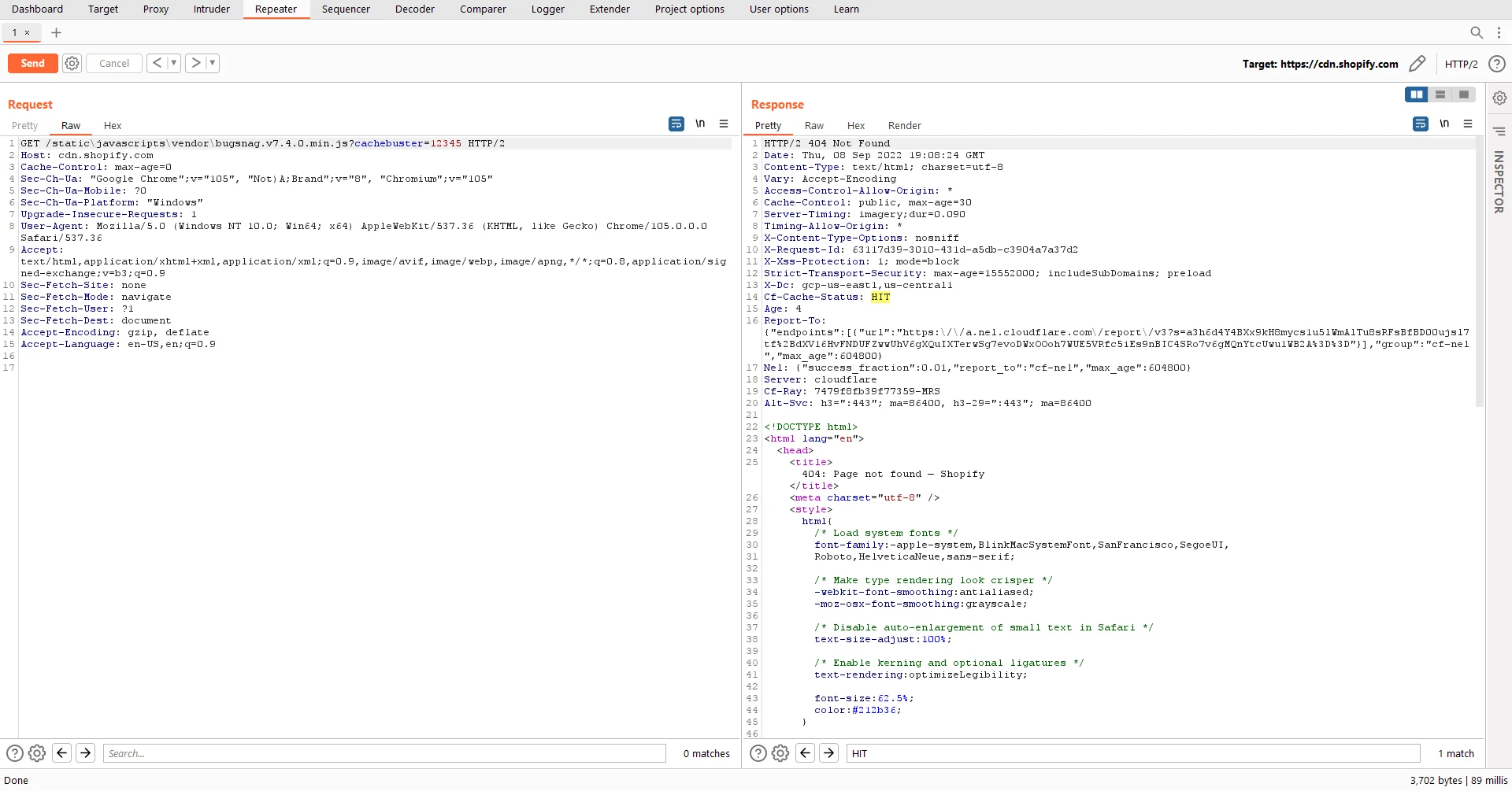
- In order to cache this response, we need to either send the malformed request multiple times in Burp repeater or use Burp intruder to keep the error page cached.
- Now, try to open https://cdn.shopify.com/static/javascripts/vendor/bugsnag.v7.4.0.min.js?cachebuster=123 in the browser and a 404 error page will be shown instead of the javascript file.
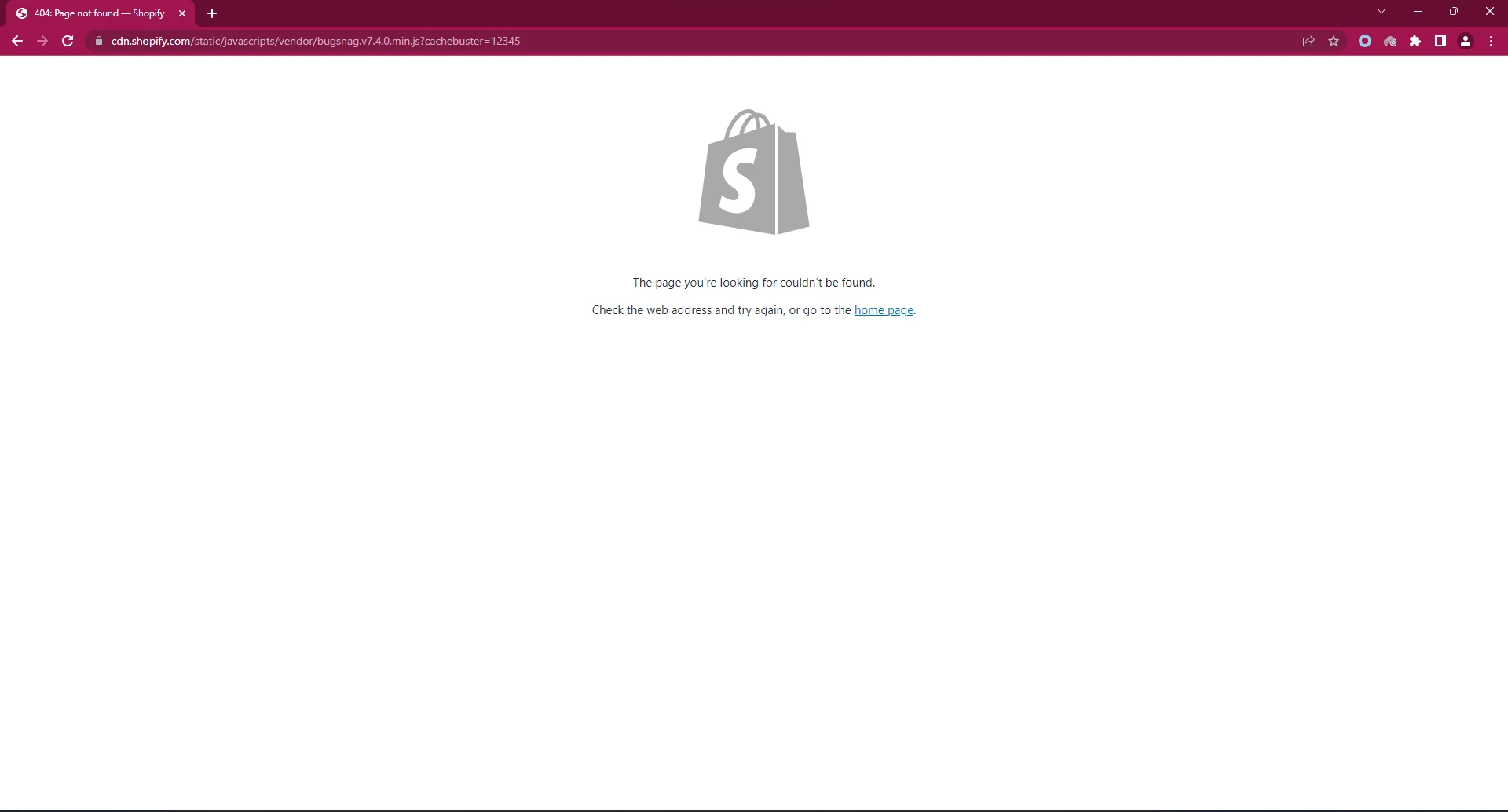
- The same vulnerability also works on shopify-assets.shopifycdn.com which is used by other Shopify websites like accounts.shopify.com
Supporting Material:
- Here's a POC video showing how to reproduce the issue:
Impact
- DoS on any file hosted on cdn.shopify.com which could lead to DoS on other services using this cdn like (*.myshopify.com, www.shopify.com, shop.app, shopify.plus, exchangemarketplace.com, linkpop.com, shopifyinbox.com)
- DoS on any file hosted on shopify-assets.shopifycdn.com which could lead to DoS on other services using this cdn like accounts.shopify.com
Context
Shopify serves the JavaScript and static assets used by its storefronts and other properties from CDN domains. The report focuses on two of them: cdn.shopify.com, which hosts files consumed by sites such as *.myshopify.com, www.shopify.com, shop.app, shopify.plus, exchangemarketplace.com, linkpop.com and shopifyinbox.com, and shopify-assets.shopifycdn.com, used by properties such as accounts.shopify.com.
A CDN normally works as a shared cache in front of an origin. The cache decides which requests map to the same stored object using a cache key, and the origin generates the actual response. The vulnerability here lives in the gap between those two components: they disagreed about what a backslash in a path means.
Setup
The researcher needed no account or special role. The only tooling mentioned is Burp Suite, used to intercept the request, and its Repeater and Intruder components to send the malformed request repeatedly. The precondition is simply that the target file is served through the caching CDN and that the origin returns an error for the backslash variant of its path.
Finding it
The observation is a parsing discrepancy. The cache server treats a backslash as equivalent to a forward slash, so it considers these two URLs to be the same object:
https://cdn.shopify.com/static/javascripts/vendor/bugsnag.v7.4.0.min.js
https://cdn.shopify.com\static\javascripts\vendor\bugsnag.v7.4.0.min.js
The origin server does not share that view. When a backslash appears in the URL, it returns a 404 Not Found error page. Because the cache keys both forms identically, the error produced for the backslash form can be stored under the key of the legitimate file. Any later request for the real file then receives the cached 404 instead of the asset.
That is what makes it a denial of service rather than a simple error: the poisoned entry is served to every subsequent visitor who asks for that file.
Exploitation
Step 1: capture a legitimate request
Open any file hosted on cdn.shopify.com, for example https://cdn.shopify.com/static/javascripts/vendor/bugsnag.v7.4.0.min.js, and intercept the request in Burp Suite. It looks like this:
GET /static/javascripts/vendor/bugsnag.v7.4.0.min.js HTTP/1.1
Host: cdn.shopify.com
Connection: close
Upgrade-Insecure-Requests: 1
User-Agent: Mozilla/5.0 (Windows NT 10.0; Win64; x64) AppleWebKit/537.36 (KHTML, like Gecko) Chrome/[redacted] Safari/537.36
Accept: text/html,application/xhtml+xml,application/xml;q=0.9,image/avif,image/webp,image/apng,*/*;q=0.8,application/signed-exchange;v=b3;q=0.9
Accept-Encoding: gzip, deflate
Accept-Language: en-US,en;q=0.9
This is an ordinary request for a static JavaScript file, with the path expressed using forward slashes.
Step 2: replace the slashes with backslashes
To make the origin return 404 Not Found, replace the forward slashes in the URL path with backslashes.
Step 3: add a cache buster first
Before doing any testing, add a cache buster query parameter to the end of the URL so that the poisoned entry does not affect real users of the site. The report suggests appending ?cachebuster={random-value}. The modified request is:
GET /static\javascripts\vendor\bugsnag.v7.4.0.min.js?cachebuster=123 HTTP/1.1
Host: cdn.shopify.com
Connection: close
Upgrade-Insecure-Requests: 1
User-Agent: Mozilla/5.0 (Windows NT 10.0; Win64; x64) AppleWebKit/537.36 (KHTML, like Gecko) Chrome/[redacted] Safari/537.36
Accept: text/html,application/xhtml+xml,application/xml;q=0.9,image/avif,image/webp,image/apng,*/*;q=0.8,application/signed-exchange;v=b3;q=0.9
Accept-Encoding: gzip, deflate
Accept-Language: en-US,en;q=0.9
The path now uses backslashes, and the cachebuster=123 parameter isolates this test from the production cache key.
Step 4: confirm the 404 and the shared cache key
Sending this request returns a 404, and the response has the same cache key as https://cdn.shopify.com/static/javascripts/vendor/bugsnag.v7.4.0.min.js?cachebuster=123. In other words, the error generated for the backslash path is stored under the key that the forward-slash path will later look up.
Step 5: keep the error cached
To cache the response, send the malformed request multiple times, either through Burp Repeater or with Burp Intruder, so that the error page stays in the cache.
Step 6: request the legitimate URL
Now open https://cdn.shopify.com/static/javascripts/vendor/bugsnag.v7.4.0.min.js?cachebuster=123 in the browser. Instead of the JavaScript file, a 404 error page is shown.
The same vulnerability also works on shopify-assets.shopifycdn.com, which is used by other Shopify websites such as accounts.shopify.com.
A proof-of-concept video demonstrates the reproduction:
Root cause
The cache server normalises backslashes to forward slashes when it computes the cache key, while the origin server treats a backslash as a distinct character and fails to resolve the path, returning 404. Because the cache key is shared but the origin behaviour is not, an attacker can cause an error response to be stored under the key of a valid asset. The report does not describe any cache configuration or validation that would have prevented this; the mismatch between the two layers is the whole mechanism.
Impact
An attacker can block access to any file hosted on cdn.shopify.com, which the report says could lead to DoS on other services using that CDN, including *.myshopify.com, www.shopify.com, shop.app, shopify.plus, exchangemarketplace.com, linkpop.com and shopifyinbox.com. The same applies to any file hosted on shopify-assets.shopifycdn.com, potentially affecting services such as accounts.shopify.com. The condition is that the asset is served through the affected caching layer and that the poisoned entry remains cached; the report frames the impact as denial of service on the hosted files and the services that depend on them.
Fix
According to the program's summary, the vulnerability was fixed by implementing consistent path handling across all affected CDN domains, so that the cache and origin agree on how backslashes in a path are treated.
Variants to test
- Try other path normalisation differences between cache and origin, such as encoded slashes, dot segments or duplicate slashes, and check whether the cache key collapses two paths that the origin resolves differently. A positive result is a cached error or unexpected response served for the clean URL.
- Test the same backslash substitution on other CDN hostnames that front the same origin, including asset domains used by authentication or account pages. A positive result is a 404 cached under the key of a valid file.
- Check whether the cache buster parameter itself is part of the cache key as expected; if it is stripped or ignored, the test request may poison the production entry directly.
Hunting notes
This kind of bug hides wherever a CDN cache and an origin are maintained by different teams or configured separately, especially on static asset domains that many products share. During recon, look for hosts that serve versioned static files and respond differently to malformed paths than to clean ones. The signal is a 404 for a backslash variant of a path that returns 200 when written normally, combined with evidence that the cache stores the error under the clean key. The researcher showed the poisoned entry served to a normal browser request and named the downstream services that rely on the affected CDN.
What happened, in plain words
Shopify is a large platform that lets people build online shops. When you visit a Shopify shop, your browser loads lots of extra files from Shopify's servers: pictures, styling files and JavaScript files. JavaScript is the code that makes a page interactive, for example a shopping cart that updates without reloading. These files are not stored on every individual shop's server. They are stored on a handful of shared servers called a CDN, short for Content Delivery Network. A CDN is a network of servers whose job is to hand out the same files to many people quickly, and to keep a copy of each file so it does not have to be fetched from the original server every time.
The original server that holds the real files is called the origin. The CDN sits in front of it, like a shop counter in front of a warehouse. When someone asks the counter for an item, the counter either hands over a copy it already has or fetches one from the warehouse and keeps a copy for the next customer.
This report is about a disagreement between the counter and the warehouse. The CDN treated the backslash character \ and the forward slash character / as the same thing when deciding which file a request was for. The origin did not: when it saw a backslash in the address, it said "I do not know this file" and returned an error page, the familiar 404 Not Found. Because the CDN thought both spellings meant the same file, it stored that error page under the address of the real file. From then on, anyone asking for the real file got the error page instead. That is a denial of service: the file is still there, but nobody can reach it.
The researcher who found this is credited as bassem_sadaqah, the report was made through the HackerOne platform, and Shopify paid a bounty of 3,800 USD. The issue was rated medium severity with a CVSS score of 4.9. It was disclosed on 4 June 2025.
The two servers and why they matter
To follow the report you only need one idea: a request for a web page or file is just a short line of text sent to a server, and the server answers with another block of text. The first line of the request contains the address of what you want, for example /static/javascripts/vendor/bugsnag.v7.4.0.min.js. Everything after the host name is called the path. Slashes in the path separate folder names, the same way slashes separate folders on your own computer.
A cache is a storage area for copies. When the CDN receives a request, it needs a way to look up whether it already has a copy. The label it uses for that lookup is called the cache key. Think of a cloakroom: you hand in your coat and get a ticket with a number, and later the number gets your coat back. The cache key is that ticket number. If two different requests produce the same ticket number, the cache will hand back whatever it stored under it, even if the two requests were not really for the same thing.
That is the heart of this bug. The CDN computed the ticket number after turning backslashes into forward slashes, so the two addresses below got the same ticket:
https://cdn.shopify.com/static/javascripts/vendor/bugsnag.v7.4.0.min.js
https://cdn.shopify.com\static\javascripts\vendor\bugsnag.v7.4.0.min.js
The first line is the normal address of a real JavaScript file. The second line is the same address with every forward slash replaced by a backslash. To the CDN these were one and the same file. To the origin they were not: the origin only understood the first, and answered the second with a 404 error page. So the CDN could be tricked into filing an error page under the ticket number of a perfectly good file.
This class of bug is called cache poisoning. Poisoning here does not mean damaging anything physically; it means putting the wrong content into the cache so that later visitors receive it. The report also calls it a denial of service, often shortened to DoS, which means making a service unavailable to the people who need it.
What you need to try it
The researcher needed no account and no special permission on Shopify. The only tool mentioned is Burp Suite, a program that sits between your browser and a website so you can look at and change requests before they are sent. Two parts of it are used: Repeater, which lets you send the same request again and again with small edits, and Intruder, which sends a request many times automatically.
The only precondition is that the file you pick is actually served through the caching CDN, and that the origin returns an error when the path contains a backslash.
Step by step
Step 1: capture a normal request
Open any file hosted on cdn.shopify.com, for example the JavaScript file in the address below, and set Burp Suite to intercept the request. Intercepting means pausing the request on its way out so you can read and edit it. The captured request looks like this:
GET /static/javascripts/vendor/bugsnag.v7.4.0.min.js HTTP/1.1
Host: cdn.shopify.com
Connection: close
Upgrade-Insecure-Requests: 1
User-Agent: Mozilla/5.0 (Windows NT 10.0; Win64; x64) AppleWebKit/537.36 (KHTML, like Gecko) Chrome/[redacted] Safari/537.36
Accept: text/html,application/xhtml+xml,application/xml;q=0.9,image/avif,image/webp,image/apng,*/*;q=0.8,application/signed-exchange;v=b3;q=0.9
Accept-Encoding: gzip, deflate
Accept-Language: en-US,en;q=0.9
Line by line:
GET /static/javascripts/vendor/bugsnag.v7.4.0.min.js HTTP/1.1is the request line.GETmeans "give me this file". The middle part is the path, written with forward slashes.HTTP/1.1is the version of the language the browser and server use to talk.Host: cdn.shopify.comsays which website on the server you are asking. One server can host many sites, so this line tells it which one you mean.Connection: closeasks the server to close the connection after answering, rather than keeping it open for more requests.Upgrade-Insecure-Requests: 1is a browser hint saying it would prefer the secure, encrypted version of the site if one exists.User-Agent: ...identifies the browser and operating system. Here it presents itself as Chrome on Windows. Servers sometimes send different content depending on this line.Accept: ...lists the kinds of content the browser is willing to receive, with quality preferences attached.Accept-Encoding: gzip, deflatesays the browser can accept compressed responses, which saves bandwidth.Accept-Language: en-US,en;q=0.9says the browser prefers English.- The empty line at the end marks the boundary between the request's headers and its body. A
GETrequest has no body, so the request ends there.
This is a completely ordinary request for a static file, with the path written the normal way.
Step 2: swap the slashes
To make the origin return 404 Not Found, replace the forward slashes in the path with backslashes. The reason is simple: the origin does not recognise a path written that way, so it cannot find the file and reports that it is missing. That error is exactly what the attacker wants to plant in the cache.
Step 3: add a cache buster before you test
This step is about being careful. If you poison the cache entry for the real file, every real visitor to the site gets the error page, which is the very harm you are trying to demonstrate. To avoid that, add an extra parameter to the end of the address so that your test uses a different cache key from the real file. The report suggests appending ?cachebuster={random-value}. A query parameter is the part of an address after a question mark; it is a small piece of extra information sent along with the request. The modified request is:
GET /static\javascripts\vendor\bugsnag.v7.4.0.min.js?cachebuster=123 HTTP/1.1
Host: cdn.shopify.com
Connection: close
Upgrade-Insecure-Requests: 1
User-Agent: Mozilla/5.0 (Windows NT 10.0; Win64; x64) AppleWebKit/537.36 (KHTML, like Gecko) Chrome/[redacted] Safari/537.36
Accept: text/html,application/xhtml+xml,application/xml;q=0.9,image/avif,image/webp,image/apng,*/*;q=0.8,application/signed-exchange;v=b3;q=0.9
Accept-Encoding: gzip, deflate
Accept-Language: en-US,en;q=0.9
What changed:
- The path now uses backslashes:
/static\javascripts\vendor\bugsnag.v7.4.0.min.js. This is the part that makes the origin answer with an error. - The address now ends with
?cachebuster=123. This makes the cache key different from the one used for the real file, so the test stays isolated from what real users see. The value123is just a placeholder; the report describes it as a random value.
Everything else in the request is unchanged.
Step 4: confirm the error and the shared cache key
Send the modified request. It returns a 404, and the response has the same cache key as https://cdn.shopify.com/static/javascripts/vendor/bugsnag.v7.4.0.min.js?cachebuster=123. In plain terms: the error page produced for the backslash address is filed under the ticket number that the normal address will later look up. The cache has been poisoned, but only for the test address, thanks to the cache buster.
The screenshot follows the step where the malformed request returns a 404 with the same cache key as the clean address.
Step 5: keep the error in the cache
A cache does not keep everything forever. Entries can expire or be replaced. To make the poisoned entry stick, send the malformed request several times, either by repeating it in Burp Repeater or by letting Burp Intruder send it automatically. Each repeat refreshes the stored error, so it stays in place long enough to observe the effect.
Step 6: ask for the real file
Now open https://cdn.shopify.com/static/javascripts/vendor/bugsnag.v7.4.0.min.js?cachebuster=123 in the browser. Instead of the JavaScript file, you get a 404 error page. The browser asked for the correct file, but the cache answered with the error that had been stored under the same key.
The screenshot follows the step where the browser shows a 404 error page instead of the JavaScript file.
The same vulnerability also works on shopify-assets.shopifycdn.com, a second CDN domain used by other Shopify websites such as accounts.shopify.com.
A proof-of-concept video shows the whole reproduction:
Why it works
The cache server normalises backslashes to forward slashes when it works out the cache key. Normalising means tidying up an address into a standard form before comparing it. The origin server does not do that: it treats a backslash as a different character, cannot resolve the path, and returns 404. Because the cache key is shared but the origin's behaviour is not, an attacker can get an error response stored under the key of a valid file. The report does not describe any cache setting or check that would have prevented this; the mismatch between the two layers is the entire mechanism.
What an attacker could do with it
An attacker can block access to any file hosted on cdn.shopify.com. The report says this could lead to denial of service on other services that use that CDN, including *.myshopify.com, www.shopify.com, shop.app, shopify.plus, exchangemarketplace.com, linkpop.com and shopifyinbox.com. The same applies to any file hosted on shopify-assets.shopifycdn.com, potentially affecting services such as accounts.shopify.com. The condition is that the file is served through the affected caching layer and that the poisoned entry stays cached. The report frames the impact as denial of service on the hosted files and on the services that depend on them.
How it was fixed
According to the program's summary, the vulnerability was fixed by making path handling consistent across all affected CDN domains, so that the cache and the origin agree on how a backslash in a path is treated.
Other things worth testing
- Try other ways the cache and origin might tidy up addresses differently, such as encoded slashes, dot segments or doubled slashes, and check whether the cache treats two addresses as one while the origin treats them as different. A positive result is a cached error or unexpected response served for the clean address.
- Try the same backslash swap on other CDN hostnames that sit in front of the same origin, including asset domains used by login or account pages. A positive result is a 404 cached under the key of a valid file.
- Check whether the cache buster parameter really is part of the cache key. If it is stripped or ignored, your test request may poison the production entry directly, which is exactly what the cache buster was meant to prevent.
Where to look for this kind of bug
This kind of bug hides wherever a CDN cache and an origin are run by different teams or configured separately, especially on static asset domains shared by many products. During reconnaissance, meaning the early stage of looking around a target, look for hosts that serve versioned static files and that answer malformed paths differently from clean ones. The signal is a 404 for a backslash version of a path that returns 200 when written normally, together with evidence that the cache stores the error under the clean key. The researcher showed impact by getting the poisoned entry served to a normal browser request and by naming the downstream services that rely on the affected CDN, which is what turned a parsing quirk into an accepted denial-of-service report.
Glossary
- CDN (Content Delivery Network): a group of servers that store copies of files and hand them out quickly to many visitors, instead of every request going to the original server.
- Origin server: the server that holds the real, authoritative copy of a file and generates the actual response.
- Cache: a storage area for copies of responses, so the same thing does not have to be produced again for every visitor.
- Cache key: the label a cache uses to decide which stored copy belongs to a request; two requests with the same key get the same stored response.
- Cache poisoning: putting the wrong content into a cache so that later visitors receive it.
- Cache buster: an extra query parameter added to an address so that the request gets its own separate cache key and does not affect real users.
- Query parameter: the part of an address after a question mark, carrying small pieces of extra information.
- Path: the part of an address after the host name that points to a file or folder, with slashes separating the parts.
- Forward slash / backslash: the
/character used in web addresses, and the\character, which the origin here treats as a different character. - Normalisation: tidying an address into a standard form before comparing or storing it.
- 404 Not Found: the standard response a server gives when it cannot find the requested file.
- 200: the standard response meaning the request succeeded and the content follows.
- Denial of service (DoS): making a service unavailable to the people who need it.
- HTTP: the language browsers and servers use to exchange requests and responses.
- Request line: the first line of an HTTP request, containing the method, the path and the HTTP version.
- Method (GET): the word at the start of a request saying what you want to do;
GETmeans "give me this". - Header: a line in a request or response carrying extra information, such as the host name or the browser type.
- Host header: the header that says which website on a server the request is for.
- User-Agent: the header identifying the browser and operating system making the request.
- Accept / Accept-Encoding / Accept-Language: headers listing which content types, compression formats and languages the browser can handle.
- Burp Suite: a tool that sits between your browser and a website so you can inspect and modify requests.
- Burp Repeater: the part of Burp Suite that resends a request you can edit each time.
- Burp Intruder: the part of Burp Suite that sends a request many times automatically.
- Intercept: pausing a request on its way out so you can read and change it.
- Reconnaissance: the early stage of exploring a target to find things worth testing.
- CVSS: a standard scoring system for rating the severity of a security issue.
- Bounty: a payment a company makes to someone who reports a valid security issue.
- Disclosure: the point at which a reported issue is made public.


