Weaponizing NotebookLM: How a Harmless Intent Can Silently Brick Your System Storage
NotebookLM's share handler blindly copies content from a content:// URI into its private cache without checking size or available space. A zero-permission app can send an endless stream, filling internal storage until the device is unusable.
 Published on medium.com
Security
The full write-up lives on its author's site
It belongs to its author, so we link to it rather than copy it. The other two tabs are our own rewrites, checked against it.
Context
Google NotebookLM is a note-taking and research assistant. On Android it ships as the package com.google.android.apps.labs.language.tailwind, and like most apps that accept shared content it exposes an exported activity that handles incoming ACTION_SEND intents. That activity is com.google.android.apps.labs.language.tailwind.share.ShareIntentHandlerActivity, and its job is to receive text, PDF or audio shared from other apps, cache the incoming content locally, and then process it.
The write-up describes an improper input validation flaw in that handler: when NotebookLM receives a content stream through a content:// URI, it copies the stream into its own private cache directory without checking how large it is or how much space is left. The author frames this as uncontrolled resource consumption leading to a permanent denial of service through device storage exhaustion.

The image introduces the report: exploiting an improper input validation vulnerability to cause permanent denial of service through device storage exhaustion.
Setup
The report does not describe a test device, Android version, NotebookLM build number or specific tooling. The preconditions it does state are:
- NotebookLM installed on the victim's Android device.
- A second, attacker-controlled app installed on the same device. The report stresses that this app requests zero permissions and needs no sensitive privileges such as
WRITE_EXTERNAL_STORAGE; it operates entirely within the Android sandbox. - The attacker app implements a
ContentProviderthat can serve a stream to another app.
The vulnerable component is identified as:
com.google.android.apps.labs.language.tailwind.share.ShareIntentHandlerActivity
Finding it
The researcher's starting point is the exported ACTION_SEND handler. Because the activity is exported and accepts shared content, any app on the device can send it an intent. The handler then takes the content:// URI from that intent, opens an input stream and copies it into the app's private cache directory so the content can be processed.
The problem is that this copy is blind. According to the report, the handler:
- does not check
OpenableColumns.SIZEbefore copying; - does not enforce a maximum file size quota;
- does not monitor available disk space while writing.
That combination means the size of the write is controlled entirely by whoever supplies the stream. A stream that never ends, or one that is simply enormous (the report gives 100GB as an example), is copied in full into internal storage.
The author also addresses the initial triage response, which classified the issue as requiring a malicious application and therefore as a functional side-effect. The counter-arguments given are that no permissions are needed, that the write crosses an app boundary into another app's private /data/data/ directory (something a normal app cannot do directly), and that the resulting damage is irreversible for an ordinary user.
Exploitation
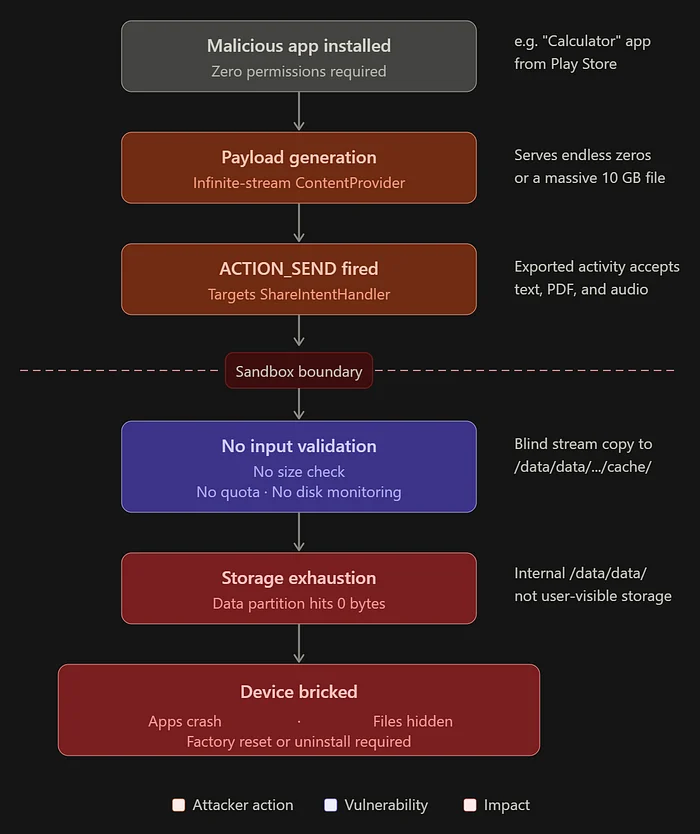
Step 1: Infection
The victim installs a seemingly harmless app, for example a calculator or wallpaper app, from the Play Store. The app requests zero permissions.
Step 2: Payload generation
In the background, the attacker app creates a ContentProvider that serves a dummy stream of infinite zeros, or a massive file such as 10GB.
Step 3: Trigger
The attacker app fires an ACTION_SEND intent targeting the NotebookLM handler:
com.google.android.apps.labs.language.tailwind.share.ShareIntentHandlerActivity
The intent carries a content:// URI pointing at the attacker's provider. Because the activity is exported, no permission or user interaction is needed to reach it.
Step 4: Silent exhaustion
NotebookLM's handler wakes up, binds to the attacker's provider and starts copying the stream into its private cache:
/data/data/com.google.android.apps.labs.language.tailwind/cache/
Nothing is shown to the user while this happens.
Step 5: The brick
The process repeats, or the single stream continues, until the data partition has 0 bytes free.
Aftermath
- Other apps crash because they cannot write to their own SQLite databases or caches.
- The user opens the file manager and sees nothing large: the data, described in the report as 50GB of garbage, sits inside NotebookLM's private directory, which is accessible only with root.
- The user is forced to uninstall NotebookLM, losing legitimate notes, or to factory reset the device.
The image illustrates the real-world attack scenario, with the victim as a user who installed NotebookLM for work or study notes.
Root cause
The handler implements ACTION_SEND without what the report calls safe resource controls. It accepts the incoming stream and performs a blind input stream copy into its private cache directory. The three missing checks are the size reported through OpenableColumns.SIZE, a hard maximum file size, and monitoring of free disk space during the write.
The design reason this matters is the direction of the trust: a normal app cannot write into another app's private /data/data/ directory, but NotebookLM volunteers to do so on the attacker's behalf, using its own storage privileges. The Android sandbox is not broken; it is used as intended by an app that fails to validate what it is asked to store. The initial triage response classified the issue as requiring a malicious application and therefore as a functional side-effect.
Impact
An attacker who can get a zero-permission app onto the victim's device can fill the internal data partition through NotebookLM. The consequences described are:
- system instability, with other apps crashing because they cannot write to their databases or caches;
- storage exhaustion that the user cannot resolve by deleting visible files, because the data is hidden in NotebookLM's private directory;
- loss of the user's legitimate NotebookLM notes through uninstall, or a full factory reset.
The report's own framing is that this is a permanent denial of service for the average user. It does not state a severity rating, CVSS score or bounty amount, and it does not describe how Google ultimately classified or remediated the report.
Fix
The report sets out the validation it says developers must add for content providers:
- Pre-flight check: query
OpenableColumns.SIZEof the incoming URI before starting the copy. - Enforce hard limits: reject shared files larger than a specific limit suited to the app's use case, for example 200MB.
- Stream monitoring: during the byte-copy loop, count the bytes written, and if the count exceeds the threshold, abort the operation and delete the partial file.
The secure implementation example given is:
long bytesCopied = 0;while ((len = in.read(buffer)) > 0) { bytesCopied += len; if (bytesCopied > MAX_LIMIT) { throw new SecurityException("Input too large!"); } out.write(buffer, 0, len);}
The loop accumulates the number of bytes read and throws once the running total passes MAX_LIMIT.
Variants to test
- Other exported
ACTION_SENDhandlers. Send an intent with acontent://URI backed by an endless stream to any app that caches shared files. A positive result is the app's private cache growing without bound while the UI shows nothing. - Size metadata mismatch. Serve a provider whose
OpenableColumns.SIZEreports a small value while the stream is much larger. A positive result is the app trusting the reported size and copying past it. - Missing free-space checks. Fill a test device's data partition to near capacity and repeat the share. A positive result is the app continuing to write until the system runs out of space rather than aborting cleanly.
- Other intent actions that carry streams. Check whether
ACTION_VIEWor similar handlers in the same app perform the same unvalidated copy into private storage. - Partial-file cleanup. Interrupt a large share and inspect the cache directory. A positive result is a partial file left behind, which an attacker can repeat to accumulate garbage across attempts.
What happened, in plain words
Google NotebookLM is an app that helps you take notes and do research, and it can read documents, PDFs and audio you share into it from other apps. On Android, every app has a name that the system uses to identify it, called a package name. NotebookLM's package name is com.google.android.apps.labs.language.tailwind.
When you tap "Share" in one app and choose another app as the destination, Android sends a small message between the two apps. That message is called an intent, and the specific kind used for sharing content is called ACTION_SEND. The receiving app has a piece of code, called an activity, that is set up to catch that message. In NotebookLM, the activity that catches shared content is called com.google.android.apps.labs.language.tailwind.share.ShareIntentHandlerActivity. Its job is to take the text, PDF or audio you shared, save a temporary copy inside NotebookLM's own storage, and then process it.
The researcher found that this activity copies whatever it is given without checking how big it is or how much free space is left on the phone. A malicious app installed on the same phone can therefore hand NotebookLM an endless or enormous stream of data, and NotebookLM will keep writing it into its own private storage until the phone's internal storage is completely full. The report calls this an improper input validation flaw, and the result is a permanent denial of service through device storage exhaustion.
The image introduces the report: exploiting an improper input validation vulnerability to cause permanent denial of service through device storage exhaustion.
A few words before we go further, because they come up constantly.
- Input validation means checking the data that arrives from outside before you act on it. Think of a bouncer at a door: anyone can walk up, but the bouncer checks who they are and how many people are already inside before letting them in. NotebookLM, in this case, has no bouncer.
- Denial of service (DoS) means making something stop working for its normal user, rather than stealing data from it. A simple everyday comparison: blocking a shop's doorway so customers cannot get in. Nothing is stolen, but the shop cannot do its job.
- Storage exhaustion means filling up a device's disk until there is no room left for anything else.
- The Android sandbox is the way Android keeps apps apart. Each app runs in its own little box and, by default, cannot read or write another app's private files. It is like each flat in a building having its own locked front door.
Context
NotebookLM is a note-taking and research assistant. On Android it ships as the package com.google.android.apps.labs.language.tailwind. Like most apps that accept shared content, it exposes an activity that handles incoming ACTION_SEND intents. That activity is com.google.android.apps.labs.language.tailwind.share.ShareIntentHandlerActivity, and its job is to receive text, PDF or audio shared from other apps, cache the incoming content locally, and then process it.
Two more terms are worth explaining here.
- Exported activity. An activity is a screen or piece of code inside an app that can be started by a message. When an activity is exported, it means other apps on the phone are allowed to send it messages. Apps that want to receive shared content have to export their share handler, otherwise the Share button would never reach them. The downside is that any app on the phone can send it a message, not just the one you tapped Share in.
- Cache. A cache is a temporary storage area where an app keeps copies of things so it can work on them quickly. Think of a kitchen counter: you put ingredients there while cooking, and clear them away afterwards. The cache lives inside the app's private storage, which other apps cannot normally touch.
The write-up describes an improper input validation flaw in that handler: when NotebookLM receives a content stream through a content:// URI, it copies the stream into its own private cache directory without checking how large it is or how much space is left. The author frames this as uncontrolled resource consumption leading to a permanent denial of service through device storage exhaustion.
A content:// URI is Android's way of naming a piece of content that one app is offering to another. It is similar to a web address, but instead of pointing at a page on the internet, it points at data that an app is willing to hand over. The app that owns the data is called a ContentProvider, and it is the thing that actually supplies the bytes when another app asks for them.
A stream is data delivered piece by piece rather than all at once, like water from a tap rather than a full bucket. That matters here because a stream does not have to end. A malicious app can offer a stream that just keeps producing data forever.
Setup
The report does not describe a test device, Android version, NotebookLM build number or specific tooling. The preconditions it does state are:
- NotebookLM installed on the victim's Android device.
- A second, attacker-controlled app installed on the same device. The report stresses that this app requests zero permissions and needs no sensitive privileges such as
WRITE_EXTERNAL_STORAGE; it operates entirely within the Android sandbox. - The attacker app implements a
ContentProviderthat can serve a stream to another app.
Permissions are the permissions slips Android makes apps ask for before they can do sensitive things, such as writing to shared storage (WRITE_EXTERNAL_STORAGE) or using the camera. The point the report makes is that the attacker app needs none of them. It does not need to be trusted with anything; it just needs to be installed.
The vulnerable component is identified as:
com.google.android.apps.labs.language.tailwind.share.ShareIntentHandlerActivity
This is the full name of the activity inside NotebookLM that receives shared content. The first part, com.google.android.apps.labs.language.tailwind, is the app's package name; the rest, share.ShareIntentHandlerActivity, is the specific piece of code inside it. You can read it like a postal address: the app is the building, and the activity is the room inside it.
Finding it
The researcher's starting point is the exported ACTION_SEND handler. Because the activity is exported and accepts shared content, any app on the device can send it an intent. The handler then takes the content:// URI from that intent, opens an input stream and copies it into the app's private cache directory so the content can be processed.
The problem is that this copy is blind. According to the report, the handler:
- does not check
OpenableColumns.SIZEbefore copying; - does not enforce a maximum file size quota;
- does not monitor available disk space while writing.
OpenableColumns.SIZE is a standard piece of information that a ContentProvider can report about its content: how many bytes it is offering. It is like a parcel having a weight written on the label. The handler never reads that label. It also never sets a maximum size of its own, and it never looks at how much room is left on the phone while it writes. So the size of the write is controlled entirely by whoever supplies the stream. A stream that never ends, or one that is simply enormous (the report gives 100GB as an example), is copied in full into internal storage.
The author also addresses the initial triage response, which classified the issue as requiring a malicious application and therefore as a functional side-effect. Triage is the first pass a security team makes over a report to decide how serious it is. The counter-arguments given are that no permissions are needed, that the write crosses an app boundary into another app's private /data/data/ directory (something a normal app cannot do directly), and that the resulting damage is irreversible for an ordinary user.
/data/data/ is the part of an Android phone where each app's private files live. Each app gets its own folder there, and the sandbox stops other apps from writing into it. The subtlety is that NotebookLM is not being broken into: it is being persuaded to write into its own folder on the attacker's behalf, using its own privileges. The lock on the door is fine; the tenant is carrying boxes in for a stranger.
Exploitation
Step 1: Infection
The victim installs a seemingly harmless app, for example a calculator or wallpaper app, from the Play Store. The app requests zero permissions.
Why this step matters: because the app asks for nothing, there is nothing for the user to be suspicious about. A calculator that wants no permissions looks completely normal. The report labels this step Infection.
Step 2: Payload generation
In the background, the attacker app creates a ContentProvider that serves a dummy stream of infinite zeros, or a massive file such as 10GB.
A payload is simply the harmful thing an attacker delivers. Here the payload is not a virus or stolen data; it is an endless supply of meaningless bytes. The attacker app sets itself up as a ContentProvider, meaning it is now advertising "I have content available, come and fetch it". The content is zeros, which are cheap for the attacker to produce and take up real space when written to disk. The attacker does not need to store 10GB on the phone itself; it just needs to be able to produce it on demand.
Step 3: Trigger
The attacker app fires an ACTION_SEND intent targeting the NotebookLM handler:
com.google.android.apps.labs.language.tailwind.share.ShareIntentHandlerActivity
The intent carries a content:// URI pointing at the attacker's provider. Because the activity is exported, no permission or user interaction is needed to reach it.
This is the moment the trap springs. The attacker app sends the same kind of message that a normal Share button would send, addressed to the NotebookLM activity by its full name. The message says "here is some content, fetch it from this content:// address". Because the activity is exported, Android delivers the message. The user does not have to tap anything, and the attacker does not need any permission. The attacker does not need any permission.
Step 4: Silent exhaustion
NotebookLM's handler wakes up, binds to the attacker's provider and starts copying the stream into its private cache:
/data/data/com.google.android.apps.labs.language.tailwind/cache/
Nothing is shown to the user while this happens.
Binding here means NotebookLM connecting to the attacker's ContentProvider to ask for the content, the way a browser connects to a website to fetch a page. The handler then does exactly what it was designed to do: it copies the incoming stream into its cache folder. The path shown is the cache directory inside NotebookLM's private storage. The copy is silent: no progress bar, no notification, nothing on screen. From the user's point of view the phone is just sitting there.
Step 5: The brick
The process repeats, or the single stream continues, until the data partition has 0 bytes free.
The data partition is the section of the phone's internal storage where apps and their data live. When it reaches zero bytes free, the phone can no longer save anything new. "Brick" is informal security slang for a device that has become as useful as a brick. The report calls this step the brick.
Aftermath
- Other apps crash because they cannot write to their own SQLite databases or caches.
- The user opens the file manager and sees nothing large: the data, described in the report as 50GB of garbage, sits inside NotebookLM's private directory, which is accessible only with root.
- The user is forced to uninstall NotebookLM, losing legitimate notes, or to factory reset the device.
A few explanations for that list.
- SQLite is a small database engine that most Android apps use to store their settings and data. Apps write to it constantly. If the disk is full, those writes fail and the app crashes. This is why the damage spreads beyond NotebookLM: every app on the phone is affected.
- Root means having full administrator control over the phone, beyond what normal apps and users get. The report says the private directory is accessible only to root.
- Factory reset wipes the phone back to how it came out of the box, deleting everything on it. That is why the report calls the damage irreversible for the average user: the only ways out are losing NotebookLM's notes by uninstalling it, or losing everything by resetting.
The image illustrates the real-world attack scenario, with the victim as a user who installed NotebookLM for work or study notes.
Root cause
The handler implements ACTION_SEND without what the report calls safe resource controls. It accepts the incoming stream and performs a blind input stream copy into its private cache directory. The three missing checks are the size reported through OpenableColumns.SIZE, a hard maximum file size, and monitoring of free disk space during the write.
Root cause means the underlying reason the bug exists, as opposed to the symptom you see. The symptom is a full phone; the root cause is a copy loop with no limits. "Safe resource controls" is the report's phrase for the checks that should have been there: read the size label, refuse anything over a limit, and stop if the disk is getting full.
The design reason this matters is the direction of the trust: a normal app cannot write into another app's private /data/data/ directory, but NotebookLM volunteers to do so on the attacker's behalf, using its own storage privileges. The Android sandbox is not broken; it is used as intended by an app that fails to validate what it is asked to store. The initial triage response classified the issue as requiring a malicious application and therefore as a functional side-effect.
A security boundary is a line that is supposed to separate things that should not mix, such as one app's private files and another app's. The report's argument is that NotebookLM crosses that line for the attacker by accepting arbitrary streams into its private storage.
Impact
An attacker who can get a zero-permission app onto the victim's device can fill the internal data partition through NotebookLM. The consequences described are:
- system instability, with other apps crashing because they cannot write to their databases or caches;
- storage exhaustion that the user cannot resolve by deleting visible files, because the data is hidden in NotebookLM's private directory;
- loss of the user's legitimate NotebookLM notes through uninstall, or a full factory reset.
Impact is the answer to "what can an attacker actually achieve?". Here it is not theft or spying; it is making the phone unusable and forcing the user to lose data. The report's own framing is that this is a permanent denial of service for the average user. It does not state a severity rating, CVSS score or bounty amount, and it does not describe how Google ultimately classified or remediated the report.
Fix
The report sets out the validation it says developers must add for content providers:
- Pre-flight check: query
OpenableColumns.SIZEof the incoming URI before starting the copy. - Enforce hard limits: reject shared files larger than a specific limit suited to the app's use case, for example 200MB.
- Stream monitoring: during the byte-copy loop, count the bytes written, and if the count exceeds the threshold, abort the operation and delete the partial file.
In plain words, these three steps are: look at the label before you start, refuse anything over a sensible size, and keep counting while you copy so you can stop halfway if the label lied. The third one matters because a malicious provider can simply report a small size and then send far more data. A byte is a single unit of digital data; a megabyte (MB) is roughly a million bytes, and a gigabyte (GB) is roughly a thousand megabytes. The 200MB figure is the report's example of a limit suited to a note-taking app.
The secure implementation example given is:
long bytesCopied = 0;while ((len = in.read(buffer)) > 0) { bytesCopied += len; if (bytesCopied > MAX_LIMIT) { throw new SecurityException("Input too large!"); } out.write(buffer, 0, len);}
Line by line, in plain words:
long bytesCopied = 0;sets up a counter at zero.longis a type of number that can hold very large values, which is appropriate when you are counting bytes. This counter is the running total of how much has been copied so far.while ((len = in.read(buffer)) > 0) {starts a loop that keeps going as long as there is more data to read.in.read(buffer)reads the next chunk of data into a temporary holding area calledbuffer, and returns how many bytes it read, stored inlen. If it returns zero or less, there is nothing left and the loop ends. Think of it as scooping water from a tap into a cup, one scoop at a time, and stopping when the tap runs dry.bytesCopied += len;adds the size of this chunk to the running total. This is the counting that the original code was missing.if (bytesCopied > MAX_LIMIT) {checks whether the total has now gone past the allowed maximum.MAX_LIMITis a number the developer chooses, such as the 200MB example.throw new SecurityException("Input too large!");stops everything immediately by raising an error. Throwing an exception is the programming equivalent of pulling the emergency brake: the copy stops, and the error message says why.out.write(buffer, 0, len);writes this chunk to the destination, but only if the check above passed.outis the output, the place the data is being saved to, and0, lenmeans "write this many bytes starting from the beginning of the buffer".- The closing
}ends the loop.
The loop accumulates the number of bytes read and throws once the running total passes MAX_LIMIT.
Variants to test
Other places where the same idea could be tried, as suggestions for further testing rather than confirmed findings.
- Other exported
ACTION_SENDhandlers. Send an intent with acontent://URI backed by an endless stream to any app that caches shared files. A positive result is the app's private cache growing without bound while the UI shows nothing. In other words: the same trick, aimed at a different app that also accepts shared content. - Size metadata mismatch. Serve a provider whose
OpenableColumns.SIZEreports a small value while the stream is much larger. A positive result is the app trusting the reported size and copying past it. This tests whether an app checks the label but not the actual data, which is why the third fix above counts bytes as it goes. - Missing free-space checks. Fill a test device's data partition to near capacity and repeat the share. A positive result is the app continuing to write until the system runs out of space rather than aborting cleanly. This checks whether the app looks at free space at all.
- Other intent actions that carry streams. Check whether
ACTION_VIEWor similar handlers in the same app perform the same unvalidated copy into private storage.ACTION_VIEWis the intent used when you tap something to open it, as opposed to sharing it. The question is whether the same blind copy happens through that door too. - Partial-file cleanup. Interrupt a large share and inspect the cache directory. A positive result is a partial file left behind, which an attacker can repeat to accumulate garbage across attempts. If a half-finished copy is never deleted, an attacker can repeat the trick many times with smaller streams and still fill the disk.
Glossary
- Activity: a screen or piece of code inside an Android app that can be started by a message from another app or from the user.
- Android sandbox: the mechanism that keeps each Android app in its own isolated box, unable to read or write other apps' private files by default.
ACTION_SEND: the standard Android message used when one app shares content with another, for example when you tap Share.ACTION_VIEW: the standard Android message used when you ask an app to open something, rather than share it.- Byte: a single unit of digital data; roughly a million bytes make a megabyte (MB) and roughly a thousand megabytes make a gigabyte (GB).
- Cache: a temporary storage area where an app keeps copies of content while it works on it.
- ContentProvider: an Android component that offers data to other apps and supplies it when asked through a
content://URI. content://URI: Android's address format for content that one app offers to another, similar to a web address but pointing at app data.- CVSS score: a standard number used to rate the severity of a security vulnerability.
- Data partition: the section of a phone's internal storage where apps and their data are kept.
- Denial of service (DoS): making a system stop working for its normal user, without necessarily stealing anything.
- Exported activity: an activity that other apps on the phone are allowed to send messages to.
- Factory reset: wiping a phone back to its out-of-the-box state, deleting everything on it.
- Improper input validation: failing to check data that arrives from outside before acting on it.
- Intent: a message that one Android app sends to another to ask it to do something, such as share or open content.
OpenableColumns.SIZE: a standard piece of information a ContentProvider can report about how many bytes its content contains.- Package name: the unique name that identifies an Android app, such as
com.google.android.apps.labs.language.tailwind. - Payload: the harmful thing an attacker delivers; here, an endless or enormous stream of data.
- Permission: an approval an Android app must request before it can do something sensitive, such as writing to shared storage.
- Root: full administrator control over an Android device, beyond what normal apps and users have.
- Root cause: the underlying reason a bug exists, as opposed to the symptom it produces.
- Security boundary: a line that is supposed to separate things that should not mix, such as one app's private files and another app's.
- SecurityException: the type of error a program raises when it detects a security problem and stops.
- SQLite: a small database engine used by most Android apps to store their data.
- Storage exhaustion: filling a device's disk until no room is left for anything else.
- Stream: data delivered piece by piece rather than all at once, like water from a tap.
- Triage: the first pass a security team makes over a report to decide how serious it is.
WRITE_EXTERNAL_STORAGE: an Android permission that allows an app to write to shared storage; the attacker app in this report does not need it.




