Android Lock Screen Bypass via Google Gemini — The Patch That Wasn’t
On a fully patched Pixel 6a running Android 16, an attacker with physical access can escape the lock screen using Google Gemini's Deep Research feature without entering a PIN, password, or biometrics. The attacker can then switch Google accounts, modify security settings, read and exfiltrate Gemini conversation history, and set up persistent lock screen messaging and calling capabilities.
 Published on medium.com
Android Security
The full write-up lives on its author's site
It belongs to its author, so we link to it rather than copy it. The other two tabs are our own rewrites, checked against it.
Context
Google Gemini can be invoked from the Android lock screen by long-pressing the power button. That behaviour is intentional: the assistant overlay is reachable without authentication, and the device stays locked while it is used. The overlay is meant to be a constrained context, with anything that needs privileged access gated behind re-authentication.
This write-up describes a bypass of that boundary on a fully patched Pixel 6a running Android 16. It is the second time the same class of issue has been reported: the author found and reported a Gemini lock screen bypass to the Google Vulnerability Reward Program in 2024, Google acknowledged and rewarded it, and details were published in September 2025. The new path, reproduced in April 2026 on the March 2026 security patch, reaches the same boundary through a different door. The report's status line says it is not fixed.
Setup
The preconditions are narrow and entirely physical:
- A Pixel 6a running Android 16 with the March 2026 security patch, fully updated.
- The device locked with a PIN, so that the PIN is required to reach the home screen.
- Brief physical access to the locked device.
- No PIN, password or biometrics known to the attacker.
No accounts, tooling or network position are needed beyond holding the phone. The entire operation is described as taking under 60 seconds and requiring no technical skill after the initial discovery.
Finding it
The starting point was the earlier, patched bug. The author assumed that chapter was closed, then in April 2026 reproduced the same class of vulnerability through a different path. The framing in the report is that the boundary was the same but the door was different: the previous fix had addressed one specific navigation path rather than the underlying principle.
The pivot this time is Gemini's Deep Research feature. Selecting it from inside the lock screen overlay launches the full Gemini application, moving out of the constrained overlay into a full app context. From there, the re-authentication dialog that should stop the user is a UI dialog rather than a system-level gate, and it can be raced.
Exploitation
Step 1: lock the device
Lock the device and confirm that the PIN is required to access the home screen. This establishes the baseline: the lock screen boundary is active.
Step 2: invoke Gemini from the lock screen
Long-press the power button to invoke Gemini on the lock screen. The report notes this is by design and requires no authentication at this step.
Step 3: open the gear options
Long-press the gear icon inside the Gemini overlay. Additional options surface.
Step 4: select Deep Research
Select "Deep Research". This is the pivot point: the full Gemini application launches, transitioning out of the constrained lock screen overlay into a full app context.
Step 5: race the re-authentication dialog
Immediately press and hold the "+" icon. This races the re-authentication dialog that would normally appear and prevents it from taking focus. In the author's words, the prompt never completes and you are in.
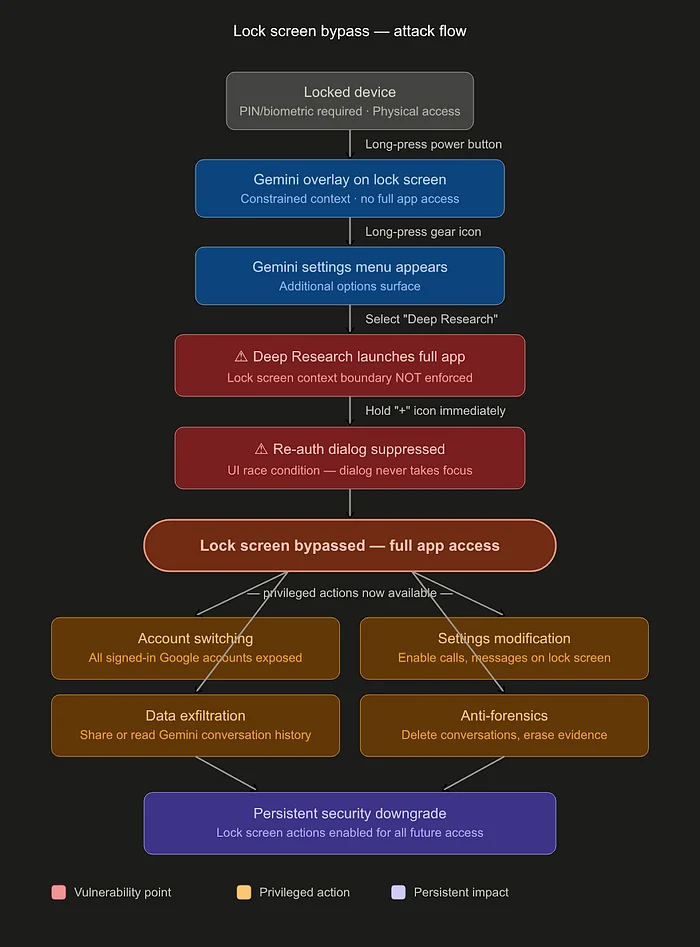
The video below walks through the full chain, from a locked device through account switching, settings modification and conversation access, with zero authentication at any step.
Root cause
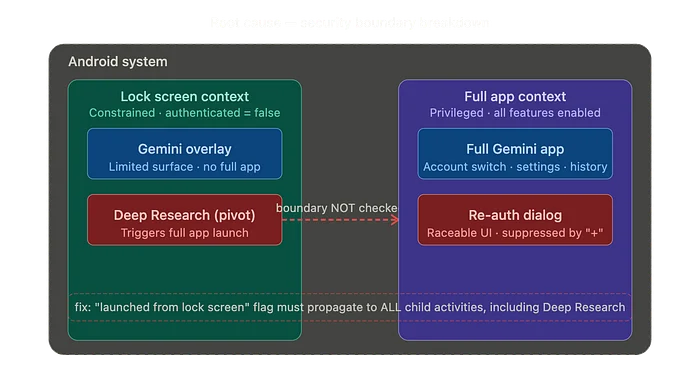
The report identifies three failures happening at the same time.
- No authentication check on context transition. When Deep Research launches the full Gemini app, Android does not verify that the device is unlocked before granting access to privileged functionality. The
launched from lock screenflag is not propagated to child activities. - A raceable re-authentication dialog. The re-auth prompt is a UI dialog, not a system-level gate. Holding the "+" icon at the right moment prevents it from taking focus. The report describes this as a software lock with a physical bypass.
- The original patch was too narrow. The previous fix addressed one specific navigation path and did not address the underlying principle: any Gemini sub-feature capable of launching a full app context is a potential escape route.
The general point is that the root issue is not Deep Research specifically. It is that the lock screen boundary has no hard enforcement once you are past the initial overlay.
Impact
An attacker with brief physical access to a locked Android device can, without ever entering a PIN, pattern or biometric:
- switch Google accounts;
- modify security settings;
- read and exfiltrate Gemini conversation history;
- set up persistent lock screen messaging and calling capabilities.
The device stays locked the entire time. No failed unlock attempts are logged, and the victim has no indication anything happened.
Once inside, the report lists the following capabilities:
- Account reconnaissance: tap the avatar to see every Google account signed into the device.
- Persistent downgrade: enable "Perform actions on lock screen", "Send messages" and "Make calls" in Gemini settings. Every future lock screen interaction then has expanded capabilities, for anyone.
- Data exfiltration: Gemini conversation history may contain sensitive personal, medical, financial or professional queries, and it can be shared to any external contact in seconds.
- Anti-forensics: delete conversations after reading them, leaving no trace.
Fix
The report proposes three changes:
- Hard system gate, not a UI dialog. Any transition from a lock screen assistant overlay to a full application context must require authentication enforced at the WindowManager/system level, something that cannot be raced or suppressed by a UI interaction.
- Feature restriction in lock screen context. Deep Research, account switching, settings, history access, and share/delete must be disabled when the device is locked, regardless of how the user navigated there.
- Flag propagation. The
launched from lock screencontext must be inherited by every child activity and fragment, so that no sub-feature can shed it.
Given that this is the second bypass of the same boundary, the report also calls for a full audit of every Gemini entry point accessible from the lock screen.
- Other assistant sub-features that launch a full app context. Try every option reachable from the lock screen overlay that opens the full application rather than staying inside the overlay. A positive result is the full app appearing while the device remains locked, with no authentication prompt completing.
- Other dialogs that can be raced. Look for re-authentication or confirmation prompts presented as UI dialogs rather than system-level gates, and try holding or repeatedly pressing an interactive element as the dialog appears. A positive result is the dialog losing focus or never completing while the privileged action proceeds.
- Child activities that drop the lock screen flag. Navigate from a lock screen entry point into nested activities and fragments, checking whether privileged actions remain available deeper in. A positive result is any child screen that behaves as if the device were unlocked.
- Persistent setting changes from the lock screen. Attempt to change assistant settings that affect future lock screen behaviour. A positive result is a setting change that survives locking and applies to later lock screen interactions.
- Data access and deletion from the lock screen. Attempt to read, share and delete assistant conversation history while locked. A positive result is any of those actions completing without authentication.
What happened, in plain words
Imagine your phone's lock screen as the front door of a house. The door is locked, and only you have the key (your PIN). But there is a small letterbox in the door, and through it you can talk to a helpful assistant. That assistant is Google Gemini, and on Android you can call it up from the lock screen by long-pressing the power button. This is on purpose: Google designed it so you can ask the assistant a quick question without unlocking the phone. The idea is that the assistant stays in its little letterbox and cannot reach into the rest of the house.
This report describes how someone with the phone in their hand for less than a minute can get the assistant to open the front door from the inside. No PIN, no password, no fingerprint. The phone stays locked the whole time, and nothing on the screen tells the owner that anything happened.
It is not the first time. In 2024 the same researcher found a similar way in, reported it to Google's bug bounty programme (the Google Vulnerability Reward Program, or VRP), and Google paid a reward and published details in September 2025. That first hole was patched. Then, in April 2026, on a fully updated Pixel 6a with the March 2026 security patch, the researcher found a different route to the same place.

A bit of context
Before the steps, some background so the rest makes sense.
- Lock screen: the screen you see when you wake a phone that has been locked. It shows the time and notifications, and it refuses to show your apps until you prove who you are.
- PIN, password, pattern, biometrics: the different ways a phone lets you prove it is you. A PIN is a short number, a pattern is a swipe path, biometrics means your fingerprint or face. All of them are called authentication: proving identity.
- Assistant overlay: when you long-press the power button, Gemini appears on top of the lock screen in a small panel. An overlay is a layer drawn over something else, like a sticky note on a window. The overlay is deliberately limited: it can answer questions, but it is not supposed to reach your apps, your accounts or your settings.
- Bug bounty programme: a scheme where companies pay independent researchers for finding security flaws and reporting them privately, so they can be fixed before criminals use them.
- Patch: a software update that fixes a flaw. A security patch level (here, March 2026) is the date of the latest such fixes a phone has installed.
The researcher assumed the story ended with the 2025 publication. It did not. In April 2026, on a fully updated Pixel 6a with the March 2026 security patch, the same kind of weakness came back through a different path. The report puts it neatly: same boundary, different door.
What's at stake
Why does this matter if the attacker needs the phone in their hand? Because a locked phone is supposed to protect everything inside it even when a stranger is holding it: at a bar, on a train, at a party, while you are asleep. The report lists what an attacker can do with brief physical access, without ever entering a PIN, pattern or biometric:
- switch Google accounts;
- modify security settings;
- read and take away Gemini conversation history;
- set up persistent lock screen messaging and calling capabilities.
Persistent here means the change survives after the attacker hands the phone back. The device stays locked the entire time, no failed unlock attempts are logged, and the victim has no indication anything happened.
How it works
The attack is five steps. Each one is something a person can do with a finger, no tools, no cables, no computer.
Step 1. Lock the device. Confirm PIN is required to access the home screen.
Why: this sets the baseline. You want to be sure the phone really is locked and really does ask for the PIN, so that anything that happens next is genuinely happening past the lock.
Step 2. Long-press the power button to invoke Gemini on the lock screen. This is by design, no authentication required at this step.
Why: this is the intended feature, not the bug. Google lets you talk to the assistant from the lock screen. The attack starts from a legitimate door.
Step 3. Long-press the gear icon inside the Gemini overlay. Additional options surface.
Why: the gear is the settings button. Long-pressing it (rather than tapping) reveals extra options that are not shown by default. The attacker is looking for a way out of the small overlay panel.
Step 4. Select "Deep Research." This is the pivot point. The full Gemini application launches, transitioning out of the constrained lock screen overlay into a full app context.
Why: this is the moment the small letterbox becomes a whole room. Deep Research is a Gemini feature that needs the full app to run, so choosing it makes Android open the complete Gemini application. The overlay was limited; the full app is not. That switch is the pivot.
Step 5. Immediately press and hold the "+" icon. This races the re-authentication dialog that would normally appear, preventing it from taking focus. The prompt never completes and you're in.
Why: when the full app opens from the lock screen, Android is supposed to ask you to prove it is you (re-authentication). That prompt is a dialog: a small box that appears on screen and waits for your answer. The trick is timing. By holding down the "+" button at the exact moment the dialog tries to appear, the attacker keeps the dialog from grabbing the screen's attention (focus). The dialog never finishes asking, and the app carries on as if the question had been answered. The report calls this a race: two things happening at once, and the attacker wins by being faster.
Proof of concept
The video walks through the full chain, from a locked device through account switching, settings modification and conversation access, with zero authentication at any step.
A proof of concept is a demonstration that the flaw is real, not theoretical. Here it is a recording of the whole sequence on a real phone.
Root cause
Root cause means the underlying reason, as opposed to the surface symptom. The report identifies three things going wrong at the same time.
1. No authentication check on context transition. When Deep Research launches the full Gemini app, Android does not verify the device is unlocked before granting access to privileged functionality. The launched from lock screen flag is simply not propagated to child activities.
In plain words: Android keeps a little label, a flag, that says "this thing was started from the lock screen". Screens inside an app are called activities (a child activity is one opened from another). The label should be passed down to every screen the app opens, so each one knows it is running behind a locked door. It is not passed down. So the full app opens without anyone checking the lock, and it behaves as if the phone were unlocked.
2. A raceable re-authentication dialog. The re-auth prompt is a UI dialog, not a system-level gate. Holding the "+" icon at the right moment prevents it from taking focus. It's a software lock with a physical bypass.
In plain words: UI means user interface, the part drawn on screen. A system-level gate is a check enforced deep in the operating system, where an app cannot talk its way past it. A UI dialog is just a box drawn on screen, and anything drawn on screen can be interrupted by a finger. The report's comparison is a lock made of software with a physical way around it.
3. The original patch was too narrow. The previous fix addressed one specific navigation path. It didn't address the underlying principle: any Gemini sub-feature capable of launching a full app context is a potential escape route.
In plain words: the 2025 fix blocked the one route the researcher had used. It did not fix the general problem, which is that any Gemini feature able to open the full app is another way out. Deep Research was simply the next one found.
The report's summary of all three: the root issue isn't Deep Research specifically. It's that the lock screen boundary has no hard enforcement once you're past the initial overlay.
What an attacker can do
Once inside, the attack surface is significant. Attack surface means all the things an attacker can now reach and use.
- Account reconnaissance. Tap the avatar to see every Google account signed into the device. Reconnaissance means looking around to learn what is there; the avatar is the little profile picture that opens the account menu.
- Persistent downgrade. Enable "Perform actions on lock screen", "Send messages" and "Make calls" in Gemini settings. Every future lock screen interaction now has expanded capabilities, for anyone. A downgrade here means lowering the security level: settings that were off are turned on, and they stay on.
- Data exfiltration. Gemini conversation history may contain sensitive personal, medical, financial, or professional queries. Share it to any external contact in seconds. Exfiltration means getting data out of the place it was kept, here by sharing it to someone outside.
- Anti-forensics. Delete conversations after reading them. No trace left. Forensics is the study of traces left behind; anti-forensics is erasing them.
The entire operation takes under 60 seconds and requires zero technical skill after the initial discovery.
The fix
The report proposes three changes.
- Hard system gate, not a UI dialog. Any transition from a lock screen assistant overlay to a full application context must require authentication enforced at the WindowManager/system level, something that cannot be raced or suppressed by a UI interaction.
In plain words: the check must live deep in the operating system, in the part that manages windows on screen (the WindowManager), not in a box that a finger can interrupt. Suppressed means stopped from appearing.
- Feature restriction in lock screen context. Deep Research, account switching, settings, history access, and share/delete must be disabled when the device is locked, regardless of how the user navigated there.
In plain words: while the phone is locked, the dangerous features should simply be switched off, no matter which route someone took to reach them.
- Flag propagation. The
launched from lock screencontext must be inherited by every child activity and fragment. No sub-feature should be able to shed it.
In plain words: the "started from the lock screen" label must follow every screen and every piece of screen (a fragment is a part of a screen) the app opens, so nothing can lose the label and pretend the phone is unlocked.
Because this is the second bypass of the same boundary, the report also calls for a full audit of every Gemini entry point accessible from the lock screen. An audit is a systematic review of everything, rather than fixing one thing at a time.
Variants to test
- Other assistant sub-features that launch a full app context. Try every option reachable from the lock screen overlay that opens the full application rather than staying inside the overlay. A positive result is the full app appearing while the device remains locked, with no authentication prompt completing.
- Other dialogs that can be raced. Look for re-authentication or confirmation prompts presented as UI dialogs rather than system-level gates, and try holding or repeatedly pressing an interactive element as the dialog appears. A positive result is the dialog losing focus or never completing while the privileged action proceeds.
- Child activities that drop the lock screen flag. Navigate from a lock screen entry point into nested activities and fragments, checking whether privileged actions remain available deeper in. A positive result is any child screen that behaves as if the device were unlocked.
- Persistent setting changes from the lock screen. Attempt to change assistant settings that affect future lock screen behaviour. A positive result is a setting change that survives locking and applies to later lock screen interactions.
- Data access and deletion from the lock screen. Attempt to read, share and delete assistant conversation history while locked. A positive result is any of those actions completing without authentication.
Final thought
Lock screen security is one promise an OS makes that users never think to question. OS means operating system, the core software of the phone. When AI assistants start opening doors inside that boundary, the attack surface grows in ways that are hard to enumerate, and patchwork fixes will keep falling behind. Patchwork means fixing one hole at a time instead of the design behind them.
The report's closing line: the right solution is a single, hard, non-raceable gate between "the overlay" and "the app". Until that exists, the boundary is a suggestion.
Glossary
- Android: the operating system made by Google that runs on many phones, including the Pixel used here.
- Anti-forensics: deliberately erasing traces so that later investigation finds nothing.
- Assistant overlay: the small Gemini panel drawn on top of the lock screen, meant to be limited in what it can reach.
- Attack surface: everything an attacker can reach and use once they are past a barrier.
- Audit: a systematic review of all entry points, rather than fixing one at a time.
- Authentication: proving who you are, with a PIN, password, pattern, fingerprint or face.
- Biometrics: authentication using a body feature, such as a fingerprint or face.
- Bug bounty programme: a scheme paying researchers for privately reporting security flaws so they can be fixed.
- Child activity: a screen opened from another screen inside an app.
- Deep Research: a Gemini feature that runs in the full Gemini application rather than the lock screen overlay.
- Dialog: a small box drawn on screen that waits for the user's answer.
- Exfiltration: getting data out of where it was stored, for example by sharing it to an outside contact.
- Flag: a small label in software recording a fact, here that something was started from the lock screen.
- Focus: which element on screen is currently receiving the user's input; a dialog needs focus to be answered.
- Fragment: a part of a screen inside an Android app.
- Gemini: Google's AI assistant, reachable from the Android lock screen by long-pressing the power button.
- Google Vulnerability Reward Program (VRP): Google's bug bounty programme.
- Lock screen: the screen shown when a phone is locked, which refuses access to apps until the owner authenticates.
- Operating system (OS): the core software that runs the phone and enforces rules like locking.
- Overlay: a layer drawn on top of something else.
- Patchwork fix: fixing individual holes one by one instead of the design behind them.
- Persistent: surviving after the attacker has finished, for example a setting that stays changed.
- PIN: a short number used to unlock a phone.
- Pixel 6a: the Google phone model used in the report.
- Proof of concept: a demonstration that a flaw is real, here a video of the whole chain.
- Race: two things happening at once where the attacker wins by acting faster, here holding a button so a dialog cannot take focus.
- Re-authentication: asking the user to prove their identity again before a privileged action.
- Reconnaissance: looking around to learn what is available, such as which accounts are signed in.
- Root cause: the underlying reason a flaw exists, as opposed to its visible symptom.
- Security patch level: the date of the latest security fixes installed on a device.
- Suppressed: stopped from appearing or taking effect.
- System-level gate: a check enforced deep in the operating system, which an app cannot bypass with a screen interaction.
- UI (user interface): the part of software drawn on screen for the user.
- WindowManager: the part of Android that manages windows on screen.
launched from lock screenflag: the label recording that something was started from the lock screen, which should follow every child screen but here does not.


