Hinge Hackerone Writeup
Hinge used Cloudinary's default settings without media access controls, so original uploaded images could be accessed by removing transformation parameters from the image URL. An attacker could view uncropped original photos that users intended to hide.
 Published on tbutler0x90.medium.com
Hinge is dating application for android and iOS devices launched in 2013. Like its competitors Tinder and Bumble, it enables users to search through a database of other users and match with potential dating partners.
The full write-up lives on its author's site
It belongs to its author, so we link to it rather than copy it. The other two tabs are our own rewrites, checked against it.
Context
Hinge is a dating application for Android and iOS devices launched in 2013. Like its competitors Tinder and Bumble, it lets users search a database of other users and match with potential dating partners. It offers features to create unique profiles, integrate with existing social platforms, and chat with other users, and it uses a mixture of proprietary code and third-party services.
This write-up covers a low risk misconfiguration disclosed to Hinge through HackerOne in March 2020 by Tyler Butler and triaged in June 2020. HackerOne is a bug bounty platform that connects freelance security researchers with clients to enable public and private security vulnerability disclosure.
The finding is about improper media access controls in a third-party media storage provider used by Hinge. By abusing the default configuration of the Cloudinary Image Transformation API, original user images could be accessed in their original and unedited state. This posed a minimal risk to users who intend to use the crop feature to remove undesirable and potentially sensitive aspects of profile photos. While it is unlikely that leaving the application in its disclosed state would result in a widespread sensitive information leak, Hinge decided to triage the application to mitigate the risks involved. To exploit the flaw on a large scale, an attacker would need a highly customised approach.
The scope of the analysis is constrained to the Hinge iOS application (app-id 595287172), the hinge.app.link subdomain, and the hinge-res.cloudinary subdomain. The security settings exploited in the HackerOne report apply to the Android app as well, but that is not discussed here.
Setup
The general approach involved two main steps.
- Burp Suite was used to intercept network traffic sent between a sample iPhone and the Hinge HTTP and HTTPS API endpoints. Burp Suite is an application security testing software produced by Portswigger. Intercepted traffic was dissected by endpoint and manually analysed.
- The application was used on an iPhone as a normal user. Features which exposed endpoints were tested and all external links were collected and analysed.
To protect Hinge users' personal information, the proof of concept documentation uses sample Cloudinary assets not associated with Hinge.
The Hinge platform consists of native applications for both Android and iOS devices. In addition to integration with the Facebook-owned social media platform Instagram, several third-party Software as a Service (SaaS) providers supplement custom development. According to data analysed from Burp Suite packet captures, Hinge uses SendBird, a chat as a service platform; Braze, a CRM and marketing platform; and Branch, a mobile measurement and deep-link solution platform. Central to the application is the ability for users to create custom profiles using a mixture of user-uploaded images, captions, questionnaire answers, and a link to their Instagram feed. Storage of user images is done through the SaaS provider Cloudinary. Users are required to upload six images when first creating an account, and the first image displayed on the profile is used as the user's profile picture.
Cloudinary
The Cloudinary platform offers image, video, asset, and media management solutions for developers and e-commerce. It is used in photo-heavy applications because of its easy to use API. As summed up on the Cloudinary website, the API enables users to "apply artistic effects to an image or to simply scale it. With simple system of chained transformations, you can crop, scale, transcode, filter, and optimize your original high-resolution images on the fly. Tailor transformations based on conditional parameters or the viewing context to deliver the most appropriate version to users". The ability to dynamically display assets based on conditions means that assets can be displayed optimally regardless of their environment. This can commonly be seen in the use of thumbnail images: when the image needs to be displayed as a thumbnail or icon, it is dynamically optimised to retain its essential aspects despite being reduced in size. Cloudinary clients include Buzzfeed, CNN, and Uber among others.
Cloudinary Image Transformation API
Each asset in the Cloudinary media library is given a unique public ID and is accessible through their website at the cloudinary.com/image/upload directory. Cloudinary uses dynamic URLs to apply effects to images on its platform. To apply effects, transformation parameters can be appended to the address of the asset. In total, 33 different transformation parameters can be used for a variety of purposes such as changing height and width, effects, backgrounds, and custom functions among others. An example of a transformed image on Hinge looks like the following:
https://hinge-res.cloudinary.com/image/upload/x_0.18,y_0.21,w_0.36,h_0.27,c_crop/w_1055,q_auto/f_webp/[profile number]/[unique profile id].jpg
When users make a change to an image hosted on Cloudinary, new transformation requests are added on the fly. Original image assets themselves are not changed; however, transformation parameters applied to the request URL change what is displayed when requested. This distinction means that both the original asset as it was uploaded to the platform and the new requested URL with transformations are able to be requested and exist available to the public. This is an intended function of Cloudinary and a default setting, but it can be changed through the enforcement of media access controls such as Strict Transformations and Signed Delivery URLs.
One media access control method to mitigate the risk of user requested transformations is Strict Transformations. Through this feature, application owners can explicitly define which, if any, transformations can be requested by users. Another access control method is the Signed Delivery URL option. With this option, images are validated using a URL signature, which is a base64 encoding of a SHA1 digest made from the application owner's image ID and transformation string chained with the API secret. Only images which pass authentication can be viewed, meaning access to images can be controlled for private or authenticated viewing or manipulation.
Finding it
The risk described in this report relies on the lack of media access controls on user images. By default, no access controls are implemented on the Cloudinary platform. In effect, any asset uploaded to the platform should be accessible in its original state regardless of what users cropped out in the app.
To exploit these settings, the URL address of user profile pictures needed to be located. This was achieved using the iOS app's "share profile" option. This feature enables users to share profiles with others. It generates a standard message, "I recommended [Username] for you on Hinge! Log into the app to view their profile", as well as a URL link to the user's profile with the format:
https://app.hinge.co/[User profile ID]
When shared through SMS messaging and opened on mobile devices with Hinge installed, the link triggers the application to open. If Hinge is not installed, the user is re-directed to the app store. Users are automatically guided in this way from the use of iOS deep links, a feature implemented for iOS in 2009.
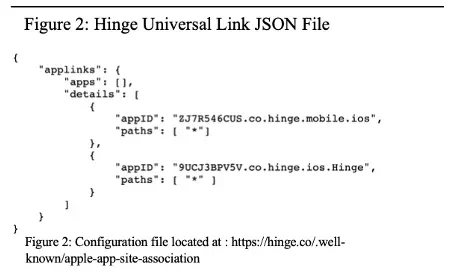
Figure 2 shows the hinge.co subdomain which hosts the Universal Link JSON file necessary for such configurations. User profiles are also able to be viewed with a browser. Browser-based Hinge profiles feature only the username, a comment, and a profile photo. Browser access to the user profile photo allowed for easy access to the custom Hinge Cloudinary domain, hinge-res.cloudinary.com.
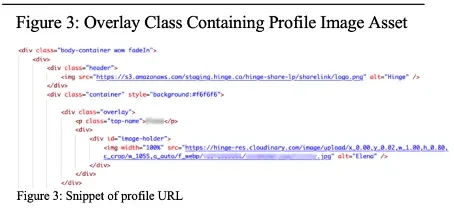
As seen in Figure 3, profile pictures are loaded into the browser-based profile page through the hinge-res subdomain of Cloudinary. The URL extension, including the various tags denoted with backspaces, are a part of the Cloudinary Image Transformation API.
With no media access controls in place, exploitation of the transform API is fairly straightforward: by removing the transformation parameters from the GET request URL, the original asset can be seen as it was uploaded by the user.
Exploitation
Step 1: Locate the profile picture URL
Use the iOS app's "share profile" option to generate a link of the form https://app.hinge.co/[User profile ID], or open the same profile in a browser. The browser-based profile page loads the profile photo from the hinge-res subdomain of Cloudinary, exposing the full transformation URL.
Step 2: Remove the transformation parameters
Take the transformation URL and strip the transformation segment, leaving the original asset path. The original image is then served as it was uploaded by the user, before any cropping applied in the app.
Step 3: Demonstrate on a sample account
To demonstrate accessing original user assets, and to protect the information and identity of Hinge users, a limited proof of concept was created using a free account on the Cloudinary platform. After creating a free account, a public domain image was uploaded to the account's media library. Next, using the Transformations dashboard, a new transformation was created which adjusts image width to 461 pixels, moves the x axis to position 190 and the y axis to position 0. The final transformation request looks like the following:
c_crop,w_461,x_190,y_0
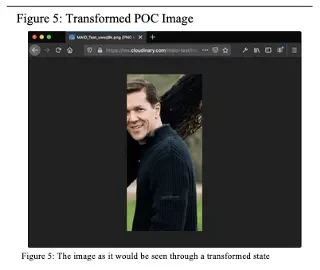
With Strict Transformations not enabled, the transformation was applied to the sample image. The new transformed image was browsed at the footnoted address and is shown in Figure 5.
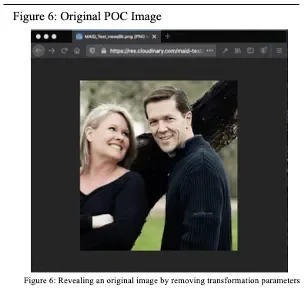
To demonstrate the flaw with default Cloudinary settings, the transformation parameter was removed from the requested address. The original image was browsed using the footnoted address and is shown in Figure 6.
Root cause
The mistake is a configuration issue rather than a code flaw: Cloudinary applies no media access controls by default, so both the original asset and any transformed variant remain publicly requestable. Cloudinary applies no media access controls by default, so the transformation segment of the URL was the only thing standing between a visitor and the unedited upload. Removing that segment returned the original image. Because transformations are applied on the fly and the original asset is never modified, cropping in the app never removed the underlying data.
Impact
The risks involved in leaving original user assets available publicly are low. HackerOne classified this finding as a 3.7 on HackerOne's severity scale. Still, some of the findings using this method to view original images were interesting. Some users uploaded screenshots of their personal mobile devices, and only after upload edited the image to zoom in on a face or body. The full screenshot exposed other information about those users. In one example, a screenshot of the user's Instagram profile revealed their name and Instagram handle. Other users uploaded images in various stages of undress and used the crop feature to crop out features other than their face. Commonly, many users used the crop feature to crop themselves out of images with others, including large group photos or photos with significant others.
While no seriously damaging information or images was found through this method, it does not take much extrapolation to see how, in the wrong hands, a determined attacker could scrape these images and find a subset that the user would not want available online.
Fix
Hinge triaged the report to mitigate the risks involved. The write-up does not describe the specific change made. The controls that address this class of issue are the two Cloudinary media access controls described above: Strict Transformations, which lets the application owner explicitly define which transformations may be requested, and Signed Delivery URLs, which validate images with a URL signature (a base64 encoding of a SHA1 digest made from the image ID and transformation string chained with the API secret) so that only authenticated requests are served.
Variants to test
- Other Cloudinary-backed applications. Find a profile or asset URL on a
res.cloudinary.comstyle host, strip the transformation segment, and request the base asset. A positive result is the original, uncropped image being returned. - Signed Delivery URL enforcement. Request a transformed URL without a valid signature. A positive result is the image being served anyway, showing signatures are not enforced.
- Strict Transformations enforcement. Request a transformation that the application does not define. A positive result is the arbitrary transformation being applied.
- Deep-link and share features. Use share or deep-link features to enumerate profile URLs, then follow them to the media host. A positive result is a stable, guessable path to the underlying asset.
- Browser-rendered profiles. Load profiles in a browser rather than the app and inspect the image requests. A positive result is the full transformation URL being exposed in the page source.
What happened, in plain words
Hinge is a dating app for Android and iOS phones, launched in 2013. Like Tinder and Bumble, it lets you look through a pool of other users and match with people you might want to date. You build a profile, you can link it to social platforms, and you can chat with matches. Under the surface, Hinge is a mix of its own code and services run by other companies.
This article is about a small security mistake that was reported to Hinge through HackerOne in March 2020 by Tyler Butler, and triaged in June 2020. HackerOne is a bug bounty platform: a website where independent security researchers and companies meet, so that people can report security problems to the company that owns the software, either publicly or privately, instead of keeping them secret or misusing them.
The mistake was about how user photos were stored and served by a third-party company, Cloudinary. Cloudinary is a media storage provider: Hinge uploads user photos there, and Cloudinary delivers them to phones and browsers. Cloudinary has a feature that lets an app ask for a modified copy of an image, for example a cropped version. Because of the default settings, the original, unedited photo could also be fetched by anyone who knew the address. That matters because users crop photos to hide things they do not want to show, and the crop only changes the copy that is displayed, not the file that was uploaded.
The risk was judged minimal. It is unlikely that leaving the app in that state would cause a widespread leak of sensitive information, and to abuse it at large scale an attacker would need a highly customised approach. Even so, Hinge decided to triage the report, which means accepting it into its process and working to reduce the risk.
The analysis only covers the Hinge iOS app (app-id 595287172), the hinge.app.link subdomain, and the hinge-res.cloudinary subdomain. The same settings also applied to the Android app, but that is not discussed here.
How the analysis was done
The researcher worked in two main steps.
- Burp Suite was used to intercept network traffic between a sample iPhone and the Hinge HTTP and HTTPS API endpoints. Burp Suite is a security testing tool made by Portswigger. It sits between the phone and the internet and lets you read, and change, the requests and responses that pass through. Intercepted traffic was then split up by endpoint and looked at by hand.
- The app was used on an iPhone like a normal user would use it. Features that made the app talk to its servers were tried, and every external link the app produced was collected and examined.
To protect Hinge users' personal information, the proof of concept in this article uses sample Cloudinary assets that do not belong to Hinge.
The Hinge platform is made of native apps for Android and iOS. Besides integrating with Instagram, the social media platform owned by Facebook, Hinge uses several third-party Software as a Service (SaaS) providers to add features it does not build itself. SaaS simply means software that another company runs for you over the internet, like webmail or an online photo album. From the Burp Suite packet captures, the researcher identified SendBird, a chat-as-a-service platform; Braze, a CRM and marketing platform; and Branch, a mobile measurement and deep-link platform. The core of the app is the ability to build a custom profile from uploaded images, captions, questionnaire answers, and a link to an Instagram feed. User images are stored through Cloudinary. When you first create an account you must upload six images, and the first image on the profile is used as your profile picture.
Cloudinary
Cloudinary offers image, video, asset and media management for developers and e-commerce. Photo-heavy apps use it because its API is easy to work with. An API, or Application Programming Interface, is the set of addresses and rules one piece of software uses to ask another piece of software to do something. Think of it as a restaurant menu: you do not walk into the kitchen, you order from a list of dishes the kitchen is willing to make. As Cloudinary's own website puts it, the API lets users "apply artistic effects to an image or to simply scale it. With simple system of chained transformations, you can crop, scale, transcode, filter, and optimize your original high-resolution images on the fly. Tailor transformations based on conditional parameters or the viewing context to deliver the most appropriate version to users". Because assets can be displayed dynamically depending on conditions, they can be shown in the best form for wherever they appear. A common example is thumbnails: when an image has to appear as a small thumbnail or icon, it is optimised on the fly so that its essential parts survive the shrinking. Cloudinary's clients include Buzzfeed, CNN and Uber, among others.
The Cloudinary Image Transformation API
Every asset in a Cloudinary media library gets a unique public ID and can be reached through the cloudinary.com/image/upload directory. Cloudinary uses dynamic URLs to apply effects. A URL is just the address of something on the web, the text you type in a browser's address bar. A dynamic URL is one where part of the address is instructions, not just a location: change the instructions and you get a different result. To apply effects, transformation parameters are added to the address of the asset. In total, 33 different transformation parameters exist, for things like height and width, effects, backgrounds and custom functions. An example of a transformed image on Hinge looks like this:
https://hinge-res.cloudinary.com/image/upload/x_0.18,y_0.21,w_0.36,h_0.27,c_crop/w_1055,q_auto/f_webp/[profile number]/[unique profile id].jpg
Reading that address from left to right: https:// is the protocol, the way the browser talks to the server. hinge-res.cloudinary.com is the host, the server that holds the images. /image/upload/ is the path that tells Cloudinary this is an image delivery request. Then comes the transformation segment, x_0.18,y_0.21,w_0.36,h_0.27,c_crop/w_1055,q_auto/f_webp/, which is a chain of instructions: x and y set a position, w and h set width and height, c_crop says crop, w_1055 asks for a 1055 pixel wide result, q_auto lets Cloudinary pick the quality automatically, and f_webp asks for the WebP image format. Finally [profile number]/[unique profile id].jpg identifies which image it is. The square brackets are placeholders in this example, not literal characters.
When a user changes an image hosted on Cloudinary, new transformation requests are added on the fly. The original asset itself is not changed. Only the transformation parameters in the request URL change what is displayed when the image is requested. That distinction matters: both the original asset as it was uploaded and the new transformed URL can be requested, and both are available to the public. This is intended behaviour and a default setting of Cloudinary, but it can be changed by enforcing media access controls such as Strict Transformations and Signed Delivery URLs.
One media access control method that reduces the risk of user-requested transformations is Strict Transformations. With it, the application owner explicitly defines which transformations, if any, users may request. Another is the Signed Delivery URL option. With that option, images are checked using a URL signature, which is a base64 encoding of a SHA1 digest made from the application owner's image ID and transformation string chained with the API secret. In plain terms: the server computes a short code from the image details plus a secret password that only the app owner knows, and only requests carrying a matching code are served. Only images that pass this check can be viewed, so access can be limited to private or authenticated viewing and manipulation.
Finding it
The risk in this report comes from the lack of media access controls on user images. By default, Cloudinary implements no access controls. In effect, any asset uploaded to the platform should be reachable in its original state, no matter what the user cropped out in the app.
To abuse these settings, the researcher first had to find the URL of user profile pictures. This was done with the iOS app's "share profile" option. That feature lets you share a profile with someone else. It generates a standard message, "I recommended [Username] for you on Hinge! Log into the app to view their profile", plus a link to the user's profile in this format:
https://app.hinge.co/[User profile ID]
Here app.hinge.co is Hinge's own host and [User profile ID] is the identifier of the profile being shared. When the link is sent by SMS and opened on a phone that has Hinge installed, it makes the app open. If Hinge is not installed, the user is redirected to the app store. This automatic guidance comes from iOS deep links, a feature implemented for iOS in 2009. A deep link is a link that points not just at a website but at a specific place inside an app, the way a bookmark can point at a particular page rather than a home page.
Figure 2 shows the hinge.co subdomain that hosts the Universal Link JSON file needed for this kind of configuration. A Universal Link is Apple's mechanism for letting a normal web link open an app instead of a browser page, and the JSON file is the small settings file that tells iOS which links belong to the app.
User profiles can also be viewed in a browser. Browser-based Hinge profiles show only the username, a comment and a profile photo. Being able to reach the profile photo in a browser gave easy access to the custom Hinge Cloudinary domain, hinge-res.cloudinary.com.
As Figure 3 shows, profile pictures are loaded into the browser-based profile page from the hinge-res subdomain of Cloudinary. The URL extension, including the various tags marked with backspaces, is part of the Cloudinary Image Transformation API.
With no media access controls in place, abusing the transform API is fairly straightforward: remove the transformation parameters from the GET request URL and the original asset can be seen as the user uploaded it. A GET request is simply a browser asking a server for something, the normal kind of request made when you open a page or an image.
Exploitation
Step 1: Locate the profile picture URL
Use the iOS app's "share profile" option to generate a link of the form https://app.hinge.co/[User profile ID], or open the same profile in a browser. The browser-based profile page loads the profile photo from the hinge-res subdomain of Cloudinary, which exposes the full transformation URL.
Step 2: Remove the transformation parameters
Take the transformation URL and strip the transformation segment, leaving the original asset path. The original image is then served as it was uploaded by the user, before any cropping applied in the app. This works because the transformation segment is only an instruction about how to display the image; the file underneath is untouched.
Step 3: Demonstrate on a sample account
To demonstrate access to original user assets while protecting the information and identity of Hinge users, a limited proof of concept was built on a free Cloudinary account. A proof of concept is a small, safe demonstration that a problem is real, done without touching real victims. After creating the free account, a public domain image was uploaded to the account's media library. Then, using the Transformations dashboard, a new transformation was created that sets the image width to 461 pixels, moves the x axis to position 190 and the y axis to position 0. The final transformation request looks like this:
c_crop,w_461,x_190,y_0
Each part is one instruction: c_crop means crop, w_461 sets the width to 461 pixels, x_190 sets the horizontal starting position to 190, and y_0 sets the vertical starting position to 0. Together they say: cut a 461 pixel wide strip starting 190 pixels from the left and at the very top.
With Strict Transformations not enabled, the transformation was applied to the sample image. The new transformed image was browsed at the footnoted address and is shown in Figure 5.
To demonstrate the flaw with default Cloudinary settings, the transformation parameter was removed from the requested address. The original image was browsed using the footnoted address and is shown in Figure 6.
Root cause
The mistake is a configuration issue, not a flaw in the code. Cloudinary applies no media access controls by default, so both the original asset and any transformed variant stay publicly requestable. Cloudinary applies no media access controls by default, so the transformation segment of the URL was the only thing between a visitor and the unedited upload. Removing that segment returned the original image. Because transformations are applied on the fly and the original asset is never modified, cropping in the app never removed the underlying data.
Impact
The risk of leaving original user assets publicly available is low. HackerOne classified the finding as 3.7 on HackerOne's severity scale. Even so, some of what could be seen this way was interesting. Some users uploaded screenshots of their personal phones and only afterwards edited the image to zoom in on a face or body. The full screenshot exposed other information about those users. In one example, a screenshot of the user's Instagram profile revealed their name and Instagram handle. Other users uploaded images in various stages of undress and used the crop feature to cut out parts other than their face. Commonly, many users used the crop feature to remove themselves from photos with other people, including large group photos or photos with a partner.
No seriously damaging information or images were found this way, but it does not take much imagination to see how, in the wrong hands, a determined attacker could scrape these images and find a subset that the user would not want online. Scraping means collecting data automatically at scale.
Fix
Hinge triaged the report to reduce the risks involved. This write-up does not describe the specific change that was made. The controls that address this class of issue are the two Cloudinary media access controls described above: Strict Transformations, which lets the application owner explicitly define which transformations may be requested, and Signed Delivery URLs, which check images with a URL signature (a base64 encoding of a SHA1 digest made from the image ID and transformation string chained with the API secret) so that only authenticated requests are served.
Variants to test
- Other Cloudinary-backed applications. Find a profile or asset URL on a
res.cloudinary.comstyle host, strip the transformation segment, and request the base asset. A positive result is the original, uncropped image being returned. - Signed Delivery URL enforcement. Request a transformed URL without a valid signature. A positive result is the image being served anyway, which shows signatures are not enforced.
- Strict Transformations enforcement. Request a transformation that the application does not define. A positive result is the arbitrary transformation being applied.
- Deep-link and share features. Use share or deep-link features to list profile URLs, then follow them to the media host. A positive result is a stable, guessable path to the underlying asset.
- Browser-rendered profiles. Load profiles in a browser rather than the app and inspect the image requests. A positive result is the full transformation URL being exposed in the page source.
Glossary
- API: the set of addresses and rules one piece of software uses to ask another to do something, like a menu you order from.
- Asset: a single stored file, such as an image or video, in a media library.
- Base64: a way of writing binary data as plain text characters so it can travel safely inside URLs and other text.
- Bug bounty platform: a service that connects independent security researchers with companies so problems can be reported and rewarded.
- Burp Suite: a security testing tool by Portswigger that sits between a device and the internet and lets you read and change traffic.
- Cloudinary: a third-party service that stores and delivers images and video for apps.
- CRM: customer relationship management software, used to manage contact with users and customers.
- Deep link: a link that opens a specific place inside an app rather than a web page.
- Dynamic URL: a web address where part of the address is an instruction, so changing it changes the result.
- Endpoint: a specific address on a server that an app talks to.
- GET request: the ordinary kind of web request a browser makes to fetch a page or file.
- HackerOne: the bug bounty platform through which this finding was reported and triaged.
- Host: the server name in a URL, such as hinge-res.cloudinary.com.
- HTTP / HTTPS: the protocols browsers and apps use to talk to servers; HTTPS is the encrypted version.
- JSON: a plain-text format for structured data, used for settings files and API responses.
- Media access control: a setting that decides who may fetch or transform stored media.
- Misconfiguration: a security problem caused by a setting left at an unsafe value, rather than a bug in the code.
- Native application: an app built for a specific phone platform, such as iOS or Android.
- Packet capture: a recording of network traffic, used to see what an app sends and receives.
- Parameter: a named value in a URL or request that changes what the server does.
- Proof of concept: a small, safe demonstration that a problem is real.
- Public ID: the unique name Cloudinary gives each stored asset.
- SaaS: software as a service, software run by another company and used over the internet.
- Scraping: automatically collecting data at scale.
- SHA1 digest: a short fingerprint computed from data, used here as part of a signature.
- Signed Delivery URL: a Cloudinary option where an image is only served if the request carries a valid signature.
- Strict Transformations: a Cloudinary option where the app owner lists exactly which transformations users may request.
- Subdomain: a named part of a larger domain, such as hinge-res.cloudinary.com under cloudinary.com.
- Transformation parameter: an instruction in a Cloudinary URL that changes how an image is displayed, such as crop, width or format.
- Triage: the step where a company accepts a reported issue into its process and starts working on it.
- Universal Link: Apple's mechanism for letting a normal web link open an app instead of a browser page.
- URL: the address of something on the web.
- URL signature: a short code computed from the request details plus a secret, used to prove a request is authorised.
- WebP: an image file format used on the web.




