How I found XSS vulnerability in Amazon in 5 minutes using shodan
An Amazon-owned host running Oracle Business Intelligence was vulnerable to a reflected cross-site scripting flaw in its login page, because the redirect parameter was echoed into the page without encoding. An attacker could craft a link that runs script in the victim's browser on the Amazon domain.
 Published on medium.com
This is my first write-up. I was scrolling through twitter and I found this great tip:
The full write-up lives on its author's site
It belongs to its author, so we link to it rather than copy it. The other two tabs are our own rewrites, checked against it.
What the report shows
The target is an Oracle Business Intelligence login endpoint on an Amazon-owned host. The researcher's starting point was a tip seen on Twitter, which the write-up shows in a screenshot. The write-up opens with a screenshot of that tip.

From there the researcher built a Shodan query to find hosts running Oracle Business Intelligence:
html:">Oracle Business Intelligence"
To narrow the results to the organisation of interest, an org filter was added, giving the final query:
html:">Oracle Business Intelligence" org:amazon
This returned an IP address owned by Amazon that the researcher judged to be vulnerable to the CVE. The proof of concept is a single URL against the login page, with a redirect parameter carrying a double quote followed by an image tag whose onerror handler calls alert(document.domain):
https://[redacted]/bi-security-login/login.jsp?msi=false&redirect=%22%3E%3Cimg/src/onerror%3dalert(document.domain)%3E
The screenshot below the URL is the final proof of concept.
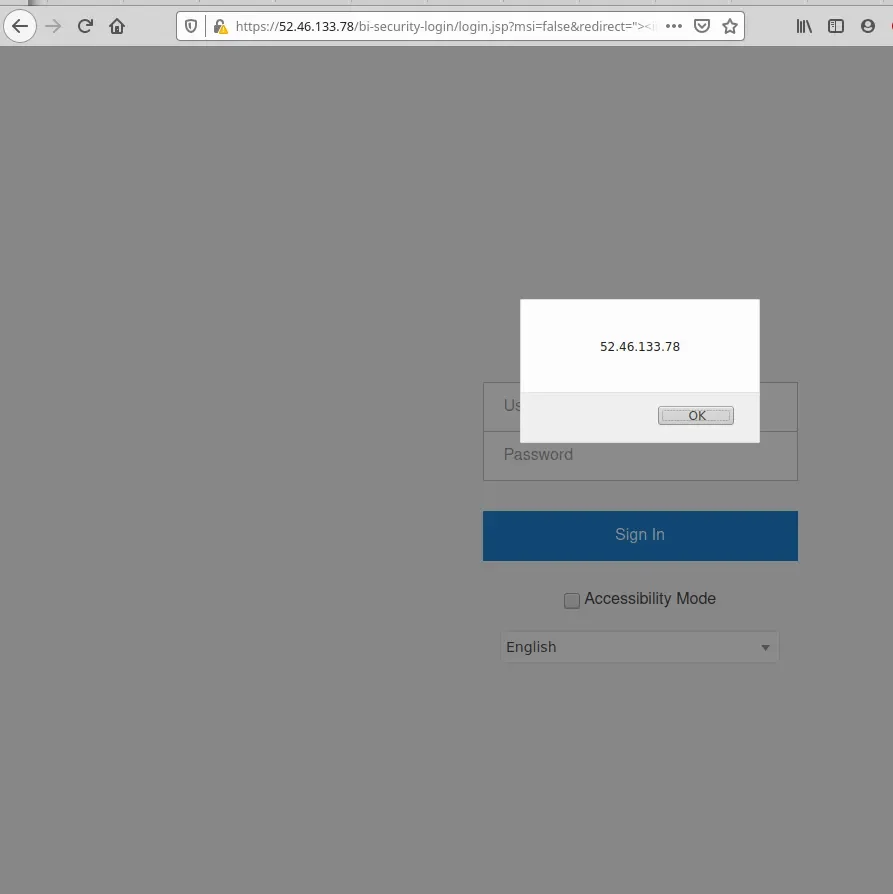
The report does not name the CVE, does not give a version number, and does not describe the server response or the rendered page beyond the screenshot. It records no bounty amount, no severity rating and no fix. It ends after the proof of concept.
Root cause
The payload only works if the surrounding markup is broken out of first, which is what the "> sequence does: it closes whatever attribute and tag the value is placed inside, so the following <img> element is treated as markup rather than text. A parameter that is meant to hold a URL is therefore being reflected as raw HTML.
Impact
What an attacker could then do depends on what that origin holds: session cookies without the HttpOnly flag, tokens stored in the page, or actions the victim can perform on the application. The report itself claims nothing beyond the alert, so the practical consequences on this host are not established in the text.
How this kind of bug works
Reflected cross-site scripting happens when an application takes a value from the request and places it into an HTML response without context-aware encoding. The browser cannot tell data from markup: once the value contains characters such as <, > or a quote that closes an attribute, the parser treats the rest as structure. The redirect parameter is a classic case, because applications often echo it back into a link, a hidden form field or a script block so the user can be sent onwards after login.
The defences that stop it are output encoding applied for the exact context (HTML text, attribute value, URL, JavaScript string), a strict Content Security Policy that blocks inline handlers and untrusted script sources, and, for redirect parameters specifically, validation against an allowlist of relative paths or known hosts. Input filtering alone is weaker, because the same value may be safe in one context and dangerous in another.
How to test for it
- Map every parameter that is reflected in a response, paying particular attention to ones that control navigation, such as
redirect,return,next,urlandcontinue. - Send a benign marker value and locate every place it appears in the response body, including hidden inputs,
hrefattributes and inline scripts. - Determine the context: HTML text, a quoted attribute, an unquoted attribute, a URL or a JavaScript string. The escape sequence needed differs for each.
- Send a context-appropriate probe. For an attribute, try closing the quote and the tag first, then a harmless element or handler. For HTML text, a plain element is enough.
- Confirm execution in a real browser rather than by string matching in the response. A positive result is script running in the target origin, for example an alert showing the document domain.
- Check whether the parameter is also used server-side for a redirect, since a value that is encoded in the body may still be used unsafely in a
Locationheader.
Common false positives: the payload appears encoded in the response, so it renders as text; the reflection sits inside a JavaScript string where the quote is escaped; a browser-side filter or CSP blocks the handler; or the page reflects the value only after a client-side framework sanitises it. Always verify in the browser with the same encoding the server actually returns.
How it is fixed
Apply context-aware output encoding to every reflected value, using the framework's escaping helpers rather than manual replacement. For redirect parameters, accept only relative paths or values from an allowlist and reject anything else. Set cookies with HttpOnly and SameSite so a script cannot read them. Deploy a Content Security Policy that disallows inline event handlers and restricts script sources, which limits the damage of any encoding mistake that slips through. Keep the underlying product patched.
Hunting notes
Login and authentication pages are productive because they frequently echo a return URL. The same pattern appears in error pages, search results, language selectors and any endpoint that builds a link back to the user. Internet-wide scanners such as Shodan are useful for finding specific product banners and login pages at scale; combining a product fingerprint with an organisation filter narrows results to a single program's estate, but always confirm the host is in scope before testing.
Recon signals worth noting: a product version known to have a published XSS CVE, a redirect or return parameter in a login URL, and responses where the parameter value is reproduced verbatim.
What happened, in plain words
This is a short account of finding a cross-site scripting (XSS) flaw on a login page belonging to Amazon. The researcher started from a tip seen on Twitter, shown in a screenshot in the write-up. The write-up opens with a screenshot of that tip.
Oracle Business Intelligence is a reporting and analytics product. Its login page takes a redirect parameter.
To find such installations, the researcher searched Shodan with a query that looks for pages containing a particular string in their HTML:
html:">Oracle Business Intelligence"
The html: part tells Shodan to match the page content, and the quoted string is a fragment of markup that appears on Oracle Business Intelligence pages. To narrow the results to Amazon, an organisation filter was added:
html:">Oracle Business Intelligence" org:amazon
The org:amazon part restricts results to hosts registered to Amazon. This returned an IP address owned by Amazon that the researcher judged to be vulnerable to the CVE. A CVE is a public identifier for a known security flaw.
The proof of concept is a single URL against the login page:
https://[redacted]/bi-security-login/login.jsp?msi=false&redirect=%22%3E%3Cimg/src/onerror%3dalert(document.domain)%3E
Let us break it down. The address https://[redacted]/bi-security-login/login.jsp is the login page. The query string starts with msi=false, a parameter whose meaning the report does not explain. The important part is redirect=%22%3E%3Cimg/src/onerror%3dalert(document.domain)%3E.
The <img> tag then becomes part of the page.
The screenshot below the URL is the final proof of concept.
The report does not name the CVE, does not give a version number, and does not describe the server response or the rendered page beyond the screenshot. It records no bounty amount, no severity rating and no fix. It ends after the proof of concept.
In general, how this kind of bug works
Reflected cross-site scripting happens when an application takes a value from the request and places it into an HTML response without encoding it for the context it lands in. The browser cannot tell data from markup: once the value contains characters such as <, > or a quote that closes an attribute, the parser treats the rest as structure. The redirect parameter is a classic case, because applications often echo it back into a link, a hidden form field or a script block so the user can be sent onwards after login.
The defences that stop it are output encoding applied for the exact context (HTML text, attribute value, URL, JavaScript string), a strict Content Security Policy that blocks inline handlers and untrusted script sources, and, for redirect parameters specifically, validation against an allowlist of relative paths or known hosts. Input filtering alone is weaker, because the same value may be safe in one context and dangerous in another.
In general, how to test for it
- Map every parameter that is reflected in a response, paying particular attention to ones that control navigation, such as
redirect,return,next,urlandcontinue. - Send a benign marker value and locate every place it appears in the response body, including hidden inputs,
hrefattributes and inline scripts. - Determine the context: HTML text, a quoted attribute, an unquoted attribute, a URL or a JavaScript string. The escape sequence needed differs for each.
- Send a context-appropriate probe. For an attribute, try closing the quote and the tag first, then a harmless element or handler. For HTML text, a plain element is enough.
- Confirm execution in a real browser rather than by string matching in the response. A positive result is script running in the target origin, for example an alert showing the document domain.
- Check whether the parameter is also used server-side for a redirect, since a value that is encoded in the body may still be used unsafely in a
Locationheader.
Common false positives: the payload appears encoded in the response, so it renders as text; the reflection sits inside a JavaScript string where the quote is escaped; a browser-side filter or CSP blocks the handler; or the page reflects the value only after a client-side framework sanitises it. Always verify in the browser with the same encoding the server actually returns.
In general, how it is fixed
Apply context-aware output encoding to every reflected value, using the framework's escaping helpers rather than manual replacement. For redirect parameters, accept only relative paths or values from an allowlist and reject anything else. Set cookies with HttpOnly and SameSite so a script cannot read them. Deploy a Content Security Policy that disallows inline event handlers and restricts script sources, which limits the damage of any encoding mistake that slips through. Keep the underlying product patched.
In general, hunting notes
Login and authentication pages are productive because they frequently echo a return URL. The same pattern appears in error pages, search results, language selectors and any endpoint that builds a link back to the user. Internet-wide scanners such as Shodan are useful for finding specific product banners and login pages at scale; combining a product fingerprint with an organisation filter narrows results to a single program's estate, but always confirm the host is in scope before testing.
Recon signals worth noting: a product version known to have a published XSS CVE, a redirect or return parameter in a login URL, and responses where the parameter value is reproduced verbatim.
Glossary
- Cross-site scripting (XSS): a vulnerability where an attacker injects script into a page viewed by another user.
- Reflected XSS: the injected value is echoed back in the response to the same request, rather than stored on the server.
- Shodan: a search engine that indexes internet-connected devices and services by their banners and page content.
- Oracle Business Intelligence: a reporting and analytics product with a login page that accepts a redirect parameter.
- CVE: a public identifier for a known security vulnerability.
- Redirect parameter: a URL parameter that tells the application where to send the user after an action, such as login.
- Payload: the crafted input an attacker sends to trigger a vulnerability.
- HTML attribute: a property of an HTML element, such as
srcoronerror. onerrorhandler: JavaScript that runs when an element fails to load, such as an image with a bad address.alert(document.domain): a JavaScript call that shows a pop-up with the current page's domain, used to prove script execution.- Origin: the combination of scheme, host and port that defines a page's security boundary.
- Output encoding: converting characters so they are treated as data, not markup, in a given context.
- Content Security Policy (CSP): a browser security mechanism that restricts which scripts and resources a page may load.
- HttpOnly: a cookie flag that prevents JavaScript from reading the cookie.
- SameSite: a cookie flag that limits when the cookie is sent with cross-site requests.
- Allowlist: a list of permitted values; anything not on the list is rejected.