Amazon Packaging feedback XSS
The Amazon packaging feedback form had a hidden parameter that allowed an open redirect, and another parameter that switched to a JavaScript-based redirect. The JavaScript redirect did not properly encode quotation marks, allowing an attacker to inject arbitrary JavaScript and execute it in the context of the Amazon domain.

I received an order from Amazon the other day which had a URL printed on the side of the box leading to the packaging feedback form. Amazon have a vulnerability reporting programme and I had a spare 20 minutes, so I thought I'd have a look to see if there were any obvious security vulnerabilities.
The full write-up lives on its author's site
It belongs to its author, so we link to it rather than copy it. The other two tabs are our own rewrites, checked against it.
Context
Amazon ships orders in boxes that carry a printed URL pointing to the packaging feedback form at http://www.amazon.co.uk/packaging. The form lets a customer comment on how an order was packaged. Amazon runs a vulnerability reporting programme, so with a spare 20 minutes the researcher decided to look at the form for obvious security problems.
The interesting part of the form is a hidden input named failureRedirect, which the application follows when invalid user input is submitted. In other words, when validation fails the user is sent to a URL supplied by the client. That is the feature that turned out to be abusable.
Setup
No accounts, roles or special tooling are described. The researcher worked against the public packaging feedback form reached from the printed URL, using a browser and the ability to craft and submit POST requests. The payload is delivered as an HTML form that is POSTed to the endpoint.
Finding it
After a few dead ends, the researcher noticed the hidden failureRedirect field. Testing showed that the URL in that field could be set to any domain, as long as it started with a valid protocol. That is an open redirect on its own.
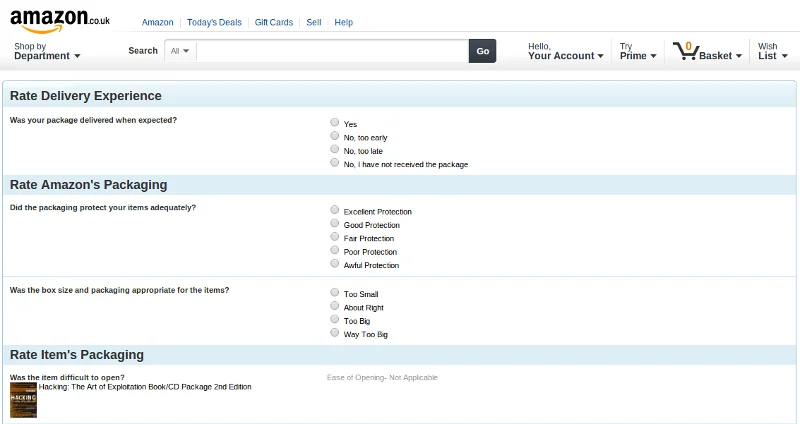
The screenshot shows the packaging feedback form as it normally appears.
There was more to it. By default the redirect was performed with the standard Location HTTP header. The researcher noticed a second parameter, useJSRedirect, which in normal use was always set to 0. Changing it to 1 made the script return a small JavaScript redirect snippet instead of the Location header:
<!DOCTYPE html PUBLIC "-//W3C//DTD HTML 4.01 Transitional//EN" "http://www.w3.org/TR/html4/loose.dtd">
<html>
<head>
<meta http-equiv="Content-Type" content="text/html; charset=UTF-8">
<title>Redirecting...</title>
<script>
function cmuJsOnLoad() {
	var redirect = "http://www.amazon.co.uk/";
	parent.location.href = redirect;
}
</script>
</head>
<body onload="cmuJsOnLoad()">
</body>
</html>
The snippet places the failureRedirect value into the redirect variable. Quotation marks inside that string were not properly encoded, so it was trivial to break out of the redirect code and execute arbitrary JavaScript inside the <script> tag that the packaging feedback form itself returns.
Exploitation
Step 1: switch the redirect to JavaScript mode
Set useJSRedirect to 1 so that the response contains the inline script shown above rather than a Location header. The failureRedirect value is then embedded as the redirect variable.
Step 2: break out of the string
Submit a failureRedirect value that closes the double-quoted string and appends arbitrary JavaScript. The researcher delivered it as a POST to the form endpoint:
<form action="https://cmu-receiver-eu.amazon.com/packagingFeedback/upload" method="post" enctype="multipart/form-data">
	<input type="hidden" name="failureRedirect" value='http://bitquark.co.uk/";alert("Your session cookies:\n"+document.cookie+"\n\n-- Bitquark");//' />
	<input type="hidden" name="useJSRedirect" value="1" />
</form>
The failureRedirect value starts with a valid URL, http://bitquark.co.uk/, so it passes the check that the value begins with a valid protocol. The " then terminates the string in the generated script, and the alert(...) call runs with the victim's document.cookie. The trailing // comments out the rest of the generated line.
That comment matters: a ?s_tc=1 string is always appended to the URL, and without the comment it would generate an error and stop the exploit code from running.
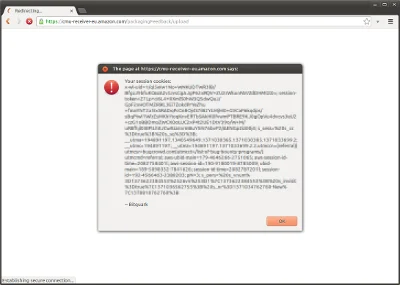
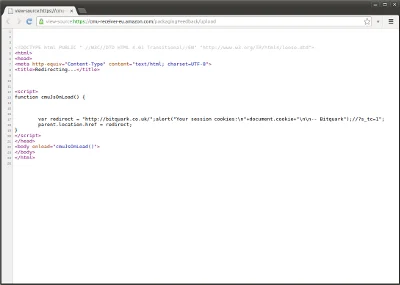
The two screenshots show the injected script executing and the page source during the attack, where the redirect string is broken out of and the payload sits directly after the variable assignment.
Step 3: avoid the browser's XSS filter
Because the attack is structured around a fairly innocuous looking string, it does not trigger Chrome's XSS protection. The researcher notes this as an added bonus.
Root cause
The application reflects the client-controlled failureRedirect value into a JavaScript string inside an inline <script> block without properly encoding quotation marks. The only validation observed was that the value had to start with a valid protocol, which the payload satisfies by beginning with http://bitquark.co.uk/. The useJSRedirect parameter selects the vulnerable code path: with 0 the value goes into a Location header, with 1 it goes into the script. The protocol check does not constrain the rest of the string, and the attack did not trigger Chrome's XSS protection.
Impact
The payload executes arbitrary JavaScript in the returned page and reads document.cookie for that origin. The report does not describe any other impact, and no bounty was paid: Amazon replied that it operates under a responsible disclosure policy and does not offer a reward, though it acknowledges reporters of bona fide issues when it publishes an advisory.
Fix
Amazon reported the issue fixed on 2013-06-17, but testing on 2013-06-21 showed the script was still vulnerable. The researcher contacted Amazon again. On 2013-07-01 Amazon sent a notification of a fix, explaining that the previous email had been sent accidentally before the fix was deployed. Testing on 2013-07-03 confirmed it was fixed as expected. The report does not describe the code change itself; the fix that addresses the root cause is to encode quotation marks (and other script-breaking characters) when embedding failureRedirect in the JavaScript string, or to stop reflecting it into script at all.
Variants to test
- Look for hidden redirect parameters on error paths, such as
failureRedirect,returnUrlorredirect, and check whether they are reflected into aLocationheader or into inline script. A positive result is a value that changes where the browser goes, or that appears verbatim inside a<script>block. - Look for a parameter that switches redirect style, such as
useJSRedirect, and try flipping its value. A positive result is a response body containing a JavaScript redirect snippet instead of aLocationheader. - Try payloads that begin with a valid protocol and then break out of the string, for example
http://example.com/";alert(1);//. A positive result is the alert firing, or the injected code appearing unencoded in the page source. - Check whether a fixed suffix is appended to the reflected value, as with
?s_tc=1here, and end payloads with//to comment it out. A positive result is the payload executing despite the suffix. - Test the same payloads in Chrome to see whether the browser's XSS filter catches them. A positive result is execution without an interstitial block, which suggests the payload looks innocuous enough to slip past the filter.
What happened, in plain words
Amazon sends orders in cardboard boxes, and on the side of the box there is a printed web address that leads to a page where you can tell Amazon what you thought of the packaging. That page is a form: you type your comments, press a button, and Amazon records them. The researcher who wrote this report had a spare 20 minutes, knew that Amazon runs a programme for people who report security problems, and decided to look at that form to see whether anything obviously wrong was going on.
What they found was a way to make the form run JavaScript code of the attacker's choosing inside a victim's browser. JavaScript is the programming language that web pages use to do things on your computer, such as react to clicks, change what is on screen, and read data the site has stored in your browser. Being able to run your own JavaScript on someone else's page is a serious problem, because that code runs with the same trust as the site itself. This class of bug is called cross-site scripting, usually shortened to XSS: an attacker gets their code to run as if it came from the site the victim is visiting.
This beginner's version walks through the same story in the same order: how the form was found, what was odd about it, how the oddity was turned into an attack, why the attack worked, what damage it could do, how it was fixed, and what to look for if you want to try the same kind of check on another site.
The starting point: a form on a box
Amazon ships orders in boxes that carry a printed URL pointing to the packaging feedback form at http://www.amazon.co.uk/packaging. A URL is just a web address, the thing you type into the address bar of a browser. The form lets a customer comment on how an order was packaged.
Amazon runs a vulnerability reporting programme, which is a published way for outsiders to tell a company about security problems they have found, usually with an email address or a web form dedicated to it. Because that programme exists, the researcher felt comfortable spending a little time poking at the form rather than just ignoring it.
The interesting part of the form is a hidden input named failureRedirect. A form on a web page is made of inputs: text boxes you can type in, checkboxes, buttons, and so on. A hidden input is one that exists in the page but is not shown to you; the browser still sends its value when the form is submitted. The name failureRedirect is a strong hint about what it does: "redirect" means send the browser somewhere else, and "failure" suggests it is used when something goes wrong.
That is exactly what it turned out to be. When you submit invalid input, the application follows the URL in failureRedirect and sends your browser there. In other words, when validation fails, the user is sent to a URL supplied by the client. "Client" here means the browser, which is to say the person using the site, which is to say anyone at all. A value that the server takes from the client and acts on without checking is the raw material of a great many security bugs, and this one is no exception.
Setting up
No accounts, roles or special tooling are described. The researcher worked against the public packaging feedback form reached from the printed URL, using a browser and the ability to craft and submit POST requests.
A POST request is one of the ways a browser talks to a web server. When you fill in a form and press submit, the browser usually sends a POST request carrying the values you entered. A GET request is the other common kind: it is what happens when you simply type an address or click a link, and the values travel in the address itself. The difference matters here because the attack is delivered as a form that the victim submits, which produces a POST.
Finding it
After a few dead ends, the researcher noticed the hidden failureRedirect field. Testing showed that the URL in that field could be set to any domain, as long as it started with a valid protocol. A protocol is the first part of a web address, the http:// or https:// bit, which tells the browser how to talk to the server. A domain is the name of a site, such as example.com.
So the check was: does the value begin with something like http://? If yes, the browser was sent there. Nothing else about the destination was checked. That behaviour on its own is called an open redirect: a site that will happily forward its visitors to any address someone supplies. Open redirects are often treated as low severity, because on their own they just move you to another page. But they are a useful building block for phishing, where an attacker sends a link that looks like it belongs to a trusted site but ends up somewhere else. And, as the researcher found, there was more to it.
The screenshot shows the packaging feedback form as it normally appears, the page a customer reaches from the address printed on the box.
By default the redirect was performed with the standard Location HTTP header. HTTP is the language browsers and servers use to exchange pages and data. A response from a server is made of headers, which are small labelled pieces of information about the response, followed by the body, which is the actual content. The Location header is the standard way to tell a browser "the thing you asked for is over there, go to this address instead". When you visit a page and are bounced to another one without clicking anything, a Location header is usually what did it.
The researcher noticed a second parameter, useJSRedirect, which in normal use was always set to 0. A parameter is a named value sent along with a request, like a setting. This one had a name that reads as "use JavaScript redirect", and a value of 0, which in this context means "off". Changing it to 1 made the script return a small JavaScript redirect snippet instead of the Location header:
<!DOCTYPE html PUBLIC "-//W3C//DTD HTML 4.01 Transitional//EN" "http://www.w3.org/TR/html4/loose.dtd">
<html>
<head>
<meta http-equiv="Content-Type" content="text/html; charset=UTF-8">
<title>Redirecting...</title>
<script>
function cmuJsOnLoad() {
	var redirect = "http://www.amazon.co.uk/";
	parent.location.href = redirect;
}
</script>
</head>
<body onload="cmuJsOnLoad()">
</body>
</html>
Line by line, in plain words:
- The first line and the
<html>,<head>and<body>tags are the ordinary skeleton of an HTML page. HTML is the markup language pages are written in; tags in angle brackets describe the structure. - The
<meta>line declares that the page is HTML encoded as UTF-8, a common character encoding. It is boilerplate. <title>Redirecting...</title>sets the text shown in the browser tab.<script>opens a block of JavaScript, the code the browser will run.function cmuJsOnLoad() {starts the definition of a function, which is a named block of code that can be called later. The name iscmuJsOnLoad.var redirect = "http://www.amazon.co.uk/";creates a variable calledredirectand gives it the valuehttp://www.amazon.co.uk/. A variable is a named box that holds a value. In the real application, this is where the value offailureRedirectis placed.parent.location.href = redirect;tells the browser to navigate to whatever address is in that variable.parentrefers to the page that contains this one, andlocation.hrefis the address currently being viewed.- The closing braces and tags end the function, the script block and the page.
<body onload="cmuJsOnLoad()">means: when the page has finished loading, run the function calledcmuJsOnLoad.
So the whole page exists to do one thing: as soon as it loads, send the browser to the address in the redirect variable. The snippet places the failureRedirect value into that variable. Quotation marks inside that string were not properly encoded, so it was trivial to break out of the redirect code and execute arbitrary JavaScript inside the <script> tag that the packaging feedback form itself returns.
"Not properly encoded" needs a moment. In the generated code, the value sits between two double quotes: var redirect = "...";. The double quotes mark where the string starts and ends. If the value itself contains a double quote, and that quote is not escaped (turned into a harmless form such as \"), then the browser treats it as the end of the string. Everything after it is then read as code rather than as text. That is the break-out: the attacker supplies a quote, the string ends early, and whatever comes next is executed.
Exploitation
Step 1: switch the redirect to JavaScript mode
Set useJSRedirect to 1 so that the response contains the inline script shown above rather than a Location header. The failureRedirect value is then embedded as the redirect variable. This step matters because the Location header path does not put the value into a script at all; only the JavaScript path does, and only the JavaScript path can be broken out of in this way.
Step 2: break out of the string
Submit a failureRedirect value that closes the double-quoted string and appends arbitrary JavaScript. The researcher delivered it as a POST to the form endpoint:
<form action="https://cmu-receiver-eu.amazon.com/packagingFeedback/upload" method="post" enctype="multipart/form-data">
	<input type="hidden" name="failureRedirect" value='http://bitquark.co.uk/";alert("Your session cookies:\n"+document.cookie+"\n\n-- Bitquark");//' />
	<input type="hidden" name="useJSRedirect" value="1" />
</form>
Line by line, in plain words:
<form ...>opens an HTML form. Theactionattribute is the address the form will be sent to, herehttps://cmu-receiver-eu.amazon.com/packagingFeedback/upload. Themethod="post"says to send it as a POST request. Theenctype="multipart/form-data"is the encoding used when a form may contain files.- The first
<input>is a hidden field namedfailureRedirect. Its value is the payload. Hidden means the victim never sees it; it is sent anyway. - The second
<input>is a hidden field nameduseJSRedirectwith the value1, which switches the response to the JavaScript redirect path from Step 1. - The closing
</form>ends the form. There is no submit button in this snippet, so the attacker would need to arrange for the form to be submitted, for example with a button or a line of script.
Now the payload itself, piece by piece:
http://bitquark.co.uk/is a perfectly ordinary URL. It is there because the only check the application performed was that the value starts with a valid protocol, and this satisfies it."is the double quote that closes the string in the generated script. Everything after it is no longer treated as part of the address.;ends the statement, so the next piece is read as a fresh instruction.alert(...)is a JavaScript function that pops up a dialog box with a message. It is the classic way to prove that code is running."Your session cookies:\n"+document.cookie+"\n\n-- Bitquark"builds the message shown in that dialog.document.cookieis the browser's way of reading the cookies that belong to the current site. A cookie is a small piece of data a site stores in your browser, and it is commonly used to remember who you are after you log in. The\nsequences are newlines, so the message is laid out neatly, and-- Bitquarkis a signature.//starts a comment in JavaScript: everything after it on that line is ignored by the browser.
That comment matters. A ?s_tc=1 string is always appended to the URL, and without the comment it would generate an error and stop the exploit code from running. In other words, the application adds a fixed suffix to the value, and that suffix would otherwise end up sitting in the middle of the injected code and break it. The // swallows the suffix harmlessly.
The two screenshots show the injected script executing and the page source during the attack, where the redirect string is broken out of and the payload sits directly after the variable assignment.
Step 3: avoid the browser's XSS filter
Because the attack is structured around a fairly innocuous looking string, it does not trigger Chrome's XSS protection. Chrome, Google's browser, has a built-in filter that tries to spot reflected XSS attacks and block them. "Reflected" means the malicious value is sent in the request and immediately echoed back in the response, which is exactly what happens here. The filter works by pattern matching, and a payload that begins with an ordinary-looking URL and only later turns into code can slip past it. The researcher notes this as an added bonus.
Root cause
The application reflects the client-controlled failureRedirect value into a JavaScript string inside an inline <script> block without properly encoding quotation marks. "Reflects" means it takes a value from the request and writes it straight into the response. "Inline script" means JavaScript written directly inside the HTML page rather than loaded from a separate file.
The only validation observed was that the value had to start with a valid protocol, which the payload satisfies by beginning with http://bitquark.co.uk/. The useJSRedirect parameter selects the vulnerable code path: with 0 the value goes into a Location header, with 1 it goes into the script. The protocol check does not constrain the rest of the string, and the attack did not trigger Chrome's XSS protection.
A useful way to picture the mistake: imagine a form letter with a blank that says "Dear ____,". If someone writes Bob. PS: please send money, the letter still reads as intended up to the full stop, and then contains an instruction the author never meant to include. Encoding the quote is the equivalent of making sure anything written in the blank stays inside the blank.
Impact
The payload executes arbitrary JavaScript in the returned page and reads document.cookie for that origin. "Origin" means the combination of protocol, domain and port that a browser uses to decide which site a page belongs to; cookies are tied to an origin, and script running on a page can read the cookies for that same origin.
The report does not describe any other impact, and no bounty was paid: Amazon replied that it operates under a responsible disclosure policy and does not offer a reward, though it acknowledges reporters of bona fide issues when it publishes an advisory. A responsible disclosure policy is a company's stated process for receiving and handling reports of security problems, usually with a promise not to take legal action against people who follow it.
Fix
Amazon reported the issue fixed on 2013-06-17, but testing on 2013-06-21 showed the script was still vulnerable. The researcher contacted Amazon again. On 2013-07-01 Amazon sent a notification of a fix, explaining that the previous email had been sent accidentally before the fix was deployed. Testing on 2013-07-03 confirmed it was fixed as expected.
Encoding here means turning a character that has special meaning in code into a form that is displayed as text instead, so a quote supplied by a user can never end the string early.
Variants to test
If you want to look for the same kind of problem on a site you are allowed to test, these are the checks the report suggests, in order:
- Look for hidden redirect parameters on error paths, such as
failureRedirect,returnUrlorredirect, and check whether they are reflected into aLocationheader or into inline script. A positive result is a value that changes where the browser goes, or that appears verbatim inside a<script>block. Start by submitting the form with an obviously invalid entry and watching where the browser ends up. - Look for a parameter that switches redirect style, such as
useJSRedirect, and try flipping its value. A positive result is a response body containing a JavaScript redirect snippet instead of aLocationheader. You can see the response body in your browser's developer tools, under the network tab. - Try payloads that begin with a valid protocol and then break out of the string, for example
http://example.com/";alert(1);//. A positive result is the alert firing, or the injected code appearing unencoded in the page source. Viewing the page source is how you check the second half of that. - Check whether a fixed suffix is appended to the reflected value, as with
?s_tc=1here, and end payloads with//to comment it out. A positive result is the payload executing despite the suffix. - Test the same payloads in Chrome to see whether the browser's XSS filter catches them. A positive result is execution without an interstitial block, which suggests the payload looks innocuous enough to slip past the filter. An interstitial is the warning page a browser shows instead of the page you asked for when it thinks something is wrong.
Glossary
- API: a defined way for one piece of software to ask another for something, like a menu of requests a service accepts.
- Cookie: a small piece of data a website stores in your browser, often used to remember that you are logged in.
- Cross-site scripting (XSS): a bug where an attacker gets their own code to run inside someone else's web page, as if the site itself had served it.
- Domain: the name of a website, such as
example.com. - Encoding (escaping): turning characters that have special meaning in code into harmless text, so user input cannot change how the code is read.
- Endpoint: the specific address on a server that a request is sent to.
- Form: the part of a web page with fields you fill in and a button you press to send the values to a server.
- Function: a named block of code that can be run when called.
- GET request: a request that asks for something, with values carried in the address itself.
- Header: a small labelled piece of information sent alongside a request or response, such as
Location. - Hidden input: a form field that exists in the page but is not shown to the user; its value is still sent.
- HTML: the markup language web pages are written in.
- HTTP: the language browsers and servers use to exchange pages and data.
- Inline script: JavaScript written directly inside an HTML page rather than loaded from a separate file.
- JavaScript: the programming language web pages use to run code in your browser.
Locationheader: the standard response header that tells a browser to go to a different address.- Open redirect: a feature that will forward a visitor to any address someone supplies, without checking where it goes.
- Origin: the combination of protocol, domain and port that a browser uses to decide which site a page belongs to.
- Parameter: a named value sent with a request, like a setting.
- Payload: the value an attacker sends to trigger a bug.
- POST request: a request that sends values to a server, typically what happens when you submit a form.
- Protocol: the first part of a web address, such as
http://orhttps://, which says how to talk to the server. - Reflected: a value from a request that is written straight back into the response.
- Responsible disclosure policy: a company's stated process for receiving and handling reports of security problems.
- String: a piece of text in code, usually written between quotes.
- URL: a web address.
- Validation: checking that input meets expected rules before using it.
- Variable: a named box in code that holds a value.
- Vulnerability reporting programme: a published way for outsiders to tell a company about security problems they have found.