How I got access to millions of [redacted] accounts
A script that accepted a URL parameter could be made to send requests to an external server, and those requests included the current user's authentication token plus an internal service token. By trying several similar scripts, the researcher obtained a superuser token that allowed full access to other users' accounts, including personal information, password changes, and files.

I'd like to start by saying that the company involved has my full respect for handling security in a mature manner and actively seeking researchers to take a deep look at their products. It's important to note that during testing I did not access personal data or files belonging to users other than my own.
The full write-up lives on its author's site
It belongs to its author, so we link to it rather than copy it. The other two tabs are our own rewrites, checked against it.
Context
The target was a web application run by a company that was running a time-limited, invite-only bug bounty. The researcher notes that the company handled the report maturely and actively sought researchers to look at its products. During testing the researcher did not access personal data or files belonging to users other than their own.
The feature at the centre of the report is a script that takes a URL parameter and fetches a URL. The application also uses JSON Web Tokens (JWTs) for authentication: every POST request requires an Authorization header containing credentials in JWT format. That design makes classic CSRF attacks against the application effectively impossible, but it also means that any token an attacker can obtain can be decoded to reveal the username, permissions and other information about its owner.
Setup
The bounty had been running for nearly two weeks when the researcher joined, with 24 hours left on the clock. No specific accounts, roles, tools or versions are described beyond the log script the researcher set up to capture out-of-band requests. The precondition for the main finding is that the vulnerable script can be made to issue a request to an attacker-controlled webserver.
Finding it
Early testing produced little that was new: an information leak, header injection and an XSS, all of which had already been reported several times. The interesting discovery came from a script that was passed a URL parameter. A URL parameter that drives a server-side fetch is a classic sign of a request-forgery or out-of-band issue, and experimentation confirmed it: the application could be made to place requests to an external webserver, as long as a particular path was present in the URL. The researcher set up a log script and captured the requests for later analysis.
Exploitation
Step 1: Confirm out-of-band requests
By supplying URLs that pointed at the researcher's own server and included the required path, the researcher caused the application to make requests to that server. The captured requests were logged for analysis. This established that the URL parameter was not restricted to internal or allow-listed destinations.
Step 2: Test for reflected XSS
The researcher injected various URLs and examined the responses, checking whether data returned by the attacker-controlled server could be used to trigger an XSS. It could not: everything ended up properly encoded in a clean JSON string.
Step 3: Test for internal reconnaissance
The same script could be used to perform reconnaissance on the internal network, which the researcher describes as curious. The researcher notes the script could be used to perform reconnaissance on the internal network.
Step 4: Inspect the captured request headers
The POST request received from the remote server did not just contain the usual headers. It also contained a custom header named X-User-Token, which held a full copy of the user's authentication token. With a single call to the vulnerable script, the researcher would be handed the security token, and therefore the account, of the current user.
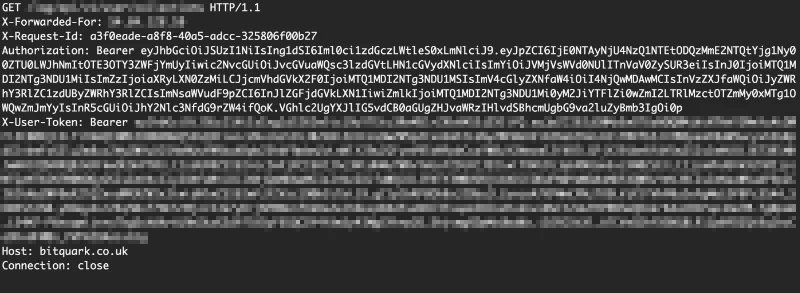
The image shows the captured HTTP request containing the user's authentication token.
Step 5: Decode the second token
The request to the researcher's server also contained an Authorization header with another, distinct security token, apparently used for internal authentication between services. Decoding it in a JWT debugger revealed the name of the user whose token it was: webproxy. The account had some permissions the researcher had not seen before, but after testing, the extra permissions turned out to be fairly limited in scope.
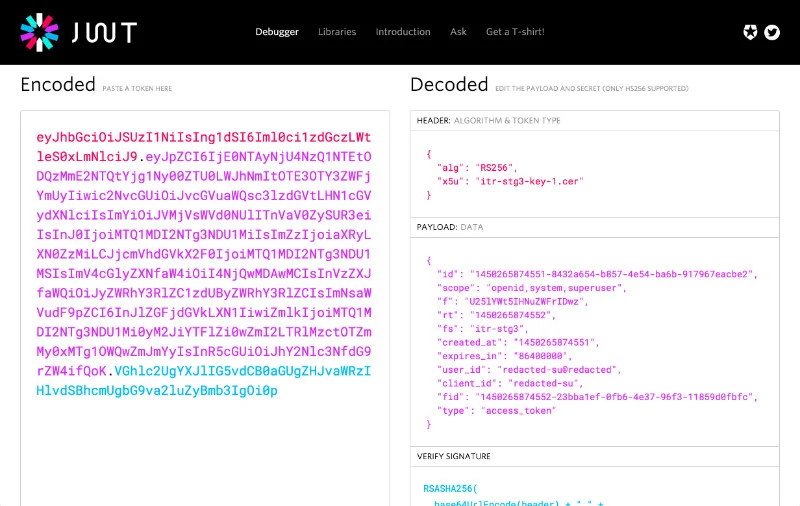
The image shows the JWT token, which can be decoded to reveal the username, permissions and other information about the owner.
Step 6: Repeat across the other scripts
By this point the researcher had a few other scripts that took a URL parameter and suffered from similar out-of-band request issues, each slightly different in the way it needed to be called to perform the desired action. Trying each of the URLs in turn produced the webproxy user each time, until one of the requests contained something different.
Step 7: Obtain the superuser token
One of the captured requests carried a token for a superuser account. The researcher does not disclose the account name. Checking the permissions on this new token showed they were very impressive, described as superhero-like. Setting the token as their own and trying a few API calls, the researcher could do everything: access personal information of another account, change their password, and list and download their personal files. This was found on the very last day of the bounty.
Root cause
The vulnerable script accepted a URL parameter and made a request to it, and requests to an external webserver succeeded as long as a particular path was present in the URL. The captured out-of-band request contained a custom X-User-Token header carrying the user's full authentication token, and an Authorization header carrying a separate internal service token. Because the destination was attacker-controlled, both tokens were delivered to the attacker. The JWT design that made CSRF impractical did nothing here, since the tokens were handed over directly rather than replayed by a browser. The report does not describe the code itself, so the exact implementation mistake is not stated.
Impact
An attacker who can make a victim's session trigger the vulnerable script obtains that user's authentication token and can take over the account. With the superuser token the researcher could access another account's personal information, change its password, and list and download its personal files. The internal webproxy token gave only limited extra permissions. The researcher states that during testing they did not access personal data or files belonging to users other than their own.
Fix
The bugs were escalated, validated, and 21 hours later patches were pushed. The report does not describe what the patches changed.
Variants to test
- Any parameter that takes a URL and causes a server-side fetch: point it at a logging server and check whether a request arrives. A positive result is an inbound request from the application's infrastructure.
- The same parameter with a path component the application expects: if the fetch only fires when a particular path is present, include it and watch for the request.
- Inspect every captured request for custom headers and
Authorizationheaders. A positive result is a token, cookie or credential that belongs to the application rather than to your own server. - Decode any JWT you capture and check the username and permissions. A positive result is an identity or permission set you did not expect, such as an internal service account.
- Repeat across every script that accepts a URL parameter, since each may need a slightly different call to trigger the fetch. A positive result is a token from a different, more privileged account.
- Check whether data returned from your server is reflected into the response. A positive result is unencoded output; in this report it was properly encoded in a clean JSON string, so no XSS was possible.
What happened, in plain words
A security researcher looked at a website run by a company that was running a bug bounty. A bug bounty is a programme where a company invites outside people to try to break into its systems and pays or thanks them for reporting what they find, instead of getting angry about it. This particular bounty was time-limited, meaning the window for finding bugs was closing.
The researcher found a script on the site that took a web address (a URL) from the visitor and then went off to fetch that address. That is a bit like a hotel concierge who will fetch anything from any shop you name, without checking whether the shop is one the hotel trusts. By pointing that script at a server the researcher controlled, the researcher could watch the site make requests to that server. Those requests turned out to carry the logged-in user's security token, which is the digital equivalent of a passport: whoever holds it is treated as that user. With the token, the researcher could act as the user. Eventually one of the requests carried a token for a superuser, an account with very broad powers, and with it the researcher could read another account's personal information, change its password, and list and download its files.
The company responded quickly: the bugs were escalated, validated, and patches were pushed 21 hours later. The researcher notes that during testing they did not access personal data or files belonging to users other than their own.
The setting
The target was a web application, meaning a program you use through your browser rather than something installed on your computer. The company behind it ran a time-limited bug bounty. The researcher says the company handled the report maturely and actively looked for researchers to examine its products.
Two features of the application matter for the story:
- A script that takes a URL parameter and fetches that URL. A URL parameter is the part of a web address after the question mark, like
?page=2; it is a value the visitor supplies and the site reads. A script is a small program on the server that does something with that value. The script was passed a URL parameter and could be made to fetch an address. - Authentication by JSON Web Token, or JWT. Authentication means proving who you are. A JWT is a compact string of characters that the server issues after you log in and that your browser sends back with later requests, so the server can recognise you without asking for your password again. Think of a wristband at an event: you show your ticket once, get the wristband, and after that the staff just glance at the wristband. Every POST request, which is the kind of request a browser sends when it submits a form or sends data to be processed, had to carry an
Authorizationheader containing credentials in JWT format. A header is a small labelled line of extra information attached to a request, like the address block on an envelope.
That JWT design has a side effect the researcher points out. Classic CSRF attacks become effectively impossible. CSRF, cross-site request forgery, is a trick where a malicious website makes your browser send a request to another site while you are logged in there, so the request carries your credentials without you meaning to send it. Because this application needs a JWT in a header, and a random website cannot read your token to put it in that header, the trick does not work. But the same design is useful to an attacker in a different way: a JWT can be decoded, and decoding it reveals the username, permissions and other information about the owner of the token. A JWT is not encrypted by default; it is more like a sealed envelope with a see-through window, tamper-evident but readable.
Finding it
The bounty had been running for nearly two weeks when the researcher joined, with 24 hours left on the clock. Early testing produced little that was new: an information leak (some data exposed that should not be), header injection (a way of slipping extra headers into a response), and an XSS. XSS, cross-site scripting, is when an attacker gets their own code to run inside another person's browser session on a site, for example by getting text they control displayed as if it were part of the page. All three had already been reported several times, so they were not the prize.
The interesting discovery came from a script that was passed a URL parameter. When a URL parameter decides where the server goes to fetch something, that is a classic sign of a request-forgery or out-of-band issue. Request forgery means making the server send a request the attacker chose; out-of-band means the evidence comes back through a different channel than the normal response, for example a request arriving at a server the attacker runs. Experimentation confirmed it: the application could be made to place requests to an external webserver, as long as a particular path was present in the URL. A path is the part of a URL after the domain, like /shop/items. The researcher set up a log script, a small program that records incoming requests, and captured the requests for later analysis.
Exploitation
Step 1: Confirm out-of-band requests
By supplying URLs that pointed at the researcher's own server and included the required path, the researcher caused the application to make requests to that server. The captured requests were logged for analysis. This established that the URL parameter was not restricted to internal or allow-listed destinations. An allow-list is a list of destinations a program is permitted to contact; if the script had one, the researcher's server would not have been on it and no request would have arrived.
Why this step matters: before building anything on a suspicion, you confirm the behaviour. The arrival of a request at a server the researcher controls is proof that the application will talk to an arbitrary destination.
Step 2: Test for reflected XSS
The researcher injected various URLs and examined the responses, checking whether data returned by the attacker-controlled server could be used to trigger an XSS. The idea is simple: if the application fetches a page from the researcher's server and then shows that page's content to the victim without cleaning it, the researcher could put code in the page and have it run in the victim's browser. It could not: everything ended up properly encoded in a clean JSON string. JSON is a plain text format for structured data, and encoding means special characters are converted into harmless representations so they are displayed as text rather than interpreted as code.
Why this step matters: it rules out one path and tells you the output is handled safely, so the interesting part must be the request going out, not the data coming back.
Step 3: Test for internal reconnaissance
The same script could be used to perform reconnaissance on the internal network, which the researcher describes as curious. Reconnaissance means exploring to learn what exists, and an internal network is the private set of machines a company uses behind its public website, normally unreachable from the internet. If the script can be pointed at internal addresses, it can be used to probe what is there. The researcher notes the script could be used to perform reconnaissance on the internal network. A primitive here just means a basic capability you can build on.
Step 4: Inspect the captured request headers
The POST request received from the remote server did not just contain the usual headers. It also contained a custom header named X-User-Token, which held a full copy of the user's authentication token. With a single call to the vulnerable script, the researcher would be handed the security token, and therefore the account, of the current user.
The image shows the captured HTTP request containing the user's authentication token.
In plain words: the application did not merely fetch the address. It introduced itself to the researcher's server by presenting the logged-in user's wristband. Anyone who runs that server now holds the wristband and can use it until it expires or is revoked.
Step 5: Decode the second token
The request to the researcher's server also contained an Authorization header with another, distinct security token, apparently used for internal authentication between services. Services here means the separate programs a company runs that talk to each other, for example a web front end asking a file store for a document. They need to prove to each other who they are, and they do that with their own tokens. Decoding it in a JWT debugger, a tool that reads the contents of a JWT without needing the secret, revealed the name of the user whose token it was: webproxy. The account had some permissions the researcher had not seen before, but after testing, the extra permissions turned out to be fairly limited in scope.
The image shows the JWT token, which can be decoded to reveal the username, permissions and other information about the owner.
Why this step matters: the first token belonged to a normal user. The second belonged to an internal service account, which is a kind of robot user that programs use to log in to each other. Finding one is a sign that the request is crossing an internal boundary, and internal accounts sometimes have powers ordinary users do not.
Step 6: Repeat across the other scripts
By this point the researcher had a few other scripts that took a URL parameter and suffered from similar out-of-band request issues, each slightly different in the way it needed to be called to perform the desired action. Trying each of the URLs in turn produced the webproxy user each time, until one of the requests contained something different.
Why this step matters: one vulnerable script is a bug; several are a pattern. Each may need a slightly different URL to trigger the fetch, so you try them one by one and watch what comes back. The surprise is that one of them returns a different identity.
Step 7: Obtain the superuser token
One of the captured requests carried a token for a superuser account. A superuser is an account with the highest level of permission, the one that can do anything. The researcher does not disclose the account name. Checking the permissions on this new token showed they were very impressive, described as superhero-like. Setting the token as their own and trying a few API calls, the researcher could do everything: access personal information of another account, change their password, and list and download their personal files. This was found on the very last day of the bounty.
An API, application programming interface, is the set of addresses and rules a program exposes so other programs can ask it to do things, for example get user details or change password. When you use a website, your browser is often calling the site's API behind the scenes. Setting the token as their own means the researcher put the captured token into their own requests, so the server treated them as the superuser.
Why it worked
The vulnerable script accepted a URL parameter and made a request to it, and requests to an external webserver succeeded as long as a particular path was present in the URL. The captured out-of-band request contained a custom X-User-Token header carrying the user's full authentication token, and an Authorization header carrying a separate internal service token. Because the destination was attacker-controlled, both tokens were delivered to the attacker. The JWT design that made CSRF impractical did nothing here, since the tokens were handed over directly rather than replayed by a browser. The report does not describe the code itself, so the exact implementation mistake is not stated.
A useful comparison: a courier who will deliver a parcel to any address you name, and who staples the sender's house keys to the parcel before leaving, is not a secure courier. The problem is not that the courier travels; it is that the courier travels anywhere and carries secrets.
What it meant
An attacker who can make a victim's session trigger the vulnerable script obtains that user's authentication token and can take over the account. With the superuser token the researcher could access another account's personal information, change its password, and list and download its personal files. The internal webproxy token gave only limited extra permissions. The researcher states that during testing they did not access personal data or files belonging to users other than their own.
The fix
The bugs were escalated, validated, and 21 hours later patches were pushed. Escalated means passed up to the people who can act on it; validated means the company reproduced and confirmed the problem; a patch is a change to the software that removes the flaw. The report does not describe what the patches changed. A trust boundary is the line between systems that trust each other and systems that do not; credentials should not cross it.
Things to try on your own targets
These are the same checks the researcher performed, written as a checklist. Each one states what a positive result looks like, so you know when you have found something.
- Any parameter that takes a URL and causes a server-side fetch: point it at a logging server and check whether a request arrives. A positive result is an inbound request from the application's infrastructure.
- The same parameter with a path component the application expects: if the fetch only fires when a particular path is present, include it and watch for the request.
- Inspect every captured request for custom headers and
Authorizationheaders. A positive result is a token, cookie or credential that belongs to the application rather than to your own server. A cookie is a small piece of data a site stores in your browser and gets back on later requests, often used to remember that you are logged in. - Decode any JWT you capture and check the username and permissions. A positive result is an identity or permission set you did not expect, such as an internal service account.
- Repeat across every script that accepts a URL parameter, since each may need a slightly different call to trigger the fetch. A positive result is a token from a different, more privileged account.
- Check whether data returned from your server is reflected into the response. A positive result is unencoded output; in this report it was properly encoded in a clean JSON string, so no XSS was possible.
Glossary
- API: the set of addresses and rules a program exposes so other programs can ask it to do things, such as fetch a user's details or change a password.
- Authentication: proving who you are to a system, usually by logging in.
- Authorization header: a labelled line in a request that carries credentials, here a JWT, so the server can check who is asking.
- Bug bounty: a programme where a company invites outside researchers to find security flaws and report them, often with a reward.
- Cookie: a small piece of data a site stores in your browser and receives back on later requests, often used to keep you logged in.
- Credentials: the data that proves an identity, such as a password or a token.
- CSRF (cross-site request forgery): a trick where a malicious site makes your browser send a request to another site while you are logged in there, so your credentials ride along without your intent.
- Custom header: an extra labelled line added to a request beyond the standard ones, here
X-User-Token. - Encoding: converting special characters into harmless representations so they are shown as text rather than run as code.
- Escalated: passed up to the people with the authority to act on a report.
- Header: a small labelled line of extra information attached to a request or response, like the address block on an envelope.
- Header injection: slipping extra headers into a response where they do not belong.
- Information leak: exposure of data that should not be visible.
- Internal network: the private set of machines a company uses behind its public website, normally unreachable from the internet.
- Internal service account: a robot-like account that programs use to log in to each other, such as webproxy.
- JSON: a plain text format for structured data, made of names and values.
- JWT (JSON Web Token): a compact string issued after login that the browser sends back on later requests; it can be decoded to reveal the username, permissions and other details of its owner.
- JWT debugger: a tool that reads the contents of a JWT without needing the secret.
- Log script: a small program that records incoming requests so they can be examined later.
- Out-of-band: evidence that arrives through a different channel than the normal response, for example a request landing on a server the attacker runs.
- Parameter: a value supplied in a URL, usually after the question mark, that the site reads and acts on.
- Patch: a change to software that removes a flaw.
- Path: the part of a URL after the domain, such as
/shop/items. - Permissions: the actions an account is allowed to perform.
- POST request: the kind of request a browser sends when it submits a form or sends data to be processed.
- Primitive: a basic capability you can build further attacks on.
- Reconnaissance: exploring to learn what exists, for example probing an internal network.
- Request forgery: making a server send a request the attacker chose.
- Script: a small program, here one running on the server that fetches a URL it is given.
- Server-side fetch: the server, rather than your browser, going out to retrieve an address.
- Superuser: an account with the highest level of permission, able to do anything.
- Token: a string that stands in for your login, like a wristband at an event; whoever holds it is treated as you.
- Trust boundary: the line between systems that trust each other and systems that do not; credentials should not cross it.
- URL: a web address.
- Validated: confirmed by reproducing the problem.
- XSS (cross-site scripting): getting an attacker's code to run inside another person's browser session on a site.