Leaked Salesforce API access token at IKEA.com
IKEA's customer care form shared a Salesforce API access token with the browser to upload files, and the token was not restricted to the user's own support ticket, allowing access to other customer data. An attacker could use the token to query the Salesforce REST API and retrieve customer records such as names and phone numbers.
 Published on medium.com
This time we will learn how a relative simple and easy to spot bug can have a high impact; a potential data leak of customer data.
The full write-up lives on its author's site
It belongs to its author, so we link to it rather than copy it. The other two tabs are our own rewrites, checked against it.
Context
IKEA uses Salesforce as its Customer Relationship Management (CRM) platform for customer care support. Salesforce is easy to embed on a brand's own website through its API, and IKEA did exactly that for some of the contact forms on IKEA.com. This write-up is about one of those forms: a file upload on a customer care contact page that handed the visitor's browser a Salesforce API access token.
The starting point was a tweet from a social media account of the brand. Searching the brand's social media accounts for interesting subdomains and URLs is a useful manual technique alongside automated subdomain enumeration. The tweet deeplinked to https://social.ikea.es/KAirva, which resolved to https://ww9.ikea.com/es/es/contacto/formulario.php?cid=a1:of%7Ca2:es%7Ca3:csc_social%7Ccc:915, a simple page with a web form.
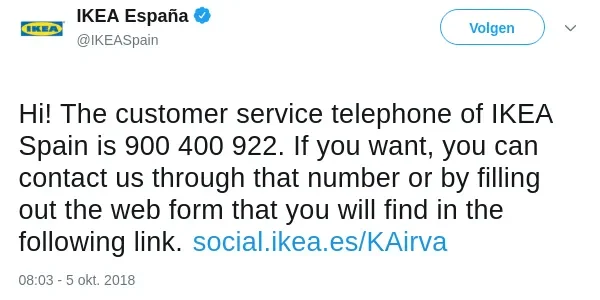
IKEA Spain Tweet
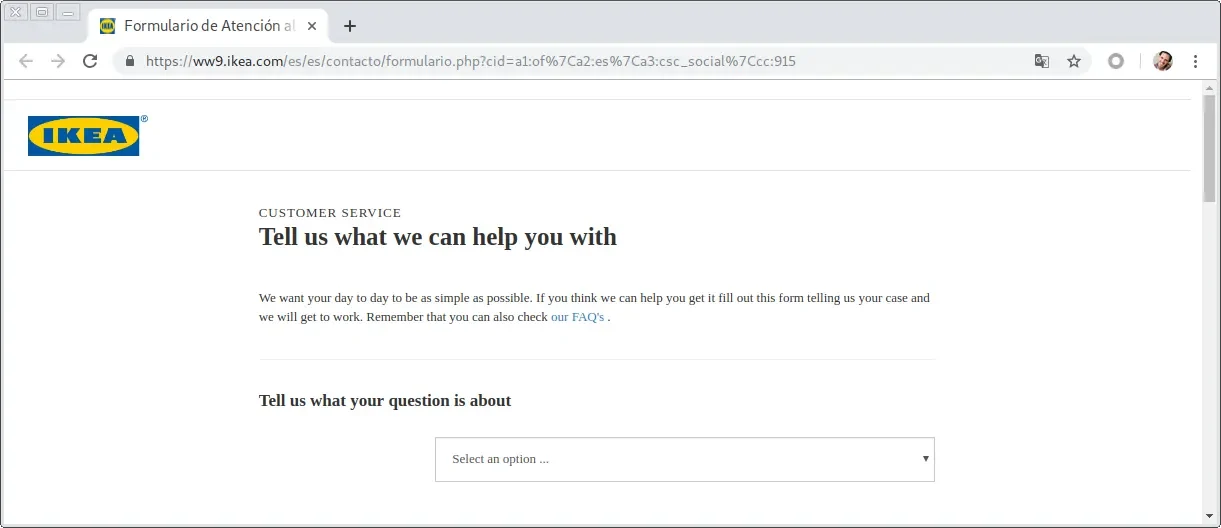
Setup
The tools used were Amass for subdomain enumeration, Burp Suite (including the Param Miner plugin and the Proxy History), and Chrome DevTools to watch the network requests made by the browser. No accounts, roles or special access were needed: the form was reachable by any visitor, and the whole issue was found by interacting with it as a normal user.
Finding it
Forms always deserve a closer look. The questions I ask of any form are: are there query parameters reflected in the source (reflected XSS), can I upload arbitrary files (stored XSS), or can I inject HTML into one of the fields that is later executed in the administrator's web interface (blind XSS)?
For the query parameters I ran Param Miner in Burp Suite to look for parameters reflected in the page source, then put candidate requests in Repeater to try to build a reflected XSS. On this page no reflected parameters vulnerable to XSS were found.
The next thing to check was the file upload: where do uploaded files end up, and can I upload my own HTML files to a public IKEA URL? I opened Chrome DevTools, selected a file, pressed the upload button and watched the network requests (the Burp Suite Proxy History shows the same thing).
What stood out was that the browser made quite a few requests to upload a simple file.
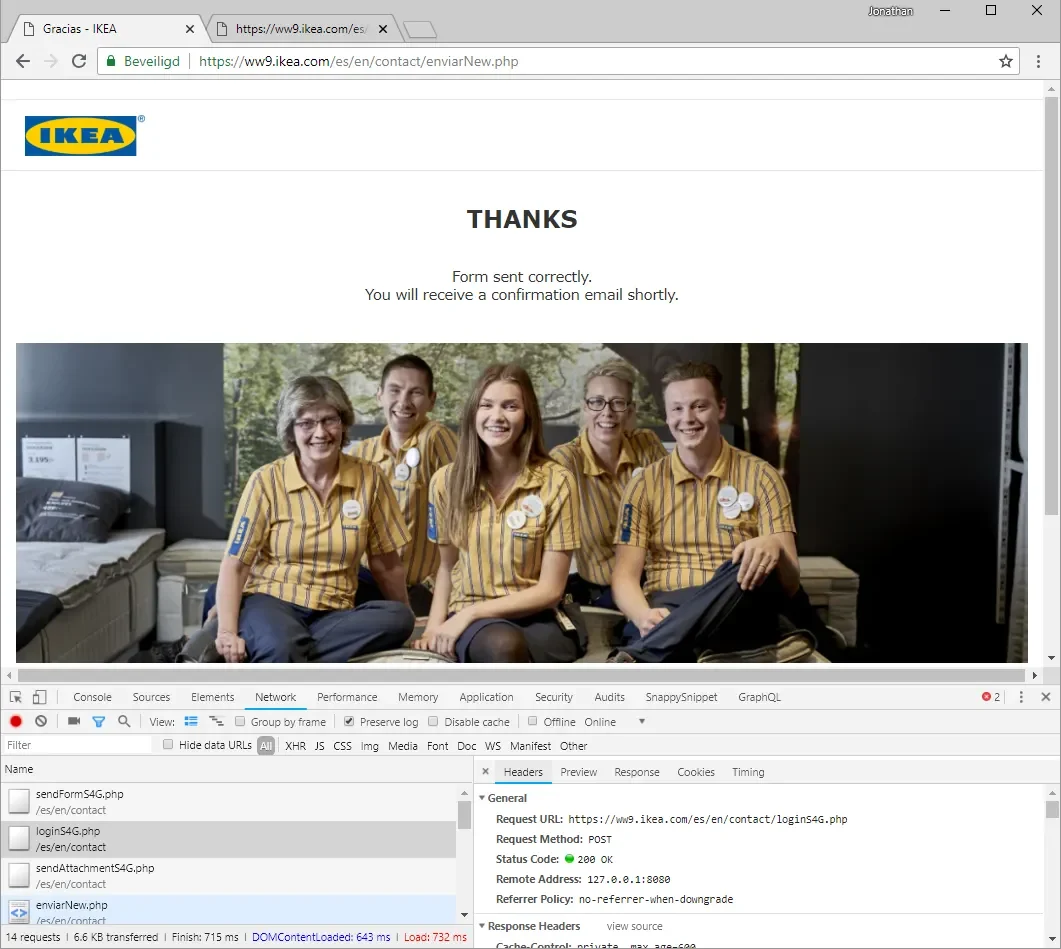
Three requests are needed for a simple file upload
- The first request
https://ww9.ikea.com/es/en/contact/sendFormS4G.phpcreates a Salesforce Object ID for the ticket and returns the ID. - The second request
https://ww9.ikea.com/es/en/contact/loginS4G.phpreturns a Salesforce API access token. - The third request
https://ww9.ikea.com/es/en/contact/sendAttachmentS4G.phpuploads the file to the Object ID returned by the first request, using the Salesforce API access token from the second request.
Three requests for a simple upload is cumbersome, but if it works it works. The interesting part is the API access token being shared with the browser. Does it only have access to our own Salesforce Object ID, or can it be used to access other objects as well? The token can be used to make requests directly to the Salesforce REST API.
Exploitation
Step 1: Read the Salesforce REST API documentation
Before sending anything, I checked the Salesforce REST API documentation for three things:
- How to use the access token in requests.
- How to check which objects we can access.
- How to create a list output of a specific object type.
Step 2: List the object types and our permissions
The first request lists the different types of objects and our access permissions:
curl https://yourInstance.salesforce.com/services/data/v37.0/sobjects/ -H "Authorization: Bearer token"
The Authorization: Bearer header carries the token that the contact form had handed to the browser. The response is a JSON document describing the available objects and what the token is allowed to do with them.

We can access, search, create and delete all the account objects. This means we may have a potential customer data leak.
The output shown is a small snippet of a 389kb JSON file. It contains 465 different object types, from AuthConfigs to Emailmessages, and for most of them we are allowed to query and retrieve them.
Step 3: Retrieve a small sample of customer records
During bug bounties you want to show the impact of a bug, but at the same time you need to be responsible. That means limiting the amount of data you request: don't dump the full database, a few records are enough to show the impact. I created a small list of 25 customers with their names and phone numbers by requesting a list of users from an account:
curl https://eu15.salesforce.com/services/data/v43.0/sobjects/Account/listviews/00B24000003oGRNEA2/results -H “Authorization: Bearer 00D24XXXXXXXXXXXXXX” -o poc1.json
The request targets a specific list view on the Account object and writes the response to poc1.json.
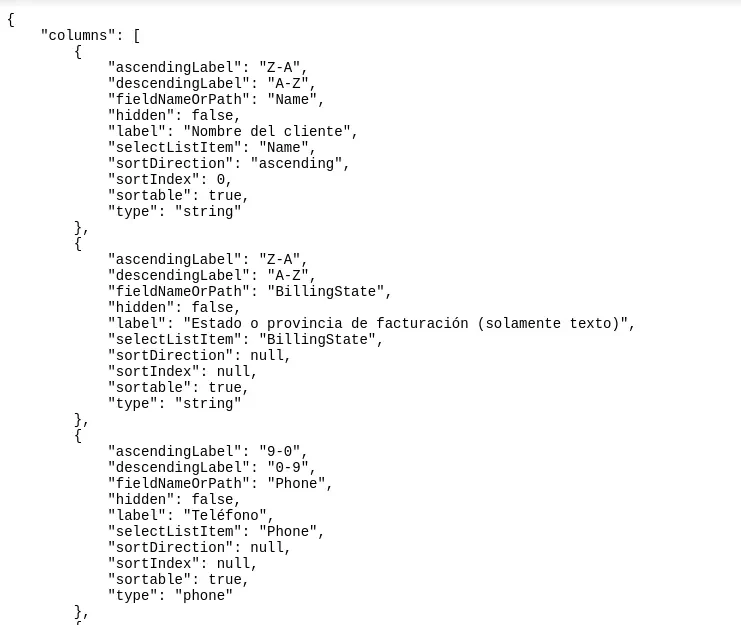
Output of poc1.json: definitions of the columns
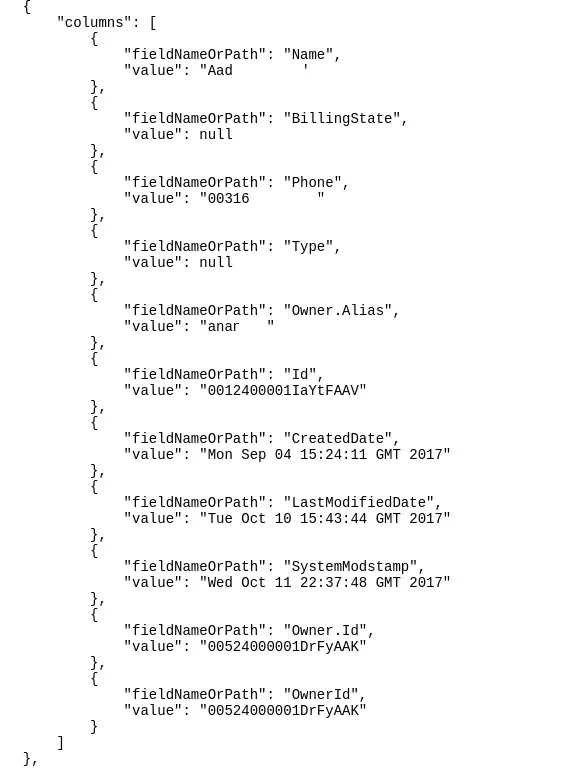
A snippet of the output, name and phone is censored from the screenshot
This proved that the bug may lead to a customer data leak, so it was time to write the report and inform IKEA.
Root cause
The file upload was handled by having the browser talk to Salesforce in three steps, and the second step handed a Salesforce API access token to the visitor. The token was not restricted to the visitor's own support ticket: it gave access to other customer data as well. The report recommends keeping the credential server side and restricting the token's permissions.
Impact
An attacker who uploads a file through the contact form receives a Salesforce API access token in the browser. With that token, requests to the Salesforce REST API can list the object types and permissions available, and for most of the 465 object types the token is allowed to query and retrieve records. In the proof of concept this included a list view on the Account object returning customer names and phone numbers. The result is a potential customer data leak. The report frames this as a potential leak rather than a confirmed mass exfiltration, and the sample was deliberately limited to 25 records.
Fix
IKEA fixed the bug and revoked the API key. The report's recommended solutions are:
- Restrict the access permissions of the shared access token.
- Don't share any access tokens with a visitor; handle the file upload server side.
Variants to test
- Other Salesforce-backed forms. Look for contact, support or upload forms that make several requests, one of which returns a token. A positive result is a response containing an access token that can then be used against the Salesforce REST API.
- Token scope checks. Take any token handed to the browser and request the object listing endpoint. A positive result is a response listing object types with query and retrieve permissions beyond the object the feature needs.
- List view access. If the token can read an
Accountlist view, request its results. A positive result is customer records such as names and phone numbers coming back. - Social media reconnaissance. Search the brand's Facebook, Twitter and LinkedIn accounts for deeplinks and domain names. A positive result is a link that resolves to a form or endpoint not found through subdomain enumeration alone.
- Form parameter reflection. Run Param Miner against the form and test reflected parameters in Repeater. A positive result is a parameter reflected in the page source that can be turned into reflected XSS.
- Upload destination. Check where uploaded files end up and whether HTML files can be uploaded to a public URL. A positive result is an uploaded HTML file served from a public IKEA URL.
What happened, in plain words
IKEA runs some of the contact forms on IKEA.com on top of Salesforce, a service that companies use to keep track of their customers and support conversations. One of those forms lets a visitor attach a file. To make that upload work, the website handed the visitor's own browser a key to IKEA's Salesforce account. That key was not limited to the visitor's own support ticket: it could also be used to read other customer records, such as names and phone numbers. This article walks through how the form was found, how the key was spotted, and how it was used to show the problem, in the same order as the original report.
A few words before we start, because they come back all the time:
- Salesforce is a customer relationship management (CRM) product. Think of it as a very large, shared address book and case file that a company's support staff use to look up who a customer is and what they have asked about.
- An API (application programming interface) is a way for one piece of software to talk to another without a human clicking buttons. A useful comparison is a restaurant: the menu is the API, the kitchen is the system, and you order by naming a dish rather than walking into the kitchen yourself. Salesforce publishes a REST API, which means you can ask it for data over ordinary web requests.
- A token (here, an access token) is a short string that acts like a temporary key or a cloakroom ticket. Whoever holds it is treated as allowed to do certain things, without typing a username and password each time. If that ticket is handed to the wrong person, they can use it too.
- curl is a command-line program that sends web requests. You give it a URL and some options, and it prints whatever the server sends back. It is the browser's address bar without the pictures.
Background
A previous report covered a local file inclusion bug at IKEA.com, which was complicated to exploit. This one is the opposite: a simple mistake that is easy to spot but has a serious consequence, a potential leak of customer data.
Many well known brands use Salesforce for customer care. Salesforce is designed to be embedded in a company's own website through its API, which is exactly what IKEA did for some of the contact forms on IKEA.com. The form in this report is a file upload on a customer care contact page, and the problem is that this form gave the visitor's browser a Salesforce API access token.
Finding the form
The search started the way many searches start: looking for interesting subdomains. A subdomain is the part in front of the main domain, as in shop.example.com versus example.com. Companies often have many of them, and some are forgotten or less protected.
Amass, a tool that collects subdomains from public data sets, gives a list to start from. Searching manually is never a bad idea either. One manual technique is to look at the brand's social media accounts: open Facebook, Twitter and LinkedIn, search for the brand name, look for domain names in the posts, and see what turns up.
IKEA Spain Tweet
That is how a tweet from an IKEA Spain account turned up. The tweet contained a link to https://social.ikea.es/KAirva, which redirected to https://ww9.ikea.com/es/es/contacto/formulario.php?cid=a1:of%7Ca2:es%7Ca3:csc_social%7Ccc:915. That address is a simple page with a web form on it.
The tweet deeplinks to a page that resolves to a simple contact form.
Why bother with social media when you have a subdomain scanner? Because a link in a tweet is a link a real customer followed, and it can point at a form or a parameter that the scanner never saw. It is a cheap extra pair of eyes.
Looking at the form
Forms deserve a closer look, always. For any form, three questions are worth asking:
- Are any of the values in the address (the query parameters, the
name=valuepairs after the?) copied into the page that comes back? If so, you may have reflected XSS, where an attacker's script is echoed back and runs in the victim's browser. - Can you upload arbitrary files? If an uploaded HTML file is later served from the site, that is stored XSS: the script is saved on the server and runs for whoever opens the file.
- Can you put HTML into one of the fields, HTML that is later shown inside the administrator's own web interface? That is blind XSS: you cannot see the result yourself, but staff can.
Checking the query parameters
To look for reflected parameters, the report used Param Miner, a plugin for Burp Suite. Burp Suite is a program that sits between your browser and the website and lets you read and change every request. Repeater is one of its windows: you send a request, look at the response, change something, send it again.
The method: run Param Miner to find parameters that appear in the page source, then take a promising request into Repeater and try to turn the reflection into a reflected XSS.
On this page, no reflected parameters vulnerable to XSS were found. That is a normal result, and it is worth saying plainly: most checks end in nothing, and you move on.
Watching the file upload
The next thing to check was the file upload. Two questions: where do uploaded files end up, and can you upload your own HTML file so that it is served from a public IKEA address?
To see what happens, open Chrome DevTools (the browser's built-in inspector), select a file, press the upload button, and watch the network requests. The Burp Suite Proxy History shows the same traffic.
What stood out was that the browser made quite a few requests just to upload one simple file.
Three requests are needed for a simple file upload
- The first request,
https://ww9.ikea.com/es/en/contact/sendFormS4G.php, creates a Salesforce Object ID for the ticket and returns that ID. - The second request,
https://ww9.ikea.com/es/en/contact/loginS4G.php, returns a Salesforce API access token. - The third request,
https://ww9.ikea.com/es/en/contact/sendAttachmentS4G.php, uploads the file to the Object ID from the first request, using the token from the second request.
An Object ID is simply the unique name Salesforce gives to one record, here one support ticket. It is like a parcel tracking number: it identifies exactly one item.
Three requests for one upload is cumbersome, but if it works it works. The interesting part is the second step. Why does the browser need a Salesforce access token at all, and what can that token do? Does it only reach our own ticket, or does it open the rest of the account as well? The token can be used to send requests straight to the Salesforce REST API, so that question can be answered directly.
Using the token
Step 1: Read the documentation
Before sending anything, the report checked the Salesforce REST API documentation for three things:
- how to use the access token in a request;
- how to check which objects the token can access;
- how to get a list output of a specific object type.
Reading the manual first is not a formality. It tells you the exact shape of the request, so that a failed attempt means something rather than nothing.
Step 2: Ask what the token is allowed to do
The first request lists the different types of objects and the access permissions:
curl https://yourInstance.salesforce.com/services/data/v37.0/sobjects/ -H "Authorization: Bearer token"
Line by line:
curlis the program sending the request.https://yourInstance.salesforce.com/services/data/v37.0/sobjects/is the address of the Salesforce API endpoint that describes the available objects.yourInstanceis a placeholder for the customer's own Salesforce address, andv37.0is the version of the API being called.-H "Authorization: Bearer token"adds a header, which is extra information sent along with the request. TheAuthorizationheader is where you prove who you are, andBearermeans "the holder of this token is allowed in".tokenis the placeholder for the real token string.
The response is a JSON document. JSON is a text format for structured data, a bit like a very strict shopping list with labels. It describes the available objects and what the token may do with them.
We can access, search, create and delete all the account objects. This means we may have a potential customer data leak.
The output shown is a small snippet of a 389kb JSON file. It contains 465 different object types, from AuthConfigs to Emailmessages, and for most of them the token is allowed to query and retrieve records. In plain terms: the cloakroom ticket did not open one hook, it opened most of the cloakroom.
Step 3: Take a small, responsible sample
During a bug bounty you want to show the impact, but you also need to be responsible. That means limiting how much data you ask for: do not dump the full database, a few records are enough to prove the point. The report created a small list of 25 customers with their names and phone numbers by requesting a list of users from an account:
curl https://eu15.salesforce.com/services/data/v43.0/sobjects/Account/listviews/00B24000003oGRNEA2/results -H “Authorization: Bearer 00D24XXXXXXXXXXXXXX” -o poc1.json
Line by line:
curlsends the request.https://eu15.salesforce.com/services/data/v43.0/sobjects/Account/listviews/00B24000003oGRNEA2/resultsis the address of a specific list view on theAccountobject. A list view is a saved filter that shows a set of records, like a saved search in an address book.Accountis the Salesforce object that holds company and customer records, and00B24000003oGRNEA2identifies this particular view.-H “Authorization: Bearer 00D24XXXXXXXXXXXXXX”sends the token in theAuthorizationheader, in the same way as the previous request. The token value is masked here.-o poc1.jsonwrites the response into a file calledpoc1.jsoninstead of printing it on screen.pocstands for proof of concept, the small demonstration that the problem is real.
Output of poc1.json: definitions of the columns
A snippet of the output, name and phone is censored from the screenshot
That was enough to show that the bug may lead to a customer data leak, so it was time to write the report and tell IKEA.
Why it happened
The upload was built so that the browser talks to Salesforce in three steps, and the second step hands a Salesforce API access token to the visitor. The token was not restricted to the visitor's own support ticket: it also gave access to other customer data. The report recommends keeping the credential on the server and restricting the token's permissions.
A comparison: a hotel that gives every guest a master key so they can open their own room has made a design mistake, even if the key works perfectly.
What the impact was
Anyone who uploads a file through the contact form receives a Salesforce API access token in their browser. With that token, requests to the Salesforce REST API can list the object types and permissions available, and for most of the 465 object types the token is allowed to query and retrieve records. In the proof of concept this included a list view on the Account object returning customer names and phone numbers. The result is a potential customer data leak. The report frames it as a potential leak rather than a confirmed mass exfiltration, and the sample was deliberately limited to 25 records.
The fix
IKEA fixed the bug and revoked the API key. The report's recommended solutions are:
- Restrict the access permissions of the shared access token.
- Do not share any access tokens with a visitor; handle the file upload server side.
What to try yourself
- Other Salesforce-backed forms. Look for contact, support or upload forms that make several requests, one of which returns a token. A positive result is a response containing an access token that can then be used against the Salesforce REST API.
- Token scope checks. Take any token handed to the browser and request the object listing endpoint. A positive result is a response listing object types with query and retrieve permissions beyond the object the feature needs.
- List view access. If the token can read an
Accountlist view, request its results. A positive result is customer records such as names and phone numbers coming back. - Social media reconnaissance. Search the brand's Facebook, Twitter and LinkedIn accounts for deeplinks and domain names. A positive result is a link that resolves to a form or endpoint not found through subdomain enumeration alone.
- Form parameter reflection. Run Param Miner against the form and test reflected parameters in Repeater. A positive result is a parameter reflected in the page source that can be turned into reflected XSS.
- Upload destination. Check where uploaded files end up and whether HTML files can be uploaded to a public URL. A positive result is an uploaded HTML file served from a public IKEA URL.
Glossary
- API: a way for one piece of software to ask another for data or actions, without a human clicking through screens.
- Access token: a string that acts as a temporary key, proving to a service that the holder is allowed to do certain things.
- Amass: a tool that collects subdomains from public data sets.
- Blind XSS: a cross-site scripting attack whose payload is stored and later runs in someone else's browser, typically an administrator's interface, so the attacker does not see it directly.
- Burp Suite: a program that sits between a browser and a website so requests and responses can be inspected and modified.
- Chrome DevTools: the inspection panel built into the Chrome browser, including a view of the network requests a page makes.
- CRM (customer relationship management): software a company uses to store customer details and support conversations.
- curl: a command-line program for sending web requests and printing the responses.
- Header: extra information sent alongside a web request or response, such as who is authorised.
- JSON: a text format for structured data, made of labelled values.
- List view: a saved filter in Salesforce that shows a particular set of records.
- Local file inclusion: a bug where a web application is tricked into loading a file from the server it should not load.
- Object ID: the unique identifier Salesforce gives to one record, such as one support ticket.
- Param Miner: a Burp Suite plugin that looks for parameters a page accepts or reflects.
- Query parameter: a
name=valuepair in a URL after the?, used to pass information to the page. - Reflected XSS: a cross-site scripting attack where the malicious input is echoed straight back in the response and runs in the victim's browser.
- Repeater: a Burp Suite window for sending a request, reading the response, editing and sending again.
- REST API: a web API that uses ordinary web requests and URLs to read and change data.
- Salesforce: a customer relationship management service used by companies for sales and customer care.
- Stored XSS: a cross-site scripting attack where the malicious input is saved on the server and runs for anyone who later views it.
- Subdomain: a part of a domain in front of the main name, as in
shop.example.com. - XSS (cross-site scripting): a bug where an attacker gets their own script to run inside another user's browser on a trusted site.