Medium Content spoofing and XSS
The jobs page on Medium's site took a job identifier from the URL and inserted it into a request to an external job API without validation, so an attacker could use path traversal to make the page display job content from any other company's account on that API. Because the page rendered that content as HTML, an attacker who controlled a posting on the API could inject script that ran on Medium's domain.
 Published on ahussam.me
Last week, I found a content spoofing bug in Medium’s jobs site, which can lead to stroed XSS.
The full write-up lives on its author's site
It belongs to its author, so we link to it rather than copy it. The other two tabs are our own rewrites, checked against it.
Context
Medium runs its job listings on a separate static page, jobs.medium.com/show.html. The page does not render the job description on the server. Instead it reads a jobId value from the URL and uses JavaScript to fetch the job details from Lever, an applicant tracking system whose API exposes a JSON endpoint per posting. The page then writes the returned JSON into the DOM to show the description and the apply link.
The researcher was not hunting on this site at all. He visited a job link out of curiosity about the technologies Medium uses:
https://jobs.medium.com/show.html?jobId=8b2157c9-f755-40f7-b2c7-e81c49a51664
The .html extension suggested a static page driven by JavaScript, and he likes reading JavaScript to learn techniques and look for DOM XSS.
Setup
No account, tool or special role was needed to find the bug. The only precondition was a browser and the public job page. For the escalation scenario, the attacker needs to be able to register an account at Lever, because the spoofed content is served from a Lever posting that the attacker controls.
Finding it
Reading show.html led to jobOpening.min.js, the file responsible for fetching the job details. The relevant part of the minified bundle is:
function(e,t,n){
"use strict";function r(e){return e&&e.__esModule?e:{default:e}}var i=n(120),o=r(i),s=n(131);
(0,o.default)((0,s.urlParam)("jobId"))},130:function(e,t){"use strict";
Object.defineProperty(t,"__esModule",{value:!0});
t.openingUrl=function(e){return"https://api.lever.co/v0/postings/medium/"+e},t.applyUrl=function(e){return"https://api.lever.co/v0/postings/medium/"+e+"?key=hfhW4CLqdCzAsQdyfQL5"}},131:function(e,t){"use strict";
function n(e){var t=new RegExp("[?&]"+e+"=([^&#]*)").exec(window.location.href);return t[1]||0}Object.defineProperty(t,"__esModule",{value:!0}),t.urlParam=n}});
The flow, as the researcher breaks it down, is:
- JavaScript gets the
jobIdparameter from the URL. - It passes the value of the parameter to a function as
e. - The function builds a URL to the Lever API by concatenating the fixed prefix
https://api.lever.co/v0/postings/medium/withe. - The code writes the JSON response to the page.
The urlParam helper extracts the value with a regular expression over window.location.href, so whatever text sits between jobId= and the next & or # becomes part of the API path. Nothing validates that the value is a bare identifier.
Exploitation
Step 1: confirm the normal request
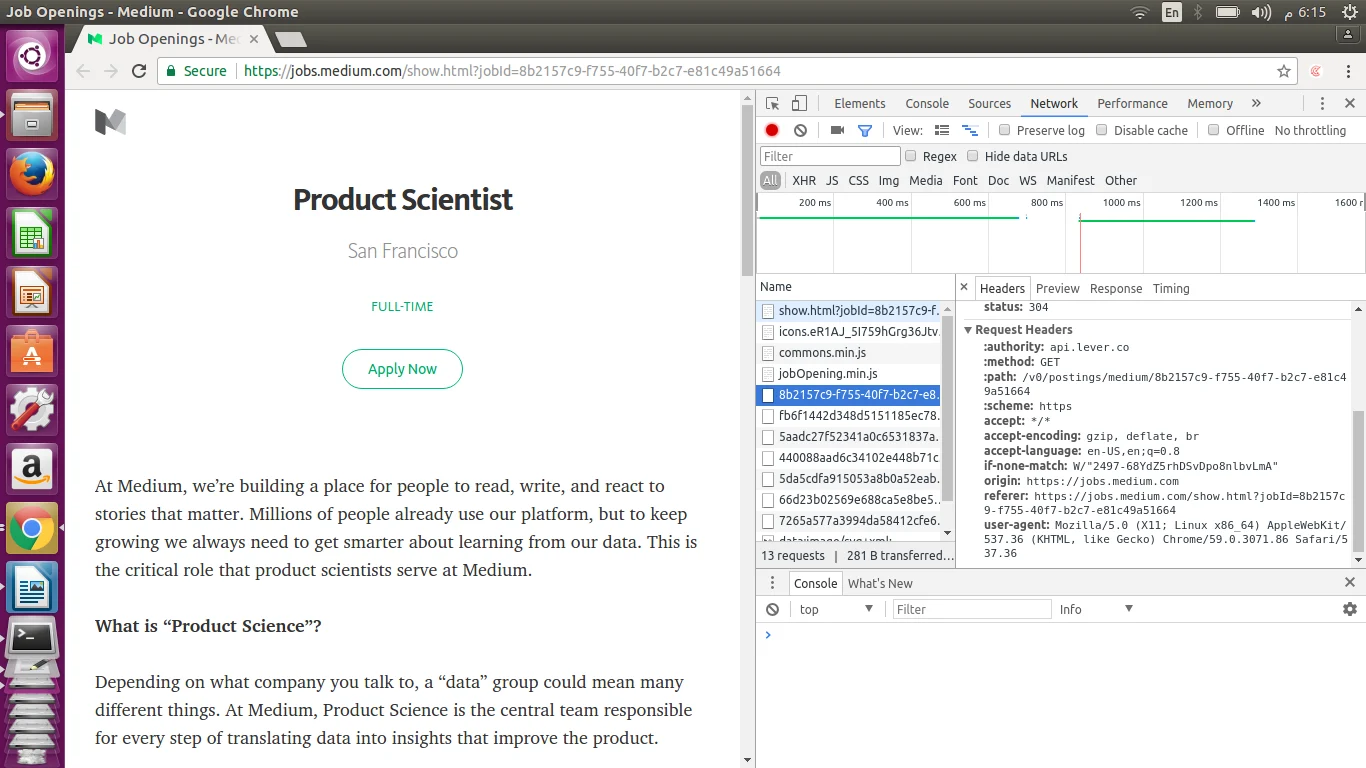
With a genuine Medium job ID, the page requests:
https://api.lever.co/v0/postings/medium/8b2157c9-f755-40f7-b2c7-e81c49a51664
Step 2: find a second organisation on Lever
Googling the endpoint surfaced other Lever customers, for example:
https://api.lever.co/v0/postings/hightechhigh/f427aa0d-8260-48e2-b93b-cad30d049729
This was one of the useful results the researcher found by googling the endpoint.
Step 3: traverse out of the medium path
The key was to change the path of the request using double dot (..) and a slash, then append the other organisation and posting ID. The proof of concept:
https://jobs.medium.com/show.html?jobId=../hightechhigh/f427aa0d-8260-48e2-b93b-cad30d049729
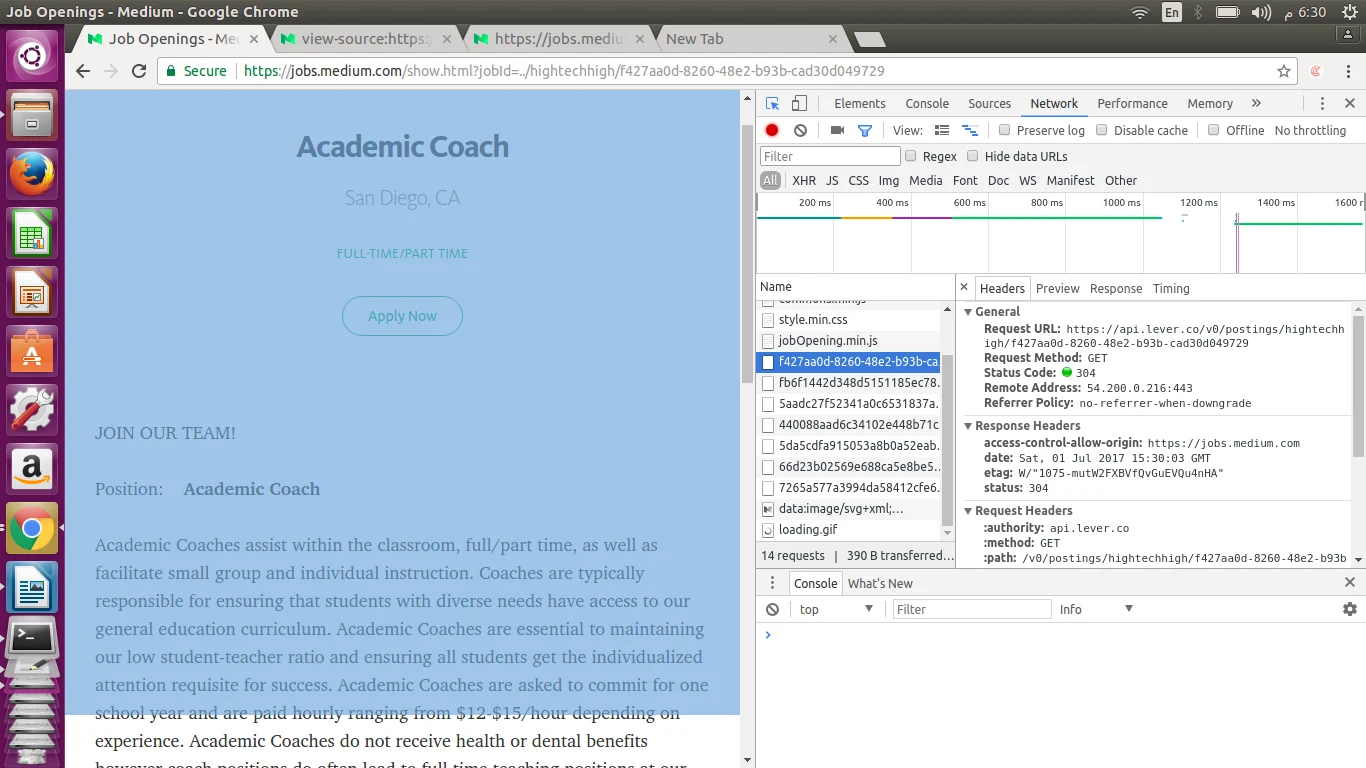
The jobId value ../hightechhigh/f427aa0d-8260-48e2-b93b-cad30d049729 is concatenated onto the fixed prefix, so the request resolves to the hightechhigh posting instead of a Medium one. The page renders that other organisation's job content under the jobs.medium.com origin.
Step 4: serve attacker-controlled content
An attacker can register an account at Lever, for example:
https://api.lever.co/v0/postings/hackerorg/XXXXXXXX-XXXXX-XXXX-XXXX-XXXXXXXXXXX
and then build the URL:
https://jobs.medium.com/show.html?jobId=../hackerorg/XXXXXXXX-XXXXX-XXXX-XXXX-XXXXXXXXXXX
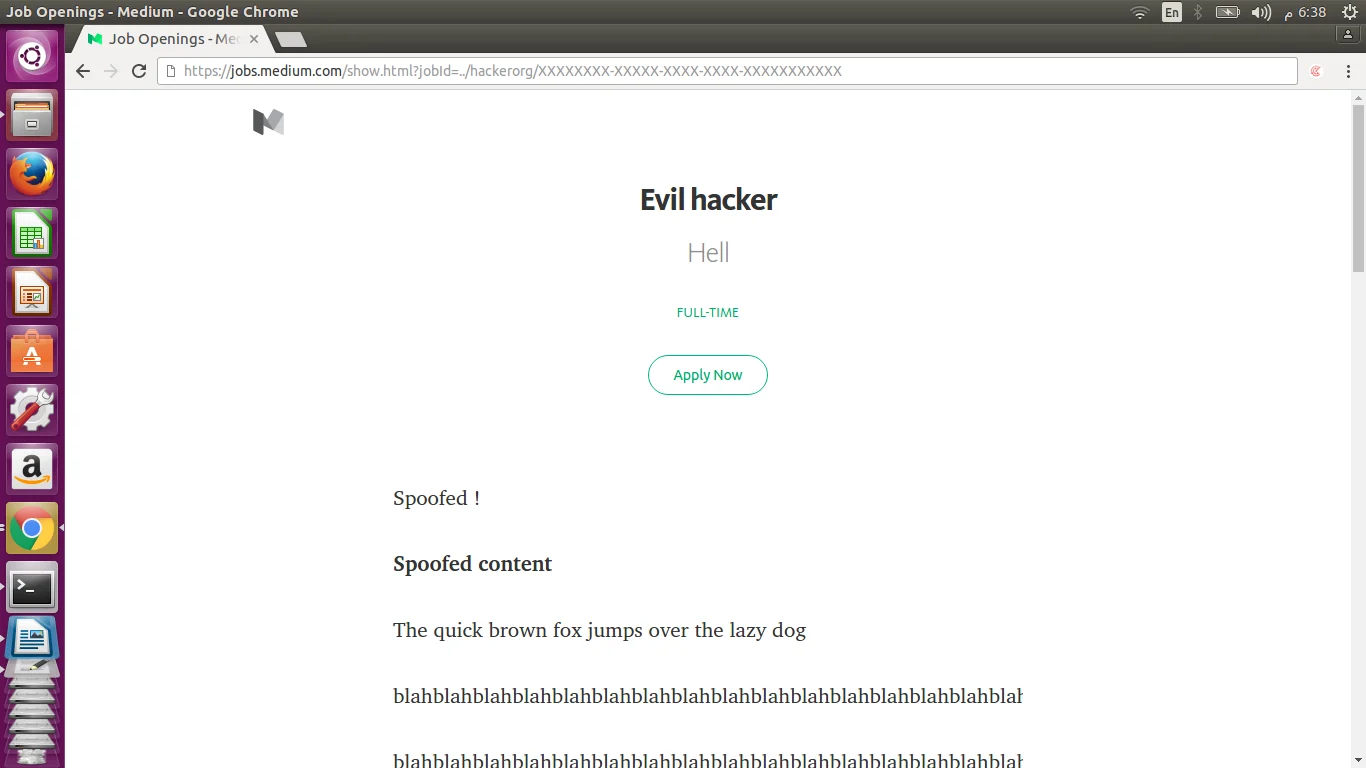
The page now displays the attacker's own posting content on Medium's jobs domain.
Step 5: escalate to stored XSS
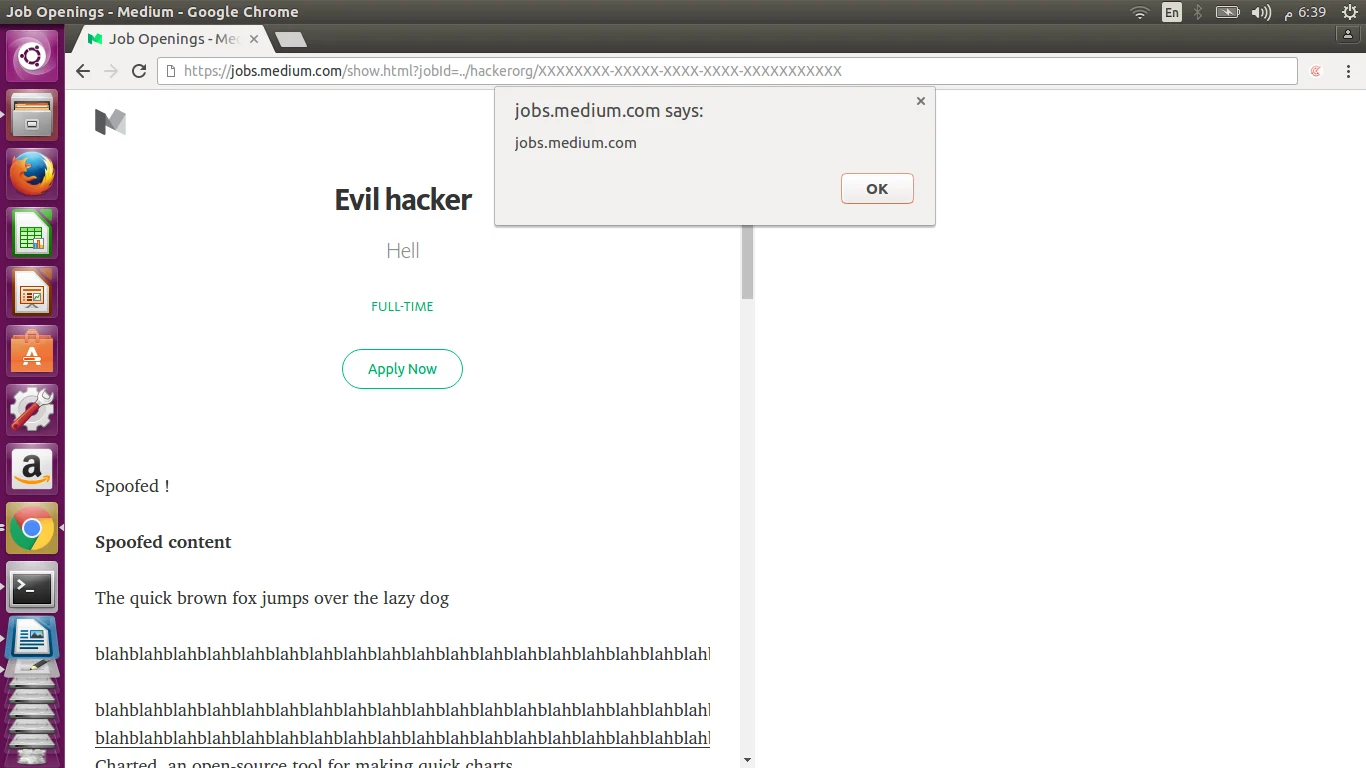
The report says the bug can even lead to stored XSS, demonstrated with alert(document.domain). Using alert(document.domain) as the payload demonstrates script execution in the jobs.medium.com origin.
Root cause
The page builds the API URL by string concatenation, "https://api.lever.co/v0/postings/medium/" + e, where e comes straight from the jobId query parameter. There is no check that the value is a single posting identifier, so path traversal sequences in the parameter move the request to a different organisation's postings. The response is then written into the page, so content from any Lever customer is rendered as if it belonged to Medium. The stored XSS follows from the same trust: the page treats the API response as trusted content for its own origin, even though the response can come from an attacker-controlled posting.
Impact
An attacker can make jobs.medium.com display arbitrary job content of their choosing, which is content spoofing on a Medium-owned domain. With a Lever account, the same trick stores the content and, per the report, escalates to stored XSS in the jobs.medium.com origin.
Fix
The report says the bug is patched but does not describe the change.
Variants to test
- Other static pages that take an identifier from the query string and concatenate it into an API path. A positive result is a request that reaches a different tenant or resource than intended.
- Encoded traversal forms such as
%2e%2e%2fin the same parameter, in case only the literal../was filtered. A positive result is the same cross-tenant fetch. - Multi-tenant SaaS APIs where the tenant segment precedes the object ID, as with Lever's
organisation/posting-idlayout. A positive result is content from an organisation the target does not own. - Any page that renders a third-party JSON response into its own origin. A positive result is attacker-controlled markup or script executing on the target domain.
What happened, in plain words
Medium is a website where people publish articles. Medium also hires people, and it lists its open jobs on a separate small site, jobs.medium.com. That jobs site does not keep the job descriptions on Medium's own computers. Instead, each job page is a thin shell: it reads a job number from the address bar, asks another company's service for the details of that job, and then draws the answer on the screen.
That other company is Lever, which makes software for managing job applications. Lever runs a public web service (an API) that hands out job details in a machine-friendly format called JSON. Medium's page takes the job number from the URL, glues it onto a fixed Lever web address, fetches the result, and puts it on the page.
The problem is that the page never checks what the job number looks like. It just glues whatever text is in the address bar onto the end of the Lever address. By putting a special sequence of characters in the job number, you can make the page ask Lever for a completely different company's job posting. If you have your own Lever account, you can make it ask for your own posting, with your own text in it, and that text appears on jobs.medium.com as if Medium had written it. That is content spoofing: showing content on a trusted site that the site's owner did not create. And because the page also draws the posting's text as if it were part of the page, you can put a small script in the posting and have it run in the browser of anyone who opens the link. That is cross-site scripting, or XSS.
The researcher was not even looking for a bug on the jobs site. He wanted to see which technologies Medium uses, opened a job link, noticed the page was a static file driven by JavaScript, and started reading the scripts. The whole finding came from reading code in the browser.
Background: the pieces involved
Before the steps, here are the concepts you need. Each one is explained from zero.
- Static page: a file that the web server hands over exactly as stored, without building it fresh for each visitor. The page can still change on screen because JavaScript running in your browser can fetch data and rewrite the page after it loads. Think of a printed form that comes with blank boxes, and a clerk (the JavaScript) who fills the boxes in after you arrive.
- JavaScript: the programming language that runs inside your browser. It can read the address bar, send requests to other servers, and change what you see on the page.
- URL and query string: a URL is a web address. The part after a
?is the query string, a list ofname=valuepairs. Inshow.html?jobId=123, the parameter name isjobIdand its value is123. Think of the query string as the notes you write on the outside of an envelope: the server and the page can read them. - API: a web service built for programs rather than people. You send it a request at a particular address, and it sends back data, often in JSON. Think of a restaurant's kitchen window: you name a dish, the kitchen passes a plate back. An API is the window, not the dining room.
- JSON: a text format for structured data, made of names and values in curly braces, like
{"text": "hello"}. It is easy for programs to read. - Endpoint: one specific address on an API that does one specific thing.
https://api.lever.co/v0/postings/medium/<id>is an endpoint that returns one job posting. - Path: the part of a URL after the domain name, such as
/v0/postings/medium/8b21.... It is like the folder path on a computer: each/moves you one level deeper. - Path traversal: using
..in a path to mean "go up one folder". On a filesystem,folder/../othermeans "leavefolder, then enterother". If a program glues user text into a path without checking it,..lets the user climb out of the intended folder and reach something else. Think of a building where every visitor is supposed to go to room 5, but the sign says "room 5, then take the stairs up and go to room 9": the..is the stairs. - Content spoofing: making a trusted website display content that its owner did not create, so visitors believe the owner did. Think of putting your own poster inside a shop's display window.
- XSS (cross-site scripting): getting your own JavaScript to run inside someone else's website in a visitor's browser. The script then runs with the trust of that site: it can read what the site can read and act as the site. Stored XSS means the malicious content is saved on a server first (here, in a Lever posting) and served to every visitor who opens the page, rather than being placed only in one crafted link.
- Origin: the combination of scheme, domain and port, such as
https://jobs.medium.com. Browsers treat each origin as a separate security zone. Script running in one origin should not be able to read data from another. That is why running a script onjobs.medium.commatters: the browser considers it part of Medium's jobs site. - DOM: the browser's live model of the page, the tree of elements you see. "Writing to the DOM" means changing the page from JavaScript, for example inserting text or HTML into an element.
- Minified file: a JavaScript file with spaces, line breaks and long names squeezed out to make it smaller and faster to download. It is the same code, just hard to read.
jobOpening.min.jsis one. - Regular expression: a pattern for matching text.
[?&]jobId=([^&#]*)means "find?jobId=or&jobId=, then capture everything up to the next&or#". It is a way to pull one value out of a URL.
Setup: what you need to follow along
Nothing special. A browser and the public job page are enough to find the bug. No account, no tool, no special role. For the later escalation, the attacker needs one thing more: the ability to register a free account at Lever, because the spoofed content has to come from a Lever posting the attacker controls. That is the only precondition beyond a browser.
Finding it: reading the page's scripts
The researcher was not hunting on this site. He wanted to see which technologies Medium uses, so he opened a job link:
https://jobs.medium.com/show.html?jobId=8b2157c9-f755-40f7-b2c7-e81c49a51664
Line by line: the domain is jobs.medium.com; the file is show.html; the query string has one parameter, jobId, whose value is a long string of letters, digits and hyphens. That value is the job's identifier, a unique label for one posting.
The .html extension told him the page is a static file, and static pages that show changing data usually do it with JavaScript. He likes reading JavaScript to learn techniques and to look for DOM XSS, the kind of XSS where the flaw is in how the page's own script handles data in the browser.
Reading show.html led him to jobOpening.min.js, the file responsible for fetching the job details. Here is the relevant part of that minified bundle, exactly as it appears:
function(e,t,n){
"use strict";function r(e){return e&&e.__esModule?e:{default:e}}var i=n(120),o=r(i),s=n(131);
(0,o.default)((0,s.urlParam)("jobId"))},130:function(e,t){"use strict";
Object.defineProperty(t,"__esModule",{value:!0});
t.openingUrl=function(e){return"https://api.lever.co/v0/postings/medium/"+e},t.applyUrl=function(e){return"https://api.lever.co/v0/postings/medium/"+e+"?key=hfhW4CLqdCzAsQdyfQL5"}},131:function(e,t){"use strict";
function n(e){var t=new RegExp("[?&]"+e+"=([^&#]*)").exec(window.location.href);return t[1]||0}Object.defineProperty(t,"__esModule",{value:!0}),t.urlParam=n}});
This is dense because it is minified, so here is what each part does in plain words:
- The outer
function(e,t,n){...}is a wrapper that the bundler puts around each module. The namese,t,nare just short placeholders; minifiers rename everything to save bytes. "use strict";turns on JavaScript's stricter mode, which catches some sloppy mistakes.function r(e){return e&&e.__esModule?e:{default:e}}is a small helper that normalises how modules are imported. It is plumbing, not security relevant.var i=n(120),o=r(i),s=n(131);loads two other modules from the bundle, numbered 120 and 131. Module 131 is the one that reads URL parameters; module 120 is the one that uses the job ID.(0,o.default)((0,s.urlParam)("jobId"))is the core: it calls the URL-parameter reader for the namejobId, and passes the result into the module that fetches the job.130:function(e,t){...}starts module 130. Inside it,t.openingUrl=function(e){return"https://api.lever.co/v0/postings/medium/"+e}defines a function that builds the API address by gluing the fixed prefixhttps://api.lever.co/v0/postings/medium/onto whatever valueeholds. The+is string concatenation: it joins text end to end.t.applyUrl=function(e){return"https://api.lever.co/v0/postings/medium/"+e+"?key=..."}does the same for the apply link, adding an API key as a query parameter.131:function(e,t){...}starts module 131.function n(e){var t=new RegExp("[?&]"+e+"=([^&#]*)").exec(window.location.href);return t[1]||0}is the URL-parameter reader. It builds a regular expression from the parameter name, runs it againstwindow.location.href(the full address in the browser), and returns the first captured group, or0if nothing matched. In plain words: "find?jobId=or&jobId=in the address and give me everything up to the next&or#".t.urlParam=nsimply exports that function under the nameurlParam.
The flow, as the researcher breaks it down, is:
- JavaScript gets the
jobIdparameter from the URL. - It passes the value of the parameter to a function as
e. - The function builds a URL to the Lever API by concatenating the fixed prefix
https://api.lever.co/v0/postings/medium/withe. - The code writes the JSON response to the page.
The important detail is in step 3: the value from the address bar goes straight into the API address with nothing in between. There is no check that the value is a single identifier. Whatever text sits between jobId= and the next & or # becomes part of the API path. That is the seed of the bug.
What is Lever?
Lever is a US-based software company headquartered in San Francisco, California that provides an applicant tracking system for hiring. It was founded in 2012 by Sarah Nahm, Nate Smith, and Randal Truong. An applicant tracking system is software that companies use to collect and manage job applications. Lever's API has a JSON endpoint that contains the job details, which is exactly what Medium's page calls.
The bug: changing the path of the request
Since the page takes the ID of the job from the URL and sends it to the API, we can change the path of the request. Here is the ID of a real Medium job:
With that genuine ID, the page sends a request to Lever:
https://api.lever.co/v0/postings/medium/8b2157c9-f755-40f7-b2c7-e81c49a51664
Line by line: https:// is the secure web protocol; api.lever.co is Lever's API server; /v0/postings/ is the versioned part of the API for job postings; medium is the organisation segment, the name of the Lever customer; and the long string at the end is the posting ID. So the shape is organisation/posting-id. The organisation segment is the part that decides whose postings you are asking for.
The researcher googled this endpoint and got useful results, such as:
https://api.lever.co/v0/postings/hightechhigh/f427aa0d-8260-48e2-b93b-cad30d049729
Line by line: same API, same version, same postings section, but the organisation is hightechhigh instead of medium, followed by that organisation's posting ID. This confirms two things: the path after /v0/postings/ is organisation/posting-id, and the organisation segment is something a caller can choose. If the page lets you choose it, you can ask for someone else's posting.
The key was to change the path of the request using double dot (..) and a slash, then add the other organisation and posting ID. Here is the proof of concept:
https://jobs.medium.com/show.html?jobId=../hightechhigh/f427aa0d-8260-48e2-b93b-cad30d049729
Line by line: the page is still jobs.medium.com/show.html; the jobId value is now ../hightechhigh/f427aa0d-8260-48e2-b93b-cad30d049729. When the page glues that onto the fixed prefix, the result is https://api.lever.co/v0/postings/medium/../hightechhigh/f427aa0d-8260-48e2-b93b-cad30d049729. The .. means "go up one level", so the path leaves the medium folder and enters hightechhigh. The request resolves to the hightechhigh posting instead of a Medium one, and the page draws that other organisation's job content under the jobs.medium.com origin. That is content spoofing: another company's job appears on Medium's jobs domain.
Evil hacker scenario: serving your own content
An evil hacker can register an account at Lever, for example:
https://api.lever.co/v0/postings/hackerorg/XXXXXXXX-XXXXX-XXXX-XXXX-XXXXXXXXXXX
Line by line: this is the same API shape, but the organisation is hackerorg, an account the attacker controls, and the posting ID is shown as placeholders because it is whatever Lever assigns to the attacker's posting. The attacker writes the posting's text themselves, so they control every word that will appear on Medium's page.
After that, the attacker creates the following URL:
https://jobs.medium.com/show.html?jobId=../hackerorg/XXXXXXXX-XXXXX-XXXX-XXXX-XXXXXXXXXXX
Line by line: the jobId value is ../hackerorg/XXXXXXXX-XXXXX-XXXX-XXXX-XXXXXXXXXXX. Glued onto the prefix, it becomes https://api.lever.co/v0/postings/medium/../hackerorg/XXXXXXXX-XXXXX-XXXX-XXXX-XXXXXXXXXXX, which climbs out of medium and into hackerorg. The page now displays the attacker's own posting content on Medium's jobs domain. Anyone who opens the link sees the attacker's text presented as a Medium job listing.
The page will look like this:
From spoofing to stored XSS
It can even lead to stored XSS. The report says the bug can even lead to stored XSS, demonstrated with alert(document.domain). The page treats the API response as trusted content for its own origin, even though the response can come from an attacker-controlled posting.
To demonstrate, the researcher used alert(document.domain) as the payload. alert opens a pop-up box; document.domain is the current page's domain. If the box appears showing jobs.medium.com, the script ran in Medium's origin, not in some harmless sandbox. That is the proof of XSS.
Why it worked
The page builds the API URL by string concatenation, "https://api.lever.co/v0/postings/medium/" + e, where e comes straight from the jobId query parameter. There is no check that the value is a single posting identifier, so path traversal sequences in the parameter move the request to a different organisation's postings. The response is then written into the page, so content from any Lever customer is rendered as if it belonged to Medium. The stored XSS follows from the same trust: the page treats the API response as trusted content for its own origin, even though the response can come from an attacker-controlled posting.
In everyday terms: the page asks the kitchen for "dish number 5" but never checks that the number is a number. You can write "dish number 5, then go next door and bring back whatever they are cooking", and the page serves it as its own.
Impact
An attacker can make jobs.medium.com display arbitrary job content of their choosing, which is content spoofing on a Medium-owned domain. With a Lever account, the same trick stores the content and, per the report, escalates to stored XSS in the jobs.medium.com origin.
Fix
The report says the bug is patched but does not describe the change. In plain words: check that the job number really is a job number, and treat the answer from the API as untrusted text, not as ready-made page markup.
Variants to test
- Other static pages that take an identifier from the query string and concatenate it into an API path. A positive result is a request that reaches a different tenant or resource than intended.
- Encoded traversal forms such as
%2e%2e%2fin the same parameter, in case only the literal../was filtered.%2eis an encoded dot and%2fan encoded slash, so the server may decode them back into../after the filter has looked. A positive result is the same cross-tenant fetch. - Multi-tenant SaaS APIs where the tenant segment precedes the object ID, as with Lever's
organisation/posting-idlayout. A positive result is content from an organisation the target does not own. - Any page that renders a third-party JSON response into its own origin. A positive result is attacker-controlled markup or script executing on the target domain.
Glossary
- API: a web service built for programs rather than people; you send a request to a specific address and get data back, often as JSON.
- Applicant tracking system: software a company uses to collect and manage job applications and postings.
- Concatenation: joining two pieces of text end to end, as the
+operator does in JavaScript. - Content spoofing: making a trusted website display content its owner did not create, so visitors believe the owner did.
- DOM: the browser's live model of the page, the tree of elements you see; writing to it means changing the page from JavaScript.
- DOM XSS: XSS where the flaw is in how a page's own script handles data in the browser.
- JSON: a text format for structured data, made of names and values in curly braces, easy for programs to read.
- JavaScript: the programming language that runs inside your browser and can read the address bar, send requests and change the page.
- Minified file: a JavaScript file with spaces, line breaks and long names squeezed out to make it smaller; the same code, harder to read.
- Origin: the combination of scheme, domain and port, such as
https://jobs.medium.com; browsers treat each origin as a separate security zone. - Path: the part of a URL after the domain name, such as
/v0/postings/medium/8b21..., like a folder path on a computer. - Path traversal: using
..in a path to mean "go up one folder", letting user text climb out of the intended location. - Proof of concept (PoC): a minimal request or link that demonstrates a bug really works.
- Query string: the part of a URL after
?, a list ofname=valuepairs the page or server can read. - Regular expression: a pattern for matching text, used here to pull one value out of a URL.
- Static page: a file the web server hands over as stored, which JavaScript can still change on screen after it loads.
- Stored XSS: XSS where the malicious content is saved on a server first and served to every visitor who opens the page.
- URL: a web address.
- XSS (cross-site scripting): getting your own JavaScript to run inside someone else's website in a visitor's browser, with that site's trust.






