Cloudflare XSS
 Published on ahussam.me
Long time ago, I found a bug in http://securityundefined.com of XSS vuln in the path:
The full write-up lives on its author's site
It belongs to its author, so we link to it rather than copy it. The other two tabs are our own rewrites, checked against it.
Context
The target here is not a single application but a shared piece of infrastructure: the Cloudflare edge that sits in front of customer sites. The path in question is /cdn-cgi/pe/bag2, which takes a value in the r[] parameter. Because the endpoint lives under /cdn-cgi/ on every proxied hostname, it appears on any site that uses Cloudflare, regardless of what the site itself is built with.
The researcher had first found an XSS in this path on http://securityundefined.com:
http://securityundefined.com/cdn-cgi/pe/bag2?r[]=
That report was fixed after a while. At the time the researcher did not know that /cdn-cgi/pe/bag2?r[]= belongs to Cloudflare, so the finding was not generalised. Later, while searching on another bug bounty programme, the same path turned up again:
http://foo.bar/cdn-cgi/pe/bag2?r[]=
Seeing it a second time suggested the issue might not be specific to the first site, so the researcher tested it directly.
Setup
The testing was done with a browser and a proxy. The requests shown use Firefox user agents (Firefox 42.0 on Windows NT 6.3 and Firefox 39.0 on Windows NT 6.2), and the outcome was compared across Firefox, IE 9, IE 10 and IE 11. The proxy was used to capture the full request that produced a 200 OK, because the plain request did not.
No account, role or special access is described. The precondition is simply that the target hostname is proxied through Cloudflare, which is what makes the /cdn-cgi/ path resolve.
Finding it
The first probe was a simple GET to the path without the r[] value:
GET /cdn-cgi/pe/bag2?r= HTTP/1.1
Host: foo.bar
User-Agent: Mozilla/5.0 (Windows NT 6.3; WOW64; rv:42.0) Gecko/20100101 Firefox/42.0
Accept: text/html,application/xhtml+xml,application/xml;q=0.9,*/*;q=0.8
Accept-Language: en-US,en;q=0.5
Accept-Encoding: gzip, deflate
Connection: keep-alive
The response was:
HTTP/1.1 405 Not Allowed
Date: Mon, 16 Nov 2015 16:17:42 GMT
Content-Type: text/html
Server: cloudflare-nginx
cf-ray: 246481f1dd7c08ea-CDG
Transfer-Encoding: chunked
Connection: Keep-Alive
The Server: cloudflare-nginx header and the cf-ray header show that the response comes from Cloudflare even though the site itself is not Cloudflare. The site uses Cloudflare's services, so the edge answers for it. The 405 Not Allowed was the puzzle: the researcher wanted a 200 OK, and the plain request did not produce one.
Exploitation
Step 1: capture a request that returns 200 OK
A proxy was used to observe the full request that the browser sent when the endpoint did return 200 OK. The captured request was:
GET /cdn-cgi/pe/bag2?r[]=http://foo.bar/xxx.js HTTP/1.1
Host:foo.bar
User-Agent: Mozilla/5.0 (Windows NT 6.2; WOW64; rv:39.0) Gecko/20100101 Firefox/39.0
Accept: text/html,application/xhtml+xml,application/xml;q=0.9,/;q=0.8
Accept-Language: en-US,en;q=0.5
Accept-Encoding: gzip, deflate
PE-Token:[redacted]-1438819567-1800
Connection: keep-alive
The difference from the first probe is the r[] value, which now holds a URL (http://foo.bar/xxx.js), and the presence of a PE-Token header. The captured request carries a PE-Token header that the first probe did not.
Step 2: find where the token comes from
The researcher then asked where the PE-Token can be obtained. The answer is in the body of the 405 Not Allowed page itself. Looking at the source of that error page shows an inline Cloudflare bootstrap script:
<html>
<head><title>405 Not Allowed</title><script type="text/javascript">
//<![CDATA[
try{if (!window.CloudFlare) {var CloudFlare=[{verbose:0,p:1438806465,byc:0,owlid:"cf",bag2:1,mirage2:0,oracle:0,paths:{cloudflare:"/cdn-cgi/nexp/dok3v=1613a3a185/"},atok:"xxxxxxxxxxx",petok:"[redacted]-1438819567-1800",betok:"[redacted]-1438819567-120",zone:"salesforce.com",rocket:"0",apps:{"clky":{"sid":"xxxx","uid":"xxxx"}}}];!function(a,b){a=document.createElement("script"),b=document.getElementsByTagName("script")[0],a.async=!0,a.src="//ajax.cloudflare.com/cdn-cgi/nexp/dok3v=d134393e0a/cloudflare.min.js",b.parentNode.insertBefore(a,b)}()}}catch(e){};
//]]>
</script>
</head>
<body bgcolor="white">
<center><h1>405 Not Allowed</h1></center>
<hr><center>cloudflare-nginx</center>
</body>
</html>
The petok value in that object is the same string that the request sends as PE-Token.
Step 3: replace the resource URL with a payload
With the token in hand, the researcher changed the r[] value from http://foo.bar/xxx.js to:
<script>alert(1)</script>
The result depended on the browser. In Firefox nothing happened. In IE 9, 10 and 11 the XSS executed.
Step 4: understand the browser difference
The reason for the split is the content type. The response for this endpoint was served as Content-Type: multipart/mixed, and IE read that as an HTML page and executed the markup inside it, while Firefox did not.
Step 5: confirm the reach
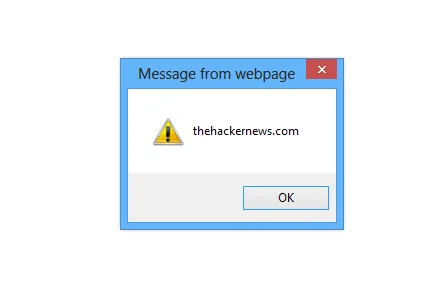
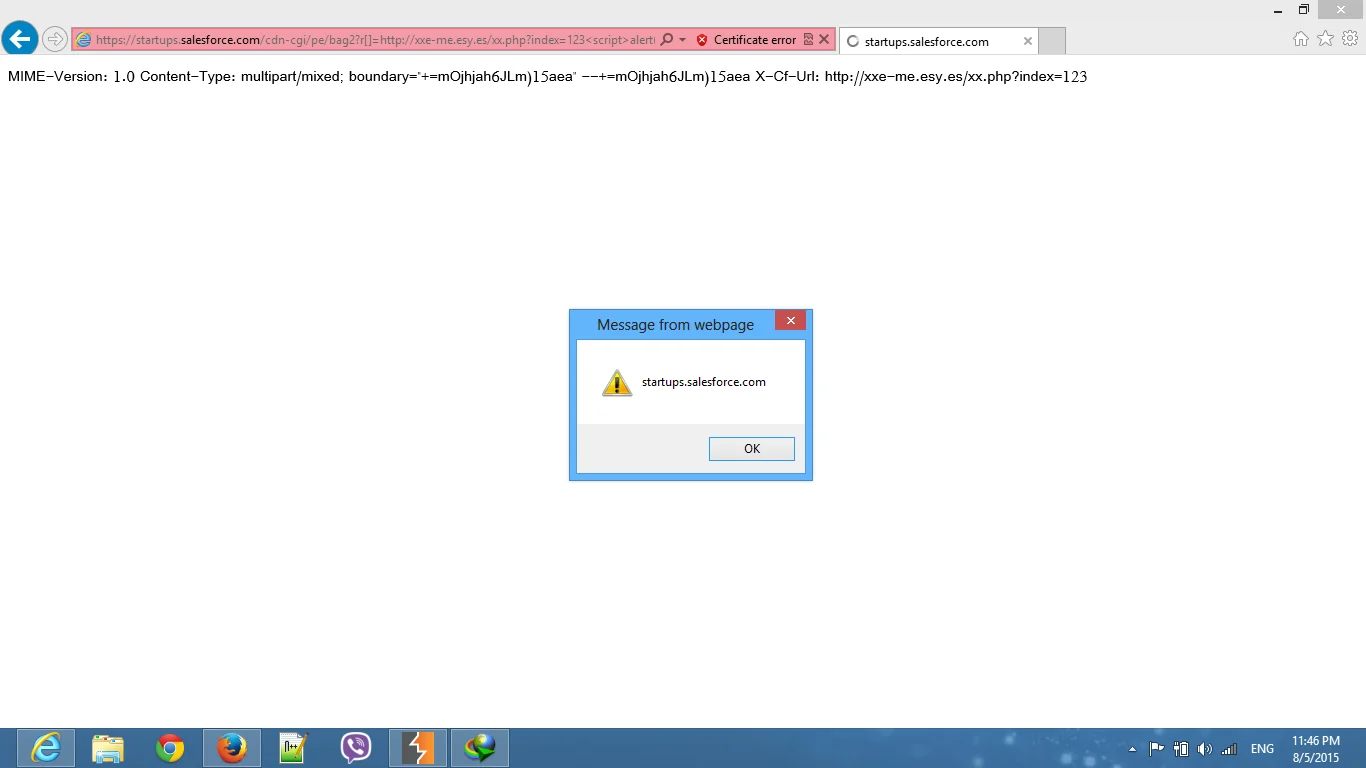
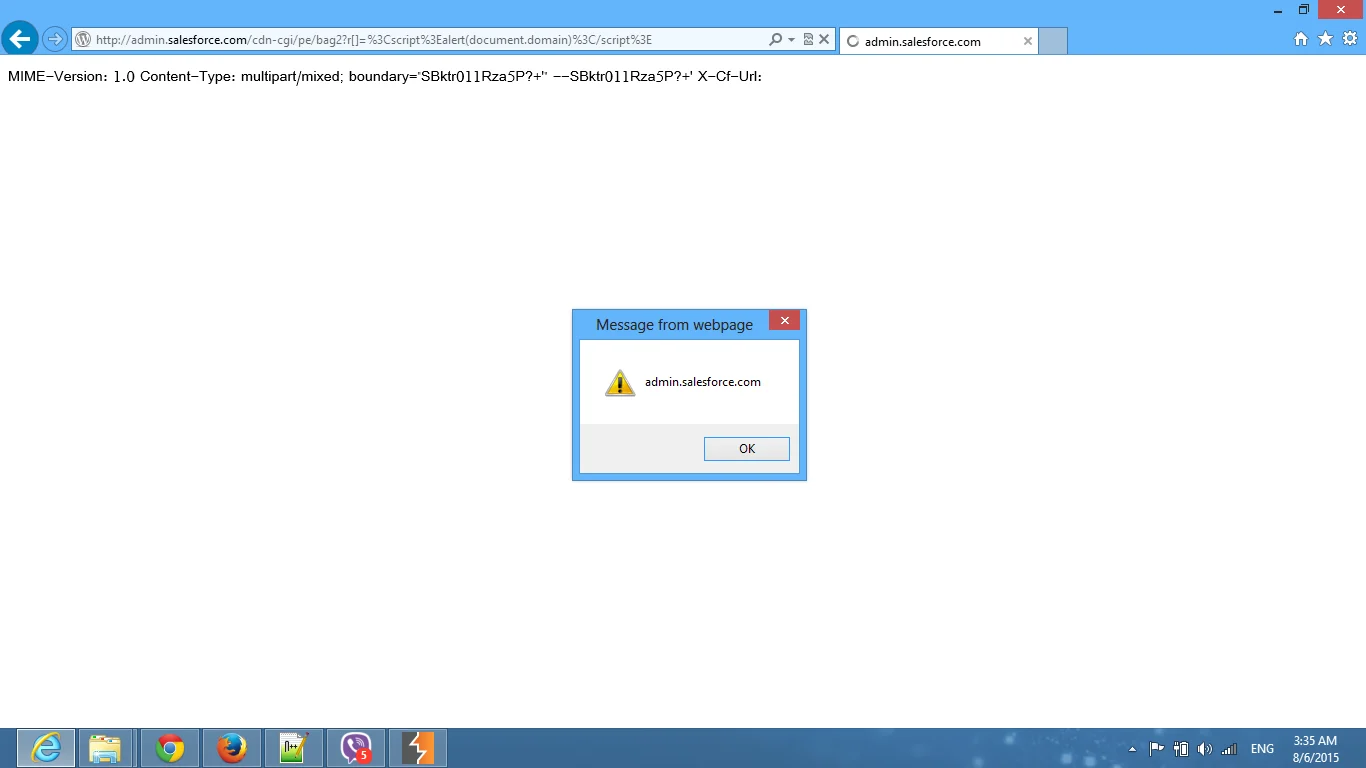
The researcher figured out that many websites use Cloudflare's service. The screenshots below show some of the sites where the XSS worked:
Root cause
The r[] parameter of /cdn-cgi/pe/bag2 is reflected into a response that is served as Content-Type: multipart/mixed. The endpoint does not neutralise HTML markup supplied in that parameter, and IE 9 through 11 executed the injected script. Because the response is labelled multipart/mixed, browsers that sniff or interpret that type as HTML, in this case IE 9 through 11, parse and execute the injected script. Firefox did not, which is why the payload only fired in IE.
The PE-Token header is not a defence against the injection: the value is published in the petok field of the 405 Not Allowed page. and the value is published in the petok field of the 405 Not Allowed page that any visitor can load. The token does nothing to stop attacker-controlled content from being reflected.
Impact
An attacker who can get a victim to load a crafted /cdn-cgi/pe/bag2?r[]= URL on a Cloudflare-proxied site can execute script in that site's origin, but only for victims using IE 9, 10 or 11. Firefox users were unaffected in the researcher's testing. The researcher found the same path on many websites that use Cloudflare's service. The report does not describe any specific victim, data access or account takeover; the demonstrated effect is script execution in the page.
Fix
Cloudflare marked the report as N/A but fixed it afterwards anyway. The report does not describe the change that was made.
Variants to test
- Request
/cdn-cgi/pe/bag2?r[]=on any host you know is proxied through Cloudflare and read the405 Not Allowedbody for apetokvalue. A positive result is a token you can replay in aPE-Tokenheader. - Replay the request with a benign URL in
r[]and the captured token, and check the status andContent-Type. A positive result is a200 OK. - Replace the URL with an HTML payload and load the result in IE 9, 10 and 11. A positive result is the script executing; compare with Firefox to see the browser split.
- Try the same path on other Cloudflare-fronted hostnames you are authorised to test, since the endpoint is shared infrastructure. A positive result is the same reflection and execution on a host unrelated to the first one.
- Look for other
/cdn-cgi/endpoints that take a URL or list of URLs and return content, and check theirContent-Typeand reflection behaviour. A positive result is attacker-controlled markup returned under a type that a browser will render as HTML.
What happened, in plain words
A security researcher found a way to make a script run inside the pages of many different websites at once, without touching any of those websites directly. The trick was not in the sites themselves but in a shared service that sits in front of them: Cloudflare.
Cloudflare is a company that many websites pay to stand between their visitors and their own servers. When you visit such a site, your browser actually talks to Cloudflare first, and Cloudflare passes the request on. This is useful for the site owner: Cloudflare can block attacks, speed up loading and hide the real server. The side effect is that some addresses under a special folder, /cdn-cgi/, are answered by Cloudflare itself on every site it protects, no matter what that site is built with.
One of those addresses is /cdn-cgi/pe/bag2. It is a small feature that takes a value in a parameter called r[]. The researcher found that a script placed in r[] executed in IE 9, 10 and 11. That class of bug is called cross-site scripting, or XSS: an attacker gets their own code to run in the context of someone else's site.
The researcher had actually found this once before, on a single site, reported it, and seen it fixed. At the time they did not realise the address belonged to Cloudflare, so they did not think to check other sites. Later, on a different bug bounty programme, the same address appeared again. That is when the penny dropped: if the same path shows up on unrelated sites, the bug probably lives in the shared service, not in any one site.
This is the beginner's walkthrough of how the researcher went from a plain request that returned an error, to a working script execution, and why it only worked in some browsers.
The target: shared infrastructure, not one app
The thing being tested is not a single application. It is a piece of infrastructure that many applications share: the Cloudflare edge. "Edge" here just means the machines that sit at the outer boundary of a network, the first thing a visitor's request reaches.
The path in question is /cdn-cgi/pe/bag2. Cloudflare uses the /cdn-cgi/ folder for its own internal features. The bag2 endpoint takes a list of resource addresses in the r[] parameter and returns them bundled together. A "resource" is anything a web page loads: a JavaScript file, a stylesheet, an image. Bundling several of them into one response saves round trips, which is why the feature exists.
Because the endpoint lives under /cdn-cgi/ on every hostname that Cloudflare proxies, it appears on any site that uses Cloudflare, regardless of what the site itself is built with. Think of it like a shared letterbox in the lobby of an office building: every company in the building has the same letterbox in the same place, and the building's concierge handles it, not the company.
The researcher had first found an XSS in this path on http://securityundefined.com:
http://securityundefined.com/cdn-cgi/pe/bag2?r[]=
That report was fixed after a while. At the time the researcher did not know that /cdn-cgi/pe/bag2?r[]= belongs to Cloudflare, so the finding was not generalised. Later, while searching on another bug bounty programme, the same path turned up again:
http://foo.bar/cdn-cgi/pe/bag2?r[]=
Seeing it a second time suggested the issue might not be specific to the first site, so the researcher tested it directly. A bug bounty programme is a scheme where a company invites outsiders to test its systems and pays for valid findings. foo.bar is a placeholder name used in write-ups to avoid naming the real site.
Setup
The testing was done with a browser and a proxy. A proxy is a piece of software that sits between your browser and the internet and records every request and response that passes through, so you can read exactly what was sent and received. It is like putting a transparent hose between the tap and the bucket so you can see the water.
The requests shown use Firefox user agents (Firefox 42.0 on Windows NT 6.3 and Firefox 39.0 on Windows NT 6.2). A user agent is a line of text your browser sends to identify itself, such as its name and version. The outcome was compared across Firefox, IE 9, IE 10 and IE 11. IE is Internet Explorer, Microsoft's older browser.
The proxy was used to capture the full request that produced a 200 OK, because the plain request did not. 200 OK is the standard status code for "here is your content". 405 Not Allowed means the server understood the request but refuses that method or that shape of request.
No account, role or special access is described. The precondition is simply that the target hostname is proxied through Cloudflare, which is what makes the /cdn-cgi/ path resolve.
Finding it
The first probe was a simple GET to the path without the r[] value:
GET /cdn-cgi/pe/bag2?r= HTTP/1.1
Host: foo.bar
User-Agent: Mozilla/5.0 (Windows NT 6.3; WOW64; rv:42.0) Gecko/20100101 Firefox/42.0
Accept: text/html,application/xhtml+xml,application/xml;q=0.9,*/*;q=0.8
Accept-Language: en-US,en;q=0.5
Accept-Encoding: gzip, deflate
Connection: keep-alive
Line by line:
GET /cdn-cgi/pe/bag2?r= HTTP/1.1is the request line.GETmeans "give me this". The path is/cdn-cgi/pe/bag2, and?r=starts the query string with a parameter namedrthat has an empty value.HTTP/1.1is the version of the language being spoken.Host: foo.bartells the server which site you are asking for. One server can host many sites, so this line picks one.User-Agent: ...identifies the browser, here Firefox 42.0 on a 64-bit Windows 6.3 machine.Accept: ...lists the content types the browser is willing to receive, with rough preference weights.Accept-Language: en-US,en;q=0.5says the browser prefers US English.Accept-Encoding: gzip, deflatesays the browser can accept compressed responses.Connection: keep-aliveasks to keep the connection open for further requests.
The response was:
HTTP/1.1 405 Not Allowed
Date: Mon, 16 Nov 2015 16:17:42 GMT
Content-Type: text/html
Server: cloudflare-nginx
cf-ray: 246481f1dd7c08ea-CDG
Transfer-Encoding: chunked
Connection: Keep-Alive
Line by line:
HTTP/1.1 405 Not Allowedis the status line. The server is refusing this request shape.Date: ...is when the response was generated.Content-Type: text/htmlsays the body is an HTML page.Server: cloudflare-nginxnames the software that produced the response. This is the giveaway: the site is not Cloudflare, but the answer comes from Cloudflare.cf-ray: ...is a Cloudflare request identifier, useful for support and debugging. The-CDGsuffix is a location code.Transfer-Encoding: chunkedmeans the body is sent in pieces rather than with a declared length.Connection: Keep-Aliveagrees to keep the connection open.
The Server: cloudflare-nginx header and the cf-ray header show that the response comes from Cloudflare even though the site itself is not Cloudflare. The site uses Cloudflare's services, so the edge answers for it. The 405 Not Allowed was the puzzle: the researcher wanted a 200 OK, and the plain request did not produce one.
Exploitation
Step 1: capture a request that returns 200 OK
A proxy was used to observe the full request that the browser sent when the endpoint did return 200 OK. The captured request was:
GET /cdn-cgi/pe/bag2?r[]=http://foo.bar/xxx.js HTTP/1.1
Host:foo.bar
User-Agent: Mozilla/5.0 (Windows NT 6.2; WOW64; rv:39.0) Gecko/20100101 Firefox/39.0
Accept: text/html,application/xhtml+xml,application/xml;q=0.9,/;q=0.8
Accept-Language: en-US,en;q=0.5
Accept-Encoding: gzip, deflate
PE-Token:[redacted]-1438819567-1800
Connection: keep-alive
Line by line:
GET /cdn-cgi/pe/bag2?r[]=http://foo.bar/xxx.js HTTP/1.1now has a value inr[]: the address of a JavaScript file on the same site. The square brackets inr[]are a common convention for "this parameter can be given more than once, as a list".Host:foo.baris the same idea as before, just without a space after the colon.User-Agent: ...identifies Firefox 39.0 on Windows 6.2 this time.Accept: ...is the list of acceptable content types.Accept-Language,Accept-EncodingandConnectiondo the same jobs as before.PE-Token:[redacted]-1438819567-1800is the new and important line. A token is a short string that proves you are allowed to do something, like a cloakroom ticket: it does not say who you are, it just proves you were given the ticket. This one is the token the captured request carries.
The difference from the first probe is the r[] value, which now holds a URL (http://foo.bar/xxx.js), and the presence of a PE-Token header. The token is the value the captured request carries in its PE-Token header.
Step 2: find where the token comes from
The researcher then asked where the PE-Token can be obtained. The answer is in the body of the 405 Not Allowed page itself. Looking at the source of that error page shows an inline Cloudflare bootstrap script:
<html>
<head><title>405 Not Allowed</title><script type="text/javascript">
//<![CDATA[
try{if (!window.CloudFlare) {var CloudFlare=[{verbose:0,p:1438806465,byc:0,owlid:"cf",bag2:1,mirage2:0,oracle:0,paths:{cloudflare:"/cdn-cgi/nexp/dok3v=1613a3a185/"},atok:"xxxxxxxxxxx",petok:"[redacted]-1438819567-1800",betok:"[redacted]-1438819567-120",zone:"salesforce.com",rocket:"0",apps:{"clky":{"sid":"xxxx","uid":"xxxx"}}}];!function(a,b){a=document.createElement("script"),b=document.getElementsByTagName("script")[0],a.async=!0,a.src="//ajax.cloudflare.com/cdn-cgi/nexp/dok3v=d134393e0a/cloudflare.min.js",b.parentNode.insertBefore(a,b)}()}}catch(e){};
//]]>
</script>
</head>
<body bgcolor="white">
<center><h1>405 Not Allowed</h1></center>
<hr><center>cloudflare-nginx</center>
</body>
</html>
Line by line, in plain words:
<html>,<head>,<title>and<script type="text/javascript">are ordinary HTML tags. The<script>tag means "run the JavaScript that follows".//<![CDATA[and//]]>are old wrappers that stop the script from confusing very old parsers. They are comments to a modern browser.try{ ... }catch(e){}means "attempt this, and if anything goes wrong, ignore the error quietly".if (!window.CloudFlare)checks whether Cloudflare's script has already run on this page. If it has not, the block runs.var CloudFlare=[{...}]creates a variable holding a list with one object inside. An object is a bag of named values, like a form with labelled fields.verbose:0,p:1438806465,byc:0,owlid:"cf",bag2:1,mirage2:0,oracle:0are settings for Cloudflare's features.bag2:1is the one that matters here: it says the bag2 feature is switched on.paths:{cloudflare:"/cdn-cgi/nexp/dok3v=1613a3a185/"}is a folder path Cloudflare uses for its own files.atok:"xxxxxxxxxxx"is another token, redacted here.petok:"[redacted]-1438819567-1800"is the value we care about. It is exactly the string the request sends asPE-Token.betok:"[redacted]-1438819567-120"is a third token, for a different feature.zone:"salesforce.com"names the Cloudflare zone, which is the site configuration this page belongs to.rocket:"0"andapps:{"clky":{"sid":"xxxx","uid":"xxxx"}}are more feature settings, with identifiers redacted.- The
!function(a,b){...}()part is a small self-running function. It creates a new<script>element, sets its address to//ajax.cloudflare.com/cdn-cgi/nexp/dok3v=d134393e0a/cloudflare.min.js, marks it to load without blocking the page, and inserts it into the document so the browser fetches and runs it. - The
<body>part is the visible page: a centred heading saying405 Not Allowedand a line sayingcloudflare-nginx.
The petok value in that object is the same string that the request sends as PE-Token. That is the key insight: the gate is not secret. It is printed on the door.
Step 3: replace the resource URL with a payload
With the token in hand, the researcher changed the r[] value from http://foo.bar/xxx.js to:
<script>alert(1)</script>
This is the classic XSS test payload. <script> starts a script block, alert(1) asks the browser to pop up a box showing the number 1, and </script> closes the block. If the box appears, the browser treated the attacker's text as code. It is the equivalent of writing "shout hello" on a form and having the clerk actually shout hello instead of filing the form.
The result depended on the browser. In Firefox nothing happened. In IE 9, 10 and 11 the XSS executed.
Step 4: understand the browser difference
The reason for the split is the content type. The response for this endpoint was served as Content-Type: multipart/mixed, and IE read that as an HTML page and executed the markup inside it, while Firefox did not.
multipart/mixed is a format for sending several pieces of content in one message, each with its own label. It is meant for things like email attachments, not for pages a browser should render. Browsers have to decide what to do with a type they do not expect. Some, like IE, look at the content and guess, a behaviour called content sniffing. Others, like Firefox, stick to the declared type and refuse to treat it as a page. That difference is why the same payload behaved differently in the two browsers.
Step 5: confirm the reach
The researcher figured out that many websites use Cloudflare's service. The screenshots below show some of the sites where the XSS worked:
Root cause
The r[] parameter of /cdn-cgi/pe/bag2 is reflected into a response that is served as Content-Type: multipart/mixed. "Reflected" means the value you send in the request is copied straight into the response, without being cleaned. The endpoint does not neutralise HTML markup supplied in that parameter, and IE 9 through 11 executed the injected script. Because the response is labelled multipart/mixed, browsers that sniff or interpret that type as HTML, in this case IE 9 through 11, parse and execute the injected script. Firefox did not, which is why the payload only fired in IE.
The PE-Token header is not a defence against the injection: the value is published in the petok field of the 405 Not Allowed page. and the value is published in the petok field of the 405 Not Allowed page that any visitor can load. The token does nothing to stop attacker-controlled content from being reflected. A gate that hands out its own key to everyone who walks up to it is not much of a gate.
Impact
An attacker who can get a victim to load a crafted /cdn-cgi/pe/bag2?r[]= URL on a Cloudflare-proxied site can execute script in that site's origin, but only for victims using IE 9, 10 or 11. "Origin" means the combination of scheme, host and port that a browser uses to decide what a page is allowed to touch; script running in a site's origin can read that site's data and act as the logged-in user. Firefox users were unaffected in the researcher's testing. The researcher found the same path on many websites that use Cloudflare's service. The report does not describe any specific victim, data access or account takeover; the demonstrated effect is script execution in the page.
Fix
Cloudflare marked the report as N/A but fixed it afterwards anyway.
Variants to test
These are the follow-up checks a tester would run to confirm the finding and look for more of the same. Only test hosts you are authorised to test.
- Request
/cdn-cgi/pe/bag2?r[]=on any host you know is proxied through Cloudflare and read the405 Not Allowedbody for apetokvalue. A positive result is a token you can replay in aPE-Tokenheader. - Replay the request with a benign URL in
r[]and the captured token, and check the status andContent-Type. A positive result is a200 OK. - Replace the URL with an HTML payload and load the result in IE 9, 10 and 11. A positive result is the script executing; compare with Firefox to see the browser split.
- Try the same path on other Cloudflare-fronted hostnames you are authorised to test, since the endpoint is shared infrastructure. A positive result is the same reflection and execution on a host unrelated to the first one.
- Look for other
/cdn-cgi/endpoints that take a URL or list of URLs and return content, and check theirContent-Typeand reflection behaviour. A positive result is attacker-controlled markup returned under a type that a browser will render as HTML.
Glossary
- API: a defined way for one piece of software to ask another for something, like a service counter with a fixed list of requests it accepts.
- Bug bounty programme: a scheme where a company invites outsiders to test its systems and pays for valid findings.
- Cloudflare: a company whose service sits between a website's visitors and the website's own servers, handling traffic, caching and filtering.
- Content sniffing: a browser's habit of guessing what a response is by looking at its content, rather than trusting the declared type.
- Content type: the label on a response saying what kind of content it is, such as
text/htmlormultipart/mixed. - Cross-site scripting (XSS): a bug where an attacker's code runs inside someone else's website in the victim's browser.
- Edge: the outer machines of a network, the first ones a visitor's request reaches.
- GET: the HTTP method used to ask a server for a resource.
- Header: a labelled line in an HTTP request or response carrying extra information, such as the browser name or the content type.
- Host: the site name in a request, used to pick which site on a shared server you mean.
- HTTP: the language browsers and servers use to exchange requests and responses.
- IE (Internet Explorer): Microsoft's older web browser.
- Multipart/mixed: a format for sending several pieces of content in one message, each with its own label.
- Origin: the combination of scheme, host and port that a browser uses to decide what a page may access.
- Parameter: a named value in a URL's query string, such as
r[]in?r[]=.... - Payload: the piece of attacker-supplied content intended to trigger the bug, here
<script>alert(1)</script>. - PE-Token: the header Cloudflare's bag2 endpoint requires before it serves a bundled resource.
- petok: the field in the
405 Not Allowedpage's script that holds the same value asPE-Token. - Proxy: software that sits between your browser and the internet and records the traffic passing through.
- Reflection: copying a value from the request straight into the response without cleaning it.
- Resource: anything a web page loads, such as a JavaScript file, stylesheet or image.
- Status code: the three-digit number at the start of an HTTP response, such as
200 OKor405 Not Allowed. - Token: a short string that proves you are allowed to do something, like a cloakroom ticket.
- User agent: the line a browser sends to identify its name and version.
- Zone: a site configuration in Cloudflare, identified by its domain name.






