Security vs Compliance-Cloudflare Password Policy Restriction Bypass
The password policy on Cloudflare's signup and reset pages was enforced only in the browser interface, not on the server. An attacker could intercept the signup request and change the password to a weak one, which the server accepted.
 Published on infosecwriteups.com
InfoSec Write-ups
The full write-up lives on its author's site
It belongs to its author, so we link to it rather than copy it. The other two tabs are our own rewrites, checked against it.
Context
This write-up covers a password policy restriction bypass found on the Cloudflare Bug Bounty program on HackerOne. Cloudflare enforces a strong password policy on its signup and password reset flows: the policy requires a password of at least 8 characters, including a special character and a number. The researcher's point is that this policy is enforced only in the UI, not on the server side. If an attacker intercepts the signup API request, they can set a weak password for their own account.
The author frames this as both a security and a compliance issue: strong password policies are compulsory for compliance in many products, and the policy is only as good as the enforcement behind it.

Setup
The work was done against the Cloudflare signup/reset page, using Burp Suite's Proxy tool to intercept and modify requests. No special accounts or roles are described; the researcher simply navigated to the signup/reset page and entered details with a strong password in the UI. This was the author's second valid report on the Cloudflare program; the first was a Blind SSRF, already disclosed.
Finding it
The researcher noticed that the strong password policy (8 characters, special character, number) was applied only on the UI. The hypothesis was that the server accepted whatever password arrived in the signup API request, regardless of the policy shown in the browser. That would let a user set a weak password for their own account by tampering with the request.
Exploitation
Step 1: Fill in the signup/reset form with a strong password
The researcher navigated to the Cloudflare signup/reset page and entered all the details with a strong password on the UI. This produces a normal, policy-compliant request.
Step 2: Capture the request in Burp Suite
With Burp Suite's Proxy tool, the signup request was captured. The report does not include the raw request text.
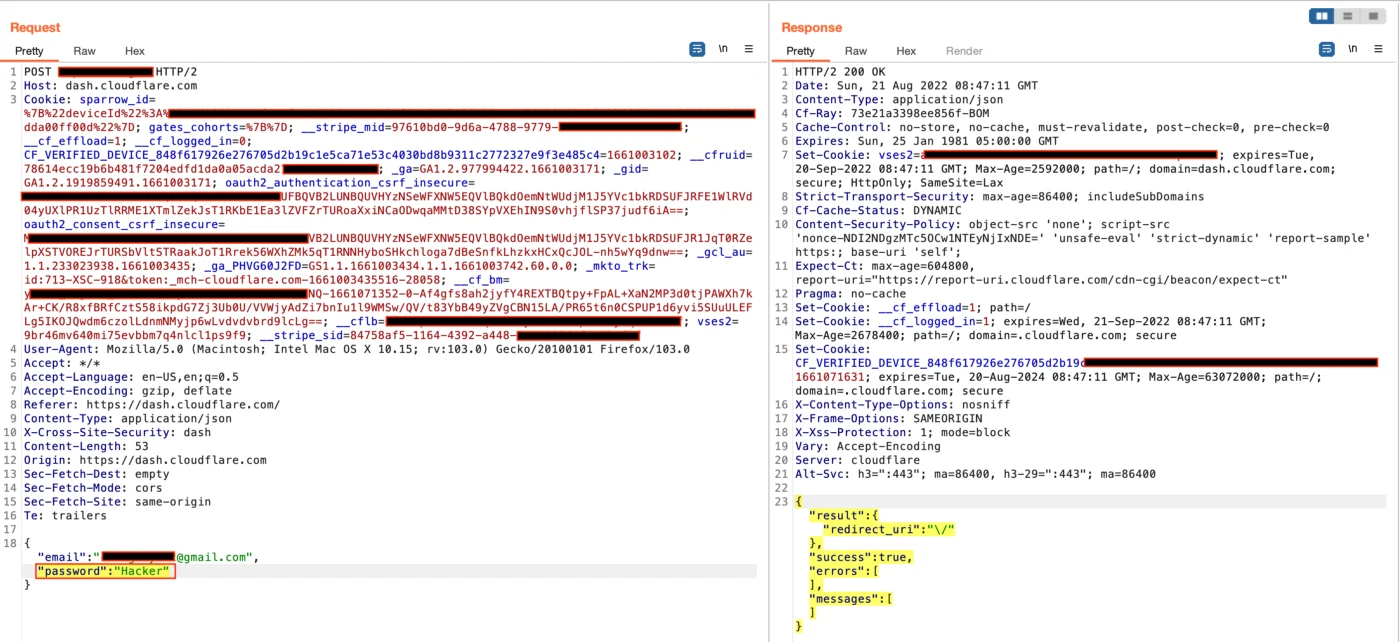
Login Request
Step 3: Replace the strong password with a weak one
The captured request was manipulated to change the strong password to a weak one, for example from Hacker@123 to Hacker. The report does not show the exact request body or parameter names.
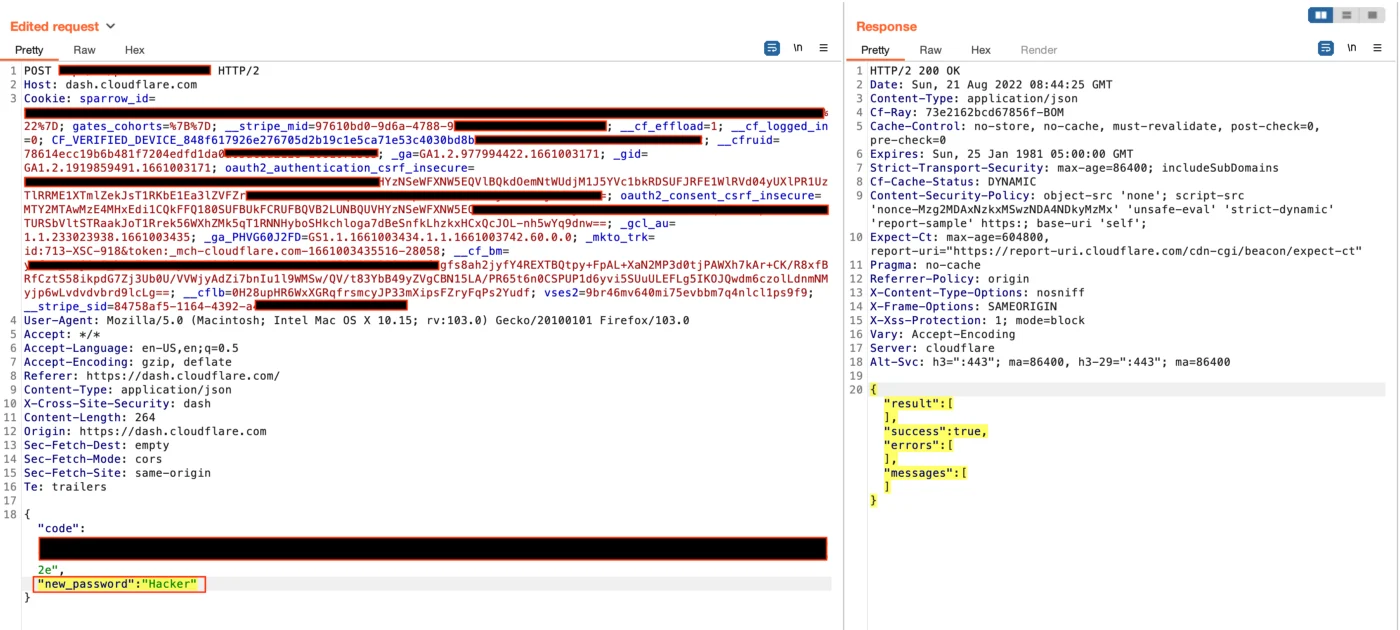
Password Reset
Step 4: Forward and observe the response
The modified request was forwarded to the server and returned a 200 OK response. The weak password was accepted and updated on the account. This confirms the server did not re-validate the password against the policy.
Root cause
The password policy is enforced client-side only. The UI blocks weak passwords, but the signup and reset API endpoints accept whatever password is submitted. The policy was enforced only in the UI, so a request that bypasses the UI was accepted. Existing defences did not stop it because the only check was in the browser, which the attacker controls.
Impact
A user can set a weak password for their own account by intercepting and modifying the signup or reset request. The report describes this as a security and compliance issue. The report does not describe any way to use this against another user's account; the demonstrated effect is on the attacker's own account.
Fix
The report states that the issue was fixed after a retest request, but does not describe the code change.
Timeline and reward
- August 21: reported to the Cloudflare program on HackerOne.
- August 22: report triaged.
- August 23: rewarded $200 plus a $50 bonus for a well-written report.
- August 23: retest requested.
- August 23: issue fixed and a $50 retest reward paid.
The total bounty for this report was $300. At the time of writing, the author was in the top 6 hunters on the Cloudflare Bug Bounty Program.
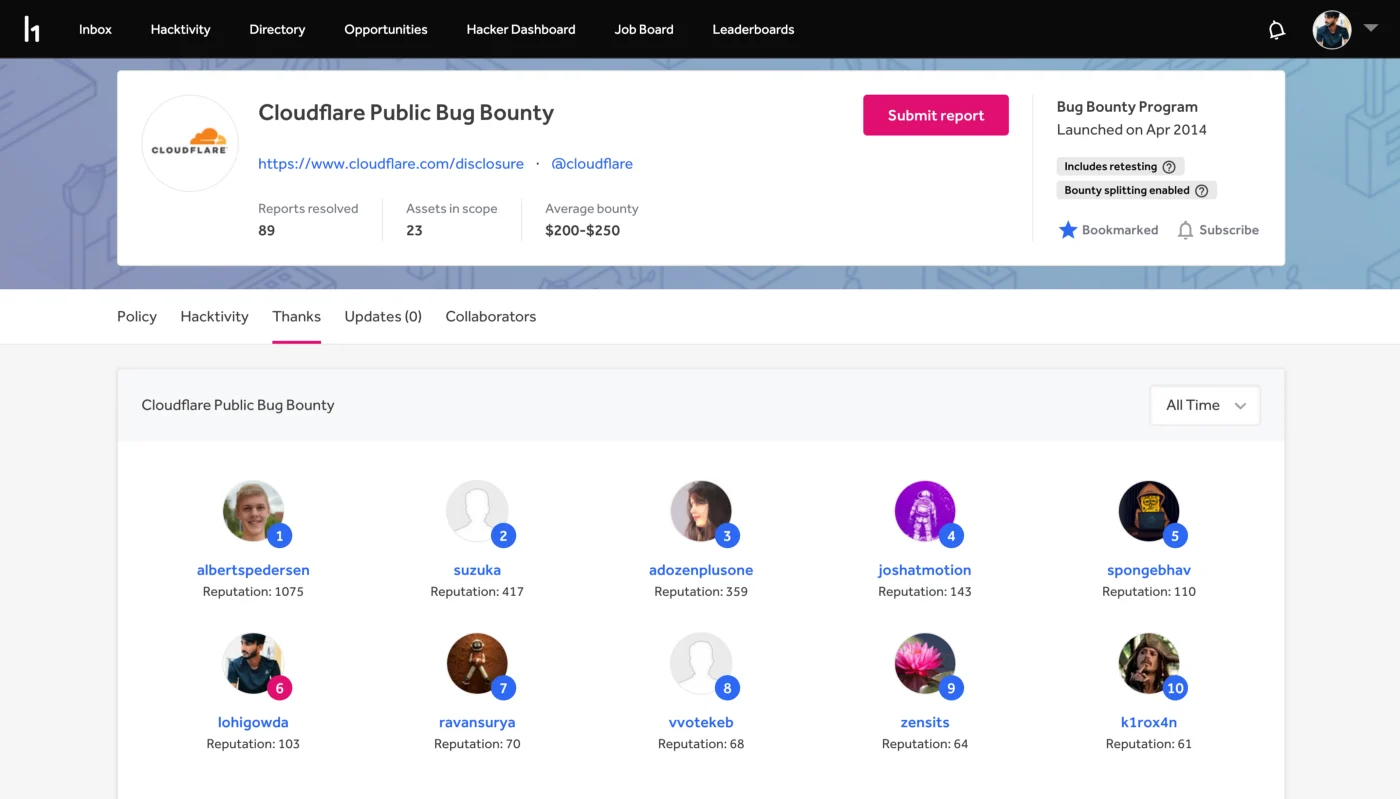
Cloudflare Thanks Page
Variants to test
- Signup endpoint: submit a weak password in the signup request and check whether the account is created. A positive result is a created account with a password that violates the stated policy.
What happened, in plain words
A security researcher found a gap between what a website tells you and what it actually checks. Cloudflare, a large internet company, has a signup page that insists on a strong password: at least 8 characters, with a special character and a number. That rule was real in the browser, but the server behind the page did not enforce it. By catching the message the browser sends to the server and editing it before it arrived, the researcher set a weak password (Hacker) on an account. The server replied 200 OK, meaning "done", and the weak password was accepted.
The author calls this both a security problem and a compliance problem. Many products are required by rules and standards to enforce strong passwords. A password policy that only exists in the browser is like a nightclub bouncer who checks IDs at the door but leaves the back door open: anyone who walks around the front can get in.
The ideas you need first
Before the steps, a few everyday ideas. You do not need to install anything to follow along.
- A web page and a server. When you fill in a form, your browser does not decide anything important. It packages what you typed into a message and sends it to a computer somewhere else, the server. The server is the one that stores accounts and decides whether to accept them.
- An API. Think of an API as the serving hatch between the browser and the server. The page you see is the dining room; the API is the hatch where orders are passed through. The browser sends a request ("create this account with this password") and the server sends back a response ("created", or "no").
- A request and a response. A request is the message going to the server. A response is the message coming back. Responses carry a status code, a number that says how it went.
200 OKmeans the server did what was asked. - Client-side and server-side. "Client-side" means the work happens in your browser, on your computer, which you control. "Server-side" means it happens on the company's computer, which you do not control. A check done only client-side can be removed or bypassed by anyone who knows how, because the browser belongs to them.
- Intercepting a request. A tool can sit between your browser and the server like a postal worker who opens every letter, lets you rewrite it, and then sends it on. Burp Suite is one such tool; its Proxy feature is the part that does the intercepting.
- The vulnerability class: client-side enforcement of server-side security. This is the formal name for the gap above. The security rule is enforced in the browser (client side) but the thing being protected lives on the server (server side). The browser is under the user's control, so the rule can be skipped. The correct pattern is to check in the browser for convenience and check again on the server, because the server is the only place an attacker cannot edit.
The setup
The work was done against Cloudflare's signup and password reset page. The only tool described is Burp Suite's Proxy, used to intercept and modify requests. The researcher did not need a special account or role: they simply opened the signup/reset page and typed in details with a strong password, exactly as a normal visitor would.
This was the author's second valid report on the Cloudflare program on HackerOne. HackerOne is a bug bounty platform: companies list their products there and pay researchers who report security problems responsibly. The author's first report on Cloudflare was a Blind SSRF, which had already been disclosed. SSRF, server-side request forgery, is a different bug where an attacker makes the server fetch a address of the attacker's choosing; it is not needed to understand this report.
Finding it
The researcher noticed that the strong password policy, 8 characters with a special character and a number, was applied only in the UI. UI means the user interface, the part you see and click. The hypothesis was simple: the server probably accepts whatever password arrives in the signup API request, no matter what the page in front of it demands. If that were true, a user could give their own account a weak password by editing the request on its way to the server.
Why does this matter if the account is the attacker's own? Because password policies exist to protect accounts from guessing and from password-reuse attacks, and because compliance frameworks require them. If the rule can be skipped, the compliance claim is not true, and any account created this way is weaker than the product promises.
Exploitation
Step 1: Fill in the signup/reset form with a strong password
The researcher opened the Cloudflare signup/reset page and entered all the details with a strong password in the UI. This produces a normal request that obeys the policy. Doing this first is deliberate: you want to see a request the server is known to accept, so that later you change only one thing and can tell what caused any difference.
Step 2: Capture the request in Burp Suite
With Burp Suite's Proxy tool, the signup request was captured. The report does not include the raw request text.
Login Request
Step 3: Replace the strong password with a weak one
The captured request was edited so that the strong password became a weak one, for example from Hacker@123 to Hacker. The report does not show the exact request body or the names of the fields.
Password Reset
Step 4: Forward and observe the response
The edited request was sent on to the server, and the server answered 200 OK. The weak password was accepted and set on the account. That is the proof: the server did not re-check the password against the policy. If it had, it would have refused the request with an error instead of a success.
Why it worked
The password policy was enforced client-side only. The page in the browser blocks weak passwords, but the signup and reset API endpoints accept whatever password is submitted. The policy was enforced only in the page, so a request that skips the page was accepted. The only defence was in the browser, and the browser is controlled by the person making the request, so it was not a defence at all.
What it means
A user can set a weak password for their own account by intercepting and modifying the signup or reset request. The report describes this as a security and compliance issue. It does not describe any way to use this against another user's account; the demonstrated effect is on the attacker's own account.
The fix
A retest is simply the researcher checking again after the company says it is fixed, to confirm the hole is really closed.
Timeline and reward
- August 21: reported to the Cloudflare program on HackerOne.
- August 22: the report was triaged. Triaged means the company reviewed it and accepted it as a real issue worth working on.
- August 23: rewarded $200 plus a $50 bonus for a well-written report.
- August 23: a retest was requested.
- August 23: the issue was fixed and a $50 retest reward was paid.
The total bounty for this report was $300. At the time of writing, the author was in the top 6 hunters on the Cloudflare Bug Bounty Program.
Cloudflare Thanks Page
Other places to look for the same mistake
These are variations on the same idea: find a rule the page enforces, then send the request without the page and see whether the server still enforces it.
- Signup endpoint: submit a weak password in the signup request and check whether the account is created. A positive result is a created account with a password that violates the stated policy.
Glossary
- API: the interface through which a browser and a server exchange requests and responses; think of it as the serving hatch between the page you see and the computer that stores the data.
- Blind SSRF: server-side request forgery where the attacker makes the server send a request but cannot see the response directly; mentioned only as the author's earlier report.
- Bug bounty program: a scheme where a company invites researchers to report security problems and pays for valid ones, often run on a platform such as HackerOne.
- Burp Suite: a tool used by security researchers to intercept, inspect and edit the traffic between a browser and a server.
- Client-side: happening in the user's browser, on the user's own computer, and therefore under the user's control.
- Client-side enforcement of server-side security: a vulnerability where a security rule is checked only in the browser while the thing being protected is on the server, so the rule can be bypassed.
- Compliance: meeting rules and standards that a product or company is required to follow, such as password requirements.
- Endpoint: a specific address on a server that accepts a particular kind of request, such as the signup endpoint or the reset endpoint.
- HackerOne: a platform where companies publish bug bounty programs and researchers submit reports.
- Intercept: to catch a request in transit between browser and server so it can be read or changed before it is sent on.
- Password policy: the rules a password must satisfy, here at least 8 characters including a special character and a number.
- Proxy: a tool or setting that sits between your browser and the server and passes messages through, optionally letting you edit them.
- Request: the message a browser sends to a server asking it to do something.
- Response: the message a server sends back, including a status code.
- Retest: checking again after a fix is claimed, to confirm the problem is gone.
- Server: the remote computer that stores accounts and makes the real decisions.
- Server-side: happening on the company's computer, which the user cannot edit.
- Status code: a number in a response saying how the request went;
200 OKmeans success. - Triaged: reviewed and accepted by the company as a genuine issue.
- UI (user interface): the part of a product you see and interact with in the browser.
- Vulnerability: a weakness in a product that lets someone make it behave in a way its makers did not intend.