Confused Deputy Vulnerability in Cloudflare CASB
A confused deputy flaw in Cloudflare CASB let the author view sensitive information about other customers' Microsoft and GitHub organisations, including employee names, emails, repository details and SharePoint links.
 Published on albertpedersen.com
On April 18, 2023, I discovered a vulnerability in Cloudflare CASB that enabled me to view sensitive information about other customers’ Microsoft and GitHub organizations. This included employee names/emails, links to SharePoint files, repository names/descriptions and more.
The full write-up lives on its author's site
It belongs to its author, so we link to it rather than copy it. The other two tabs are our own rewrites, checked against it.
Context
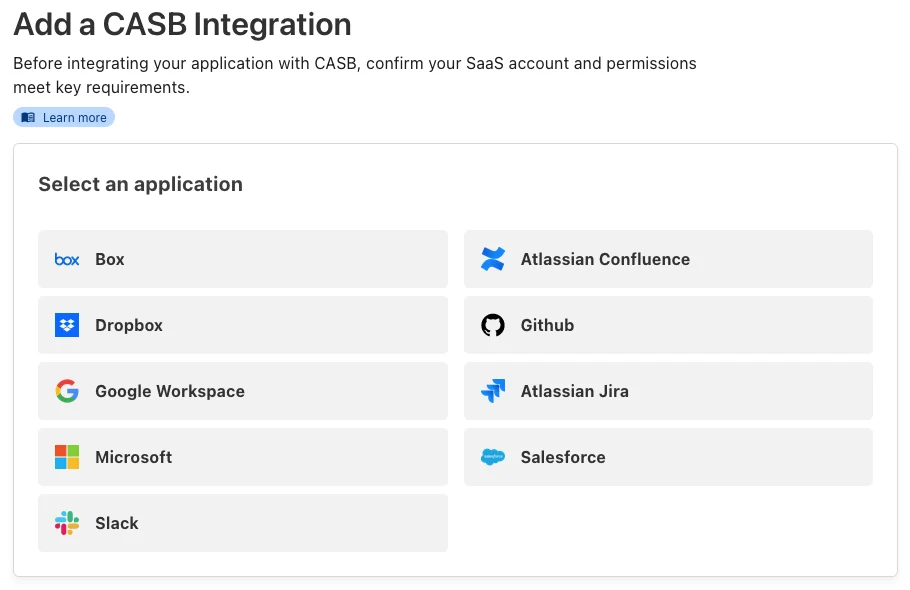
Cloudflare CASB (Cloud Access Security Broker) is a product that integrates with an organization's cloud-hosted applications and services (SaaS, PaaS and IaaS) to scan for and alert on security issues and possible misconfigurations. At the time of writing, it could integrate with Atlassian Confluence and Jira, Box, Dropbox, GitHub, Google Workspace, Microsoft 365, Salesforce and Slack organization accounts.
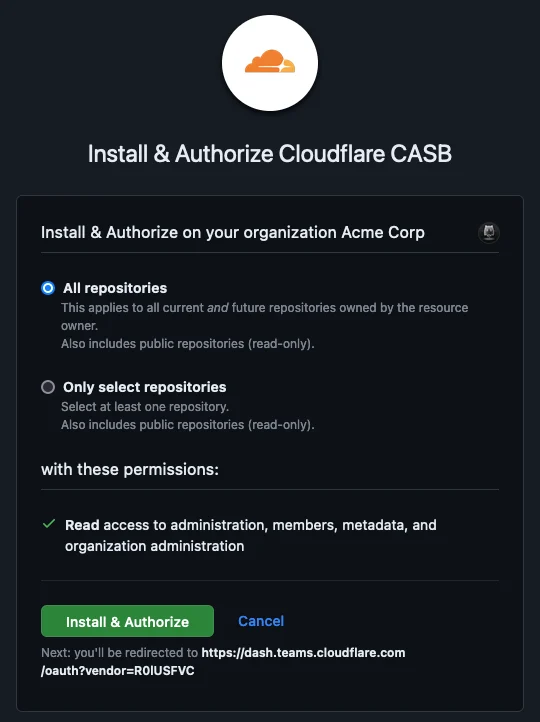
For GitHub integrations, Cloudflare CASB looks for organization members without 2FA enabled, vulnerabilities in repository dependencies, public repositories without a security policy, repositories with an unprotected default branch, and more. It works by having you sign into your GitHub account and authorize the Cloudflare CASB application, which grants the application full read access to your GitHub organization so it can perform those checks.
Because of this, the Cloudflare CASB GitHub application has access to all GitHub organizations that have installed it. It is therefore Cloudflare's responsibility to associate GitHub accounts with Cloudflare accounts and implement access control.
Setup
I created a GitHub integration in my own Cloudflare account to observe how the linking process works. For the cross-account tests I used a second Cloudflare account, and a friend who uses Cloudflare CASB gave me permission to test against their GitHub organization and their Microsoft organization.
Finding it
I was curious about how exactly GitHub and Cloudflare accounts were being linked, and whether this process could be exploited. So I went ahead and created a GitHub integration.
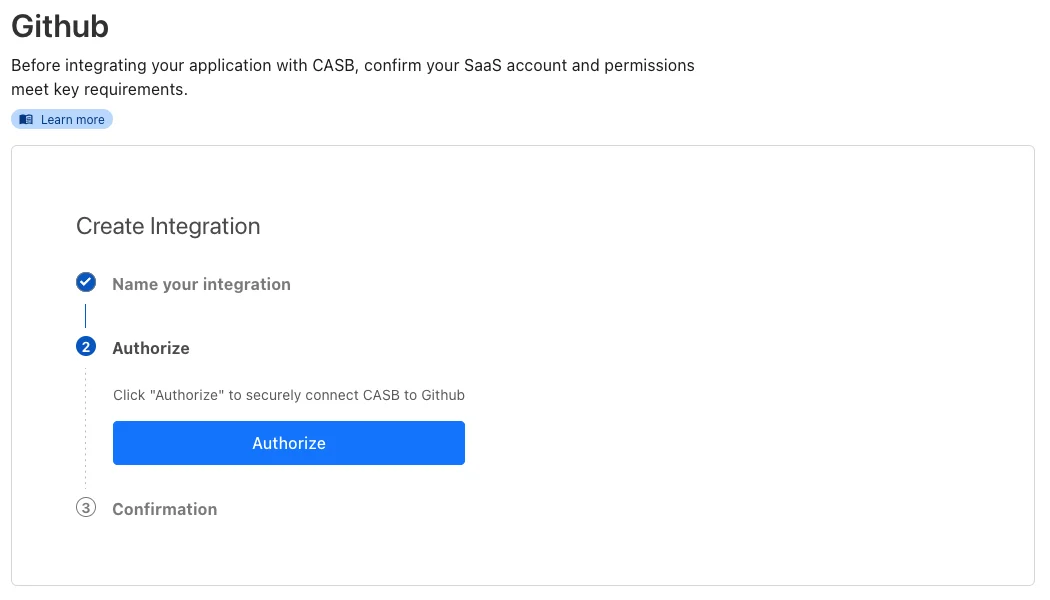
After authorizing the Cloudflare CASB app to access my GitHub organization, I was redirected to the following URL:
https://one.dash.cloudflare.com/oauth
?code=deadbeefdeadbeefdead
&installation_id=12345678
&setup_action=install
&state=[redacted]:My+GitHub+Integration
&vendor=R0lUSFVC
When the /oauth page loads, a POST request is sent to https://dash.cloudflare.com/api/v4/accounts/[redacted]/casb/integrations with the following payload:
{
	"name": "My GitHub Integration",
	"policy_id": "3d5f554c-f630-4ffa-ab94-c5047f9d8e3a",
	"credentials": {
		"code": "12345678"
	}
}
nameis the user-defined name of the integrationpolicy_idis a UUID indicating the type of integration (e.g.3d5f554c-f630-4ffa-ab94-c5047f9d8e3afor GitHub integrations)credentials.codeis the OAuth code returned by the vendor
But the credentials.code field does not match the OAuth code from the URL above. In fact, it looks like the dashboard is sending the GitHub app installation ID instead of the OAuth code. This made me wonder if I could simply specify the installation ID of another Cloudflare customer to create an integration for their GitHub organization and access their CASB findings.
Exploitation
Step 1: Replay the integration creation request in a second account
I tried resending the same POST request in a different Cloudflare account. The request completed successfully. For some reason, however, Cloudflare CASB was not coming up with any findings in either account, so I was unable to verify that it had worked properly.
Step 2: Use another customer's installation ID
For this reason, I asked a friend, who uses Cloudflare CASB, for permission to test against their GitHub account. They provided me with the ID of their Cloudflare CASB GitHub app installation.
I resent the POST request again with the installation ID that my friend had provided. Shortly after, CASB findings for their GitHub account started appearing in my Cloudflare dashboard.

The GitHub app installation ID is just an incrementing integer, and at the time of writing there were "only" around 36 million GitHub app installations. A bad actor could simply enumerate all the possible IDs to find those belonging to Cloudflare CASB installations.
CASB findings can contain sensitive information. For example, Cloudflare exposes repository names and descriptions in CASB findings. Also, the "GitHub Organization User 2FA Disabled" finding lists the name of organization members that do not have 2FA enabled. This information would be useful to a bad actor trying to break into the GitHub account of an employee at the target company.
Step 3: Read the dashboard JavaScript to find other affected vendors
This was bad enough by itself and warranted a vulnerability report, but I wondered if other integration types had the same problem of not validating the OAuth access code. So I looked at the Zero Trust dashboard's JavaScript files and found the following function. I have cleaned it up and renamed some variables for clarity.
function getCode(vendor, url) {
	switch(vendor.id) {
		case 'GITHUB':
			return url.searchParams.get('installation_id')
		case 'MICROSOFT_INTERNAL':
			return url.searchParams.get('tenant')
		default:
			return url.searchParams.get('code')
	}
}
This function is called when the OAuth callback URL is loaded. The result is used as the value of the credentials.code field in the integration creation payload. It confirms that the installation ID is used when creating a GitHub integration, and it tells us that Microsoft integrations use the tenant parameter of the callback URL. For any other vendor, the code parameter (OAuth code) is used.
Step 4: Inspect the Microsoft callback URL
I wanted to check if Microsoft integrations were also vulnerable, but I do not have a Microsoft organization myself. My friend also uses Cloudflare CASB with their Microsoft organization and gave me permission to test this vulnerability against their Microsoft account as well.
If you look at the callback URL for a Microsoft integration, you will see that the tenant parameter is a random UUID. This would obviously not be feasible to guess or enumerate.
https://one.dash.cloudflare.com/[redacted]/oauth
?vendor=TUlDUk9TT0ZUX0lOVEVSTkFM
&admin_consent=True
&tenant=72f988bf-86f1-41af-91ab-2d7cd011db47
&state=[redacted]:My+Microsoft+Integration
However, after looking at the Microsoft OAuth documentation, I found that the tenant can also be the primary domain name of the Microsoft organization. Therefore, I tried creating a Microsoft integration using the domain as the code.
I later discovered it is possible to retrieve the tenant UUID of any domain from https://login.microsoftonline.com/<domain>/.well-known/openid-configuration, so this attack would have still been possible if the API only accepted UUIDs rather than arbitrary strings.
Step 5: Create a Microsoft integration with a domain name as the code
{
	"name":"My Microsoft Integration",
	"policy_id": "3cd1645e-2b50-4651-afb3-25fc0493bca5",
	"credentials": {
		"code": "example.com"
	}
}
$ curl https://api.cloudflare.com/client/v4/accounts/[redacted]/casb/integrations \
	-H 'X-Auth-Email: <EMAIL>' \
	-H 'X-Auth-Key: <API_KEY>' \
	-H 'Content-Type: application/json' \
	-d '{"name":"My Microsoft Integration","credentials":{"code":"example.com"},"policy_id":"3cd1645e-2b50-4651-afb3-25fc0493bca5"}'
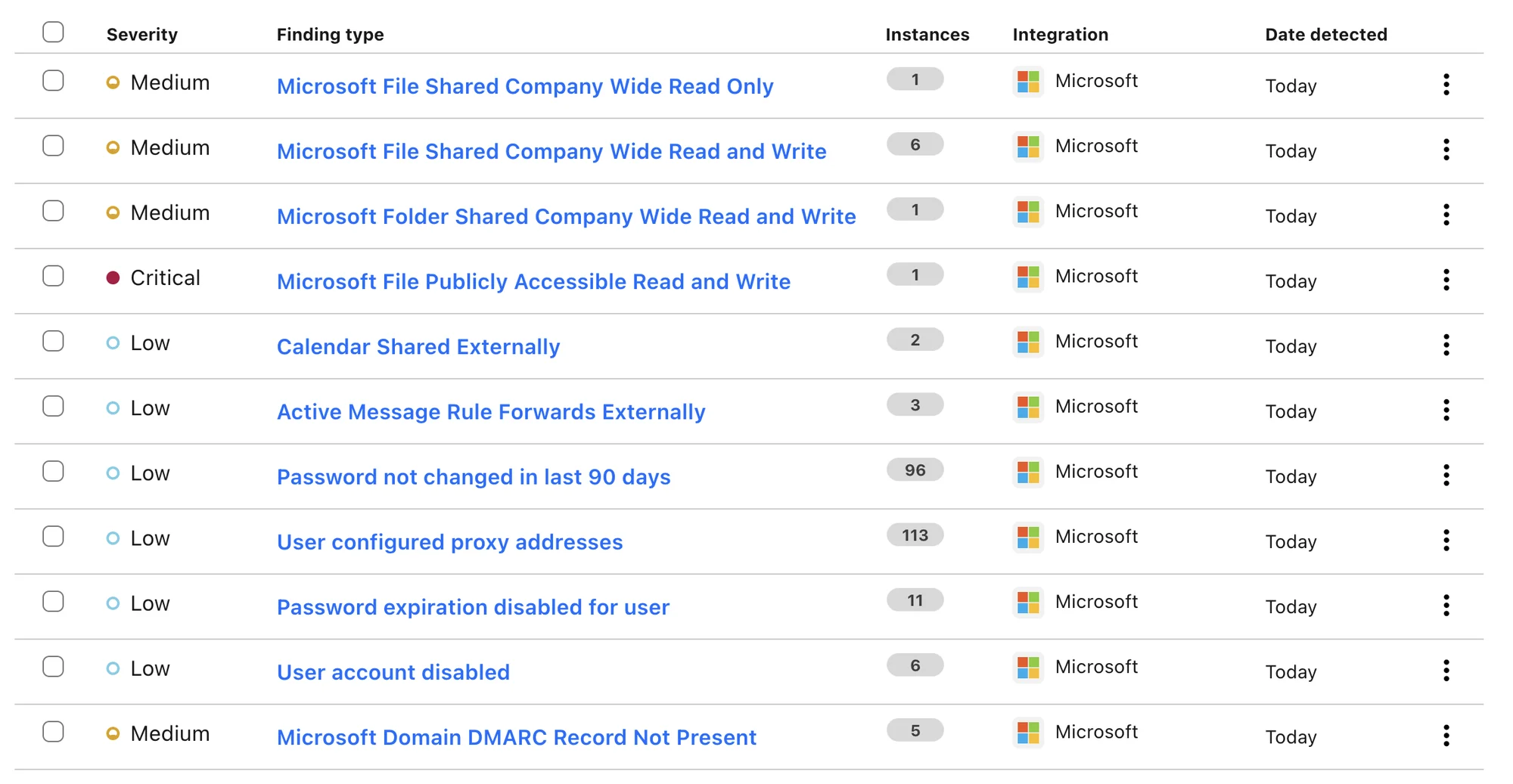
The request succeeded and a couple of minutes later these items appeared in my dashboard. They contain sensitive information about users in the organization (names and email addresses), and the "Microsoft File ..." findings also contain direct links to the affected SharePoint sites.
It would have been easy for a bad actor to go through e.g. the top 10,000 domains and attempt to create integrations for each of them. If any of them used Cloudflare CASB with their Microsoft organization, the attacker would have gained access to a bunch of sensitive information about the organization and its employees.
Root cause
The integration creation endpoint accepted a value in credentials.code that was not an OAuth code at all: for GitHub it was the app installation ID, and for Microsoft it was the tenant identifier. The server accepted an installation ID or tenant identifier in place of an OAuth code, which allowed binding another customer's installation to the caller's Cloudflare account. Because the Cloudflare CASB application already holds read access to every organization that installed it, the association between a vendor installation and a Cloudflare account was not enforced properly. The dashboard JavaScript shows the client choosing which URL parameter to send per vendor.
Impact
An attacker with a Cloudflare account could create a CASB integration pointing at another customer's GitHub app installation ID or Microsoft tenant and then read that customer's CASB findings. For GitHub this exposed repository names and descriptions and the names of organization members without 2FA enabled, which is useful for someone trying to break into an employee's GitHub account. For Microsoft it exposed user names and email addresses and, in the "Microsoft File ..." findings, direct links to affected SharePoint sites. GitHub installation IDs are incrementing integers with roughly 36 million in existence at the time, so enumeration was practical. Microsoft tenant UUIDs are not enumerable, but the tenant parameter also accepts the organization's primary domain name, so a list of common domains could be tried instead.
Fix
Cloudflare fixed the vulnerability by ensuring that multiple CASB integrations cannot be created for a single Microsoft tenant or GitHub app installation ID. My first retest showed that the fix only protected new integrations; Cloudflare then confirmed the fix had been applied retroactively to all integrations.
Variants to test
- Other vendors in the same product. The
getCodefunction falls back to the OAuthcodeparameter for every vendor other than GitHub and Microsoft. Try creating an integration for each supported vendor (Atlassian, Box, Dropbox, Google Workspace, Salesforce, Slack) and check whether the server validates that the code was issued to your account. A positive result is an integration that returns findings for an organization you do not control. - Identifier substitution on any integration endpoint. Wherever a client sends an opaque identifier that the server later uses to fetch third-party data, replace it with an identifier belonging to a second test account. A positive result is data from the second account appearing in the first.
- Alternate identifier formats. As with the Microsoft tenant, check whether an identifier field accepts more than one representation (domain name, UUID, slug, numeric ID). A positive result is a request that succeeds with a format the UI never sends.
- Enumeration of sequential IDs. For any integration type whose identifier is a small or sequential integer, sample a range of values and watch for successful creations or for findings appearing. A positive result is any integration bound to an installation you do not own.
- Retroactive coverage of a fix. After a fix is announced, retest with integrations created before the fix as well as new ones. A positive result is an old integration still returning another account's findings.
What happened, in plain words
On 18 April 2023, Albert Pedersen found a flaw in Cloudflare CASB, a Cloudflare product that checks other companies' cloud accounts for security problems. By abusing the way the product linked a customer's GitHub or Microsoft account to a Cloudflare account, he could make his own Cloudflare dashboard show security findings belonging to other customers. Those findings included employee names and email addresses, links to SharePoint files, and repository names and descriptions. Cloudflare paid a bounty of $3300 and fixed the problem.
The class of bug is called a confused deputy. A deputy is someone you trust to act on your behalf, like a receptionist who is allowed to fetch files from the archive. A confused deputy is that receptionist being tricked into fetching files for someone who should not have them, because the receptionist has the access and does not check who is really asking. Here, Cloudflare's servers were the deputy: they already had permission to read every customer's GitHub and Microsoft data, and they did not check that the person asking was entitled to the account they named.
What Cloudflare CASB is
A Cloud Access Security Broker (CASB) is a service that sits between a company and the cloud apps its staff use, and reports on how those apps are configured. Think of a building inspector who is given a key to every office and writes a report on which doors are unlocked. Cloudflare CASB integrates with an organization's cloud-hosted applications and services (SaaS, PaaS and IaaS) to scan for and alert on security issues and possible misconfigurations.
At the time of writing, it could integrate with Atlassian Confluence and Jira, Box, Dropbox, GitHub, Google Workspace, Microsoft 365, Salesforce and Slack organization accounts.
The screenshot shows the Cloudflare dashboard listing those supported providers, so you can see the range of services a single CASB account can be connected to.
For GitHub integrations, Cloudflare CASB looks for:
- organization members without 2FA enabled
- vulnerabilities in repository dependencies
- public repositories without a security policy
- repositories with an unprotected default branch
- and more
2FA (two-factor authentication) means logging in with a password plus a second proof, such as a code from a phone app. A member without it is easier to break into. A repository is a project folder hosted on GitHub, and a dependency is another piece of software that project relies on. A security policy is a file telling people how to report problems in the project. A default branch is the main line of code, and leaving it unprotected means people can change it without review.
It works by having you sign into your GitHub account and authorize the Cloudflare CASB application, which grants the application full read access to your GitHub organization so it can perform those checks.
The screenshot shows the GitHub authorization screen where you approve the Cloudflare CASB app. This is the moment a customer hands read access to their organization over to Cloudflare.
Because of this, the Cloudflare CASB GitHub application has access to all GitHub organizations that have installed it. It is therefore Cloudflare's responsibility to associate GitHub accounts with Cloudflare accounts and implement access control.
A tenant is one organization's own private slice of Microsoft's cloud, with its own users, mail and files. Access control means deciding who is allowed to see or do what. The whole bug lives in that sentence: the app can read everything, so the only thing standing between customers is Cloudflare correctly deciding which Cloudflare account owns which GitHub organization or Microsoft tenant.
Setting up the test
I created a GitHub integration in my own Cloudflare account to observe how the linking process works. For the cross-account tests I used a second Cloudflare account, and a friend who uses Cloudflare CASB gave me permission to test against their GitHub organization and their Microsoft organization.
curl is a command-line tool for sending web requests by hand, useful when you want to change a request that a website normally builds for you. An API (Application Programming Interface) is the set of addresses a website's own pages talk to behind the scenes, so that programs can ask for the same data the pages show. An API key is a long secret string that identifies your account to that API, like a password for programs.
Finding it
I was curious about how exactly GitHub and Cloudflare accounts were being linked, and whether this process could be exploited. So I went ahead and created a GitHub integration.
The screenshot shows the Cloudflare dashboard while creating a GitHub integration, which is the screen that starts the linking process.
After authorizing the Cloudflare CASB app to access my GitHub organization, I was redirected to the following URL:
https://one.dash.cloudflare.com/oauth
?code=deadbeefdeadbeefdead
&installation_id=12345678
&setup_action=install
&state=[redacted]:My+GitHub+Integration
&vendor=R0lUSFVC
Line by line:
https://one.dash.cloudflare.com/oauthis the page Cloudflare sends you back to after GitHub says yes. The part after the?is the query string, a list ofname=valuepairs carried in the address.code=deadbeefdeadbeefdeadis an OAuth code. OAuth is the standard "log in with another service" handshake: GitHub hands back a short-lived code, and the receiving server swaps it for access. The code is meant to be single-use and tied to the person who just approved the app.installation_id=12345678is GitHub's internal number for this particular installation of the Cloudflare CASB app on this organization. It identifies the installation, not the person.setup_action=installsimply says the app was installed.state=[redacted]:My+GitHub+Integrationcarries the Cloudflare account ID and the name the user chose, so the page knows where to put the result. The+is how a space is written in a URL.vendor=R0lUSFVCsays which service this is. It is the wordGITHUBencoded in base64, a way of writing text using only safe characters.
When the /oauth page loads, a POST request is sent to https://dash.cloudflare.com/api/v4/accounts/[redacted]/casb/integrations with the following payload:
{
	"name": "My GitHub Integration",
	"policy_id": "3d5f554c-f630-4ffa-ab94-c5047f9d8e3a",
	"credentials": {
		"code": "12345678"
	}
}
A POST request is a request that sends data to a server to create or change something, as opposed to a GET request that just asks for a page. The payload is the body of that request, written here in JSON, a text format of curly braces, names and values that programs use to exchange structured data.
nameis the user-defined name of the integration.policy_idis a UUID (a long random-looking identifier) indicating the type of integration, for example3d5f554c-f630-4ffa-ab94-c5047f9d8e3afor GitHub integrations.credentials.codeis supposed to be the OAuth code returned by the vendor.
But the credentials.code field does not match the OAuth code from the URL above. In fact, it looks like the dashboard is sending the GitHub app installation ID instead of the OAuth code. This made me wonder if I could simply specify the installation ID of another Cloudflare customer to create an integration for their GitHub organization and access their CASB findings.
That is the heart of the bug. Instead of a fresh, single-use code, the request carried a permanent installation number, and the server accepted it.
Exploitation
Step 1: Replay the integration creation request in a second account
I tried resending the same POST request in a different Cloudflare account. The request completed successfully. For some reason, however, Cloudflare CASB was not coming up with any findings in either account, so I was unable to verify that it had worked properly.
Replaying a request means sending exactly the same request again, here from a different account, to see whether the server cares who is asking. It accepted the request, which was a hint, but with no findings appearing there was nothing to prove yet. The step was taken to separate "the server accepts it" from "the server actually gives me someone else's data".
Step 2: Use another customer's installation ID
For this reason, I asked a friend, who uses Cloudflare CASB, for permission to test against their GitHub account. They provided me with the ID of their Cloudflare CASB GitHub app installation.
I resent the POST request again with the installation ID that my friend had provided. Shortly after, CASB findings for their GitHub account started appearing in my Cloudflare dashboard.
The screenshot shows the list of GitHub CASB findings in the researcher's own dashboard, with columns for name, severity, number of occurrences, integration name and date detected. These are findings about the friend's organization, not his own.
The GitHub app installation ID is just an incrementing integer, and at the time of writing there were "only" around 36 million GitHub app installations. A bad actor could simply enumerate all the possible IDs to find those belonging to Cloudflare CASB installations.
Enumerating means trying every value in turn, like dialling every number in a range. An incrementing integer is easy to enumerate because the values are predictable: 1, 2, 3 and so on. Thirty-six million sounds large, but a program can try that many values quickly.
CASB findings can contain sensitive information. For example, Cloudflare exposes repository names and descriptions in CASB findings. Also, the "GitHub Organization User 2FA Disabled" finding lists the name of organization members that do not have 2FA enabled. This information would be useful to a bad actor trying to break into the GitHub account of an employee at the target company.
Step 3: Read the dashboard JavaScript to find other affected vendors
This was bad enough by itself and warranted a vulnerability report, but I wondered if other integration types had the same problem of not validating the OAuth access code. So I looked at the Zero Trust dashboard's JavaScript files and found the following function. I have cleaned it up and renamed some variables for clarity.
JavaScript is the programming language that runs inside web pages in your browser. Because the browser has to download it to run it, anyone can read it. That makes it a good place to learn how a website builds its requests.
function getCode(vendor, url) {
	switch(vendor.id) {
		case 'GITHUB':
			return url.searchParams.get('installation_id')
		case 'MICROSOFT_INTERNAL':
			return url.searchParams.get('tenant')
		default:
			return url.searchParams.get('code')
	}
}
Line by line:
function getCode(vendor, url) {defines a reusable block of code namedgetCodethat takes two inputs: which vendor this is, and the callback URL.switch(vendor.id) {starts a list of cases, choosing one branch based on the vendor's identifier.case 'GITHUB':applies when the vendor is GitHub.return url.searchParams.get('installation_id')then returns theinstallation_idvalue from the URL.searchParams.getis the browser's built-in way of reading one named value out of a query string.case 'MICROSOFT_INTERNAL':applies when the vendor is Microsoft.return url.searchParams.get('tenant')returns thetenantvalue from the URL instead.default:covers every other vendor.return url.searchParams.get('code')returns the normal OAuthcode.
This function is called when the OAuth callback URL is loaded. The result is used as the value of the credentials.code field in the integration creation payload. It confirms that the installation ID is used when creating a GitHub integration, and it tells us that Microsoft integrations use the tenant parameter of the callback URL. For any other vendor, the code parameter (OAuth code) is used.
In other words, the browser was deliberately sending a permanent identifier instead of a one-time code for two of the vendors. The browser choosing what to send is fine on its own, because the browser belongs to the user and can be changed. The problem is that the server accepted the value.
Step 4: Inspect the Microsoft callback URL
I wanted to check if Microsoft integrations were also vulnerable, but I do not have a Microsoft organization myself. My friend also uses Cloudflare CASB with their Microsoft organization and gave me permission to test this vulnerability against their Microsoft account as well.
If you look at the callback URL for a Microsoft integration, you will see that the tenant parameter is a random UUID. This would obviously not be feasible to guess or enumerate.
https://one.dash.cloudflare.com/[redacted]/oauth
?vendor=TUlDUk9TT0ZUX0lOVEVSTkFM
&admin_consent=True
&tenant=72f988bf-86f1-41af-91ab-2d7cd011db47
&state=[redacted]:My+Microsoft+Integration
Line by line:
https://one.dash.cloudflare.com/[redacted]/oauthis the callback page for that Cloudflare account.vendor=TUlDUk9TT0ZUX0lOVEVSTkFMis again base64, this time spellingMICROSOFT_INTERNAL.admin_consent=Truerecords that an administrator approved the app for the whole organization.tenant=72f988bf-86f1-41af-91ab-2d7cd011db47is the Microsoft tenant UUID, a long random identifier. Guessing it is hopeless, which is why this looked safe at first.state=[redacted]:My+Microsoft+Integrationagain carries the Cloudflare account ID and the chosen name.
However, after looking at the Microsoft OAuth documentation, I found that the tenant can also be the primary domain name of the Microsoft organization. Therefore, I tried creating a Microsoft integration using the domain as the code.
A domain name is the part of an address after the @ in an email or after www. in a web address, such as example.com. Domain names are public and easy to collect, so if the server accepts a domain where it expects a tenant, the randomness of the UUID no longer protects anything.
I later discovered it is possible to retrieve the tenant UUID of any domain from https://login.microsoftonline.com/<domain>/.well-known/openid-configuration, so this attack would have still been possible if the API only accepted UUIDs rather than arbitrary strings.
Step 5: Create a Microsoft integration with a domain name as the code
{
	"name":"My Microsoft Integration",
	"policy_id": "3cd1645e-2b50-4651-afb3-25fc0493bca5",
	"credentials": {
		"code": "example.com"
	}
}
This is the same shape of payload as the GitHub one. name is the label shown in the dashboard, policy_id is the UUID for the Microsoft integration type, and credentials.code now holds a domain name instead of any kind of code.
$ curl https://api.cloudflare.com/client/v4/accounts/[redacted]/casb/integrations \
	-H 'X-Auth-Email: <EMAIL>' \
	-H 'X-Auth-Key: <API_KEY>' \
	-H 'Content-Type: application/json' \
	-d '{"name":"My Microsoft Integration","credentials":{"code":"example.com"},"policy_id":"3cd1645e-2b50-4651-afb3-25fc0493bca5"}'
Line by line:
curlis the command-line tool sending the request.- The URL is the Cloudflare API address for creating CASB integrations under that account.
-H 'X-Auth-Email: <EMAIL>'adds a header, which is extra information attached to a request. This one carries the account's email address.-H 'X-Auth-Key: <API_KEY>'adds the secret API key header. Together, the email and key prove which Cloudflare account is making the call.-H 'Content-Type: application/json'tells the server the body is JSON, so it knows how to read it.-d '...'is the body itself, the same JSON payload as above on one line.
The request succeeded and a couple of minutes later these items appeared in my dashboard. They contain sensitive information about users in the organization (names and email addresses), and the "Microsoft File ..." findings also contain direct links to the affected SharePoint sites.
The screenshot shows the Microsoft CASB findings in the researcher's dashboard, again with name, severity, number of occurrences, integration name and date detected. These belong to the friend's Microsoft organization.
It would have been easy for a bad actor to go through e.g. the top 10,000 domains and attempt to create integrations for each of them. If any of them used Cloudflare CASB with their Microsoft organization, the attacker would have gained access to a bunch of sensitive information about the organization and its employees.
Why it worked
The integration creation endpoint accepted a value in credentials.code that was not an OAuth code at all: for GitHub it was the app installation ID, and for Microsoft it was the tenant identifier. The server did not verify that the caller was entitled to that installation or tenant before binding it to the caller's Cloudflare account. Because the Cloudflare CASB application already holds read access to every organization that installed it, the server-side association between a vendor installation and a Cloudflare account was the only access control boundary, and it was missing. The dashboard JavaScript shows the client choosing which URL parameter to send per vendor, but the trust decision was left to the server, which did not make it.
A useful rule of thumb: anything the browser sends can be changed by the user, so the server must check every value it receives.
What an attacker could see
An attacker with a Cloudflare account could create a CASB integration pointing at another customer's GitHub app installation ID or Microsoft tenant and then read that customer's CASB findings. For GitHub this exposed repository names and descriptions and the names of organization members without 2FA enabled, which is useful for someone trying to break into an employee's GitHub account. For Microsoft it exposed user names and email addresses and, in the "Microsoft File ..." findings, direct links to affected SharePoint sites. GitHub installation IDs are incrementing integers with roughly 36 million in existence at the time, so enumeration was practical. Microsoft tenant UUIDs are not enumerable, but the tenant parameter also accepts the organization's primary domain name, so a list of common domains could be tried instead.
The fix
Cloudflare fixed the vulnerability by ensuring that multiple CASB integrations cannot be created for a single Microsoft tenant or GitHub app installation ID. My first retest showed that the fix only protected new integrations; Cloudflare then confirmed the fix had been applied retroactively to all integrations.
"Retroactively" matters: a fix that only stops new bad integrations leaves any that already exist in place, so the old ones have to be checked too.
Timeline
All times are UTC.
| Time | Event |
|---|---|
| 2023-04-18 13:45 | Report submitted to Cloudflare's HackerOne program |
| 2023-04-18 13:51 | Cloudflare triages the report |
| 2023-04-19 01:06 | Cloudflare confirms a fix has been released and requests a retest |
| 2023-04-19 10:32 | Retest shows the fix only protects new integrations |
| 2023-04-19 15:00 | Cloudflare awards a bounty of $3300 |
| 2023-04-20 09:06 | Cloudflare confirms the fix has been applied retroactively to all integrations |
| 2023-06-07 09:05 | Cloudflare agrees to disclose the report and lets the researcher publish this write-up |
Triaging is the first pass where the receiving team confirms a report is real and worth investigating. A bounty is the payment a company makes for a valid report.
Similar things worth testing
- Other vendors in the same product. The
getCodefunction falls back to the OAuthcodeparameter for every vendor other than GitHub and Microsoft. Try creating an integration for each supported vendor (Atlassian, Box, Dropbox, Google Workspace, Salesforce, Slack) and check whether the server validates that the code was issued to your account. A positive result is an integration that returns findings for an organization you do not control. - Identifier substitution on any integration endpoint. Wherever a client sends an opaque identifier that the server later uses to fetch third-party data, replace it with an identifier belonging to a second test account. A positive result is data from the second account appearing in the first.
- Alternate identifier formats. As with the Microsoft tenant, check whether an identifier field accepts more than one representation (domain name, UUID, slug, numeric ID). A positive result is a request that succeeds with a format the UI never sends.
- Enumeration of sequential IDs. For any integration type whose identifier is a small or sequential integer, sample a range of values and watch for successful creations or for findings appearing. A positive result is any integration bound to an installation you do not own.
- Retroactive coverage of a fix. After a fix is announced, retest with integrations created before the fix as well as new ones. A positive result is an old integration still returning another account's findings.
Glossary
- 2FA (two-factor authentication): logging in with a password plus a second proof, such as a code from a phone app.
- Access control: the rules deciding who is allowed to see or do what.
- API (Application Programming Interface): the set of addresses a website's own pages use behind the scenes, which programs can also call.
- API key: a long secret string that identifies an account to an API, like a password for programs.
- Base64: a way of writing text using only safe characters, often used to carry values in URLs.
- Bounty: a payment a company makes for a valid security report.
- CASB (Cloud Access Security Broker): a service that connects to a company's cloud apps and reports on security issues and misconfigurations.
- Confused deputy: a trusted service with broad access being tricked into acting for someone who should not have that access.
curl: a command-line tool for sending web requests by hand.- Default branch: the main line of code in a repository.
- Dependency: another piece of software that a project relies on.
- Domain name: the part of an address such as
example.com, after the@in an email or afterwww.in a web address. - Enumerate: to try every value in turn, such as every number in a range.
- Header: extra information attached to a web request, such as who is making it.
- Installation ID: GitHub's internal number identifying one installation of an app on one organization.
- JavaScript: the programming language that runs inside web pages in the browser, and which anyone can read.
- JSON: a text format of curly braces, names and values used to exchange structured data between programs.
- OAuth: the standard handshake for "log in with another service", where a short-lived code is swapped for access.
- OAuth code: the short-lived, single-use value returned by that handshake.
- Payload: the body of a request, the data being sent.
- POST request: a request that sends data to a server to create or change something.
- Query string: the
name=valuepairs after the?in a URL. - Repository: a project folder hosted on GitHub.
- Retroactively: applied to things that already existed, not only to new ones.
- SaaS, PaaS, IaaS: software, platform and infrastructure delivered as a service over the internet.
- Security policy: a file telling people how to report problems in a project.
- Tenant: one organization's own private slice of Microsoft's cloud, with its own users, mail and files.
- Triaging: the first pass where a receiving team confirms a report is real and worth investigating.
- UUID: a long random-looking identifier, such as
3d5f554c-f630-4ffa-ab94-c5047f9d8e3a. - Vendor: here, the third-party service being integrated, such as GitHub or Microsoft.

