Recon Harder
An unauthenticated file upload endpoint on a Starbucks Singapore server accepted files with a .aspx extension, allowing the upload of a script that could execute commands on the server. The attacker could run arbitrary code and potentially compromise the server, databases, and user data.
 Published on kamilonurozkaleli.com
After I found a critical vulnerability in Starbucks Singapore web application, I wanted to dig a little deeper and began to examine the com.starbucks.singapore Android app. Unfortunately, I did not find any weaknesses in the mobile application and I decided to focus on the application server on which the application…
The full write-up lives on its author's site
It belongs to its author, so we link to it rather than copy it. The other two tabs are our own rewrites, checked against it.
Context
The target was the Starbucks Singapore mobile application and the application server it talks to. The researcher had previously found a critical vulnerability in the Starbucks Singapore web application and wanted to dig deeper, so he turned to the com.starbucks.singapore Android app. The mobile app did not yield any weaknesses, so he focused on the application server at mobile.starbucks.com.sg that the app interacts with.
The app mostly talks to a REST API on that server, but in some operations it also talks to an endpoint with the .aspx extension. The application server runs on IIS. The feature at the centre of the report is an image upload handler: an endpoint that accepts image files from the frontend and stores them.
Setup
No accounts, roles or special privileges are described. The work was done against the public mobile application server; whether the endpoint was reachable without authentication was one of the open questions. The tools used were:
- The IIS Tilde Enumeration Scanner by Soroush Dalili, to discover short (8.3) file names.
ffuf, to brute-force the rest of a discovered file name.- The Android application com.starbucks.singapore and its traffic, as the starting point for recon.
Finding it
The first pass found nothing. The .aspx endpoints the app used had no weaknesses, and directory scanning for more endpoints turned up nothing exploitable either. The researcher took a few weeks off.
He came back to IIS specifically, knowing the application server runs on IIS. While researching IIS vulnerabilities he came across the Hacking IIS video by shubs, which reminded him of the IIS Tilde Enumeration Scanner. He had known the tool before but had not thought to use it during his earlier exploration.
Running the scanner against the server surfaced some .ashx endpoints in the /api directory:
DOWNLO~1.ASH
EMAIL-~1.ASH
IMAGEU~1.ASH
MAILIN~1.ASH
The scanner exploits a behaviour that Microsoft describes as a feature: it discloses the first six characters of a file name and the first three characters of its extension. From that information he tried to recover the full file names and quickly found some of them:
download.ashx
email-bounce.ashx
Those two were not useful for any purpose, so he focused on IMAGEU~1.ASH. The letter U suggested the word upload. He scanned with ffuf using the pattern imageuploadFUZZ.ashx and discovered the endpoint is imageuploadhandler.ashx.
The name implies the endpoint is used to upload image files. That raised a set of questions:
- Is the endpoint accessible to unauthorised users?
- What request format does it accept?
- Can files other than images be uploaded?
- If a file can be uploaded, what is the full path to access it?
- Will the uploaded file be executed?
Exploitation
Step 1: Probe the endpoint
He sent random GET and POST requests to the endpoint. The only response was 200 OK and nothing more: no error codes, no error or success messages. He could not tell whether the endpoint was working at all.
Step 2: Find how the frontend calls it
Thinking from a developer's perspective, an upload endpoint is called from the frontend either from an HTML form or via JavaScript with an XMLHttpRequest. Exploring the JavaScript files, he found ajaxfileupload.js.

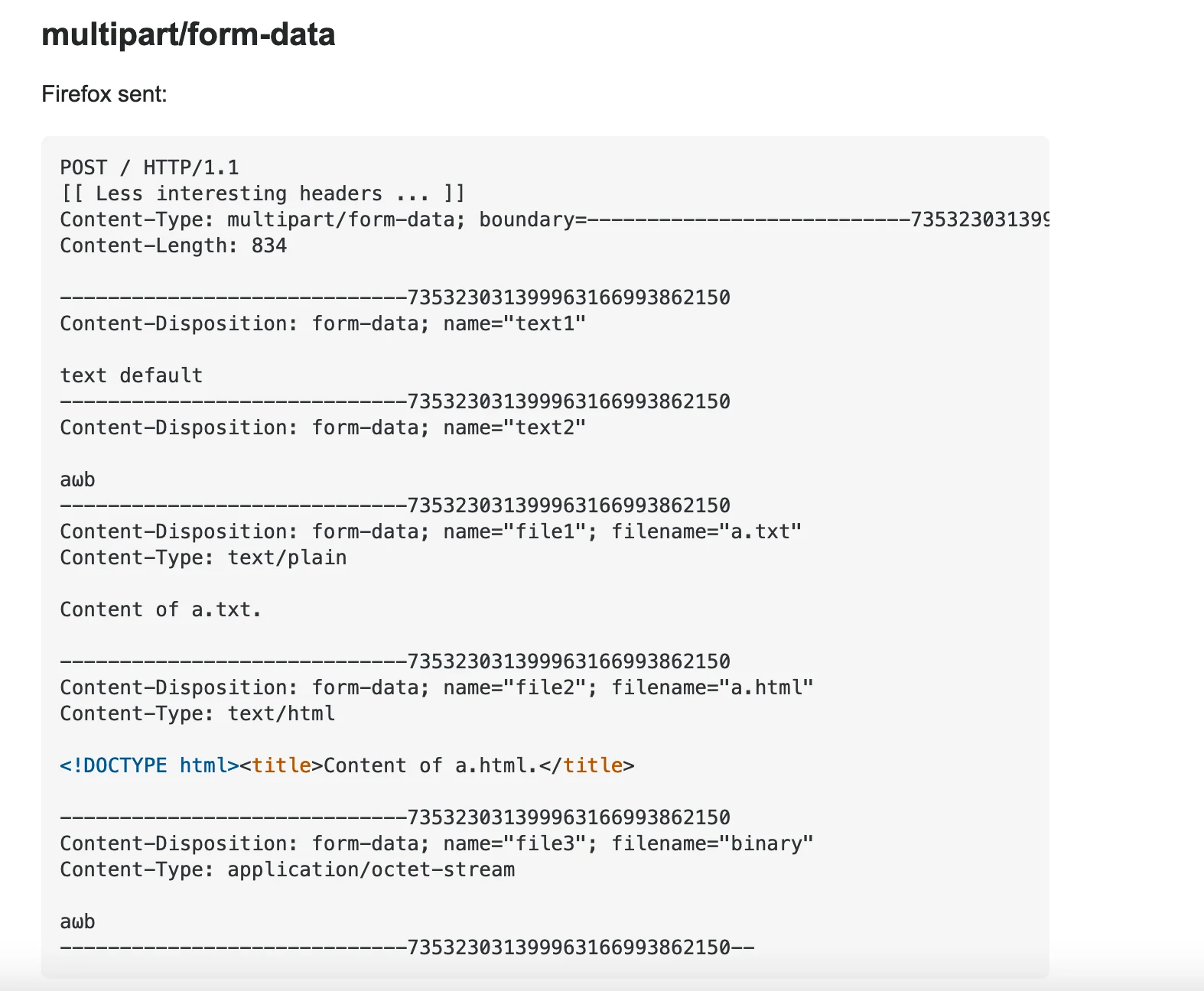
The script appends an HTML upload form into the page. The file to be uploaded is sent as multipart/form-data. With some extra research he worked out the proper upload request format.
Step 3: Upload a non-image file
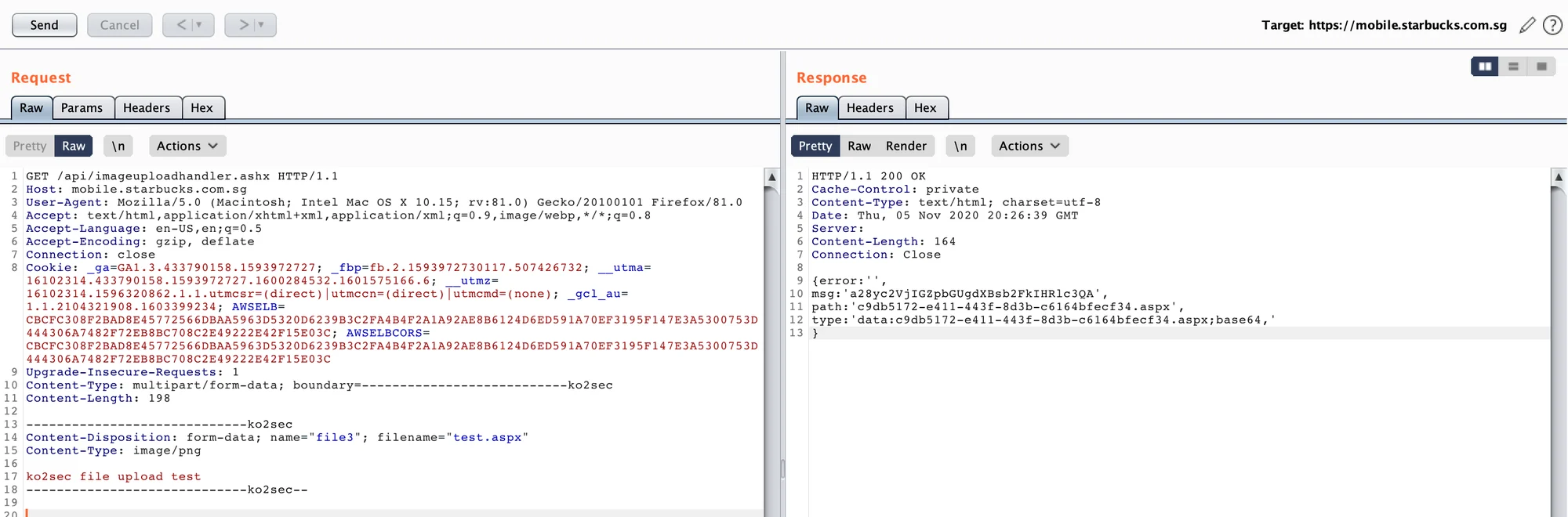
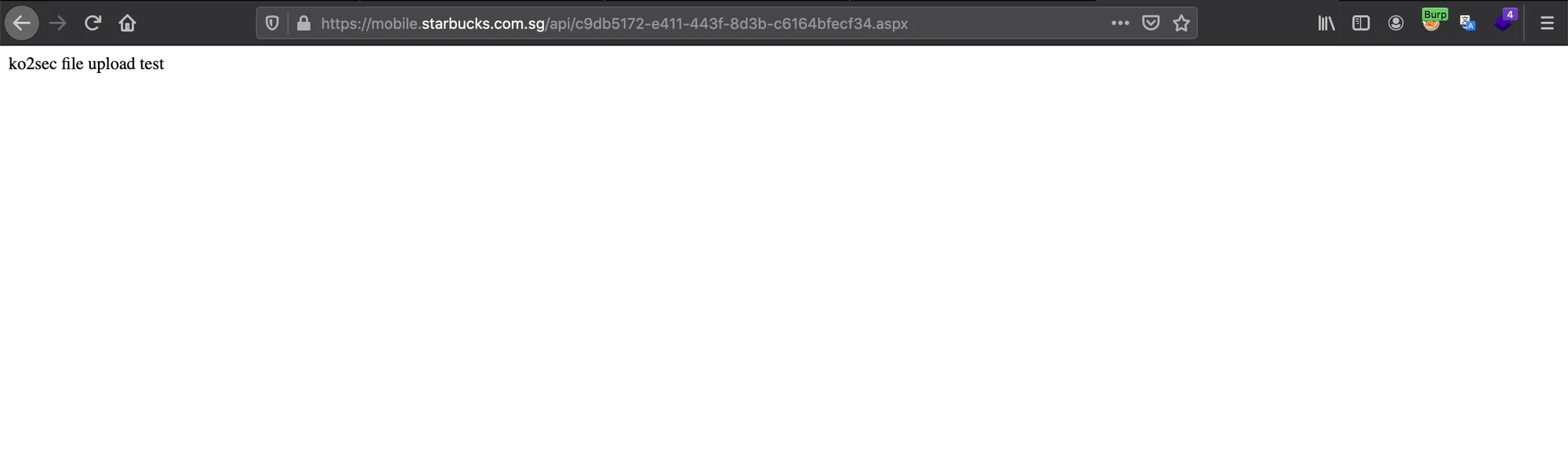
He uploaded a file with a .aspx extension containing only text, and it was successfully uploaded. The endpoint converted the filename to UUID format and returned the uuid plus extension in the response. The uploaded file could be found in the /api directory.
Step 4: Get permission, then execute code
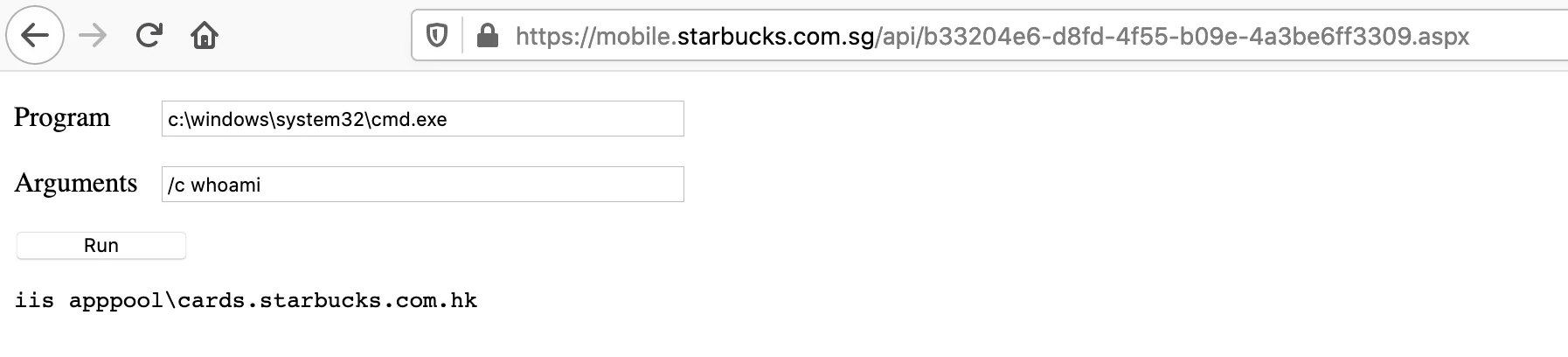
He reported the vulnerability to Starbucks via HackerOne and asked permission to try remote code execution. After getting permission from the triager, he uploaded a simple script and ran the whoami command, adding the output to the report.
Root cause
The upload handler accepted files with a .aspx extension and stored them under /api, and the uploaded script was executed. A file with a .aspx extension containing only text was accepted and uploaded. Random GET and POST requests to the endpoint returned only 200 OK, with no error or success messages.
The recon step that exposed the handler was IIS 8.3 short-name enumeration, which discloses the first six characters of a file name and the first three characters of its extension. That was enough to identify IMAGEU~1.ASH and then brute-force the rest of the name with ffuf.
Impact
A malicious person could use this vulnerability to seize the entire server, databases, user information and application source code. He or she could make apps inaccessible or manipulate them however he or she wanted. The payment systems of the mobile applications in Starbucks stores are also located on these servers, so the report notes that much more critical damage could be incurred.
The whoami output returned iis apppool\cards.starbucks.com.hk. HK is Hong Kong, but the target was the Singapore domain, which indicated the Hong Kong zone was using the same application. He then looked for other zones using the same application and found the same endpoint and the same vulnerability on the mobile application servers belonging to:
- Singapore
- Hong Kong
- Vietnam
- Thailand
- Malaysia
- Cambodia
All of these were added to the report, but vulnerabilities belonging to other zones were not rewarded, as only Singapore applications were within the scope.
Timeline as given in the report:
| Date | Event |
|---|---|
| Nov 6th 2020 | Report submitted |
| Nov 6th 2020 | Triaged |
| Nov 14th 2020 | Rewarded $4200 bounty for 9.1 CVSS score |
| Nov 24th 2020 | Rewarded $1400 bounty for increasing CVSS score to 9.8 |
The HackerOne report is here.
Fix
The report does not describe what was changed. What the design should do, based on the root cause above, is: .
Variants to test
- Tilde enumeration on other IIS hosts. Run the IIS Tilde Enumeration Scanner against
/apiand other directories. A positive result is a list ofXXXXXX~1.EXTnames that reveal handler names such as upload, download or mail endpoints. - Brute-force the rest of a short name. Take a discovered pattern like
imageuploadFUZZ.ashxand runffufwith a wordlist. A positive result is a200response for a full handler name. - Upload a script extension to any upload handler. Send a
multipart/form-datarequest with a.aspx(or other executable) file containing only text. A positive result is a success response that returns a stored name or path. - Fetch the stored file. Request the returned path under
/api. A positive result is the file being served, and if it executes, the output of a harmless command such aswhoami. - Check sibling zones. When a
whoamior similar output names a different brand or country domain, test the same endpoint on the other zones' servers. A positive result is the same handler responding on those hosts.
What happened, in plain words
A security researcher was looking at the Starbucks Singapore mobile app and the server it talks to. He found a page on that server that was meant to accept pictures and save them. The page accepted a file with a .aspx extension containing only text, and the uploaded script was executed. After reporting and getting permission, he uploaded a simple script and ran the whoami command. That kind of bug is called remote code execution, or RCE: someone from outside can make the server run their own code.
Before that, he had to find the page at all. It had a long, hard-to-guess name, and the server was leaking the first few letters of its name through an old Windows behaviour called 8.3 short names. With that hint he guessed the rest of the name, worked out how the app's own web page sent uploads, and sent the same kind of request himself.
He reported it, got permission to prove the impact, and the report was rewarded. The same endpoint and vulnerability existed on several Starbucks country servers, but only Singapore applications were within the scope.
Background: the pieces involved
Before the steps, here are the things you need to know about, explained from zero.
The app and its server
The researcher had already found a serious bug in the Starbucks Singapore website. Wanting to go deeper, he looked at the Android app whose package name is com.starbucks.singapore. An app like this is mostly a window onto a server: the phone sends requests over the internet, the server does the work and sends answers back. He found nothing wrong inside the app itself, so he turned to the server the app talks to, at mobile.starbucks.com.sg.
API and REST API
An API (application programming interface) is the set of addresses and rules a program uses to ask a server for things. Think of a restaurant: the menu and the waiter are the API, the kitchen is the server. You do not walk into the kitchen; you order through the waiter using names the kitchen understands.
A REST API is a common style of API built around web addresses (URLs) and standard request types such as GET (fetch something) and POST (send something). The Starbucks app mostly used a REST API on that server.
Endpoints and file extensions
An endpoint is one specific address on a server that does one specific job, for example /api/imageuploadhandler.ashx. The ending of the address, such as .aspx or .ashx, is the file extension. On Microsoft web servers it usually tells you what kind of program handles the request. .aspx pages are web pages that run code on the server; .ashx files are lighter handlers that usually just take a request and return data, without a full page.
IIS
IIS (Internet Information Services) is Microsoft's web server software, the program that listens for requests on a Windows machine and hands them to the right page or handler. The Starbucks application server runs on IIS. Knowing this matters, because IIS has some well-known quirks.
Upload handlers
An upload handler is an endpoint whose job is to receive a file from a browser or app and store it. A profile picture upload is the everyday example. The feature at the centre of this report is an image upload handler: it accepts image files from the frontend and stores them.
The frontend
The frontend is the part of a website that runs in your browser: the page, its buttons, and the JavaScript that reacts when you click. When you pick a file and press upload, the frontend is what actually sends the file to the server.
GET and POST, and status codes
A browser talks to servers with HTTP requests. GET asks for something; POST sends something, such as form data or a file. Every answer carries a status code, a three-digit number. 200 OK means "fine, done". Error codes such as 404 (not found) or 500 (server error) tell you something went wrong. A server that answers 200 OK to everything, including nonsense, tells you nothing useful.
multipart/form-data
When a browser uploads a file, it cannot just paste the bytes into a plain form. It uses a format called multipart/form-data, which wraps each field and each file in its own labelled section inside one request, like several envelopes packed into one parcel. The server unpacks the sections and finds the file inside.
XMLHttpRequest and JavaScript files
JavaScript is the programming language that runs in web pages. XMLHttpRequest is the browser feature JavaScript uses to send requests to a server without reloading the page. Websites ship their JavaScript as .js files that anyone can download and read, which is why reading them is a standard recon step: they show exactly how the frontend talks to the server.
UUID
A UUID (universally unique identifier) is a long random-looking string such as 3f2b.... Servers often rename uploaded files to a UUID so that two people uploading photo.jpg do not overwrite each other, and so that filenames cannot be guessed.
Directory scanning and brute-forcing
Directory scanning means asking a server for many possible addresses in a list, hoping some exist. Brute-forcing is the same idea applied to a name: try every candidate until one works. Both are automated with tools.
8.3 short names and tilde enumeration
Old Windows file systems had a limit: file names could be at most eight characters plus a three-character extension. To stay compatible, Windows still creates a short alias for every long file name. imageuploadhandler.ashx might get the alias IMAGEU~1.ASH: the first six characters, a tilde, a number, and the first three characters of the extension.
This alias can be requested over the web. That means a stranger can learn the first six letters of a file's name and the first three of its extension, even when the full name is secret. This leak is called IIS tilde enumeration. Microsoft has long described the behaviour as a feature rather than a bug, which is why it persists.
Remote code execution and web shells
Remote code execution (RCE) means an attacker can make the server run code of their choosing. A common route is a web shell: a small script uploaded to the server that, when requested in a browser, runs a command on the machine and shows the output. The whoami command is the classic harmless test: it just prints which Windows account the server is running as.
CVSS and bounty
CVSS is a standard 0 to 10 score for how severe a vulnerability is; 9.1 and 9.8 are both in the "critical" band. A bounty is money a company pays a researcher for reporting a bug responsibly. HackerOne is a platform where such reports are filed and triaged. Triaged means the company's staff confirmed the report is valid and passed it on.
Step 1: Recon, and finding nothing
The researcher started from the Android app com.starbucks.singapore. He found no weaknesses in the mobile application itself, so he focused on the application server at mobile.starbucks.com.sg that the app interacts with.
The app mostly talked to a REST API on that server, but in some operations it also talked to an endpoint with the .aspx extension. He checked those endpoints and found no weaknesses. He then tried directory scanning to find more endpoints. That also turned up nothing exploitable, so he took a few weeks off.
Why this matters: the first pass is often empty. The useful information here is negative but important. He now knew the server was IIS, and he knew the app used both a REST API and some .aspx pages.
Step 2: Recon harder, with IIS in mind
After the break he decided to research IIS vulnerabilities specifically, because he knew the application server was running on IIS. While researching, he came across the Hacking IIS video by shubs. The video reminded him of the IIS Tilde Enumeration Scanner by Soroush Dalili. He had known the tool before but had not thought to use it during his earlier exploration.
This is a common pattern in security work: a tool you already know becomes useful once you know which server software you are facing. The scanner automates the 8.3 short-name leak described above.
What the scanner found
Running the scanner against the server surfaced some .ashx endpoints in the /api directory:
DOWNLO~1.ASH
EMAIL-~1.ASH
IMAGEU~1.ASH
MAILIN~1.ASH
Line by line, in plain words:
DOWNLO~1.ASH: a file whose real name starts withDOWNLOand whose extension starts withASH. Probably something likedownload.ashx.EMAIL-~1.ASH: a name starting withEMAIL-, extension startingASH.IMAGEU~1.ASH: a name starting withIMAGEU, extension startingASH.MAILIN~1.ASH: a name starting withMAILIN, extension startingASH.
Each line is a short alias, not the real file name. The tilde and the number are the giveaway. The scanner exploits a behaviour that Microsoft describes as a feature: it discloses the first six characters of a file name and the first three characters of its extension.
Recovering full names
From those hints he tried to find the full file names and quickly found some of them:
download.ashx
email-bounce.ashx
download.ashxmatchesDOWNLO~1.ASH:DOWNLOplusad.email-bounce.ashxmatchesEMAIL-~1.ASH:EMAIL-plusbounce.
Neither was useful for any purpose, so he focused on IMAGEU~1.ASH. The letter U made him wonder whether the word was upload. He scanned with the ffuf tool using the pattern imageuploadFUZZ.ashx, where FUZZ is the part the tool replaces with each candidate from a wordlist. That discovered the endpoint is imageuploadhandler.ashx.
Why this step was taken: the short alias gave him a six-letter head start. Guessing the rest of a name is far easier when you already know how it begins and ends.
The questions that followed
Looking at the name of the endpoint, it is understood that it is used to upload image files. But there were a few problems:
- Is this endpoint accessible to unauthorised users?
- What is the accepted format of this endpoint while sending a request?
- Can files other than image files be uploaded?
- If a file can be uploaded, what is the full path to access it?
- Will the uploaded file be executed?
Each question maps to a piece of the bug. If the answer to 1 is yes, anyone can reach it. If 3 is yes, the "image" label is a lie. If 4 and 5 are yes, an uploaded file becomes a running program.
Step 3: Probing the endpoint
To find answers, he sent random GET and POST requests to this endpoint. The only response he got was 200 OK, nothing more. There were no error codes and no error or success messages. He was not sure whether the endpoint was working at all.
Why this is interesting: a well-behaved upload endpoint would reject a request with no file in it, usually with a 400 (bad request). Random GET and POST requests returned only 200 OK, with no error or success messages, so he was not sure the endpoint was working.
Step 4: Finding how the frontend calls it
At this point he thought from the perspective of a developer. If you have an endpoint you use to upload files, how do you send requests to it from the frontend? Either from within an HTML form or via JavaScript with an XMLHttpRequest.
He started exploring JavaScript files and found a file named ajaxfileupload.js.
The image shows the scheme: the JavaScript file appends an HTML upload form into the page. In other words, the page does not contain a visible upload form in its HTML from the start; the script builds one and inserts it. That is why reading the script was necessary: the form and the request format were hidden inside it.
As you can see there, the file to be uploaded is sent as multipart/form-data. With some extra research, he found the proper upload request format.
The second image shows the generic multipart/form-data upload request: the request body split into labelled sections, one of which carries the file. This is the shape he needed to copy by hand, because he was not using the website's own form; he was building the request himself.
Why this step was taken: guessing a request format is slow. Reading the frontend tells you exactly what the server expects, because the frontend has to satisfy the server every day.
Step 5: Uploading a non-image file
At this point he tried to upload a file with a .aspx extension containing only text, and it was successfully uploaded. The endpoint converted the filename to UUID format, which would also return the uuid plus extension in the response. The uploaded file could be found in the /api directory.
The third image shows the successful upload request and its response. The fourth shows the uploaded file being browsed at its new address.
What this proves, in plain words:
- The endpoint accepted a file that was not an image. The name said "image upload", but nothing checked the content.
- The server renamed the file to a UUID and told him the new name plus extension in the response. That is helpful for the site, and equally helpful for an attacker: you always know where your file landed.
- The file was stored under
/api, and the uploaded script was later executed.
Step 6: Permission, then code execution
He immediately reported the vulnerability to Starbucks via HackerOne and asked permission to try remote code execution. After getting permission from the triager, he uploaded a simple script and ran the whoami command and added the output to the report.
The image shows the successfully executed remote code: the output of whoami coming back from the server.
Why ask permission first: running commands on someone else's server can disrupt it. A triager is the person on the company side who reads reports and decides what is allowed. Getting a yes in writing keeps the test safe and legitimate.
Why whoami: it is the least harmful command that still proves code execution. It only prints the account name the server process runs under. If you get an answer, your code ran.
What the output revealed
Did you notice something interesting? The whoami command returned iis apppool\cards.starbucks.com.hk. HK is for Hong Kong, but the target was the Singapore domain. So it was an indicator that he should also check whether the Hong Kong zone was using the same application.
In plain words: the account name contains a hostname for a different country. That suggests the Singapore server and the Hong Kong server are the same application deployed in more than one place, possibly sharing configuration. If one is vulnerable, the others probably are too.
His concerns turned out to be true. The Starbucks Hong Kong application server had the same endpoint and the same vulnerability. He then tried to find other zones using the same application, and found that the Starbucks mobile application servers belonging to
- Singapore
- Hong Kong
- Vietnam
- Thailand
- Malaysia
- Cambodia
in total had the same vulnerability. He added them to the report, but vulnerabilities belonging to other zones were not rewarded, as only Singapore applications were within the scope.
Scope is the list of systems a bounty program allows you to test and pays for. Finding the same bug on an out-of-scope server is still useful information, but it does not earn a reward.
Impact
A malicious person could use this vulnerability to seize the entire server, databases, user information and application source code. He or she could make apps inaccessible or manipulate them however he or she wanted. Considering that the payment systems of mobile applications in Starbucks stores are also located on these servers, much more critical damage could be incurred.
In everyday terms: once you can run commands on a web server, you are no longer limited to the website. You can read the files the server can read, including configuration and source code, and you can reach the database the server talks to. If payment logic lives on the same machines, the consequences reach customers' money.
Timeline
| Date | Event |
|---|---|
| Nov 6th 2020 | Report submitted |
| Nov 6th 2020 | Triaged |
| Nov 14th 2020 | Rewarded $4200 bounty for 9.1 CVSS score |
| Nov 24th 2020 | Rewarded $1400 bounty for increasing CVSS score to 9.8 |
The two payments add up to $5600. The second payment came after the score was raised to 9.8.
You can find the HackerOne report here.
Why it worked, in one place
The upload handler accepted files with a .aspx extension and stored them under /api, and the uploaded script was executed. A file with a .aspx extension containing only text was accepted and uploaded. Random GET and POST requests to the endpoint returned only 200 OK, with no error or success messages.
The recon weakness that exposed the handler is IIS 8.3 short-name disclosure, which leaks the first six characters of a file name and the first three characters of its extension. That was enough to identify IMAGEU~1.ASH and then brute-force the rest of the name with ffuf.
How to avoid this
The report does not describe what was changed. Based on the cause, the design should do three things: check that an uploaded file really is an image by looking at its content, not just its name; store uploads outside any directory IIS executes; and stop returning a bare 200 OK for malformed requests.
What to look for elsewhere
These are the same ideas applied to other sites, useful as a checklist.
- Tilde enumeration on other IIS hosts. Run the IIS Tilde Enumeration Scanner against
/apiand other directories. A positive result is a list ofXXXXXX~1.EXTnames that reveal handler names such as upload, download or mail endpoints. - Brute-force the rest of a short name. Take a discovered pattern like
imageuploadFUZZ.ashxand runffufwith a wordlist. A positive result is a200response for a full handler name. - Upload a script extension to any upload handler. Send a
multipart/form-datarequest with a.aspx(or other executable) file containing only text. A positive result is a success response that returns a stored name or path. - Fetch the stored file. Request the returned path under
/api. A positive result is the file being served, and if it executes, the output of a harmless command such aswhoami. - Check sibling zones. When a
whoamior similar output names a different brand or country domain, test the same endpoint on the other zones' servers. A positive result is the same handler responding on those hosts.
Glossary
- API: the set of addresses and rules a program uses to ask a server for things, like a menu and waiter in a restaurant.
- REST API: a common style of API built around web addresses and standard request types such as GET and POST.
- Endpoint: one specific address on a server that does one specific job.
- File extension: the ending of a file or address, such as
.aspxor.ashx, that usually says what kind of program handles it. - IIS: Microsoft's web server software, which listens for requests on a Windows machine and hands them to the right page or handler.
- Upload handler: an endpoint whose job is to receive a file and store it.
- Frontend: the part of a website that runs in your browser, including its JavaScript.
- HTTP request: a message a browser or app sends to a server, with a type such as GET or POST.
- GET: an HTTP request type that asks for something.
- POST: an HTTP request type that sends something, such as form data or a file.
- Status code: a three-digit number in every HTTP answer, such as
200 OKfor success or 404 for not found. - multipart/form-data: the format browsers use to upload files, wrapping each field and file in its own labelled section inside one request.
- JavaScript: the programming language that runs in web pages.
- XMLHttpRequest: the browser feature JavaScript uses to send requests to a server without reloading the page.
- UUID: a long random-looking identifier used to give uploaded files unique names.
- Directory scanning: asking a server for many possible addresses from a list, hoping some exist.
- Brute-forcing: trying every candidate from a list until one works.
- 8.3 short name: an old Windows alias for a long file name, made of the first six characters, a tilde, a number and the first three characters of the extension.
- IIS tilde enumeration: the leak of 8.3 short names over the web, revealing the first six characters of a file name and the first three of its extension.
- Remote code execution (RCE): a bug that lets an outsider make a server run code of their choosing.
- Web shell: a small script uploaded to a server that runs commands on the machine when requested.
- whoami: a command that prints which account the server process is running as, used as a harmless proof of code execution.
- CVSS: a standard 0 to 10 score for how severe a vulnerability is.
- Bounty: money a company pays a researcher for reporting a bug responsibly.
- HackerOne: a platform where security reports are filed and triaged.
- Triaged: confirmed as valid by the company's staff and passed on for handling.
- Scope: the list of systems a bounty program allows you to test and pays for.
- ffuf: a tool that sends requests with a placeholder replaced by each word from a list, used here to guess the rest of a file name.



