The Accidental RCE
The file upload feature for support tickets only checked the file extension on the client side and used a weak server-side check that could be bypassed with a null byte in the filename. An attacker could upload a PHP web shell and execute it, achieving remote code execution.

I’m gonna share my story of a Remote Code Execution vulnerability that I found by happenstance. Since, I’m not supposed to disclose any information about the target, we will call it “redacted.com”.
The full write-up lives on its author's site
It belongs to its author, so we link to it rather than copy it. The other two tabs are our own rewrites, checked against it.
Context
This is the story of a Remote Code Execution vulnerability found by accident on a target the author calls "redacted.com". The report does not name the program or the company, and the author states up front that no information about the target can be disclosed.
The target was an e-commerce website. The feature that mattered in the end was the support ticket page: a logged-in user can raise a ticket about their issues and attach files to it. The application accepted only a limited set of extensions for those attachments, namely .jpg, .png and .pdf.
Setup
- The author had moved on from a previous target with an extremely limited scope and picked this e-commerce site as a new target.
- Testing started unauthenticated, looking for XSS in the search bar, without success.
- An account was created on the site to get a better scope.
- The main tool used for the upload analysis was Burp Suite, with the request sent to the Repeater.
No versions, endpoints, parameter names or headers are given in the report.
Finding it
After logging in, the author noticed that the application lets a user link their social handles. Injecting into that feature triggered an alert, and a second account confirmed that the alert also fired when someone else viewed the attacker's profile. That bug was reported, and the author returned to the account to keep testing.
While closing the alert that popped up, a stray click landed on a new page where a user can raise a ticket. That page allows files to be attached. Uploading a PHP shell was refused.
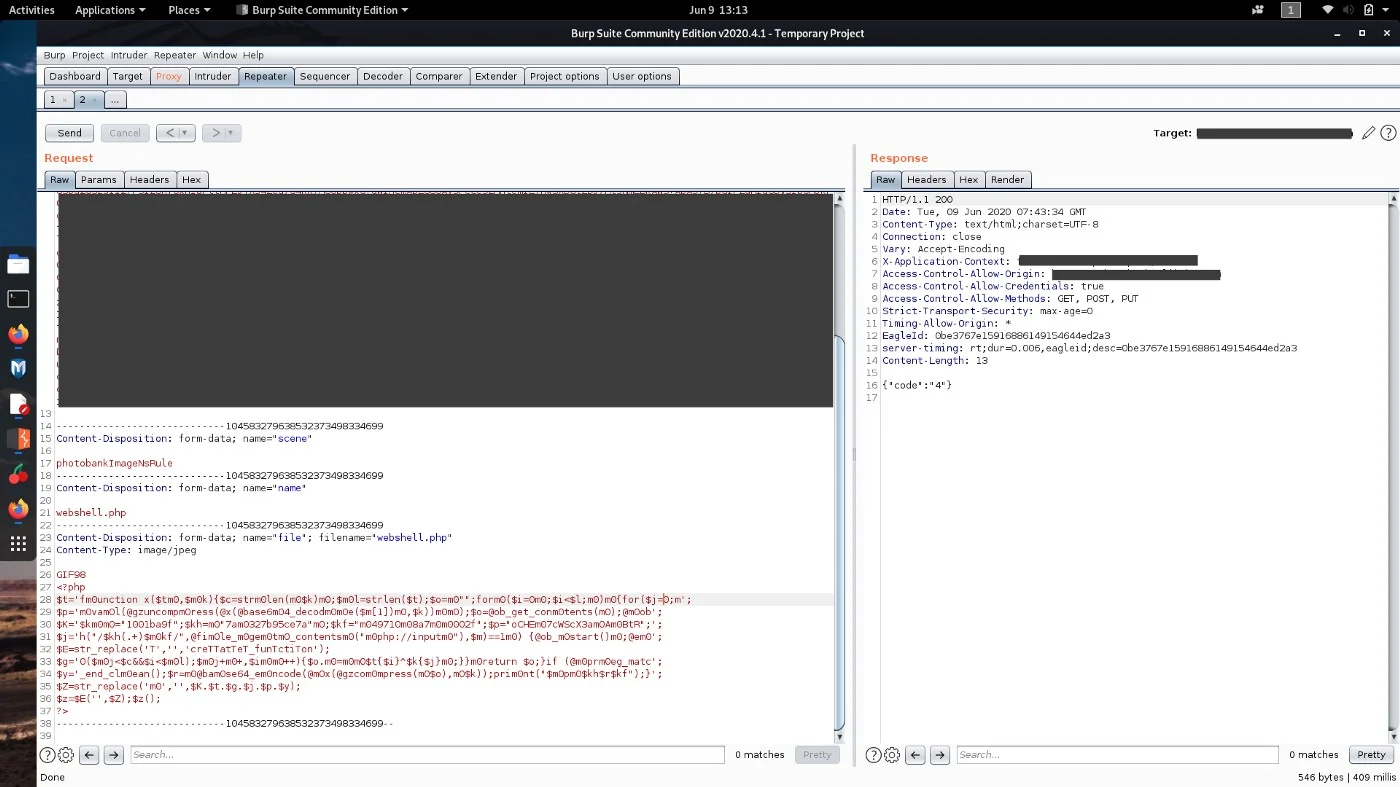
After a few minutes of experimenting, the author concluded that only .jpg, .png and .pdf were allowed. To understand how the check worked, a valid .jpg file was uploaded through Burp Suite and the response was intercepted. The file was stored in a directory of redacted.com.
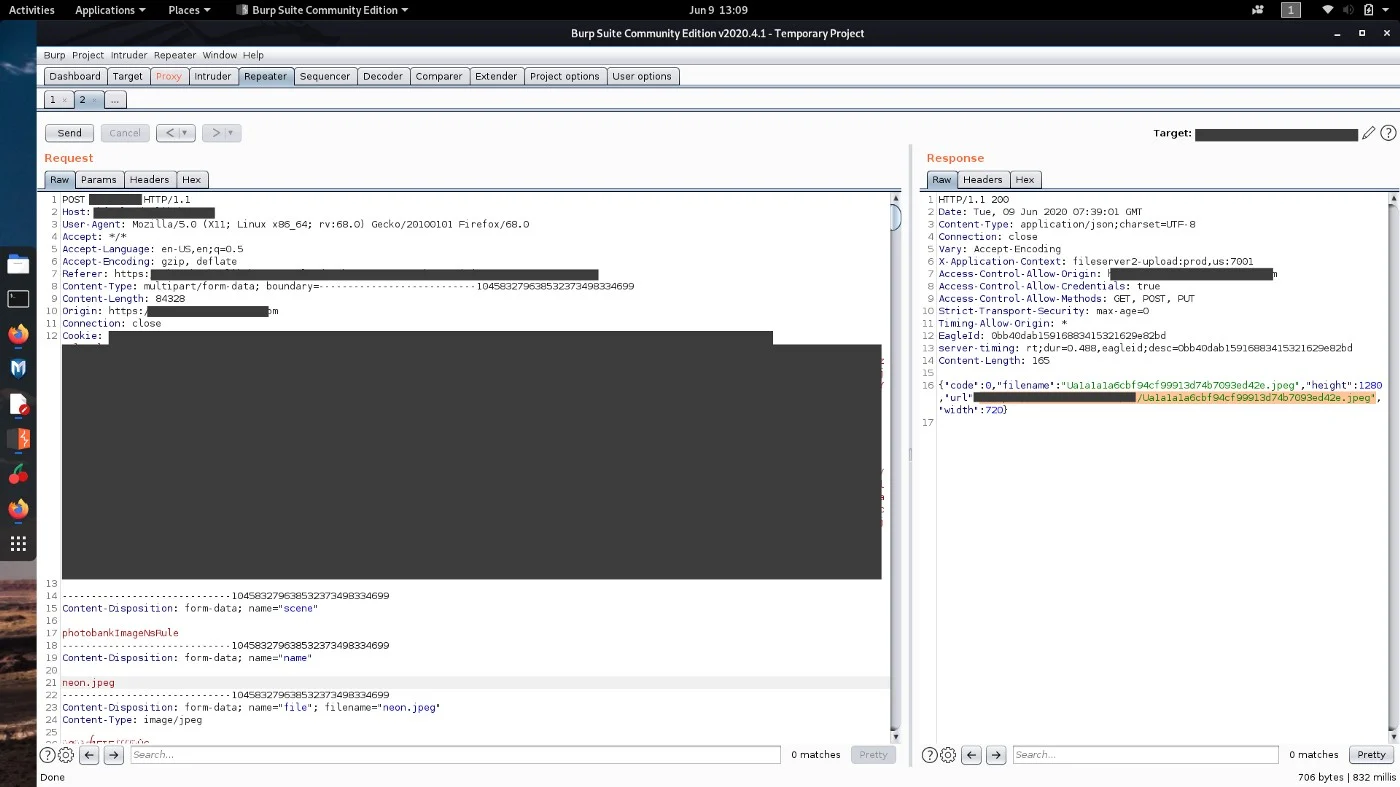
The PHP web shell was then renamed with a .jpg extension, but the upload still failed.
Exploitation
The author wrote down two hypotheses about the mechanism:
- The file extension is validated at the client's end only.
- The file content is validated at the server's end.
Step 1: GIF98 magic bytes plus a .jpg name
The web shell's code was prefixed with GIF98 to get past the server-side content check, and the file was named with a .jpg extension to get past the client-side name check. The file was uploaded, but there was no RCE, and changing the .jpg extension produced an error whose cause the author did not understand at that point.
Step 2: Null byte truncation in the file name
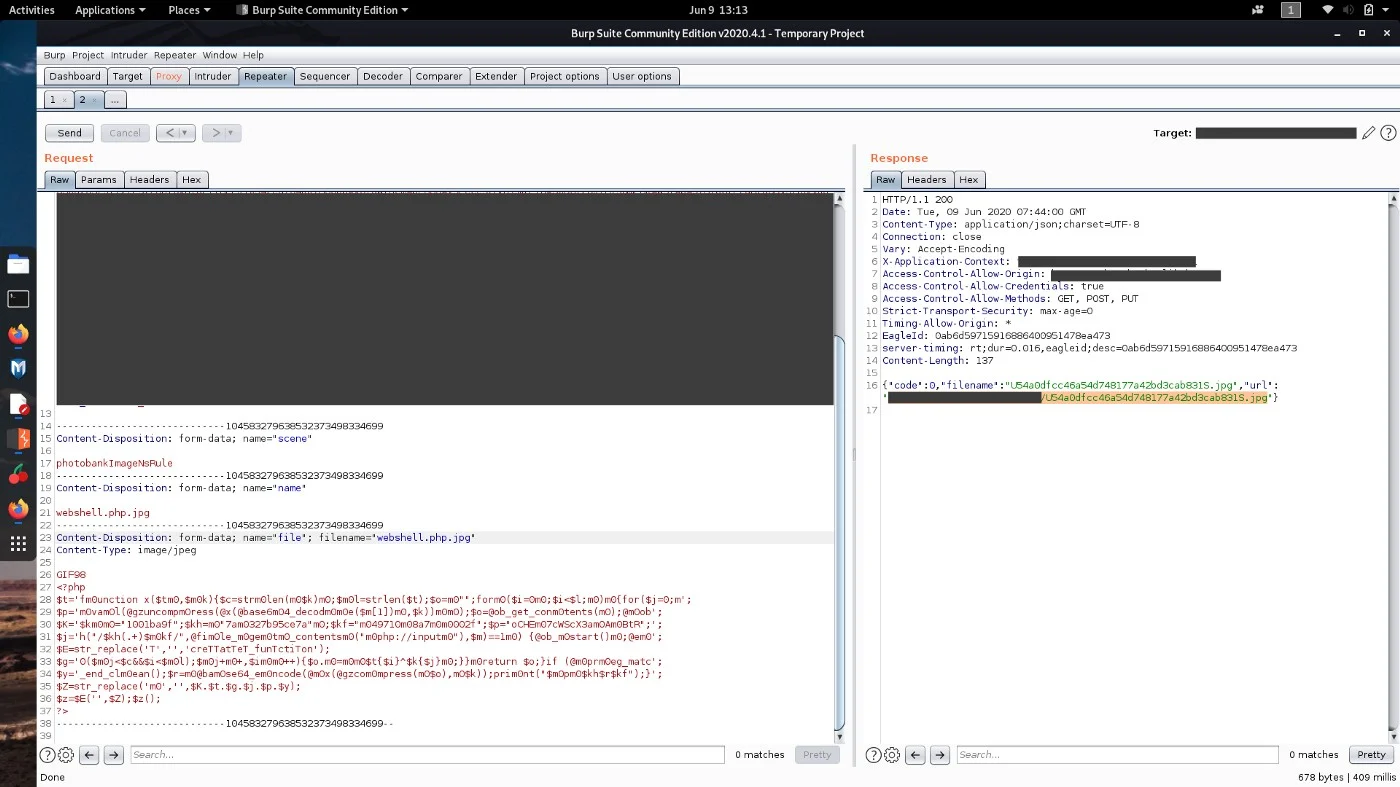
The author suspected a server-side extension check that was not functioning properly. The same web shell, still carrying GIF98 in its code and the .jpg extension, was uploaded again. In Burp Repeater the file name was changed from webshell.jpg to:
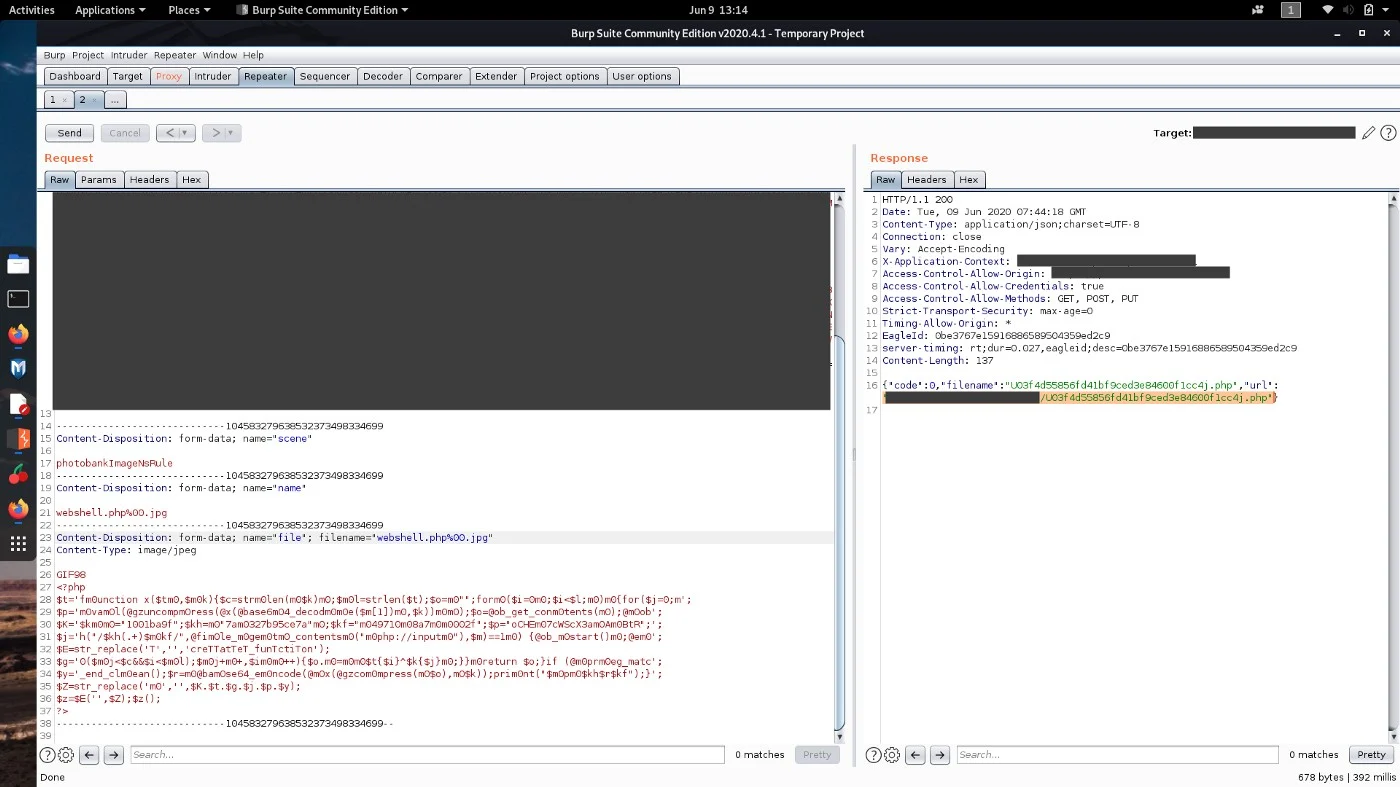
webshell.php%00.jpg
The %00 is a URL-encoded null byte, used to truncate the .jpg extension at the server's end. The file was uploaded as a PHP file. The file was uploaded as a PHP file.
Step 3: Execution
The author then checked whether the uploaded web shell executed, and it did: RCE was achieved.
Timeline and payout
| Date | Event | Amount |
|---|---|---|
| June 01 | Reported to the HackerOne team | |
| June 01 | Marked as triaged by the HackerOne team | |
| June 02 | Temporary fix pushed | $800 |
| June 08 | Final fix pushed | $4000 |
Total: $4800.
Root cause
The report describes two layers of validation: the extension is checked on the client side, and the file content is checked on the server side. The GIF98 was added to the web shell's code to escape the server-side validation, and the .jpg name to bypass the client-side check. The author suspected a server-side extension check that was not functioning properly, and the null byte in the name led to the file being uploaded as a PHP file. The report does not show the server-side code, so the exact implementation is not stated.
Impact
An authenticated user who can raise a support ticket could upload a PHP web shell and get it executed on the server, which gives remote code execution in the context of the web application.
Fix
The report only records that a temporary fix was pushed on June 02 and a final fix on June 08.
Variants to test
- Upload a valid image and inspect the response to learn the storage path.
- Try a harmless script with a
.jpgname and aGIF98prefix to see whether content sniffing is the only server-side check. - Try a null byte in the file name, as in
shell.php%00.jpg, and check whether the stored file keeps the.phpextension. - Try other truncation and parsing tricks on the file name, such as trailing dots, spaces or double extensions, and check the name the server reports back.
- Try the same upload flow on other file-attachment features, such as avatars or support attachments, and check whether the stored file executes when requested.
What happened, in plain words
A security researcher was testing a shopping website (called "redacted.com" in the report) and accidentally found a way to run their own code on the server. They could upload a file that the server would treat as a program, not just a picture. This kind of bug is called Remote Code Execution (RCE). The researcher reported it and earned $4,800 in bug bounty rewards.
The story starts with the researcher looking for a different bug (cross-site scripting, XSS) in the search bar, but not finding one. They created an account and found that users could link social media profiles. They injected code there and got an alert box to pop up, which proved an XSS bug. They reported that and kept testing.
While closing the alert, they accidentally clicked somewhere and landed on a page where users can open support tickets and attach files. They tried to upload a PHP shell (a script that lets an attacker run commands on the server) but it was blocked. They noticed only .jpg, .png, and .pdf files were allowed. They used Burp Suite (a tool for intercepting and modifying web traffic) to see how the upload worked. They suspected the file extension was checked in the browser (client-side) and the file content was checked on the server (server-side). They tried to bypass these checks by adding "GIF98" to the shell's code and naming it with a .jpg extension, but it still didn't execute. Then they tried a trick: they changed the filename to "webshell.php%00.jpg". The %00 is a null byte, which acts like a string terminator. The server's extension check saw .jpg and allowed it, but when saving the file, the null byte cut off the .jpg, so the file was saved as webshell.php. They uploaded it, and the shell executed, giving them RCE.
The timeline: reported on June 1, triaged the same day, temporary fix on June 2 ($800), final fix on June 8 ($4000). Total $4800.
Now, let's go through the whole story step by step, explaining everything as if you're new to security.
Context
This is the story of a Remote Code Execution vulnerability found by accident on a target the author calls "redacted.com". The report does not name the program or the company, and the author states up front that no information about the target can be disclosed.
The target was an e-commerce website. The feature that mattered in the end was the support ticket page: a logged-in user can raise a ticket about their issues and attach files to it. The application accepted only a limited set of extensions for those attachments, namely .jpg, .png and .pdf.
What is an e-commerce website?
An e-commerce website is an online shop where you can buy and sell products or services. Think of it like a digital storefront. It usually has features like user accounts, shopping carts, and customer support.
What is a support ticket?
A support ticket is a way for customers to ask for help. You fill out a form describing your problem and can often attach files (like screenshots) to help explain. The support team then responds. In this case, the ticket system allowed file attachments.
What is a file extension?
A file extension is the part of a filename after the last dot, like ".jpg" or ".pdf". It tells the computer what type of file it is and which program should open it. For example, ".jpg" is for images, ".pdf" for documents.
Why only certain extensions?
Websites often restrict the types of files you can upload to prevent malicious files from being uploaded. For example, they might only allow images and PDFs because those are generally safe. If they allowed any file, someone could upload a malicious script.
Setup
- The author had moved on from a previous target with an extremely limited scope and picked this e-commerce site as a new target.
- Testing started unauthenticated, looking for XSS in the search bar, without success.
- An account was created on the site to get a better scope.
- The main tool used for the upload analysis was Burp Suite, with the request sent to the Repeater.
No versions, endpoints, parameter names or headers are given in the report.
What is scope?
In bug bounty programs, scope defines what you are allowed to test. It might be a specific domain, a set of features, or a type of vulnerability. Testing outside scope is not allowed. The previous target had a very limited scope, so the author moved on.
What is unauthenticated testing?
Unauthenticated means you are not logged in. Testing without an account is like walking into a shop as a visitor. You can see some things, but not everything. The author tested the search bar for XSS but did not find it.
What is XSS?
Cross-Site Scripting (XSS) is a vulnerability where an attacker can inject malicious scripts into web pages viewed by other users. For example, if a search bar reflects what you type without proper sanitisation, an attacker could craft a link that, when clicked, runs a script in the victim's browser. That script could steal cookies or perform actions on behalf of the user. The author was looking for XSS in the search bar but didn't find it.
Why create an account?
Creating an account gives you access to more features, like linking social media profiles or raising support tickets. It expands the attack surface, meaning there are more things to test.
What is Burp Suite?
Burp Suite is a tool used by security testers to intercept and modify HTTP traffic between their browser and the web server. It acts as a proxy. You can pause requests, change them, and see responses. The Repeater is a part of Burp that lets you manually send requests and observe responses, which is useful for experimenting.
Finding it
After logging in, the author noticed that the application lets a user link their social handles. Injecting into that feature triggered an alert, and a second account confirmed that the alert also fired when someone else viewed the attacker's profile. That bug was reported, and the author returned to the account to keep testing.
While closing the alert that popped up, a stray click landed on a new page where a user can raise a ticket. That page allows files to be attached. Uploading a PHP shell was refused.
After a few minutes of experimenting, the author concluded that only .jpg, .png and .pdf were allowed. To understand how the check worked, a valid .jpg file was uploaded through Burp Suite and the response was intercepted. The file was stored in a directory of redacted.com.
The PHP web shell was then renamed with a .jpg extension, but the upload still failed.
What are social handles?
Social handles are your usernames on social media platforms like Twitter or Facebook. Some websites let you link your social media accounts to your profile, so others can find you. This feature often involves input fields where you enter your handle, and the website may display it on your profile.
What is a PHP shell?
A PHP shell is a script written in PHP (a programming language used for web development) that allows an attacker to execute commands on the server. It's like a remote control for the server. If you can upload and execute a PHP shell, you can run any command the server user can run, which is a severe security issue.
Why was the PHP shell refused?
The website only allowed .jpg, .png and .pdf, and the PHP shell was refused.
What is client-side vs server-side validation?
Client-side validation happens in your browser, using JavaScript or HTML attributes. It's fast and provides immediate feedback, but it can be bypassed because the user controls the browser. Server-side validation happens on the server, after the data is sent. It's more secure because the user cannot easily change it. However, if server-side validation is flawed, it can be bypassed.
Why upload a valid .jpg through Burp?
The author wanted to see how the server responds when a valid file is uploaded. By intercepting the response, they could learn where the file is stored and what checks are performed. This helps in understanding the security mechanism.
What does it mean that the file was stored in a directory of redacted.com?
It means the uploaded file is accessible via a URL on the website. For example, if the file was stored at https://redacted.com/uploads/image.jpg, you could visit that URL to view the image. This is important because if you can upload a script and it's stored in a directory that executes scripts, you can execute it by visiting the URL.
Why did renaming to .jpg fail?
The author renamed the PHP shell to have a .jpg extension, hoping to bypass the extension check. But the upload still failed. The upload still failed, and the author did not state why.
Exploitation
The author wrote down two hypotheses about the mechanism:
- The file extension is validated at the client's end only.
- The file content is validated at the server's end.
Step 1: GIF98 magic bytes plus a .jpg name
The web shell's code was prefixed with GIF98 to get past the server-side content check, and the file was named with a .jpg extension to get past the client-side name check. The file was uploaded, but there was no RCE, and changing the .jpg extension produced an error whose cause the author did not understand at that point.
What are magic bytes?
Magic bytes (or file signatures) are the first few bytes of a file that identify its type. For example, a GIF image typically starts with "GIF89a" or "GIF87a". A JPEG starts with bytes like FF D8 FF. Server-side content validation often checks these bytes to ensure the file is actually an image. By adding "GIF98" to the PHP shell's code, the author hoped to get past the server-side content check.
Why did it still not work?
The file was uploaded, but it didn't execute. The file was uploaded, but there was no RCE. The author then tried changing the extension, but got an error. They didn't understand why at that point.
Step 2: Null byte truncation in the file name
The author suspected a server-side extension check that was not functioning properly. The same web shell, still carrying GIF98 in its code and the .jpg extension, was uploaded again. In Burp Repeater the file name was changed from webshell.jpg to:
webshell.php%00.jpg
The %00 is a URL-encoded null byte. The idea is that the server-side extension check sees the trailing .jpg and accepts the file, while the code that later writes the file to disk stops reading the name at the null byte, so the stored name ends in .php. The file was uploaded as a PHP file.
What is a null byte?
A null byte is a byte with the value zero. In many programming languages, strings are terminated by a null byte. So if a filename contains a null byte, functions that manipulate strings might stop reading at that point. For example, the string "webshell.php\0.jpg" might be treated as "webshell.php" by some functions, while others might see the whole string. This discrepancy can be exploited.
How does the bypass work?
The author's reading was that the extension check accepted the trailing .jpg while the file was written with a .php name. So the check sees ".jpg" and allows it, but the save function sees "webshell.php" and saves it as a PHP file. Then, when the file is accessed, the server executes it as PHP, giving RCE.
Why did the author use Burp Repeater?
Burp Repeater allows you to manually modify requests. The author could change the filename in the request to include the null byte and send it to the server.
Step 3: Execution
The author then checked whether the uploaded web shell executed, and it did: RCE was achieved.
How did they check execution?
The report only says the author checked whether the web shell executed and that it did.
Timeline and payout
| Date | Event | Amount |
|---|---|---|
| June 01 | Reported to the HackerOne team | |
| June 01 | Marked as triaged by the HackerOne team | |
| June 02 | Temporary fix pushed | $800 |
| June 08 | Final fix pushed | $4000 |
Total: $4800.
What is HackerOne?
HackerOne is a platform that connects companies with security researchers. Companies run bug bounty programs where they reward researchers for finding and reporting vulnerabilities. The researcher reported the bug through HackerOne.
What does triaged mean?
Triaged means the report has been reviewed and validated by the company. They have confirmed the vulnerability exists and are working on a fix.
Why two payments?
The report records $800 for the temporary fix and $4000 for the final fix.
Root cause
The report describes two layers of validation: the extension is checked on the client side, and the file content is checked on the server side. The GIF98 prefix satisfies the content check, and the .jpg name satisfies the client-side check. The remaining server-side extension check, in the author's reading, did not handle a null byte in the file name correctly: the check accepted the name because of the trailing .jpg, but the file was written with a .php name. The report does not show the server-side code, so the exact implementation is not stated.
In simple terms
The website tried to protect itself by checking the file extension in the browser and the file content on the server. The author bypassed the content check by adding "GIF98" to the file. The extension check on the server was flawed: it didn't account for null bytes. So the author used a null byte to make the server think the file was a .jpg while actually saving it as a .php. The author used a null byte to make the server accept the name as a .jpg while saving it as a .php.
Impact
An authenticated user who can raise a support ticket could upload a PHP web shell and get it executed on the server, which gives remote code execution in the context of the web application.
Why is RCE dangerous?
Remote Code Execution is one of the most severe vulnerabilities. An attacker can run any command on the server, potentially reading sensitive data, modifying files, or using the server to attack other systems. In this case, the author exploited it from a normal user account.
Fix
The report only records that a temporary fix was pushed on June 02 and a final fix on June 08.
What might the fix be?
Typically, fixes for this include properly sanitising filenames, rejecting null bytes, using a whitelist of allowed extensions, and storing files outside the web root or with random names. But the report doesn't specify.
Variants to test
- Upload a valid image and inspect the response to learn the storage path and whether uploaded files are served from a directory that executes scripts.
- Try a harmless script with a
.jpgname and aGIF98prefix to see whether content sniffing is the only server-side check. - Try a null byte in the file name, as in
shell.php%00.jpg, and check whether the stored file keeps the.phpextension. - Try other truncation and parsing tricks on the file name, such as trailing dots, spaces or double extensions, and check the name the server reports back.
- Try the same upload flow on other file-attachment features, such as avatars or support attachments, and check whether the stored file executes when requested.
Explanation of variants
These are additional tests you could try if you find a similar upload feature. They help confirm the vulnerability and explore its extent.
- Upload a valid image and inspect the response: This tells you where files are stored and if that location runs scripts. For example, if files are stored in /uploads/ and that directory executes PHP, then uploading a PHP file there would execute.
- Harmless script with .jpg name and GIF98 prefix: This tests if the server only checks content and not extension. If it uploads, you know content check can be bypassed.
- Null byte in filename: This is the exact trick used. Try it to see if the server is vulnerable.
- Other truncation tricks: Some servers mishandle trailing dots or spaces, or double extensions like .php.jpg. These might bypass checks.
- Other upload features: The same flaw might exist elsewhere, like profile picture uploads. Always test all upload points.
Glossary
- Remote Code Execution (RCE): A vulnerability that allows an attacker to run arbitrary code on a remote server.
- Bug bounty: A program where companies reward security researchers for finding and reporting vulnerabilities.
- Cross-Site Scripting (XSS): A vulnerability that allows attackers to inject malicious scripts into web pages viewed by other users.
- PHP: A programming language commonly used for web development.
- Shell: A program that provides a command-line interface to interact with the operating system.
- Web shell: A shell script uploaded to a web server that allows remote command execution.
- Burp Suite: A tool for intercepting and modifying HTTP traffic between a browser and a server.
- Repeater: A Burp Suite tool that allows manual sending and modification of HTTP requests.
- Client-side validation: Validation performed in the user's browser, which can be bypassed.
- Server-side validation: Validation performed on the server, which is more secure but can still have flaws.
- File extension: The suffix of a filename indicating its type, like .jpg or .pdf.
- Magic bytes: The first few bytes of a file that identify its format.
- Null byte: A byte with value zero, often used to terminate strings in programming languages.
- URL encoding: A way to represent special characters in URLs, like %00 for null byte.
- HackerOne: A platform for bug bounty programs and vulnerability disclosure.
- Triaged: A status indicating a vulnerability report has been validated and is being addressed.
- E-commerce: Online shopping websites.
- Support ticket: A customer support request submitted through a website.
- Social handles: Usernames on social media platforms.
- Scope: The defined boundaries of what is allowed to be tested in a bug bounty program.
- Unauthenticated: Not logged in.
- Authenticated: Logged in with a user account.


