Twitter's Vine Source code dump - $10080
A publicly accessible Docker registry for Vine exposed private images, including one containing the full source code, API keys, and third-party secrets. An attacker could download the image and extract these sensitive assets.

Note: The following post provides details only about the process I followed to procure the source code of Vine. I have not and will not disclose the source code because it’s AGAINST THE LAW!!!
The full write-up lives on its author's site
It belongs to its author, so we link to it rather than copy it. The other two tabs are our own rewrites, checked against it.
Context
Vine was a short-form video service owned by Twitter, and at the time of this work it sat inside the scope of the Twitter Vulnerability Reward Program (VRP). The target of this write-up is not an application endpoint in the usual sense: it is a Docker registry that was reachable on the public internet at docker.vineapp.com. A Docker registry is the server-side component that stores and serves container images; developers push images to it and pull them back, and a registry that is meant to be internal should not answer requests from the outside world.
The author is explicit about the limits of the disclosure: the post describes only the process used to obtain the Vine source code, and the source code itself is not reproduced because publishing it would be against the law. So everything below is about how the registry was found and queried, not about the contents of the code.
Setup
The author started participating in various VRPs in 2015 and has been very active since, particularly in Twitter's, whose responses were quick and which released the bounty as soon as a bug was triaged. No special account, credential or role on Vine or Twitter is mentioned. The tooling is reconnaissance tooling plus a Docker client:
- Subbrute
- Virustotal.com
- Dnsdumster.com
- Dnsdb.org
- Censys.io
- CSP headers
For the exploitation stage, a Docker client was installed on an Ubuntu VM. The registry turned out to speak the older V1 API rather than V2, which is a precondition for everything that follows: the V1 documentation had to be used to reach the image endpoints.
Finding it
Subdomain discovery is described as an important part of reconnaissance that is mostly automated. Among the sources listed above, Censys.io returned an interesting URL, https://docker.vineapp.com.
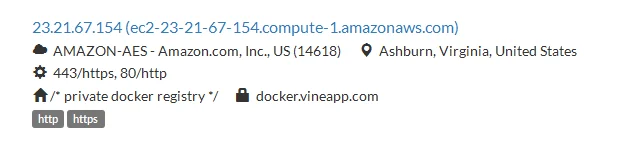
Requesting that host in a browser returned the string /* private docker registry */ in the response.
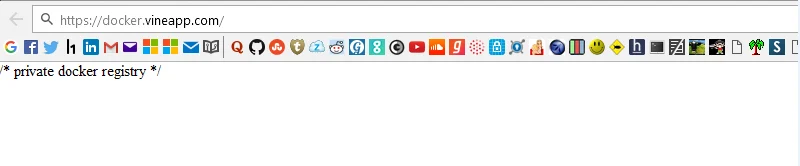
The reasoning is simple: if the registry is supposed to be private, why does it answer publicly at all? Searching for the string /* private docker registry */ explained that Docker offers functionality letting a developer host and share images over the web. Having worked with Docker before, the author judged it likely that code could be found inside those images, because developers often use such a registry to share data without having to rebuild the environment on their local machines.
Exploitation
Step 1: work out which API version the registry speaks
The first obstacle was unfamiliarity with the Docker APIs. Requests to the image endpoints that the author could reach returned nothing useful. The cause was that the registry was not running the latest version (V2), and its endpoints differ from the previous ones. Only after switching to the V1 documentation could useful responses be obtained from the server.
Step 2: enumerate the hosted images through the search endpoint
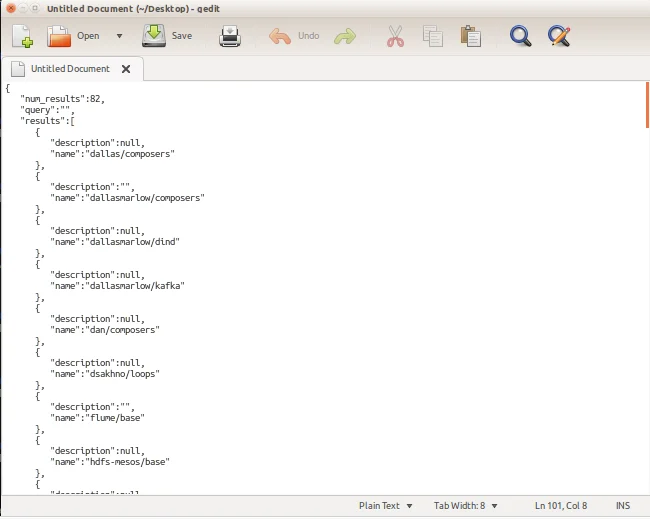
The first successful query was against the search API endpoint, which revealed that around 80+ images were hosted on the registry. The author calls this the good sign.
Step 3: pull the image that looks like a web root
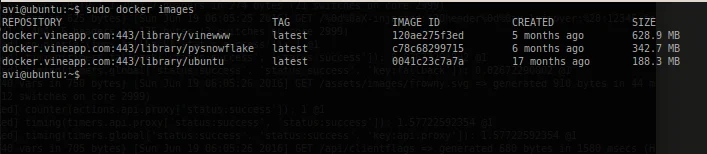
With the Docker client installed on the Ubuntu VM, the next step was to download the images. The search results listed many images, but the choice fell on vinewww, because the name looks like public_html and might therefore contain the Vine source.
sudo docker pull https://docker.vineapp.com:443/library/vinewww
Step 4: inspect the image from the inside
Once the download completed, the author ran the vinewww image with an interactive shell and got inside the running container. Running ls in vinewww showed that an MVC framework (Flask) is used.

Step 5: read what the image contains
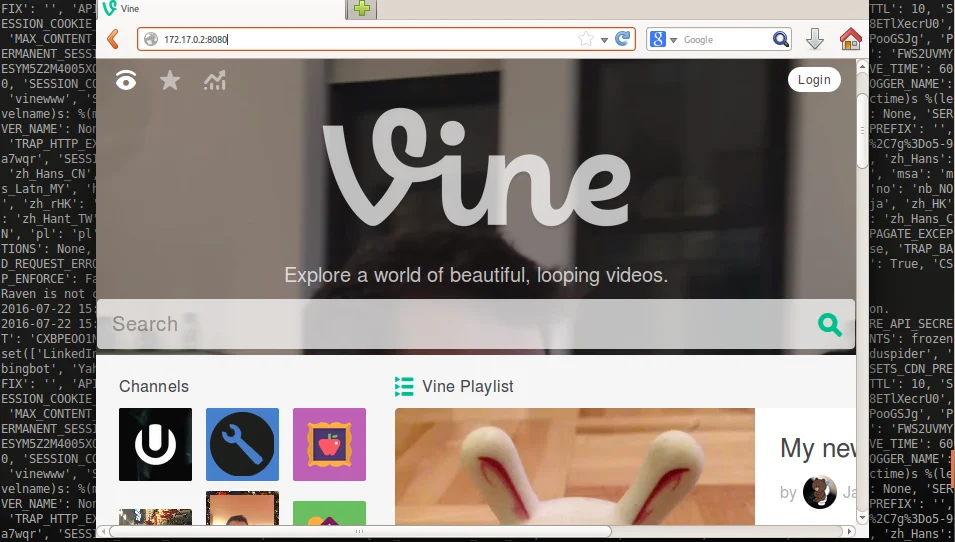
Inside the image the entire source code of Vine was visible, together with its API keys and third-party keys and secrets. Running the image without any parameter was enough to host a replica of Vine locally.
Root cause
A Docker registry holding internal images was reachable from the public internet at docker.vineapp.com, and it served its contents to anyone who asked. The registry was running the older V1 API, whose endpoints differ from V2, but that only affected how the images had to be requested; it was not a protection. The browser response showed /* private docker registry */, yet the host was publicly accessible. The image vinewww contained the application source, its API keys and third-party secrets, so anyone who pulled it could see all of that.
Impact
A party who found the host could query the search endpoint, which revealed around 80+ hosted images, and pull images such as vinewww. For vinewww that meant the full Vine source code, its API keys and third-party keys and secrets, and the ability to run a local replica of Vine from the image with no parameters. The author does not describe what those keys and secrets granted access to, so the blast radius beyond the disclosure itself is not stated. The bug was reported on 21 March 2016, more info was requested on 22 March, full exploitation was shown on 31 March, the bug was fixed the same day within 5 minutes, and a $10080 bounty was awarded on 2 April 2016.
Fix
The report does not describe the change that was made. What the situation calls for is to stop serving the registry to the public internet and to require authentication for pulls, and to keep secrets out of images that are pushed to a shared registry. Which of these was actually done is not stated.
Variants to test
- Search certificate transparency and internet-wide scan data (the author used Censys.io) for hosts named like
docker.,registry.orrepo.under a target's domains. A positive result is a host that answers Docker registry API requests from outside the network. - Request the registry root and look at the response body. A positive result is a banner or comment such as
/* private docker registry */that claims privacy while the host is publicly reachable. - Query the V1 search endpoint on a candidate registry. A positive result is a catalogue of image names, which tells you how much is exposed and which names look like application or web-root images.
- Pull a candidate image with the Docker client and inspect it with an interactive shell. A positive result is application source, configuration, API keys or third-party secrets inside the image, or an image that runs a working replica of the application with no parameters.
- Where V2 endpoints return nothing useful, try the V1 endpoints, since older registries expose a different API surface. A positive result is image listings or manifests that the V2 paths did not return.
What happened, in plain words
Vine was a short-video app owned by Twitter. At the time of this story, Vine was part of Twitter's bug bounty programme, a scheme where companies pay people who find and report security problems in their systems. The author of this write-up was taking part in several such programmes and was especially active in Twitter's, because Twitter responded quickly and paid the reward as soon as a report was confirmed as a real bug (the word used for that confirmation is "triaged").
The bug was not in the Vine app itself. It was in a piece of infrastructure called a Docker registry, which was reachable on the public internet at docker.vineapp.com. A Docker registry is a server that stores and hands out container images. A container image is a packaged bundle of an application and everything it needs to run: the code, the libraries, the configuration. Developers upload (push) images to a registry and download (pull) them back. A registry that is meant to be internal should not answer requests coming from the outside world.
The author is careful about one thing: this post only describes the process used to obtain the Vine source code. The source code itself is not reproduced, because publishing it would be against the law. So everything below is about how the registry was found and queried, not about what was inside the code.
Background: what the author was doing
The author started taking part in various VRPs in 2015 and has been very active since. No special account, password or role on Vine or Twitter is mentioned anywhere in the report. The tools involved are reconnaissance tools, used to discover parts of a company's infrastructure, plus a Docker client:
- Subbrute
- Virustotal.com
- Dnsdumster.com
- Dnsdb.org
- Censys.io
- CSP headers
For the later stage, a Docker client was installed on an Ubuntu virtual machine. A virtual machine is a computer running inside another computer, so you can experiment without touching your main system. The Docker client is the program you use to talk to a registry: it pulls images down and runs them.
One detail matters for everything that follows: the registry turned out to speak the older V1 version of the Docker API rather than V2. An API is the set of addresses and rules a program uses to talk to a server, a bit like a restaurant menu: it lists what you can ask for and how to ask for it. Different versions of an API have different menus, so the author had to read the V1 documentation to know which addresses to use.
Finding it
Finding subdomains is described as an important part of reconnaissance. A subdomain is a name that sits under a company's main domain, for example something.example.com under example.com. Companies often have many of them, and some are forgotten or misconfigured. This discovery work is mostly automated with tools. Among the sources listed above, Censys.io returned an interesting URL: https://docker.vineapp.com. Censys.io is a search engine for internet-connected devices and certificates, so it can reveal hosts that a company may not have meant to expose.
Requesting that host in a browser returned the string /* private docker registry */ in the response.
The reasoning is simple: if the registry is supposed to be private, why does it answer publicly at all? Searching the web for the string /* private docker registry */ explained that Docker offers functionality letting a developer host and share images over the web. Having worked with Docker before, the author judged it likely that code could be found inside those images, because developers often use such a registry to share data without having to rebuild the environment on their local machines. In other words: the registry was probably full of ready-made bundles of real application code, and it was answering anyone who asked.
Exploitation
Step 1: work out which API version the registry speaks
The first obstacle was unfamiliarity with the Docker APIs. Requests to the image endpoints that the author could reach returned nothing useful. The cause was that the registry was not running the latest version (V2), and its endpoints differ from the previous ones. Only after switching to the V1 documentation could useful responses be obtained from the server. This step was necessary because asking the wrong version's addresses gets you either an error or an empty answer, and it is easy to conclude wrongly that nothing is there.
Step 2: list the hosted images through the search endpoint
The first successful query was against the search API endpoint, which revealed that around 80+ images were hosted on the registry. The author calls this the good sign: a catalogue of images means the registry is not just answering, it is actually handing out its contents.
Step 3: pull the image that looks like a web root
With the Docker client installed on the Ubuntu VM, the next step was to download the images. The search results listed many images, but the choice fell on vinewww, because the name looks like public_html and might therefore contain the Vine source. public_html is a conventional folder name on web servers for the files that make up a website, so a name like vinewww suggests the web application itself.
sudo docker pull https://docker.vineapp.com:443/library/vinewww
Line by line:
sudoruns the command with administrator rights, which the Docker client usually needs on Linux.docker pullis the Docker client command that downloads an image from a registry.https://docker.vineapp.com:443/library/vinewwwis the full address of the image: the registry host, the standard HTTPS port 443, thelibrarynamespace (a grouping for images), and the image namevinewww.
Step 4: inspect the image from the inside
Once the download completed, the author ran the vinewww image with an interactive shell and got inside the running container. A container is a running instance of an image, and an interactive shell is a command prompt inside it, so you can look around its files as if you were sitting at that machine. Running ls in vinewww showed that an MVC framework (Flask) is used. ls is the basic command that lists the files in a folder. MVC is a common way of organising web application code, and Flask is a particular web framework written in Python.
Step 5: read what the image contains
Inside the image the entire source code of Vine was visible, together with its API keys and third-party keys and secrets. An API key is a password-like string that lets a program use another service; third-party keys and secrets are the same idea for services run by other companies. Running the image without any parameter was enough to host a replica of Vine locally, meaning the bundle was complete enough to start a working copy of the site on the author's own machine.
Root cause
A Docker registry holding internal images was reachable from the public internet at docker.vineapp.com, and it served its contents to anyone who asked. The registry was running the older V1 API, whose endpoints differ from V2, but that only affected how the images had to be requested; it was not a protection. The browser response showed /* private docker registry */, yet the host was publicly accessible. The image vinewww contained the application source, its API keys and third-party secrets, so anyone who pulled it could see all of that.
Impact
A party who found the host could query the search endpoint, which revealed around 80+ hosted images, and pull images such as vinewww. For vinewww that meant the full Vine source code, its API keys and third-party keys and secrets, and the ability to run a local replica of Vine from the image with no parameters. The author does not describe what those keys and secrets granted access to, so the blast radius beyond the disclosure itself is not stated. The bug was reported on 21 March 2016, more info was requested on 22 March, full exploitation was shown on 31 March, the bug was fixed the same day within 5 minutes, and a $10080 bounty was awarded on 2 April 2016.
Fix
The report does not describe the change that was made. What the situation calls for is to stop serving the registry to the public internet and to require authentication for pulls, and to keep secrets out of images that are pushed to a shared registry. Which of these was actually done is not stated.
Variants to test
- Search certificate transparency and internet-wide scan data (the author used Censys.io) for hosts named like
docker.,registry.orrepo.under a target's domains. A positive result is a host that answers Docker registry API requests from outside the network. - Request the registry root and look at the response body. A positive result is a banner or comment such as
/* private docker registry */that claims privacy while the host is publicly reachable. - Query the V1 search endpoint on a candidate registry. A positive result is a catalogue of image names, which tells you how much is exposed and which names look like application or web-root images.
- Pull a candidate image with the Docker client and inspect it with an interactive shell. A positive result is application source, configuration, API keys or third-party secrets inside the image, or an image that runs a working replica of the application with no parameters.
- Where V2 endpoints return nothing useful, try the V1 endpoints, since older registries expose a different API surface. A positive result is image listings or manifests that the V2 paths did not return.
Glossary
- API: the set of addresses and rules a program uses to talk to a server, like a menu of what you can ask for and how.
- API key: a password-like string that lets a program use another service.
- Bug bounty programme: a scheme where a company pays people who find and report security problems in its systems.
- Container: a running instance of a container image, isolated from the rest of the machine.
- Container image: a packaged bundle of an application and everything it needs to run, such as code, libraries and configuration.
- CSP headers: response headers a website sends to tell the browser which sources of content are allowed; they can also hint at the domains a site uses.
- Docker: software for building, sharing and running container images.
- Docker client: the program used to talk to a registry, pull images and run them.
- Docker registry: a server that stores and hands out container images.
- Endpoint: a specific address on a server that accepts a particular kind of request.
- Flask: a web framework written in Python.
- Interactive shell: a command prompt inside a running container, where you can type commands and look at files.
- MVC: a common way of organising web application code into models, views and controllers.
- Namespace: a grouping for images inside a registry, such as
library. - Public internet: the ordinary network anyone can reach, as opposed to a company's internal network.
- Pull: download an image from a registry with the Docker client.
- Push: upload an image to a registry.
- Reconnaissance: the discovery phase of security work, finding hosts, names and services that belong to a target.
- Replica: a working copy of an application running somewhere else.
- Secret: a password-like value that grants access to something and must be kept private.
- Subdomain: a name that sits under a company's main domain, for example
something.example.comunderexample.com. - Triaged: confirmed by the company as a real, valid bug report.
- Unauthenticated: without logging in or proving who you are.
- Virtual machine: a computer running inside another computer.
- VRP (Vulnerability Reward Program): another name for a bug bounty programme.
- V1 / V2 API: two versions of the Docker registry API; they use different addresses, so documentation for the right version is needed.




