How I earned 5040$ from Twitter by showing a way to Harvest other users IP address
A Vine API endpoint used for reposts returned the IP address of the user who made the repost, encoded as a decimal number. Anyone who knew a reposted post ID could call the endpoint and decode the value to learn another user's IP address.
 Published on medium.com
This is Prial Islam a security researcher from Bangladesh . This is a old finding of mine adding into my blog .
The full write-up lives on its author's site
It belongs to its author, so we link to it rather than copy it. The other two tabs are our own rewrites, checked against it.
Context
Vine's API exposed a timeline endpoint that returns the data behind a user's posts, including reposts. When a user reposts another Vine, the API response for that user's timeline includes a repost object describing the original post and the user who made it. That object carried a field named ipAddress, holding the IP address of the reposting user in decimal (long) form rather than dotted-quad notation.
The finding was reported to Twitter's bug bounty programme on HackerOne and rewarded with 5040 USD. The author had previously disclosed a separate Vine issue that exposed phone numbers, IP addresses and emails, rewarded with 7560 USD.
Setup
No special accounts, roles or tooling are required beyond the ability to call the public API. The only precondition is that the victim has reposted a Vine, because the leak appears in the repost data of a timeline response. The author notes that many Vine users reposted posts, so this condition was common. A POST ID of a reposted Vine is needed, and an online IP address converter is used to turn the decimal value back into a readable address.
Finding it
While testing Vine API endpoints, the author noticed that the endpoint used by the repost mechanism took a parameter named ipAddress whose value was a plain number such as 2130706433. That does not look like an IP address, which normally appears as [redacted]. A search explained that the value is valid: it is an IP address converted to long/decimal format. Passing the number through an online converter returned the real address.
Exploitation
Step 1: Identify a reposted post
Find a Vine post that a victim has reposted, and take its POST ID. The author notes that many users reposted posts, so suitable IDs were easy to find.
Step 2: Request the timeline endpoint with that ID
The vulnerable endpoint is:
https://vine.co/api/timelines/users/<POST ID>
Placing a reposted post ID in the path and visiting it returns the timeline data. The author's example:
https://vine.co/api/timelines/users/1293308695089926144
Step 3: Read the leaked value from the response
The response contained a repost object with the reposting user's details and the ipAddress field. Sensitive contents were removed by the Twitter security team before publication:
“repost”: { “username”: “██████”, “verified”: 0, “vanityUrls”: [], “created”: “█████”, “repostId”: ████████, “avatarUrl”: “██████”, “userId”: ████, “user”: { “username”: “█████████”, “verified”: 0, “vanityUrls”: [], “avatarUrl”: “█████████”, “userId”: ████, “private”: 0, “location”: █████████ }, “flags|platform_lo”: 1, “postId”: ███, “ipAddress”: 2130706433 , “flags|platform_hi”: 1 }
The ipAddress value is in decimal form. Converting it with the same online tool yields the valid IP address of the user who reposted.
Root cause
The timeline response contained the reposting user's IP address as a decimal integer in the ipAddress field. The report does not describe the server-side code, so the exact reason the field was included is not stated; what is clear is that a value intended for internal use was returned to any caller of a public endpoint.
Impact
Anyone who could obtain the ID of a reposted Vine could read the IP address of the user who reposted it, without interacting with that user. Because reposting was widespread, the author frames this as a way to harvest other users' IP addresses at scale. The report does not describe further uses of the address, and the response also carried other user fields, though the sensitive ones were redacted in the published example.
Fix
Variants to test
- Look for numeric fields in API responses that resemble decimal IP addresses (values around
2130706433for[redacted]). A positive result is a value that converts to a plausible address belonging to a user. - Check other objects that embed user data, such as likes, follows, comments and shares, for the same field. A positive result is the field appearing in any response returned to an unauthenticated caller.
- Test whether the field appears for private accounts or for users who have not interacted with the requester. A positive result is an address returned for a user with no relationship to the caller.
- Compare responses with and without authentication to see whether the field is filtered for some callers only. A positive result is the field present in the unauthenticated response.
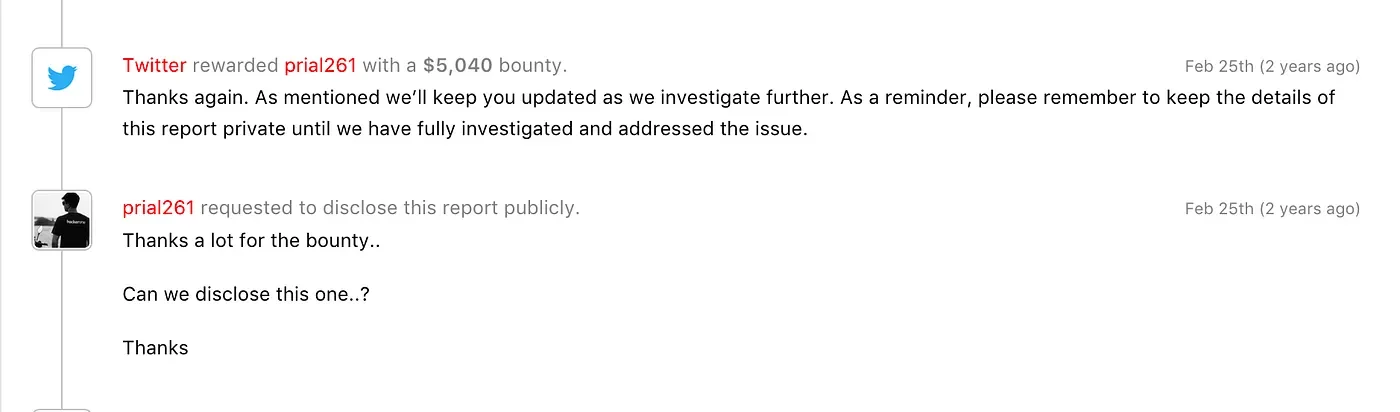
The author notes the bounty amount, 5040 USD, paid for the report.
What happened, in plain words
A security researcher found that a public Vine web address, one that anyone can open in a browser, was handing back the IP address of users who had reposted a video. An IP address is the number that identifies a device on the internet, a bit like the return address on an envelope: it can help reveal roughly where someone is and which network they use. The address was not shown in the usual readable form; it was stored as one long number, which most people would not recognise. By converting that number back, anyone could read the address of the person who reposted. The researcher reported it to Twitter, which owned Vine, through its bug bounty programme on HackerOne, a website where companies pay people for reporting security flaws. Twitter paid 5040 USD for the report.
That earlier report is only mentioned in passing here; this article is about the IP address leak.
Background ideas you need first
Before walking through the steps, here are the few ideas the rest of the article relies on.
- API: an API is the part of a website that serves raw data rather than a finished web page. Think of a restaurant: the web page is the plated meal you see, and the API is the kitchen window where the data is handed out. A program, or your browser, can ask the API for data directly.
- Endpoint: one specific address inside an API, the way one counter in a building handles one kind of request. Each endpoint does one job, such as returning a user's timeline.
- Timeline: the list of posts shown on a user's profile, in order.
- Repost: when a user shares someone else's video on their own timeline. The original video stays with its author, but the reposting user's timeline now shows it too, and the platform records who reposted it.
- Parameter: a named piece of information sent with a request, like a field on a paper form. A parameter has a name and a value.
- IP address: the numeric label of a device or network on the internet. The familiar form looks like
[redacted], four numbers separated by dots. The same address can also be written as a single large number, called its decimal or long form. Both forms mean the same thing, just as 90 minutes and 1.5 hours describe the same amount of time. - Information disclosure: the vulnerability class here. It means a system reveals data to someone who should not have it. Nothing is broken or taken over; the problem is that private information is handed out.
- Bug bounty programme: a scheme where a company invites outside researchers to look for flaws and pays for valid reports, instead of punishing them.
Setting up
No special account, role or tool is needed. All you need is a browser and the ability to open a web address. The one condition is that the person whose address you want to see must have reposted a Vine, because the leak appears inside the repost information that the timeline response contains. The researcher notes that many Vine users reposted posts, so this condition was common and easy to meet. You also need the POST ID of a reposted Vine: a POST ID is the unique number that identifies one specific post, a bit like an order number. Finally, an online converter is used to turn the long decimal number back into a readable IP address.
Finding it
While testing Vine API endpoints, the researcher noticed that the endpoint used by the repost mechanism took a parameter named ipAddress, and its value was a plain number such as 2130706433. That does not look like an IP address, which normally appears as [redacted]. A web search explained that the value is in fact valid: it is an IP address converted to long/decimal format. Running the number through an online converter returned the real address. The converter the researcher used is linked in the report as an online IP address converter.
Why this step matters: seeing a strange number in a field named ipAddress is the clue. The name tells you what the number is supposed to be, and the format tells you it has been transformed. Recognising the transformation is what turns an odd value into a readable address.
Exploitation
Step 1: Identify a reposted post
Find a Vine post that a victim has reposted, and take its POST ID. Because many users reposted posts, suitable IDs were easy to find. The reason for this step is that the leak only appears in the repost data, so the post you look up must be one that was reposted.
Step 2: Request the timeline endpoint with that ID
The vulnerable endpoint is:
https://vine.co/api/timelines/users/<POST ID>
Line by line: https:// means the request is made over an encrypted connection. vine.co is the site. /api/timelines/users/ is the path that asks the API for a user's timeline. <POST ID> is a placeholder where the actual post number goes; the angle brackets are not typed, they just mark the spot.
Placing a reposted post ID in the path and visiting it returns the timeline data. The researcher's example:
https://vine.co/api/timelines/users/1293308695089926144
Here the placeholder has been replaced with a real post ID, 1293308695089926144. Opening this address in a browser sends the request and shows the raw response, the same way opening any web address shows a page, except this one returns data rather than a designed page.
Step 3: Read the leaked value from the response
The response contained a repost object with the reposting user's details and the ipAddress field. An object here simply means a bundle of related fields grouped together, like a card with several lines of information. Sensitive contents were removed by the Twitter security team before publication:
“repost”: { “username”: “██████”, “verified”: 0, “vanityUrls”: [], “created”: “█████”, “repostId”: ████████, “avatarUrl”: “██████”, “userId”: ████, “user”: { “username”: “█████████”, “verified”: 0, “vanityUrls”: [], “avatarUrl”: “█████████”, “userId”: ████, “private”: 0, “location”: █████████ }, “flags|platform_lo”: 1, “postId”: ███, “ipAddress”: 2130706433 , “flags|platform_hi”: 1 }
Line by line, in plain words: repost is the name of the bundle describing the repost. username is the account name, blacked out here. verified is a flag, 0 meaning not verified. vanityUrls is an empty list. created is a date, blacked out. repostId is the number of the repost itself. avatarUrl is the link to the profile picture. userId is the account's internal number. user is a second, nested bundle with the same kind of details for the account: username, verified, vanityUrls, avatarUrl, userId, private (0 meaning the account is public) and location. Then come flags|platform_lo and flags|platform_hi, two internal markers, and postId, the post number. The important line is ipAddress, whose value is 2130706433.
The ipAddress value is in decimal form. Converting it with the same online tool yields the valid IP address of the user who reposted. The reason for this last step is that the decimal number is hard to read and hard to compare; the converted form is the address a person can actually use and understand.
Why it happened
The timeline response contained the reposting user's IP address as a decimal integer in the ipAddress field. The report does not describe the server-side code, so the exact reason the field was included is not stated. What is clear is that a value meant for internal use was returned to any caller of a public endpoint. A useful comparison: it is like a shop that prints the customer's home address on the receipt and leaves the receipts in a public tray.
What the impact was
Anyone who could obtain the ID of a reposted Vine could read the IP address of the user who reposted it, without ever interacting with that user. Because reposting was widespread, the researcher frames this as a way to harvest other users' IP addresses at scale. The report does not describe further uses of the address. The response also carried other user fields, though the sensitive ones were redacted in the published example.
The fix
Variants to test
- Look for numeric fields in API responses that resemble decimal IP addresses (values around
2130706433for[redacted]). A positive result is a value that converts to a plausible address belonging to a user. - Check other objects that embed user data, such as likes, follows, comments and shares, for the same field. A positive result is the field appearing in any response returned to an unauthenticated caller.
- Test whether the field appears for private accounts or for users who have not interacted with the requester. A positive result is an address returned for a user with no relationship to the caller.
- Compare responses with and without authentication to see whether the field is filtered for some callers only. A positive result is the field present in the unauthenticated response.
The image is the author's closing note.
Glossary
- API: the part of a website that serves raw data to programs and browsers, rather than a finished page.
- Endpoint: one specific address inside an API that handles one kind of request.
- Timeline: the ordered list of posts on a user's profile.
- Repost: sharing another user's video on your own timeline, with the platform recording who reposted it.
- Parameter: a named piece of information sent with a request, with a name and a value.
- POST ID: the unique number that identifies one specific post.
- IP address: the numeric label of a device or network on the internet, usually written as four numbers separated by dots.
- Decimal (long) form: the same IP address written as a single large number instead of dotted form.
- Object: a bundle of related named fields grouped together in a response.
- Information disclosure: a vulnerability where a system reveals data to someone who should not have it.
- Bug bounty programme: a scheme where a company pays outside researchers for valid reports of security flaws.
- HackerOne: the website where the report was submitted and handled.
- Unauthenticated: without logging in, so with no account or identity attached to the request.
- Redacted: sensitive text removed or blacked out before publication.