A story of stored XSS bypass
A stored cross-site scripting vulnerability existed in a user input field because double quotes and greater-than signs were not filtered properly, allowing an attacker to inject HTML attributes. An attacker could execute JavaScript when a victim hovered over the input field.
 Published on medium.com
JavaScript
The full write-up lives on its author's site
It belongs to its author, so we link to it rather than copy it. The other two tabs are our own rewrites, checked against it.
Context
The target was a private site where users can add their personal information. Among the fields available to a user was an input named Secret Key, which the report describes as allowing a user to process payments and store transaction information to an application. The write-up does not name the application or the vendor; it only says the site was private and that the researcher was testing it.
The researcher introduces himself as a cyber security researcher from Bangladesh and notes that this is his first write-up and that he does not consider himself strong at XSS. The finding is an XSS in that Secret Key input, reached by adding an HTML attribute rather than by injecting a new tag.
Setup
No accounts, roles, tools or versions are described. The only precondition visible in the report is that the Secret Key field's submitted value appears back in the page inside an <input> element, and that the researcher could submit values to it and then inspect the resulting page source. Testing was done by submitting payloads into the field and reading the HTML that came back.
Finding it
The researcher started with a conventional image-based payload:
"><img src=x onerror=prompt(document.domain)>
It was filtered. The page source came back as:
<input type="text" id="****" name="****" value=""><img img" class="form-control" rel="gp" data-size="20" data-character-set="a-z,A-Z,0-9">
From this response the researcher drew two conclusions:
- The quotation mark (
") and the greater-than sign (>) are not being filtered properly. - Malicious tags are being filtered, which is why
<img>came back asimg img.
That left two possible routes to executing JavaScript: bypass the less-than (<) filter, or add a malicious HTML attribute to the existing element. The researcher tried many ways to bypass the less-than character and could not, so he proceeded with the second route.
Exploitation
Step 1: inject an attribute with a function call
Payload:
" OnMouseOver=prompt(1)
Response:
<input type="text" id="****" name="****" value="" OnMouseOver=prompt(" class="form-control" rel="gp" data-size="20" data-character-set="a-z,A-Z,0-9">
The attribute was successfully added to the element, but the opening bracket of the call was encoded as (, so the handler would not run as written.
Step 2: avoid brackets with template-literal syntax
Payload:
" OnMouseOver=prompt`1`
Response:
<input type="text" id="****" name="****" value="" OnMouseOver=prompt`1`" class="form-control" rel="gp" data-size="20" data-character-set="a-z,A-Z,0-9">
The brackets were gone, but the code did not execute. Looking closely at the output, the researcher saw that the payload needed one more quotation mark so that the attribute value would be properly delimited.
Step 3: close the attribute value
Payload:
" OnMouseOver="prompt`1`
Response:
<input type="text" id="ipn_secret_keygen" name="ipn_secret_keygen" value=""OnMouseOver="alert`1`" class="form-control" rel="gp" data-size="20" data-character-set="a-z,A-Z,0-9">
With the value closed, the injected OnMouseOver attribute sat cleanly on the element. The researcher then moved the mouse pointer over the input, and the OnMouseOver event executed the XSS popup.
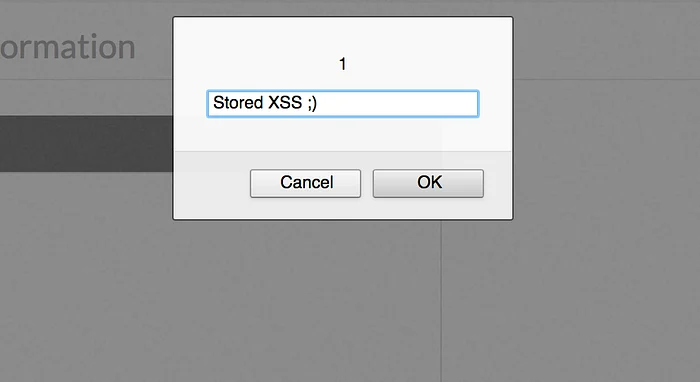
The screenshot shows the popup firing after the pointer was placed on the input, captioned by the author as the XSS being executed.
Root cause
The field's value is written back into the page inside an <input> element without adequate encoding of the characters that matter for attribute context. The report shows that the quotation mark and the greater-than sign were not filtered properly, while tag syntax was stripped (the <img> became img img). Because the quotation mark survived, an attacker could close the existing value attribute and introduce a new event handler attribute on the same element. The bracket filter on prompt( was worked around by using template-literal call syntax, prompt1``, which needs no parentheses. The final requirement was to close the injected attribute value with a second quotation mark so the handler was parsed as intended.
In other words, the defence was a blocklist aimed at tags and brackets, not context-aware output encoding. Blocklisting tags does nothing when the injection point is an attribute, and blocklisting brackets does nothing when the language offers a bracket-free call form.
Impact
The report does not analyse impact beyond demonstrating that JavaScript executes in the page. The report does not state which users can view another user's Secret Key, whether administrative staff see it, or what data the script could reach. The field is described as one that allows a user to process payments and store transaction information, which is the context in which the researcher frames the finding.
Fix
The appropriate remedy, given the mechanism shown, is context-aware output encoding of the value when it is rendered into the attribute, so that quotation marks and other attribute-breaking characters are encoded rather than passed through, combined with server-side validation of the field's expected format. Relying on tag and bracket blocklists is not sufficient, as this case shows.
Variants to test
- Submit a double quote into any field that is reflected inside an attribute value and check whether the attribute can be closed. A positive result is a response where the quote appears unencoded and a following attribute is parsed as part of the element.
- Where parentheses are filtered, try template-literal call syntax such as
prompt1or `alert`1. A positive result is a handler that executes without any bracket characters. - Try event handlers that fire without user interaction where possible, and pointer-based ones such as
OnMouseOverwhere interaction is acceptable. A positive result is a popup or other observable execution when the event occurs. - Test case variations of the handler name and attribute syntax. A positive result is the handler surviving into the rendered HTML.
- Check whether the same field is rendered to other users or to staff. A positive result is the payload appearing in another user's view of the record.
What happened, in plain words
A security researcher was testing a private website where users can save their personal information. One of the fields on that site was called Secret Key, and the report says this field lets a user process payments and store transaction information for an application. The researcher found that whatever he typed into that field was put back into the web page without being made safe. By typing a carefully chosen piece of text, he was able to make the page run a small piece of JavaScript of his own choosing whenever someone moved their mouse over the field. That is called cross-site scripting, or XSS: the attacker gets their own code to run inside the page.
This is a beginner's walkthrough of that finding. It explains every idea from scratch, follows the same steps in the same order, and shows the same payloads the researcher used.
A few ideas before we start
- HTML is the language web pages are written in. It is made of tags such as
<input>, which create things on the page like text boxes, and attributes, which are extra settings written inside the tag, such astype="text"orvalue="". - An attribute is a name and a value, written as
name="value". The quotation marks around the value tell the browser where the value starts and stops. If an attacker can type a quotation mark that the browser treats as the end of the value, they can add their own attribute after it. Think of it like a form where you write your name in a box marked with quote marks: if you can sneak in a closing quote, you can write extra instructions on the same line. - JavaScript is the programming language browsers run. It can show popups, read the page, and do many other things. When a page runs JavaScript that an attacker supplied, that is the XSS vulnerability.
- An event handler is an attribute that tells the browser "when this thing happens, run this JavaScript". For example,
OnMouseOvermeans "when the mouse pointer moves over this element". - Filtering means the website checks what you typed and removes or changes parts it does not like. A blocklist filter removes specific known-bad things (certain tags, certain characters). It is like a bouncer with a list of banned faces: anyone not on the list gets in.
- Encoding means turning a character into a safe stand-in so the browser shows it as text instead of treating it as code. For example,
(is the encoded form of the opening bracket(. - Page source is the HTML the browser actually received. You can view it in most browsers with right-click then "View page source", or with developer tools. Looking at it shows exactly what the server sent back after your input.
The starting point
The report does not name the site or the company. It only says the site was private and that the researcher was testing it. The researcher introduces himself as a cyber security researcher from Bangladesh and says this is his first write-up and that he does not consider himself strong at XSS.
The only thing needed to follow along is the ability to type a value into the Secret Key field and then look at the page source to see what came back. No special tools, accounts or versions are described.
Finding it
The researcher began with a common, well-known XSS payload, the kind you would try first on any input field:
"><img src=x onerror=prompt(document.domain)>
Line by line, this payload is trying to do the following:
"closes whatever attribute value the input is currently inside, so the browser stops treating the following text as part of that value.>closes the existing<input>tag, so the browser thinks the element has ended.<img src=x onerror=prompt(document.domain)>starts a new image element.src=xpoints at an image that does not exist, which causes an error, andonerror=...says "when that error happens, run this JavaScript". The JavaScriptprompt(document.domain)would show a popup containing the site's domain name.
The idea is: break out of the field, add a new tag, and make it run code. This is the classic route.
It did not work. The page source came back as:
<input type="text" id="****" name="****" value=""><img img" class="form-control" rel="gp" data-size="20" data-character-set="a-z,A-Z,0-9">
Reading this line by line:
<input type="text" ...>is the text box the site created for the Secret Key field.type="text"means a normal text box.idandnameidentify the field; the report shows them as****.value=""is where the user's saved value goes. Here it is empty, because the payload did not end up inside it.<img img"is the interesting part.<is the encoded form of the less-than sign<. So the browser will display a literal<character as text rather than starting a tag. The wordimgappears twice, and the closing>of the original payload is gone.class="form-control" rel="gp" data-size="20" data-character-set="a-z,A-Z,0-9"are the site's own attributes, which style and configure the field.
From this the researcher drew two conclusions, and they are worth spelling out because they shape everything that follows:
- The quotation mark (
") and the greater-than sign (>) were not being filtered properly. The quote survived, and the>was simply dropped rather than encoded. - Malicious tags were being filtered. The
<img>came back asimg img, meaning the filter recognised the tag and mangled it so it could not work.
So there were two possible routes to running JavaScript:
- Find a way to sneak the less-than sign (
<) past the filter, so a whole new tag could be created. - Give up on new tags and instead add a malicious attribute to the existing
<input>element.
The researcher tried many ways to get the less-than sign through and could not. So he took the second route: add an attribute to the element that was already there.
Exploitation
Step 1: inject an attribute with a function call
Payload:
" OnMouseOver=prompt(1)
Line by line:
"closes thevalue=""attribute of the input, so the browser thinks the value has ended.OnMouseOver=prompt(1)adds a new attribute to the same<input>tag.OnMouseOveris an event handler: when the mouse pointer moves over the element, run the JavaScript that follows.prompt(1)is JavaScript that shows a popup with the number 1 in it.
The response was:
<input type="text" id="****" name="****" value="" OnMouseOver=prompt(" class="form-control" rel="gp" data-size="20" data-character-set="a-z,A-Z,0-9">
Line by line:
value=""is now closed, and the injectedOnMouseOver=follows it. So the attribute was successfully added to the element. That is progress.prompt(is the problem.(is the encoded form of the opening bracket(. The filter turned the bracket into a safe stand-in, so the browser will not see a real bracket there. The handler would not run as written, becauseprompt(is not valid JavaScript.
So the attribute injection worked, but the bracket filter stopped the function call.
Step 2: avoid brackets with template-literal syntax
Payload:
" OnMouseOver=prompt`1`
Line by line:
"again closes thevalueattribute.OnMouseOver=starts the new event handler attribute.prompt1calls the `prompt` function without using brackets. In JavaScript, a function can be called by putting a **template literal** (text between backticks) directly after its name. So `prompt`1means the same asprompt(1): show a popup with 1 in it. The backtick is a different character from the bracket, so the bracket filter has nothing to catch.
The response was:
<input type="text" id="****" name="****" value="" OnMouseOver=prompt`1`" class="form-control" rel="gp" data-size="20" data-character-set="a-z,A-Z,0-9">
Line by line:
- The brackets are gone, and the backtick version survived. Good.
- But look at the end:
prompt1". There is a stray quotation mark right after the backtick. That quote is the site's own closing quote for the attribute value. Because the injected attribute was never given an opening quote, the browser reads the attribute value as everything up to that stray quote, which includes the backtick and the 1. The handler is not parsed the way the researcher intended, so the code did not execute.
The lesson: the payload needed one more quotation mark, so that the injected attribute's value would be properly opened and closed.
Step 3: close the attribute value
Payload:
" OnMouseOver="prompt`1`
Line by line:
"closes the site'svalueattribute.OnMouseOver=starts the new attribute."opens the value of the new attribute, so the browser knows where the handler code begins.prompt1`` is the bracket-free function call, and the final backtick closes the template literal. The site's own closing quote then closes the attribute value cleanly.
The response was:
<input type="text" id="ipn_secret_keygen" name="ipn_secret_keygen" value=""OnMouseOver="alert`1`" class="form-control" rel="gp" data-size="20" data-character-set="a-z,A-Z,0-9">
Line by line:
value=""is the site's value attribute, now closed.OnMouseOver="alert1"is the injected attribute, with its value properly opened and closed. The handler is now a clean, complete attribute on the element. Note that the rendered output showsalert1rather than `prompt`1; the report's payload usedprompt, and the response showsalert. Either way, it is a bracket-free call to a popup function.class="form-control" ...are the site's own attributes, unchanged.
With the value closed, the injected OnMouseOver attribute sat cleanly on the element. The researcher then moved the mouse pointer over the input, and the OnMouseOver event executed the XSS popup.
The screenshot shows the popup firing after the pointer was placed on the input, captioned by the author as the XSS being executed.
Why it worked
The field's value is written back into the page inside an <input> element without adequate encoding of the characters that matter in that position. The report shows that the quotation mark and the greater-than sign were not filtered properly, while tag syntax was stripped (the <img> became img img). Because the quotation mark survived, an attacker could close the existing value attribute and introduce a new event handler attribute on the same element. The bracket filter on prompt( was worked around by using template-literal call syntax, prompt1``, which needs no parentheses. The final requirement was to close the injected attribute value with a second quotation mark so the handler was parsed as intended.
In other words, the defence was a blocklist aimed at tags and brackets, not context-aware output encoding. Blocklisting tags does nothing when the injection point is an attribute, and blocklisting brackets does nothing when the language offers a bracket-free call form. A blocklist is like a bouncer with a list of banned faces: change your appearance slightly and you walk straight past. Proper encoding, by contrast, treats every character as text unless it is known to be safe, so there is nothing to sneak past.
Impact
The report does not analyse impact beyond demonstrating that JavaScript executes in the page. The report does not state which users can view another user's Secret Key, whether administrative staff see it, or what data the script could reach. The field is described as one that allows a user to process payments and store transaction information, which is the context in which the researcher frames the finding.
Fix
The appropriate remedy, given the mechanism shown, is context-aware output encoding of the value when it is rendered into the attribute, so that quotation marks and other attribute-breaking characters are encoded rather than passed through, combined with server-side validation of the field's expected format. Relying on tag and bracket blocklists is not sufficient, as this case shows.
Variants to test
If you want to look for the same kind of problem yourself, here are the same ideas in beginner terms:
- Submit a double quote into any field that is reflected inside an attribute value and check whether the attribute can be closed. A positive result is a response where the quote appears unencoded and a following attribute is parsed as part of the element.
- Where parentheses are filtered, try template-literal call syntax such as
prompt1or `alert`1. A positive result is a handler that executes without any bracket characters. - Try event handlers that fire without user interaction where possible, and pointer-based ones such as
OnMouseOverwhere interaction is acceptable. A positive result is a popup or other observable execution when the event occurs. - Test case variations of the handler name and attribute syntax. A positive result is the handler surviving into the rendered HTML.
- Check whether the same field is rendered to other users or to staff. A positive result is the payload appearing in another user's view of the record.
Glossary
-
Attribute: an extra setting written inside an HTML tag, such as
type="text"orvalue="", made of a name and a value. -
Blocklist: a filter that removes or changes specific known-bad things (certain tags, certain characters).
-
Cross-site scripting (XSS): a vulnerability where an attacker gets their own JavaScript to run inside a web page viewed by someone else.
-
Encoding: turning a character into a safe stand-in (for example
(for() so the browser shows it as text instead of treating it as code. -
Event handler: an HTML attribute that tells the browser to run JavaScript when something happens, such as
OnMouseOverwhen the pointer moves over an element. -
Filtering: the website checking what you typed and removing or changing parts it does not like.
-
HTML: the language web pages are written in, made of tags and attributes.
-
JavaScript: the programming language browsers run, which can show popups, read the page and do much more.
-
Page source: the HTML the browser actually received, viewable with "View page source" or developer tools.
-
Payload: the piece of text an attacker types in, designed to make the page do something unintended.
-
Tag: an HTML building block such as
<input>or<img>that creates an element on the page. -
Template literal: text between backticks in JavaScript, which can be used to call a function without brackets, as in
prompt1``.