Twitter - protected tweets exposure
A URL redirect on Twitter's search page revealed whether a search query returned results, allowing an attacker to infer the content of protected tweets by testing search queries. An attacker could extract sensitive information such as credit card numbers, phone numbers, and other details from protected tweets.

Leaking sensitive information from protected tweets via a prepared website. This vulnerability could lead to exposure of information such as credit card numbers, bank account numbers, phone numbers, tokens, specific words or even the whole phrases but also the exposure of any additional information such as mentioned…
The full write-up lives on its author's site
It belongs to its author, so we link to it rather than copy it. The other two tabs are our own rewrites, checked against it.
Context
Twitter's search feature lets a user query tweets, and the Advanced Search options allow narrowing results by criteria such as the author (from:), words contained in the tweet, and so on. When a search returns no results, Twitter redirects the browser to a slightly different URL than when results are found. That difference in the resulting URL is the observable signal this report builds on.
The target here is not a server-side flaw in Twitter itself but a cross-site information leak: a prepared website, hosted at terjanq.github.io, that makes a victim's browser perform searches against Twitter and infers, from the URL the browser ends up on, whether a given query matched any of the victim's tweets. Because the search runs in the victim's own authenticated session, it also covers tweets that are set as private (protected).
Setup
To reproduce the issue you need:
- Test Twitter accounts with the option Protect your Tweets enabled in the settings, so that the tweets are private.
- A browser pointed at the researcher's proof of concept page:
https://terjanq.github.io/Bug-Bounty/Twitter/protected-tweets-exposure-efvju8i785y1/poc.html
- Some phrases placed in the protected tweets, so that the extraction has something to find.
The attack itself is delivered as a web page; the victim only has to visit it while logged in to Twitter.
Finding it
While looking for further URL exposure issues on Twitter, the researcher noticed an unsafe URL redirect that depends on the search results. The behaviour is described as follows:
If there are no search results for a query e.g. https://twitter.com/search?q=veryveryunsaferedirect&src=typd the URL changes to https://twitter.com/search?f=tweets&q=secret%20from%3Aterjanq&src=typd and it doesn’t when results were found. As can be spotted, the
f=tweetsparameter was added and hence that state can be leaked.
In other words, the report's example shows that a search that finds nothing ends up on a URL with f=tweets added, while a search that finds something does not. That single bit, whether the parameter appears, is enough to answer a yes/no question about the victim's tweets.
Detecting the URL change can be done in several ways. The researcher reuses the technique already reported to Twitter in report 491243 and described at:
https://terjanq.github.io/Bug-Bounty/Twitter/url-information-disclosure-q67svgtbqarv/index.html
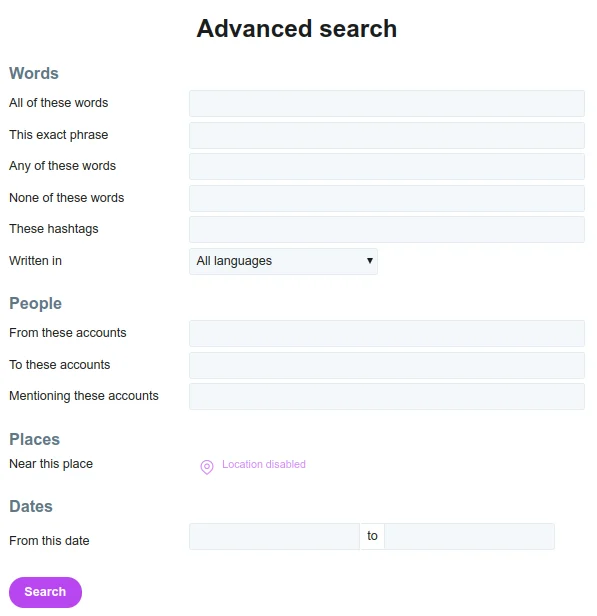
The combination of that URL-change detection with the Advanced Search options is what turns a redirect quirk into a data extraction primitive. Knowing only the victim's username, the attacker can obtain very detailed information about the victim's tweets even when those tweets are private. The full list of available search options is shown in the image below.
Exploitation
Step 1: Prepare the victim accounts
Create test Twitter accounts and enable Protect your Tweets in the settings. This makes the tweets private, which is the condition the attack is meant to defeat.
Step 2: Open the PoC
Visit the proof of concept page and click the button to start it:
https://terjanq.github.io/Bug-Bounty/Twitter/protected-tweets-exposure-efvju8i785y1/poc.html
Step 3: Configure the search
Put the phrases you want to find into your tweets, then fill the field from: with your account's username and submit the form.
Step 4: Run the extraction
Click the button Fetch all 3-digit numbers from tweets and wait for the timer to stop.
Step 5: Read the result
When the timer stops, you should see all the three-digit numbers from your tweets.
Making it efficient with logical operators
To make the X-Search attack more effective, the attacker can use the logical operators AND and OR to narrow down the search area. For example, by using phrases like:
1001 OR 1002 OR 1003 OR 1004 …
the attacker can use binary search to extract all four-digit numbers in only a few requests. The number of words that can be used in a search is limited to 50, but that is still large enough to extract four-digit numbers effectively: it would take around 300 requests to extract all of them, and by combining them in the correct order whole phrases such as a credit card number can be leaked. The PoC demonstrates the attack on three-digit numbers.
Caveats noted by the researcher
The exploit can be coded much more efficiently. For example, instead of using one window to make the redirects, several windows can be used to speed it up. Also, because of the style it was written in, false positives can appear when lags occur; primitive protection is implemented for that case, but it is not perfect.
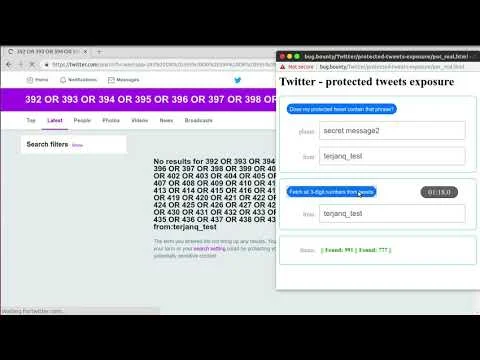
A short video demonstrates the PoC in action:
https://youtu.be/bSUS4THqssY
Root cause
The observable defect is the conditional redirect: when a search returns no results, Twitter adds the f=tweets parameter to the URL, and when results are found it does not. That makes the outcome of a search, which depends on the victim's private data, readable from the URL that the victim's browser lands on. Combined with a technique for detecting that URL change from a third-party page, the search result becomes a cross-origin oracle: the attacker's page can ask "does this account have a tweet matching this query?" and read the answer.
Because the query is executed in the victim's authenticated session, the search covers protected tweets as well. The report does not describe the server-side code or the exact mechanism by which the URL change is detected; it refers to the earlier report 491243 and the accompanying write-up for that technique.
Impact
A regular Twitter user can have their protected tweets leaked, along with additional information such as mentioned users, tweet time frames and tweet locations. The summary also lists exposure of credit card numbers, bank account numbers, phone numbers, tokens, specific words and even whole phrases, as well as hashtags. The attacker needs to know the victim's username, and the 50-word query limit shapes how much can be recovered.
Fix
The report does not state what change was made. The behaviour that needs to go away is the result-dependent URL rewrite: the presence or absence of f=tweets should not depend on whether the query matched anything, so that a search outcome cannot be read from the URL.
Variants to test
- Other result-dependent redirects. Look for endpoints that rewrite the URL only when a query returns nothing, or only when it returns something. A positive result is a parameter, path segment or fragment that appears or disappears based on the data, and that you can observe from a cross-origin page.
- Other search operators. On any product with an advanced search syntax, try operators that restrict by author, date, location or hashtag. A positive result is a query whose yes/no answer reveals private content of the logged-in user.
- Logical operator batching. Try
ORchains of candidate values within the query word limit to turn the oracle into a binary search. A positive result is recovering a value in far fewer requests than one query per candidate. - Parallel windows. Run several windows performing the redirects at once. A positive result is a speed-up, with false positives partly handled by the primitive lag protection the researcher mentions.
- Private or restricted content. Repeat the queries against content the victim has restricted (protected tweets, private posts, limited audiences). A positive result is that the oracle still answers for that content, showing the restriction is not enforced on the search outcome.
What happened, in plain words
Twitter lets you search tweets. If you type a search that finds nothing, the URL changes to a slightly different one. If the search does find something, it leaves the address alone. That tiny difference, the address changing or not changing, is the whole basis of this report.
Because the searches run as you, they also look inside your protected (private) tweets. By asking many such questions, the page can piece together numbers, words and whole phrases from private tweets.
This is not a bug inside Twitter's servers in the usual sense. It is a leak that crosses from one website (the attacker's page) to another (Twitter), using your browser as the messenger. The researcher calls the technique X-Search.
Some words you will meet
Before the details, a few everyday ideas:
- URL: the address of a page, like the street address of a house.
https://twitter.com/search?q=hellois a URL. The part after?carries extra settings, called parameters. - Parameter: a named setting in a URL, written
name=value. In?q=hello, the parameterqhas the valuehello. Several are joined with&. - Query: the search text you give Twitter.
- Session: the state of being logged in. Your browser holds a small piece of proof (a cookie) that tells Twitter who you are, so Twitter shows you your own private content.
- Cookie: a small piece of data a site stores in your browser so it can recognise you on the next request. Think of a cloakroom ticket: show it and you get your coat back.
- Cross-site / cross-origin leak: information moving from one website to another without permission. Browsers normally try to stop one site reading another site's pages, so attackers look for small side channels, indirect signals, instead.
- Oracle: in security, any yes/no signal that answers a question about secret data. Here the oracle is "did the address change?".
- Binary search: a way to find a value by halving the possibilities each time, like guessing a number between 1 and 100 by asking "is it above 50?".
- PoC (proof of concept): a small demonstration that the problem is real.
Context: what Twitter's search does
Twitter's search feature lets a user query tweets. The Advanced Search options narrow results by criteria such as the author, written from:, words contained in the tweet, and so on. When a search returns no results, Twitter redirects the browser to a slightly different URL than when results are found. That difference in the resulting URL is the observable signal this report builds on.
The target here is not a server-side flaw in Twitter itself but a cross-site information leak: a prepared website, hosted at terjanq.github.io, that makes a victim's browser perform searches against Twitter and infers, from the URL the browser ends up on, whether a given query matched any of the victim's tweets. Because the search runs in the victim's own logged-in session, it also covers tweets that are set as private (protected).
In plain terms: the attacker does not break into Twitter. The attacker gets your own browser to ask Twitter questions on your behalf, then reads a tiny side effect of the answer.
Setup: what you need to try it
To reproduce the issue you need:
- Test Twitter accounts with the option Protect your Tweets enabled in the settings, so that the tweets are private. This is the condition the attack is meant to defeat: we want to prove that private tweets can still be probed.
- A browser pointed at the researcher's proof of concept page:
https://terjanq.github.io/Bug-Bounty/Twitter/protected-tweets-exposure-efvju8i785y1/poc.html
This is a normal web page on a site the researcher controls. Opening it is all the victim has to do; the page then drives the browser.
- Some phrases placed in the protected tweets, so that the extraction has something to find. Without known content in the tweets, there is nothing to demonstrate recovering.
The attack itself is delivered as a web page; the victim only has to visit it while logged in to Twitter.
Finding it: the address that changes
While looking for further URL exposure issues on Twitter, the researcher noticed an unsafe URL redirect that depends on the search results. The behaviour is described as follows:
If there are no search results for a query e.g. https://twitter.com/search?q=veryveryunsaferedirect&src=typd the URL changes to https://twitter.com/search?f=tweets&q=secret%20from%3Aterjanq&src=typd and it doesn’t when results were found. As can be spotted, the
f=tweetsparameter was added and hence that state can be leaked.
Let us unpack that. The first address is a search for the nonsense word veryveryunsaferedirect. It finds nothing. After the search, the browser ends up on an address that now contains f=tweets. The second address in the quote is a search for secret from:terjanq, meaning tweets by the user terjanq containing the word secret. The %20 is just how a space is written inside a URL, and %3A is how a colon is written, so from%3Aterjanq is the same as from:terjanq.
In other words, a search that finds nothing ends up with f=tweets added to the query string, while a search that finds something keeps the original URL. That single bit, whether the parameter appears, is enough to answer a yes/no question about the victim's tweets.
Detecting the URL change can be done in several ways. The researcher reuses the technique already reported to Twitter in report 491243 and described at:
https://terjanq.github.io/Bug-Bounty/Twitter/url-information-disclosure-q67svgtbqarv/index.html
That earlier work is the method for noticing, from an outside page, that the address inside a browser window has changed. The report points to it rather than repeating it. The combination of that URL-change detection with the Advanced Search options is what turns a redirect quirk into a data extraction primitive. Knowing only the victim's username, the attacker can obtain very detailed information about the victim's tweets even when those tweets are private. The full list of available search options is shown in the image below.
The image shows the range of Advanced Search options the attacker can use, which is what makes the yes/no questions so flexible: author, words, and more.
Exploitation, step by step
Step 1: Prepare the victim accounts
Create test Twitter accounts and enable Protect your Tweets in the settings. This makes the tweets private, which is the condition the attack is meant to defeat. Doing this on test accounts keeps the demonstration safe and repeatable.
Step 2: Open the PoC
Visit the proof of concept page and click the button to start it:
https://terjanq.github.io/Bug-Bounty/Twitter/protected-tweets-exposure-efvju8i785y1/poc.html
This page is the attacker's tool. Clicking the button starts the machinery that will open Twitter searches and watch the addresses.
Step 3: Configure the search
Put the phrases you want to find into your tweets, then fill the field from: with your account's username and submit the form. Here you do it yourself so you can watch the extraction work on content you control.
Step 4: Run the extraction
Click the button Fetch all 3-digit numbers from tweets and wait for the timer to stop. Each search is one yes/no question; the timer is just the page working through the list of candidates.
Step 5: Read the result
When the timer stops, you should see all the three-digit numbers from your tweets. That is the point of the demonstration: the page never reads your tweets, it only learns which guesses were right.
Making it efficient with logical operators
To make the X-Search attack more effective, the attacker can use the logical operators AND and OR to narrow down the search area. OR means "match if any of these words appear"; AND means "match only if all of them appear". For example, by using phrases like:
1001 OR 1002 OR 1003 OR 1004 …
the attacker can use binary search to extract all four-digit numbers in only a few requests. The idea: instead of asking about one number at a time, ask about a whole group. If the answer is yes, the secret is somewhere in the group, and the attacker splits the group again. The number of words that can be used in a search is limited to 50, but that is still large enough to extract four-digit numbers effectively: it would take around 300 requests to extract all of them, and by combining them in the correct order whole phrases such as a credit card number can be leaked. The PoC demonstrates the attack on three-digit numbers.
Caveats noted by the researcher
The exploit can be coded much more efficiently. For example, instead of using one window to make the redirects, several windows can be used to speed it up. Also, because of the style it was written in, false positives can appear when lags occur; primitive protection is implemented for that case, but it is not perfect. A false positive here means the page thinks a search matched when it did not, usually because the browser was slow and the address was read at the wrong moment.
A short video demonstrates the PoC in action:
https://youtu.be/bSUS4THqssY
Root cause: why it works
The observable defect is the conditional redirect: when a search returns no results, Twitter adds the f=tweets parameter to the URL, and when results are found it does not. That makes the outcome of a search, which depends on the victim's private data, readable from the URL that the victim's browser lands on. Combined with a technique for detecting that URL change from a third-party page, the search result becomes a cross-origin oracle: the attacker's page can ask "does this account have a tweet matching this query?" and read the answer.
Because the query is executed in the victim's logged-in session, the search covers protected tweets as well. The report does not describe the server-side code or the exact mechanism by which the URL change is detected; it refers to the earlier report 491243 and the accompanying write-up for that technique.
A comparison: imagine a librarian who will not show you a private letter, but will answer "is there a letter here mentioning the word 'bank'?" by nodding or shaking their head. One answer reveals almost nothing; many answers, chosen cleverly, reveal the letter.
Impact: what can leak
A regular Twitter user can have their protected tweets leaked, along with additional information such as mentioned users, tweet time frames and tweet locations. The summary also lists exposure of credit card numbers, bank account numbers, phone numbers, tokens, specific words and even whole phrases, as well as hashtags. The attacker needs to know the victim's username, and the 50-word query limit shapes how much can be recovered.
Fix: what should change
The report does not state what change was made. The behaviour that needs to go away is the result-dependent URL rewrite: the presence or absence of f=tweets should not depend on whether the query matched anything, so that a search outcome cannot be read from the URL.
Variants to test: where else to look
- Other result-dependent redirects. Look for endpoints that rewrite the URL only when a query returns nothing, or only when it returns something. A positive result is a parameter, path segment or fragment that appears or disappears based on the data, and that you can observe from a cross-origin page.
- Other search operators. On any product with an advanced search syntax, try operators that restrict by author, date, location or hashtag. A positive result is a query whose yes/no answer reveals private content of the logged-in user.
- Logical operator batching. Try
ORchains of candidate values within the query word limit to turn the oracle into a binary search. A positive result is recovering a value in far fewer requests than one query per candidate. - Parallel windows. Run several windows performing the redirects at once. A positive result is a speed-up, with false positives partly handled by the primitive lag protection the researcher mentions.
- Private or restricted content. Repeat the queries against content the victim has restricted (protected tweets, private posts, limited audiences). A positive result is that the oracle still answers for that content, showing the restriction is not enforced on the search outcome.
Glossary
- URL: the address of a web page, including any settings after a
?. - Parameter: a named setting in a URL, written
name=value, with several joined by&. - Query string: the part of a URL after
?that carries parameters. - Query: the search text sent to a search feature.
- Redirect: when a server or page sends the browser to a different address than the one requested.
- Session: the state of being logged in, maintained by the browser on the user's behalf.
- Cookie: a small piece of data stored by a site in the browser so it can recognise the user later.
- Authenticated session: a session where the browser proves who the user is, so private content is shown.
- Cross-site / cross-origin leak: information passing from one website to another without permission, often through indirect signals.
- Side channel: an indirect signal (timing, address changes, sizes) that reveals something about data you cannot read directly.
- Oracle: any yes/no signal that answers a question about secret data.
- Binary search: finding a value by repeatedly halving the set of possibilities.
- Logical operators (
AND,OR): search words that combine conditions;ORmatches any,ANDmatches all. from:operator: an advanced search term that limits results to tweets by a given account.- Protected tweets: tweets set to private, visible only to approved followers.
- PoC (proof of concept): a small demonstration showing a problem is real.
- False positive: a result that wrongly says something was found.
- Request: one message from the browser to a website asking for something.
- Endpoint: a specific address on a website that performs a particular action.
- X-Search: the researcher's name for this search-based extraction technique.