Foreword
The Twitter ads media library allowed a user to publish a tweet from another user's account by manipulating the owner_id and user_id parameters in the tweet publishing request. An attacker could share their own media file with a victim, then use the victim's user ID to post a tweet as them without knowing their password.

During the security exploration of Twitter social network as part of BugBounty-program, I found the vulnerability which allowed hackers to publish entries in Twitter-network by any user of this service, meanwhile without having the access to the account of a victim.
The full write-up lives on its author's site
It belongs to its author, so we link to it rather than copy it. The other two tabs are our own rewrites, checked against it.
Context
Twitter ran a bug bounty programme, and during security exploration of the Twitter social network I found a vulnerability that allowed publishing entries in the Twitter network on behalf of any user of the service, without having access to the victim's account. I found it on 26 February 2017 and it was fixed on 28 February 2017. The report reference is https://hackerone.com/reports/208978.
The target feature is the media library of the Twitter ads service at https://ads.twitter.com/. That service has a media library where you can upload media files (video, pictures, gif animation) and review media files uploaded earlier, which were used at the moment of tweet publication. The library is available at:
https://ads.twitter.com/accounts/*id_of_your_account*/media.
Setup
I used two accounts of my own:
- account No. 1, my first account;
- account No. 2, my second account.
I do not remember the exact statements of the output errors, so in this write-up they are called "error No. 1" and "error No. 2". The only error text I recall is the one quoted in the exploitation steps below.
Finding it
Navigating to the library shows the function for uploading media files:
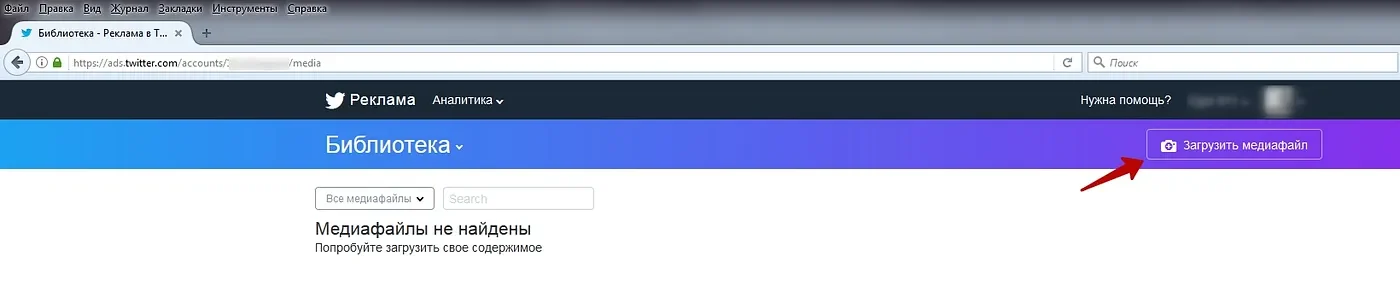
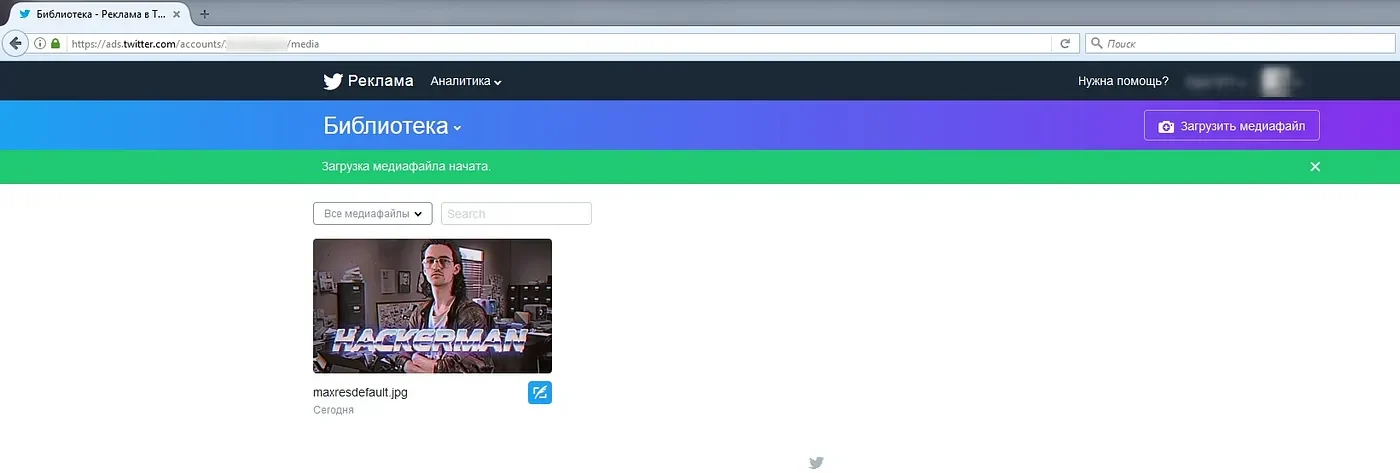
After pressing the button «Download media-file» and choosing an appropriate file, the picture appears:
Clicking the uploaded image shows the following:
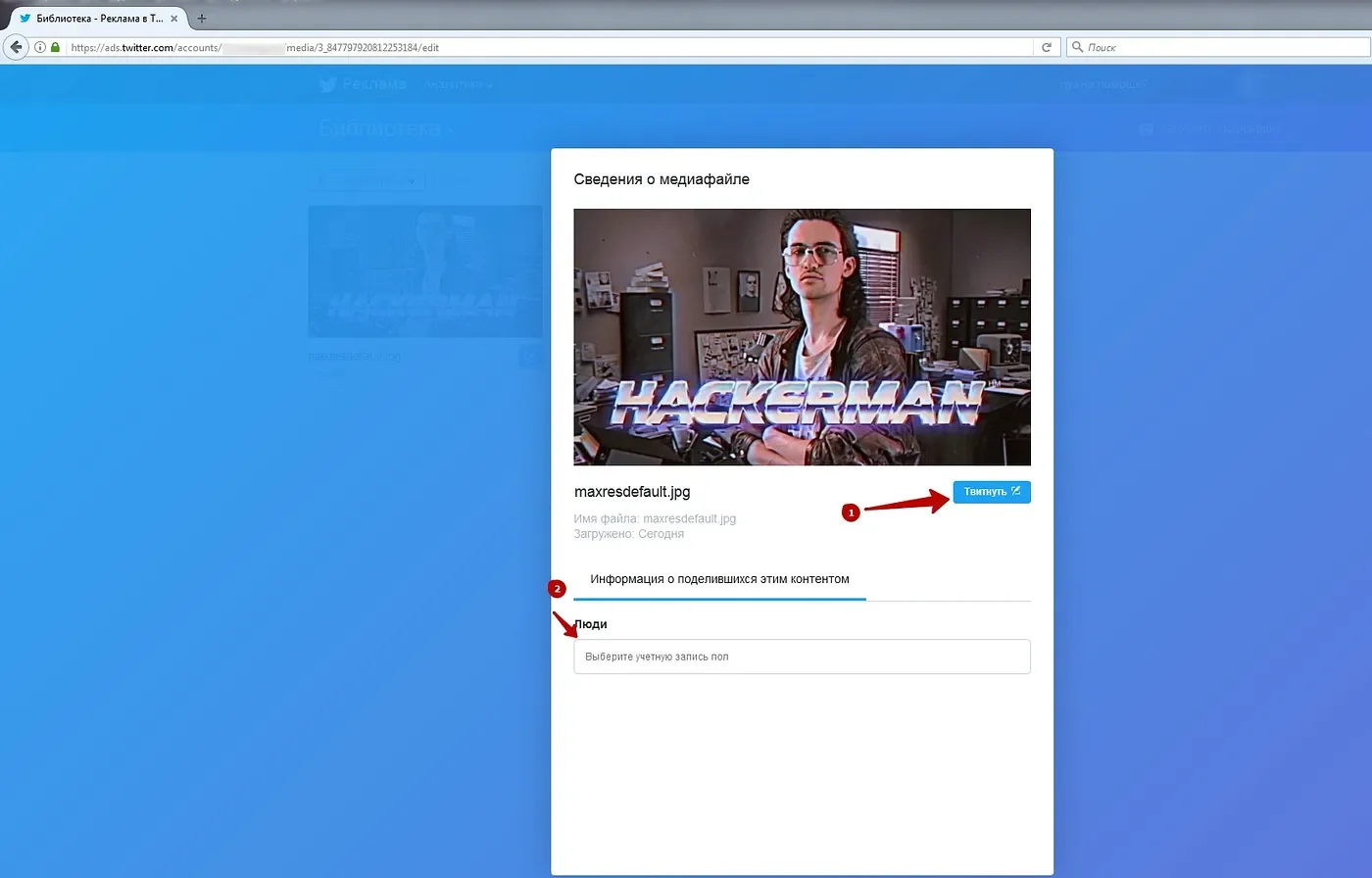
- We are able to tweet our media file.
- We are able to share the media file with any user.
Taking a closer look at the tweet functionality:
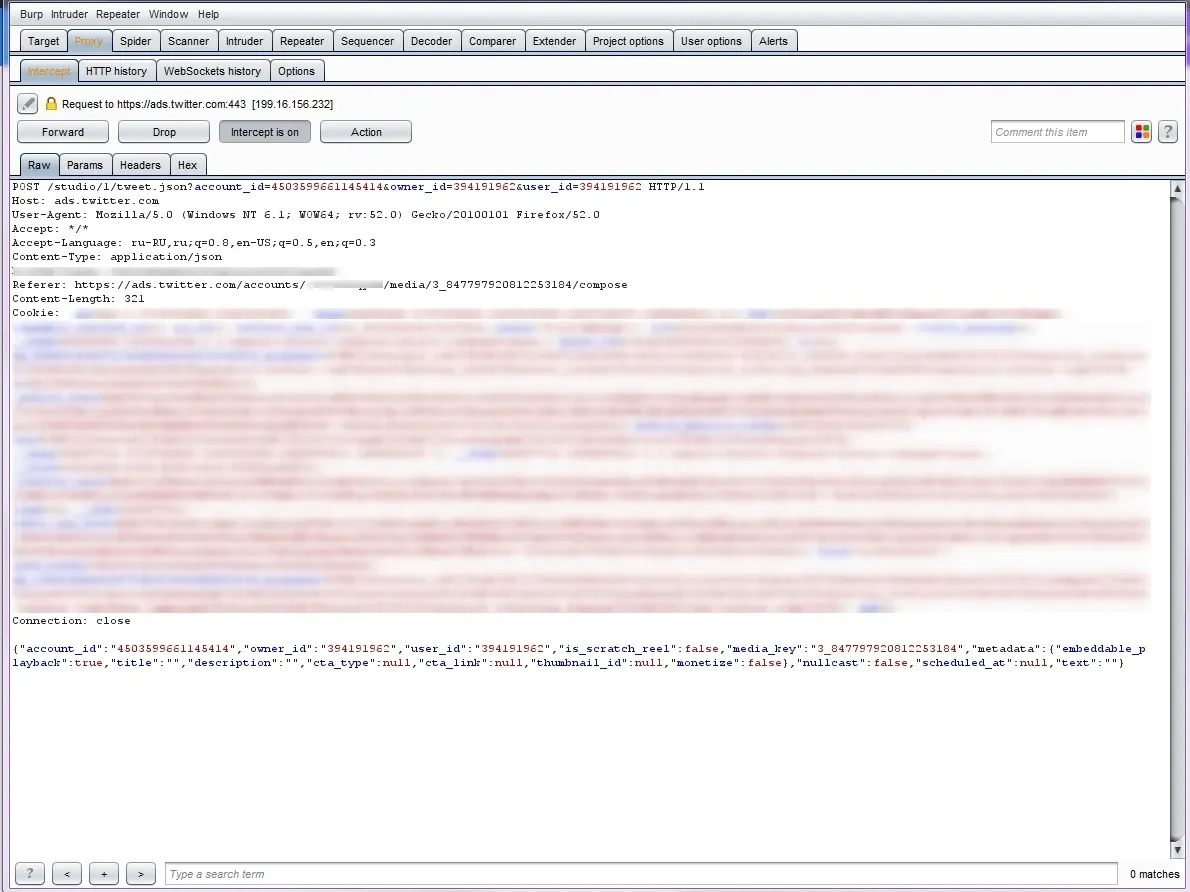
What we may see here:
account_idis the id of the account (directly in the library);owner_idis the id of the image owner;user_idis the user the tweet will be published to, the one that has this id;media_keyis the id of the media file that is being published (it is illustrated in the address string in screenshot No. 3).
The tweet publication request carries these identifiers. That is what looked wrong: the identifiers are supplied by the client and are not bound to the authenticated session.
Exploitation
Step 1: change owner_id and user_id in GET and POST
First I intercepted the request for tweet publishing and changed the parameters owner_id and user_id in the GET request and in the JSON sent by the POST method, from the id of account No. 1 to the corresponding id of account No. 2. I did not receive the expected result, but error No. 1 instead.
Step 2: change owner_id and user_id in POST only
After that I decided to change owner_id and user_id in POST only, and I received error No. 2. As far as I remember, the text was the following:
User with owner_id *id which was a substitute* is not an owner of this media-file *here should be a media_key*
Step 3: learn a media_key in advance from account No. 2
I took account No. 2, went to the service ads.twitter.com, then went to the library, and uploaded the picture to know media_key in advance.
Step 4: substitute owner_id, user_id and media_key
Returning to account No. 1, I intercepted the request for the tweet and changed owner_id and user_id in the GET and POST methods for the corresponding data of account No. 2, and the media key for the one I knew from uploading the picture while working with account No. 2. Here error No. 1 appeared again. That was very sad, but nevertheless, when the substitution for owner_id and user_id was made in GET and POST methods earlier, there was only one error (error No. 1), and in the case of the substitution for owner_id and user_id only in the POST method there was another error (error No. 2).
So I changed owner_id, user_id and media_key in the POST method, and the response informed me about a successful attempt of tweet publication. Passing to account No. 2, I saw that the tweet with the formerly uploaded picture from account No. 2 was published, although account No. 2 had published nothing itself.
Step 5: remove the media_key restriction by sharing the file
At this point we could publish tweets by any user, but there was an explicit restriction that seriously decreased the impact (severity) of the vulnerability: the user we use to make a publication must have a media file uploaded. Moreover, it is necessary to know the media_key of this file, and it is almost impossible to reveal it by brute force, as it contains 18 digits. In my explorations I did not find a 100% way to know this media_key; there were always some restrictions and circumstances which allow getting that media_key.
I remembered the possibility to share an uploaded media file. I came to the idea that if we share our media file with the user from whose account we want to make a publication, that user will be considered the owner of this media file, error No. 2 would not appear, and the tweet would be published successfully. That is exactly what happened.
For successful exploitation we did not have the media_key, but when we are the owners of the file we may see its media_key (screenshot No. 3).
The scenario then looks like this:
- We upload our media file.
- Share this file with the user whose account we use to publish the entry.
- Intercept the query for tweet publication and simply change in the POST method the following data:
owner_idanduser_idto the Twitter id of the victim account (it is quite simple to know this, as there are a lot of online services). - We receive the message about a successful attempt of tweet publication.
- Have fun.
Now we can report the vulnerability with peace of mind.
Root cause
The tweet publication endpoint takes owner_id, user_id and media_key from the client, in the GET request and in the JSON body sent by POST, and uses them to decide whose media file is published and to whose account the tweet is attributed. The server checks that the owner_id matches the owner of the media file (that is the check behind error No. 2). Because the media library lets an owner share a media file with another user, that user becomes an acceptable owner for the file, and the ownership check passes while the user_id still points at the victim. The identifiers are therefore an insecure direct object reference.
Impact
An attacker could publish tweets from the account of any other user without access to that account. The conditions are that the attacker has a media file uploaded and shared with the victim account, and knows the victim's Twitter id, which is easy to obtain from online services. When the attacker is the owner of the file, they may see its media key. The original report does not state any further impact beyond publishing entries on behalf of the victim.
Fix
The vulnerability was fixed on 28 February 2017. The report does not describe the change that was made.
Variants to test
- On other advertising or scheduling interfaces, intercept the publish request and swap the owner and target user identifiers between two of your own accounts. A positive result is a publication appearing on the second account while the first account's session made the request.
- Try changing the identifiers in the GET query string and in the JSON body separately, then together, and compare the error messages. Different errors for different combinations show which layer performs which check, as error No. 1 and error No. 2 did here.
- Use the sharing or collaboration feature to make a second account an owner of your media, then publish with that account's identifiers. A positive result is that the ownership error disappears and the publication succeeds.
- Check whether media keys or other object identifiers are exposed to users who are not the owner, for example in share links or library listings. A positive result is a key you can use in a publish request for an account that never uploaded the file.
- Test whether the target user identifier is validated against the session at all, by substituting an identifier of an account you do not control in a test environment. A positive result is a successful response rather than an authorisation error.
What happened, in plain words
Twitter runs a bug bounty programme. That means Twitter pays people who find security problems in its products and report them privately, instead of using them or selling them. While I was exploring Twitter's systems as part of that programme, I found a problem that let someone publish tweets from any other user's account without ever logging in as that user. I found it on 26 February 2017 and Twitter fixed it on 28 February 2017. The public report is at https://hackerone.com/reports/208978.
The feature involved is the media library of the Twitter ads service at https://ads.twitter.com/. The ads service is a separate part of Twitter aimed at advertisers. It has a media library: a place where you upload media files (video, pictures, gif animation) and look back at files you uploaded earlier, which were used when a tweet was published. The library lives at this address:
https://ads.twitter.com/accounts/*id_of_your_account*/media.
Read that address as a template. The part *id_of_your_account* is a placeholder: in a real browser it is replaced by a number that identifies your account. So the address is really "the media page of the account whose number is here".
To understand the bug you need one idea: when you click a button in a web page, your browser sends a request to a server, and that request carries data. Some of that data tells the server what to do. If the server trusts data that the browser (and therefore the user) can freely edit, a user can make the server do things it should not allow. That is the heart of this story.
Setup
I used two accounts of my own:
- account No. 1, my first account;
- account No. 2, my second account.
Using two accounts you control is the standard safe way to test this kind of problem: you play the attacker with one account and the victim with the other, and nobody else is affected.
I do not remember the exact statements of the output errors, so in this write-up they are called "error No. 1" and "error No. 2". The only error text I recall is the one quoted in the exploitation steps below.
Finding it
Navigating to the library shows the function for uploading media files:
The library shows the function for uploading media files. This is the starting point: everything in this report happens around files that live in this library.
After pressing the button «Download media-file» and choosing an appropriate file, the picture appears:
Clicking the uploaded image shows the following:
- We are able to tweet our media file.
- We are able to share the media file with any user.
Two actions are offered for a file in the library. The first publishes a tweet containing that file. The second shares the file with another user. Keep the second one in mind: it becomes the key to the whole attack later.
Taking a closer look at the tweet functionality:
What we may see here:
account_idis the id of the account (directly in the library);owner_idis the id of the image owner;user_idis the user the tweet will be published to, the one that has this id;media_keyis the id of the media file that is being published (it is illustrated in the address string in screenshot No. 3).
These four names are identifiers. An identifier (id) is just a number or string that names a specific thing: a specific account, a specific user, a specific file. The important point is where they appear: in the request that your browser sends when you publish a tweet. The request carries them. That is what looked wrong: the identifiers are supplied by the client (your browser) and are not tied to the session you are logged in with.
A session is how a website remembers that a request comes from you after you log in. When you log in, the server gives your browser a small piece of data (often called a cookie or a token) and the browser sends it back with every later request. The server uses it to know who you are. If a request contains both "this is the logged-in user" (from the session) and "publish as user X" (from an editable field), the server must check that the two agree.
Exploitation
Step 1: change owner_id and user_id in GET and POST
First I intercepted the request for tweet publishing and changed the parameters owner_id and user_id in the GET request and in the JSON sent by the POST method, from the id of account No. 1 to the corresponding id of account No. 2. I did not receive the expected result, but error No. 1 instead.
Some vocabulary before the details. Intercepting a request means catching it between your browser and the server so you can read and edit it before it is sent. People do this with a proxy tool: the browser is configured to send its traffic through the tool, the tool shows each request, and you can modify it. GET and POST are two kinds of HTTP request. HTTP is the language browsers and servers speak. A GET request normally asks for something and puts its data in the URL (the address string). A POST request normally sends data to be processed and puts its data in the body of the request. JSON is a common text format for structured data in a request body; it looks like a list of names and values in curly brackets.
So in this step I took the publish request, which had two parts (a GET part with parameters in the URL and a POST part with a JSON body), and in both parts I replaced the ids of account No. 1 with the ids of account No. 2. The idea was simple: if the server believes these fields, then telling it "publish as account No. 2" should make it publish as account No. 2. It did not. The server answered with error No. 1. That is useful information: something in the request was inconsistent, and the server noticed.
Step 2: change owner_id and user_id in POST only
After that I decided to change owner_id and user_id in POST only, and I received error No. 2. As far as I remember, the text was the following:
User with owner_id *id which was a substitute* is not an owner of this media-file *here should be a media_key*
Line by line: the message says that the user identified by owner_id (the value I had substituted) is not the owner of the media file (the file identified by a media_key, which the message would have shown). In plain words, the server checked one thing: does the owner_id I sent actually own the file I am trying to publish? It said no, because the file still belonged to account No. 1 while I claimed the owner was account No. 2.
This is a very informative error. It tells us the server does perform an ownership check on owner_id. It tells us the server performs an ownership check on owner_id. That is the gap to aim at.
Step 3: learn a media_key in advance from account No. 2
I took account No. 2, went to the service ads.twitter.com, then went to the library, and uploaded the picture to know media_key in advance.
Why this step? Because the error in step 2 mentioned the media_key, and because the publish request needs a media_key for the file being published. If I wanted to publish from account No. 2, I needed a file that account No. 2 owned, and I needed to know that file's key. The easiest way to learn a key is to own the file: when you upload a file yourself, the library shows you its key. So I uploaded a picture with account No. 2 and noted the key.
Step 4: substitute owner_id, user_id and media_key
Returning to account No. 1, I intercepted the request for the tweet and changed owner_id and user_id in the GET and POST methods for the corresponding data of account No. 2, and the media key for the one I knew from uploading the picture while working with account No. 2. Here error No. 1 appeared again. That was very sad, but nevertheless, when the substitution for owner_id and user_id was made in GET and POST methods earlier, there was only one error (error No. 1), and in the case of the substitution for owner_id and user_id only in the POST method there was another error (error No. 2).
So I changed owner_id, user_id and media_key in the POST method, and the response informed me about a successful attempt of tweet publication. Passing to account No. 2, I saw that the tweet with the formerly uploaded picture from account No. 2 was published, although account No. 2 had published nothing itself.
Let us slow down, because this is the moment the bug becomes real. I was logged in as account No. 1. I sent a publish request whose body said, in effect, "publish this file, owned by account No. 2, as account No. 2". The server accepted it and the tweet appeared on account No. 2. Account No. 2 never did anything; its owner never clicked anything. The only thing that made it work was that the file belonged to account No. 2, so the ownership check from step 2 passed.
The comparison between the two errors is the lesson. Changing the ids in both GET and POST gave error No. 1. Changing them in POST only gave error No. 2. Different combinations produce different errors, which shows that different parts of the server check different things. When I changed all three fields in POST only, no error came back at all. Reading error messages carefully, and comparing what changes when you change one thing at a time, is how you map out what a server checks.
Step 5: remove the media_key restriction by sharing the file
At this point we could publish tweets by any user, but there was an explicit restriction that seriously decreased the impact (severity) of the vulnerability: the user we use to make a publication must have a media file uploaded. Moreover, it is necessary to know the media_key of this file, and it is almost impossible to reveal it by brute force, as it contains 18 digits. In my explorations I did not find a 100% way to know this media_key; there were always some restrictions and circumstances which allow getting that media_key.
Brute force means trying every possible value until one works. A key of 18 digits has an enormous number of possibilities, so guessing is not realistic. That is why the restriction mattered: the attack only worked if the victim account already had a file in the library and I somehow knew that file's key. For a random victim, neither is true.
I remembered the possibility to share an uploaded media file. I came to the idea that if we share our media file with the user from whose account we want to make a publication, that user will be considered the owner of this media file, error No. 2 would not appear, and the tweet would be published successfully. That is exactly what happened.
This is the clever part. The sharing feature, which is a normal product feature, changes who counts as an owner of a file. If I share my file with the victim account, the server treats the victim as an owner of my file. Now the ownership check passes, because the owner_id I send (the victim's) really does own the file. And I still know the media_key, because I uploaded the file myself and the library shows keys to owners.
For successful exploitation we did not have the media_key, but when we are the owners of the file we may see its media_key (screenshot No. 3).
The scenario then looks like this:
- We upload our media file.
- Share this file with the user whose account we use to publish the entry.
- Intercept the query for tweet publication and simply change in the POST method the following data:
owner_idanduser_idto the Twitter id of the victim account (it is quite simple to know this, as there are a lot of online services). - We receive the message about a successful attempt of tweet publication.
- Have fun.
Step 3 mentions the victim's Twitter id. That is just the number that identifies an account on Twitter. It is not secret: many online services will tell you the numeric id behind a username. So the attacker does not need access to the victim's account, does not need the victim's password, and does not need the victim to do anything. The attacker needs only a file of their own, the share action, and the victim's public id.
Now we can report the vulnerability with peace of mind.
Root cause
The tweet publication endpoint takes owner_id, user_id and media_key from the client, in the GET request and in the JSON body sent by POST, and uses them to decide whose media file is published and to whose account the tweet is attributed. The server checks that the owner_id matches the owner of the media file (that is the check behind error No. 2). Because the media library lets an owner share a media file with another user, that user becomes an acceptable owner for the file, and the ownership check passes while the user_id still points at the victim. The identifiers are therefore an insecure direct object reference.
An insecure direct object reference (IDOR) is the name for this whole family of bugs. The server has objects (here, a media file and a user account) and refers to them by identifiers. If the server accepts an identifier from the user and acts on it without checking that this user is allowed to touch that object, the reference is insecure. The everyday comparison: a hotel clerk who hands out a room key to anyone who says a room number, without checking that the person is the guest of that room. The room number is not secret, and saying it should not be enough.
Impact
An attacker could publish tweets from the account of any other user without access to that account. The conditions are that the attacker has a media file uploaded and shared with the victim account, and knows the victim's Twitter id, which is easy to obtain from online services. When the attacker is the owner of the file, they may see its media key. The original report does not state any further impact beyond publishing entries on behalf of the victim.
Fix
The vulnerability was fixed on 28 February 2017. The report does not describe the change that was made.
Variants to test
These are directions for testing similar features elsewhere, using only accounts you control.
- On other advertising or scheduling interfaces, intercept the publish request and swap the owner and target user identifiers between two of your own accounts. A positive result is a publication appearing on the second account while the first account's session made the request.
- Try changing the identifiers in the GET query string and in the JSON body separately, then together, and compare the error messages. Different errors for different combinations show which layer performs which check, as error No. 1 and error No. 2 did here.
- Use the sharing or collaboration feature to make a second account an owner of your media, then publish with that account's identifiers. A positive result is that the ownership error disappears and the publication succeeds.
- Check whether media keys or other object identifiers are exposed to users who are not the owner, for example in share links or library listings. A positive result is a key you can use in a publish request for an account that never uploaded the file.
- Test whether the target user identifier is validated against the session at all, by substituting an identifier of an account you do not control in a test environment. A positive result is a successful response rather than an authorisation error.
Glossary
- Bug bounty programme: a scheme where a company pays researchers who report security problems privately, so the problems can be fixed instead of abused.
- Vulnerability: a weakness in software that lets someone make it behave in a way its owners did not intend, often to their harm.
- Media library: the part of the ads service where uploaded pictures, videos and gif animations are stored and listed.
- Tweet: a post published on Twitter.
- Account id (
account_id): the number that identifies an account in the ads service. - Owner id (
owner_id): the identifier of the user who owns a media file. - User id (
user_id): the identifier of the user a tweet is published as. - Media key (
media_key): the identifier of a specific media file; in this report it has 18 digits. - Identifier (id): a number or string that names one specific thing, such as one account or one file.
- HTTP: the language browsers and servers use to exchange requests and responses.
- GET request: an HTTP request that normally asks for something and carries its data in the URL.
- POST request: an HTTP request that normally sends data to be processed and carries it in the request body.
- JSON: a text format for structured data, made of names and values in curly brackets.
- Request body: the part of a request that carries data, as opposed to the URL.
- Parameter: a named value in a request, such as
owner_id. - Intercept: to catch a request between browser and server so it can be read and edited before it is sent.
- Proxy tool: software that sits between your browser and the server and lets you inspect and modify traffic.
- Session: the server's memory of who you are after you log in, kept alive by data your browser sends with each request.
- Cookie / token: the small piece of data your browser stores and sends back so the server can recognise your session.
- Client: the program making the request, normally your browser, as opposed to the server.
- Server: the computer that receives requests and decides what to do with them.
- Endpoint: a specific address on a server that performs a specific action, such as publishing a tweet.
- Authorisation: the decision about whether a given user is allowed to perform a given action.
- Ownership check: a check that the user named in a request really owns the object being acted on.
- Brute force: trying every possible value until one works; impractical for an 18-digit key.
- Severity / impact: how much harm a vulnerability can cause if abused.
- IDOR (insecure direct object reference): a bug where the server accepts an object identifier from the user and acts on it without checking that this user may touch that object.
- Root cause: the underlying reason a bug exists, as opposed to its symptoms.
- Fix: the change made to the software to close the vulnerability.


