Cache Deception
Medium's caching rules cached any path that looked like a file, so a user could set their username to end with a file extension (e.g., 'yuval.png') and cause their profile page to be cached. An attacker could then retrieve the cached page to obtain CSRF tokens and information about profile viewers.
 Published on medium.freecodecamp.org
In my previous post, I tried to demonstrate how powerful and cool reverse engineering Android apps can be. I did this by showing how to modify Medium’s app so all membership-required stories in it would be available for free.
The full write-up lives on its author's site
It belongs to its author, so we link to it rather than copy it. The other two tabs are our own rewrites, checked against it.
Context
Medium's Android app talks to Medium's HTTP APIs through the Retrofit library, which turns those APIs into Java interfaces. Because of that, the endpoints and their available parameters sit in the app's code in a structured form. Medium also serves user profile pages at URLs of the form https://medium.com/@username.
This write-up grew out of an earlier project in which the author modified Medium's Android app so that membership-required stories would be available for free. While working on that, he collected the API endpoints declared in the app and iterated over them, which led to a cache deception bug on Medium's profile pages.
Setup
The work started from the Medium Android app and its use of Retrofit.
Finding it
Extracting the endpoints from the Retrofit interfaces produced a list of about 900 endpoints, each with its available parameters specified.
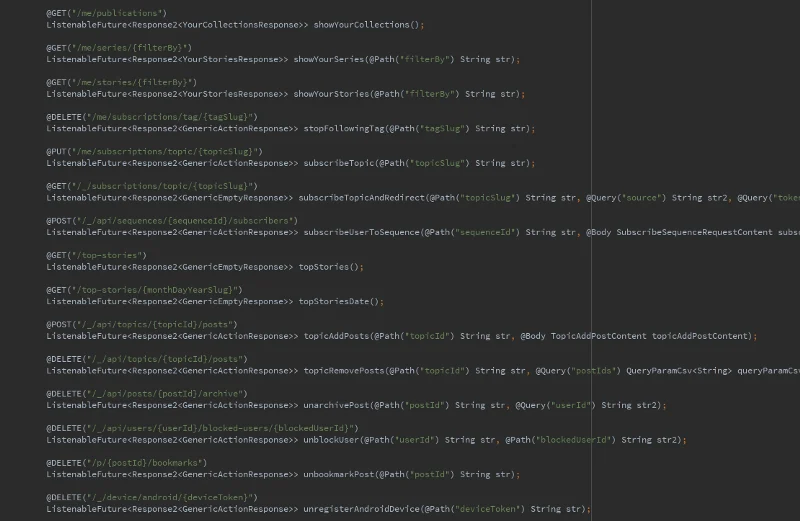
The screenshot shows a sample of the extracted endpoints.
With that list in hand, the author iterated over it looking for URLs that ended with user-controlled input. The reasoning was that caching services commonly have a misconfiguration where they cache every resource path that looks like a file. The goal was to find an endpoint that both contains sensitive information and is cached by Medium's servers.
Medium did cache paths that looked like files by default, but only for resources directly under the root directory of the site, for example:
https://medium.com/niceImage.png
Among the extracted endpoints, the user profile pages met the requirements. The profile page URL ends with user-controlled input.
Exploitation
Step 1: choose a username that looks like a file
The author set his username to yuval.png, which made his profile page URL:
https://medium.com/@yuval.png
Because the path ends in a file extension, the response was cached when someone visited it. The cached response stayed for a while, four hours, after which the server dropped it.
Step 2: get a victim to visit the profile page
When someone visited the crafted profile URL, its response was cached there for a while. From then on, the cached response was served to anyone requesting the same URL.
Step 3: read the cached response
The cached response contained sensitive information from the victim's visit:
- CSRF tokens, which are embedded in the returned document.
- Information about who viewed the profile, and the identity of the currently logged-in user, which can also be extracted from the returned documents.
The author notes that each cached response blocked other responses from being cached for its four-hour lifetime, but this was not a problem: a simple script can change usernames repeatedly, generating new URLs that are not cached yet.
A secondary use
The same behaviour could be used by users who want to hide the "block user" option on their own profile page, by repeatedly entering it with a script. Users cannot block themselves on their own profile, so when others receive a cached response that was created for the account owner, they do not get the option either.
Root cause
Medium's caching layer cached paths that looked like files by default, but only for resources directly under the site root. The profile page URL ends with user-controlled input, so a username ending in a file extension caused the response to be cached. The cached response contained CSRF tokens and information about the logged-in user, so caching it made those values available to anyone who requested the same URL.
Impact
Setting a username ending in a file extension causes profile page responses to be cached. By getting a logged-in user to visit that URL, the cached response can later be retrieved and contains CSRF tokens and information about the logged-in user and profile viewers. The cached response stays for four hours, and usernames can be changed repeatedly to generate fresh URLs.
The same mechanism could have been used by users willing to hide the "block user" option on their own profile, by repeatedly entering it with a script.
Fix
The report does not describe the fix Medium applied.
Variants to test
- Extract API endpoints from a mobile app's Retrofit interfaces and look for URLs ending in user-controlled input. A positive result is an endpoint whose response is cached when the path ends in a file extension.
- Set a username or other user-controlled path segment to end in a file extension, such as
.png, and request the resulting URL while logged in. A positive result is a cached response that is later served to a different client. - Check whether the cached response contains CSRF tokens or identity information. A positive result is a token or user identifier that belongs to the account that generated the cached response.
- Test whether changing the username repeatedly produces new uncached URLs. A positive result is a fresh cache entry for each new username, allowing repeated collection.
- Look for features that behave differently for the account owner than for other users, such as the "block user" option, and check whether a cached owner response exposes that difference to visitors.
Timeline
- Aug 24: initial report sent; an automatic email said Medium would try to respond within 48 hours.
- Sep 14: follow-up asking whether anything was unclear, since there had been no response.
- Nov 1: another message, saying a rejection would be fine and asking for a response to confirm receipt.
- Nov 20: Medium responded, apologised for the delay, and rewarded the bug with $100 and a shirt.
The author notes that the reward was $100 because Medium's program is small.
Further reading
The author points to two works that made cache-based attacks practical:
- "Web Cache Deception Attack" by Omer Gil, February 2017, which demonstrates the attack on PayPal and names the term.
- "Practical Web Cache Poisoning" by James Kettle, August 2018, with a follow-up, "Bypassing Web Cache Poisoning Countermeasures".
What happened, in plain words
A security researcher found a way to make Medium's servers store a copy of a logged-in user's profile page and then show that copy to anyone who asked for it. The trick was to choose a username that ended in something like .png, so the profile page looked like an image file to the caching system. Once someone visited the crafted profile URL, the cached copy, which contained CSRF tokens and information about the logged-in user, was served to anyone who requested the same URL. Medium paid a $100 bounty for the report.
This article explains the whole story from scratch, including what caching is, what an API is, and why a username ending in .png caused such a problem.
Background: how the app talks to Medium
Medium's Android app does not contain all of Medium's content. Instead, it asks Medium's servers for data using an API (Application Programming Interface). Think of an API as a waiter in a restaurant: you (the app) tell the waiter what you want from a menu, the waiter goes to the kitchen (the server), and brings back your order (the data). The menu items are called endpoints: each endpoint is a specific URL that the app can call to get or send a particular kind of information, such as your profile, a story, or a list of comments.
The app uses a library called Retrofit to turn those API endpoints into Java code. Retrofit is like a translator that lets the app describe each API call in a structured way, with all the possible parameters (options) written out clearly. Because of this, the endpoints and their parameters are not hidden; they sit in the app's code in a readable form.
Medium also has user profile pages at URLs like https://medium.com/@username. Medium serves user profile pages at URLs like https://medium.com/@username.
This whole investigation started from an earlier project where the author modified Medium's Android app to make membership-only stories free. While doing that, he collected the API endpoints declared in the app and then tested them one by one, which led to the cache deception bug described here.
Setting up
The author began with the Medium Android app and its use of Retrofit.
Finding the bug
Extracting the endpoints
By examining the Retrofit interfaces in the app, the author produced a list of about 900 endpoints, each with its available parameters specified.
The screenshot shows a sample of the extracted endpoints.
With that list in hand, he went through it looking for URLs that ended with user-controlled input. The reasoning was that caching services often have a misconfiguration where they cache every resource path that looks like a file. His goal was to find an endpoint that both contains sensitive information and is cached by Medium's servers.
How caching works, and why it matters
To understand the bug, you need to know what caching is. When you visit a website, your browser often saves static files like images, stylesheets, and scripts so it does not have to download them again on your next visit. This saves time and bandwidth. Similarly, servers and CDNs (Content Delivery Networks, such as Cloudflare) cache responses. A CDN is a network of servers placed around the world that sit between users and the main server. When someone requests a file, the CDN can return a saved copy immediately instead of asking the main server to generate it again. This reduces load on the server and speeds up responses for everyone.
Caching static files is good: everyone benefits. But what happens if a server caches a non-static response that contains sensitive information? The server will start serving that cached copy to everyone who requests the same URL, making the sensitive information public. That is the essence of cache deception: tricking a server into caching sensitive data by exploiting badly configured caching rules. Once the data is cached, an attacker can come back and collect it.
The misconfiguration at Medium
Medium did cache paths that looked like files by default, but only for resources directly under the root directory of the site. For example, a URL like this would be cached:
https://medium.com/niceImage.png
This URL ends with .png, so the caching layer treats it as an image file and stores the response. The author's list contained one endpoint that met the requirements: user profile pages. The profile page URL ends with user-controlled input. So if he set his username to something ending in a file extension, his profile page URL would look like a file to the caching layer.
Exploitation
Step 1: choose a username that looks like a file
The author set his username to yuval.png. This made his profile page URL:
https://medium.com/@yuval.png
Because the path ends in a file extension (.png), the response was cached when someone visited it. The cached response stayed for a while, four hours, after which the server dropped it.
Step 2: get a victim to visit the profile page
When someone visited the crafted profile URL, its response was cached there for a while. From then on, the cached response was served to anyone requesting the same URL.
Step 3: read the cached response
The cached response contained sensitive information from the victim's visit:
- CSRF tokens, which are embedded in the returned document. A CSRF token is a secret value that a website includes in forms and requests to prevent Cross-Site Request Forgery attacks. In simple terms, it is a unique string that proves the request came from the legitimate site, not from an attacker's site. If an attacker steals a CSRF token, they might be able to forge requests on behalf of the victim.
- Information about who viewed the profile, and the identity of the currently logged-in user, which can also be extracted from the returned documents.
The author notes that each cached response blocked other responses from being cached for its four-hour lifetime, but this was not a problem: a simple script can change usernames repeatedly, generating new URLs that are not cached yet.
A secondary use
The same behaviour could be used by users who want to hide the "block user" option on their own profile page, by repeatedly entering it with a script. Users cannot block themselves on their own profile, so when others receive a cached response that was created for the account owner, they do not get the option either.
Root cause
Medium's caching layer cached paths that looked like files by default, but only for resources directly under the site root. The profile page URL ends with user-controlled input, so a username ending in a file extension caused the response to be cached. The cached response contained CSRF tokens and information about the logged-in user, so caching it made those values available to anyone who requested the same URL.
Impact
Setting a username ending in a file extension causes profile page responses to be cached. By getting a logged-in user to visit that URL, the cached response can later be retrieved and contains CSRF tokens and information about the logged-in user and profile viewers. The cached response stays for four hours, and usernames can be changed repeatedly to generate fresh URLs.
The same mechanism could have been used by users willing to hide the "block user" option on their own profile, by repeatedly entering it with a script.
Fix
The report does not describe the fix Medium applied.
Variants to test
- Extract API endpoints from a mobile app's Retrofit interfaces and look for URLs ending in user-controlled input. A positive result is an endpoint whose response is cached when the path ends in a file extension.
- Set a username or other user-controlled path segment to end in a file extension, such as
.png, and request the resulting URL while logged in. A positive result is a cached response that is later served to a different client. - Check whether the cached response contains CSRF tokens or identity information. A positive result is a token or user identifier that belongs to the account that generated the cached response.
- Test whether changing the username repeatedly produces new uncached URLs. A positive result is a fresh cache entry for each new username, allowing repeated collection.
- Look for features that behave differently for the account owner than for other users, such as the "block user" option, and check whether a cached owner response exposes that difference to visitors.
Timeline
- Aug 24: initial report sent; an automatic email said Medium would try to respond within 48 hours.
- Sep 14: follow-up asking whether anything was unclear, since there had been no response.
- Nov 1: another message, saying a rejection would be fine and asking for a response to confirm receipt.
- Nov 20: Medium responded, apologised for the delay, and rewarded the bug with $100 and a shirt.
The author notes that the reward was $100 because Medium's program is small.
Further reading
The author points to two works that made cache-based attacks practical:
- "Web Cache Deception Attack" by Omer Gil, February 2017, which demonstrates the attack on PayPal and names the term.
- "Practical Web Cache Poisoning" by James Kettle, August 2018, with a follow-up, "Bypassing Web Cache Poisoning Countermeasures".
Glossary
- API: Application Programming Interface; a set of rules that lets one piece of software talk to another, like a menu of requests a program can make.
- Endpoint: A specific URL that an API exposes, which a client can call to perform an action or retrieve data.
- Retrofit: A library for Android and Java that turns HTTP APIs into Java interfaces, making it easy to define and call API endpoints in code.
- CDN: Content Delivery Network; a system of distributed servers that cache and deliver content to users based on their location, reducing load on the origin server.
- Cache: A temporary storage area that holds copies of data so future requests for that data can be served faster.
- Cache deception: An attack that tricks a server or CDN into caching sensitive, non-static content by making it look like a static file, so that the cached copy is later served to other users.
- CSRF token: A secret, unique value embedded in web pages and requests to prevent Cross-Site Request Forgery attacks; it proves that a request originated from the legitimate site.
- Cross-Site Request Forgery (CSRF): An attack that forces a logged-in user's browser to send a request to a web application they are authenticated to, without their knowledge, often to perform an action like changing a password or making a transfer.
- User-controlled input: Any part of a URL, form, or request that a user can set or influence, such as a username or a search term.
- File extension: The suffix at the end of a filename, such as
.pngor.jpg, that indicates the file type. - Static file: A file that is stored on a server and served as-is, without being generated dynamically for each request, like an image or a CSS file.
- Dynamic page: A web page that is generated on the fly by the server for each request, often personalised for the user.
- Bounty: A reward, often monetary, given by an organisation to a security researcher who reports a vulnerability.
- Bug bounty program: A program run by an organisation that offers rewards for responsibly disclosing security vulnerabilities.
- Cache poisoning: An attack where an attacker injects malicious content into a cache so that it is served to other users.
- Web Cache Deception Attack: A specific attack technique, named by Omer Gil, that exploits caching misconfigurations to access sensitive data.
- Practical Web Cache Poisoning: A research paper by James Kettle that made cache poisoning attacks practical.




