Shopify.com Web Cache Deception vulnerability leads to personal information and CSRF tokens leakage
Shopify.com was vulnerable to web cache deception, where an attacker could trick a cache into storing authenticated user pages by appending a .css extension to a URL. This allowed the attacker to retrieve personal information and CSRF tokens from the cached page.

- Triaged in 32 hours
- Fixed in 3 months
- Paid in 8 days
- Disclosed after 3 months
Shopify.com Web Cache Deception Vulnerability
Matteo Golinelli, July 21, 2021. <█████████> <████>
I am testing websites for possible Web Cache Deception vulnerabilities (you can find more about it here) and I discovered that shopify.com is vulnerable.
Web cache deception (WCD) is an attack where an attacker tricks a caching proxy into erroneously storing private information transmitted over the Internet and subsequently gains unauthorized access to that cached data.
This vulnerability allows a potential attacker to steal personal (and potentially sensitive) information of users of a website with a simple social engineering attack. The victim is only required to open a link in a browser on which they are authenticated on the given website to have their information mistakenly stored by the cache server and become accessible to the attacker.
To confuse the cache server, I am using multiple path confusion techniques and by appending to the URL a random string followed by the extension .css.
I discovered that by applying path confusion followed by a random file name and .css it is possible for an attacker to leak authenticated user's personal information.
Using the slash character (/), the exploit URL can be formed as follows:
https://help.shopify.com/es/manual/your-account/copyright-and-trademark/<RANDOM_STRING>.css
This URL will be interpreted as a CSS file from the cache server, resulting in the web page being cached (with the personal information of the authenticated user embedded). Your website, instead, returns a 404 not found error page that includes some user's personal information.
Please find all vulnerable URLs in attachment F1384114
Steps to Reproduce
- Create a random string: e.g.,
abcdefg - Compose the URL as explained before: e.g.,
https://help.shopify.com/es/manual/your-account/copyright-and-trademark/abcdefg.css - Follow the URL on a browser where a user is authenticated simulating a victim
- Access the URL using
curlto simulate an attacker. - Find the personal information of the user in the source code of the web page in the incognito browser.
See PoC below.
Leaked Data
- User first and last name, username and email.
- User's profile picture.
- User's valid CSRF token: enables attackers to bypass CSRF protection.
Leaked data is all the data included in 404 error pages.
Proof of Concept
█████
In the browser on the right, the user is authenticated, while on the left we have a curl request without providing any header (i.e., no cookies for authentication) simulating the attacker. Note the presence of the username in the curl response (the cached page).
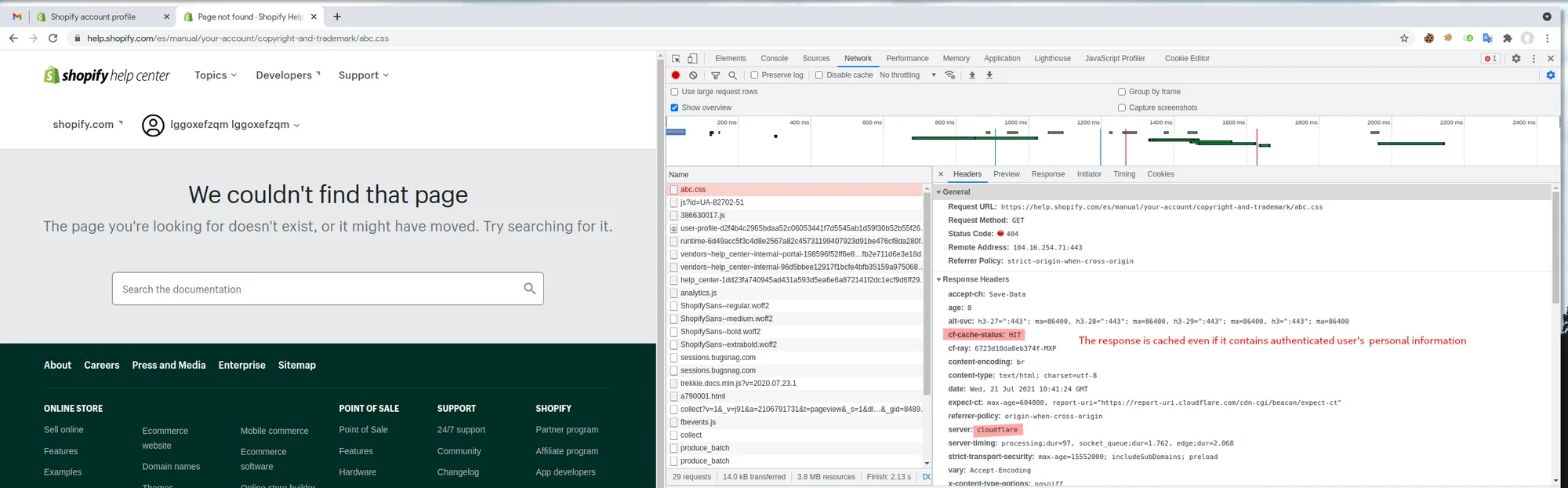
In this screenshot we can see that the page gets cached even if it contains personal information of the authenticated user.
Note: the attack works from different IP addresses in different locations, hence the attacker must not be in the same LAN as the victim to carry out the attack. The attacker must however be served by the same public cache for the attack to be successful (e.g., a European victim cannot be attacked by a US-based attacker).
Other vulnerable subdomains
I detected other vulnerable subdomains of third party stores on shopify:
https://hatchful.shopify.com/furniture-logo-maker%25%32%46random.css: leaks the authenticated user's API key.
Mitigation
A possible mitigation is not to classify cacheable responses by the extension in the URL only, but also from their actual content type.
I see from the headers that the CDN in use is Cloudflare, they have a ready to go mitigation: https://blog.cloudflare.com/web-cache-deception-attack-revisited/.
Impact
User's personal information and valid CSRF tokens get leaked to the attacker.
Context
Shopify runs a large multi-tenant platform. The report focuses on shopify.com and, in particular, on help.shopify.com, the help centre that serves documentation pages under locale paths such as /es/manual/your-account/copyright-and-trademark/. The feature that matters here is the 404 error page: when a requested path does not exist, the application returns a not-found page that, for an authenticated user, embeds personal information about that user. The report also mentions another affected host, hatchful.shopify.com, listed among vulnerable subdomains of third-party stores on Shopify.
The vulnerability class is web cache deception (WCD). A caching proxy can be tricked into storing a private, authenticated response under a URL that looks like a static asset, and then serving that cached copy to anyone who requests the same URL. The victim only has to open a link while authenticated; the attacker then fetches the same URL without credentials and receives the cached private content.
Setup
No special accounts or tools are described beyond a browser and curl. The researcher tested websites for WCD by appending path-confusion segments and a random string followed by a static extension. The precondition for the attack is that the victim is authenticated on the target and that the attacker is served by the same public cache as the victim. The report notes that the attack works from different IP addresses in different locations, so the attacker does not need to be on the same LAN as the victim, but a European victim cannot be attacked by a US-based attacker because they are not served by the same cache.
Finding it
The researcher was testing sites for WCD and found that shopify.com was vulnerable. The technique is to confuse the cache server with multiple path confusion techniques and to append a random string followed by the extension .css. The cache then treats the response as a CSS file and stores it, while the origin returns a 404 page that includes the authenticated user's personal information.
Using the slash character (/), the exploit URL can be formed as follows:
https://help.shopify.com/es/manual/your-account/copyright-and-trademark/<RANDOM_STRING>.css
This URL is interpreted as a CSS file by the cache server, so the web page is cached with the personal information of the authenticated user embedded. The website, instead, returns a 404 not found error page that includes some of the user's personal information.
Exploitation
Step 1: Create a random string
For example, abcdefg.
Step 2: Compose the URL
Using the pattern above, for example:
https://help.shopify.com/es/manual/your-account/copyright-and-trademark/abcdefg.css
Step 3: Make the victim follow the URL
Open the URL in a browser where a user is authenticated, simulating a victim. The origin returns a 404 page that contains the user's personal information, and the cache stores that response because the URL ends in .css.
Step 4: Fetch the URL as the attacker
Access the same URL using curl to simulate an attacker. No authentication headers or cookies are supplied. The cache serves the stored copy, which contains the victim's data.
Step 5: Read the leaked data
Find the personal information of the user in the source code of the web page in the incognito browser. The report's proof of concept shows a browser on the right where the user is authenticated and a curl request on the left without any header (no cookies for authentication) simulating the attacker. The username appears in the curl response, which is the cached page.
The screenshot shows that the page gets cached even though it contains personal information of the authenticated user.
Leaked data
The 404 error pages include:
- User first and last name, username and email.
- User's profile picture.
- User's valid CSRF token, which enables attackers to bypass CSRF protection.
All the leaked data is data included in 404 error pages.
Other vulnerable subdomains
The researcher also detected other vulnerable subdomains of third-party stores on Shopify:
https://hatchful.shopify.com/furniture-logo-maker%25%32%46random.css
This URL leaks the authenticated user's API key.
Root cause
The report's suggested mitigation implies the cache may classify responses by the extension in the URL, so a path ending in .css is treated as a static asset and stored. The origin, however, returns a dynamic 404 page that includes user-specific data. The report suggests not classifying cacheable responses by the extension in the URL only, but also from their actual content type. The report's suggested mitigation is not to classify cacheable responses by the extension in the URL only, but also from their actual content type. The CDN in use is Cloudflare, which the report says has a ready-to-go mitigation.
Impact
An attacker can steal personal and potentially sensitive information from users of the website with a simple social engineering attack: the victim only has to open a link in a browser where they are authenticated. The leaked data includes the user's first and last name, username, email, profile picture and a valid CSRF token, which enables bypassing CSRF protection. The attack requires the attacker to be served by the same public cache as the victim; it works across different IP addresses and locations, but a European victim cannot be attacked by a US-based attacker.
Fix
The report recommends not classifying cacheable responses by the extension in the URL only, but also from their actual content type. It notes that Cloudflare, the CDN in use, has a ready-to-go mitigation described in a Cloudflare blog post. The report does not state what Shopify changed.
Variants to test
- Path confusion with a slash followed by a random string and
.csson other help-centre paths, as in the reported URL. A positive result is a 404 page that contains the authenticated user's data when fetched without cookies after the victim has visited the URL. - Encoded path separators such as
%25%32%46, as in thehatchful.shopify.comURL. A positive result is a cached response that leaks an API key or other user-specific data.
Hunting notes
The report does not describe the bounty decision process.
What happened, in plain words
Shopify is a company that lets anyone build an online shop. Its website shopify.com has a help centre at help.shopify.com, where shop owners read documentation pages. Those pages live under address paths such as /es/manual/your-account/copyright-and-trademark/ (the es part means the Spanish version).
When you ask a website for a page that does not exist, the website usually answers with a "404 not found" error page. On Shopify's help centre, that error page was not empty: for a logged-in user, it quietly included personal details about that user.
A researcher named Matteo Golinelli was testing websites for a trick called web cache deception. The idea is simple. Big websites sit behind a cache: a server that keeps copies of pages so it can hand them out quickly to the next visitor, instead of asking the real website every time. A cache decides what to keep based on the shape of the address (the URL). If the address ends in .css, the cache assumes it is a stylesheet, meaning a file that tells the browser how a page should look, and stylesheets are the same for everyone, so the cache happily stores a copy.
The researcher found that by using path confusion and adding a made-up name ending in .css to a help-centre address, he could make the cache store a page that was not a stylesheet at all. The real website answered with its 404 error page, which contained the logged-in user's private details, and the cache saved that page because the address ended in .css. Anyone who then requested the same address got the saved copy, private details included, without logging in.
The victim's only job is to open a link while logged in. That is the social engineering part: the attacker sends a link that looks harmless, the victim clicks it, and the private page ends up in the cache where the attacker can collect it.
The setup
The report describes no special accounts or tools beyond an ordinary browser and curl. curl is a small command-line program that fetches a web address and prints the answer as text; it is useful because it does not log in anywhere and does not run a page's scripts, so it behaves like a stranger with no account.
Two conditions must hold for the attack to work:
- The victim must be logged in on the target site, so that the site's answer contains the victim's private details.
- The attacker and the victim must be served by the same public cache. The report notes the attack works from different IP addresses in different locations, so the attacker does not need to be on the same local network as the victim. But a European victim cannot be attacked by a US-based attacker, because the two are served by different caches.
An IP address is the number that identifies a device on the internet, a bit like a postal address. A local network (LAN) is the set of devices sharing one home or office connection.
Finding it
The researcher was testing sites for web cache deception and found that shopify.com was vulnerable. His technique was to confuse the cache server with several path confusion tricks and to append a random string followed by the extension .css.
Path confusion means building an address that two different systems read in two different ways. The cache looks at the end of the address, sees .css, and thinks "static file, safe to store". The real website looks at the whole address, finds no such page, and answers with its 404 error page, which happens to contain the logged-in user's details. Neither system is doing anything unusual on its own; the problem is that they disagree about what the address means.
Using the slash character (/), the exploit URL can be formed as follows:
https://help.shopify.com/es/manual/your-account/copyright-and-trademark/<RANDOM_STRING>.css
Line by line:
https://is the secure version of the protocol browsers use to talk to websites.help.shopify.comis the help-centre site./es/manual/your-account/copyright-and-trademark/is a real documentation path, in Spanish, about copyright and trademarks.<RANDOM_STRING>is a placeholder for any made-up text, so the address points at a page that does not exist..cssis the ending that makes the cache treat the answer as a stylesheet.
This URL is interpreted as a CSS file by the cache server, so the web page gets cached with the personal information of the authenticated user embedded. The website, instead, returns a 404 not found error page that includes some of the user's personal information.
Exploitation
Step 1: Create a random string
For example, abcdefg.
Step 2: Compose the URL
Using the pattern above, for example:
https://help.shopify.com/es/manual/your-account/copyright-and-trademark/abcdefg.css
This is the same address as before with the placeholder replaced by the random string. It still ends in .css, so the cache still treats it as a stylesheet, and it still points at a page that does not exist, so the website still answers with its 404 page.
Step 3: Make the victim follow the URL
Open the URL in a browser where a user is authenticated, simulating a victim. "Authenticated" means logged in: the browser holds a cookie, a small piece of data the site gave it at login, which the browser sends with every request so the site knows who is asking. Because the browser sends that cookie, the 404 page the site builds includes the user's personal details. Because the address ends in .css, the cache stores that answer.
Step 4: Fetch the URL as the attacker
Access the same URL using curl to simulate an attacker. No authentication headers or cookies are supplied. A header is a line of extra information sent along with a web request or response, such as what kind of file is wanted or who is asking. With no cookie, the site has no idea who is calling, but the cache does not need to know: it already has a stored copy of the address, and it hands that copy over.
Step 5: Read the leaked data
Find the personal information of the user in the source code of the web page in the incognito browser. The source code of a page is the raw text the browser receives before drawing anything on screen; you can view it in any browser. The report's proof of concept shows a browser on the right where the user is logged in, and a curl request on the left with no header at all (no cookies for authentication) playing the attacker. The username appears in the curl response, which is the cached page.
The screenshot shows that the page gets cached even though it contains personal information of the authenticated user.
Leaked data
The 404 error pages included:
- The user's first and last name, username and email.
- The user's profile picture.
- The user's valid CSRF token, which enables attackers to bypass CSRF protection.
A CSRF token (cross-site request forgery token) is a secret value a site puts into its pages so that it can tell a genuine action by the logged-in user from a forged one triggered by another website. If an attacker learns that value, the protection no longer works, because the attacker can present the same value and the site cannot tell the difference.
All the leaked data is data included in 404 error pages.
Other vulnerable subdomains
The researcher also detected other vulnerable subdomains of third-party stores on Shopify:
https://hatchful.shopify.com/furniture-logo-maker%25%32%46random.css
Line by line:
https://hatchful.shopify.comis a different Shopify subdomain, belonging to a third-party store./furniture-logo-makeris a page path on that site.%25%32%46is an encoded form of characters.%25stands for a percent sign and%32%46stands for the text2F, so the sequence is a doubly encoded form of the characters2F. Encoding is how special characters are written safely inside a URL; encoding them twice is a way to slip a slash past software that would otherwise clean up or block it.random.cssis the random name with the stylesheet ending, as before.
This URL leaks the authenticated user's API key. An API key is a long secret string that identifies a program or account when it talks to a service, much like a password for software rather than for a person.
Root cause
The report's suggested mitigation implies the cache may classify responses by the extension in the URL, so a path ending in .css is treated as a static asset and stored. The origin, meaning the real web server behind the cache, however, returns a dynamic 404 page that includes user-specific data. The report suggests not classifying cacheable responses by the extension in the URL only, but also from their actual content type. The report's suggested mitigation is not to classify cacheable responses by the extension in the URL only, but also from their actual content type. The CDN in use is Cloudflare, which the report says has a ready-to-go mitigation. A CDN (content delivery network) is a worldwide network of cache servers placed close to users so pages load faster; it is the cache in this story.
Impact
An attacker can steal personal and potentially sensitive information from users of the website with a simple social engineering attack: the victim only has to open a link in a browser where they are logged in. The leaked data includes the user's first and last name, username, email, profile picture and a valid CSRF token, which enables bypassing CSRF protection. The attack requires the attacker to be served by the same public cache as the victim; it works across different IP addresses and locations, but a European victim cannot be attacked by a US-based attacker.
Fix
The report recommends not classifying cacheable responses by the extension in the URL only, but also from their actual content type. It notes that Cloudflare, the CDN in use, has a ready-to-go mitigation described in a Cloudflare blog post. The report does not state what Shopify changed.
Variants to test
- Path confusion with a slash followed by a random string and
.csson other help-centre paths, as in the reported URL. A positive result is a 404 page that contains the logged-in user's data when fetched without cookies after the victim has visited the URL. - Encoded path separators such as
%25%32%46, as in thehatchful.shopify.comURL. Normalisation is the clean-up step where software rewrites an address into a standard form; encoding a slash twice can make it survive that clean-up. A positive result is a cached response that leaks an API key or other user-specific data.
Hunting notes
An endpoint is a specific address on a server that answers requests. The report does not describe the bounty decision process.
Glossary
- API key: a long secret string that identifies a program or account when it talks to a service, like a password for software.
- Authenticated: logged in, so the site knows which user is asking.
- Cache: a server that keeps copies of responses so it can serve them quickly to later visitors.
- CDN (content delivery network): a worldwide network of cache servers placed near users to speed up websites.
- Cookie: a small piece of data a site gives the browser at login, sent back with later requests so the site recognises the user.
- CSRF token: a secret value placed in pages so a site can tell a genuine user action from a forged one; if leaked, that protection can be bypassed.
- CSS: the language that describes how a web page looks; a
.cssfile is a stylesheet, normally the same for every visitor. - curl: a command-line program that fetches a web address and prints the raw answer, without logging in or running scripts.
- Endpoint: a specific address on a server that answers requests.
- Header: a line of extra information sent with a web request or response, such as the file type wanted or who is asking.
- IP address: the number identifying a device on the internet, like a postal address.
- LAN (local network): the set of devices sharing one home or office connection.
- Normalisation: the clean-up step where software rewrites an address into a standard form.
- Origin: the real web server behind a cache, which produces the actual pages.
- Path confusion: building an address that two systems read differently, so one treats it as a static file and the other as a dynamic page.
- Recon: the early look-around phase of a security test, gathering information about a target.
- Social engineering: tricking a person into doing something, such as clicking a link, rather than attacking software directly.
- Source code (of a page): the raw text the browser receives before drawing the page, viewable in any browser.
- Static asset: a file such as a stylesheet or image that is the same for every visitor and is therefore safe to cache.
- URL: the address of a page or file on the web.
- Web cache deception (WCD): tricking a cache into storing a private, logged-in response under an address that looks like a public static file, then collecting that stored copy without logging in.