Web Cache Deception Attack leads to user info disclosure
The web application cached user-specific pages under attacker-chosen paths with static file extensions, without proper cache validation. An attacker could visit the same crafted URL and view the cached page source to disclose another user's personal information.
 Published on medium.com
Around a few days ago, I got some users information leakage due to web cache Deception Attack.
The full write-up lives on its author's site
It belongs to its author, so we link to it rather than copy it. The other two tabs are our own rewrites, checked against it.
Context
Web Cache Deception is an attack against applications that sit behind a caching layer (a proxy, a CDN, or similar) which does not validate properly what it stores. The idea is simple: if a site caches responses based on the URL extension, an attacker can append an extension such as .css, .jpg or .js to a URL that returns personalised content, and the cache will store that personalised response under the crafted path. Anyone who then requests the same path receives the victim's cached data.
The researcher's own illustration of the concept uses a hypothetical site:
www.example.com/home.php
www.example.com/home.php/a.jpg
If the site has cache functionality, it caches the internal information of the page and stores it under that endpoint in its cache directory. The extension can be anything: .css, .jpg, .js. Once a user visits and their information is cached, an attacker visits the same endpoint and reads the user's personal information from the source code.
The targets were three hosts on a private program, referred to in the write-up as:
app.example.com, the main area to develop an appexample.com, where you can register and log inmanage.example.com, a web app used for authenticating with Slack workspaces and other services, and for retrieving information through API endpoints
Setup
The researcher was invited to a private program and worked against the three hosts above. Registration and login were possible on example.com. No specific tools, versions or special configuration are described; the technique relies on an authenticated session in one browser and an incognito window to observe what an unauthenticated visitor receives, plus view-source: to inspect cached content.
Finding it
On example.com the researcher noticed there was no cache control header or anything similar. That alone is not proof of vulnerability, and the write-up says so explicitly: not every site without a cache control header is vulnerable, and it also depends on how the backend routing actually works.
The landing page looked like this:
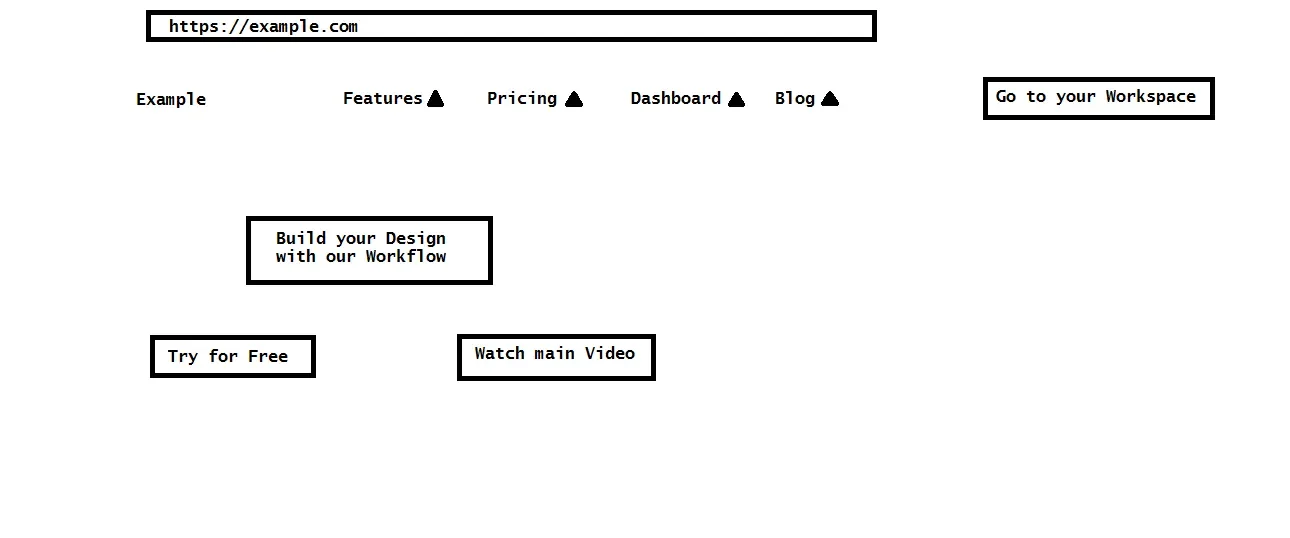
With that observation in hand, the researcher decided to try appending a static extension to the URL.
Exploitation
Step 1: Request a non-existent path with a static extension on example.com
The endpoint visited was:
https://example.com/welcome.css
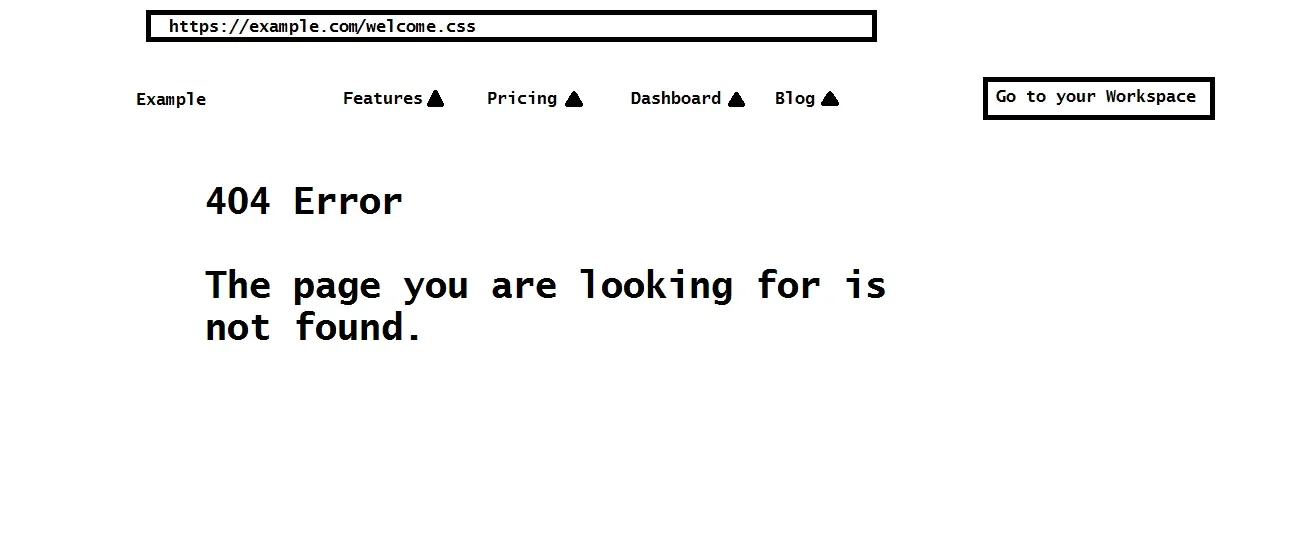
The page was a 404 error page, but it still displayed "go to your workspace", which suggested that some information could be fetched from it.
Step 2: Check the same endpoint without a session
After visiting the URL while authenticated, the researcher opened the same endpoint in incognito mode. For only two or three seconds it displayed "Go to your Workspace" and then changed itself into the login and signup area. The write-up suggests the session may not have been cached properly, so for a moment the page showed the workspace link before falling back to signup and login, but the information had been cached.
Step 3: Read the cached content from source
To confirm, the researcher loaded the source of the same endpoint:
view-souce:https://example.com/welcome.css
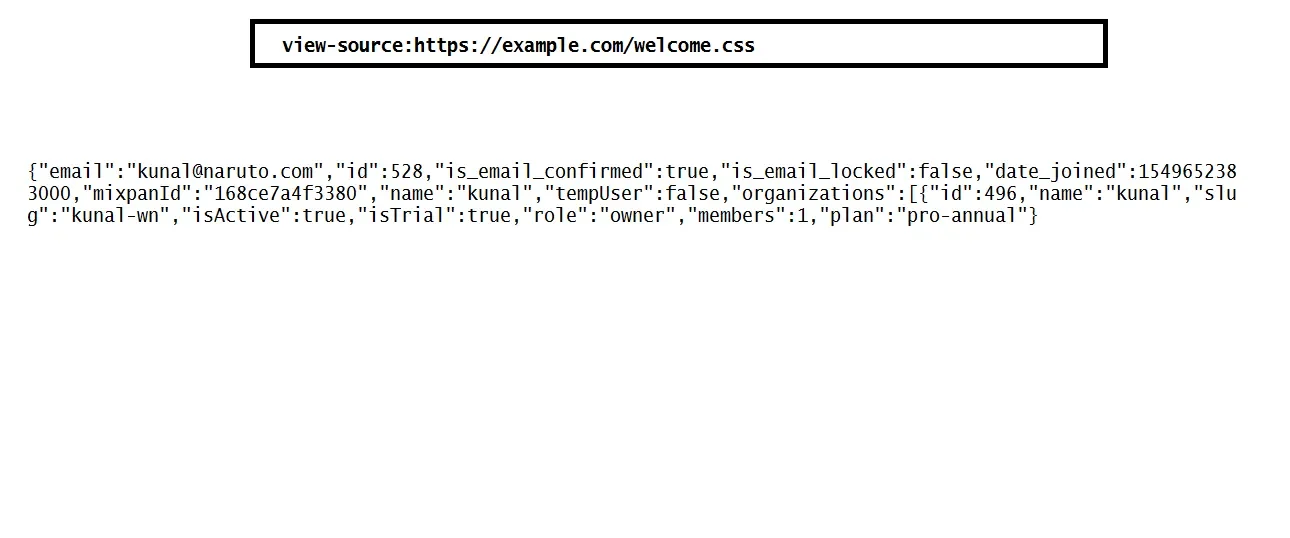
The cached information was there and disclosed personal details.
Step 4: Try app.example.com
The researcher then tried app.example.com with the same idea, but with no luck.
Step 5: Map the routing on manage.example.com
Visiting manage.example.com redirected to app.example.com, which indicates routing rules in the backend: manage.example.com can only be used for /api endpoints or /auth endpoints. To confirm, the researcher injected an arbitrary path:
manage.example.com/a
The response looked like this:
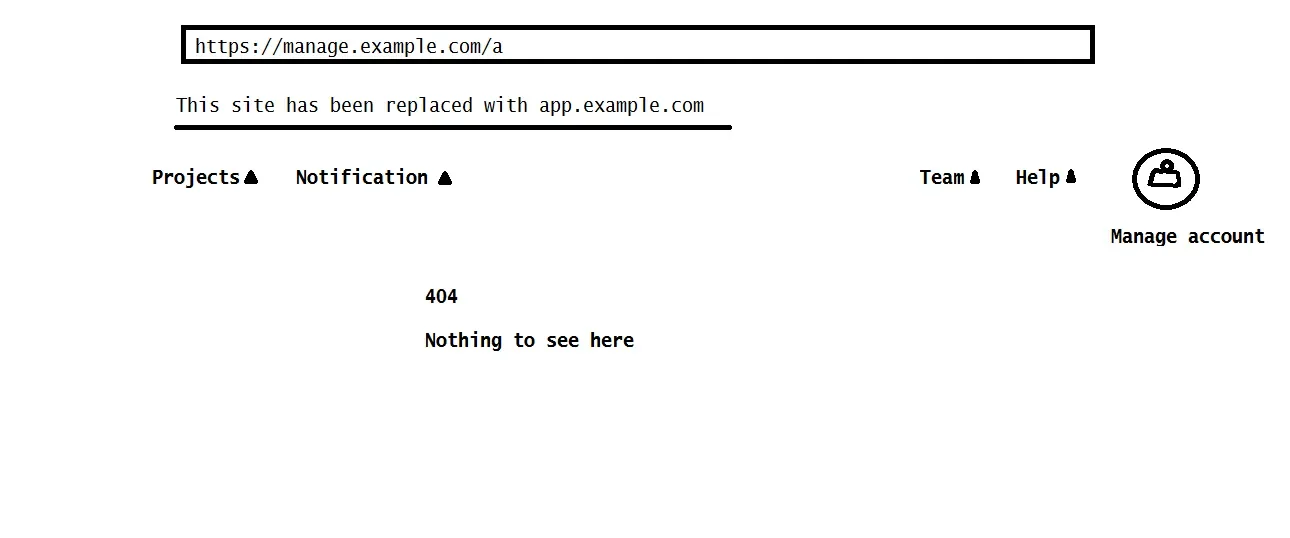
The write-up concludes the site had been deprecated in terms of frontend interaction.
Step 6: Look at the response headers
While examining that response, the researcher noticed there was no cache control header. It was still unclear whether the attack would work this time.
Step 7: Request a static extension on manage.example.com
The endpoint tried was:
manage.example.com/hello.css
The response was the same as the error response above. But when the same endpoint was visited in incognito mode, it cached the information and displayed the same view with an active session.
Step 8: Read the cached content from source
The source was inspected with:
view-source://manage.example.com/hello.css
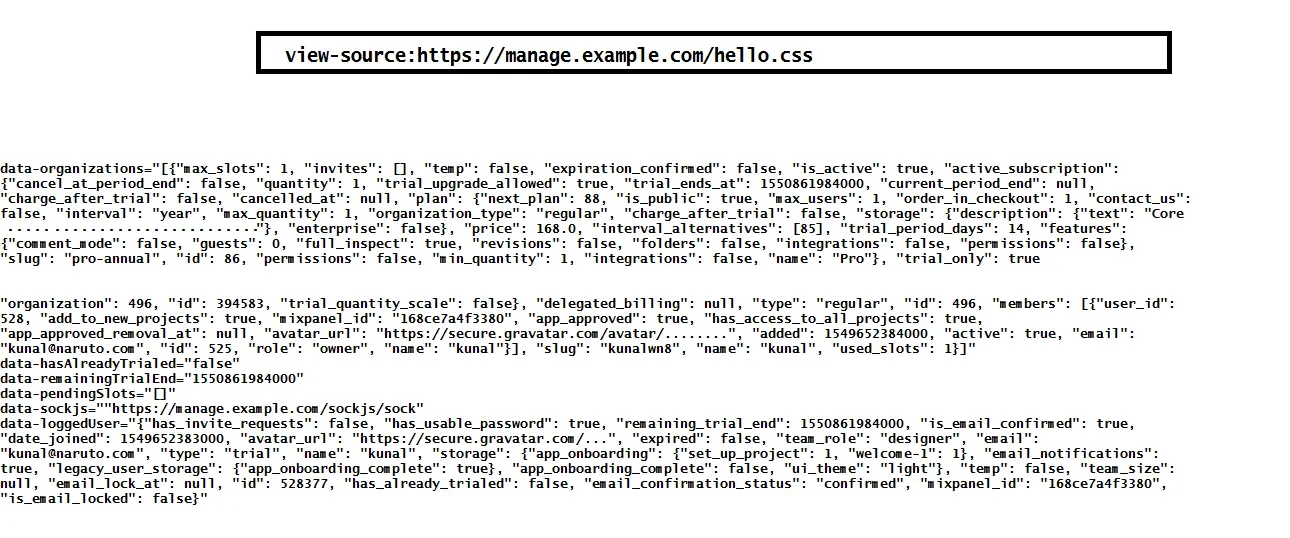
This time the cached information was far larger than in the first part on example.com.
Root cause
In both cases the application returned personalised content for a URL that carried a static file extension, and the cached source disclosed user information. The write-up frames the underlying issue as a cache that is used but not validated correctly, with no cache control header present on the responses involved.
A missing cache control header is not sufficient on its own. The write-up stresses that whether the attack works also depends on how the backend routing actually works: sometimes you land on the page even after adding the extra path, sometimes you land on a 404 error page, and if the source code of that 404 page contains no information, there is nothing to gain.
Impact
An attacker who knows the crafted URL can read the cached response of another user and obtain that user's personal details from the source code. On example.com the cached source disclosed personal details; on manage.example.com the amount of cached information was much larger. The write-up does not enumerate the specific fields disclosed.
The impact is bounded by what the cached page actually contains. The researcher notes that most of the time companies use API or GraphQL endpoints to retrieve data, so if you see a session in incognito mode but cannot view information in the source code of that page, there is no use: only your account name will be leaked and nothing else.
Fix
The write-up does not describe the fix that was applied. The timeline records that the report was submitted on 9 February 2019, triaged on 11 February 2019, and resolved and rewarded with $150 + $150 on 21 February 2019, along with positive feedback.
Variants to test
- Append a static extension to an authenticated page, for example
https://example.com/welcome.css, and load the same URL in a private window. A positive result is personalised content appearing in the page source for the unauthenticated visitor. - Try different extensions (
.css,.jpg,.js) on the same path, since the write-up notes the extension can be anything. - Try arbitrary paths on hosts that redirect elsewhere, such as
manage.example.com/a, to learn which path prefixes the backend routes. A positive result is a response that reveals the routing rules, for example that only/apiand/authare served. - Repeat the extension trick on those routed hosts, for example
manage.example.com/hello.css, and check the source in a private window. A positive result is a cached response containing more data than the first host. - Check response headers for the absence of cache control on each candidate endpoint, remembering that a missing header is only a hint and that backend routing decides whether the trick works.
- Where a 404 page is returned, inspect its source for any leaked information before discarding it; if there is none, the endpoint is not useful.
- If a token or other sensitive value appears in the cached source, consider whether it can be chained with other bugs, as the write-up suggests checking all aspects and analysing repeatedly.
What happened, in plain words
Imagine a coffee shop where the barista keeps a tray of finished drinks by the counter so the next customer with the same order gets served instantly. That tray is a cache: a fast storage spot that saves a copy of something so it can be handed out again without doing the work twice. Websites use caches too, usually through a proxy or a content delivery network (CDN), to serve pages faster and reduce load on the servers behind them.
The problem starts when the cache is too trusting. If a website decides what to save based on the end of the URL, an attacker can add a harmless-looking file extension such as .css, .jpg or .js to a page that shows private, logged-in content. The cache does not validate the request properly and stores the personalised page under that made-up address. Anyone who then opens the same address gets the victim's private page from the cache, without ever logging in. This is called a Web Cache Deception attack, and the researcher found it on a private bug bounty program, leaking some users' information.
A bug bounty program is a scheme where a company invites independent researchers to look for security problems in its systems and pays for valid reports. This one was private, meaning only invited researchers could take part. The researcher was rewarded with $150 + $150.
The idea behind the attack
Before the proof of concept, the write-up explains the concept with a hypothetical site. Suppose a website has a page like this:
www.example.com/home.php
www.example.com/home.php/a.jpg
The first line is the normal page. The second line is the same page with /a.jpg stuck on the end. If the site has cache functionality, it caches the internal information of the page and stores it under that endpoint in its cache directory. The extension can be anything: .css, .jpg, .js.
Line by line:
www.example.com/home.phpis the address of a page that might show something personal, for example your account details after you log in.www.example.com/home.php/a.jpgis the same page with an extra path segment that ends in a picture extension. To a human it looks like a file inside a folder. To a careless cache it looks like a static image, which is the kind of thing that is safe to store and share with everybody.- If the cache stores the personalised response under that second address, then once a user visits and their information is cached, an attacker visits the same endpoint and reads the user's personal information from the source code.
Source code is the raw text a browser receives before it draws the page. You can see it in any browser with the view-source feature, which shows the HTML, scripts and data behind what you see on screen. Private information that is not visible on the rendered page can still sit in that raw text.
The three targets
The researcher was invited to a private program and worked against three hosts, referred to in the write-up as:
app.example.com, the main area to develop an appexample.com, where you can register and log inmanage.example.com, a web app used for authenticating with Slack workspaces and other services, and for retrieving information through API endpoints
A host is one named machine on the internet, such as example.com or app.example.com. An API is a way for one piece of software to talk to another: instead of a page designed for a human, the server sends back raw data that a program can use. Slack is a workplace chat service, and a Slack workspace is a company's own area inside it. Authenticating with a Slack workspace means proving to the site that you own or belong to that workspace, usually by logging in through Slack.
Setting up
Registration and login were possible on example.com. The technique needs only a normal browser: an authenticated session in one window, an incognito window to see what a stranger receives, and view-source to inspect the cached content. A session is the period during which a site remembers who you are, normally by storing a small piece of data called a cookie in your browser. Incognito or private mode starts with no cookies, so the site treats you as a new, logged-out visitor.
Finding it
On example.com the researcher noticed there was no cache control header or anything similar. A response header is a small line of extra information the server sends alongside a page, and a cache control header is the instruction that tells caches what they may store and for how long. Its absence is a hint, not proof: the write-up says explicitly that not every site without a cache control header is vulnerable, and that it also depends on how the backend routing actually works. Routing is the server's rulebook for deciding which piece of code handles which address.
The landing page looked like this:
The image shows the example.com landing page as the researcher sketched it. With that observation in hand, the researcher decided to try appending a static extension to the URL.
Exploitation
Step 1: Request a non-existent path with a static extension on example.com
The endpoint visited was:
https://example.com/welcome.css
This is a single request: the normal site address with /welcome.css added. No such file exists, so the server answers with a 404 error page, the standard "not found" response. The interesting part is that the error page still displayed "go to your workspace", which suggested that some information could be fetched from it. In other words, the error page still displayed "go to your workspace", which suggested that some information could be fetched from it.
Step 2: Check the same endpoint without a session
After visiting the URL while authenticated, the researcher opened the same endpoint in incognito mode. For only two or three seconds it displayed "Go to your Workspace" and then changed itself into the login and signup area. The write-up suggests the session may not have been cached properly, so for a moment the page showed the workspace link before falling back to signup and login, but the information had been cached.
Why this step matters: the incognito window is the attacker's view. If a stranger with no account can see anything personal there, the cache has handed out someone else's data. The brief flash of the workspace link was the clue that the information had been cached.
Step 3: Read the cached content from source
To confirm, the researcher loaded the source of the same endpoint:
view-souce:https://example.com/welcome.css
view-souce: is how the researcher wrote it, including the typo; the browser feature is normally spelled view-source:. It tells the browser to show the raw text of the page instead of drawing it. The cached information was there and disclosed personal details, as the screenshot of the leaked information shows.
Step 4: Try app.example.com
The researcher then tried app.example.com with the same idea, but with no luck. Not every host behind the same company behaves the same way, so each one has to be tested on its own.
Step 5: Map the routing on manage.example.com
Visiting manage.example.com redirected to app.example.com. A redirect is the server telling your browser "the thing you want is over there, go and ask that address instead". This indicates routing rules in the backend: manage.example.com can only be used for /api endpoints or /auth endpoints. To confirm, the researcher injected an arbitrary path:
manage.example.com/a
This request asks for a path that certainly does not exist, /a, to see how the server reacts. The response looked like this:
The screenshot shows the error response from manage.example.com/a. The write-up concludes the site had been deprecated in terms of frontend interaction, meaning the human-facing part of the site was no longer really in use there.
Step 6: Look at the response headers
While examining that response, the researcher noticed there was no cache control header. It was still unclear whether the attack would work this time, because as noted earlier a missing header alone proves nothing.
Step 7: Request a static extension on manage.example.com
The endpoint tried was:
manage.example.com/hello.css
Again this is the host plus a made-up file name ending in .css. The response was the same as the error response above. But when the same endpoint was visited in incognito mode, it cached the information and displayed the same view with an active session. An active session view means the page was rendered as if a logged-in user were looking at it, even though the incognito window had no login at all.
Step 8: Read the cached content from source
The source was inspected with:
view-source://manage.example.com/hello.css
This time the cached information was far larger than in the first part on example.com, as the screenshot of the cached source shows.
Why it worked
In both cases the application returned personalised content for a URL that carried a static file extension, and the cached source disclosed user information. The write-up frames the underlying issue as a cache that is used but not validated correctly, with no cache control header present on the responses involved.
A missing cache control header is not sufficient on its own. Whether the attack works also depends on how the backend routing actually works: sometimes you land on the page even after adding the extra path, sometimes you land on a 404 error page, and if the source code of that 404 page contains no information, there is nothing to gain.
What an attacker could get
An attacker who knows the crafted URL can read the cached response of another user and obtain that user's personal details from the source code. On example.com the cached source disclosed personal details; on manage.example.com the amount of cached information was much larger. The write-up does not list the specific fields disclosed.
The impact is bounded by what the cached page actually contains. The researcher notes that most of the time companies use API or GraphQL endpoints to retrieve data, so if you see a session in incognito mode but cannot view information in the source code of that page, there is no use: only your account name will be leaked and nothing else. GraphQL is a way of asking an API for exactly the data you want, rather than receiving a fixed page.
How it was fixed
The write-up does not describe the fix that was applied. The timeline records that the report was submitted on 9 February 2019, triaged on 11 February 2019, and resolved and rewarded with $150 + $150 on 21 February 2019, along with positive feedback. Triaged means the security team reviewed the report and accepted it as valid.
Things to try yourself
- Append a static extension to an authenticated page, for example
https://example.com/welcome.css, and load the same URL in a private window. A positive result is personalised content appearing in the page source for the unauthenticated visitor. - Try different extensions (
.css,.jpg,.js) on the same path, since the write-up notes the extension can be anything. - Try arbitrary paths on hosts that redirect elsewhere, such as
manage.example.com/a, to learn which path prefixes the backend routes. A positive result is a response that reveals the routing rules, for example that only/apiand/authare served. - Repeat the extension trick on those routed hosts, for example
manage.example.com/hello.css, and check the source in a private window. A positive result is a cached response containing more data than the first host. - Check response headers for the absence of cache control on each candidate endpoint, remembering that a missing header is only a hint and that backend routing decides whether the trick works.
- Where a 404 page is returned, inspect its source for any leaked information before discarding it; if there is none, the endpoint is not useful.
- If a token or other sensitive value appears in the cached source, consider whether it can be chained with other bugs. A token is a short piece of data that acts like a temporary key, proving who you are or granting access to something. Chaining means using one small finding to unlock a bigger one.
Glossary
- API: a way for software to talk to software, returning raw data rather than a page built for a human.
- Authenticated session: the period during which a site remembers who you are, usually via a cookie stored in your browser.
- Backend routing: the server's rulebook for deciding which code handles which address.
- Bug bounty program: a scheme where a company invites independent researchers to find security problems and pays for valid reports.
- Cache: fast storage that keeps a copy of a response so it can be served again without repeating the work.
- Cache control header: a response header that tells caches what they may store and for how long.
- CDN: content delivery network, a service that serves copies of content from many locations to reduce latency.
- Chaining: using one finding to enable or amplify another.
- Cookie: a small piece of data a site stores in your browser to recognise you between requests.
- Deprecated: no longer really in use or supported.
- Endpoint: a specific address on a server that handles a particular request.
- Extension: the part of a file name after the dot, such as
.cssor.jpg, which hints at the file type. - GraphQL: a way of asking an API for exactly the data you want.
- Header: a small line of extra information a server sends alongside a response.
- Host: one named machine on the internet, such as
example.com. - Incognito mode: a browser mode that starts with no cookies, so sites treat you as a logged-out stranger.
- Private program: a bug bounty program open only to invited researchers.
- Proxy: an intermediary server that forwards requests and can also cache responses.
- Redirect: the server telling your browser to ask a different address instead.
- Response: what a server sends back after a request.
- Session: see authenticated session.
- Slack workspace: a company's own area inside the Slack chat service.
- Source code: the raw text a browser receives before drawing the page, visible with view-source.
- Static file: a file that is the same for everyone, such as an image or stylesheet, as opposed to a page built for one user.
- Token: a short piece of data acting like a temporary key that proves identity or grants access.
- Triaged: reviewed by a security team and accepted as a valid report.
- 404 error page: the standard "not found" response when the requested address does not exist.
- Web Cache Deception: an attack where a cache stores a personalised response under a crafted address and serves it to someone else.





