Web Cache Deception to API endpoint attack using cached token header
A web cache deception flaw caused a page to be cached that contained an API access token, app key and user identifier. An attacker who lured a victim to a crafted URL could reuse those cached credentials against the API to read inbox requests and upload a profile picture as the victim.
 Published on medium.com
In my last write-up, I wrote about web-cache deception that leads to information leakage of any personal user’s info.
The full write-up lives on its author's site
It belongs to its author, so we link to it rather than copy it. The other two tabs are our own rewrites, checked against it.
Context
This write-up describes a web cache deception issue found on a private bounty program. The target was a web application whose main domain, referred to here as www.example.com, served the user-facing site, while another API domain, ww4.example.com, performed the operations. Every meaningful interaction in the application, such as uploading a file, fetching inbox content and changing settings, was carried out by calling an API endpoint on the API domain. Those API calls carried an authentication token header together with a user id.
The feature at the centre of the report is the caching of pages on the main domain. The researcher noticed that responses from www.example.com were being cached, and that a crafted path could make a page containing sensitive parameters end up in the cache. The cached parameters were then reused against the API domain to perform operations as the victim.
A key property of the attack, stated at the start of the report, is that it required user interaction only one time. After that single interaction, the attacker could perform API operations from their own side without any further involvement from the victim.
Setup
The report does not describe any special accounts, roles, tools or software versions. The work was done by intercepting requests to www.example.com and observing response headers, then replaying and modifying API requests to ww4.example.com. The researcher used an incognito browser session to visit the same page and viewed the page source to inspect the cached content.
The attack depended on the application caching responses on the main domain and on a cached page embedding the user's API credentials in its source. The API domain must then accept those credentials, which is what the researcher set out to verify.
Finding it
While trying to understand how the web application worked, the researcher established that uploads, inbox fetching and settings changes all went through API endpoints on ww4.example.com, authenticated with an auth token header and a user id.
Intercepting requests to www.example.com, the researcher saw X-caches-status set to HIT in the response header. That indicated the responses were being served from a cache.
To probe the caching behaviour further, the researcher injected random endpoints such as bb.jpg and aa.css. These did not produce an error like a format-not-found error. When the endpoint example.com/aa.css was injected, the response was a redirect to a 404 error page:
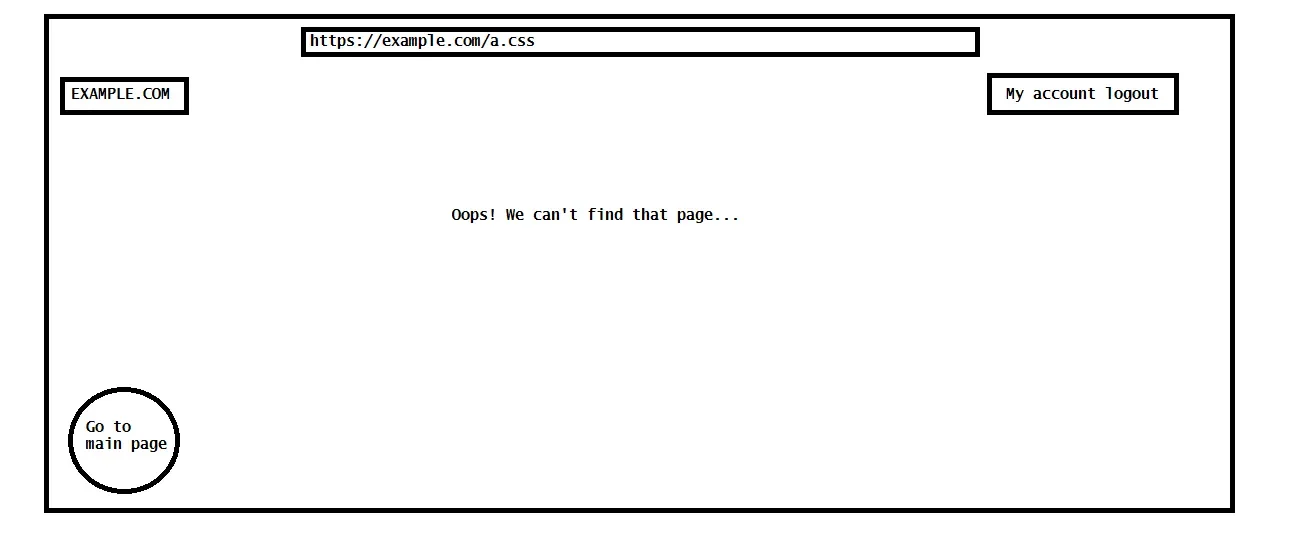
The image shows the 404 error page returned after requesting the injected aa.css endpoint.
Exploitation
Step 1: Confirm what the cache stores
The researcher visited the same page in incognito mode and viewed the source code. There was no disclosure of personal information, only the account name. Reading further down the source, however, the researcher found the token header, the access-key and the user's encrypted ID cached in the endpoint:
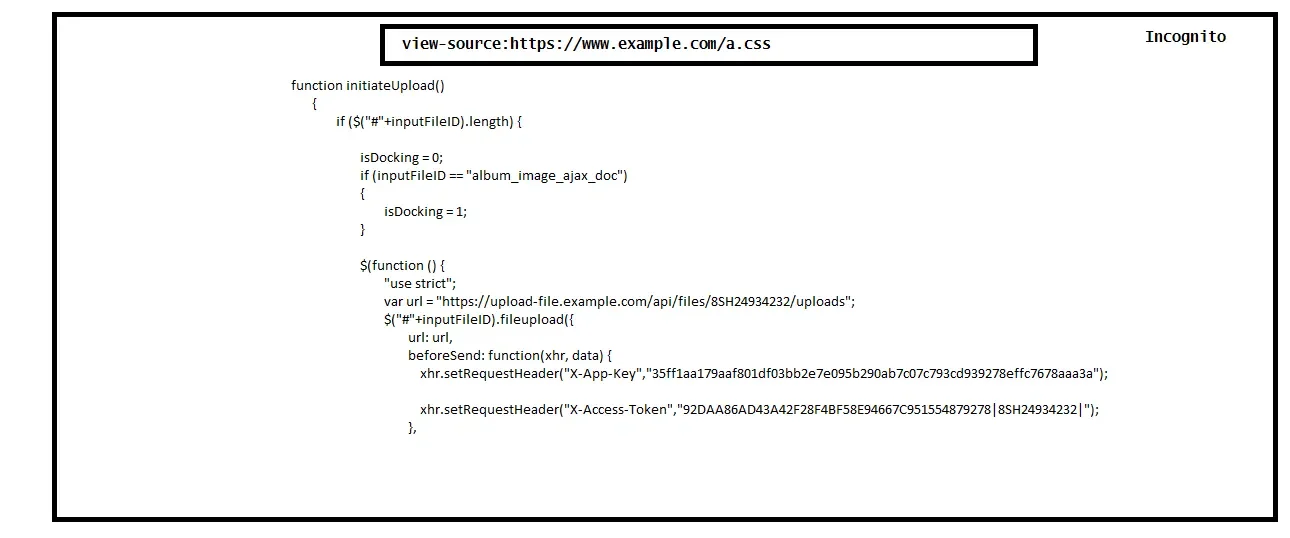
The image shows the page source with the token header, access-key and encrypted user ID present in the cached response.
So the cached page exposed more important parameters than personal information: it carried the credentials needed to talk to the API.
Step 2: Identify the parameters the API needs
The researcher noted that to fetch and upload content through the API endpoint, only three parameters are needed:
- User ID
- X-access-token
- X-app-key
All three were present in the cached page, which gave the researcher a complete set of credentials to test against the API.
Step 3: Check how the API request looks in guest mode
The open question was whether the cached parameters would be validated by the API endpoint. To find out, the researcher intercepted the API request made from the guest endpoint:
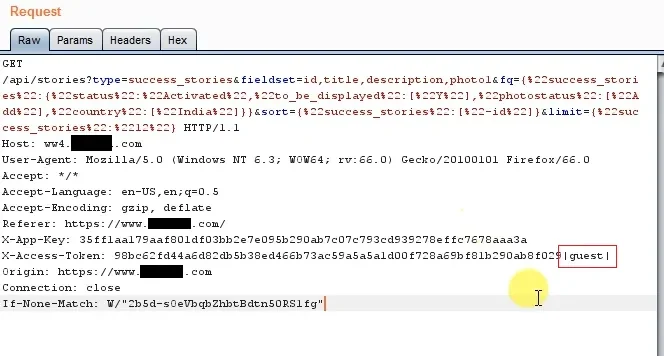
The images show the intercepted API request in guest mode. In the access token, the mode is marked as "guest".
Step 4: Replay the API call with the cached parameters
The researcher then modified the API endpoint used to fetch pending requests in the inbox, injecting the cached parameters (user id and token):
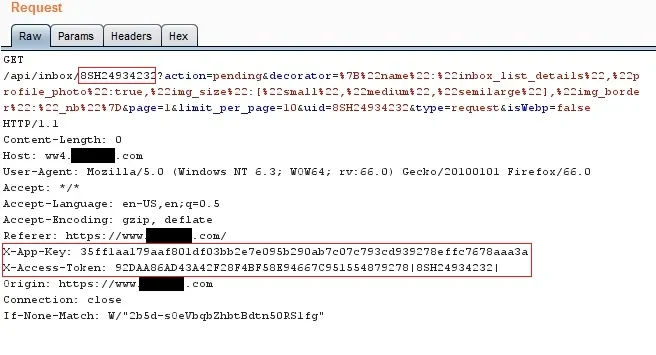
The image shows the modified API request with the cached user id and token injected.
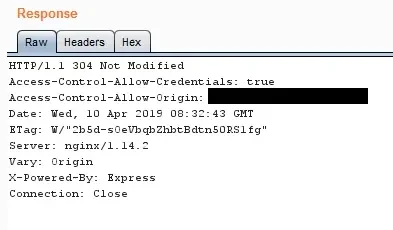
The response came back as follows:
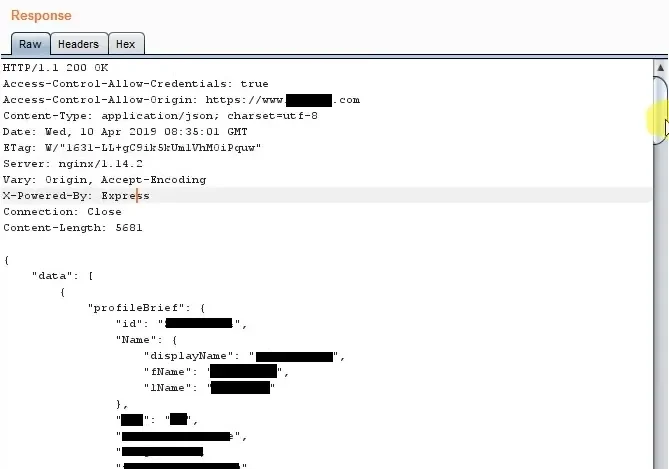
The image shows the API response returning the pending inbox requests.
The researcher was able to retrieve information such as pending inbox requests from the API endpoint using the previously cached token parameters.
Step 5: Move from reading to writing
Fetching inbox content was not the limit. The researcher was also able to use the POST method on the upload profile picture functionality with the cached token and user id. This resulted in an unauthorised profile picture upload performed through the API endpoint using the cached parameters:

The image shows the API endpoint being used to perform the unauthorised profile picture upload with the cached parameters.
After retrieving information and modifying settings, the researcher wrote up the report.
Root cause
The application cached responses on the main domain, and a crafted path such as aa.css led to a cached page whose source held the user's API credentials. The cached page embedded the user's API credentials, namely the token header, the access-key and the encrypted user ID, in its source. Because the API domain accepted those same credentials, anyone who could read the cached page could act as the user against the API.
The report does not describe the server or cache configuration in detail, so the exact mechanism by which the crafted path was treated as cacheable is not stated. What the report does show is that the cache stored a page containing credentials and that the API validated those credentials when they were replayed.
Impact
The attack allowed the researcher to read pending inbox requests and to perform an unauthorised profile picture upload through the API, using credentials taken from a cached page. The report frames this as a one-time user interaction attack: once the victim triggered the cached page, the attacker could carry out API operations from their own side with no further interaction from the victim. The researcher notes this made the issue more severe.
The report does not enumerate every API operation that could be reached, nor does it state which users or accounts were affected beyond the demonstration.
Fix
The report states that the company asked the researcher how the issue could be mitigated, but it does not record the specific fix that was applied.
Variants to test
- Inject static-looking paths such as
.cssor.jpginto authenticated pages and check whether the response is cached and whether the source contains tokens, keys or user identifiers. A positive result is a cached response whose source includes credentials that the API accepts. - Compare the cached page in an incognito session with the authenticated session. A positive result is sensitive parameters appearing in the cached copy even though the visitor is unauthenticated.
- Take any token, access-key and user id found in a cached response and replay them against the API endpoints used for reading and writing. A positive result is the API returning data or accepting a state-changing request such as an upload.
- Check whether the cached token is still valid and whether the API validates it. A positive result is the API accepting the cached token rather than rejecting it as expired or as belonging to a guest.
- Test both GET and POST operations with the cached parameters. A positive result is a successful read of private data and a successful write such as a profile change.
What happened, in plain words
A website was storing copies of its pages in a temporary holding area so that they would load faster for the next visitor. This holding area is called a cache. Normally that is a good thing. The problem was that one of those stored pages contained the secret keys a logged-in user needs to talk to the website's back end. The researcher found a cached page that contained the secret keys a logged-in user needs to talk to the website's back end, read the keys out of it, and then used those keys to act as the user: reading their inbox and even uploading a profile picture on their behalf.
The clever part is that the victim only had to interact once. After that single visit, the attacker could do everything from their own computer, with no further involvement from the victim.
Before going further, a few words on the pieces involved, because the rest of the article depends on them.
- A web application is a website that does things, not just shows text: it lets you log in, upload a photo, read messages. Your browser sends requests to a server, and the server sends back pages or data.
- An API (Application Programming Interface) is the back door the website's own pages use to get things done. Think of a restaurant: the dining room (the website you see) is separate from the kitchen (the API). The waiter carries your order to the kitchen and brings back the food. In this story, the dining room was
www.example.comand the kitchen wasww4.example.com. - A token (or auth token) is like a wristband you get at an event after showing your ID. You do not show your ID again; you just show the wristband and staff let you in. In web terms, the token is a long string of characters the server gives you after login, and your browser sends it with every request so the server knows who you are.
- A header is a small label attached to a request or a response, carrying extra information. Think of it as the note stapled to a parcel: it is not the parcel itself, but it tells the courier what to do with it.
- Web cache deception is the name of the trick in this report. The attacker makes the cache believe a private page is a public, reusable file (like an image or a stylesheet), so the cache stores it and hands it to whoever asks next. The victim's private page ends up sitting in a shared cupboard.
- User interaction means the victim has to do something (click, visit, log in). The fewer times the victim has to act, the more dangerous the attack, because the attacker can work quietly afterwards.
The researcher found this on a private bug bounty program. A bug bounty program is a scheme where a company pays people to find security problems in its systems and report them responsibly instead of exploiting them. The researcher was paid around $250.
Setting the scene
The report does not describe any special accounts, tools or software versions. The work was done with a browser and the ability to look at the requests and responses going back and forth. The researcher used an incognito browser window (a private window that does not share your logged-in session) to see what a stranger would see, and used the browser's "view source" feature to read the raw HTML of a page.
Two things had to be true for the attack to work:
- The main site had to cache its responses, and the cache had to be trickable into storing a page that contains the user's API credentials.
- The API had to accept those credentials when they were replayed later.
The researcher set out to check both.
Finding it
While exploring how the site worked, the researcher noticed that every meaningful action, such as uploading a file, fetching inbox content and changing settings, was carried out by calling an API endpoint on ww4.example.com. Each of those calls carried an auth token header and a user id.
An endpoint is simply a specific address on a server that does a specific job. If the API is a kitchen, an endpoint is a particular counter: one for "fetch inbox", one for "upload photo", and so on.
While intercepting requests to www.example.com, the researcher saw a response header called X-caches-status set to HIT. In caching language, a HIT means the response came from the cache rather than being freshly generated by the server. A MISS would mean the server had to build the page from scratch. Seeing HIT told the researcher that caching was active and worth probing.
To test the caching behaviour, the researcher tried adding random-looking paths to the site, such as bb.jpg and aa.css. These are file extensions normally used for images and stylesheets. The injected paths did not produce an error like a format-not-found error. The site did not return an error like "format not found" for these paths.
When the researcher requested example.com/aa.css, the response was a redirect to a 404 error page:
The image shows the 404 error page returned after requesting the injected aa.css endpoint. A 404 is the standard "page not found" response.
Exploitation
Step 1: Confirm what the cache stores
The researcher opened the same page in an incognito window and viewed the source code. Source code here means the raw HTML the browser receives, before it draws anything on screen. You can see it in most browsers with "View Page Source".
At first there was no personal information, only the account name. That alone would be a minor leak. But scrolling further down the source, the researcher found the token header, the access-key and the user's encrypted ID sitting in the cached page:
The image shows the page source with the token header, access-key and encrypted user ID present in the cached response.
An access key (or app key) is one of the credentials the API needs. An encrypted ID is the user's identifier scrambled so it is not directly readable, but still usable by the system. Together, these are the credentials the API needs.
So the cached page exposed something far more valuable than a name: it carried the keys to the API.
Step 2: Identify the parameters the API needs
The researcher noted that to fetch and upload content through the API, only three pieces of information are needed:
- User ID
- X-access-token
- X-app-key
A parameter is a named value sent along with a request, like a form field. The names X-access-token and X-app-key are the labels the API expects for the token and the app key. All three were present in the cached page, which gave the researcher a complete set of credentials to test against the API.
Step 3: Check how the API request looks in guest mode
The open question was whether the API would actually accept the cached credentials. A cached token might be expired, or the API might reject anything that did not come from a logged-in session. To find out, the researcher intercepted the API request made from the guest endpoint:
The images show the intercepted API request in guest mode. In the access token, the mode is marked as "guest". Guest mode means the site lets you do some things without logging in, using a temporary identity. The researcher intercepted the guest request to see whether the cached parameters would be validated by the API.
Step 4: Replay the API call with the cached parameters
The researcher then took the API endpoint used to fetch pending requests in the inbox and modified it, injecting the cached user id and token:
The image shows the modified API request with the cached user id and token injected. Injecting here simply means putting the stolen values into the request in place of the guest values.
The response came back as follows:
The image shows the API response returning the pending inbox requests.
The researcher was able to retrieve information such as pending inbox requests from the API endpoint using the previously cached token parameters. In other words, the API accepted the stolen credentials and treated the request as if it came from the real user.
Step 5: Move from reading to writing
Reading the inbox was not the limit. The researcher was also able to use the POST method on the upload profile picture functionality with the cached token and user id. A method is the verb of an HTTP request: GET means "give me something", POST means "here is something, store it". Using POST with the stolen credentials meant the researcher could change data, not just read it.
This resulted in an unauthorised profile picture upload performed through the API endpoint using the cached parameters:
The image shows the API endpoint being used to perform the unauthorised profile picture upload with the cached parameters.
After retrieving information and modifying settings, the researcher wrote up the report.
Why it worked
The application cached responses on the main domain, and a crafted path such as aa.css led to a cached page whose source held the user's API credentials. The cached page embedded the user's API credentials, namely the token header, the access-key and the encrypted user ID, in its source. Because the API domain accepted those same credentials, anyone who could read the cached page could act as the user against the API.
The report does not describe the server or cache configuration in detail, so the exact mechanism by which the crafted path was treated as cacheable is not stated. What the report does show is that the cache stored a page containing credentials and that the API validated those credentials when they were replayed.
What it meant
The attack allowed the researcher to read pending inbox requests and to perform an unauthorised profile picture upload through the API, using credentials taken from a cached page. The report frames this as a one-time user interaction attack: once the victim triggered the cached page, the attacker could carry out API operations from their own side with no further interaction from the victim. The researcher notes this made the issue more severe.
The report does not enumerate every API operation that could be reached, nor does it state which users or accounts were affected beyond the demonstration.
The fix
The report states that the company asked the researcher how the issue could be mitigated, but it does not record the specific fix that was applied.
Things to try yourself
- Inject static-looking paths such as
.cssor.jpginto authenticated pages and check whether the response is cached and whether the source contains tokens, keys or user identifiers. A positive result is a cached response whose source includes credentials that the API accepts. - Compare the cached page in an incognito session with the authenticated session. A positive result is sensitive parameters appearing in the cached copy even though the visitor is unauthenticated.
- Take any token, access-key and user id found in a cached response and replay them against the API endpoints used for reading and writing. A positive result is the API returning data or accepting a state-changing request such as an upload.
- Check whether the cached token is still valid and whether the API validates it. A positive result is the API accepting the cached token rather than rejecting it as expired or as belonging to a guest.
- Test both GET and POST operations with the cached parameters. A positive result is a successful read of private data and a successful write such as a profile change.
Glossary
- API: the back-end service a website uses to do things; the kitchen behind the dining room.
- API endpoint: a specific address on the API that performs one job, such as fetching the inbox.
- Access key / app key: a secret that identifies the application to the API, separate from the user's own token.
- Auth token: a string of characters proving who you are, given after login and sent with each request.
- Bug bounty program: a scheme where a company pays researchers to find and report security problems.
- Cache: a temporary storage area that keeps copies of responses so they can be served faster next time.
- Cache HIT: a response served from the cache rather than freshly generated.
- Cache MISS: a response that had to be generated by the server because the cache did not have it.
- Encrypted ID: a user identifier scrambled so it is not directly readable but still usable by the system.
- Endpoint: a specific address on a server that does a specific job.
- GET: an HTTP method meaning "give me something".
- Guest mode: a temporary identity the site gives visitors who have not logged in.
- Header: a small label attached to a request or response carrying extra information.
- Incognito window: a private browser window that does not share your logged-in session.
- Inject: to put a value into a request, often a stolen one, in place of the original.
- Method: the verb of an HTTP request, such as GET or POST.
- Parameter: a named value sent along with a request, like a form field.
- POST: an HTTP method meaning "here is something, store it".
- Source code (page source): the raw HTML the browser receives before rendering it.
- User interaction: something the victim has to do, such as click or visit a page.
- User ID: the identifier the system uses for a particular user.
- Web cache deception: a trick where the cache is made to store a private page as if it were a public file, then serves it to others.
- 404: the standard "page not found" response.





