Imagemagick GIF coder vulnerability leads to memory disclosure (Hackerone)
An outdated version of ImageMagick left the colour palette uninitialised when processing GIF files without a palette, so crafted images uploaded to a profile picture feature could leak server memory. The attacker could recover fragments of server memory such as file paths and operating system details from the returned images.
 Published on medium.com
This is my first write up about a bug which I discovered already around January, hope you guys like it. :)
The full write-up lives on its author's site
It belongs to its author, so we link to it rather than copy it. The other two tabs are our own rewrites, checked against it.
Context
In January 2018 I found a memory disclosure bug on HackerOne's own platform, in the profile upload feature. The feature is the profile upload feature on HackerOne. That processing was done with an outdated ImageMagick, and the bug is the one described by Emil Lerner (neex) as the ImageMagick GIF exploit, CVE-2017-15277.
The report quotes the description of the flaw as follows:
"Imagemagick gif exploit (CVE-2017-15277) is a type of vulnerability which affects the outdated version of ImageMagick 7.0.6-1 and Graphicsmagick 1.3.26 leaves the palette uninitialized when processing a GIF file that has neither a global nor local palette. If the affected product is used as a library loaded into a process that operates on interesting data, this data sometimes can be leaked via the uninitialized palette."
In simpler terms: an outdated ImageMagick 7.0.6-1 or GraphicsMagick 1.3.26 leaves the colour palette uninitialised when it processes a GIF that has neither a global nor a local palette. If that library runs inside a process that holds interesting data, the uninitialised palette can carry that data back out in the image the server returns. ImageMagick itself is an open-source tool for displaying, converting and editing raster and vector images, used by many web applications to crop, resize and change colour across many image formats.
Setup
The only tool needed is the neex repository, downloaded from https://github.com/neex/gifoeb. The test surface was the profile upload feature on HackerOne. No special role or privilege is described.
Finding it
The idea is straightforward: generate an image file that triggers the uninitialised palette, upload it wherever the site processes images, and look at the preview that comes back. If the returned file contains uninitialised pixel data rather than a clean image, the target is leaking memory through the palette.
Exploitation
Step 1: get the tool and generate payload files
I downloaded the neex repository from https://github.com/neex/gifoeb. Then I created many exploitable GIF files with the generator:
./gifoeb gen 512x512 dump.gif
The report notes that you can give extensions such as .gif, .jpg, .tiff, .bmp and many more, so the same generator can produce payloads for whatever format the target accepts.
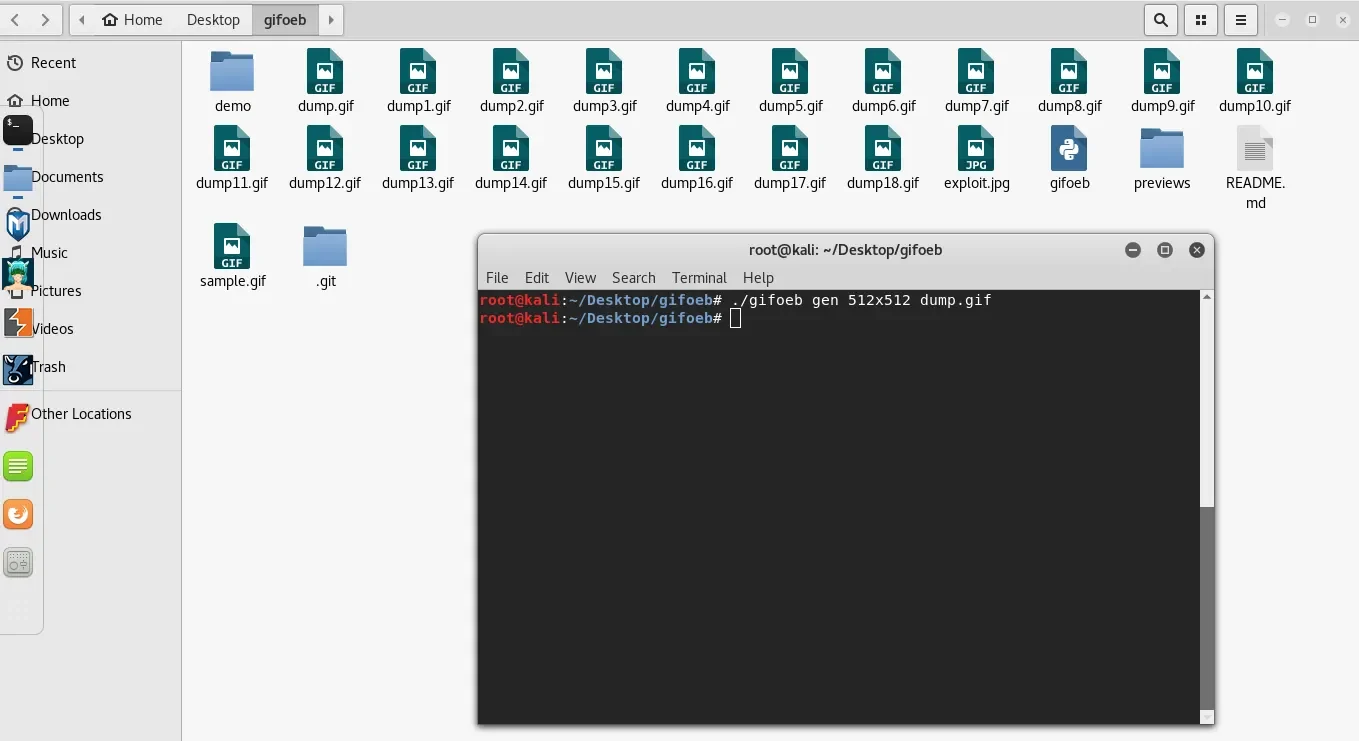
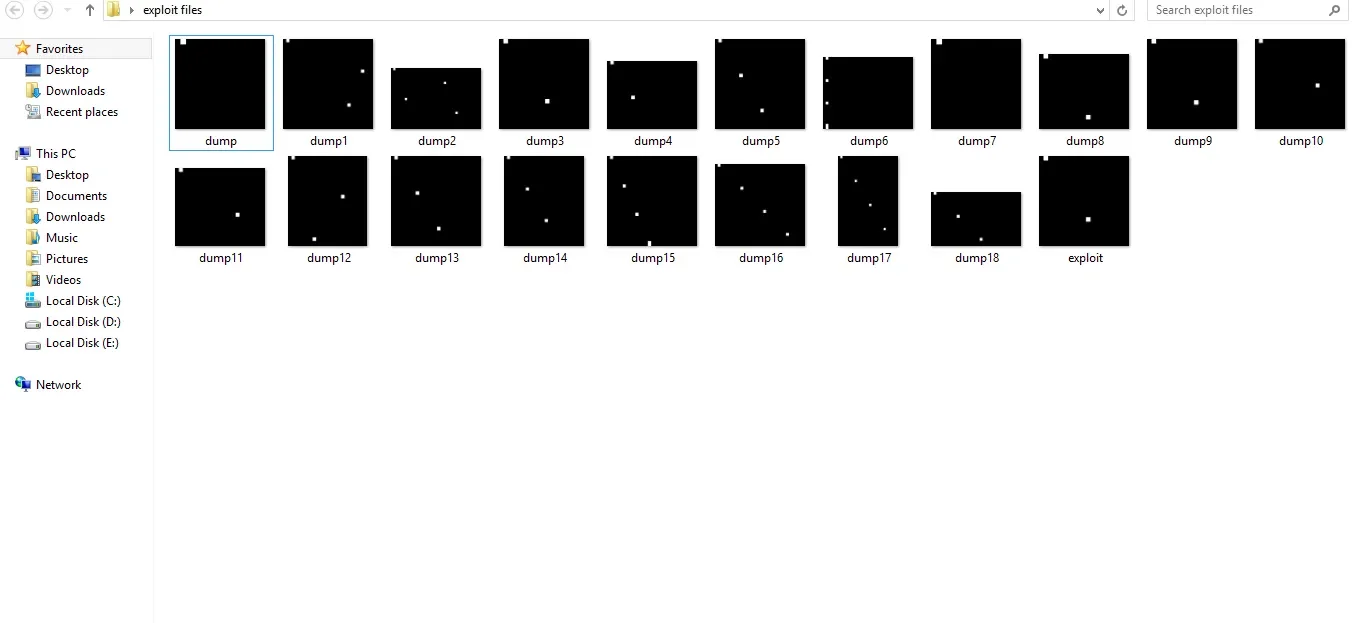
The generated files are the exploitable files.
Step 2: upload to the profile upload feature
I tried uploading one of the exploitable files through the profile upload feature on HackerOne.
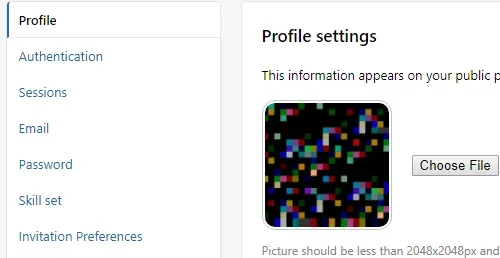
Step 3: read the reflected pixels
In response, I got different reflected pixels.

Step 4: collect as many previews as possible
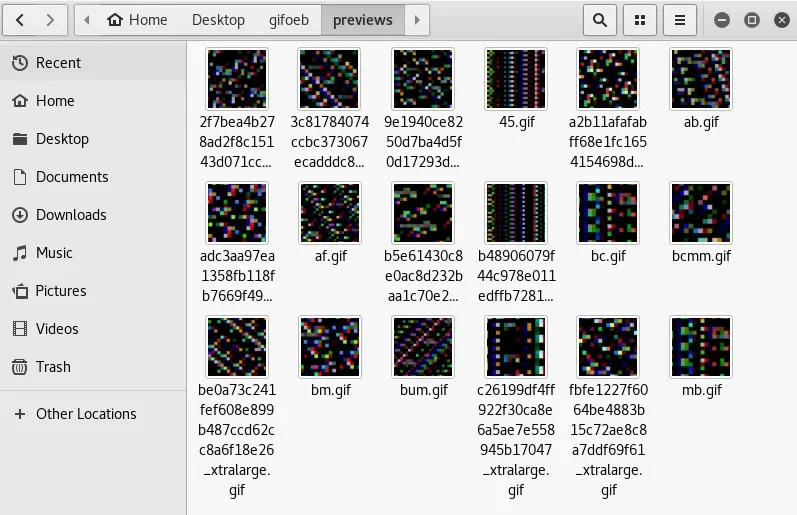
I then started uploading exploitable files and downloading all the reflected pixel files, as many as possible, in GIF format.
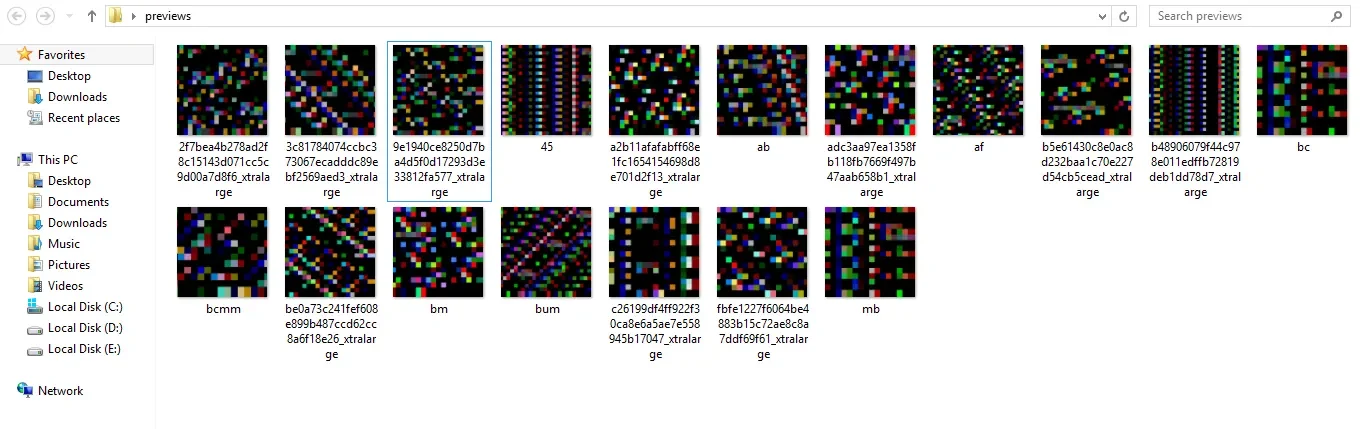
I saved all the downloaded files inside a previews folder.
Step 5: recover the leaked memory
Finally I recovered the contents of all the files with this loop:
for p in previews/*; do ./gifoeb recover $p | strings; done
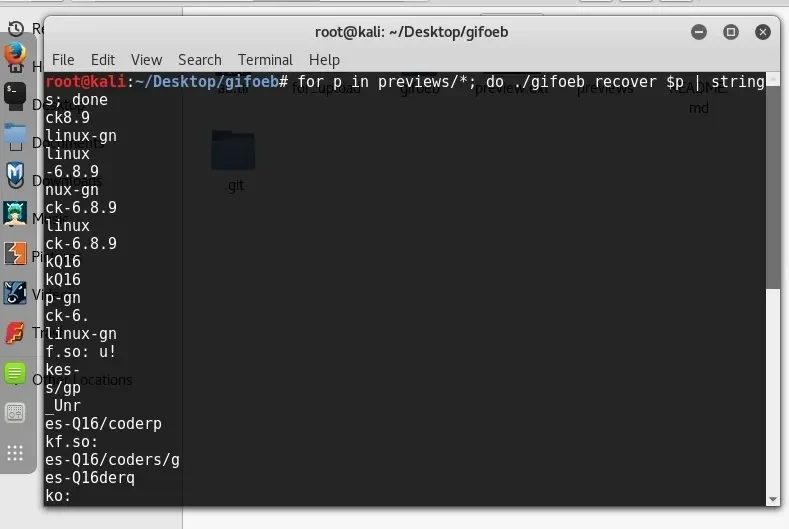
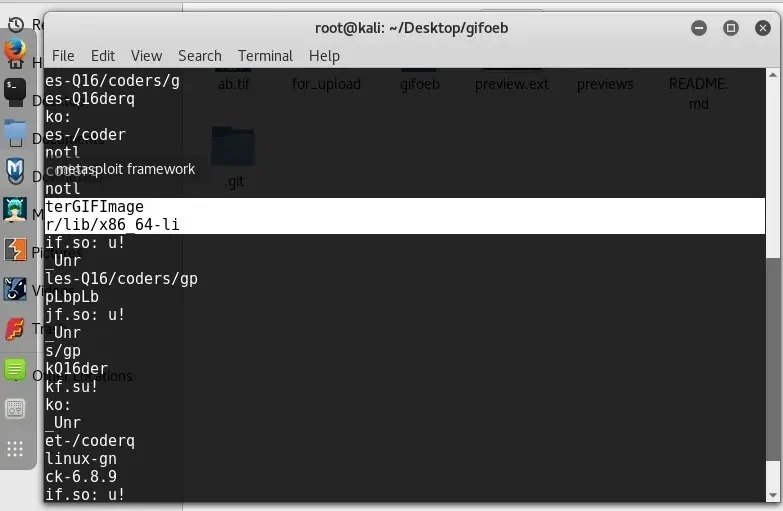
The uninitialised pixels recovered from the downloaded GIF files were leaking memory disclosure collected from the server, such as path or server OS information and many more.
Root cause
The flaw is in the image library, not in the upload feature: when ImageMagick 7.0.6-1 (or GraphicsMagick 1.3.26) processes a GIF that has neither a global nor a local palette, the palette is left uninitialised. The palette is left uninitialised, so leftover memory can be leaked via the uninitialised palette. Because the library runs inside the web application's process, the leftover memory can include data the process was handling. The report's solution is to update ImageMagick to the latest version behind every server.
Impact
If the conditions are right, these exploitable files can leak mails, cookies, SQL queries, path directories and many more. On HackerOne the leak was limited: only OS and path leakage and other stack traces came back. The report hedges the wider impact with "if possible", so treat the mail, cookie and SQL examples as what the technique could expose on a target that keeps such data in the processing process, not as something observed here.
Fix
The report states the issue has been mitigated completely by updating ImageMagick to the latest version behind every server, so there is no more leakage. The report also gives advice for testing:
- In recent ImageMagick versions the bug is mitigated: if you upload an exploitable file you get a black screen image and nothing else, so a black image leaks nothing.
- Even if you get reflected pixel files, check whether they disclose anything. If you only get stack traces like
a/!a^a;bb(b, do not report it unless you get string values related to server path leakage, info leakage and similar. - Create different image files with different resolutions and extensions, and focus on grey pixel palettes, since they contain more information than blue, green or red pixels. This differs from site to site and with the ImageMagick version.
Variants to test
- Upload generated payloads with several extensions (.gif, .jpg, .tiff, .bmp) to every feature that processes images, such as avatars and profile pictures. A positive result is a preview whose pixels differ from the uploaded image.
- Vary the resolution passed to the generator. A positive result is recovered output containing readable strings such as file paths or OS details.
- Prefer grey palettes when inspecting recovered files, since they carry more information than blue, green or red pixels. A positive result is a string value tied to the server rather than a bare stack trace.
Timeline
| Date | Event |
|---|---|
| 6 Jan 2018 | Report submitted to the Security Program (HackerOne) |
| 7 Jan 2018 | Security team assessed and triaged the report |
| 7 Jan 2018 | CVE-2017-15277 reference assigned, as the vulnerability was found by Emil Lerner (neex) |
| 20 Jan 2018 | $500 bounty awarded, my first bounty |
| 7 Feb 2018 | Report resolved |


Thanks to Jobert, Reed, Joystick, Dirk and Wvdv, and to Emily Lerner (neex) for finding these vulnerabilities around ImageMagick and creating the repository on GitHub.
What happened, in plain words
In January 2018 I found a bug on HackerOne's own website, in the feature that lets you upload a profile picture. When you upload an image there, the server processes it and returns reflected pixels. That processing was done with an old version of a piece of software called ImageMagick, and that old version has a known flaw. The flaw lets a specially crafted image make the server hand back a little piece of its own memory inside the preview image. Memory is where a running program keeps the data it is working with, so a leak like this can expose things the server was handling at that moment.
The flaw is the one described by Emil Lerner (neex) as the ImageMagick GIF exploit, CVE-2017-15277. A CVE number is a public catalogue number given to a known security flaw so people can look it up and track fixes.
My report quotes the description of the flaw as follows:
"Imagemagick gif exploit (CVE-2017-15277) is a type of vulnerability which affects the outdated version of ImageMagick 7.0.6-1 and Graphicsmagick 1.3.26 leaves the palette uninitialized when processing a GIF file that has neither a global nor local palette. If the affected product is used as a library loaded into a process that operates on interesting data, this data sometimes can be leaked via the uninitialized palette."
That quote is dense, so let me unpack it. A GIF is an image file format, the kind used for simple pictures and short animations. A palette is the list of colours an image is allowed to use: instead of storing a full colour for every pixel, a GIF stores a small table of colours and then, for each pixel, just a number pointing into that table. A GIF can carry this table in two places, globally for the whole file or locally for one frame, and the quote says the crafted file has neither. When ImageMagick 7.0.6-1 or GraphicsMagick 1.3.26 processes such a file, it does not clear the palette memory first. "Uninitialised" means the memory still holds whatever was there before, like a whiteboard that was never wiped. If the library runs inside a program that is busy with other data, that leftover data can end up in the palette and therefore in the image the server sends back.
ImageMagick itself is an open-source tool for displaying, converting and editing raster and vector images. Raster images are made of pixels, vector images are made of shapes and lines. Many web applications use it behind the scenes to crop, resize and change the colour of images, and it supports a large number of image formats. That is why a flaw in it matters to websites: the website may never show ImageMagick to you, but it is doing the work.
Setup
The only tool needed is the neex repository, downloaded from https://github.com/neex/gifoeb. A repository (repo) is a folder of code published on GitHub, a website where people share code; downloading it gives you the programs inside. The test surface was the profile upload feature on HackerOne. No special role or privilege is described.
Finding it
The idea is straightforward: generate an image file that triggers the uninitialised palette, upload it wherever the site processes images, and look at the preview that comes back. If the returned file contains uninitialised pixel data rather than a clean image, the target is leaking memory through the palette. Think of it as handing someone a form with some boxes left blank and seeing whether the copy they hand back still has someone else's writing in those boxes.
Exploitation
Step 1: get the tool and generate payload files
I downloaded the neex repository from https://github.com/neex/gifoeb. Then I created many exploitable GIF files with the generator:
./gifoeb gen 512x512 dump.gif
Line by line: ./gifoeb means run the program called gifoeb that sits in the current folder (the ./ says "here, in this folder"). gen is the command that tells it to generate a file. dump.gif is the name of the file to write. The report notes that you can give extensions such as .gif, .jpg, .tiff, .bmp and many more, so the same generator can produce payloads for whatever format the target accepts. A payload here simply means the crafted file you feed to the target.
The generated files are the exploitable files.
Step 2: upload to the profile upload feature
I tried uploading one of the exploitable files through the profile upload feature on HackerOne. The point of this step is that the upload feature is the place where the server takes an image from a user and processes it, which is exactly the situation the flaw needs.
Step 3: read the reflected pixels
In response, I got different reflected pixels. "Reflected" here means the server sent the processed image back to me, and the pixels I saw were not the ones I uploaded.
Step 4: collect as many previews as possible
I then started uploading exploitable files and downloading all the reflected pixel files, as many as possible, in GIF format.
I saved all the downloaded files inside a previews folder.
Step 5: recover the leaked memory
Finally I recovered the contents of all the files with this loop:
for p in previews/*; do ./gifoeb recover $p | strings; done
Line by line: for p in previews/* starts a loop that goes through every file in the previews folder, one at a time, and calls the current one p. do marks the start of what to do for each file. The | symbol (a pipe) passes that output to the next program instead of printing it. strings is a standard tool that pulls out the readable text from a stream of bytes, ignoring the binary noise. done closes the loop. In short: for every downloaded preview, extract the hidden bytes and show only the readable words.
The uninitialised pixels recovered from the downloaded GIF files were leaking memory disclosure collected from the server, such as path or server OS information and many more. A path is the location of a file on the server, like a postal address for a file, and OS information means details about the operating system the server runs.
Root cause
The flaw is in the image library, not in the upload feature: when ImageMagick 7.0.6-1 (or GraphicsMagick 1.3.26) processes a GIF that has neither a global nor a local palette, the palette is left uninitialised. The palette is left uninitialised, so leftover memory can be leaked via the uninitialised palette. A buffer is a reserved chunk of memory a program uses to hold data temporarily. Because the library runs inside the web application's process, the leftover memory can include data the process was handling. The report's solution is to update ImageMagick to the latest version behind every server.
Impact
If the conditions are right, these exploitable files can leak mails, cookies, SQL queries, path directories and many more. A cookie is a small piece of data a website stores in your browser so it can recognise you on later requests, and it can act like a temporary pass. SQL is the language used to talk to databases, so a leaked SQL query can reveal how the site stores its data. On HackerOne the leak was limited: only OS and path leakage and other stack traces came back. A stack trace is the list of function calls a program was making when something happened, useful for debugging but not usually secret. The report hedges the wider impact with "if possible", so treat the mail, cookie and SQL examples as what the technique could expose on a target that keeps such data in the processing process, not as something observed here.
Fix
The report states the issue has been mitigated completely by updating ImageMagick to the latest version behind every server, so there is no more leakage. The report also gives advice for testing:
- In recent ImageMagick versions the bug is mitigated: if you upload an exploitable file you get a black screen image and nothing else, so a black image leaks nothing.
- Even if you get reflected pixel files, check whether they disclose anything. If you only get stack traces like
a/!a^a;bb(b, do not report it unless you get string values related to server path leakage, info leakage and similar. - Create different image files with different resolutions and extensions, and focus on grey pixel palettes, since they contain more information than blue, green or red pixels. This differs from site to site and with the ImageMagick version.
Variants to test
- Upload generated payloads with several extensions (.gif, .jpg, .tiff, .bmp) to every feature that processes images, such as avatars and profile pictures. A positive result is a preview whose pixels differ from the uploaded image.
- Vary the resolution passed to the generator. A positive result is recovered output containing readable strings such as file paths or OS details.
- Prefer grey palettes when inspecting recovered files, since they carry more information than blue, green or red pixels. A positive result is a string value tied to the server rather than a bare stack trace.
Timeline
| Date | Event |
|---|---|
| 6 Jan 2018 | Report submitted to the Security Program (HackerOne) |
| 7 Jan 2018 | Security team assessed and triaged the report |
| 7 Jan 2018 | CVE-2017-15277 reference assigned, as the vulnerability was found by Emil Lerner (neex) |
| 20 Jan 2018 | $500 bounty awarded, my first bounty |
| 7 Feb 2018 | Report resolved |
A bounty is a reward a company pays to someone who reports a security problem responsibly. Triaged means the security team confirmed the report was worth investigating.
Thanks to Jobert, Reed, Joystick, Dirk and Wvdv, and to Emily Lerner (neex) for finding these vulnerabilities around ImageMagick and creating the repository on GitHub.
Glossary
- API: a defined way for one program to ask another program to do something, like a menu of requests a kitchen will accept.
- Bounty: a reward paid by a company for a responsibly reported security problem.
- Buffer: a reserved chunk of memory a program uses to hold data temporarily.
- Cookie: a small piece of data a website stores in your browser so it can recognise you on later requests.
- CVE: a public catalogue number for a known security flaw, so people can look it up and track fixes.
- GIF: an image file format, often used for simple pictures and short animations, that stores colours in a palette.
- GraphicsMagick: an image processing library, a fork of ImageMagick, with its own version numbers.
- ImageMagick: an open-source tool and library for displaying, converting and editing raster and vector images.
- Library: a collection of ready-made code that other programs load and use, rather than writing everything themselves.
- Memory disclosure / memory leak: a bug where a program sends back data from its own memory that it should have kept private.
- OS (operating system): the core software a computer runs, such as the system that manages files and programs on a server.
- Palette: the table of colours an image is allowed to use; each pixel stores a number pointing into this table.
- Path: the location of a file on a computer, like a postal address for a file.
- Payload: the crafted input you feed to a target to trigger a bug.
- Pixel: one dot of colour in an image; images are grids of pixels.
- Process: a running program, with its own memory, on a computer.
- Raster image: an image made of a grid of pixels.
- Reflected: sent back to you by the server, as in a preview image returned after upload.
- Repository (repo): a folder of code published and shared, often on GitHub.
- SQL: the language used to talk to databases.
- Stack trace: the list of function calls a program was making at a given moment, useful for debugging.
- Strings: a standard command-line tool that pulls readable text out of binary data.
- Triaged: reviewed and confirmed as worth investigating by a security team.
- Uninitialised: memory that was never cleared, so it still holds whatever was there before.
- Vector image: an image made of shapes and lines rather than pixels.
- Vulnerability: a weakness in software that can be used to make it behave in a way its makers did not intend.




