ImageMagick: The hidden vulnerability behind your online images
ImageMagick versions up to 7.1.0-49 mishandled PNG tEXt chunks with the keyword 'profile', treating the text as a filename. An attacker could upload a crafted PNG to cause a denial of service (waiting on stdin) or embed the contents of an arbitrary readable file into the processed image, leading to information disclosure.
 Published on metabaseq.com
ImageMagick is a free and open-source software suite for displaying, converting, and editing image files. It can read and write over 200 image file formats and, therefore, is very common to find it in websites worldwide since there is always a need to process pictures for users’ profiles, catalogs, etc.
The full write-up lives on its author's site
It belongs to its author, so we link to it rather than copy it. The other two tabs are our own rewrites, checked against it.
Context
ImageMagick is a free and open-source software suite for displaying, converting and editing image files. It can read and write over 200 image file formats, which makes it very common on websites that need to process pictures for user profiles, catalogues and similar features.
During a recent APT Simulation engagement, the Ocelot team found that ImageMagick was used to process images on a Drupal-based website. That prompted the team to look for new vulnerabilities in the component, starting from the latest version at the time, ImageMagick 7.1.0-49. The work produced two zero days:
- CVE-2022-44267: ImageMagick 7.1.0-49 is vulnerable to Denial of Service. When it parses a PNG image (for example for a resize), the convert process can be left waiting for stdin input.
- CVE-2022-44268: ImageMagick 7.1.0-49 is vulnerable to Information Disclosure. When it parses a PNG image (for example for a resize), the resulting image can have embedded the content of an arbitrary remote file, if the ImageMagick binary has permissions to read it.
In both cases the attacker needs to upload a malicious image to a website that uses ImageMagick, in order to exploit the vulnerabilities remotely. The ImageMagick volunteers validated the issues and released patches in a timely manner; the fix commit referenced in the write-up is [redacted].
Setup
The testing was done against ImageMagick 7.1.0-49, the latest version at the time of the research. The real-world context was a Drupal-based website that used ImageMagick to process uploaded images. No accounts, roles or special tooling beyond the ability to upload an image and trigger a conversion are described.
Finding it
The starting point is how ImageMagick handles PNG textual chunks. A PNG can carry a textual chunk type such as tEXt. These chunks have a keyword and a text string. If the keyword is the string profile (without quotes), ImageMagick interprets the text string as a filename and loads the content of that file as a raw profile.
That design decision is what both bugs hang on. If the filename is - (a single dash), ImageMagick tries to read the content from standard input, which can leave the process waiting forever. If the filename is a real, readable path, the file content ends up embedded in the image that ImageMagick produces, and the attacker can download it.
Exploitation
CVE-2022-44267: denial of service
When ImageMagick parses a PNG file, for example in a resize operation when receiving an image, the convert process can be left waiting for stdin input. That leads to a denial of service, because the process will not be able to process other images.
A malicious actor can craft a PNG, or use an existing one, and add a textual chunk type such as tEXt whose keyword is profile and whose text string is -. ImageMagick then tries to read the content from standard input, potentially leaving the process waiting forever.
The execution path is:
- Upload an image to trigger an ImageMagick command such as
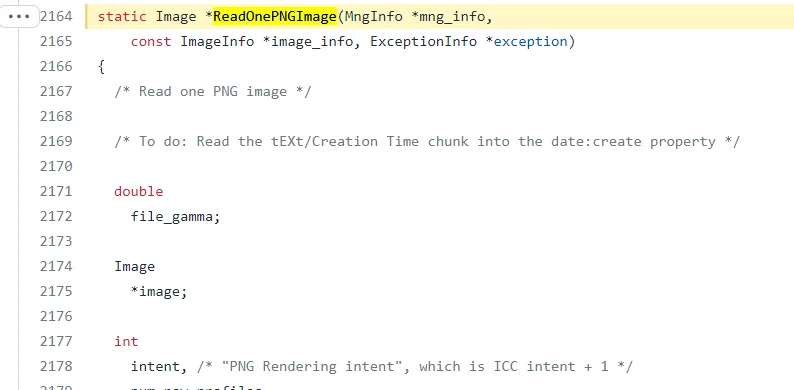
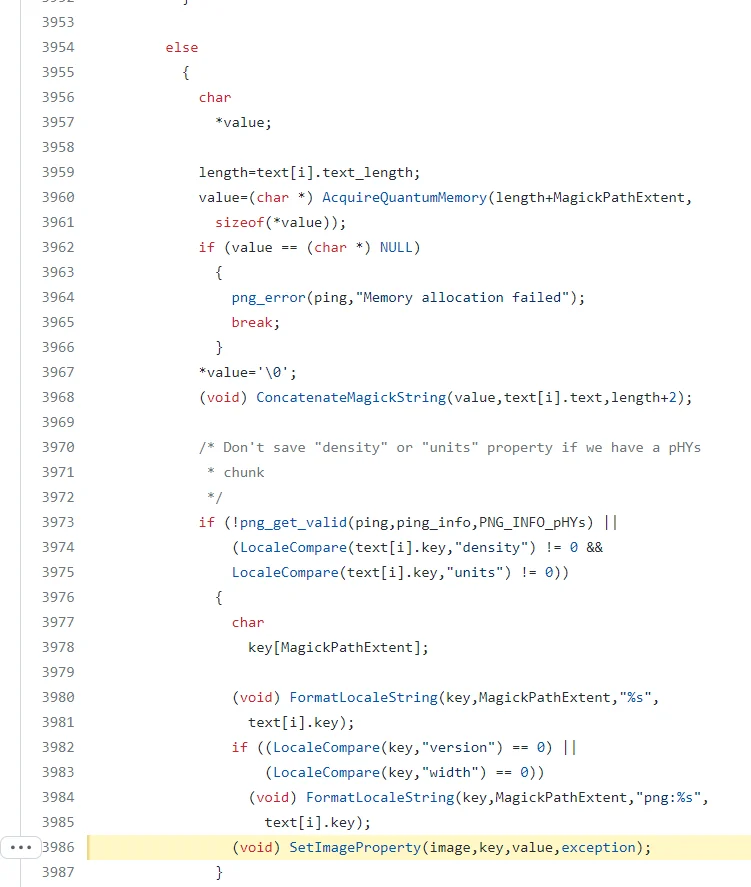
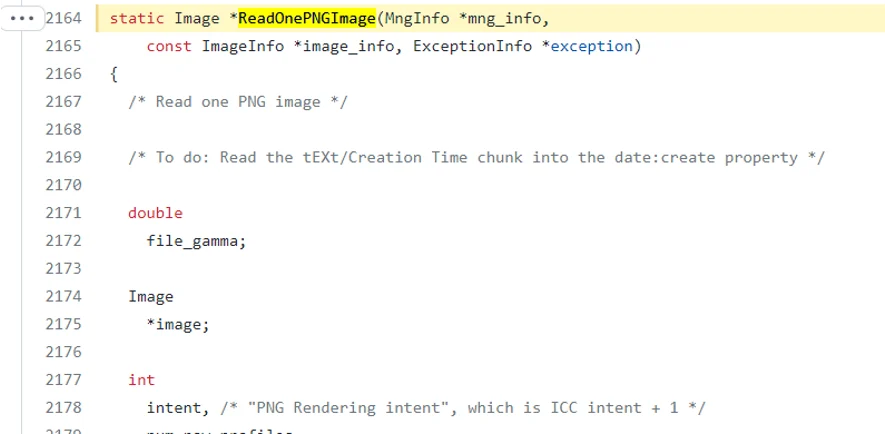
convert. ReadOnePNGImage(coders/png.c:2164) reads thetEXtchunk.
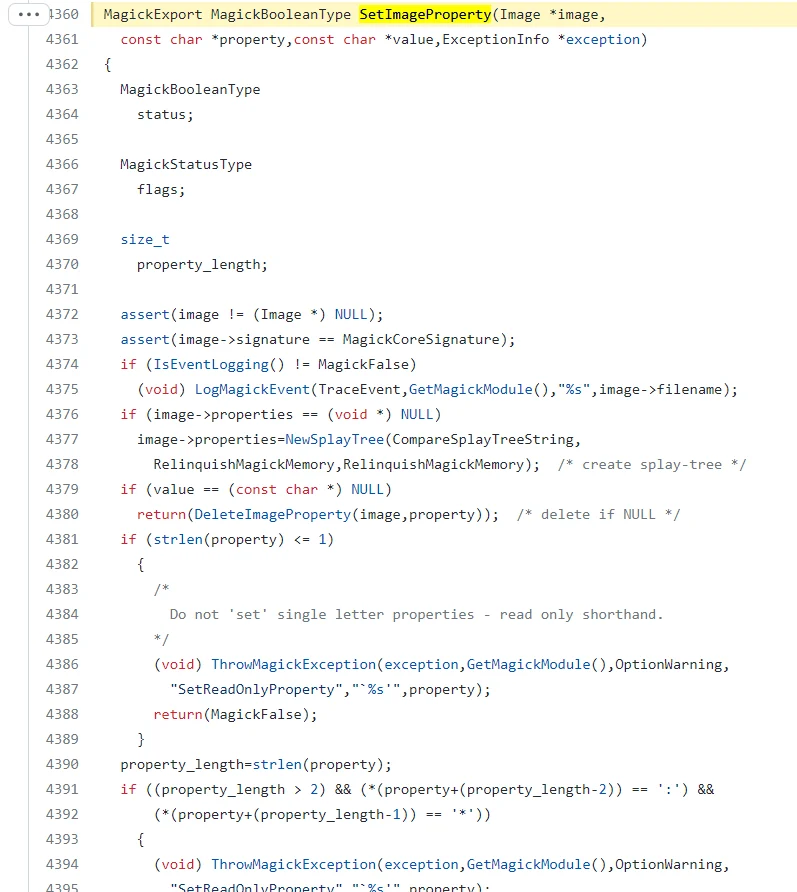
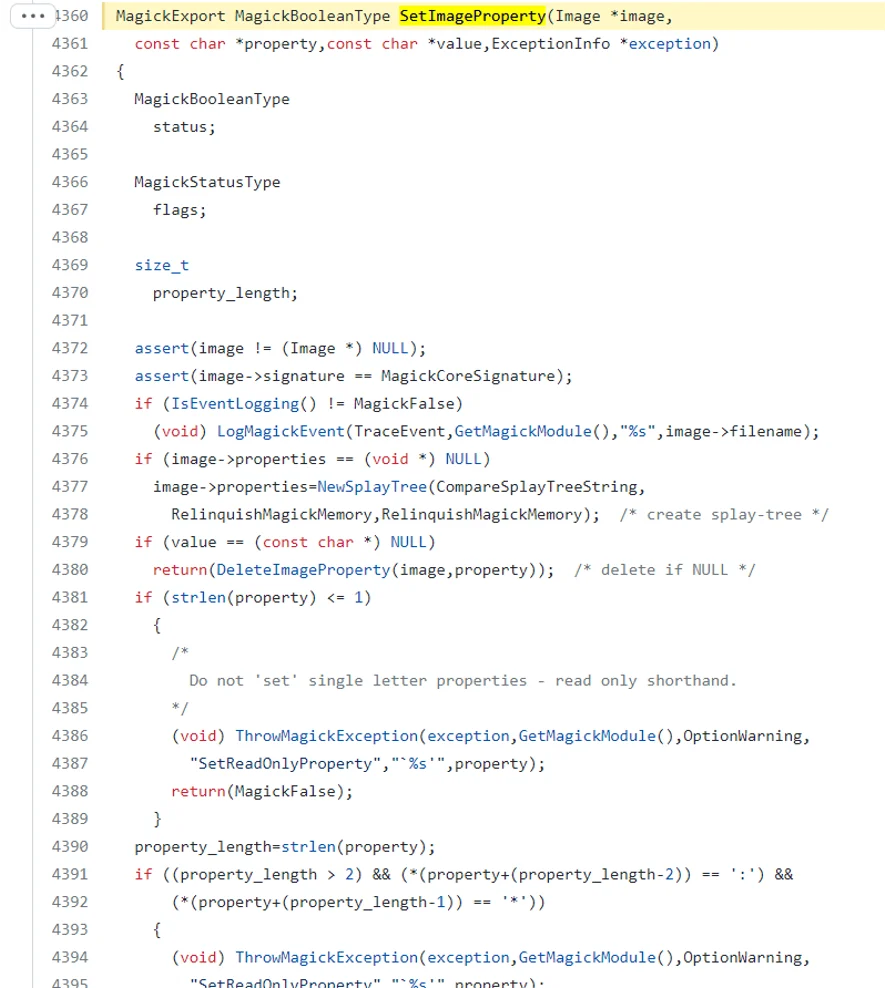
SetImageProfile(MagickCore/property.c:4360) is reached.
- The code checks whether the keyword equals
profile.
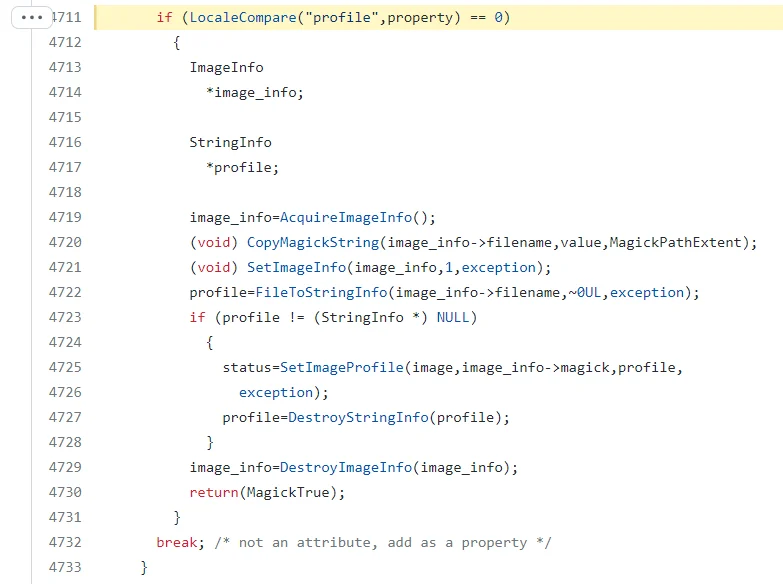
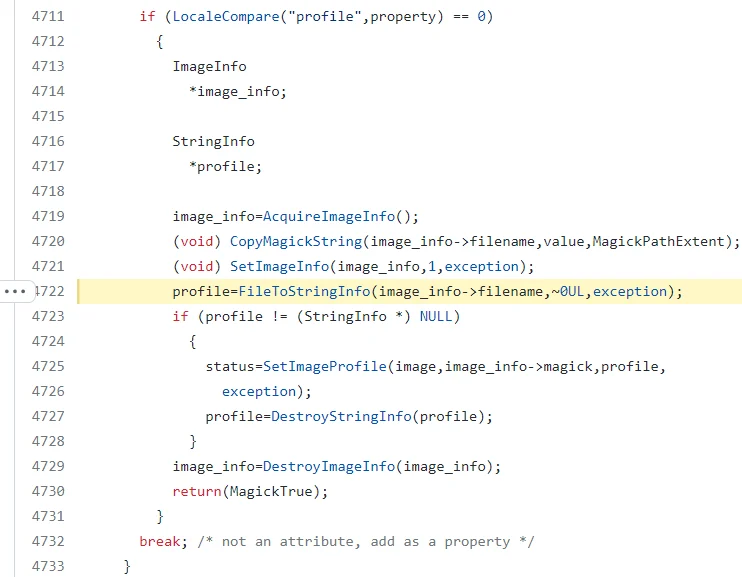
- The text string is copied as a filename in line 4720 and the content is saved in line 4722.
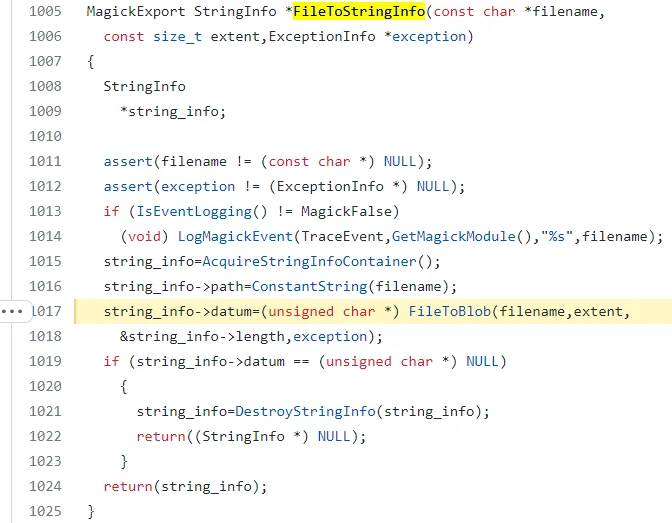
FileToStringInfostores the content intostring_info->datum(MagickCore/string.c:1005).
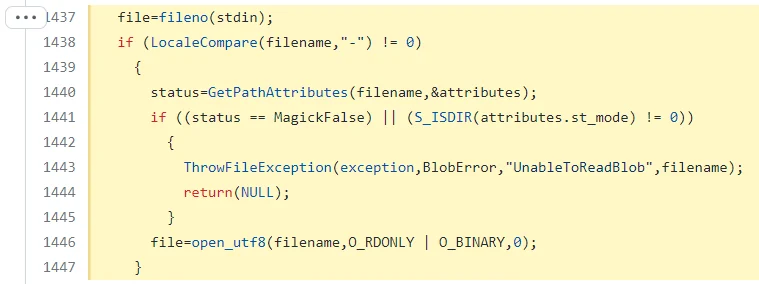
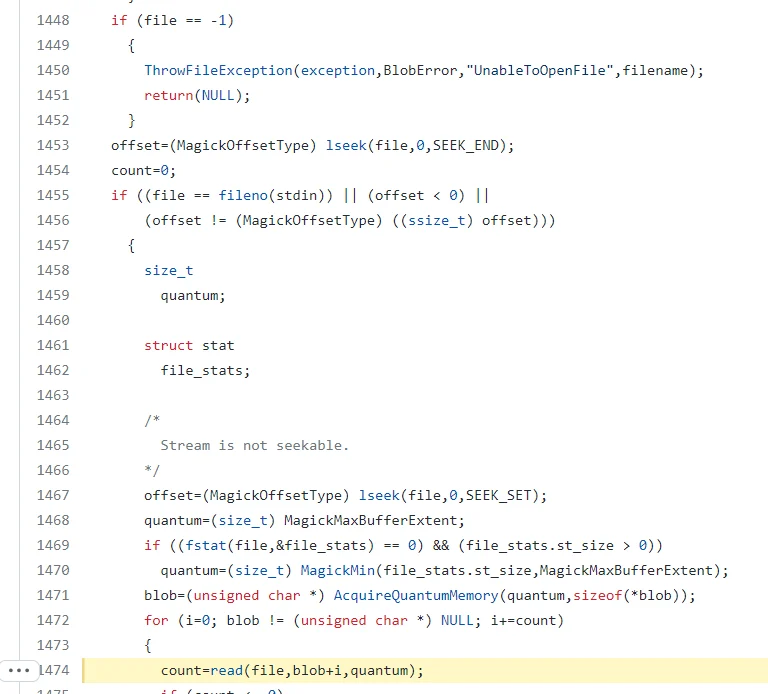
FileToBlob(MagickCore/blob.c:1396) assigns stdin to a filename of-, causing the process to wait for input forever.
The proof-of-concept PNG is:
[redacted]

The malicious image file used as evidence is OCELOT_output.png.
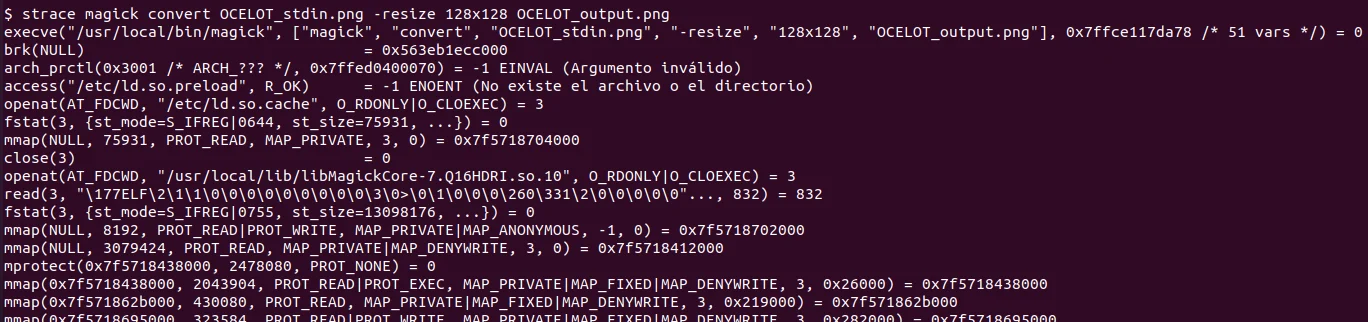
With that file processed, stdin input waits forever:

CVE-2022-44268: arbitrary remote leak
When ImageMagick parses the PNG file, for example in a resize operation, the resulting image can have embedded the content of an arbitrary remote file from the website, if the magick binary has permissions to read it.
Again, the attacker crafts a PNG, or reuses an existing one, and adds a textual chunk type such as tEXt with the keyword profile. ImageMagick interprets the text string as a filename and loads the content as a raw profile. The attacker can then download the resized image, which comes with the content of the remote file inside it.
The execution path is:
- If a valid and accessible filename is provided, the content is returned to the caller function (
FileToStringInfo) and theStringInfoobject returns to theSetImagePropertyfunction, saving the blob into the new image generated, thanks to the functionSetImageProfile.
That new image is then available for the attacker to download, with the arbitrary website file content embedded inside.
The proof-of-concept PNG content to leak /etc/passwd is:
[redacted]
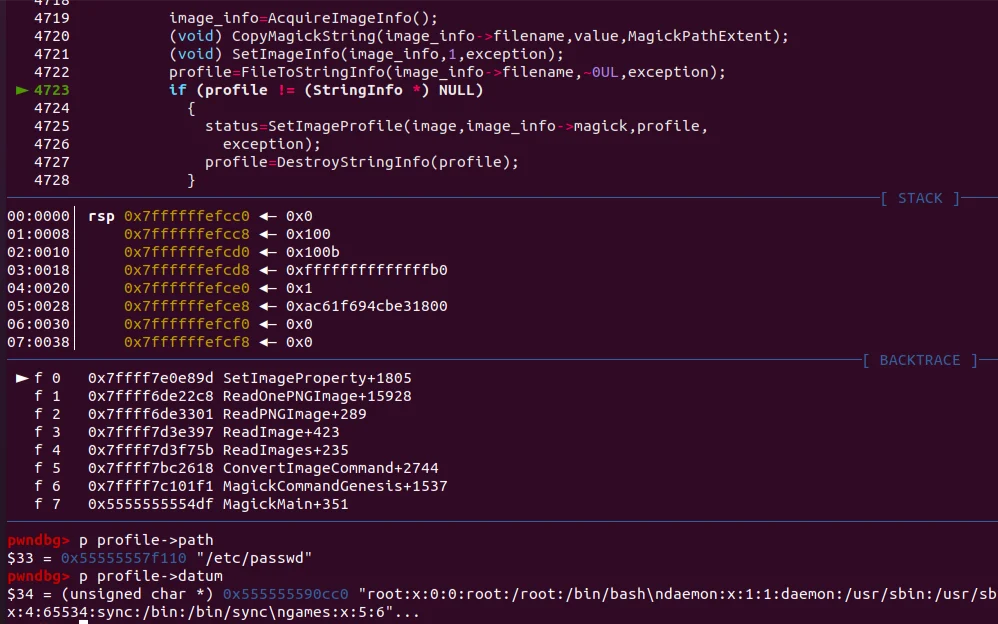
The content of /etc/passwd is stored in the image via the profile->datum variable:
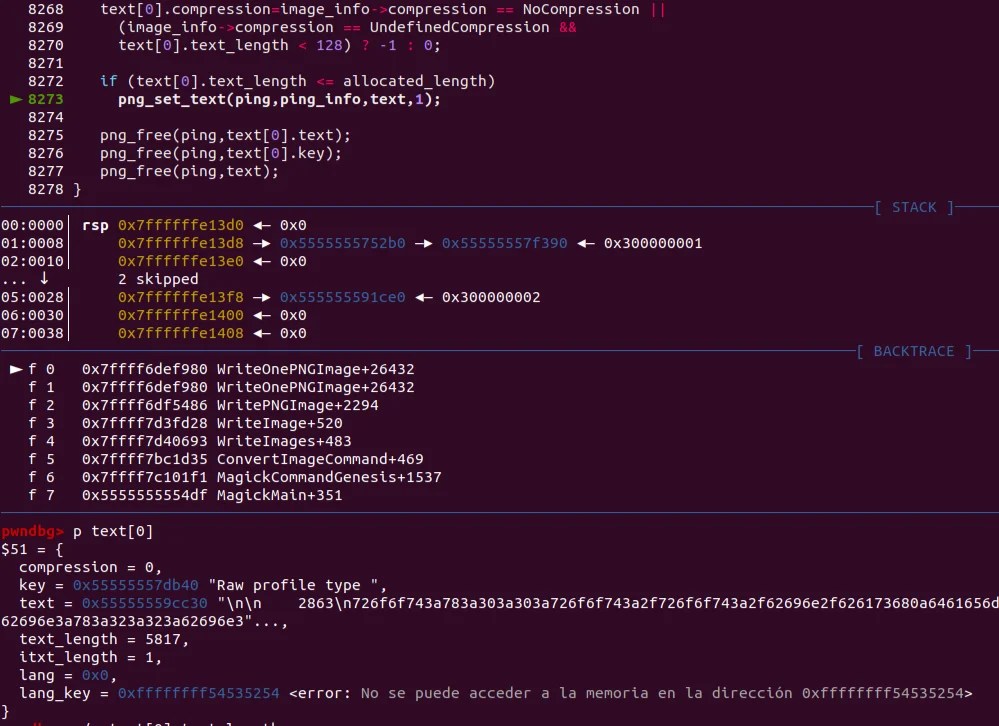
The hexadecimal representation of the /etc/passwd content, extracted from the image:
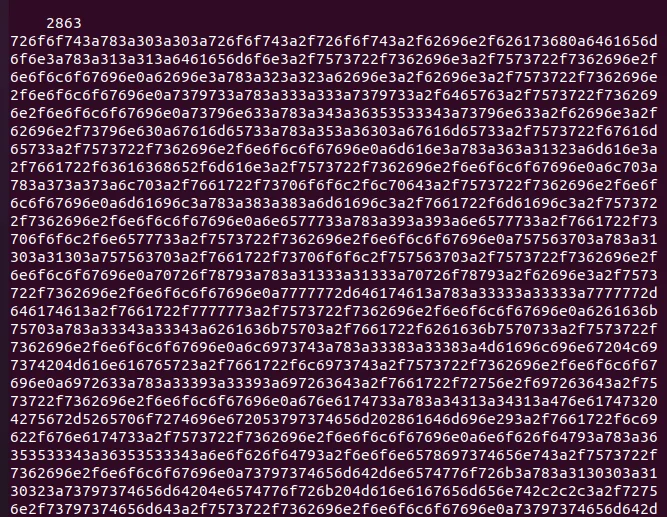
The content from /etc/passwd as received in the generated image on the website:

The video shows the exploitation:
Root cause
The flaw is in how ImageMagick treats a PNG tEXt chunk whose keyword is profile. The text string of the chunk is taken as a filename and its content is loaded as a raw profile, with no restriction on which path can be named. A filename of - is interpreted as standard input, so the process blocks waiting for data that never arrives. A real path is read and the bytes are written into the profile of the output image, which the attacker can retrieve.
Impact
For CVE-2022-44267, the impact is denial of service: the convert process can be left waiting for stdin input and will not be able to process other images. For CVE-2022-44268, the impact is information disclosure: the resulting image can carry the content of an arbitrary remote file from the website, provided the ImageMagick binary has permissions to read it. In both cases the attacker only needs to be able to upload an image to a site that processes it with ImageMagick.
Fix
ImageMagick released patches for both issues; the write-up points to commit [redacted]. The write-up does not describe the contents of the patch.
Variants to test
- Other textual chunk types. The write-up names
tEXtas an example. Try other textual chunk types that carry a keyword and a text string, with the keywordprofile. A positive result is the same behaviour: the process blocks on-, or a readable path is embedded in the output image. - Other image formats with profile support. ImageMagick reads and writes over 200 formats. Test formats that can carry a named profile and see whether a profile name is treated as a filename. A positive result is file content appearing in the converted output.
- Different target files. The PoC reads
/etc/passwd. Try other paths the ImageMagick binary can read, such as application configuration files. A positive result is the file content appearing in the downloaded image. - The dash filename against other pipelines. Upload an image whose profile filename is
-to any endpoint that runsconvert. A positive result is a worker or request that hangs and stops processing further images. - Resize and thumbnail endpoints. The write-up gives the resize operation as an example trigger. Test upload features that resize or thumbnail images and check whether the returned image contains unexpected data.
What happened, in plain words
Imagine a website that lets you upload a picture for your profile. Behind the scenes, the website does not just store your picture: it opens it, shrinks it to a small size, and saves the result. To do that shrinking, many websites use a free piece of software called ImageMagick. ImageMagick is a program that reads, converts and edits images, and it understands more than 200 different image file formats. Because it is free and so widely compatible, it sits behind a huge number of websites that need to handle pictures: profile photos, product catalogues, and so on.
A security team called Ocelot, with Bryan Gonzalez, was working on a simulated attack engagement (an APT simulation, where a team pretends to be a real attacker to test defences). During that work they noticed that a website built with Drupal (a popular system for building websites) was using ImageMagick to process uploaded images. That made them curious: what happens if you feed ImageMagick a deliberately strange image? They downloaded the newest version at the time, ImageMagick 7.1.0-49, and started experimenting.
They found two previously unknown bugs, which are called zero days because the software makers did not know about them before the researchers found them. Each bug got an official tracking number, a CVE:
- CVE-2022-44267: a Denial of Service bug. When ImageMagick opens a specially built PNG image (for example to resize it), the conversion process can end up waiting forever for input that never arrives. A process stuck like that cannot do its normal work, so the website stops being able to process other images.
- CVE-2022-44268: an Information Disclosure bug. When ImageMagick opens a specially built PNG image (for example to resize it), the resulting image can end up containing the contents of a file from the server, if the ImageMagick program is allowed to read that file. The attacker then downloads the resized image and reads the stolen file out of it.
In both cases the attacker only needs one thing: the ability to upload an image to a website that processes it with ImageMagick. No password, no special access, just the ability to upload an image to a site that processes it with ImageMagick.
The volunteers of ImageMagick validated both problems and released the patches in a timely manner. The fix is recorded in a public code change (a commit) at https://github.com/ImageMagick/ImageMagick/commit/[redacted].
Below, we walk through both bugs from scratch, including the exact bytes of the malicious images and the parts of the ImageMagick source code that the team inspected.
Background you need first
Before the details make sense, a few ideas need to be clear.
What is a PNG file? A PNG is one of the common formats for pictures on the web. Unlike a simple grid of coloured dots, a PNG file is organised into labelled blocks called chunks. Most chunks hold the picture data itself, but some chunks are there to carry extra text information, such as a title or a comment. These text-carrying chunks are called textual chunks, and one common type is called tEXt.
What is inside a tEXt chunk? A tEXt chunk holds two pieces of text: a keyword (a short label, like a name tag) and a text string (the value that goes with the label). Think of it like a luggage tag: the keyword is the name written on the tag, and the text string is the address written underneath.
What is a profile? In image software, a profile is extra data attached to an image, separate from the pixels. Colour profiles are the usual example: they tell a screen how to display the colours correctly. ImageMagick lets you attach a profile to an image, and it lets you load a profile from a file.
The design decision at the heart of both bugs. ImageMagick has a rule: if a tEXt chunk's keyword is the word profile (without quotes), then ImageMagick treats the chunk's text string as a filename and loads the contents of that file as a raw profile. In other words, the text inside the image is not treated as harmless text; it is treated as an instruction saying "go and read this file from the server's disk".
That single rule is what both vulnerabilities hang on:
- If the filename is
-(a single dash), ImageMagick tries to read the content from standard input. Standard input is the stream of data a program receives when someone types into it or pipes data into it. If nothing is being typed or piped, the program sits there waiting, potentially forever. - If the filename is a real path to a file the program can read, the file's content gets loaded as a profile and ends up embedded in the image ImageMagick produces. The attacker downloads that image and reads the file out of it.
What is convert? convert is the name of the ImageMagick command-line program that performs conversions and resizes. When a website resizes your upload, it is typically running something like convert behind the scenes.
What is a proof of concept (PoC)? A PoC is a small, concrete demonstration that a bug is real: the smallest input that reliably triggers the problem. In this case, the PoCs are short strings of hexadecimal bytes that, when written to a file, form a valid PNG image with a malicious tEXt chunk inside.
The setup
The testing was done against ImageMagick 7.1.0-49, the latest version at the time of the research. The real-world context was a Drupal-based website that used ImageMagick to process uploaded images. Nothing beyond the ability to upload an image and trigger a conversion is described: no accounts, no special roles, no special tooling.
CVE-2022-44267: the denial of service
What the bug is
When ImageMagick parses a PNG file, for example in a resize operation when receiving an image, the convert process can be left waiting for standard input. That leads to a denial of service, because the process will not be able to process other images.
A malicious actor can craft a PNG, or take an existing one, and add a textual chunk type such as tEXt whose keyword is profile and whose text string is -. ImageMagick then tries to read the content from standard input, potentially leaving the process waiting forever.
A useful comparison: imagine a shop assistant who is told "the next customer will tell you what to do". If no customer ever arrives, the assistant stands at the counter forever and serves nobody else. That is exactly what happens to the conversion process: it is told to read from standard input, nothing ever comes, and it never gets back to its other work.
Following the code, step by step
The team traced exactly which functions in the ImageMagick source code handle the malicious chunk. The execution path is:
- Upload an image to trigger an ImageMagick command such as
convert. ReadOnePNGImage(coders/png.c:2164) reads thetEXtchunk.
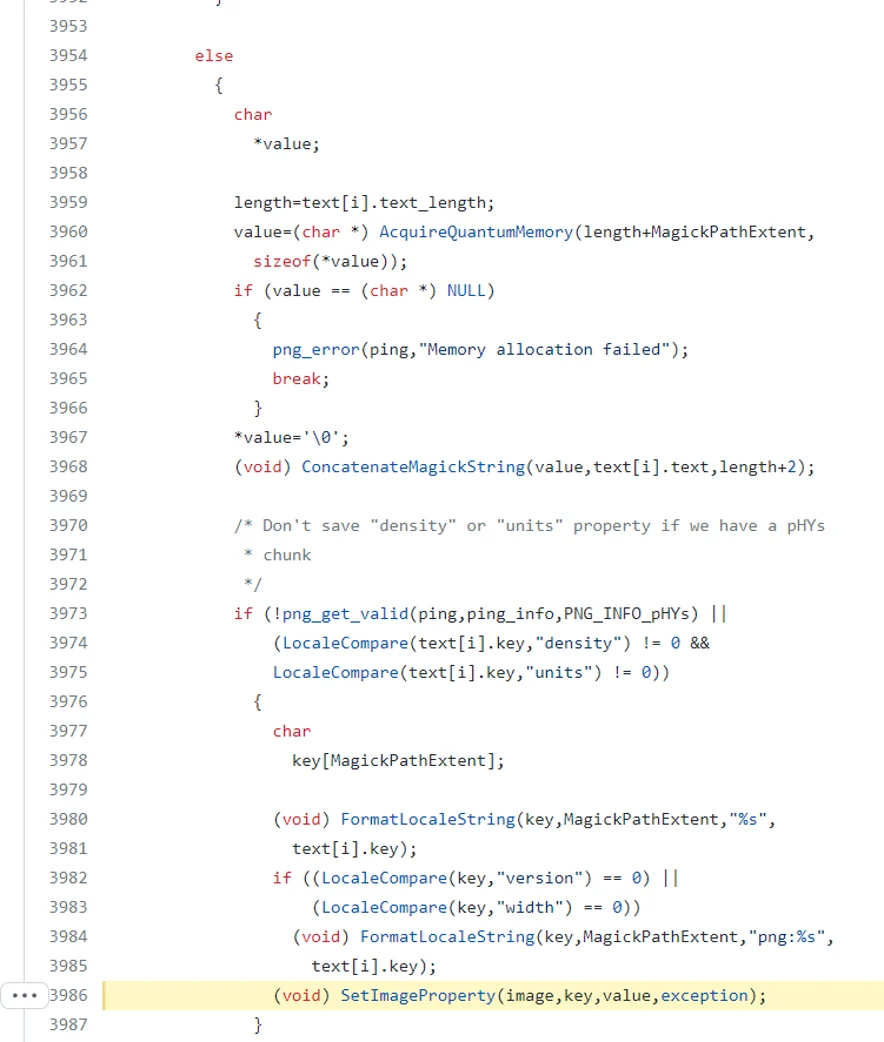
The first screenshot shows the function ReadOnePNGImage in the file coders/png.c, at line 2164. This is the part of ImageMagick that opens a PNG and walks through its chunks. The second screenshot zooms in on the reading of the tEXt chunk: this is where the keyword and the text string are pulled out of the file. This step matters because it is the entry point: everything that follows happens because this code accepted the chunk from the uploaded image.
SetImageProfile(MagickCore/property.c:4360) is reached.
This screenshot shows the function SetImageProfile in MagickCore/property.c at line 4360. Having read the chunk, ImageMagick now passes the keyword and text string to the code that deals with profiles. The name of the function tells you the intent: it is meant to attach a profile to an image.
- The code checks whether the keyword equals
profile.
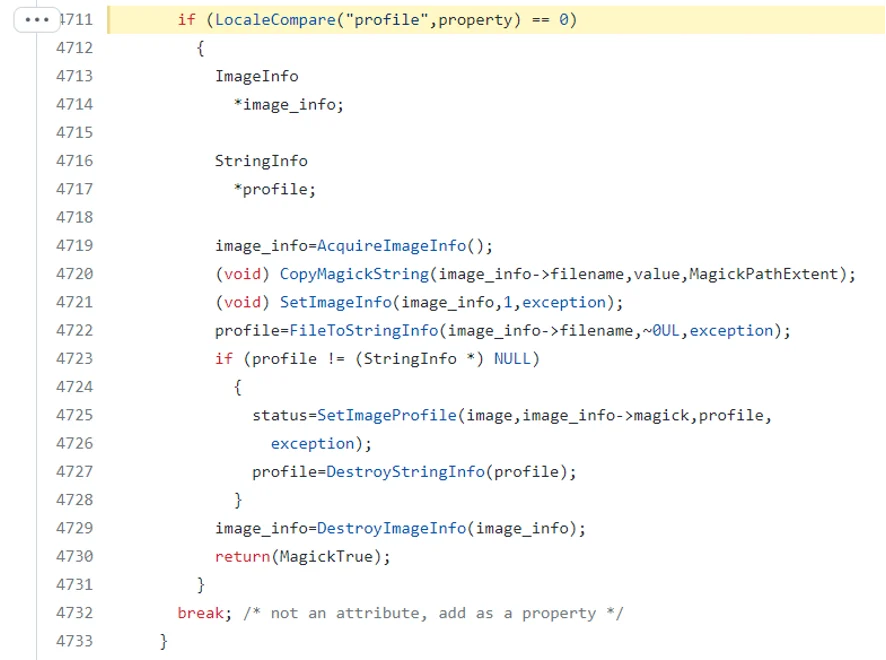
Here you can see the comparison: is the keyword the word profile? If yes, the special handling kicks in. This is the branch that turns ordinary text into a filename instruction, and it is the reason the keyword matters so much.
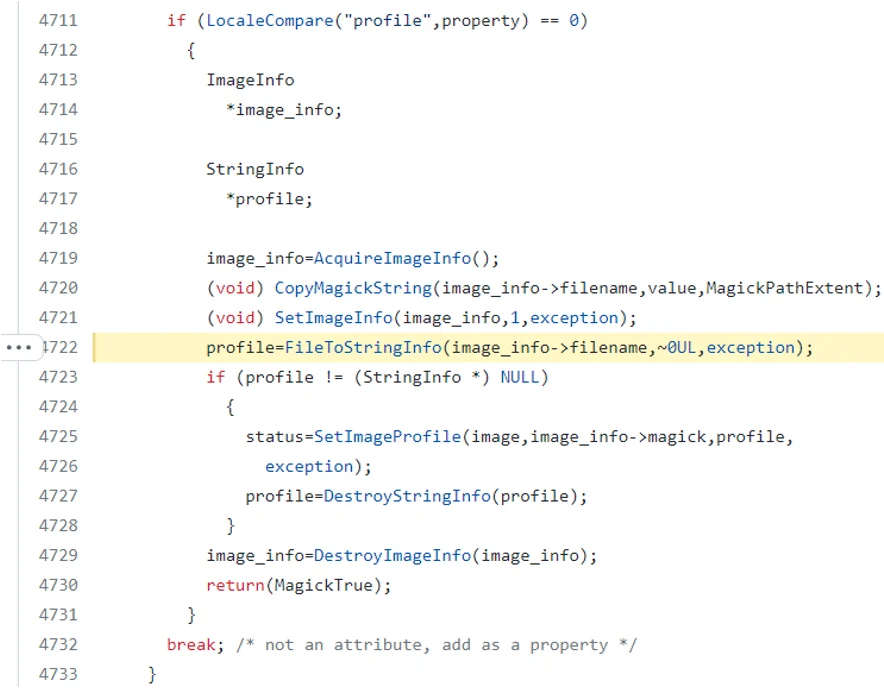
- The text string is copied as a filename in line 4720 and the content is saved in line 4722.
The screenshot shows two lines of code. Line 4720 takes the text string from the chunk and treats it as a filename. Line 4722 saves the content that was read. In plain words: the text inside the image becomes a path on the server's disk, and whatever is at that path gets read.
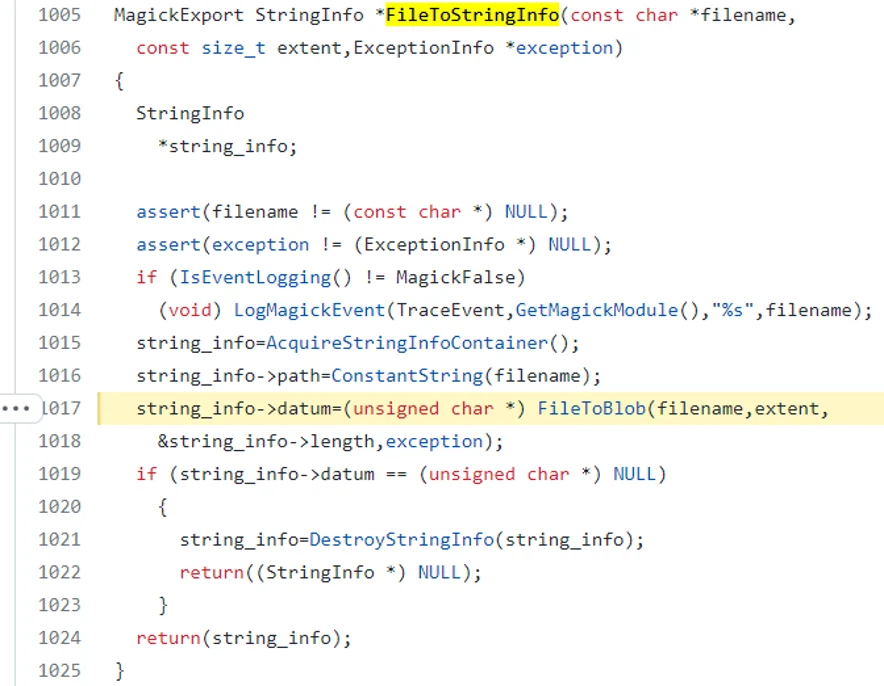
FileToStringInfostores the content intostring_info->datum(MagickCore/string.c:1005).
This screenshot shows FileToStringInfo in MagickCore/string.c at line 1005. A string here just means a piece of text or a run of bytes held in memory. The function reads the file and stores its content in a field called string_info->datum. Think of datum as a box where the file's bytes are placed so the rest of the program can use them.
FileToBlob(MagickCore/blob.c:1396) assigns stdin to a filename of-, causing the process to wait for input forever.
These two screenshots show FileToBlob in MagickCore/blob.c at line 1396. A blob is simply a lump of binary data. The key detail is the special meaning of the filename -: ImageMagick maps it to standard input. Because the malicious image names - as its "file", the program starts reading from standard input, and since nothing is being sent there, it waits. And waits.
The proof of concept
The proof-of-concept PNG is:
[redacted]
This long string is the image written in hexadecimal, a way of writing bytes using two characters per byte. If you save these characters as raw bytes into a file, you get a tiny but valid PNG. Reading it from left to right:
89504E470D0A1A0Ais the PNG signature, the fixed marker that tells every program "this is a PNG".- The next parts describe a one-pixel image: its header, its pixel data, and the markers that end each block.
74455874spellstEXtin hexadecimal. This is the malicious chunk.70726F66696C65spellsprofile: the keyword that triggers the special handling.2Dis a single dash, the filename that means standard input.49454E44AE426082is the end-of-file marker.
So the whole file is a perfectly ordinary one-pixel picture with one extra luggage tag attached, and that tag says "read from standard input".
The screenshot shows the malicious PNG bytes as they appear in the analysis.
The malicious image file used as evidence is OCELOT_output.png.
This screenshot shows the file OCELOT_output.png, the crafted image used in the test.
With that file processed, standard input waits forever:
This screenshot is the evidence of the hang: the process is stuck waiting for input that never comes. On a website, that means one worker is tied up and cannot serve other uploads, which is the denial of service.
CVE-2022-44268: reading files you should not see
What the bug is
When ImageMagick parses the PNG file, for example in a resize operation, the resulting image can have embedded the content of an arbitrary remote file from the website, if the magick binary has permissions to read it.
Again, the attacker crafts a PNG, or reuses an existing one, and adds a textual chunk type such as tEXt with the keyword profile. ImageMagick interprets the text string as a filename and loads the content as a raw profile. The attacker can then download the resized image, which comes with the content of the remote file inside it.
A comparison helps here. Imagine a photocopier that is asked to "add the document in cabinet 3 as a cover page". If the copier has the key to cabinet 3, it will happily copy that document into the output. The attacker never opens the cabinet; they just collect the photocopy. In the same way, the attacker never logs into the server; they upload an image that names a file, and the server's own image processing copies that file into the picture the attacker downloads.
Following the code, step by step
The execution path is:
The first screenshot shows ReadOnePNGImage in coders/png.c at line 2164, the same entry point as before. The second zooms in on the reading of the tEXt chunk, where the keyword and text string are extracted from the uploaded file. The difference from the first bug is only in what the text string contains: a real file path instead of a dash.
This screenshot shows SetImageProfile in MagickCore/property.c at line 4360, the function that handles profiles on an image.
Here is the same comparison as before: is the keyword profile? If so, the text string is treated as a filename. This is the check that makes the attack possible.
The screenshot shows the text string being used as a filename (line 4720) and the content being saved (line 4722). The attacker's chosen path, such as /etc/passwd, becomes the file that ImageMagick reads.
This screenshot shows FileToStringInfo in MagickCore/string.c at line 1005, storing the file's bytes into string_info->datum. The file has now been read into memory.
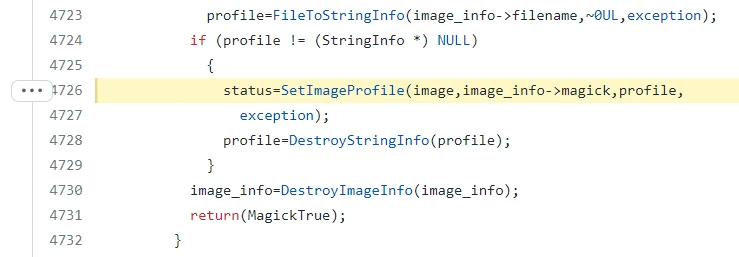
- If a valid and accessible filename is provided, the content is returned to the caller function (
FileToStringInfo) and theStringInfoobject returns to theSetImagePropertyfunction, saving the blob into the new image generated, thanks to the functionSetImageProfile.
This screenshot shows the final step: the bytes that were read are handed back up the chain and written into the new image that ImageMagick produces. A caller function is simply the function that asked for the work to be done; here, the reading function returns its result to the code that requested it. The result is that the resized image now carries the stolen file's content inside it.
That new image is then available for the attacker to download, with the arbitrary website file content embedded inside.
The proof of concept
The proof-of-concept PNG content to leak /etc/passwd is:
[redacted]
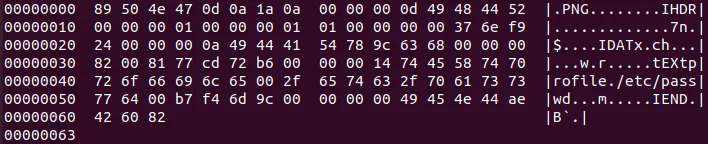
Again this is a PNG written in hexadecimal. The structure is the same as the first PoC: the PNG signature, a one-pixel image, and a tEXt chunk. The difference is in the chunk's text string. 74455874 is tEXt, 70726F66696C65 is profile, and then 2F6574632F706173737764 spells /etc/passwd, the path of the file to be read. /etc/passwd is a standard file on Linux systems that lists user accounts; it is a classic target because it is usually readable by every program and proves that file reading works.
The screenshot shows the malicious PNG bytes for the file-reading version.
The content of /etc/passwd is stored in the image via the profile->datum variable:
These screenshots show the file's content sitting in the profile->datum field of the image in memory. datum is the box where the bytes were placed earlier; here you can see the box now holds the contents of the server's file.
The hexadecimal representation of the /etc/passwd content, extracted from the image:
This screenshot shows the stolen content written out as hexadecimal, the same two-characters-per-byte notation used for the PNG itself. It is the proof that the bytes inside the image really are the file's bytes.
The content from /etc/passwd as received in the generated image on the website:
This screenshot shows the end result from the attacker's point of view: the image that the website generated and returned contains the server's file content. The attacker downloaded a picture and got a file listing with it.
The video shows the exploitation:
Why it works
The flaw is in how ImageMagick treats a PNG tEXt chunk whose keyword is profile. The text string of the chunk is taken as a filename and its content is loaded as a raw profile, with no restriction on which path can be named. A filename of - is interpreted as standard input, so the process blocks waiting for data that never arrives. A real path is read and the bytes are written into the profile of the output image, which the attacker can retrieve.
What the impact is
For CVE-2022-44267, the impact is denial of service: the convert process can be left waiting for standard input and will not be able to process other images. For CVE-2022-44268, the impact is information disclosure: the resulting image can carry the content of an arbitrary remote file from the website, provided the ImageMagick binary has permissions to read it. In both cases the attacker only needs to be able to upload an image to a site that processes it with ImageMagick.
The fix
ImageMagick released patches for both issues; the write-up points to commit [redacted]. The write-up does not describe the contents of the patch.
Other things worth testing
If you want to explore the same idea further, these are some directions to try:
- Other textual chunk types. The write-up names
tEXtas an example. Try other textual chunk types that carry a keyword and a text string, with the keywordprofile. A positive result is the same behaviour: the process blocks on-, or a readable path is embedded in the output image. - Other image formats with profile support. ImageMagick reads and writes over 200 formats. Test formats that can carry a named profile and see whether a profile name is treated as a filename. A positive result is file content appearing in the converted output.
- Different target files. The PoC reads
/etc/passwd. Try other paths the ImageMagick binary can read, such as application configuration files. A positive result is the file content appearing in the downloaded image. - The dash filename against other pipelines. Upload an image whose profile filename is
-to any endpoint that runsconvert. A positive result is a worker or request that hangs and stops processing further images. - Resize and thumbnail endpoints. The write-up gives the resize operation as an example trigger. Test upload features that resize or thumbnail images and check whether the returned image contains unexpected data.
Glossary
- APT simulation: an exercise in which a security team pretends to be a real attacker, to test how well an organisation's defences hold up.
- Blob: a lump of binary data handled as a single unit by a program.
- Caller function: the function that asks another function to do some work and receives its result.
- Chunk: a labelled block inside a PNG file; some chunks hold picture data, others hold text.
- Commit: a recorded change to a software project's source code, usually public and identified by a long code.
convert: the ImageMagick command-line program that converts and resizes images.- CVE: a public identifier for a known security vulnerability, so people can refer to it unambiguously.
- Denial of service (DoS): a bug or attack that stops a service from doing its normal work, for example by making a process wait forever.
- Drupal: a free system for building and running websites.
- Hexadecimal: a way of writing bytes using two characters per byte, from
00toFF. - ImageMagick: a free, open-source suite for displaying, converting and editing images, supporting over 200 formats.
- Information disclosure: a bug that lets someone see data they should not be able to see, such as files on a server.
- Keyword: the short label part of a textual chunk, paired with a text string.
- PNG: a common image file format organised into labelled chunks.
- Proof of concept (PoC): a small concrete input that demonstrates a bug really works.
- Profile: extra data attached to an image, separate from the pixels, such as colour information.
- Standard input (stdin): the stream of data a program receives when someone types into it or pipes data into it.
- String: a piece of text or a run of bytes held in memory.
- Text string: the value part of a textual chunk, paired with a keyword.
- Textual chunk: a PNG chunk that carries text rather than picture data;
tEXtis one type. - Zero day: a vulnerability that was not known to the software's makers before researchers found it.




