Cross-site Scripting (XSS) - DOM - iqcard.informatica.com
A page on the site took the query string from the URL and passed it straight into a client-side redirect call, so a crafted link could send visitors to another site or run script in the page's origin. An attacker could use this to redirect users, run script against them, or use the trusted domain for phishing.

- Disclosed after 3 days
Summary by the program
Researcher identified an aged DNS A record pointing to an IP address not owned by Informatica. Analysis showed that the DNS record was not in use for some time and was removed.
The report
Hello all
I found a DOM based XSS at iqcard.informatica.com
Description
After finding the path iqcard.informatica.com/pub/fujitsu/fm3v2/player/attach.html. I noticed that the code inside attach.html was vulnerable to DOM XSS, due to the fact of the javascript document.location function. search. The code below illustrates the code contained in the attach.html file
<HTML>
<HEAD>
<SCRIPT>
function GetAttach()
{
	var strSearch = document.location.search
	strSearch = strSearch.substring(1)

	document.location.replace(strSearch)
}
</SCRIPT>
</HEAD>
<BODY onload='GetAttach()'>


</BODY>
</HTML>
As can be seen through the code above, the variable * strSearch * receives everything that comes from the URL after the character? and then insert it into the function document.location.replace (). Through this scenario we have some possibilities.
1 - We can direct the user to any page we want for example:
https://iqcard.informatica.com/pub/fujitsu/fm3v2/player/attach.html?evil.com
2 - We can run a DOM Based XSS, running the javascript schema, javascript: alert (1);
https://iqcard.informatica.com/pub/fujitsu/fm3v2/player/attach.html?javascript:alert(1)
PoC
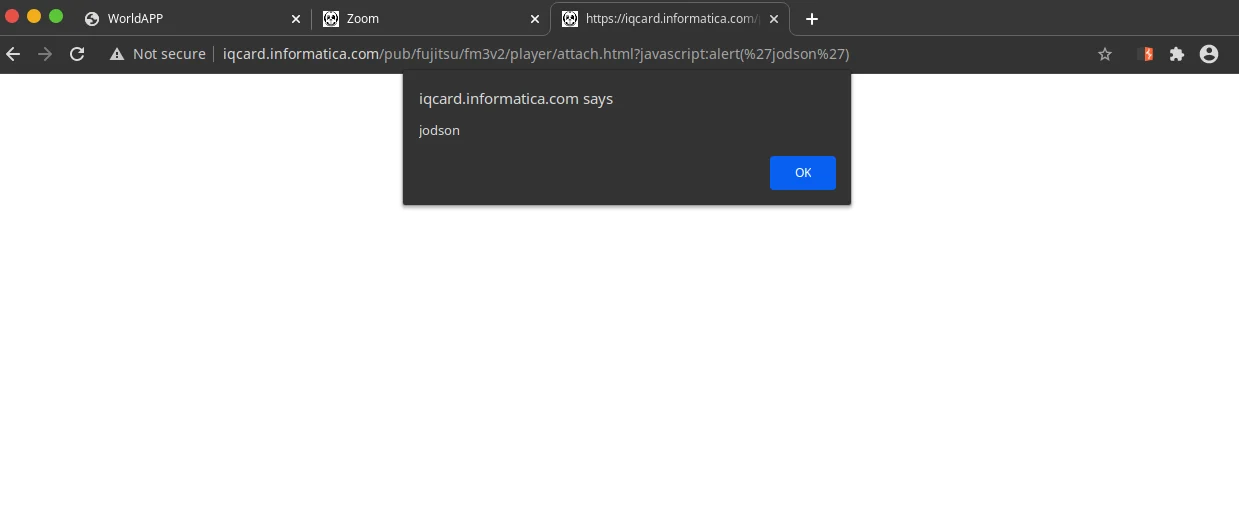
I uploaded a video and an image.
Impact
An attacker can redirect a user to a malicious page or execute XSS attacks against users of the application or use that domain as a phishing vector to attack other users of informatica.com
Attachments
Context
The target is iqcard.informatica.com, a host in the Informatica estate. The researcher found a page at the path iqcard.informatica.com/pub/fujitsu/fm3v2/player/attach.html. The page is a small HTML document whose only job is to take the query string of the URL it was loaded with and navigate the browser to it. In other words, it is a redirector: whatever follows the ? in the request becomes the new location of the page.
That behaviour is implemented entirely in client-side JavaScript, which is why the weakness is classified as a DOM-based cross-site scripting issue rather than a server-side one. The program's own summary adds a separate piece of context: the researcher identified an aged DNS A record pointing to an IP address not owned by Informatica. Analysis showed that the DNS record had not been in use for some time and was removed.
Setup
No accounts, roles, tools or versions are described. The finding needs nothing beyond a browser and the ability to load a URL with a query string, because the vulnerable logic runs in the page itself. The only precondition is that the attach.html page is reachable on the host.
Finding it
After locating the path iqcard.informatica.com/pub/fujitsu/fm3v2/player/attach.html, the researcher read the code inside attach.html and noticed it was vulnerable to DOM XSS because of the use of the JavaScript document.location function together with search. The full contents of the file, as quoted in the report, are:
<HTML>
<HEAD>
<SCRIPT>
function GetAttach()
{
	var strSearch = document.location.search
	strSearch = strSearch.substring(1)

	document.location.replace(strSearch)
}
</SCRIPT>
</HEAD>
<BODY onload='GetAttach()'>

</BODY>
</HTML>
The flow is short and easy to follow. GetAttach() runs automatically because it is bound to the onload event of the body. It reads document.location.search, which is everything in the URL from the ? onwards, and strips the leading ? with substring(1). The remaining string is passed straight to document.location.replace(), which navigates the browser to it. There is no validation, no allow-list of destinations and no encoding step between the URL and the navigation sink.
Exploitation
Because the value that reaches document.location.replace() is fully attacker-controlled through the query string, the researcher describes two possibilities.
Step 1: Redirect the user to an arbitrary page
The first possibility is to direct the user to any page the attacker wants, for example:
https://iqcard.informatica.com/pub/fujitsu/fm3v2/player/attach.html?evil.com
Here the query string is evil.com; after substring(1) removes the ?, the page calls document.location.replace('evil.com') and the browser leaves iqcard.informatica.com for the attacker's destination.
Step 2: Run JavaScript through the javascript: scheme
The second possibility is to run a DOM-based XSS by supplying a javascript: URL as the query string:
https://iqcard.informatica.com/pub/fujitsu/fm3v2/player/attach.html?javascript:alert(1)
After the leading ? is stripped, the string handed to document.location.replace() is javascript:alert(1), so the browser executes the script in the context of the iqcard.informatica.com origin instead of navigating away.
Proof of concept
The researcher uploaded a video and an image as evidence.
Root cause
The mistake is a classic DOM sink: a value taken from the URL (document.location.search) is passed to a navigation sink (document.location.replace()) without any check on its scheme or destination. The page treats the query string as a trusted redirect target, but the query string is entirely under the control of whoever crafts the link. Nothing in the quoted code constrains the value to a relative path or to an http/https URL, so both an off-site redirect and a javascript: payload are accepted. The report does not describe any server-side or browser-level defence that was in place; the vulnerability follows directly from the code shown.
Impact
In the researcher's words, an attacker can redirect a user to a malicious page, execute XSS attacks against users of the application, or use that domain as a phishing vector to attack other users of informatica.com. The XSS runs in the origin of iqcard.informatica.com, so script delivered this way executes with that origin's privileges. The redirect variant needs the victim to open a crafted link; the report does not discuss any further conditions.
Fix
The program's summary states that the aged DNS A record pointing to an IP address not owned by Informatica was analysed, found not to have been in use for some time, and removed. The report does not describe any change to attach.html itself.
Variants to test
- Look for other pages that read
document.location.search,document.location.hashordocument.location.hrefand pass the result todocument.location.replace(),document.location.assign(),window.open()or anhrefassignment. A positive result is a crafted query string or fragment that changes the destination or executes script. - Try scheme-based payloads such as
javascript:in any parameter that ends up in a navigation sink. A positive result is script execution in the target origin rather than a navigation. - Try off-site destinations in redirect-style parameters. A positive result is the browser leaving the target host for an attacker-chosen domain.
- Check whether the same redirector pattern exists on other hosts under the same parent domain, since a redirect on a trusted domain is useful for phishing even without script execution.
Hunting notes
This kind of bug hides in small utility pages: attachment viewers, player wrappers, download helpers and anything with a name like attach.html, redirect, player or goto. During recon, the signal is a page whose only visible behaviour is to bounce the browser somewhere else, especially when the destination appears in the query string. Reading the client-side source is usually enough, because the sink and the source sit a few lines apart, as they do here. The researcher demonstrated impact with two concrete URLs, one showing an arbitrary redirect and one showing javascript:alert(1), plus a screenshot and a video, which makes the behaviour easy for a triager to reproduce without any special setup.
What happened, in plain words
A security researcher found a small web page on an Informatica website that would send your browser wherever the link told it to go. If someone sent you a link to that page with a destination hidden in the link, the page would obediently forward you there. That is handy for an attacker in two ways: they can bounce you to a fake login page, or they can make the page run a tiny piece of JavaScript (the programming language that web pages use to make things happen in your browser) that the attacker wrote.
The page lives at iqcard.informatica.com/pub/fujitsu/fm3v2/player/attach.html. Its only job is to take the part of the address that comes after the question mark and use it as the new address to visit. Because that part of the address is fully controlled by whoever writes the link, the page can be made to do things its authors never intended.
This kind of bug is called DOM-based cross-site scripting, or DOM XSS. "DOM" stands for Document Object Model, the browser's internal model of the page. "Cross-site scripting" means an attacker gets their own code to run inside a page that belongs to someone else's website, so the browser treats that code as if the website itself had written it. "DOM-based" means the problem happens entirely inside the browser, in the page's own JavaScript, rather than on the server that sent the page.
The program's own summary adds a separate detail: the researcher also identified an old DNS A record pointing to an IP address that Informatica did not own. DNS is the internet's address book: it translates a name like iqcard.informatica.com into a numeric IP address. An A record is one of those name-to-address entries. Analysis showed the record had not been in use for some time and it was removed.
The page and why it matters
The target is iqcard.informatica.com, a host in the Informatica estate. The researcher found a page at the path iqcard.informatica.com/pub/fujitsu/fm3v2/player/attach.html. The page is a small HTML document (HTML is the language web pages are written in) whose only job is to take the query string of the URL it was loaded with and navigate the browser to it.
The query string is the part of a web address that starts with a question mark. In example.com/page?colour=blue, the query string is ?colour=blue. Websites use it to pass small pieces of information from one page to another. Here, the page treats that whole string as a destination address.
In other words, the page is a redirector: whatever follows the ? in the request becomes the new location of the page. A redirector is like a receptionist who, instead of giving you directions themselves, reads the note you hand them and sends you to whatever address is written on it. If anyone can write the note, anyone can choose where you end up.
That behaviour is implemented entirely in client-side JavaScript, meaning the code runs in your browser rather than on Informatica's server. That is why the weakness is classified as a DOM-based cross-site scripting issue rather than a server-side one. A server-side bug would be one where the server itself builds the dangerous response; here the server just hands over a page, and the page's own script does the damage.
What you need to try it
No accounts, roles, tools or versions are described. The finding needs nothing beyond a browser and the ability to load a URL with a query string, because the vulnerable logic runs in the page itself. The only precondition is that the attach.html page is reachable on the host.
Finding it
After locating the path iqcard.informatica.com/pub/fujitsu/fm3v2/player/attach.html, the researcher read the code inside attach.html and noticed it was vulnerable to DOM XSS because of the use of the JavaScript document.location function together with search.
document.location is the browser's built-in object that describes the current address. Its search property holds everything from the ? onwards. Reading the page's source is like reading the instructions a machine follows: if you can see the instructions, you can see what input they trust.
The full contents of the file, as quoted in the report, are:
<HTML>
<HEAD>
<SCRIPT>
function GetAttach()
{
	var strSearch = document.location.search
	strSearch = strSearch.substring(1)

	document.location.replace(strSearch)
}
</SCRIPT>
</HEAD>
<BODY onload='GetAttach()'>

</BODY>
</HTML>
Line by line, in plain words:
<HTML>,<HEAD>,<SCRIPT>and the closing tags are the page's skeleton. They tell the browser that what follows is a web page and that a script is starting.function GetAttach()defines a named block of instructions calledGetAttach. Nothing runs yet; the block is just being described.var strSearch = document.location.searchcreates a variable (a named box for holding a value) calledstrSearchand puts the URL's query string into it, question mark included.strSearch = strSearch.substring(1)takes that value and drops its first character, which is the?.substring(1)means "give me everything from position 1 onwards", and positions start at 0, so position 1 is the second character.document.location.replace(strSearch)tells the browser to navigate to whatever is now instrSearch, replacing the current page in the browser's history, so the back button does not return to it.<BODY onload='GetAttach()'>means "when the page has finished loading, runGetAttach". That is why the function runs automatically as soon as you open the page.
The flow is short and easy to follow. GetAttach() runs automatically because it is bound to the onload event of the body. It reads document.location.search, which is everything in the URL from the ? onwards, and strips the leading ? with substring(1). The remaining string is passed straight to document.location.replace(), which navigates the browser to it. There is no validation, no allow-list of destinations and no encoding step between the URL and the navigation sink.
A "sink" is the place where a value finally gets used in a way that matters, here the navigation. An "allow-list" is a list of things that are permitted, with everything else refused. "Encoding" means transforming special characters so they cannot be interpreted as instructions. None of those protections is present.
Trying it out
Because the value that reaches document.location.replace() is fully controlled through the query string, the researcher describes two possibilities.
Step 1: Send the user to any page
The first possibility is to direct the user to any page the attacker wants, for example:
https://iqcard.informatica.com/pub/fujitsu/fm3v2/player/attach.html?evil.com
Here the query string is evil.com; after substring(1) removes the ?, the page calls document.location.replace('evil.com') and the browser leaves iqcard.informatica.com for the attacker's destination.
Why does this matter? A link that starts with a trusted name such as iqcard.informatica.com looks reassuring. A victim who checks only the beginning of the address will not notice where they actually end up. That is the basis of phishing: tricking someone into trusting a link because part of it looks familiar.
Step 2: Run JavaScript through the javascript: scheme
The second possibility is to run a DOM-based XSS by supplying a javascript: URL as the query string:
https://iqcard.informatica.com/pub/fujitsu/fm3v2/player/attach.html?javascript:alert(1)
A URL's "scheme" is the part before the colon that says what kind of address it is: https means a normal web page, mailto means an email address, and javascript means "run the code that follows". Browsers accept javascript: addresses in many places where a normal link is expected.
After the leading ? is stripped, the string handed to document.location.replace() is javascript:alert(1), so the browser executes the script in the context of the iqcard.informatica.com origin instead of navigating away. alert(1) is the simplest possible demonstration: it makes the browser show a small pop-up box containing the number 1. It does nothing harmful by itself; it is used because it is unmistakable proof that code chosen by the attacker actually ran.
An "origin" is the combination of scheme, host and port that the browser uses to decide which site a page belongs to. Code running in the iqcard.informatica.com origin is treated by the browser as if Informatica had written it, which is why this is more serious than a plain redirect.
Proof of concept
The researcher uploaded a video and an image as evidence.
Why it happens
The mistake is a classic DOM sink: a value taken from the URL (document.location.search) is passed to a navigation sink (document.location.replace()) without any check on its scheme or destination. The page treats the query string as a trusted redirect target, but the query string is entirely under the control of whoever crafts the link. Nothing in the quoted code constrains the value to a relative path or to an http/https URL, so both an off-site redirect and a javascript: payload are accepted. The report does not describe any server-side or browser-level defence that was in place; the vulnerability follows directly from the code shown.
A useful comparison is a form at a hotel reception where a guest writes their own room number. If nobody checks the number against the guest list, anyone can write any room and be sent there. The page here is the receptionist, the query string is the handwritten note, and there is no guest list.
What an attacker could do
In the researcher's words, an attacker can redirect a user to a malicious page, execute XSS attacks against users of the application, or use that domain as a phishing vector to attack other users of informatica.com. The XSS runs in the origin of iqcard.informatica.com, so script delivered this way executes with that origin's privileges. The redirect variant needs the victim to open a crafted link; the report does not discuss any further conditions.
"Privileges" here means the trust the browser gives to that origin: access to things the site is allowed to see, such as cookies for that domain. A cookie is a small piece of data a website stores in your browser, often used to remember that you are logged in. Script running in the site's origin can act with the same trust the site itself has.
How it was addressed
The program's summary states that the aged DNS A record pointing to an IP address not owned by Informatica was analysed, found not to have been in use for some time, and removed. The report does not describe any change to attach.html itself.
Similar things to look for
- Look for other pages that read
document.location.search,document.location.hashordocument.location.hrefand pass the result todocument.location.replace(),document.location.assign(),window.open()or anhrefassignment. Thehashis the part of a URL after a#, andhrefis the full address. A positive result is a crafted query string or fragment that changes the destination or executes script. - Try scheme-based payloads such as
javascript:in any parameter that ends up in a navigation sink. A positive result is script execution in the target origin rather than a navigation. - Try off-site destinations in redirect-style parameters. A positive result is the browser leaving the target host for an attacker-chosen domain.
- Check whether the same redirector pattern exists on other hosts under the same parent domain, since a redirect on a trusted domain is useful for phishing even without script execution.
Where this kind of bug hides
This kind of bug hides in small utility pages: attachment viewers, player wrappers, download helpers and anything with a name like attach.html, redirect, player or goto. During recon (the early stage of exploring a target to see what exists), the signal is a page whose only visible behaviour is to bounce the browser somewhere else, especially when the destination appears in the query string. Reading the client-side source is usually enough, because the sink and the source sit a few lines apart, as they do here. The researcher demonstrated impact with two concrete URLs, one showing an arbitrary redirect and one showing javascript:alert(1), plus a screenshot and a video, which makes the behaviour easy for a triager to reproduce without any special setup. A triager is the person on the receiving side who checks a report and decides whether it is valid.
Glossary
- DOM: Document Object Model, the browser's internal representation of a web page, which scripts can read and change.
- DOM-based XSS: cross-site scripting where the dangerous handling happens in the page's own JavaScript in the browser, not on the server.
- Cross-site scripting (XSS): getting an attacker's code to run inside a page belonging to another website, so the browser trusts it as that site's code.
- JavaScript: the programming language that runs in web browsers and makes pages interactive.
- HTML: the language used to describe the structure of web pages.
- Query string: the part of a URL starting with
?, used to pass small values to a page. - URL: the address of something on the web.
- Scheme: the part of a URL before the colon, such as
https,mailtoorjavascript, which says what kind of address it is. - Redirect: sending the browser from one address to another.
- Redirector: a page whose purpose is to forward the browser to another address.
document.location: the browser object describing the current address.document.location.search: the query string of the current address, including the leading?.document.location.replace(): a browser function that navigates to a new address, replacing the current page in history.substring(1): a string operation that returns everything from position 1 onwards, dropping the first character.- Variable: a named box in a program that holds a value.
- Function: a named block of instructions that can be run when called.
onload: an event that fires when a page has finished loading.- Sink: the place in code where a value is finally used in a way that can cause harm, such as navigating the browser.
- Source: the place in code where untrusted data enters, such as the URL.
- Validation: checking that a value meets expected rules before using it.
- Allow-list: a list of permitted values, with everything else rejected.
- Encoding: transforming special characters so they cannot be interpreted as instructions.
- Origin: the combination of scheme, host and port that the browser uses to decide which site a page belongs to.
- Privileges: the trust and access the browser grants to code running in a given origin.
- Cookie: a small piece of data a website stores in the browser, often used to keep you logged in.
- Phishing: tricking someone into trusting a link or page so they hand over information or follow a malicious destination.
- DNS: the internet's name-to-address system, translating names into IP addresses.
- A record: a DNS entry that maps a name to an IP address.
- IP address: the numeric address of a machine on a network.
- Client-side: code that runs in the user's browser rather than on the server.
- Server-side: code that runs on the website's server.
- Proof of concept (PoC): a demonstration that shows a vulnerability is real, usually with the smallest possible example.
alert(1): a JavaScript function that shows a pop-up box, commonly used to prove that script ran.- Recon: the early stage of exploring a target to discover what exists.
- Triager: the person who reviews a security report and decides whether it is valid.