[kb.informatica.com] DOM based XSS in the bindBreadCrumb function
The bindBreadCrumb function built breadcrumb links by concatenating unencoded URL values (document.URL, the referrer, and search page URLs) into an anchor's href attribute, then inserted the result via innerHTML. An attacker could craft a link so that a malicious referrer value broke out of the href attribute and injected an event handler, executing script in the victim's browser.

- Triaged in 13 days
- Fixed in 5 months
- Disclosed after 6 months
The bindBreadCrumb function, which is called after the document is loaded:
$(document).ready(function () {
    bindBreadCrumb();
});
has the following insecure link assignments, that use non-encoded URL values:
strChild = "<a href='" + document.URL + "' style='color:#fff !important;font-size:10px'>Search Results</a>";

strChild = "<a href='" + varCoveoSearchResultPageURL + "' style='color:#999 !important;' >Search Results</a>";

strChild = "<a href='" + varDocumentReferrer + "' style='color:#999 !important;' >Search Results</a>";

strChild = "<a href='" + varStaticCoveoSearchResultPageURL + "' style='color:#999 !important;' >Search Results</a>";
etc.
This gives an attacker the opportunity to inject code with Javascript there.
As a proof of concept let's consider the case of the referrer value injection at the https://kb.informatica.com/solution/4/Pages/7377.aspx page:
if (qString('myk') != '') {

	var previousUrl = document.referrer.toLowerCase();

	var varCoveoSearchResultPageName = fnGetSearchPageName();

	if (previousUrl.indexOf("/home.aspx") > -1) {

		<...>

	} else {

	if (varCoveoSearchResultPageName != "") {

		<...>

	} else {

		var varDocumentReferrer = document.referrer;

		if (varDocumentReferrer != "") {

			if (varDocumentReferrer.toLowerCase().indexOf(fnGetKBSFDCHostName()) != -1) {

				var li = document.createElement("li");
				strChild = "<a href='" + varDocumentReferrer + "' style='color:#999 !important;' >Search Results</a>";
				li.innerHTML = strChild;
				document.getElementById('DynamicBreadcrumb').appendChild(li);

			} else {

				<...>

			}

		}
		else {

			<...>

		}

	}

	<...>

	}
}
As we can see, for the attack to succeed, the query string parameter myk must be non-empty:
if (qString('myk') != '') {
the referrer value most not contain /home.aspx:
var previousUrl = document.referrer.toLowerCase();

if (previousUrl.indexOf("/home.aspx") > -1) {

	<...>

} else {
the CoveoSearchUrl cookie value must be mepty:
function fnGetSearchPageName() {

	var searchPageName = GetKBCookieValue("CoveoSearchUrl");

	if (searchPageName != "") {
		searchPageName = searchPageName.split("/").slice(-1)[0].split("?")[0];
	}

	return searchPageName;
}

<...>

var varCoveoSearchResultPageName = fnGetSearchPageName();

if (varCoveoSearchResultPageName != "") {

	<...>

} else {
and the referrer value must contain //search.informatica.com:
function fnGetKBSFDCHostName() {

	<...>

	if (document.location.href.indexOf("kb.informatica.com") > -1) {
		return "//search.informatica.com";
	}

	<...>

}

<...>

var varDocumentReferrer = document.referrer;

if (varDocumentReferrer != "") {

	if (varDocumentReferrer.toLowerCase().indexOf(fnGetKBSFDCHostName()) != -1) {
PoC:
- Open the http://spqr.zz.mu/loc.php?//search.informatica.com&'/onmouseover='alert(document.domain)'&url=https://kb.informatica.com/solution/4/Pages/17377.aspx?myk=xxx link in IE
- Wait for the page to load and put the mouse cursor over the "Search results" link on top
The script will be executed:
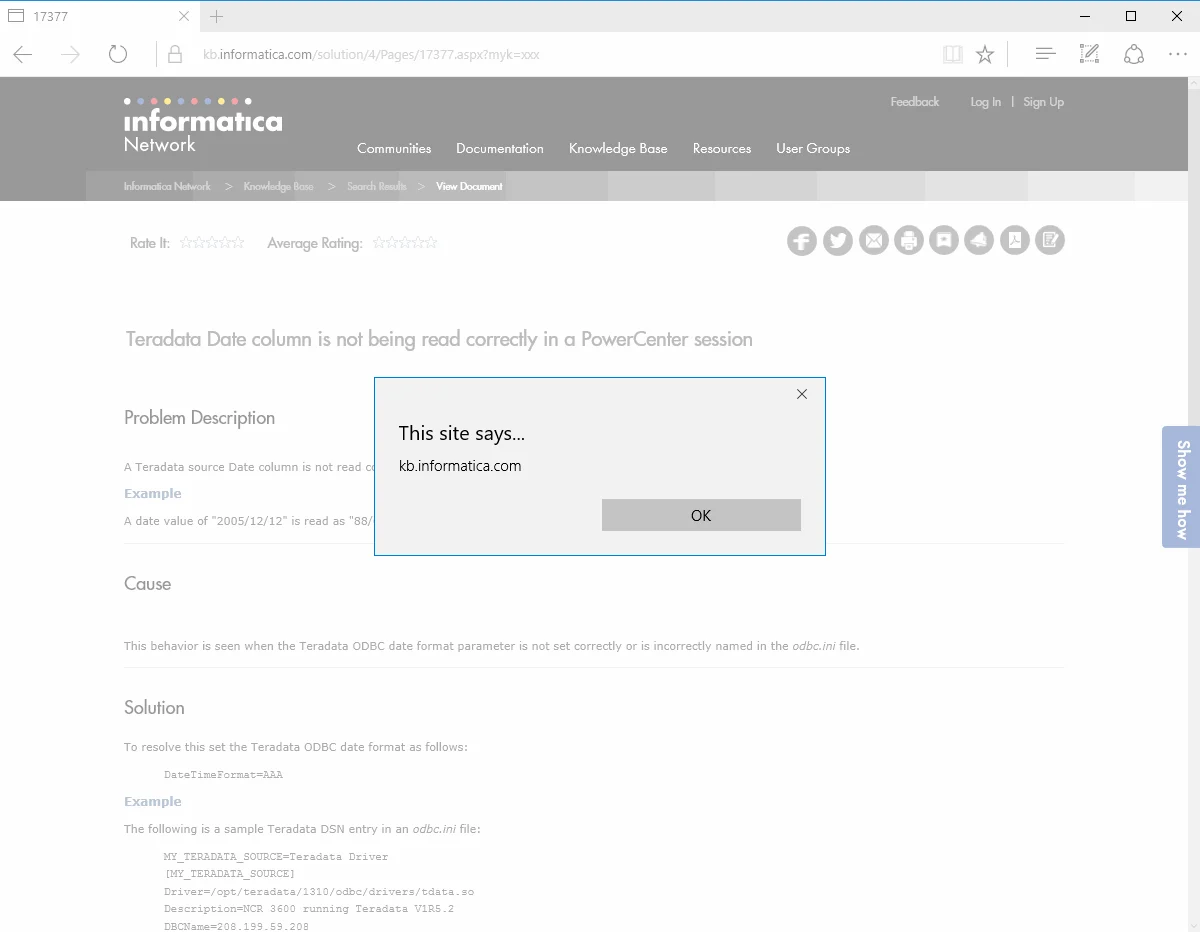
Tested with Internet Explorer 11.447 and Microsoft Edge 38.14393.
Same for the other link assignment cases.
Not written yet. The AI write-up for this report has not been written yet. The Original tab links to the source.
How it worked
Root cause
Likely the code concatenated untrusted URL and referrer values into an HTML anchor string without encoding or validation, then assigned it to innerHTML, allowing attribute breakout.
Impact
An attacker could run script in the context of the knowledge base site when a victim opened a crafted link and hovered the breadcrumb, though the report only demonstrates this in Internet Explorer and Edge.
What the attacker needed
Victim opens a crafted link; victim hovers the breadcrumb link; Internet Explorer or Edge browser; myk query parameter non-empty
How it was found
- Open the crafted link in Internet Explorer.
- Wait for the page to load.
- Hover the mouse cursor over the 'Search results' link at the top.
- The injected script executes.
Explained by bugbounty.wiki with AI from the original and checked against quotes from it; it can still be wrong. Read the original before relying on a detail.
Not written yet. The AI write-up for this report has not been written yet. The Original tab links to the source.
A web page was building a link by gluing together text from the browser, such as the address of the page that sent the visitor there, without cleaning it first. Because the text was placed straight into the page's HTML, an attacker could include quote characters and extra code so the page ran their script. This is called cross-site scripting: running an attacker's JavaScript inside a trusted site.
What is XSS?
Script an attacker supplies runs in another user's browser, on the target's origin, with that user's session.